AWS Cloud Operations Blog
Control investigation costs before they start with AWS DevOps Agent
Introduction
Before an AWS DevOps Agent investigation runs its first billable query, you can see what it will cost and decide whether to proceed. The Investigation Cost Guardrail skill brings cost awareness to AWS DevOps Agent, giving your team visibility and control over scope before the investigation begins.
This post introduces the Investigation Cost Guardrail, an open-source AWS DevOps Agent skill. It classifies the operations the agent runs across the services you configure, such as Amazon CloudWatch, AWS X-Ray, Amazon Athena, Amazon DynamoDB, Amazon S3, and AWS CloudTrail, as well as third-party tools and the agent’s own native tools. It then looks up live pricing for your Region at the time of the estimate. We walk through how it works, show example scenarios, and explain why cost awareness is becoming as valuable as security guardrails for autonomous AI.
The DevOps mindset is about breaking silos between development and operations. AWS DevOps Agent embodies the same principle: it bridges the gap between application knowledge and operations expertise, acting like another SRE on the team who can debug across both worlds. Where the mindset gives you the culture and practices, the agent gives you autonomous execution.
“You build it, you run it” was about accountability, while AWS DevOps Agent is about sustainability at scale. It extends your team’s expertise into every hour of every day, so that ownership model holds even as your systems outgrow what any one team can watch alone.
The scenarios and cost figures in this post are illustrative examples. Your actual costs and results vary by Region, data volume, and current AWS pricing.
The trust principle: cost awareness as earned judgment
Estimating what an action will cost before you take it is one of the hardest instincts to build in the cloud. We develop it over time, learning from a broad query or a full-table scan until scoping down before we run becomes second nature.
AWS DevOps Agent brings the autonomy and investigative depth of a senior SRE. With this guardrail, the agent carries that same cost-awareness from day one and applies it consistently on each action it takes. It estimates scope and cost before executing, the same discipline an experienced engineer applies instinctively.
The AI guardrail landscape
AI guardrails are safeguards that keep AI systems operating safely, responsibly, and within defined boundaries. They include policies, technical controls, and monitoring mechanisms that govern how AI models generate outputs and take action.
Most guardrail discussions focus on content safety, prompt injection prevention, or inadvertent disclosure. These matter, but another dimension becomes critical the moment AI agents move from thinking to acting: knowing what an action will cost before they take it.
Traditional software has deterministic costs. You know what an API call costs before you make it. Autonomous agents make dynamic decisions about which APIs to call, how many times, and over what scope. This skill makes dynamic economics something you can see and shape in advance. It turns cost into a deliberate, visible input to the investigation.
The shared responsibility model for AI agents
With AWS DevOps Agent, you can extend the shared responsibility model to autonomous agents:
- AWS DevOps Agent provides the investigation capabilities and the controls to govern them, such as agent instructions and skills.
- You configure guardrails, set thresholds, and define the boundaries within which the agent operates.
Guardrails that stick in practice share three characteristics:
- Activate on demand (opt-in or opt-out)
- Require no specialized expertise to understand
- Provide clear guidance when they intervene
That is the design philosophy behind this guardrail. You get cost transparency without needing to become a cloud pricing expert.
What is an AWS DevOps Agent skill?
Before diving into the cost guardrail, it is helpful to understand what a skill is and how it differs from agent instructions.
A skill is a reusable package of investigation procedures and operational knowledge, loaded by the agent on demand when it’s relevant to the current task, transforming AWS DevOps Agent from a general-purpose assistant into a specialist for your infrastructure.
In its most basic form, a skill is a directory containing a SKILL.md with optional reference files. The SKILL.md file contains:
- Frontmatter: name and description
- Step-by-step instructions the agent follows during an investigation
The description field is critical. It is how the agent decides whether to load the skill. When an investigation starts, the agent reads all available skill descriptions and selects the relevant ones. Multiple skills can load at the same time.
Skills vs. instructions: superpowers vs. standing orders
AWS DevOps Agent provides two mechanisms for injecting operational knowledge:
| Skill | Agent instructions (AGENTS.md) | |
| When loaded | On demand (agent matches description to current task) | Always (unconditional, every session) |
| Content format | Markdown or ZIP bundle with supporting files | Markdown only, no supporting files |
| Scope | Targeted to specific event types | Global policies applicable across sessions |
| Analogy | A superpower the agent activates when needed | A standing directive the agent always follows |
| Use case | Investigation procedures, troubleshooting playbooks | Security policies, coding standards, organizational guidelines |
Agent instructions are a system prompt injected into the agent’s context in every session, unconditionally. Use instructions for standing policies that must always apply.
Skills are superpowers loaded on demand, only when relevant. They can include reference files, metric tables, and multi-step procedures, representing deep, specialized capabilities that would be wasteful to load for sessions where they are not needed.
The key distinction: instructions tell the agent how to behave, while skills tell it how to investigate specific problems.
Solution overview: the investigation cost guardrail workflow
The following diagram shows where the cost guardrail sits in the investigation. It intercepts the workflow at the earliest possible point: after the agent identifies which resources to investigate, but before it executes billable queries.
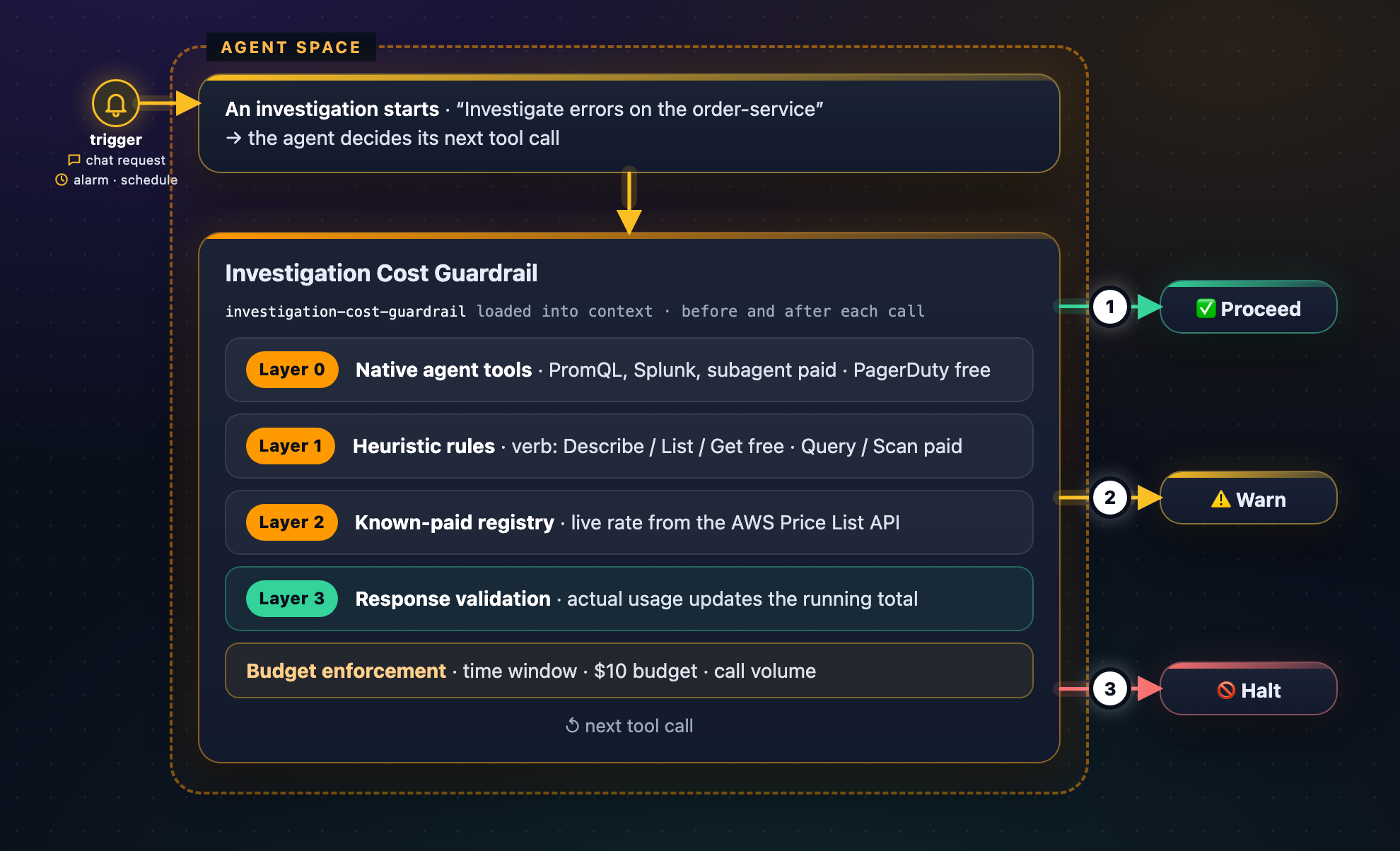
Figure 1: How the Investigation Cost Guardrail skill works in AWS DevOps Agent
How it works: a four-layer architecture
Rather than hardcoding a billable or non-billable classification for each operation of each AWS service, the skill uses the four-layer architecture shown in Figure 1 above. Together, these layers classify operations across AWS services, including services that are not listed in the registry and across the agent’s own native tools.
Layer 0: Native tool classification.
Each of the agent’s own tools carries an explicit billable and non-billable designation. PromQL (get_prometheus_metrics), use_splunk and other third-party integrations, shell and subagent spawns are all classified, alongside use_aws, which flows into the layers below.
Layer 1: Heuristic rules.
Verb-based classification works across services, including ones that are not listed in the registry. Describe, List, Get, Lookup, Check, Validate, Tag, and Untag return metadata and typically don’t incur a data-scan charge. Verbs such as Query, Scan, Execute, Invoke, and Insights process or scan data and are treated as paid. Broad paginated List and Describe calls are flagged for caution.
Layer 2: Known-paid registry.
For paid operations, the registry records the exact formula and which AWS Price List API filter to use to resolve the rate; it holds no rates of its own. It covers Amazon CloudWatch (including Logs Insights, GetMetricData, GetInsightRuleReport, Live Tail, and PromQL samples scanned), AWS X-Ray, Amazon Athena, Amazon DynamoDB, and Amazon S3 requests. Operators can extend the registry with their own entries.
Layer 3: Self-learning response validation.
After an operation runs, the skill checks the response for billable usage fields such as BytesScanned, ConsumedCapacity, or TracesProcessedCount. If a previously unclassified operation returns any of these fields, the skill classifies it as paid for the rest of the investigation, so coverage improves as the investigation runs.
Together, these layers are designed to classify most operations by their verb, including operations of services that are not listed in the registry. Response validation helps catch operations that the rules miss.
Live, per-Region pricing
Rates vary by AWS Region, so each rate is resolved live for the workload’s Region at estimation time, using the AWS Price List API without carrying baseline rates.
- Region is derived from the resource ARN.
- Each rate is looked up with pricing:GetProducts, using the workload’s Region to select the matching price.
The result is a cost estimate based on current list pricing for the region where the workload runs.
Cross-Region awareness
When the target Region differs from the Agent Space Region, the skill adds a data transfer cost. It resolves that rate live for the specific source-to-destination route and caches it per route. Inter-Region rates vary widely by geography, so the skill looks up the exact route rather than assuming a single figure.
The decision gate
Once a planned call has been classified, priced, and checked against the budget, the guardrail resolves it in one of three ways. The numbers correspond to the outcomes shown in the figure above.
- Proceed: The estimate fits within the remaining budget. The call runs without interruption and the investigation timeline records both the per-step estimate and the running total.
- Warn: The call fits within the budget but shows signs of inefficiency: a broad PromQL query, more than 200 calls to a single service, or a transfer across regions. The guardrail lets the call run and attaches a cost-efficient alternative, such as a narrower time window, label filters, or a larger step interval.
- Halt: The call does not run when the estimate would exceed the remaining budget, or a scan is requested without a time window, or when the live price lookup returns no rate. The guardrail presents the worst-case estimate and pauses for direction before any data is scanned.
When the guardrail halts, it always recommends a path forward:
- Provide an exact timestamp or a narrower time window
- Target one specific service or log group
- Provide a known error message. The agent can then search with the FilterLogEvents API, which isn’t billed per GB scanned, instead of running a Logs Insights query.
- Restrict the query to same-Region sources to avoid cross-Region transfer charges
Example scenarios
The following scenarios show three requests against the same payment workload, each typed by an engineer into the DevOps Agent console. Before every paid call the guardrail fetches the live rate, estimates the cost, and checks it against the $10.00 per-investigation budget. Only the outcome differs. Estimates are based on list prices and don’t include AWS Free Tier allowances.
Scenario A: Scoped request with a time window (proceeds)
The SRE asks: “Investigate the 5xx errors on payments-prod-alb between 13:57 and 14:27 UTC today in us-east-1”
The 30-minute window lets the skill count the Amazon CloudWatch Logs Insights scan: 1.34 GB at the live rate of $0.005 per GB, or $0.0067. Within the $10.00 budget, the query runs and the investigation continues.
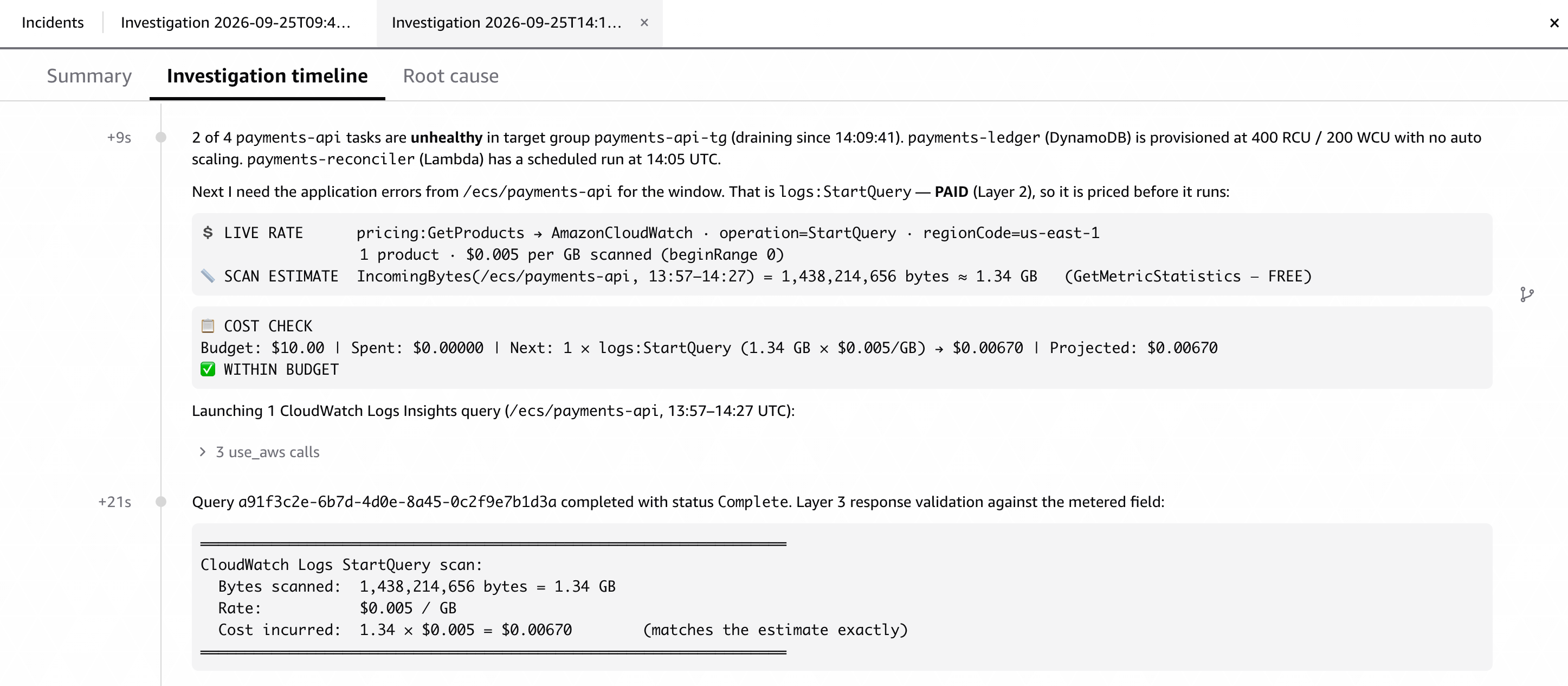
Figure 2: Live rate, scan estimate, and budget check before the first paid call, followed by validation of the actual cost. Actual costs vary by Region, data volume, and current pricing.
Scenario B: Broad request over a month of data (halts and asks)
The cloud architect asks: “Correlate every payments-api 5xx with DynamoDB throttling across all of September”
The scan would cover 2,673 GB, or $13.37, so the agent stops before starting it and lists priced options: approve the extra $3.37; narrow to 7 days ($3.74), 24 hours ($0.54), or the incident window ($0.007); use metric correlation without a data-scan charge; or end here. Nothing was scanned.
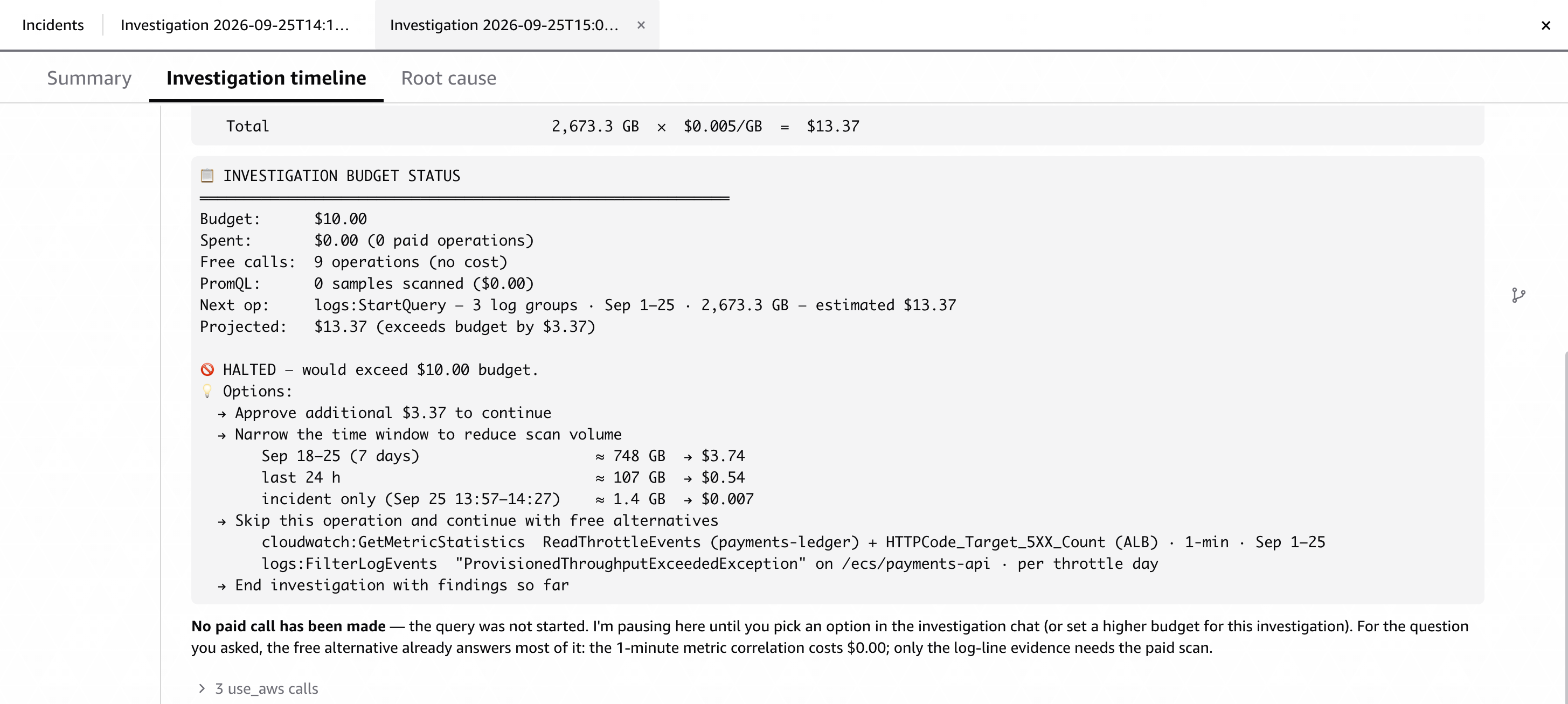
Figure 3: The agent halts over budget and gives the engineer priced ways to continue. Actual costs vary by Region, data volume, and current pricing.
Scenario C: Request with a no-spend instruction (reroutes to APIs without scan charges)
The DevOps engineer asks: “Find out why payments-worker is sending events to payments-events-dlq between 02:45 and 03:15 UTC. Don’t run any paid scans on this one.”
Two paid calls are priced: an Amazon CloudWatch Logs Insights query on the worker’s log group (38.37 GB, $0.19) and a GetMetricData batch of 12 metrics ($0.004). Both fit the budget, but the engineer ruled out paid scans, so the agent substitutes equivalents without a data-scan charge: FilterLogEvents, since the error is a known string, and GetMetricStatistics one metric at a time, which counts toward the CloudWatch API request allowance of the AWS Free Tier. The results show a new checkout-api release changed the event schema.
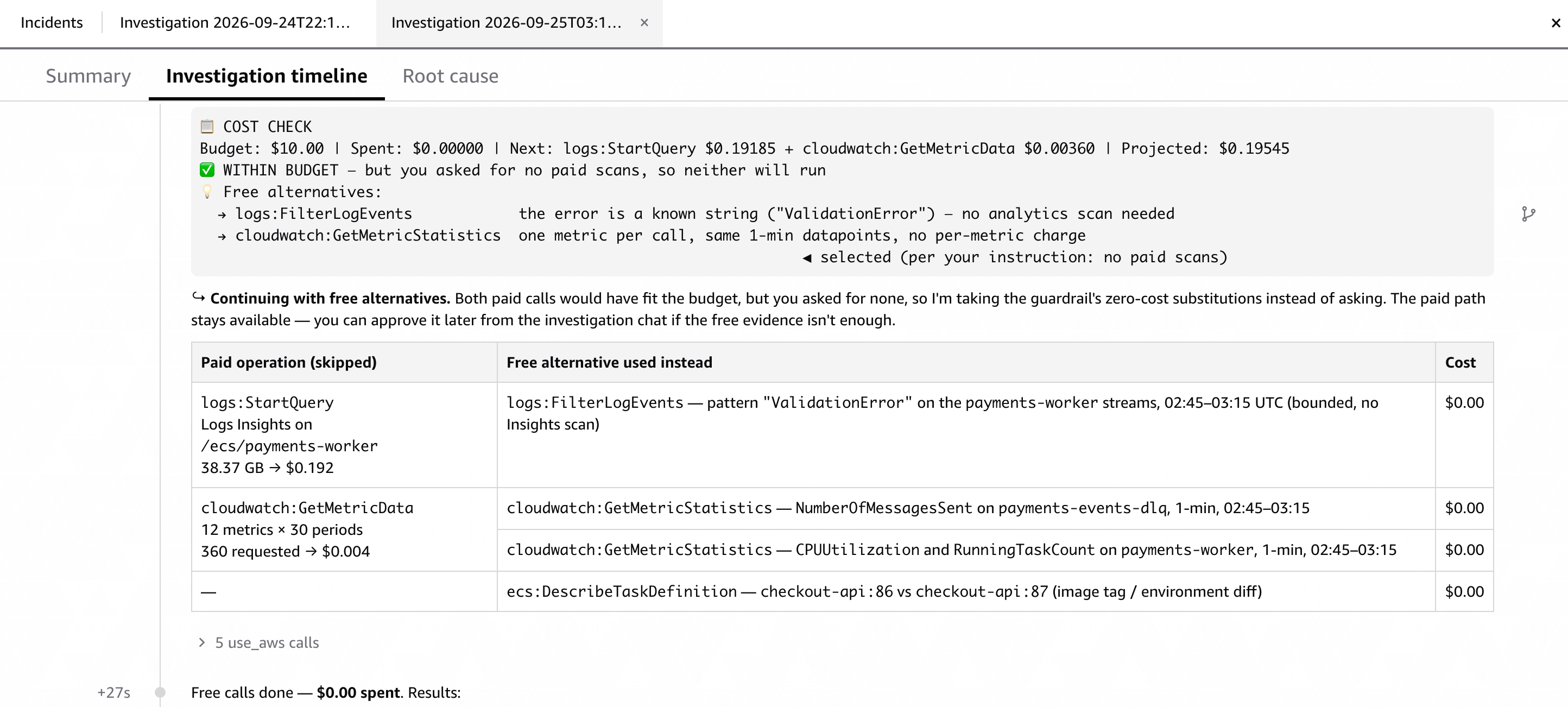
Figure 4: Within budget but skipped on the engineer’s instruction; the agent shows which calls without data-scan charge replace the Logs Insights query and the GetMetricData batch.
The broader pattern: from token budget to action budget
The guardrail represents a design pattern for autonomous AI agents that call usage-based APIs: before an agent acts, it can know what acting will cost.
This reframes AI-agent economics from token budgets (the cost of reasoning) to action budgets (the cost of execution). When agents have tool access, the downstream actions they take are where the real value lives, and making that value visible in advance turns it into a deliberate, user-approved budget.
A cloud architect or SRE builds this instinct over years. With the cost guardrail, the agent carries it from day one and applies it consistently. It is designed to keep that discipline under pressure, including during a 3 AM incident.
Technical implementation
The skill plugs into the agent’s existing skill hierarchy without changes to the core agent. It runs as a pre-flight check before each investigation:
- Reads the agent’s discovery results (which log groups, metrics, and traces it plans to query)
- Classifies each planned operation through the four layers
- Resolves live, per-Region rates from the AWS Price List API
- Returns a structured decision (proceed or pause) with a full cost breakdown
- If pausing, provides specific guidance to narrow scope
AWS DevOps Agent applies a permission guardrail to every session. Combined with Agent instructions for standing policy and directed actions for explicit operator approval, you can keep the agent operating within the boundaries you define.
Getting started
The Investigation Cost Guardrail is available in aws/tools-for-devops-agent, an open-source repository in the AWS organization on GitHub, maintained by the AWS DevOps Agent service team. The repository includes community-built skills, custom agents, and MCP servers that you can import or make your own.
Prerequisites:
- An Agent Space in AWS DevOps Agent with at least one AWS account connected.
- Permission to update the IAM role that your Agent Space assumes.
Step 1: Grant IAM permissions
The skill resolves every rate at estimation time with the AWS Price List Query API. Attach the following to the IAM role your Agent Space assumes in each connected account. For details on the permissions, see Required IAM permissions in the skill README.
{
  "Version": "2012-10-17",
  "Statement": [
    {
      "Sid": "ResolveLivePricing",
      "Effect": "Allow",
      "Action": "pricing:GetProducts",
      "Resource": "*"
    }
  ]
}
Step 2: Install the skill
Add the skill to your Agent Space using one of two methods.
Option A: GitHub integration (recommended for teams): Fork aws/tools-for-devops-agent or copy the skills/investigation-cost-guardrail/ directory into a repository you control and import it through the Agent Space GitHub integration. This keeps the skill under version control, you can pin a commit, review changes to SKILL.md through pull requests, and extend references/pricing-reference.md with your own lookup patterns.
Option B: Direct upload: Download the skill as a .zip from the repository and upload it as a user-defined skill in the Agent Space console. The archive must contain SKILL.md at the root of the skill directory, with the references/ folder alongside it:
Step 3: Add a space-level instruction
Skills load on demand based on description matching. To help ensure that the cost guardrail loads during each investigation, add the following to your Agent Space instructions.
This combines the two mechanisms described earlier: the instruction is the standing order, and the skill is the capability it invokes.
Step 4: Tune thresholds for your environment
The skill ships with a conservative default: a per-investigation budget of $10.00. Override it with a plain-language instruction in your Agent Space configuration or directly in the SKILL.md file — for example, “Use a per-investigation budget of $25.00.”
You can also extend the known-paid registry or harden specific operations without editing the skill files:
- Treat opensearch:Search as paid at $0.01 per 1000 requests.
- Always require approval before any Athena query.
Step 5: Verify
Run two investigations to confirm the guardrail is active:
First, start an investigation with no time window against a high-volume log group, for example: “Investigate errors on the order-service.” The agent should halt before running any logs:StartQuery, show a worst-case estimate derived from the log group’s total retained volume, and ask for a window or a known error string.
Second, repeat with a bounded window: “Investigate errors on the order-service between 14:00 and 14:30 UTC today.” The investigation timeline should show a budget status block before the first paid call, with each rate labeled by the Region it was resolved for, and the investigation should proceed.
If the first investigation proceeds without a pause, check that the space-level instruction from Step 3 is present. If the second halts with a rate-resolution error, re-check the pricing:GetProducts permission and the us-east-1 allowance in your tool policy.
Cleanup
To remove the guardrail and its supporting configuration, undo the setup steps:
- Delete the space-level instructions you added in Step 3 from your Agent Space instructions.
- Remove the pricing:GetProducts inline policy (and any read-only sizing policy you added) from the IAM role your Agent Space assumes.
- Delete the Investigation Cost Guardrail skill from your Agent Space.
Conclusion
AWS DevOps Agent delivers autonomous event response. With cost-awareness added to that autonomy, your team reaches the next level of operational maturity: incidents resolved fast, within a transparent budget you define.
The Investigation Cost Guardrail applies a principle experienced engineers know instinctively: assess cost before you execute. It classifies operations across services, resolves current per-Region pricing from the AWS Price List API, and turns investigation cost into a transparent, user-controlled budget. It does not slow the agent down. It gives it cost judgment.
To get started, clone the Investigation Cost Guardrail skill from tools-for-devops-agent on GitHub and add it to your AWS DevOps Agent configuration to give your investigations a cost-aware pre-flight check.
Do you have ideas for new cost classifications or pricing patterns? The guardrail is yours to extend: fork investigation-cost-guardrail, add the operations your team runs most, and point it at your own pricing model. Open an issue or submit a pull request to share what you build.