Multicloud
Breaking down cloud data silos between Amazon SageMaker Unified Studio and Google Cloud BigQuery
Amazon SageMaker Unified Studio introduces direct connectivity to Google BigQuery, removing data migration workflows. This connection enables you to use Unified Studio’s data, analytics, and AI capabilities directly on your BigQuery datasets, accelerating your time-to-insights while keeping your data in its native environment. Organizations combine BigQuery’s data warehousing with the AWS integrated suite of analytics and machine learning services through a single, unified development experience.
Amazon SageMaker integrates with Amazon Athena, which provides federated query capabilities on a wide range of data sources, including Google BigQuery. SageMaker Unified Studio allows you to directly query Google BigQuery data alongside other data sources such as Amazon S3 data lakes, S3 Tables, and Amazon Redshift data warehouses. Built on an open lakehouse architecture, SageMaker Unified Studio provides unified access to discover, access, and analyze data across cloud environments through a single interface while maintaining consistent governance and centralized permissions management—all while working with a single copy of data.
In this post, we show you how to connect to Google BigQuery from Unified Studio and query using Amazon Athena.
Solution overview
This post presents a solution where a company is using multiple data sources containing customer data across AWS and Google Cloud. You want to query this data for analytics and AI/ML workloads without data migration, while maintaining security and governance. The following diagram illustrates the solution architecture.
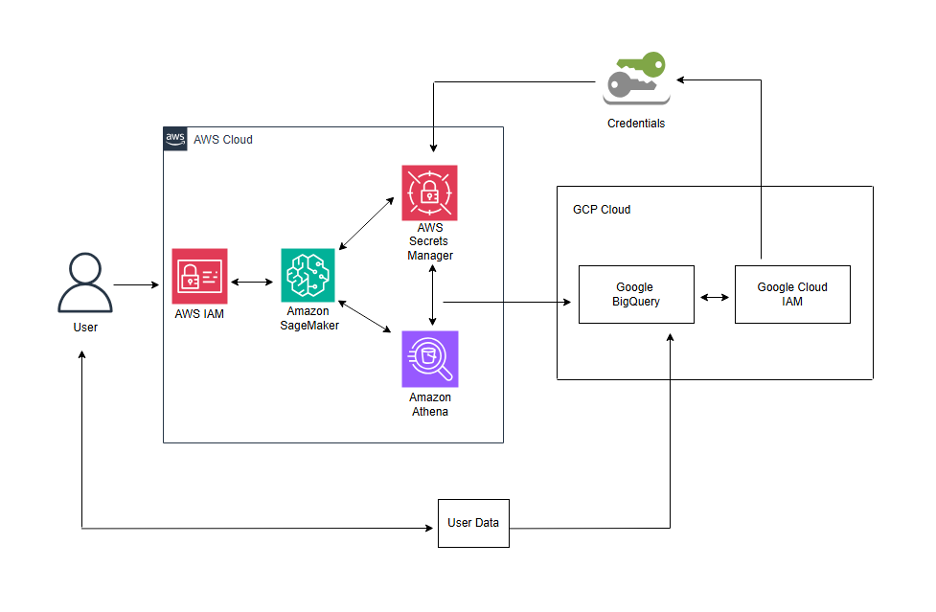
We use the following AWS services in this solution:
· Amazon SageMaker – SageMaker connects to Google BigQuery, registers datasets as federated catalogs in the lakehouse architecture of SageMaker, and displays them in the data explorer.
· Amazon Athena – Athena enables federated queries to access data stored in Google Cloud BigQuery through Amazon SageMaker Unified Studio, enabling multicloud data access without migration.
· AWS IAM – AWS Identity and Access Management (IAM) manages roles and policies enabling federated data access in SageMaker across cloud systems.
· AWS Secrets Manager – A secrets management service that helps securely store the Google Cloud service account key (JSON credentials file) that uses AWS services to authenticate and access data stored on Google Cloud Platform. This removes the need to hardcode credentials in your applications.
The Google Cloud Platform segment of architecture includes these two services:
· Google BigQuery – BigQuery stores user data that will be queried from Athena.
· Google Cloud IAM – We utilize Google Cloud IAM to establish a service account and generate a key that enables AWS to access GCP. This key is securely stored in AWS Secrets Manager.
Pre-requisites
Basic proficiency in SQL query construction and familiarity with both AWS and GCP console are required, though extensive cloud expertise is not necessary for successful implementation.
AWS
- An AWS account with permission to create IAM roles and IAM policies
- Administrator access to the lakehouse architecture of SageMaker
- Amazon SageMaker Unified Studio domain and projects using the capabilities profile or SQL Analytics profile. To learn more, refer to the Amazon SageMaker Unified Studio Administrator Guide.
GCP
- An active GCP account with permission to set up a service account for authentication
- Administrator access to BigQuery Studio
Google Cloud Platform configuration
Before initiating connectivity, two core configurations are required in Google Cloud Platform. First, make sure that BigQuery datasets containing the data you want to query are properly configured and accessible. For more instructions, refer to BigQuery Storage. Second, you must create a service account to generate a key pair within Google Cloud IAM, which will be stored to AWS Secrets Manager to facilitate secure multicloud authentication. For full instructions, refer to Create service accounts.
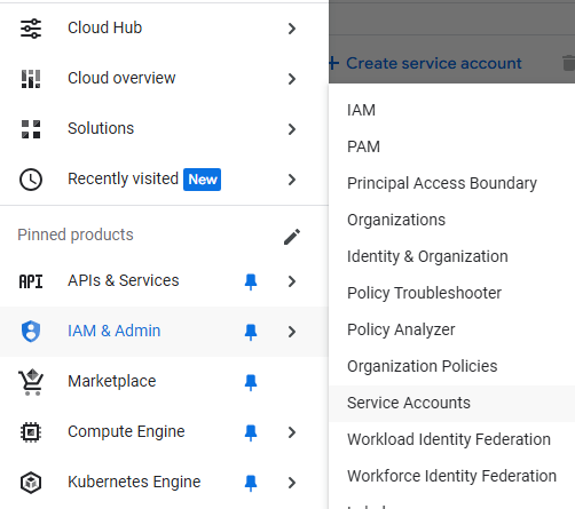
Step 1: Create Service Accounts in IAM & admin in top navigation menu under the same project.
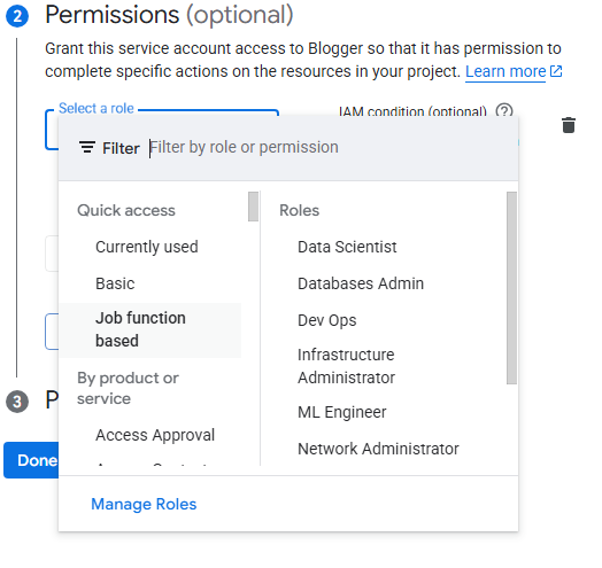
Step 2: Name service account and then provide role.
Step 3: After creating the service account, create a key within Google Cloud IAM. Click Manage keys as shown in screenshot.
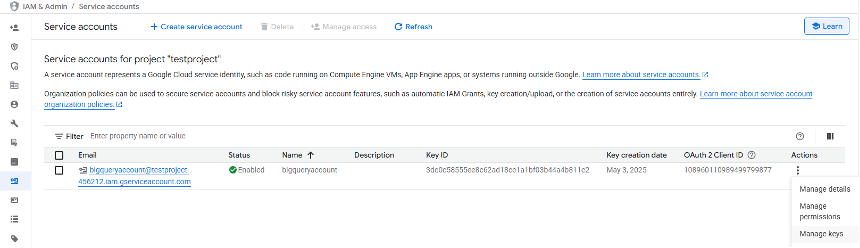
Step 4: Choose Add key and Create New Key and choose JSON format, it will be downloaded automatically, which will be uploaded to AWS Secrets Manager later.
AWS Configuration
With GCP service account key established, now proceed with the AWS configuration steps.
Step 1: We need to store a secret with GCP key details in AWS Secrets Manager.
- Open the AWS Secrets Manager in console.
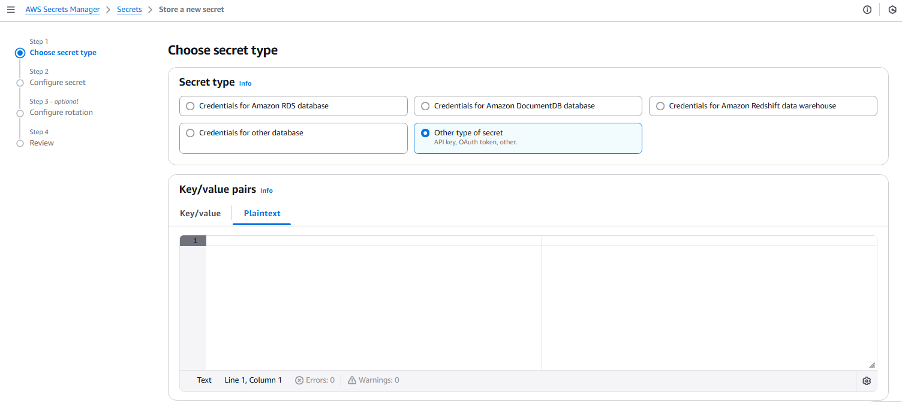
- Create a new secret by selecting Other type of secret, paste the downloaded GCP JSON key in plain text format, then proceed with Next.
Name the secret and make sure to note it for future reference, then click “Next” and store it.
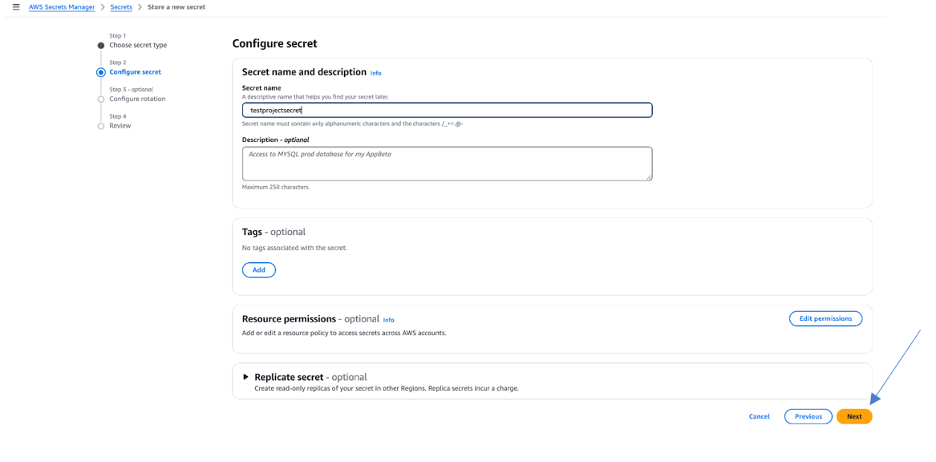
Next steps outline the process of creating an SageMaker Unified Studio project data connectivity with Google BigQuery.
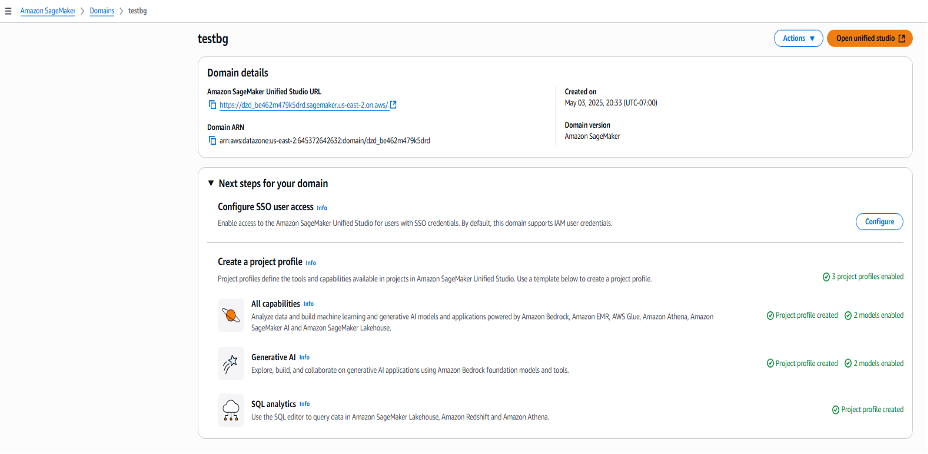
Step 2: Create domain in Amazon SageMaker
- After creating a domain, establish a profile within that domain
- Once both domain and profile setup is complete, launch Open unified studio
Step 3: Create project in the Amazon SageMaker Unified Studio
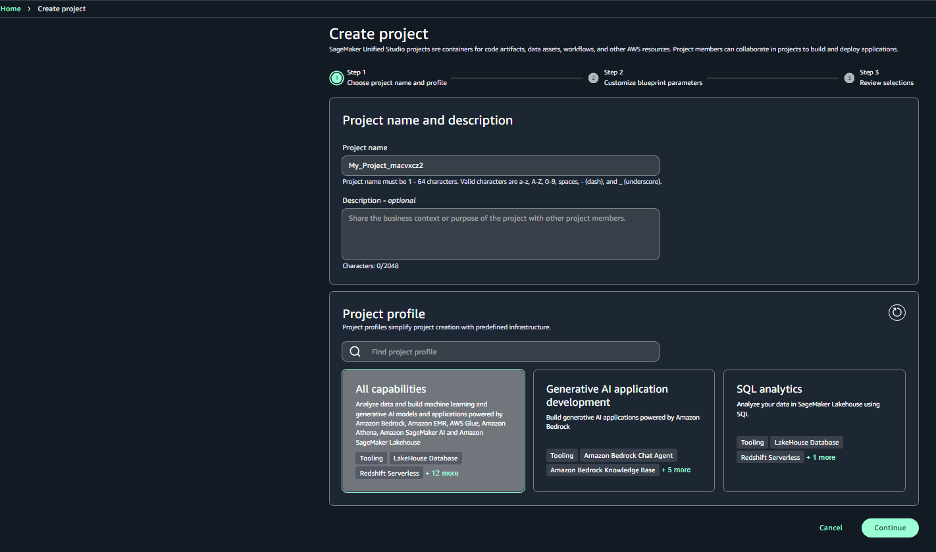
Step 4: Once the project is created, you need to grant the Project role ARN the necessary permissions to get and describe the secret.
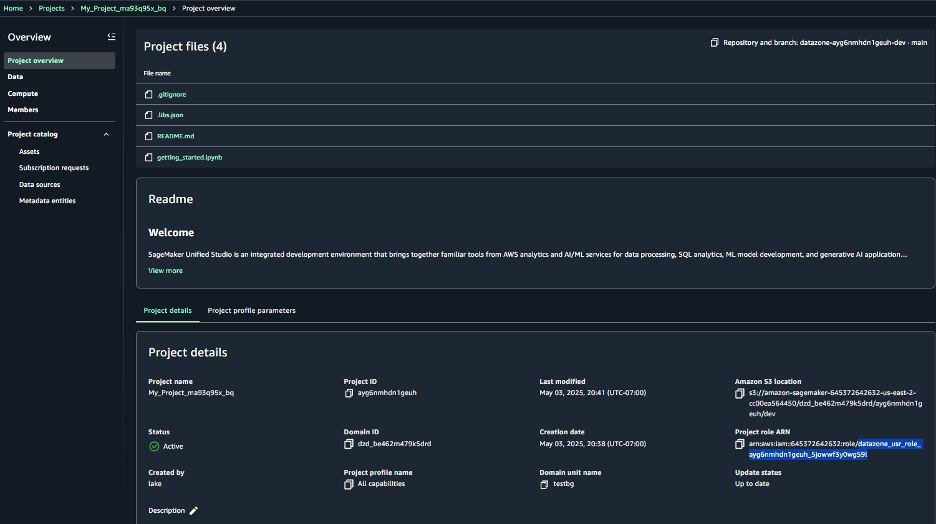
Step 5: Open IAM in the AWS Management Console. Navigate to the Roles section, then open the specific Project role mentioned in the project. Add the following inline policy to the role:
{
“Version”: “2012-10-17”,
“Statement”: [
{
“Sid”: “SecretsAccessPolicy”,
“Effect”: “Allow”,
“Action”: [
“secretsmanager:GetSecretValue”,
“secretsmanager:DescribeSecret”
],
“Resource”: “arn:aws:secretsmanager:REGION:ACCOUNT_ID:secret:SECRET_NAME”
}
]
}
Step 6: Once the project is created, choose Data in navigation panel, choose the plus icon, Add connection, and select Google BigQuery
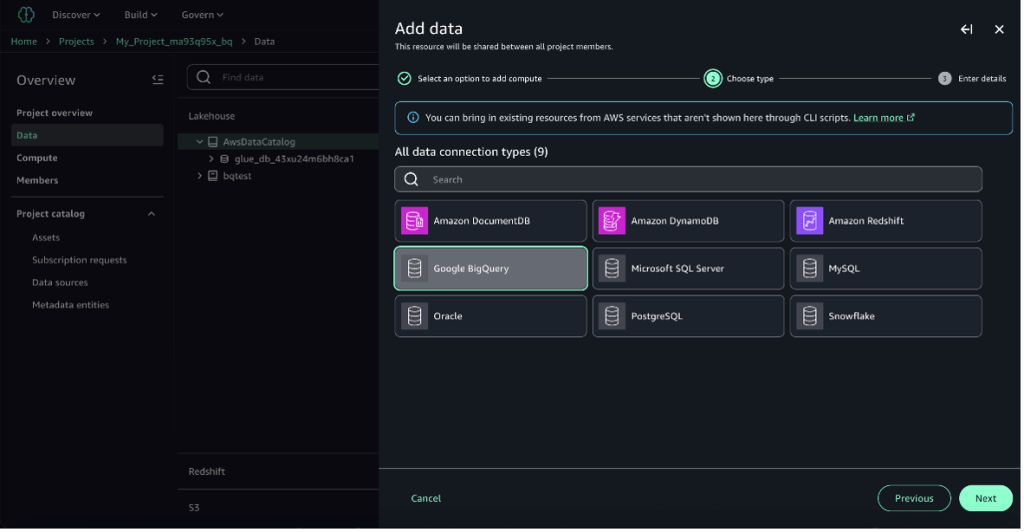
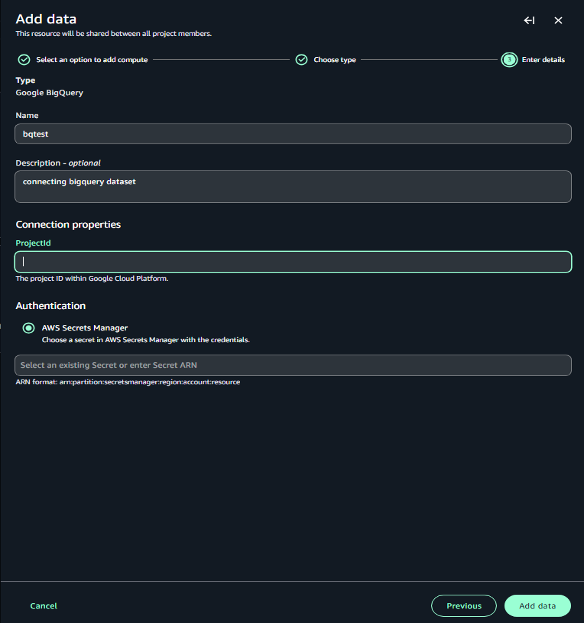
Step 7: Name the data, enter GCP ProjectID from Google Cloud Console and provide the AWS Secret ARN created in Step 1 and choose Add data
Next, Amazon SageMaker Unified Studio connects to data source, registers the data source as a federated catalog with the lakehouse architecture of SageMaker, and displays it in your data explorer.
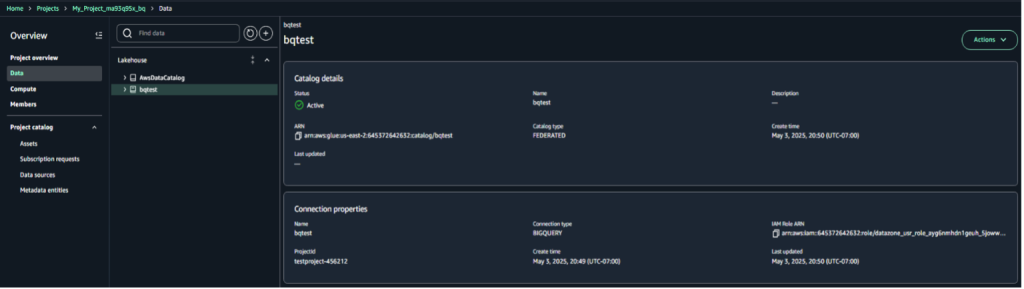
Step 8: To query the BigQuery table, navigate to Actions and select Query with Athena.
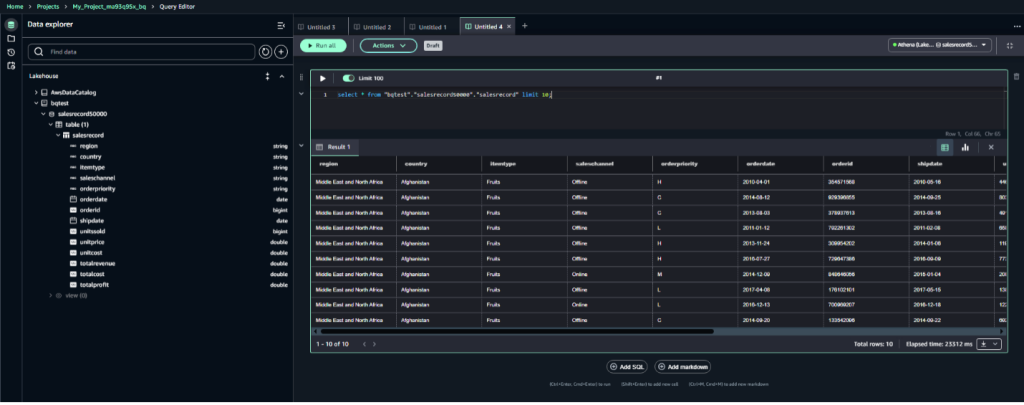
Now you can run queries on Athena that will access the data stored on Google Cloud BigQuery. Data lake administrators can implement granular access controls—from catalog-level permissions down to individual cell-level security. For steps please refer to Catalog and govern Amazon Athena federated queries with the lakehouse architecture of SageMaker.
Resource Cleanup Guide
Follow this cleanup checklist to remove the deployed resources:
GCP Cleanup:
- Remove service account from IAM & Admin
AWS Cleanup:
- Delete GCP credentials from AWS Secrets Manager
- Delete domain from SageMaker
- Delete project from SageMaker Unified Studio
Troubleshooting Connection Issues:
Check that these permissions are enabled for the IAM role and added to the policy:
- Retrieve the secret value using GetSecretValue API
- View metadata about the secret using DescribeSecret API
Limitations
The following constraints apply when using this BigQuery connection:
- Google BigQuery is case-sensitive.
- Binary data types are not supported.
- BigQuery concurrency/quota limits may cause issues. Push constraints to BigQuery to avoid quota limits.
- The lakehouse architecture of SageMaker currently supports lowercase table, column, and database names. To learn more, please refer to the user guide.
Conclusion
In this post, we showed you how to create connection between Google BigQuery and AWS services, enabling seamless access to data for business intelligence, machine learning, and data science applications without requiring complex data migrations. By minimizing data duplication and transfer processes, this solution significantly reduces development cycles and operational overhead while maintaining robust security controls through Lake Formation, you can define granular access controls that Athena will respect when running federated queries on this data.
Organizations implementing this connectivity can benefit from increased data agility, reduced complexity, and accelerated time-to-insight across their multicloud landscape. As teams leverage the strengths of both systems simultaneously under a unified governance framework, they can gain key competitive advantages through enhanced analytical capabilities and more flexible, cloud-agnostic data architecture.