Networking & Content Delivery
Achieve least-privilege access for Amazon Route 53 Profiles
If you manage DNS across multiple AWS accounts with Amazon Route 53 Profiles, achieving least-privilege access for each team can be challenging. Without fine-grained permissions, one team might inadvertently modify another team’s resources leading to governance gaps, security risks, and slower adoption of centralized DNS management. The new fine-grained AWS Identity and Access Management (AWS IAM) permissions for Amazon Route 53 Profiles solve this by letting you define access controls at the resource and action level. Each team gets only the permissions they need, which reduces risk and increases operational efficiency.
In this post, you learn how to apply fine-grained IAM policies for Amazon Route 53 Profiles that scope permissions. The permissions are scoped by resource type, resource ARN, domain name, firewall rule group priority, and Amazon Virtual Private Cloud (Amazon VPC) ID. You walk through three real-world scenarios scoping permissions for application teams, security teams, and network engineers using IAM policies with the new route53profiles condition keys. By the end, you have reusable IAM policy templates that enforce least-privilege access for multi-account DNS management.
Consider this scenario: your application team needs to associate private hosted zones with a shared Profile. However, with action-level-only permissions, they can also associate or disassociate Amazon Route 53 Resolver DNS Firewall rule groups. This responsibility should belong to your security team. This gap between what teams should do and what they can do creates governance challenges and slows adoption of centralized DNS management.
Prerequisites
To follow along with this walkthrough, you need the following:
- An AWS account with permissions to create and manage IAM policies
- An intermediate-level familiarity with AWS IAM and Amazon Route 53
- An existing Route 53 Profile (or the ability to create one)
- Familiarity with AWS Resource Access Manager (AWS RAM) and multi-account architecture (helpful but not required)
- (Optional) A multi-account setup with AWS RAM sharing configured for testing cross-account scenarios
What are Amazon Route 53 Profiles?
With Amazon Route 53 Profiles, you can define a standard Route 53 DNS configuration and apply it consistently across multiple VPCs and AWS accounts. A Profile encapsulates private hosted zone associations, Amazon Route 53 Resolver rules (forwarding and system rules), DNS Firewall rule groups, Resolver Query Logging configurations, interface VPC endpoint associations, and VPC configurations (including reverse DNS lookup configuration for Resolver Rules, DNS Firewall failure mode configuration, and DNSSEC validation configuration).
You define DNS settings once in a Profile, share it across accounts using AWS RAM, and associate it with VPCs. When you update the Profile, those changes propagate automatically to associated VPCs, which reduces per-VPC manual configuration and minimizes configuration drift.
The Challenge: Managing DNS Permissions at Scale
Previously, Route 53 Profiles supported IAM permissions only at the API-action level (applied to entire API operations rather than specific resources). This enabled you to permit or deny actions like AssociateResourceToProfile or DisassociateResourceFromProfile, but could not restrict which resource types, specific resources, or VPCs a principal might act on. This meant:
- An application team that needed to associate with a private hosted zone might also associate or disassociate DNS Firewall rule groups.
- A security team managing DNS Firewall policies might unintentionally modify Resolver rules.
- A network engineer associating VPCs with a Profile had implicit permission to modify resource associations within that Profile.
- Administrators had no way to scope permissions by domain name, resource ARN, or VPC ID.
For organizations with separate networking, security, and application teams, this limitation created governance gaps and slowed adoption of centralized DNS management.
Introducing Granular IAM Permissions for Amazon Route 53 Profiles
With the new fine-grained IAM permissions for Amazon Route 53 Profiles, you can control which users manage specific resource types and VPC associations within your Profiles. This means you can delegate DNS operations to the right teams. For example, application teams manage only their hosted zones, security teams manage only their firewall rule groups, and shared services teams manage only VPC associations while your central networking team retains full administrative control.
- You create IAM policies that restrict users to specific operations on individual resource types, scoped by:
- Operation — associate, disassociate, or update
- Resource type — HostedZone, FirewallRuleGroup, ResolverRule, ResolverQueryLoggingConfig, or VPCEndpoint
- Resource ARN — a specific hosted zone, Resolver rule, or Firewall rule group
- Domain name — hosted zone domain or Resolver rule domain
- Firewall rule group priority range — numeric priority values
- VPC ID — specific VPCs that a Profile is associated with
New IAM condition keys in the route53profiles namespace, you implement these capabilities, as shown in the following table:
| Condition Key | Scope | Value Type |
|---|---|---|
| route53profiles:ResourceTypes | Resource type filter (for example, HostedZone, FirewallRuleGroup) | String |
| route53profiles:ResourceArns | Specific resource ARN | ARN |
| route53profiles:HostedZoneDomains | Hosted zone domain name | String |
| route53profiles:ResolverRuleDomains | Resolver rule domain name | String |
| route53profiles:FirewallRuleGroupPriority | Firewall rule group priority | Number |
| route53profiles:ResourceIds | VPC ID for Profile-to-VPC association | String |
Architecture: Multi-account DNS Delegation
Consider a typical enterprise architecture with a central networking account that owns the Route 53 Profile and shares it through AWS RAM to application and security accounts. Three teams need different levels of access, as shown in the following table:
| Team | Responsibility | Required Access |
|---|---|---|
| Application team account | Associate their private hosted zones with the shared Profile | AssociateResourceToProfile, DisassociateResourceFromProfile — scoped to HostedZone resource type |
| Security team account | Manage DNS Firewall rule groups within the Profile | AssociateResourceToProfile, DisassociateResourceFromProfile, UpdateProfileResourceAssociation — scoped to FirewallRuleGroup resource type |
| Shared services team | Associate and disassociate VPCs with the Profile | AssociateProfile, DisassociateProfile — scoped to specific VPC IDs |
The central networking account retains full administrative access to the Profile, while each team receives only the permissions they need through IAM policies with the new condition keys.
Figure 1 shows this multi-account DNS delegation architecture. The central networking account owns the Route 53 Profile and shares it through AWS RAM. Each team in the receiving accounts operates within their scoped IAM permissions.
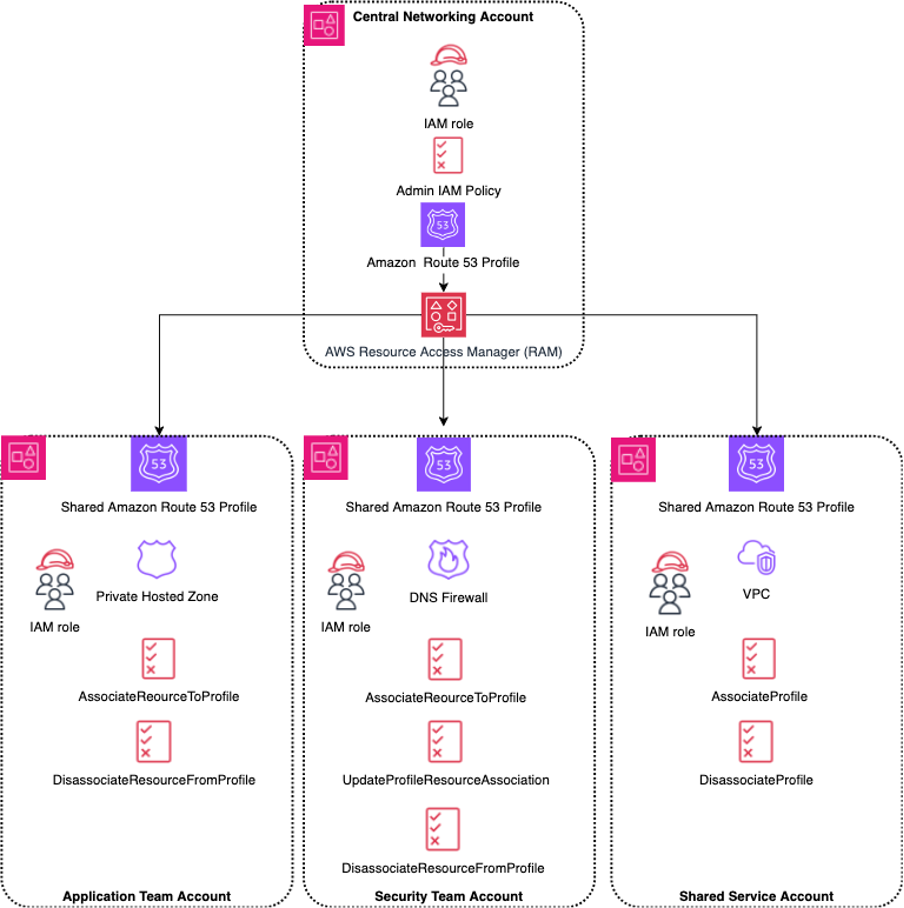
Figure 1: Multi-account DNS delegation with Amazon Route 53 Profiles and fine-grained IAM permissions
Walkthrough: Creating IAM policies for three delegation scenarios
This walkthrough covers three scenarios that demonstrate how the new IAM condition keys work with Route 53 Profiles. Each scenario targets a different team with a distinct responsibility: associating private hosted zones, managing DNS Firewall rule groups, or controlling VPC associations. By working through these scenarios, you understand how to combine condition keys with specific API actions to build least-privilege IAM policies that grant each team access to only the Profile operations they need.
Scenario 1: Application team – Associate and disassociate private hosted zones only
Your application team needs to associate its private hosted zones with a shared Route 53 Profile so that VPCs linked to that Profile can resolve the team’s private DNS records. This team doesn’t need to manage DNS Firewall rule groups, Resolver rules, or VPC associations.
With the following IAM policy, a principal can call AssociateResourceToProfile and DisassociateResourceFromProfile, but only when the resource type is HostedZone. The route53profiles:ResourceTypes condition key restricts the permitted resource type. If a principal with this policy attempts to associate a DNS Firewall rule group or a Resolver rule, Route 53 denies the request.
{
  "Version": "2012-10-17",
  "Statement": [
    {
      "Sid": "AllowHostedZoneAssociationOnly",
      "Effect": "Allow",
      "Action": [
        "route53profiles:AssociateResourceToProfile",
        "route53profiles:DisassociateResourceFromProfile"
      ],
      "Resource": "*",
      "Condition": {
        "StringEquals": {
          "route53profiles:ResourceTypes": "HostedZone"
        }
      }
    },
    {
      "Sid": "AllowProfileReadAccess",
      "Effect": "Allow",
      "Action": [
        "route53profiles:GetProfileResourceAssociation",
        "route53profiles:ListProfileResourceAssociations",
        "route53profiles:GetProfile",
        "route53profiles:ListProfiles"
      ],
      "Resource": "*"
    }
  ]
}
The first statement permits the app team to associate and disassociate resources, constrained to hosted zones by the condition key. The second statement grants read-only permissions so the team can view existing Profile configurations and verify their changes.
You can restrict this policy further by adding the route53profiles:HostedZoneDomains condition key to restrict which hosted zone domains the team can associate. For example, to enable the app team to associate only hosted zones for app.example.com, add the following condition alongside the ResourceTypes condition:
"StringEquals": {
   "route53profiles:ResourceTypes": "HostedZone",
   "route53profiles:HostedZoneDomains": "*.app.example.com"
}
Domain name values don’t include a trailing dot and are case sensitive.
Scenario 2: Security team – Manage DNS Firewall rule groups only
The security team attaches DNS Firewall rule groups to Profiles to enforce DNS filtering policies across the VPCs associated with those Profiles. This team doesn’t need to manage hosted zone associations, Resolver rule associations, or VPC associations.
The following policy uses the same condition key pattern as Scenario 1 but restricts the resource type to FirewallRuleGroup. It also includes UpdateProfileResourceAssociation so the security team can update the priority of existing Firewall rule group associations.
{
   "Version": "2012-10-17",
   "Statement": [
       {
           "Sid": "AllowFirewallRuleGroupAssociationOnly",
           "Effect": "Allow",
           "Action": [
               "route53profiles:AssociateResourceToProfile",
               "route53profiles:DisassociateResourceFromProfile",
               "route53profiles:UpdateProfileResourceAssociation"
           ],
           "Resource": "*",
           "Condition": {
               "StringEquals": {
                   "route53profiles:ResourceTypes": "FirewallRuleGroup"
               }
           }
       },
       {
           "Sid": "AllowProfileReadAccess",
           "Effect": "Allow",
           "Action": [
               "route53profiles:GetProfileResourceAssociation",
               "route53profiles:ListProfileResourceAssociations",
               "route53profiles:GetProfile",
               "route53profiles:ListProfiles"
           ],
           "Resource": "*"
       }
   ]
}
With this policy, the security team can attach, detach, and update DNS Firewall rule groups on the Profiles shared with the account but can’t modify hosted zone associations, Resolver rule associations, or VPC associations.
You can restrict this policy further by adding the route53profiles:FirewallRuleGroupPriority condition key to control which priority values the security team can assign. For example, so that the security team can associate Firewall rule groups only with a priority of 100 or higher:
"Condition": {
   "StringEquals": {
       "route53profiles:ResourceTypes": "FirewallRuleGroup"
   },
   "NumericGreaterThanEquals": {
       "route53profiles:FirewallRuleGroupPriority": "100"
   }
}
This prevents the security team from assigning priorities below 100, which you can reserve for network-level Firewall rule groups managed by a different team.
Scenario 3: Shared services team – Associate and disassociate VPCs only
The shared services team manages which VPCs are associated with a Route 53 Profile. When a VPC is created or decommissioned, the shared services team adds or removes it from the appropriate Profile. This team doesn’t need to manage the DNS resources within the Profile.
VPC associations use different API actions than resource associations. The actions are AssociateProfile and DisassociateProfile, and the condition key is route53profiles:ResourceIds, which filters by VPC ID. The following policy restricts the shared services team to associating and disassociating a specific VPC:
{
  "Version": "2012-10-17",
  "Statement": [
    {
      "Sid": "AllowVpcAssociationOnly",
      "Effect": "Allow",
      "Action": [
        "route53profiles:AssociateProfile",
        "route53profiles:DisassociateProfile"
      ],
      "Resource": "*",
      "Condition": {
        "StringEquals": {
          "route53profiles:ResourceIds": "vpc-1111111111111"
        }
      }
    },
    {
      "Sid": "AllowProfileReadAccess",
      "Effect": "Allow",
      "Action": [
        "route53profiles:GetProfileAssociation",
        "route53profiles:ListProfileAssociations",
        "route53profiles:GetProfile",
        "route53profiles:ListProfiles"
      ],
      "Resource": "*"
    }
  ]
}
To enable the team to manage multiple VPCs, list the VPC IDs as an array in the condition value:
"Condition": {
   "StringEquals": {
       "route53profiles:ResourceIds": [
           "vpc-1111111111111",
           "vpc-2222222222222"
       ]
   }
}
With this approach, you can grant VPC association permissions on a per-VPC basis, which is useful when different network engineers are responsible for different segments of your VPC infrastructure.
Key considerations
- Condition keys and supported actions: Each condition key applies only to specific API actions. The route53profiles:ResourceTypes, route53profiles:ResourceArns, route53profiles:HostedZoneDomains, route53profiles:ResolverRuleDomains, and route53profiles:FirewallRuleGroupPriority condition keys apply to AssociateResourceToProfile, DisassociateResourceFromProfile, and UpdateProfileResourceAssociation. The route53profiles:ResourceIds condition key applies only to AssociateProfile and DisassociateProfile. Using a condition key with an unsupported action has no effect. Review the Route 53 condition keys documentation for the full list of supported combinations.
- Interaction with AWS RAM: IAM policies control what actions a principal can perform, while AWS RAM controls which accounts can access the shared Profile. Both layers must permit the operation for it to succeed. Principals in consuming accounts still need IAM policies that permit the specific association actions. The condition keys work the same way in consuming and owning accounts.
- Region constraints: The route53profiles condition keys are available in AWS Regions where Route 53 Profiles is available, except Middle East (UAE) (me-central-1) and Middle East (Bahrain) (me-south-1).
- Policy constraints: AWS IAM policies are global, but Route 53 Profiles are Regional. Control scope through the Resource ARN: use arn:aws:route53profiles:us-east-1:111111111111:profile/* for a single Region, or arn:aws:route53profiles:*:111111111111:profile/* across Regions. For least-privilege, specify the Region in the ARN.
- Validating policies with AWS IAM Access Analyzer and Policy Simulator: Before deploying to production, use AWS IAM Access Analyzer to validate that your policy is well-formed and follows AWS IAM best practices. Then use the AWS IAM Policy Simulator to verify that your policies produce the expected ‘permit’ and ‘deny’ decisions for the specific API actions and condition key values your teams use. Policy Simulator results might differ from your live AWS environment, so test against live resources to confirm.
Availability and pricing
Fine-grained AWS IAM permissions for Route 53 Profile resources and VPC associations are available in each AWS Regions where Route 53 Profiles is supported, except Middle East (UAE) (me-central-1) and Middle East (Bahrain) (me-south-1). The new AWS IAM condition keys are available at no additional charge. Standard Route 53 Profiles pricing applies to Profile associations.
Clean up
If you created IAM policies, test users, or test roles to follow along with this walkthrough, clean up those resources to avoid unnecessary configuration in your accounts:
- Delete test AWS IAM policies you created on the AWS IAM console or through the AWS CLI.
- Delete or detach test users or roles that you assigned the sample policies to.
- If you created a Route 53 Profile specifically for testing, disassociate VPCs and resources from the Profile, then delete the Profile.
- If you shared a Profile through AWS RAM for testing, remove the AWS RAM resource share.
These actions help you maintain a clean account environment and avoid confusion with production policies.
Conclusion
In this post, you learned how to use the fine-grained AWS IAM condition keys for Amazon Route 53 Profiles to enforce least-privilege access for Profile resource and VPC associations. By using condition keys like route53profiles:ResourceTypes, route53profiles:ResourceArns, route53profiles:FirewallRuleGroupPriority, and route53profiles:ResourceIds, individually or combined in a single policy statement, you can delegate specific Profile operations to the right teams without granting unnecessary permissions.
As next steps, start by reviewing your existing Route 53 Profiles AWS IAM policies and identifying where you can narrow permissions using the new condition keys. Use the three scenarios in this post as templates and adapt them to match your organization’s team structure and responsibilities. Validate your policies with AWS IAM Access Analyzer and the AWS IAM Policy Simulator before deploying them, and test in a non-production environment first.
Here are some additional ways you can use these fine-grained permissions:
- Combine multiple condition keys (for example, ResourceTypes and HostedZoneDomains) to create highly specific policies for teams that manage only certain domains
- Use route53profiles:ResourceArns to restrict access to a specific set of Resolver rules or Firewall rule groups, giving you resource-level control
- Integrate these AWS IAM policies with AWS Organizations service control policies (SCPs) for organization-wide guardrails
For more information, see the following resources:
- Amazon Route 53 Developer Guide
- AWS IAM condition keys for Route 53
- Route 53 Profiles API Reference
- AWS Resource Access Manager User Guide
About the authors

Aanchal Agrawal
Aanchal Agrawal holds the position of Senior Technical Account Manager at AWS, where she specializes in Networking and Edge Security. Throughout her time at AWS, she has concentrated on aiding customers in effective cloud adoption. Leveraging her expertise in networking and edge security, she assists clients in constructing efficient and optimized cloud architectures.

Anushree Shetty
Anushree works as Senior Technical Account Manager at AWS. She specializes in Perimeter Protection and Edge services. She guides organizations through seamless AWS Edge migrations, crafting tailored cloud solutions that address specific business requirements and security needs. She consistently help customers maximize the benefits of their cloud adoption, enhancing both their security posture and operational efficiency.