Networking & Content Delivery
Deploy VPC Block Public Access across AWS Organizations
Managing security configurations across hundreds or thousands of Amazon Web Services (AWS) accounts present significant challenges for enterprise organizations. Without centralized control, you face manual configuration across accounts, inconsistent security posture, and ongoing maintenance overhead when new accounts are created. When Amazon Virtual Private Cloud (Amazon VPC) introduced VPC Block Public Access (BPA) in November 2024, organizations needed a scalable way to deploy this security feature across their entire AWS footprint.
By implementing BPA through AWS Organizations declarative policies, you eliminate these operational challenges while strengthening your security posture. This approach delivers centralized control that removes the need for manual configuration across accounts, ensures consistent security enforcement organization-wide, and automatically applies protection to newly created accounts and resources. The result is reduced operational overhead, improved compliance visibility, and the ability to maintain consistent security at scale as you grow.
In this post, we demonstrate how to deploy BPA across your AWS Organization, including how to assess your current environment, manage exceptions, and maintain consistent security at scale.
Why declarative policies work for multi-account security
The Organizations declarative policies are enforced directly at the service level, maintaining your desired configuration even when services introduce new features or APIs. This differs from traditional policy approaches that require you to update policies as services evolve.
After you attach a declarative policy, the baseline configuration is automatically maintained across accounts, including newly created accounts and resources. This eliminates the operational overhead of manually configuring each account. The policies work at the service control plane level, governing even service-linked roles that might bypass other policy types.
The account status report provides visibility into the current configuration state across accounts in your organization. You can use this report to assess readiness before enforcement, identifying which accounts may require exclusions. When users attempt non-compliant actions, you can provide a custom error message that redirects them to internal documentation or explains why the action was blocked.
Prerequisites
Before you begin, verify that you have the following:
- Access to the Organizations management account
- AWS Identity and Access Management (IAM) permissions for managing declarative policies
- Declarative polices for Amazon Elastic Compute Cloud (Amazon EC2) enabled
- Familiarity with your organization’s VPC architecture and internet connectivity requirements
Step 1: Assess your current environment
Before enabling BPA, generate the account status report to assess your current configuration across accounts in your organization. This report shows existing settings and helps you understand the impact of enforcement. You can identify which accounts may need exclusions and make informed decisions before implementing changes that could affect traffic flow.
We recommend also using Network Access Analyzer to identify resources in your accounts that currently use an internet gateway. This analysis shows you which resources would be affected when you enable BPA and block access. It can take up to 48 hours to generate this report, so we recommend planning according to that timeline. The combination of the account status report and Network Access Analyzer provides a complete picture of your environment so that you can plan exclusions and minimize disruption.
This following video shows the Organizations account status report displaying Amazon EC2 attribute compliance across all AWS Regions, including BPA showing uniform configuration with zero inconsistent accounts.
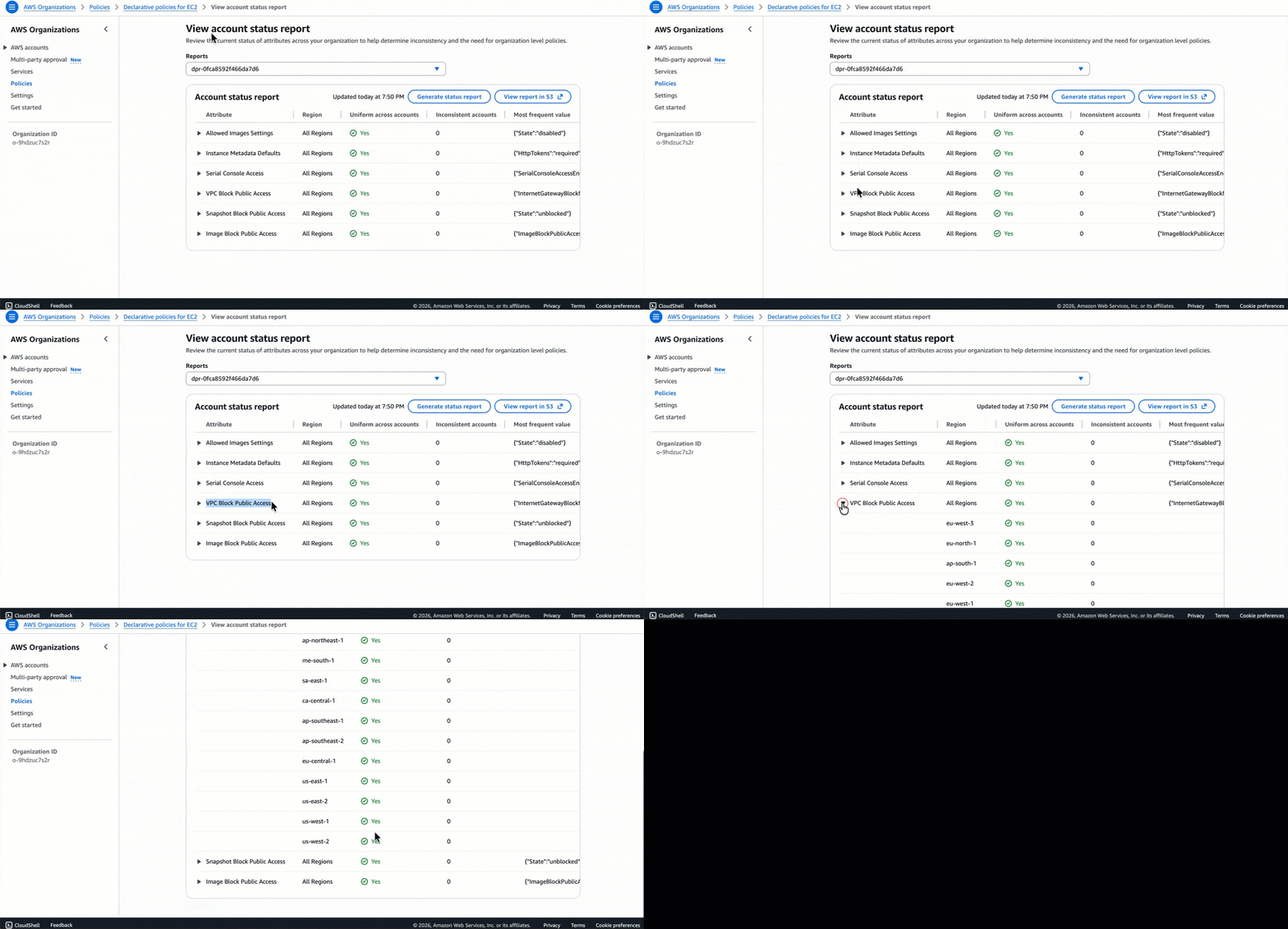 Figure 1: Account status report
Step 2: Create exclusions before enforcement
After discovering your environment, create exclusions in your sub-accounts as needed before enforcing BPA at the organization level. This approach helps prevent disruption to your current internet traffic when BPA is enabled.
Although organization-wide enforcement provides security benefits, certain workloads legitimately require internet access. BPA supports exclusions at the VPC and subnet level, exempting specific resources from the account’s BPA mode and allowing either bidirectional or egress-only access.
You must create exclusions for workloads that need direct internet connectivity. Internet-facing application load balancers, and public-facing web applications typically require bidirectional access. Bastion hosts or jump servers need inbound connectivity for administrative access. Development and testing environments often require more flexible internet access during the development cycle. Third-party integrations may require direct internet access depending on their architecture.
Account owners can create exclusions in the BPA settings for each individual account. You can create BPA exclusions for VPCs and subnets before BPA is enabled on the account. This helps prevent traffic disruption to the exclusions when BPA is turned on.
When you configure your declarative policy in Step 3, you set Exclusions allowed to enabled to allow account owners to create these exclusions at individual account level. This provides a balance between strict centralized security and the operational flexibility needed by decentralized teams according to the granular needs of their workloads.
After creating exclusions, allow a few minutes for them to take effect, then validate the configuration in your VPC Block Public Access (BPA) settings.
Figure 2 shows the AWS VPC Settings page for configuring BPA, where BPA is currently disabled and users can manage exclusions to control internet traffic for VPCs.
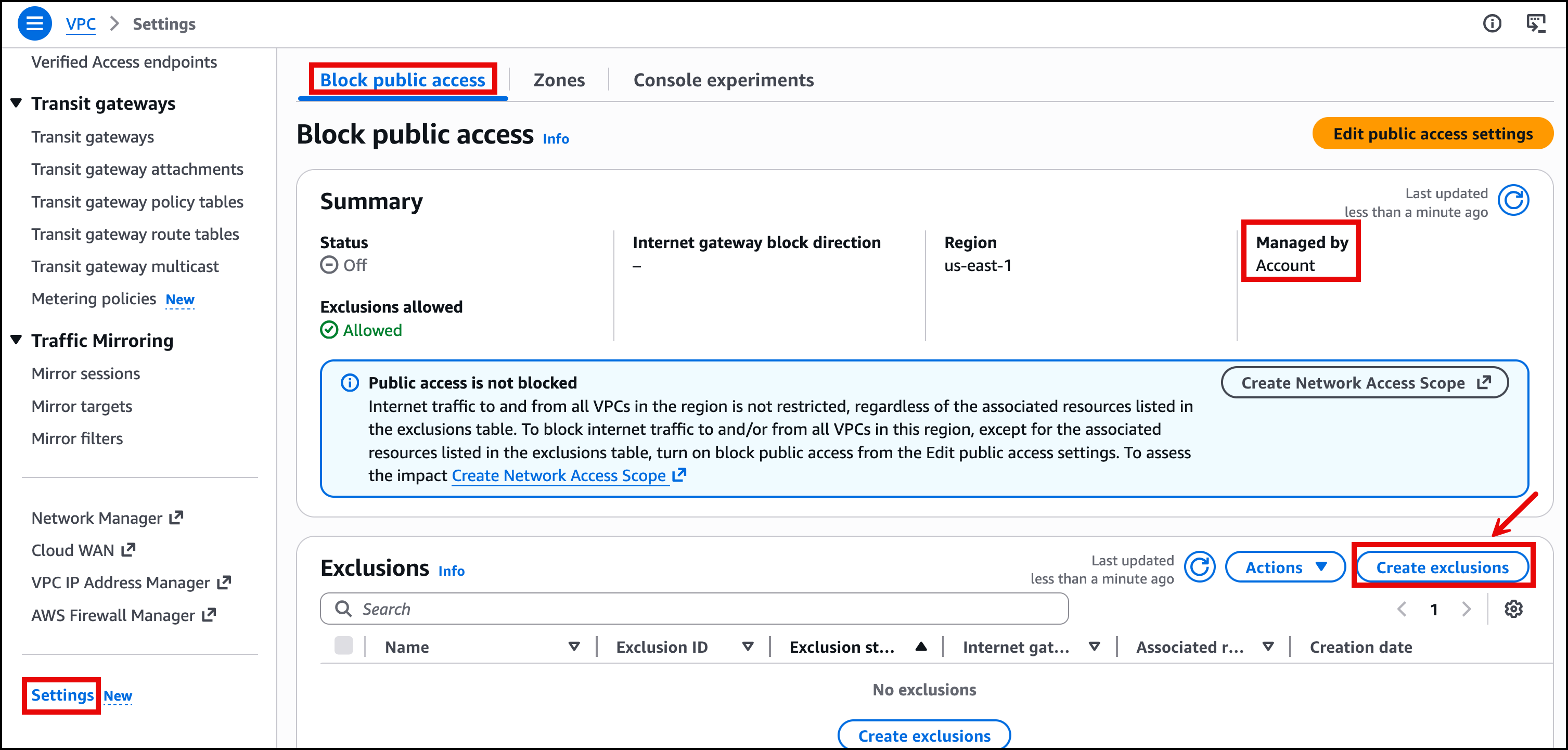 Figure 2: Create exclusions for BPA
Figure 3 shows the AWS VPC Create exclusions page where users can configure exclusion settings to allow internet traffic for specific resources when BPA is enabled. Users can choose between bidirectional or egress-only traffic direction.
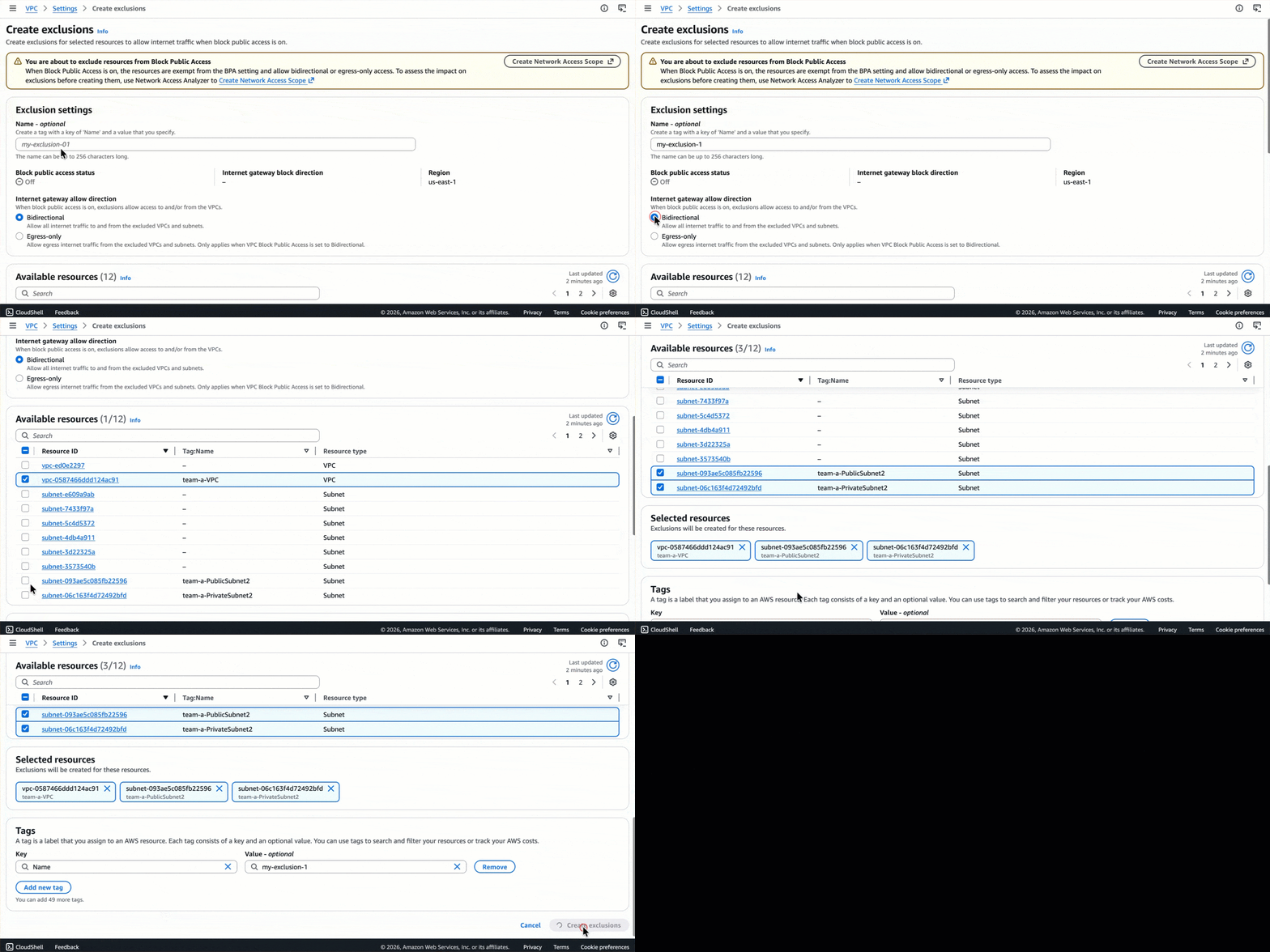 Figure 3: Exclusion settings for BPA
Figure 4 shows the AWS VPC Settings page for BPA with the status set to Off and displays three active exclusions with bidirectional internet gateway settings.
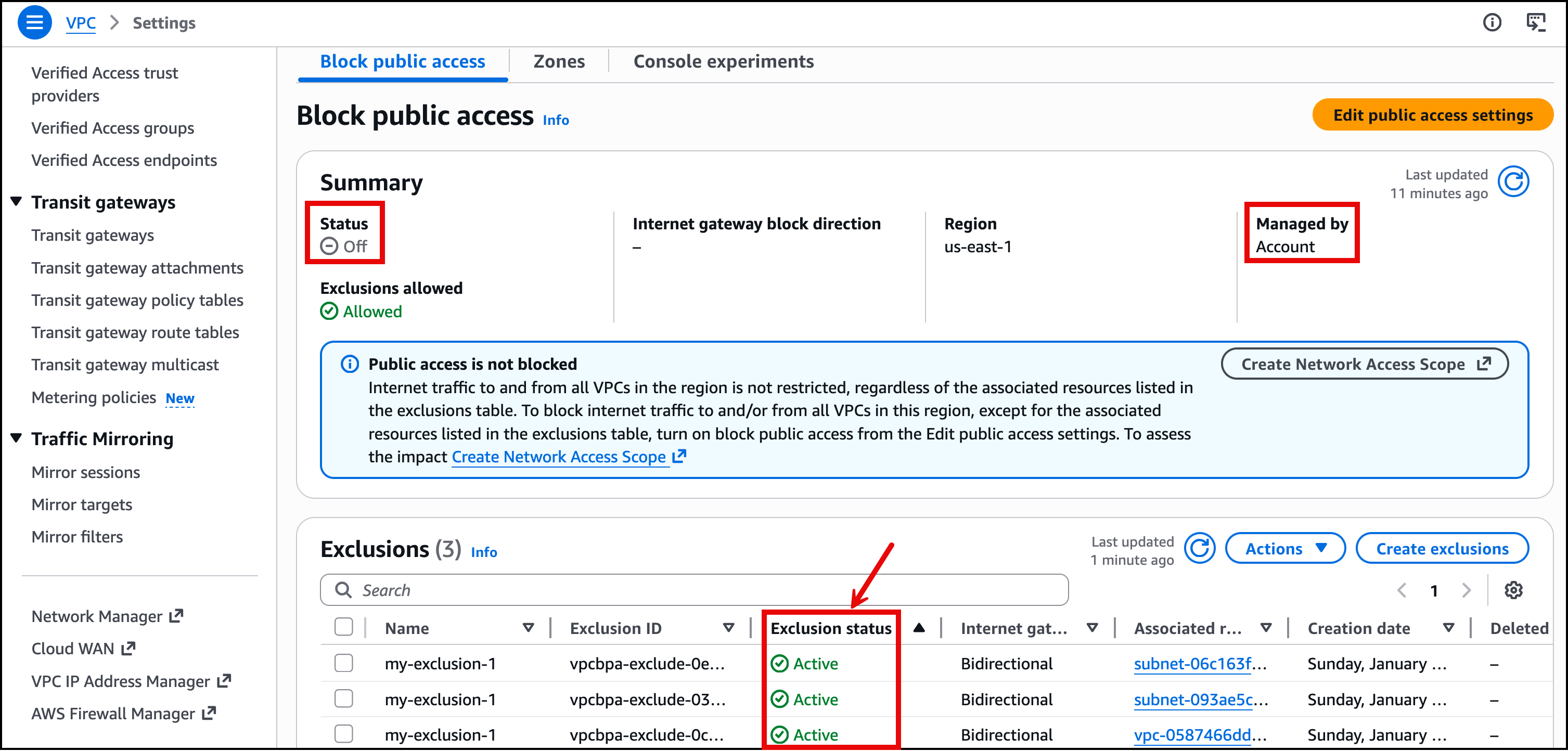 Figure 4: Exclusion status for BPA
Understanding deployment order and its impact
The order in which you enable BPA and create exclusions significantly affects your traffic flow. Based on testing different deployment scenarios, here’s what happens in each case:
Scenario 1: Create exclusions first, then enable BPA with exclusions allowed (recommended)
This is the approach we recommend. When you create exclusions before enabling BPA, your trusted traffic continues to flow without interruption. The exclusions are already in place when enforcement begins, so resources that need internet access maintain connectivity while other resources are protected.
Scenario 2: Enable BPA first, then create exclusions
If you enable BPA at the organization level with exclusions allowed, but haven’t created exclusions yet, then traffic to resources requiring internet access is blocked immediately. You’ll experience disruption until you create and apply the necessary exclusions. This is why we strongly recommend creating exclusions before enabling BPA.
Exception for greenfield deployments: The recommendation in Scenario 2 primarily applies to existing environments with active workloads. For greenfield deployments where sub-accounts are newly created without any existing VPCs or running workloads, you can safely enable BPA first before creating exclusions. This approach provides a “secure by default” posture, so that any newly deployed VPCs are automatically protected from unintended public access. Then, you can create exclusions intentionally as you deploy resources that genuinely require internet connectivity. This aligns with the principle of least privilege and eliminates the risk of accidentally exposing resources during initial deployment. However, verify that your deployment teams are aware of the BPA policy so that they can plan and request necessary exclusions as part of their infrastructure provisioning process.
Scenario 3: Create exclusions first, then enable BPA with exclusions disabled
Even if you’ve created exclusions at the account level, enabling BPA with exclusions disabled at the organization level blocks traffic to those resources. The organization-level policy overrides account-level exclusions when exclusions are disabled. Traffic breaks for resources that were previously excluded. When you want to enforce a strict guardrail to block all public Internet connectivity, this approach overrides any exclusions and ensures that all internet connectivity is blocked.
Scenario 4: Organization policy overrides account-level settings
When BPA is enabled in ingress-only mode at the account level and bidirectional mode at the organization level, the organization-level settings take precedence and are inherited by the account. The account changes to bidirectional blocking mode, potentially disrupting traffic that was previously allowed. Organization-level declarative policies always take precedence over account-level configurations.
The first key takeaway is to make sure you create your exclusions before enabling BPA at the organization level. The second is to verify that your declarative policy has exclusions set to enabled if specific workloads require internet connectivity.
Step 3: Create your BPA declarative policy
When you understand how declarative policies work and have assessed your environment, we can create the policy that enforces BPA across your organization.
A declarative policy is a plaintext file structured according to the rules of JSON. The syntax for declarative policies follows the syntax for management policy types. The following shows the basic structure:
{
 "ec2_attributes": {
  "exception_message": {
   "@@assign": "Your custom error message. https://myURL"
  }
 }
}
Create a declarative policy using the available fields for VPC BPA attributes.
Internet gateway modes
Choose the mode that matches your security requirements:
| Mode | Description | Use when |
| off | VPC BPA is not enabled | Testing or gradual rollout phases |
| block_ingress | Blocks internet traffic to VPCs (except excluded VPCs or subnets). Allows traffic to and from NAT gateways and egress-only internet gateways | You want to prevent inbound internet access while allowing outbound connectivity |
| block_bidirectional | Blocks traffic to and from internet gateways and egress-only internet gateways (except excluded VPCs and subnets) | You need the strictest security posture with no direct internet connectivity |
Exclusions configuration
| Setting | Description |
| enabled | Account owners can create exclusions for specific VPCs or subnets that require bidirectional or egress-only access |
| disabled | Account owners can’t create exclusions |
This following example enables BPA with ingress blocking mode, which blocks the inbound internet traffic to the VPCs except for excluded VPCs or subnets. This configuration allows accounts to create exclusions for specific VPCs or subnets that require internet connectivity. All outbound internet traffic continues to function from all the VPCs or subnets.
{
 "ec2_attributes": {
  "vpc_block_public_access": {
   "internet_gateway_block": {
    "mode": {
     "@@assign": "block_ingress"
    },
    "exclusions_allowed": {
     "@@assign": "enabled"
    }
   }
  }
 }
}
You can configure whether exclusions are allowed, but you can’t create the exclusions themselves within the policy. To create exclusions, account owners must create them in the individual account that owns the VPC. For more information, go to create and delete exclusions.
During the creation of the BPA policy, you have two options. You can define the policy using the JSON editor or alternatively use the Visual Editor in the Organizations console for a more guided experience.
Figure 5 shows the Organizations console page for creating a declarative policy for Amazon EC2, where you can select the internet gateway state and exclusions status through the Visual Editor. You can also use the JSON editor to review the policy in JSON format before creating it.
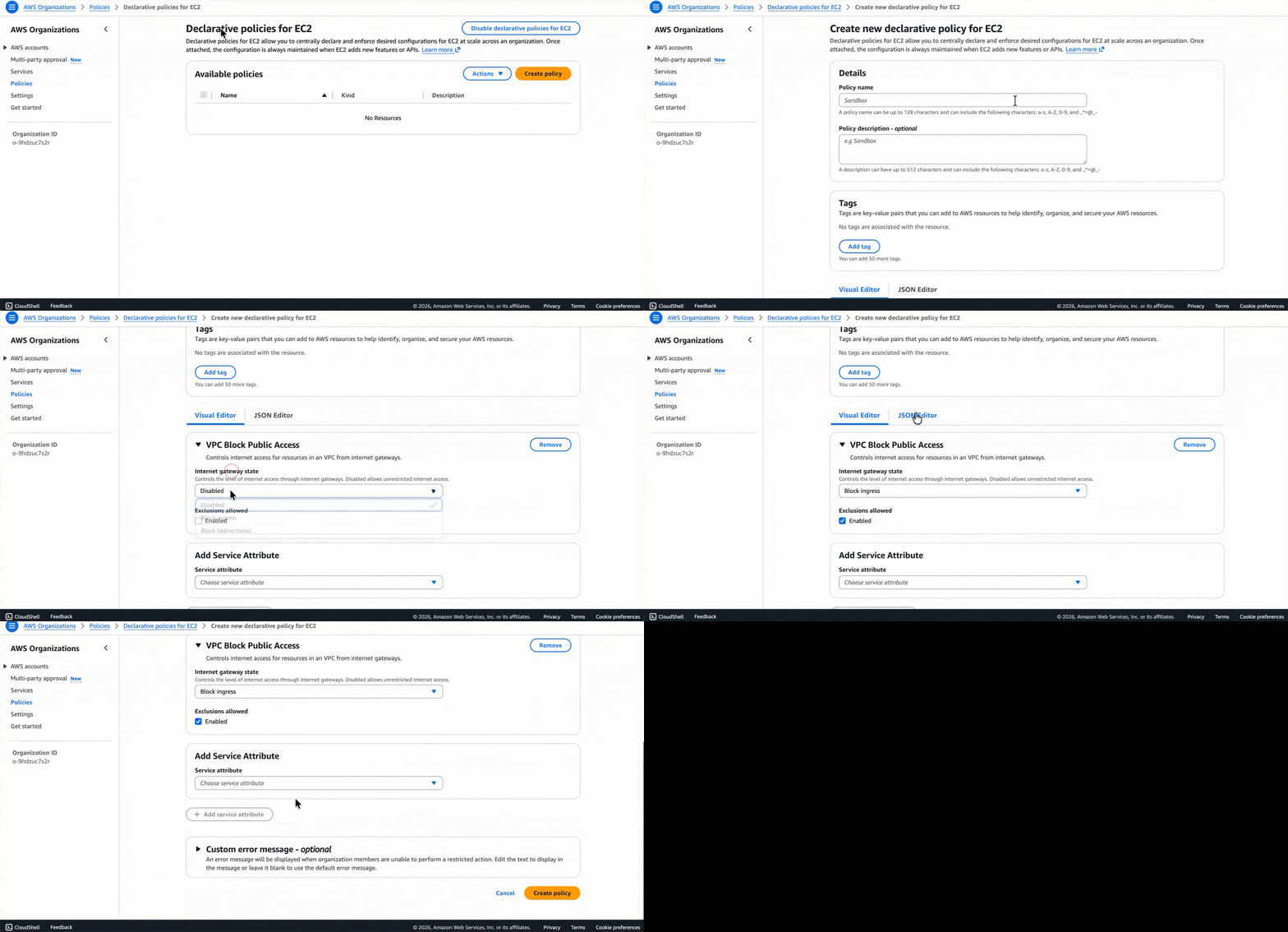 Figure 5: Create a declarative policy for Amazon EC2
Step 4: Attach the policy to your organization
After creating the policy, assess readiness one more time using the account status report. When you’re ready to enforce your baseline configurations, attach the policy to the organization root, organizational units (OUs), AWS accounts within your organization, or a combination to enforce BPA across your organization.
We recommend starting with a non-production OU to validate the configuration before expanding to production environments. You can use this gradual implementation approach to verify behavior and adjust exclusions if needed.
Figure 6 shows the Organizations Declarative policies for EC2 page displaying one available customer managed policy named “VPC-BPA-Policy” in the policies list, which is being attached to the Root with Organizations.
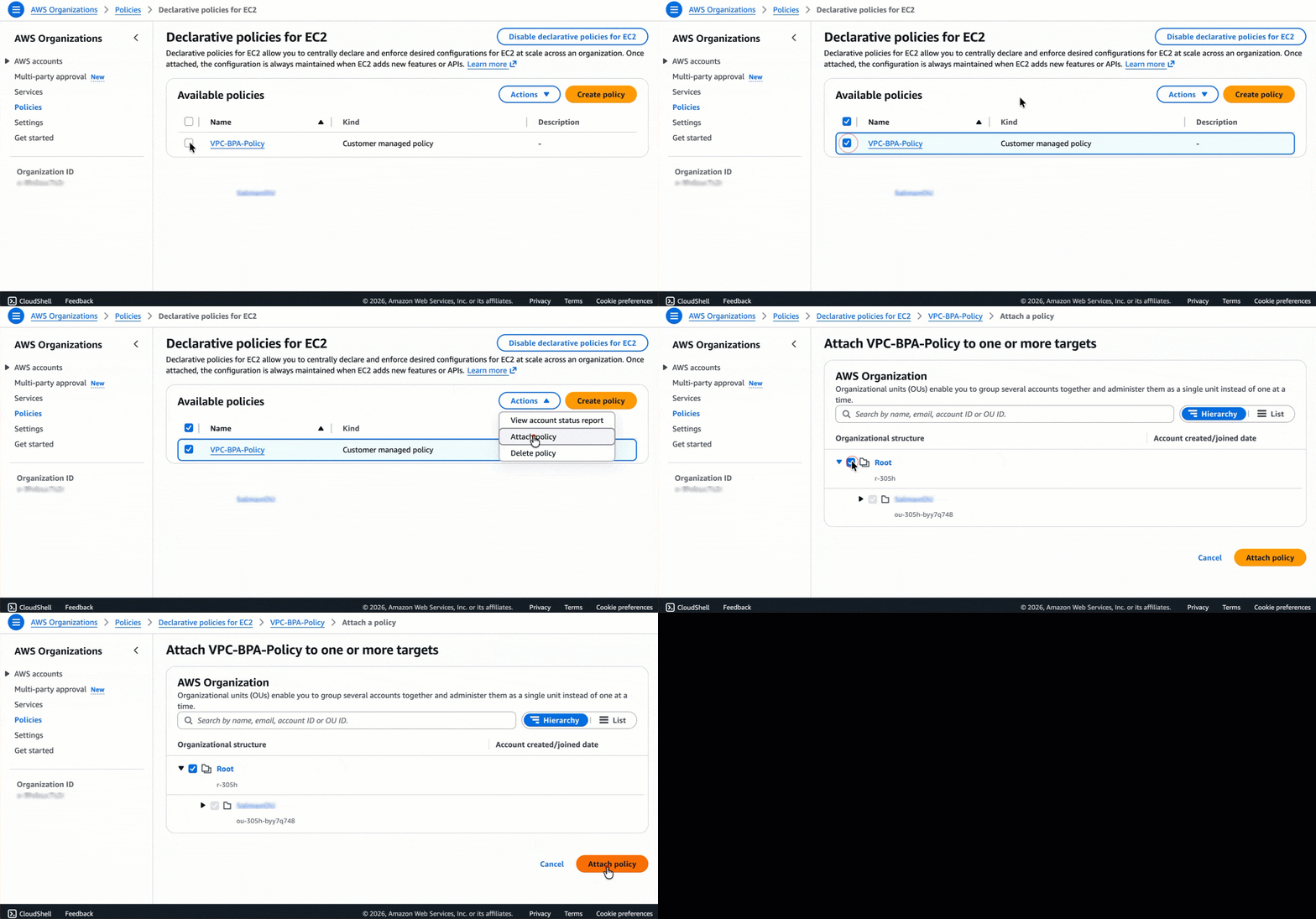 Figure 6: Attaching a declarative policy to Root
Figure 7 shows the VPC-BPA-Policy details page in Organizations. The page displays the policy information, including its name, Amazon Resource Name (ARN), and policy type as a customer-managed declarative policy for Amazon EC2. The Targets tab shows where the policy is attached.
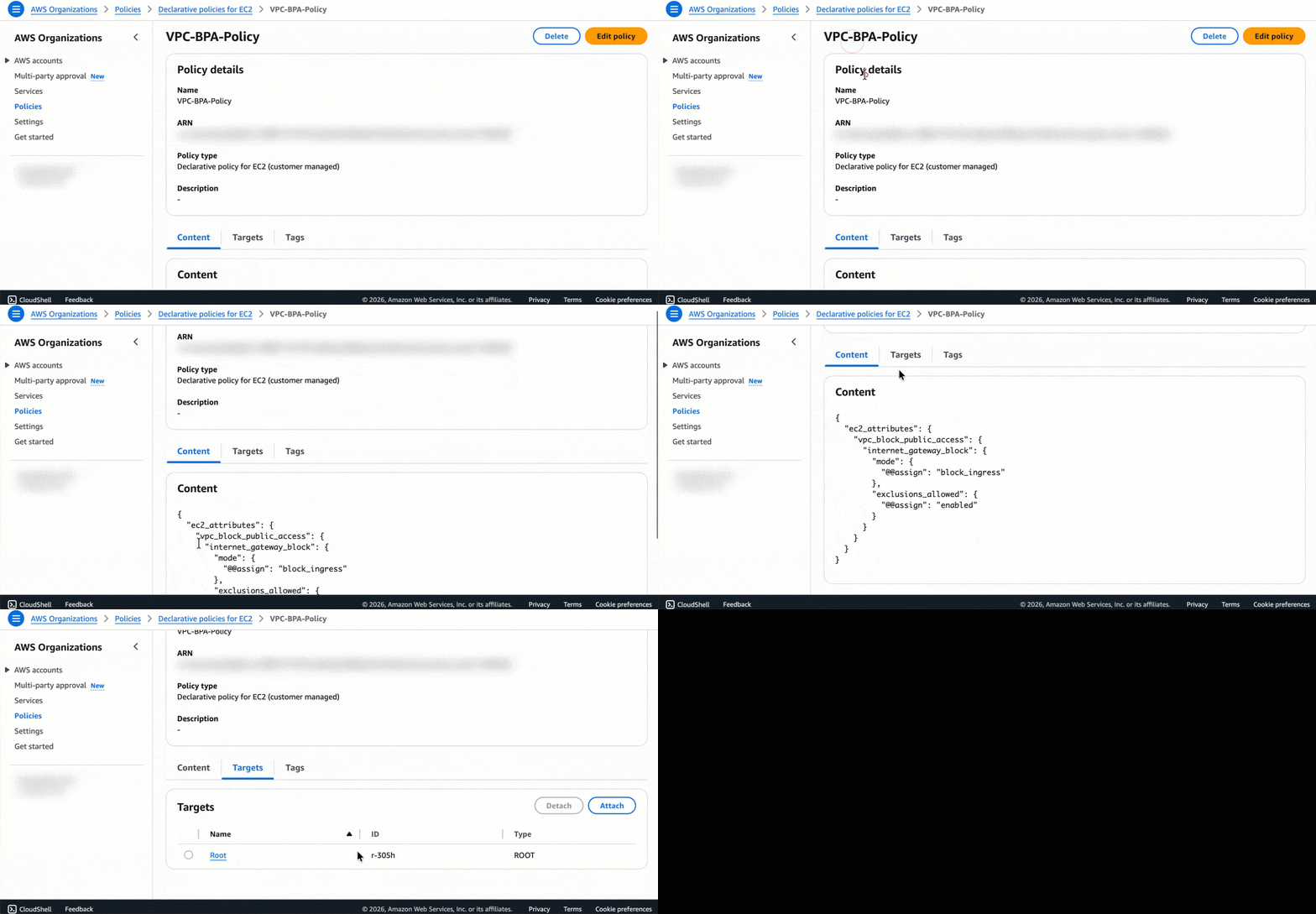 Figure 7: Successful attachment of the policy to the Root
The policy begins enforcement within a few minutes. Accounts within the scope have BPA enabled according to your configuration.
Step 5: Verify policy enforcement
Confirm that the declarative policy is enforced correctly, as shown in Figure 8. Account administrators can’t modify BPA settings directly at the account level as settings can only be managed at the organization level.
To verify enforcement:
- Using the AWS Management Console, navigate to a member account in your Organization.
- Open the Amazon VPC console and go to Settings > Block public access.
- You should see Managed by Declarative Policy, indicating organization-level enforcement.
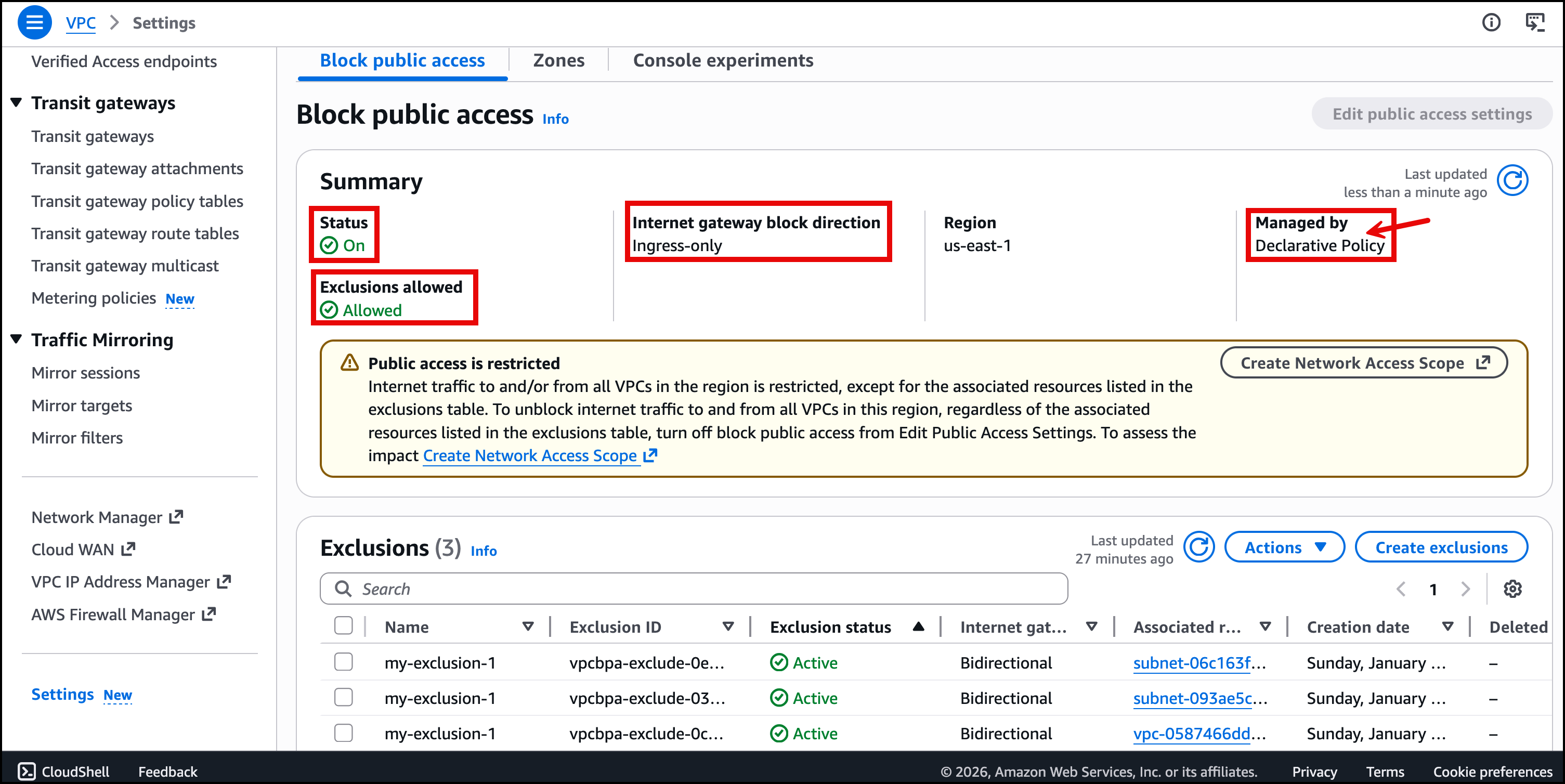 Figure 8: VPC Block Public Access managed by declarative policy
If you don’t see Managed by Declarative Policy after 10 minutes, check the policy attachment scope to verify that the account is included.
Best practices
Based on our experience implementing BPA at scale, here are recommendations to help you succeed.
Create BPA exclusions for VPCs and subnets before enabling BPA on the account to help prevent traffic disruption. An exclusion for a VPC automatically applies to subnets in the VPC, but we recommend using subnet-level exclusions when possible to implement least privilege.
You can create a maximum of 50 exclusions per account. You can request an increase through service quotas if needed. Furthermore, security groups and network ACLs still apply with exclusions and must be configured appropriately.
Apply policies at the OU level rather than the organization root when you need flexibility for different business units. Start with non-production OUs, validate behavior, then expand to production environments.
If you detach a declarative policy, then the BPA configuration rolls back to its previous state before the policy was attached. Plan your rollback strategy accordingly.
Use VPC Flow Logs to monitor traffic that BPA blocks from reaching your instance network interfaces. This visibility helps you identify legitimate traffic that may need exclusions. You can view this by enabling the reject-reason field from the available fields for VPC Flow Logs.
Cleaning up
If you created test resources while following this walkthrough, then you can remove them by following actions:
- Detach the declarative policy from test OUs or accounts
- Delete any test exclusions you created
- Delete the declarative policy if you no longer need it
Remember that detaching a declarative policy rolls back the BPA configuration to its previous state.
Conclusion
In this post, we demonstrated how to use Organizations declarative policies to enforce BPA across your organization. You can implement BPA at the organization level to maintain a consistent security posture, reduce the risk of misconfiguration, and streamline governance across hundreds or thousands of AWS accounts.
The combination of centralized enforcement, exclusion capabilities, and visibility through account status reports makes this approach well-suited for enterprise-scale VPC security management. As AWS adds new features and APIs, your BPA configuration remains enforced automatically without requiring policy updates.
We recommend starting with a non-production OU to validate your configuration, then gradually expanding to production environments. Use the account status report and Network Access Analyzer to understand your environment before enforcement and create exclusions proactively to prevent disruption.
Ready to get started? Begin by generating an account status report to assess your current environment, then follow the steps outlined in this post to implement BPA across your organization. For more guidance and examples, explore the following resources.
More resources
- AWS Organizations declarative policies
- Amazon VPC Block Public Access
- VPC BPA Advanced example
- Enhancing VPC Security with Amazon VPC Block Public Access
About the authors

Salman Ahmed
Salman is a Senior Technical Account Manager at AWS. He specializes in guiding customers through the design, implementation, and support of AWS solutions. Combining his networking expertise with a drive to explore new technologies, he helps organizations successfully navigate their cloud journey. Outside of work, he enjoys photography, traveling, and watching his favorite sports teams.

Kunj Thacker
Kunj is a Technical Account Manager at AWS, based in Vancouver, Canada. With 10 years of experience in Network and Infrastructure engineering, he helps enterprise customers build, implement, and optimize the cloud infrastructure on AWS. Passionate about emerging technologies, Kunj specializes in AWS networking services and enjoys enabling customers to architect scalable and secure cloud solutions.