Networking & Content Delivery
Introducing policy-based routing for AWS Transit Gateway
With policy-based routing (PBR) for AWS Transit Gateway, you can route traffic by more than its destination IP address. Standard Transit Gateway route tables forward by destination prefix only, so they can’t send some flows through a firewall, steer others over a specific connection, or keep business units isolated. PBR matches traffic on its 5-tuple (source IP, destination IP, source port, destination port, and protocol) and sends each class of traffic to a different Transit Gateway route table.
With PBR, you gain the following capabilities:
- Selective inspection: Send traffic to security appliances based on its source, destination, port, or protocol.
- Path selection: Route different applications or user populations over different connections, such as AWS Direct Connect or AWS Site-to-Site VPN.
- Segmentation: Isolate traffic into separate routing domains so each source reaches only the destinations you permit.
This post explains how PBR works, walks through a reference architecture and console setup, and shows three use cases.
How policy-based routing works
You associate a policy table with a Transit Gateway attachment. When traffic enters the transit gateway on that attachment, the transit gateway evaluates the packet against the rules in the policy table. Each rule has match conditions and a target route table. The first matching rule selects the route table, and that route table then forwards the packet by destination as usual. You can associate one policy table with more than one attachment, but each attachment is associated with either a route table or a policy table, not both.
Rules and evaluation order
Each customer-managed rule has the following parts:
- Rule number: Rules are evaluated in ascending order, and evaluation stops at the first match.
- Match conditions: Any combination of source CIDR, destination CIDR, protocol, source port, and destination port. A field that you leave empty matches any value.
- Target route table: The Transit Gateway route table that forwards matching traffic.
Place specific rules at lower numbers and catch-all rules at higher numbers, and leave gaps (100, 110, 120) for later inserts. If no rule matches, the traffic is dropped and the PacketDropCountNoPolicy metric is incremented.
Note: Rules that match on protocol or port might not apply to fragmented packets. For fragmented traffic, use policy-based routing rules that match only on source and destination CIDR.
The following figure shows a conceptual policy table.

Figure 1: Conceptual policy table with customer-managed rules
Rule 100 sends all traffic from 10.1.10.0/24 to tgw-rtb-firewall. Rule 110 sends HTTPS (TCP 443) from any source to tgw-rtb-direct-connect. Rule 120 has no match conditions, so it catches all remaining traffic.
System-managed entries
AWS also creates system-managed entries, for example for segment isolation on peering attachments to AWS Cloud WAN. They are evaluated before your rules, show a rule number of * on the console, and can’t be modified or deleted.
Prerequisites
Before you configure PBR, confirm the following:
- You have a transit gateway. PBR requires no additional configuration to turn on.
- You have the required AWS Identity and Access Management (IAM) permissions.
- The Transit Gateway route tables that your rules target already exist.
Example architecture: Combining four policy-based routing patterns in one policy table
The reference architecture uses one transit gateway to connect two spoke VPCs, Spoke A (10.1.0.0/16) and Spoke B (10.2.0.0/16), to an Inspection VPC (10.0.0.0/16) that runs AWS Network Firewall. The transit gateway also connects to an on-premises data center (192.168.0.0/16) over both AWS Direct Connect and AWS Site-to-Site VPN. One policy table shows four PBR patterns in this topology, as shown in the following figure.
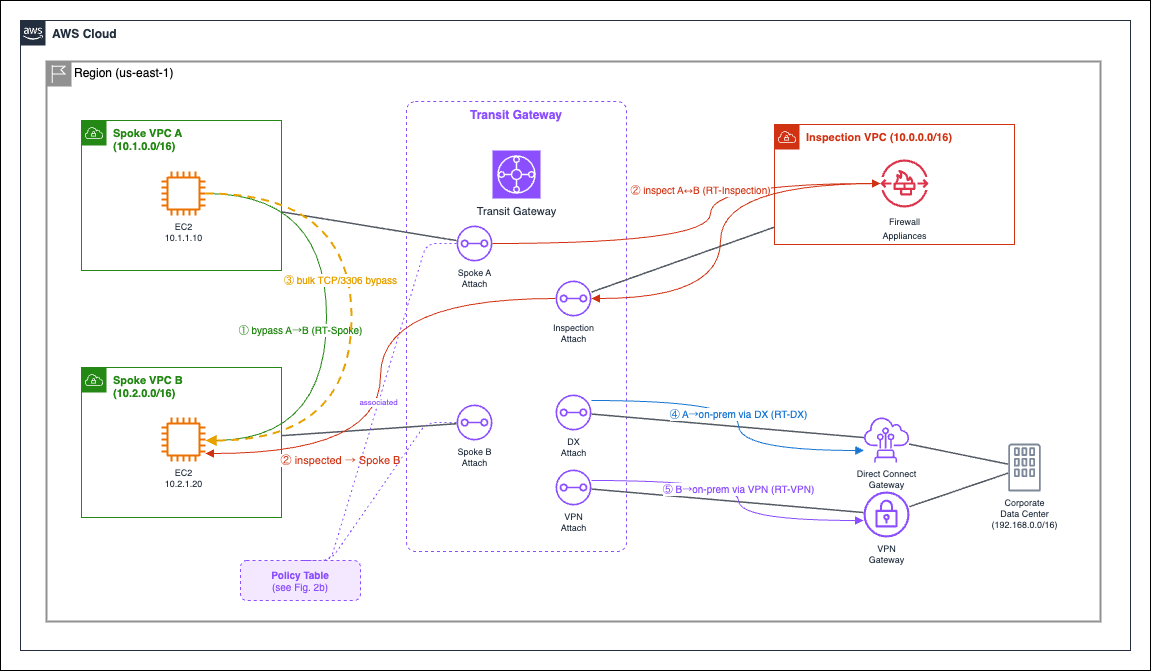
Figure 2: Reference architecture topology and policy-based traffic flows
The following figure shows the policy table and the Transit Gateway route tables for this topology.
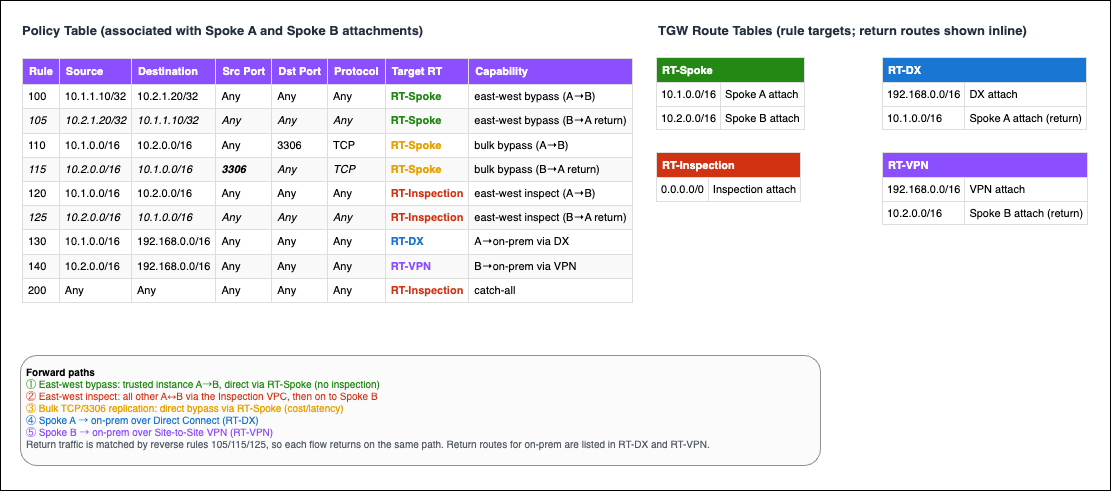
Figure 3: Policy table and Transit Gateway route tables for the reference architecture
Attachment associations
The Spoke A and Spoke B attachments are associated with the policy table. The other attachments use standard route tables:
- The Inspection VPC attachment is associated with RT-Spoke, which returns inspected traffic to the destination spoke. Appliance mode keeps both directions of a flow on the same firewall endpoint.
- The Direct Connect attachment is associated with RT-DX, which routes replies for 10.1.0.0/16 back to Spoke A.
- The VPN attachment is associated with RT-VPN, which routes replies for 10.2.0.0/16 back to Spoke B.
Policy table rules
The policy table contains the following rules, listed in evaluation order:
- Trusted pair bypass (Rules 100 and 105): Traffic between 10.1.1.10 and 10.2.1.20 goes to RT-Spoke, skipping inspection.
- Bulk replication bypass (Rules 110 and 115): TCP 3306 replication goes to RT-Spoke to save firewall capacity. Rule 115 matches source port 3306 to catch replies.
- East-west inspection (Rules 120 and 125): Other spoke-to-spoke traffic goes to RT-Inspection.
- Path selection (Rules 130 and 140): Spoke A traffic to on-premises goes to RT-DX, and Spoke B traffic goes to RT-VPN.
- Catch-all (Rule 200): Everything else goes to RT-Inspection, so unclassified traffic is inspected.
Each forward rule has a matching reverse rule, so replies take the same path. This matters for stateful firewalls, which drop flows when they see only one direction.
On-premises, the Direct Connect gateway advertises only 10.1.0.0/16 and the VPN advertises only 10.2.0.0/16, so replies return over the link the traffic used.
Getting started
The following steps create a policy table, add rules, and associate the table with attachments. They assume that the VPCs, attachments, and route tables in the reference architecture already exist. For general setup guidance, see Getting started with transit gateways.
Step 1: Create a policy table
Open the Amazon Virtual Private Cloud (Amazon VPC) console and choose Transit Gateway Policy Tables. Choose Create transit gateway policy table, select your transit gateway from the Transit gateway list, optionally add tags, and then choose Create transit gateway policy table.
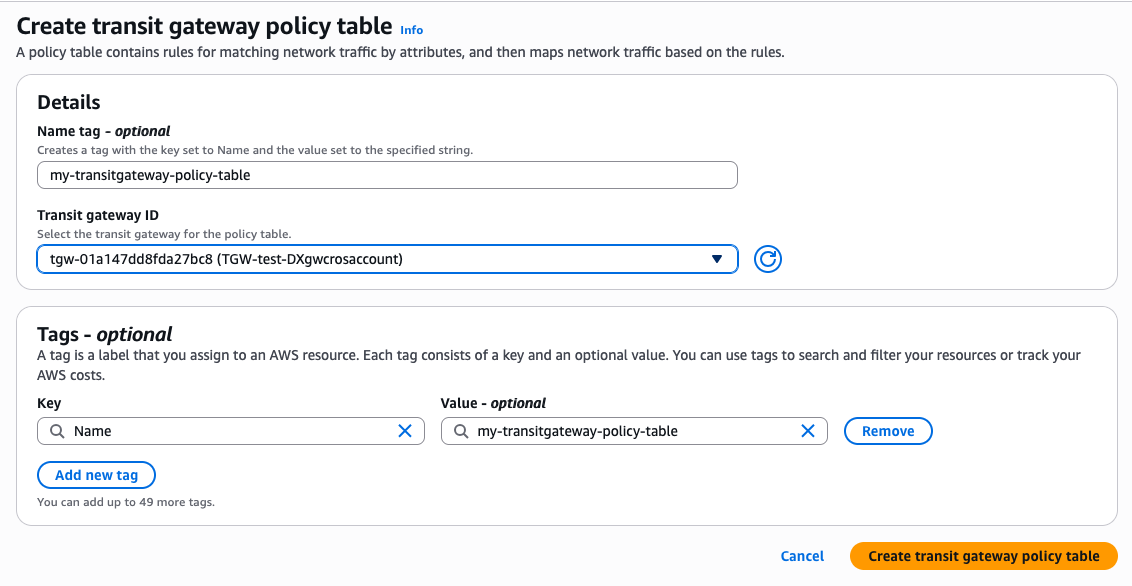
Figure 4: Creating a transit gateway policy table
The policy table starts in the Pending state. Wait for it to change to Available before you continue.
Step 2: Add rules to the policy table
Select the policy table, choose Create entry, enter a rule number, set one or more match conditions, and select the target route table. For example, Rule 130 in the reference architecture sends Spoke A traffic to on-premises over Direct Connect:
- Rule number: 130.
- Source CIDR: 10.1.0.0/16 (Spoke A).
- Destination CIDR: 192.168.0.0/16 (on-premises data center).
- Protocol, source port, destination port: left empty (Any).
- Target route table: RT-DX.
Repeat this step for each rule in Figure 3.
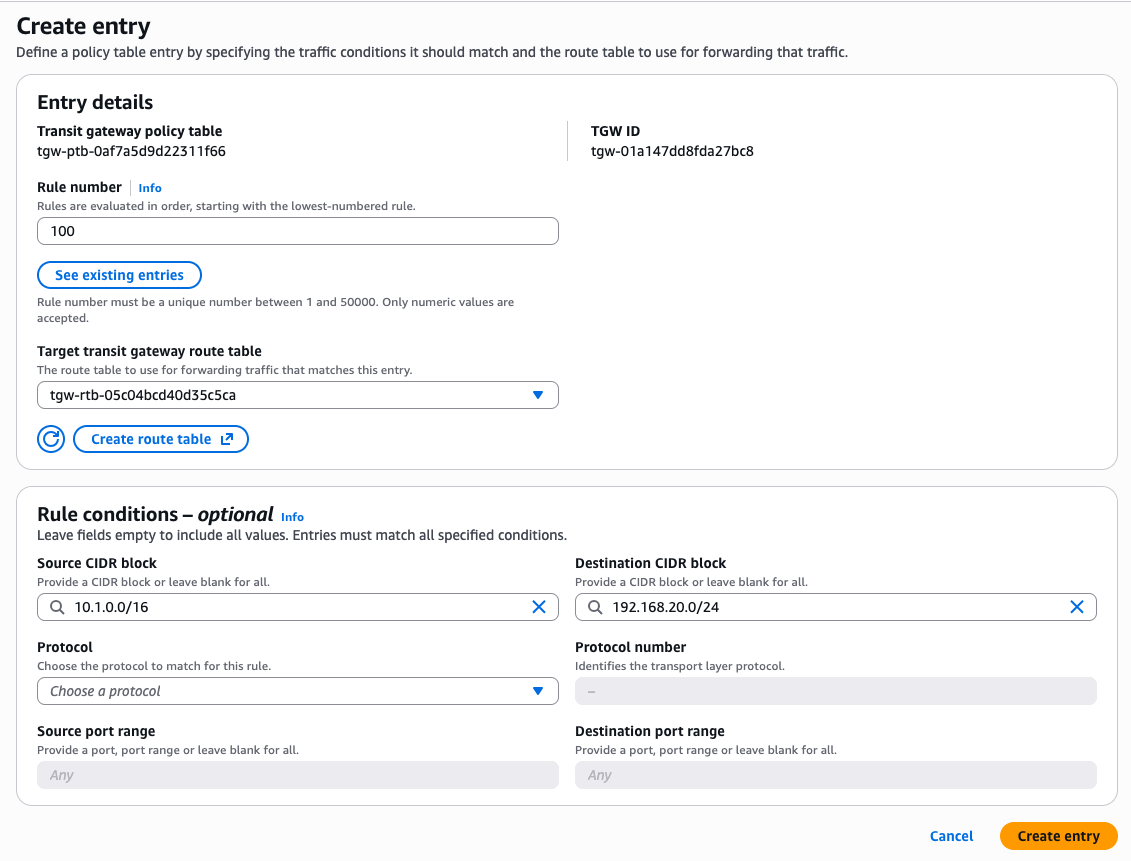
Figure 5: Creating an entry in the policy table
The following table describes the match attributes that you can use. They apply to both IPv4 and IPv6 CIDRs.
Table 1: Policy rule match attributes
| Attribute | Description | Valid values | Default |
| SourceCidrBlock | Source IP address or CIDR block | IPv4 or IPv6 CIDR (for example, 10.0.0.0/16), or omit for any | * (any) |
| SourcePortRange | Source port or range. Only evaluated when Protocol is TCP (6) or UDP (17). Automatically set to * for all other protocols. | Single port (443) or range (1024-65535). Valid range 0–65535, start ≤ end | * (any) |
| DestinationCidrBlock | Destination IP address or CIDR block | IPv4 or IPv6 CIDR, or omit for any | * (any) |
| DestinationPortRange | Destination port or range. Only evaluated when Protocol is TCP (6) or UDP (17). Automatically set to * for all other protocols. | Single port or range. Valid range 0–65535, start ≤ end | * (any) |
| Protocol | IANA protocol number. Determines whether port range fields are evaluated. | “1” (ICMPv4), “6” (TCP), “17” (UDP), “47” (GRE), or “*” for any. Port ranges are only supported for TCP and UDP. | * (any) |
Step 3: Associate the policy table with attachments
Select the policy table, open the Associations tab, and choose Create association. Choose the attachment ID, such as the Spoke A VPC attachment, and then choose Create. Disassociate any existing route table first. The state changes to Associated within a few minutes. Repeat for each attachment that the policy table should classify.
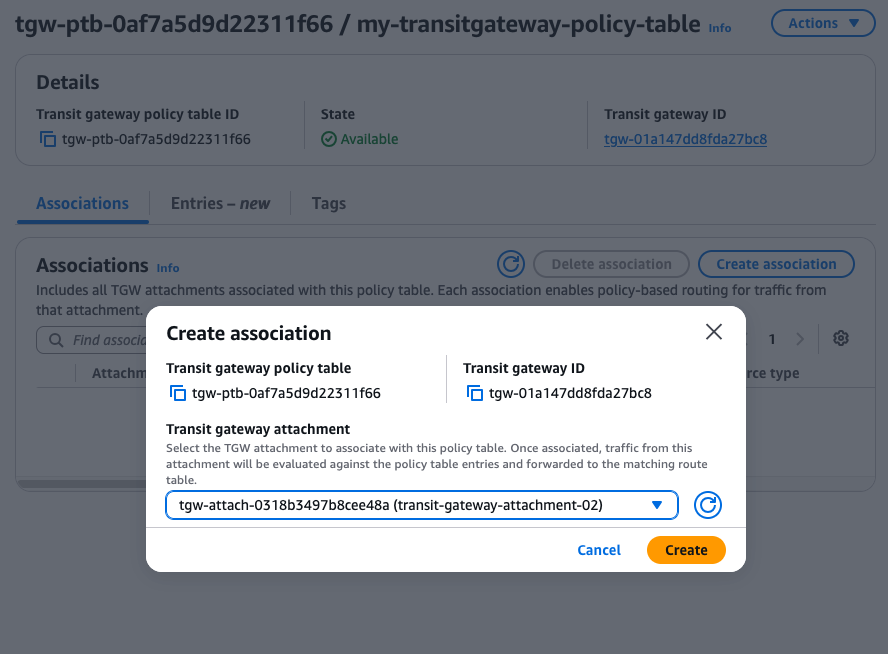
Figure 6: Associating the policy table with a Transit Gateway attachment
Technical use cases
The following three use cases show how policy-based routing applies to common networking patterns.
Use case 1: Source-based path selection by IP address and port
An enterprise wants critical production traffic on Direct Connect and routine traffic, such as backups and batch jobs, on Site-to-Site VPN. PBR sends each class to a route table that points to the right attachment, as shown in the following figure.
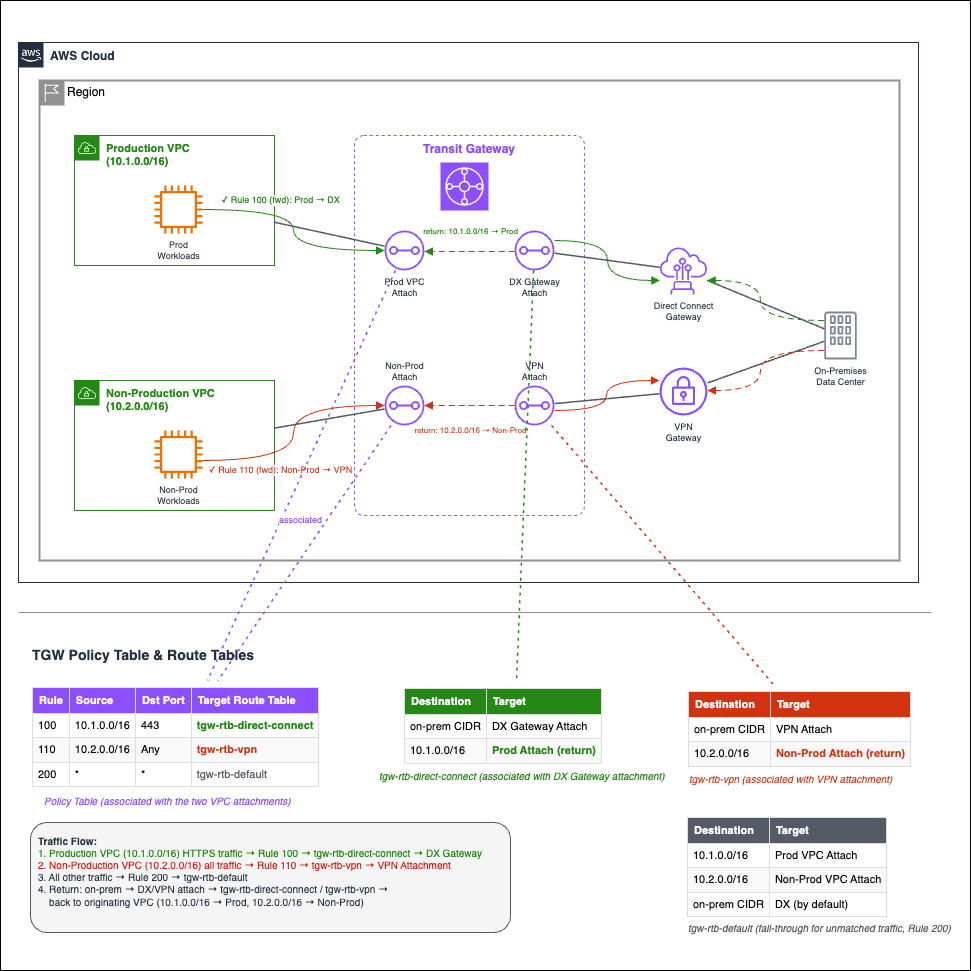
Figure 7: Source-based path selection directing traffic toward the destination
The following figure shows the policy table for this use case.

Figure 8: Policy table for source-based path selection
The traffic flows as follows:
- Rule 100: Production (10.1.0.0/16) traffic to destination port 443 matches Rule 100 and goes through tgw-rtb-direct-connect to Direct Connect.
- Rule 110: Non-Production (10.2.0.0/16) traffic matches Rule 110 and goes through tgw-rtb-vpn to the VPN.
- Catch-all: Other traffic, including Production traffic on other ports, uses the default route table, which routes on-premises traffic over the DX.
- Return: Replies arrive on the Direct Connect or VPN attachment, whose route table sends 10.1.0.0/16 to Production and 10.2.0.0/16 to Non-Production.
The tgw-pair-attachment-id field in the flow logs shows the path that the transit gateway selected for each flow.
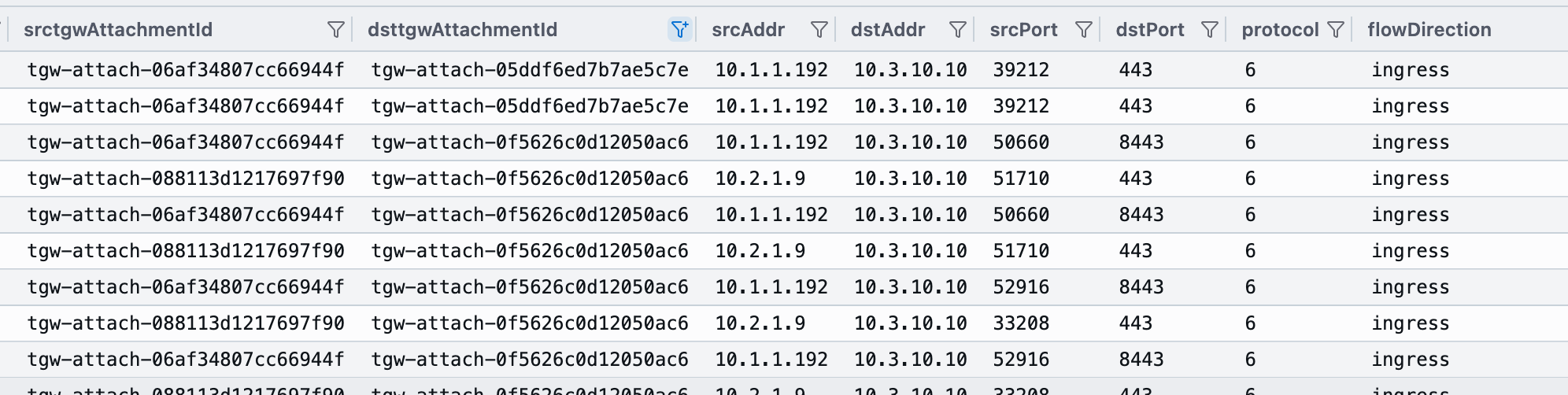
Figure 9: Transit Gateway flow logs confirming routing based on the configured match conditions
Traffic from the same Production VPC splits by port: port 443 uses Direct Connect, and port 8443 uses the VPN. No application or host changes are needed.
You can also reroute a source to an inspection appliance quickly by inserting a lower-numbered rule.
Use case 2: Network segmentation with multiple routing domains
An enterprise runs Finance and Engineering in separate VPCs. A Shared Services VPC hosts two tiers:
- A Finance-only shared subnet (10.100.10.0/24) containing sensitive financial services (for example, payment processing and compliance databases).
- A Common shared subnet (10.100.20.0/24) containing services available to all business units (for example, DNS, monitoring, and logging).
Engineering must not reach Finance-only services, both units need common services, and VPC-to-VPC traffic between units must be blocked.
Each rule targets a route table with routes only to permitted destinations. Unmatched traffic goes to a route table with only blackhole routes, as shown in the following figure.
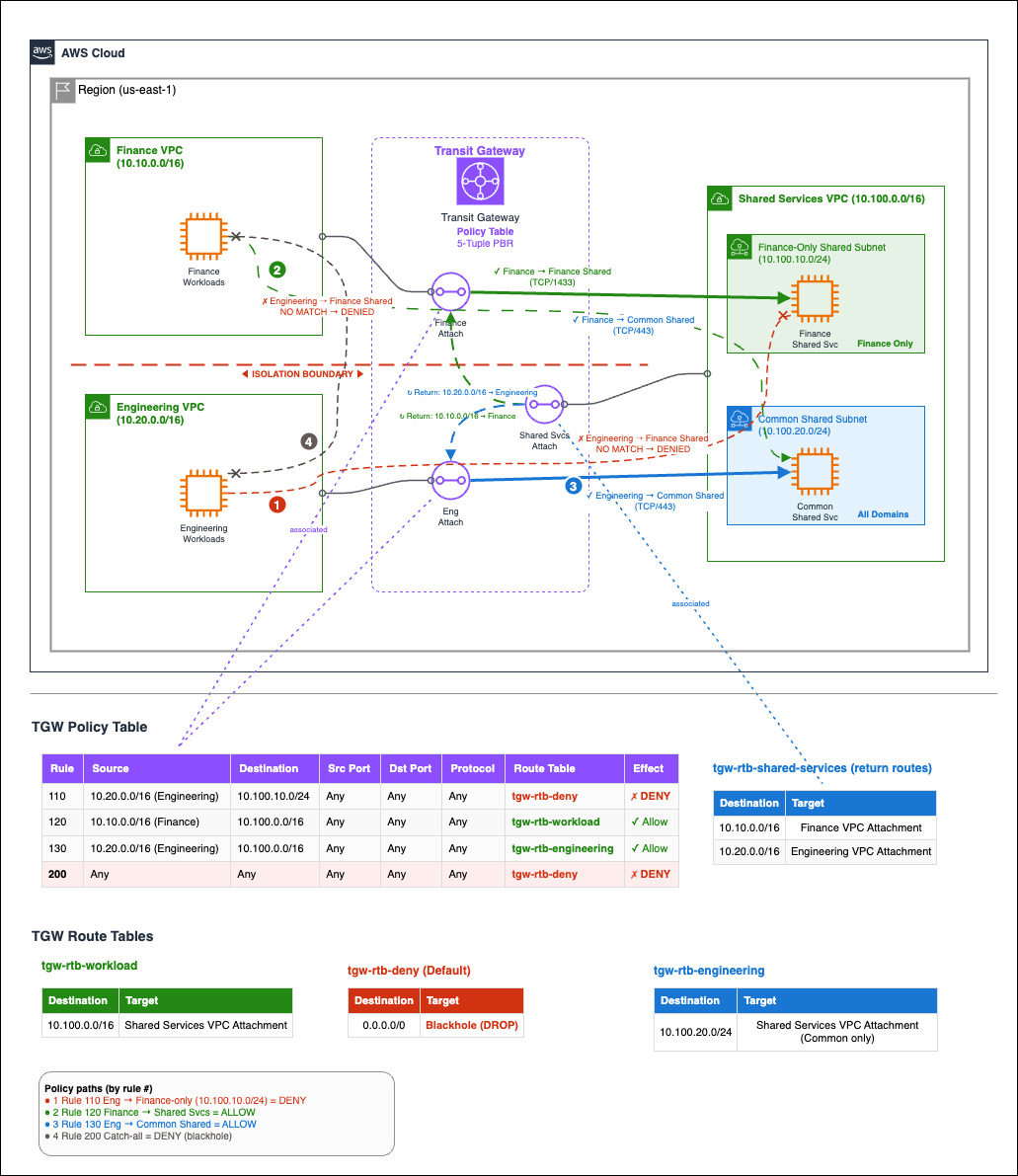
Figure 10: Network segmentation with multiple routing domains
The following figure shows the policy table for this use case.

Figure 11: Policy table for network segmentation
The traffic flows as follows:
- Engineering to Finance-only (blocked): Traffic from 10.20.0.0/16 to 10.100.10.0/24 matches Rule 110 and goes to tgw-rtb-deny, where it is dropped.
- Finance to Shared Services (allowed): Traffic from 10.10.0.0/16 to 10.100.0.0/16 matches Rule 120 and goes through tgw-rtb-workload to both subnets.
- Engineering to Common (allowed): Traffic to 10.100.20.0/24 doesn’t match Rule 110, matches Rule 130, and goes through tgw-rtb-engineering, which routes only to Common.
- Cross-unit (blocked): Finance and Engineering traffic to each other matches only catch-all Rule 200 and is dropped.
- Return: The Shared Services attachment is associated with a standard route table that sends 10.10.0.0/16 to Finance and 10.20.0.0/16 to Engineering. Dropped flows produce no replies.
The packets-lost-blackhole field in the flow logs shows drops at blackhole routes.

Figure 12: Transit Gateway flow logs summarizing allowed and dropped traffic
Engineering traffic to the Finance-only subnet shows a non-zero packets-lost-blackhole count and no egress attachment. The same source reaches the Common subnet through Rule 130, because Rule 110 is evaluated first.
Engineering has no route to Finance-only services, which limits the scope of an inadvertent access event. These routing-layer controls work alongside security groups and network ACLs, not in place of them.
Use case 3: Selective inspection bypass for trusted traffic
Many enterprises send all traffic through an inspection VPC with firewall or intrusion detection and prevention system (IDS/IPS) appliances. Some flows, such as database replication between trusted subnets, don’t need inspection. PBR can send those flows directly to their destination while everything else is still inspected.
Here, a Spoke VPC (10.1.0.0/16) sends approved TCP 3306 replication to a backup subnet (10.50.10.0/24) and other traffic to a services subnet (10.50.20.0/24) in a Shared Services VPC (10.50.0.0/16). An Inspection VPC (10.30.0.0/16) hosts the firewalls.
The Spoke attachment is associated with a forward policy table, and the Shared Services attachment with a mirrored return policy table. In each, the bypass rule is numbered below the inspection rule, as shown in the following figure.
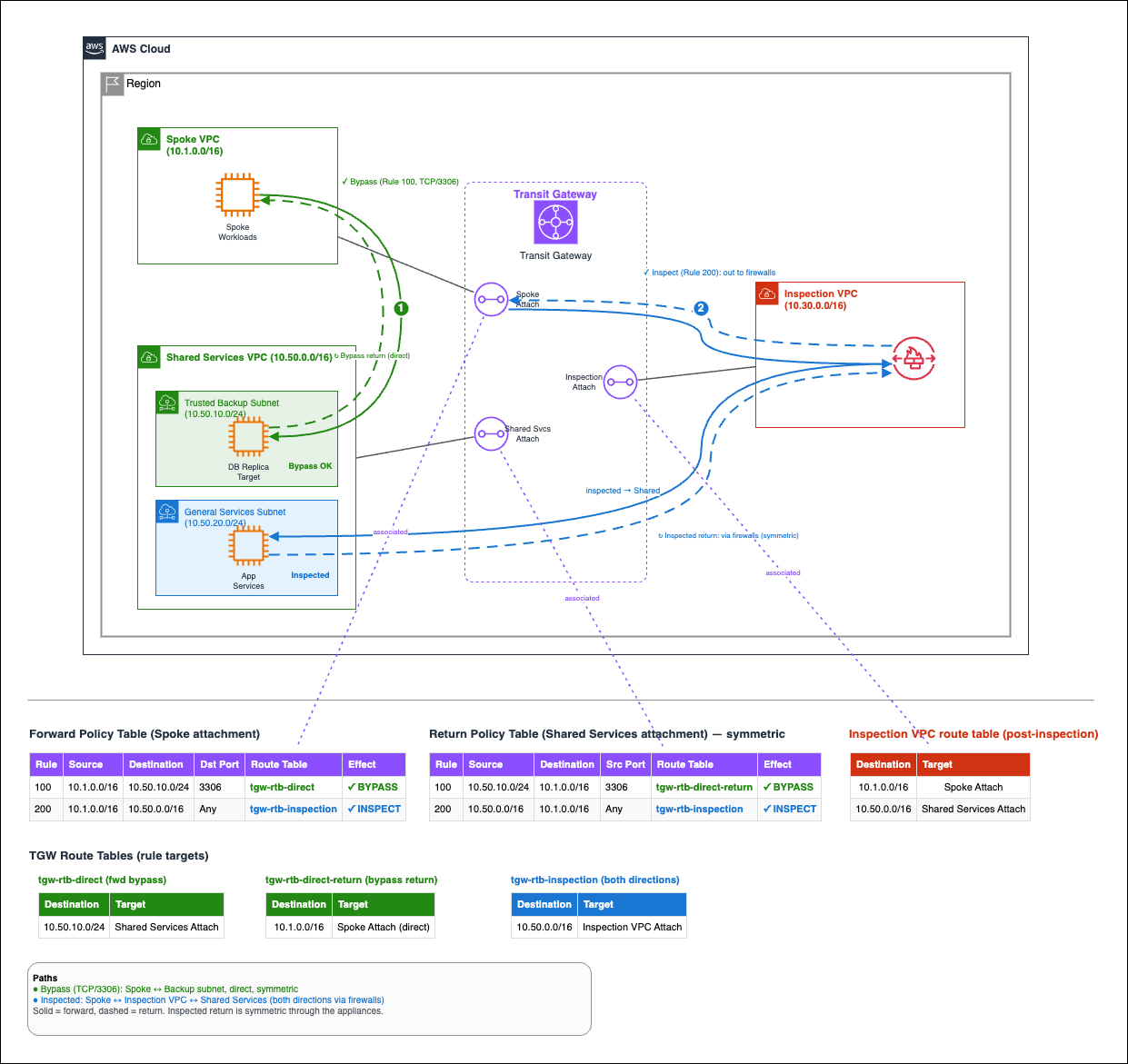
Figure 13: Policy table for selective inspection bypass
The traffic flows as follows:
- Bypass: TCP 3306 traffic to the backup subnet matches Rule 100 and goes through tgw-rtb-direct to Shared Services. Replies match Rule 100 of the return table and go directly back.
- Inspect: Other traffic matches Rule 200 and goes through tgw-rtb-inspection. Replies match Rule 200 of the return table, so they are inspected in both directions.
This keeps high-volume trusted flows off the firewalls and keeps bypass decisions in one auditable place. Flows not approved for bypass are inspected by default.
Considerations
Keep the following points in mind when you plan a PBR deployment:
- AWS Cloud WAN peering: For Transit Gateway peering attachments to AWS Cloud WAN, only system-managed entries control traffic, and you can’t add customer-managed entries for them. You can still add your own entries to the same policy table for other attachment types.
- Route advertisement: Associating a policy table with a Site-to-Site VPN or Connect attachment stops BGP route advertisement over that attachment. Direct Connect gateway attachments still advertise their allowed prefixes. A Connect attachment over Direct Connect is still a Connect attachment, so its advertisements stop. To keep advertisements, associate the attachment with a route table, as the reference architecture does for VPN.
- Regional availability: PBR is not available in the AWS GovCloud (US) Regions. Confirm availability in your target Region before you plan a deployment.
Pricing
There is no additional charge for PBR. You pay only the standard Transit Gateway charges.
Conclusion
With policy-based routing for AWS Transit Gateway, you can route traffic by its 5-tuple, not only its destination, from one centrally managed policy table. You can use it to select network paths, segment routing domains, and bypass inspection for approved flows. To learn more, see Transit Gateway policy tables in the documentation and the AWS Transit Gateway product page. To get started, create a policy table in the Amazon VPC console.