Networking & Content Delivery
Network connectivity patterns for agents deployed on Amazon Bedrock AgentCore Runtime
As you deploy AI agents into production, establishing secure network connectivity becomes a critical design decision: how do users connect to agents, how do agents connect to other agents, and how do agents reach private resources?
Amazon Bedrock AgentCore Runtime provides flexible network connectivity options that let your AI agents securely connect to public and private resources while controlling how traffic flows between users, agents, Amazon Virtual Private Cloud (Amazon VPC) resources, and other AWS services.
In this post, we discuss network connectivity patterns through AgentCore Runtime so agents can securely access public (for example, US government weather API) and private resources such as Amazon Relational Database Service (Amazon RDS) databases in your VPCs or workloads running inside your on-premises network. We explore four network architecture patterns—from the default configuration with a public endpoint to an agent working with highly sensitive data in an isolated VPC with no connectivity to the public internet.
After reading this post, you should be able to:
- Configure VPC connectivity for agents hosted on AgentCore Runtime
- Add a layer of security using AgentCore Runtime resource-based policies
- Invoke agents privately from within your VPC without traversing the public internet
- Set up VPC endpoints for AWS services that AgentCore Runtime hosted agents depend on
Solution overview
This post walks you through four network connectivity patterns for AI agents deployed on Amazon Bedrock AgentCore Runtime, each progressively addressing more stringent security requirements. In Pattern 1, you use the default public endpoint where both inbound and outbound traffic traverse the internet. In Pattern 2, you configure VPC connectivity through elastic network interfaces (ENIs), enabling your agent to securely access private resources such as Amazon RDS databases and on-premises systems. In Pattern 3, you add resource-based policies to block inbound access from the public internet and establish secure inbound connectivity to your agent from resources in your VPC using AWS PrivateLink. Finally, in Pattern 4, you achieve network connectivity with AWS services from your agent through VPC endpoints within an isolated VPC, ideal for agents that handle highly sensitive data.
Prerequisites
The following are the prerequisites for using the AWS Command Line Interface (AWS CLI) commands provided for configuring the agent with different connectivity patterns:
- Install or update the latest version of AWS CLI. We tested the commands in this post with AWS CLI version 2.34.4.
- Create an execution role for running an agent in AgentCore Runtime. Note the role Amazon Resource Name (ARN) for later use.
- Create a custom agent and deploy the Docker image on Amazon Elastic Container Registry (Amazon ECR). Note the ECR repository ARN for later use.
Where relevant, we share AWS CLI commands to configure the agent and test it. For the AWS CLI commands provided, replace the placeholders with actual values:
- us-east-1 with the AWS Region that you are using
- 123456789012 with your AWS account ID
- agentName with the name of your agent
- repositoryName with ECR repository name
- agentRuntimeID with the agent AgentCore Runtime ID, which you get after creating the agent on the AgentCore Runtime console
Pattern 1: Agents accessible over the internet (default setting)
By default, the endpoint of AI agents deployed on AgentCore Runtime is publicly accessible over internet. Customers can use both OAuth (JWT bearer token) or IAM SigV4 to provide access to the agent. In this mode, network traffic to and from the AI agent hosted on AgentCore Runtime uses public IPs; agents must have appropriate access to the data and system using external APIs to complete the tasks. The following figure shows how traffic flows in this default configuration.
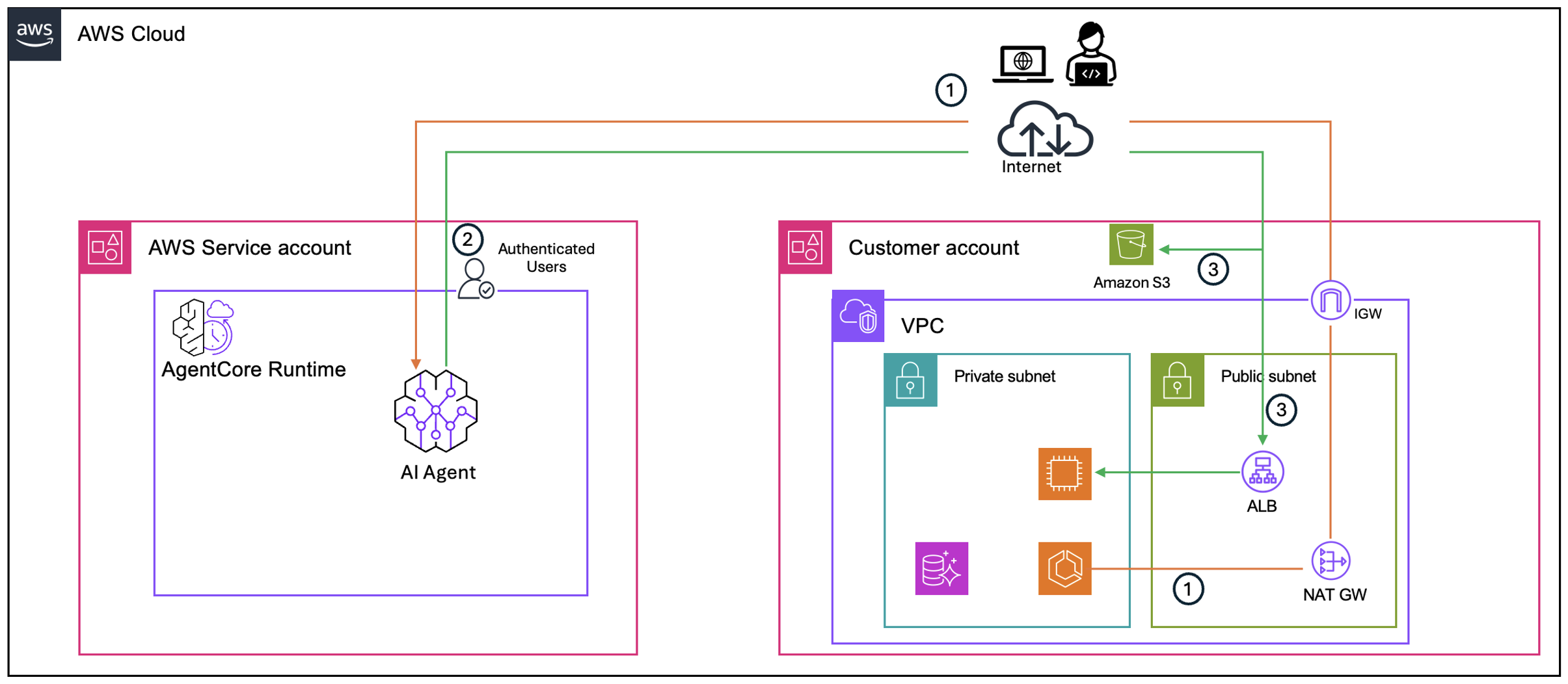
Figure 1: Default network mode for AgentCore Runtime with public endpoint accessThe traffic flow consists of the following steps:
- All requests originating from the customer’s VPC and external clients to the agent travel through the VPC’s internet gateway and over the public internet to reach the agent’s public endpoint hosted in the AWS service account.
- AgentCore Runtime authenticates the request using the configured authentication model (OAuth or IAM SigV4) and routes it to the agent.
- When the agent needs to call an AWS service, it connects to the service’s public IP addresses, with traffic flowing over the public internet.
Responses return along the same path. In this pattern, both inbound traffic to the agent and outbound traffic to AWS services traverse the public internet.
The following AWS CLI command configures an agent in public network mode:
aws bedrock-agentcore-control create-agent-runtime \

          --agent-runtime-name agentName \

          --agent-runtime-artifact containerConfiguration={containerUri="123456789012.dkr.ecr.us-east-1.amazonaws.com/repositoryName:latest" } \

          --network-configuration networkMode=PUBLIC \

          --role-arn "arn:aws:iam::123456789012:role/service-role/AmazonBedrockAgentCoreRuntimeDefaultServiceRole"\

          --region us-east-1
Open the AgentCore Runtime console to check the status of your agent. After the agent reaches Ready status, use the following AWS CLI command to invoke it:
aws bedrock-agentcore invoke-agent-runtime \

          --agent-runtime-arn arn:aws:bedrock-agentcore:us-east-1:123456789012:runtime/agentRuntimeID \

          --qualifier "DEFAULT" \

          --payload "$(echo -n '{"input":{"prompt":"What is ML?"}}'|base64)" \

          --region us-east-1 \

          /dev/stdout | jq '.'
Pattern 2: Grant agent access to private resources
In some use cases, you might want to grant agents access to systems and data inside your private network (AWS or on-premises). With AgentCore Runtime, you can configure VPC connectivity for the agent to enable secure access to resources within your private network boundaries.
When you configure VPC connectivity, AgentCore creates elastic network interfaces (ENIs) in the selected subnets. You select a minimum of two subnets, and they must be in the Availability Zones (AZs) where AgentCore is supported. ENIs are shared across agents with identical subnet and security group configurations. The security groups you provide when configuring VPC connectivity are associated with the ENIs and control which VPC resources your agent can access.
The following diagram illustrates this architecture.
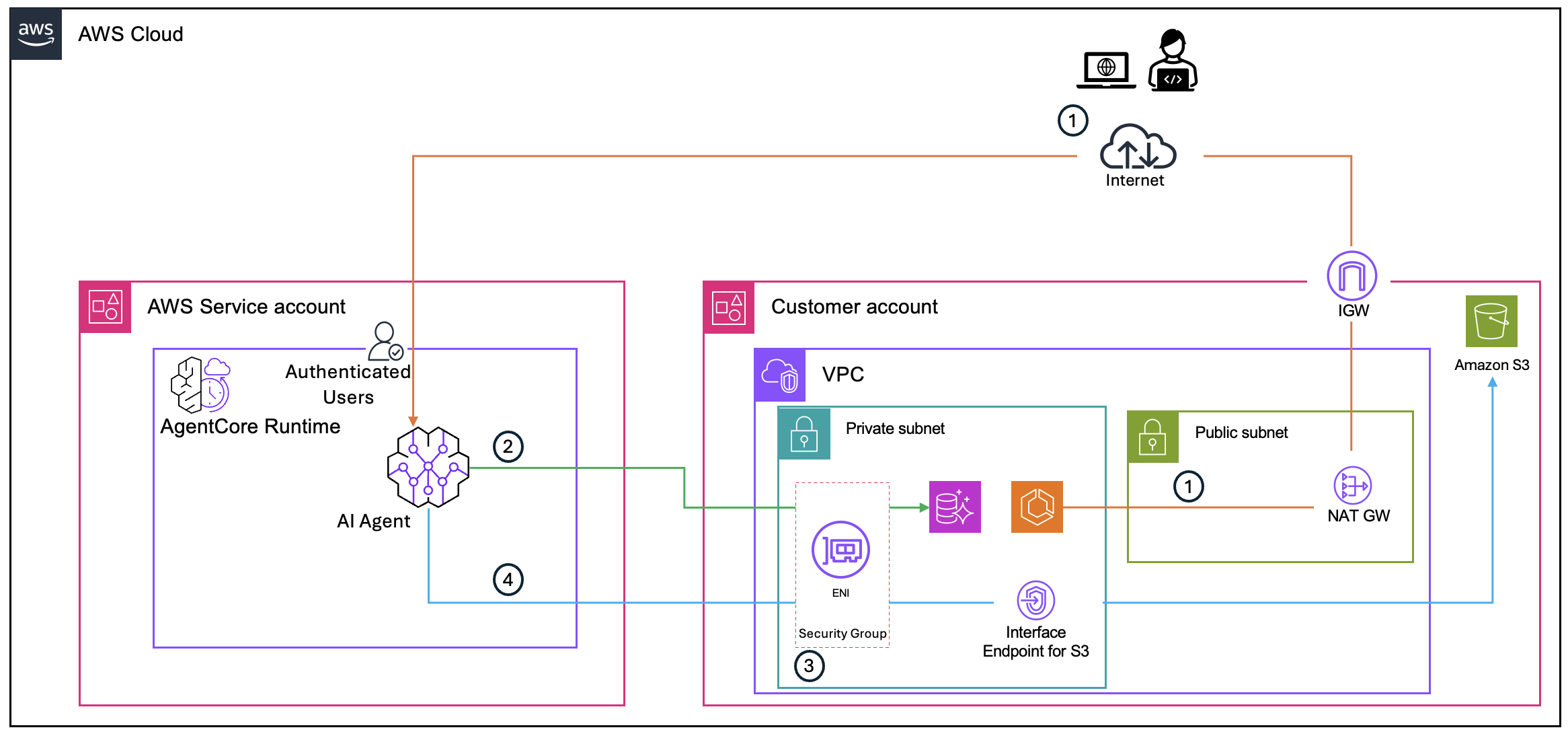
Figure 2: AgentCore Runtime configured with VPC connectivity showing ENIs in customer’s VPC
The traffic flow consists of the following steps:
- A user or application sends an inbound request to the agent’s public endpoint over the internet, the same as Pattern 1. Configuring VPC connectivity doesn’t change how callers reach the agent—the public endpoint remains accessible.
- When the agent needs to access a private resource, such as an RDS database, traffic flows from the agent through the ENIs that AgentCore created in your VPC subnets. The ENIs give the agent a network presence inside your VPC, allowing it to reach resources using private IP addresses without traversing the public internet.
- The security groups provided when configuring VPC connectivity control which VPC resources the agent can reach. The target resource’s security group must allow inbound traffic from the AgentCore Runtime ENI’s security group.
- When the agent calls public AWS services such as Amazon Bedrock or Amazon Simple Storage Service (Amazon S3), traffic flows through the ENIs. To enable access to public APIs, ensure the subnet route table has route to the internet gateway through a NAT gateway.
Configuring VPC connectivity doesn’t make the agent inaccessible from the public internet. To restrict inbound access, apply a resource-based policy as described in Pattern 3. The primary purpose of VPC connectivity is to give your agent secure access to enterprise data stores and internal services inside your VPC or on-premises environment.
The following AWS CLI command configures an agent with VPC connectivity. Make sure the security group associated with target VPC resources—such as Amazon RDS or Amazon Elastic Compute Cloud (Amazon EC2) is configured to allow inbound traffic from the security group associated with the AgentCore Runtime ENI:
aws bedrock-agentcore-control create-agent-runtime \

          --agent-runtime-name agentName \

          --agent-runtime-artifact containerConfiguration={containerUri="123456789012.dkr.ecr.us-east-1.amazonaws.com/repositoryName:latest" } \

          --network-configuration networkMode=VPC \

          --role-arn "arn:aws:iam::123456789012:role/service-role/AmazonBedrockAgentCoreRuntimeDefaultServiceRole"\

          --region us-east-1

          --network-configuration '{"networkMode":"VPC","networkModeConfig":{"subnets":["subnet-0123456789abcdef0" ","subnet-0123456789abcdef1"],"securityGroups":["sg-0123456789abcdef0"]}}'
You can invoke your agent using the same AWS CLI command provided in Pattern 1.
Pattern 3: Block inbound access to agent from public internet
Some customers might want to prevent AI agents from being accessed from the internet. These include security-conscious enterprises and customers in regulated industries (such as financial services). In these use cases, you need to make sure incoming requests to AI agents come from known AWS Identity and Access Management (IAM) principals and networks, such as a VPC or specific IP addresses. Inbound connectivity to the agent deployed on AgentCore Runtime must also follow a network route that allows them to use existing network protections, such as firewall rules.
Resource-based policies in AgentCore make it possible to control which principals (AWS accounts, IAM users, or IAM roles) can invoke and manage your AgentCore Runtime. In the resource-based policies, you can use condition keys to achieve granular access control like allow/deny traffic based on source IP address, VPC, or VPC endpoint.
The following AWS CLI command associates a resource-based policy with your agent deployed on AgentCore Runtime. Create a policy.json file based on the examples provided, and reference it in the command.
aws bedrock-agentcore-control put-resource-policy \

          --resource-arn arn:aws:bedrock-agentcore:us-east-1:123456789012:runtime/agentRuntimeID  \

          --policy file://policy.json
The following figure shows how a resource-based policy controls inbound access to the agent.
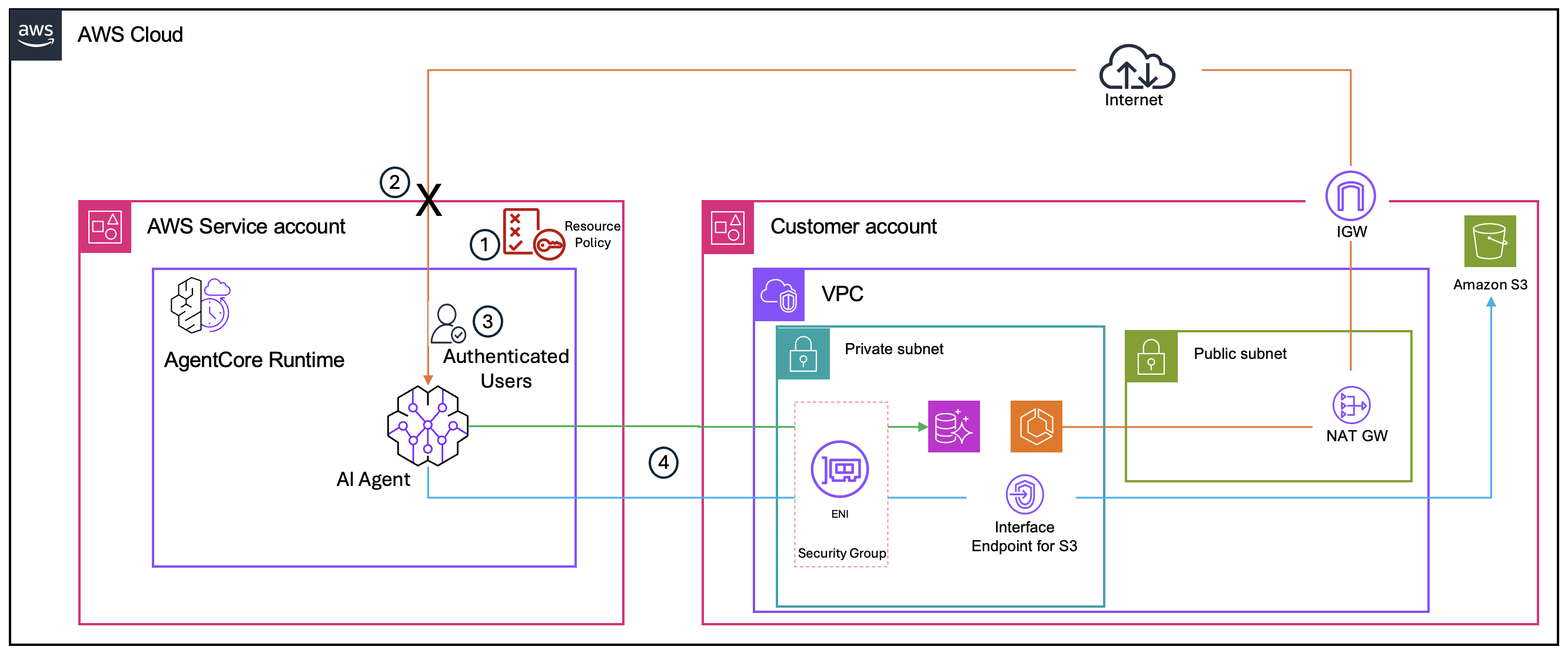
Figure 3: Resource-based policy blocking inbound access from public internet
The traffic flow consists of the following steps:
- When a request arrives at the agent’s endpoint, AgentCore Runtime evaluates the resource-based policy before the request reaches the agent. The policy checks condition keys such as the source VPC ID (aws:SourceVpc) or source IP address (aws:SourceIp).
- If the request originates from the public internet or from a VPC or IP address not specified in the policy, it is denied at the AgentCore Runtime layer—the request never reaches the agent (shown by the X in the preceding diagram).
- If the request originates from an authorized VPC or IP address, it is authenticated and forwarded to the agent.
- Outbound traffic from the agent to private resources continues to flow through the AgentCore Runtime ENIs in your VPC, the same as Pattern 2.
With the resource-based policy restricting access to a specific VPC, the next step is to create an interface VPC endpoint so callers within your VPC can reach the agent without traversing the public internet. A condition key in the resource policy restricts access to only through the VPC endpoint ID (aws:SourceVpce). The following figure shows this configuration.
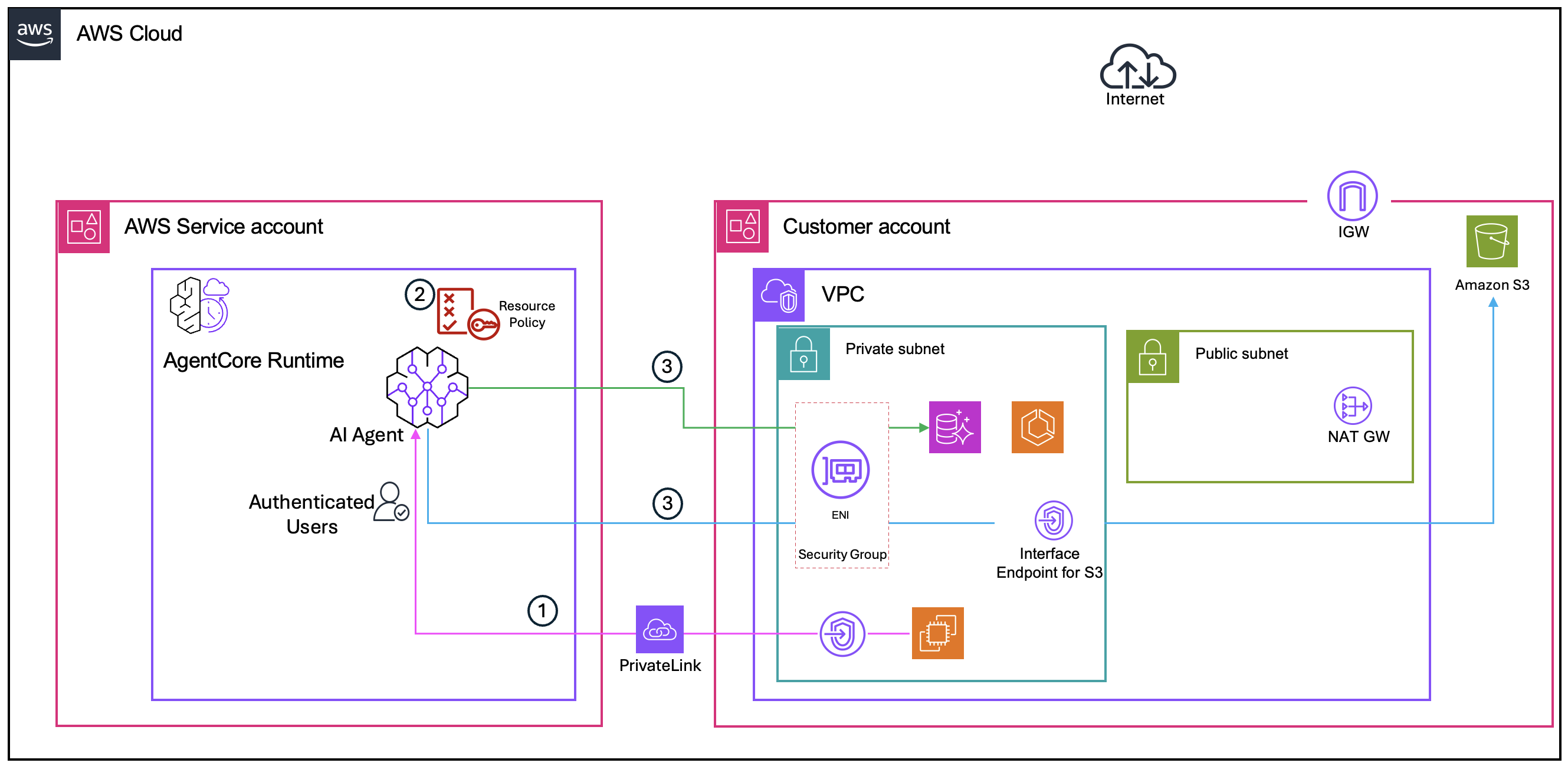
Figure 4: VPC endpoint keeping traffic within private network
The traffic flow consists of the following steps:
- A user or application within your VPC sends an inbound request to the agent. Instead of routing through the internet gateway to the agent’s public endpoint, the request is sent through the interface VPC endpoint for AgentCore Runtime. The traffic travels over AWS PrivateLink and stays entirely within the AWS network—it never reaches the public internet.
- Because the request originates from the VPC endpoint, it matches the condition key in the resource-based policy (aws:SourceVpce or aws:SourceVpc), and the request is allowed through to the agent.
- The agent accesses private resources through the AgentCore Runtime ENIs in your VPC, the same as Pattern 2.
As a result, inbound traffic to the agent stays within your private network, and agent invocation is restricted to your organizational network only.
Pattern 4: Run agent in isolated VPC
In some scenarios, network security teams mandate use of a specific VPC for configuring network connectivity for the agents deployed on AgentCore Runtime. This is particularly relevant for use cases where agents work with highly sensitive data and customers want to configure the agent with an isolated VPC, isolating the agent completely from the public network by providing no internet ingress or egress.
For this connectivity pattern to work, set up VPC endpoints and confirm that the VPC that you configured for the agent has a network path to the AWS services that your agent depends on.
By default, agents deployed on AgentCore Runtime need connectivity to the following AWS services. Depending on your use case, your agent might also need to connect with additional services, such as Amazon DynamoDB or Amazon Simple Queue Service (Amazon SQS). Create a corresponding VPC endpoint for each additional service in the VPC you configured for AgentCore Runtime.
When running AgentCore Runtime in a VPC without internet access, configure the following VPC endpoints to support proper functionality:
- Amazon ECR:
- Docker endpoint: com.amazonaws.region.ecr.dkr
- ECR API endpoint: com.amazonaws.region.ecr.api
- Amazon S3:
- Gateway endpoint for ECR Docker layer storage: com.amazonaws.region.s3
- Amazon CloudWatch:
- Logs endpoint: com.amazonaws.region.logs
The following figure shows how traffic flows stay within the private network in this fully isolated configuration.
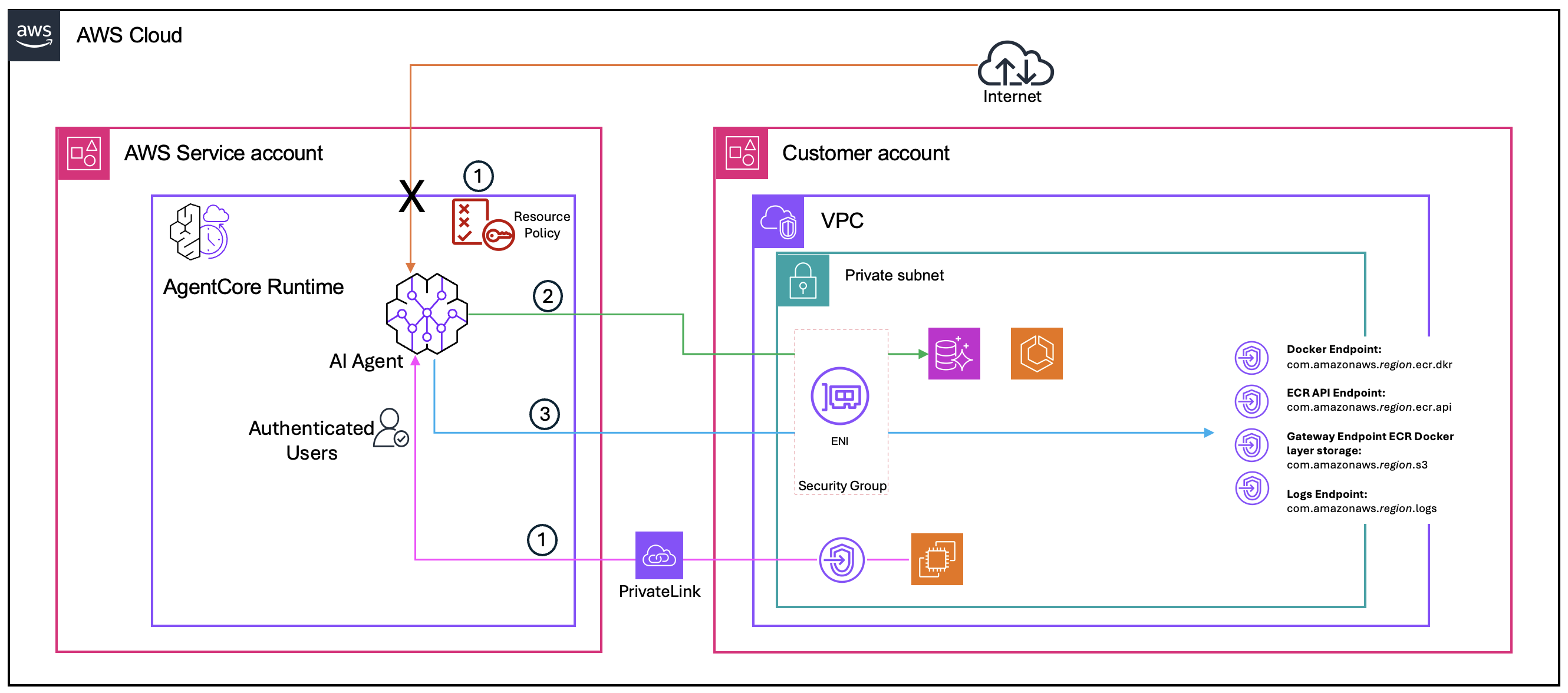
Figure 5: Running agents in isolated VPC with VPC endpoints and no internet egress
The traffic flow consists of the following steps:
- A user or application within the VPC sends an inbound request to the agent through the AgentCore Runtime interface VPC endpoint over PrivateLink, the same as Pattern 3. With the resource-based policy, only requests from the authorized VPC or VPC endpoint are allowed. No internet path exists—the X in the preceding diagram shows that public internet access to the agent is blocked.
- The agent accesses private resources (such as Amazon RDS) through the AgentCore Runtime ENIs in the isolated VPC, the same as Pattern 2. Traffic stays within the VPC using private IP addresses.
- Because the VPC has no internet gateway or NAT gateway, the agent can’t reach AWS services over the public internet. Instead, each required AWS service has a corresponding VPC endpoint within the VPC. For example, when AgentCore Runtime pulls the agent’s container image, traffic flows through the Amazon ECR and Amazon S3 VPC endpoints. When the agent writes logs, traffic flows through the Amazon CloudWatch Logs VPC endpoint. All service traffic stays within the AWS network.
This configuration offers complete isolation. The network paths—inbound to the agent, outbound to private resources, and outbound to AWS services—use either ENIs within the VPC or VPC endpoints over PrivateLink. No traffic enters or leaves the VPC through the public internet, providing the highest level of network isolation for agents handling highly sensitive data.
Conclusion
Securing enterprise AI agents requires a layered approach to network security. In this post, we explored four network connectivity patterns for agents deployed on AgentCore Runtime. Each pattern builds on the previous one to address increasingly strict security and compliance requirements.
To summarize, you can use these patterns to:
- Configure VPC connectivity to give agents secure access to private resources
- Apply resource-based policies to block inbound traffic from a specific VPC or IP address
- Restrict agent invocation to private networks using interface VPC endpoints
- Connect to AWS services through VPC endpoints in an isolated VPC
Whether you’re building a proof of concept or deploying production agents that handle confidential business data, these patterns help you align your AI infrastructure with enterprise security standards.
To get started, review the prerequisites in this post and use the instructions and AWS CLI commands to configure and test these connectivity patterns in your environment. For detailed configuration steps, see the Amazon Bedrock AgentCore Runtime documentation.
About the authors

Kunal Pansari
Kunal Pansari is a Solutions Architect at Amazon Web Services (AWS), based in Sydney, Australia. He works with enterprise and commercial customers to design secure, scalable cloud architectures. Kunal specializes in networking, AI/ML, and agentic AI solutions, helping customers adopt AWS services to solve complex business challenges.

Ratan Kumar
Ratan Kumar is a Principal Solutions Architect at AWS, based in Sydney, Australia. He helps enterprises across industries reimagine what’s possible — guiding them from technology strategy through to real-world transformation. He regularly shares his insights through the AWS blog.