Networking & Content Delivery
VPC resource gateways: Implementation patterns and use cases
When you need to connect applications across Amazon Virtual Private Clouds (Amazon VPCs) to services that don’t fit the traditional AWS PrivateLink provider-consumer model, you face complex networking challenges that VPC peering and AWS Transit Gateway alone can’t easily solve. This is especially true for overlapping IP spaces.
You can now connect to services that don’t fit the traditional PrivateLink provider-consumer model using VPC resource gateways, which simplify your networking architecture. Unlike VPC endpoint services that require providers to front their services with Network Load Balancers, resource gateways can expose a broader range of targets without the overhead of additional load balancer infrastructure.
You can now access services in scenarios that previously required complex additional setup, without the overhead of managing extra infrastructure. They help organizations to maintain security, reduce complexity, and optimize costs while allowing connecting to services which are ARN, DNS or IP-based.
Resource gateways can be accessed using multiple methods: Resource endpoints, Amazon VPC Lattice Service Network Associations and Service Network Endpoints connected to a VPC Lattice Service Network. In this post, we focus on architectural patterns involving resource gateways and resource endpoints to provide access to resources. For more information on use cases and how to use Service Network Endpoint for Amazon VPC Lattice, refer to this blog.
Let’s try to understand the Resource Gateway features through the following use cases and traffic flow patterns.
Use case 1: Accessing RDS resources privately and securely
When you adopt multi-VPC or multi-account strategies to maintain strict isolation between different business units or application components wherein application servers and databases reside in different VPCs or different AWS accounts. Additionally, this architectural pattern requirement emerges during merger and acquisitions.
Amazon Relational Database Service (Amazon RDS) simplifies managing traditional databases by automating administrative tasks. Amazon Aurora is a global-scale relational database built with full MySQL and PostgreSQL compatibility.
You can establish connectivity between your web/application servers and RDS/Aurora databases when they reside in different VPCs using VPC peering for direct VPC-to-VPC communication or setting up network connectivity using AWS Transit Gateway/AWS Cloud WAN. However, as the number of consumers increases rapidly, it increases the overhead of managing these VPC Peering connections and network flows through AWS Transit Gateway/AWS Cloud WAN.
You can use resource gateways and resource VPC endpoints to allow applications to connect to Amazon RDS resources. Figure 1 shows a high-level architecture diagram of this use case:
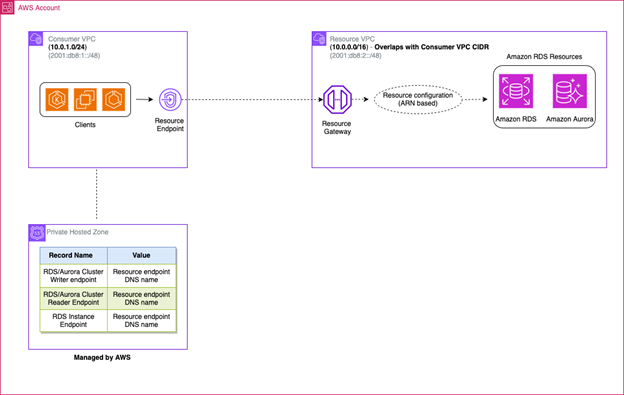
Figure 1: Accessing RDS resources privately and securely
To let private and secure access to RDS resources, you can configure resource endpoints and resource gateways through the following steps:
- Create a resource gateway in the VPC where the RDS resources exist.
- Create resource configuration(s) of type “ARN” for each RDS cluster or instance that you want to access and associate it to the resource gateway.
Note: ARN-based resources are currently supported for non-public Amazon RDS resources. The child resource configurations for ARN-based resource configurations are automatically managed by AWS. - (Optional) If the consumer and RDS VPCs are in different AWS accounts, share the resource configurations through AWS RAM from the RDS VPC account to the consumer VPC account. After the resource configurations are shared, accept the resource shares in the consumer VPC account.
- Create a VPC endpoint of type “Resource” in the Consumer VPC and associate it to the resource configuration of type ARN. While creating the VPC endpoint, optionally activate “Private DNS”. When you turn on Private DNS, you can continue to make requests to the resource using the DNS name provisioned for the resource by the AWS service, while leveraging private connectivity through the resource VPC endpoint.
Note: Confirm that DNS hostnames and DNS resolution are set to “Enabled” for the consumer VPC in order to use Private DNS. - Allow necessary traffic by adding rules in the security group(s) associated with the resource endpoints and the resource gateway.
- If Private DNS for the VPC endpoint is:
- Enabled (Recommended): You can use the DNS name of the RDS resource (writer endpoint, reader endpoint or instance endpoint) to access the resource.
- Not enabled: Use the DNS name of the resource VPC endpoint to access the RDS resources. Note that this will only work if you are not verifying the database certificate common name (CN) while establishing the connection. This is because the DNS name of the resource VPC endpoint is not present in the Subject Alternative Name (SAN) of the certificate on the RDS/Aurora DB instance.
Use case 2: Connectivity across overlapping VPC IP CIDR
When consumers and resources exist in VPCs with overlapping CIDRs, direct communication between them becomes challenging. This scenario commonly occurs during mergers and acquisitions, when connecting to partner networks, or in multi-account environments where CIDR planning wasn’t coordinated. Traditional solutions to address this problem include setting up appliances to perform NAT (Network Address Translation), using NAT Gateways, or creating Network Load Balancers and exposing services using VPC endpoint services. While these solutions do work, they require creating additional resources thereby increasing complexity and cost.
VPC resource endpoints and resource gateways provide a simpler alternative to enable consumers to access resources in VPCs in such situations. Figure 2 shows a high-level architecture diagram of this use case:
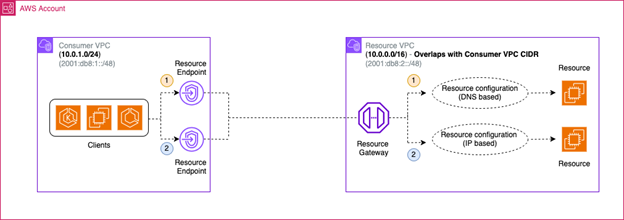
Figure 2: Using Resource endpoints and Resource Gateways in overlapping CIDR use case
To enable consumers to access resources in this case, you can do the following:
- Create a resource gateway in the VPC where the resources to be accessed reside.
- Create resource configuration(s) representing the resource or a group of resources and associate them to the resource gateway.
- (Optional) If the consumer and resource VPCs are in different AWS accounts, share the resource configurations through AWS RAM from the resource VPC account to the consumer VPC account. After the resource configurations are shared, accept the resource shares in the consumer VPC account.
- In the consumer VPC, create a VPC endpoint of type “Resource” for each corresponding resource configuration.
- Allow necessary traffic by adding rules in the security group(s) associated with the resource endpoints and the resource gateway
- Use the DNS name of the resource VPC endpoint to access the resources in the resource VPC. If you would like to use a friendly name to access the resource, you can create a Private Hosted Zone associated with the “Consumer VPC” and add CNAME records pointing the friendly DNS name to the DNS name of the resource VPC endpoint. You can find the DNS name of the resource VPC endpoint under “Associations” when you select the relevant resource VPC endpoint.
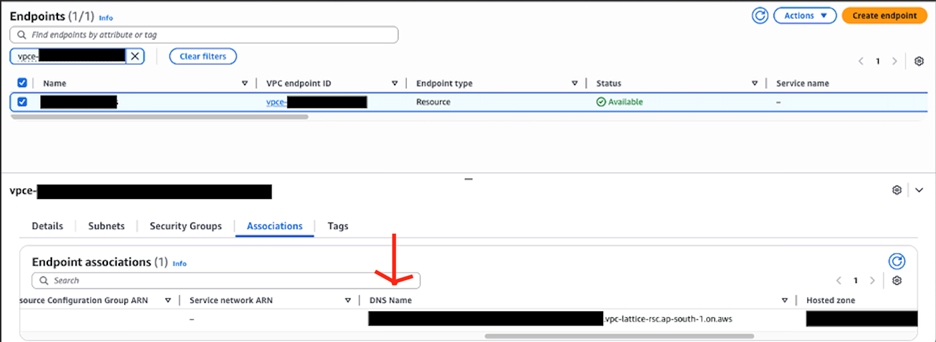
Figure 3: DNS name of the resource VPC endpoint
Use case 3: Proxy to connect to public domains
If you adopt stringent security policies requiring outbound traffic, even to public endpoints, to traverse through centralized VPCs or with private and controlled network paths. These public endpoints are often SaaS services that are not on AWS, or are on AWS, but are not exposed privately over Private Link.
You can use resource gateways to access public endpoints (AWS or 3rd Party) using centralized VPCs, or over private connectivity options like AWS VPN, AWS Direct Connect and VPC Peering for in-cloud connectivity use cases. Figure 4 shows a high-level architecture diagram of clients in a VPC accessing public endpoints through a centralized VPC and resource gateway:
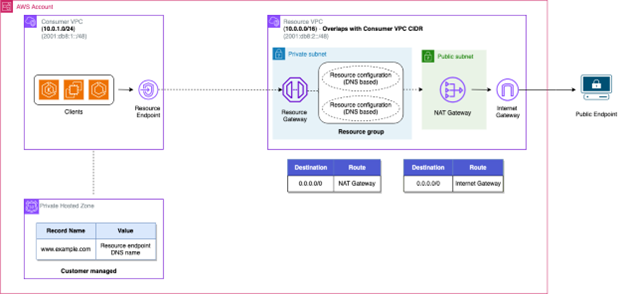
Figure 4: Accessing public endpoint with centralized VPC and resource gateway
You can follow the below approach to establish connectivity to public endpoints using centralized VPCs using resource gateways:
- Create a VPC (“Resource VPC”) with public and private subnets. Setup VPC routing to verify traffic from the private subnets to the Internet is routed through NAT gateways present in public subnets.
- Create a resource gateway in the private subnets of the resource VPC.
- Create resource configurations of type “DNS“ for each domain name that you want your consumers to access. Each DNS resource configuration maps to a single domain name that you want consumers to access. If you want consumers to access multiple domain names, you can group multiple resource configurations into a single “Resource group” thereby allowing you to use a single resource VPC endpoint to access multiple domains.
- (Optional) If the consumer and resource VPCs are in different AWS accounts, share the resource configurations through AWS RAM from the resource VPC account to the consumer VPC account. After the resource configurations are shared, accept the resource shares in the consumer VPC account.
- Create a VPC endpoint of type “Resource” in the Consumer VPC and associate it to the resource configuration.
- Allow necessary traffic by adding rules in the security group(s) associated with the resource endpoints and the resource gateway.
- Create a Private Hosted zone (associated with the consumer VPC) with records of CNAME type that map the public FQDNs to be accessed to the corresponding DNS name(s) of the resource endpoint. Refer Figure 2 for guidance on locating the DNS name of the resource endpoint.
- Use the records created in the private hosted zone to access the public endpoints from your application.
Similarly, you can route traffic to public endpoints through established private connectivity between on-premises and AWS. This allows you to limit outbound internet connections to trusted endpoints thereby allowing on-premises clients to securely communicate with public FQDNs while maintaining network isolation and meeting compliance requirements. Figure 5 shows a high-level architecture diagram of on-premises clients accessing public endpoints over AWS Site-to-Site VPN/AWS Direct Connect through resource gateway:
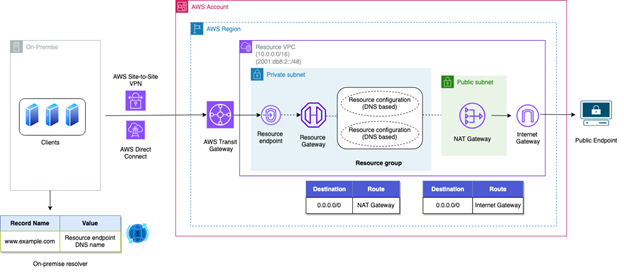
Figure 5: Accessing public endpoint from on-premises with centralized VPC and resource gateway
Use case 4: Centralizing the interface endpoints for AWS services without going over Transit Gateway or VPC peering
To enable private connections to AWS services without traversing the internet, you can use interface VPC endpoints. However, creating separate interface VPC endpoints per service in each VPC can lead to significant costs and management complexity. Therefore, a more efficient approach is to have a centralized VPC hosting all required interface endpoints and then use AWS Transit Gateway or AWS VPC Peering Connections to establish connectivity between the consumer VPCs and the resource VPCs to enable connectivity to the centralized VPC endpoints.
Resource gateway and resource endpoints provide a simpler and cost-effective option to address this use case (especially in large networks). You can create a single resource endpoint to access multiple AWS service endpoints with a lower overall cost (hourly and data processing) than a Transit Gateway attachment (assuming centralized VPC endpoints is the primary use case). Figure 6 shows a high-level architecture diagram of this use case:
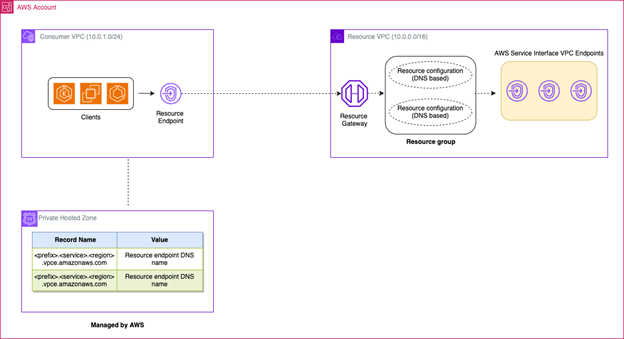
Figure 6: Accessing centralized VPC endpoints using resource gateways
Here is how you can establish private connectivity to your centralized VPC endpoints using resource gateways:
- Create the centralized interface VPC endpoints for the AWS services as per your requirements in the resource VPC.
- Create a resource gateway in the resource VPC.
- Create resource configurations with a resource definition of “DNS” for each AWS service VPC endpoint. For the domain name, add the regional DNS name of the interface VPC endpoints, for example:
vpce-xxxx.ec2.<region>.vpce.amazonaws.com.Note: Resource gateway requires the resource configuration DNS names to be publicly resolvable, therefore any private DNS names for interface VPC endpoints will not work.
- Create a resource group with the child DNS resource configurations and associate the resource group to the resource gateway.
- (Optional) If the consumer and resource VPCs are in different AWS accounts, share the resource configurations through AWS RAM from the resource VPC account to the consumer VPC account. After the resource configurations are shared, accept the resource shares in the consumer VPC account.
- Create a VPC endpoint of type “Resource” in the Consumer VPC and associate it to the resource configuration.
- Allow necessary traffic by adding rules in the security group(s) associated with the resource endpoints and the resource gateway.
- (Optional) If you prefer accessing the service endpoints using a different domain name, create a Private Hosted zone with domain name:
<region>.amazonaws.comand associate it with the consumer VPC. Add records of CNAME type for individual services to be accessed along with a prefix (for e.g.<prefix>.ec2.<region>.vpce.amazonaws.com) and point them to the corresponding DNS name(s) of the resource endpoint. The private hosted zone and records need to be in the above-mentioned format to make sure that TLS validation happens successfully. - Use the records created in the private hosted zone (for e.g.:
<prefix>.<region>.vpce.amazonaws.com), or the DNS name of the resource endpoint to access the interface endpoints from your application.
Conclusion
In this post, you explored how you can use VPC resource gateways to simplify complex networking challenges in AWS environments. We demonstrated how to establish private database connections, allow communication between networks with conflicting IP addresses, create secure internet access, and streamline AWS service access. These solutions demonstrate how VPC resource gateways help address common networking challenges while maintaining strong security, providing a valuable tool for building cloud architectures that grow with you.
Ready to simplify your AWS networking setup? Start implementing resource gateways today by exploring the VPC resource gateways documentation and try out these patterns in your own AWS environment.
About the authors

Aditya Mysore
Aditya Mysore is an FSI Solutions Architect at Amazon Web Services. He works with financial services customers to help them optimize their AWS architectures and adopt best practices for cloud-native development. Outside of work, he likes exploring new destinations and enjoys Formula 1.