AWS Physical AI Blog
Scaling Physical AI vision pipelines with Ray on Amazon SageMaker HyperPod
Introduction
RobCo, a Munich-based company building autonomous industrial robots, scaled the computer vision training behind its robots with Ray on Amazon SageMaker HyperPod. Founded in 2020 out of the Technical University of Munich, RobCo builds modular robots that automate machine tending, palletizing, and depalletizing. The robots rely on object detection and localization models, which RobCo trains on synthetic images rendered from 3D CAD models. Every new part or workcell means another run of a multi-step training pipeline, so the cost of each run adds up as RobCo takes on more customers.
Before this project, each run was a single Amazon SageMaker training job on one Amazon Elastic Compute Cloud (Amazon EC2) ml.g6.12xlarge instance with four NVIDIA L4 GPUs. A run took about 2–3 hours and cost roughly $50, and the same Amazon EC2 GPU instance also ran every CPU-only step. Because each job was pinned to that one instance type, the team sometimes waited several hours for Amazon EC2 GPU capacity before a run could start.
RobCo worked with the AWS Generative AI Innovation Center to move the pipeline to Ray on SageMaker HyperPod orchestrated by Amazon Elastic Kubernetes Service (Amazon EKS), with Karpenter autoscaling. In five weeks, the team deployed a production-ready cluster and validated RobCo’s vision workloads on it. Each run now costs approximately 15% less, and the multi-hour waits for Amazon EC2 GPU capacity no longer occur. In this post, we describe the compute problem in mixed CPU and GPU pipelines, the architecture we built with RobCo, and how the pattern applies to other workloads.
The challenge
RobCo’s training pipeline has three stages with very different compute profiles. Rendering synthetic scenes from the CAD models uses the GPU for ray tracing and the CPU for mesh processing and scene setup. Augmenting the rendered images roughly 40 times and assembling the training datasets is CPU-heavy and memory-hungry. Training the detection and classification models takes four GPUs per model.
On a single four-GPU instance, no stage used the hardware well. The GPUs sat idle during augmentation, most CPU cores were underused during training, and the two models trained one after the other. RobCo needed a system that sent each stage to the right hardware without changes to the training code, scaled to zero between runs, and survived node failures during long runs.
Solution overview
The solution combines three technologies, and each one handles a different layer of the problem. SageMaker HyperPod provides the managed cluster: it runs deep health checks on each node, replaces nodes that fail, and patches drivers and Amazon Machine Images (AMIs). Ray, deployed through the KubeRay operator, schedules each pipeline task onto a worker that has the CPUs, GPUs, and custom resources the task asks for. Karpenter, which HyperPod manages as the cluster autoscaler, adds instances when Ray workers need capacity and removes them when they go idle. Ray scales pods, which are the logical workers, and Karpenter scales nodes, which are the instances underneath them. Figure 1 shows how a request moves through these layers.
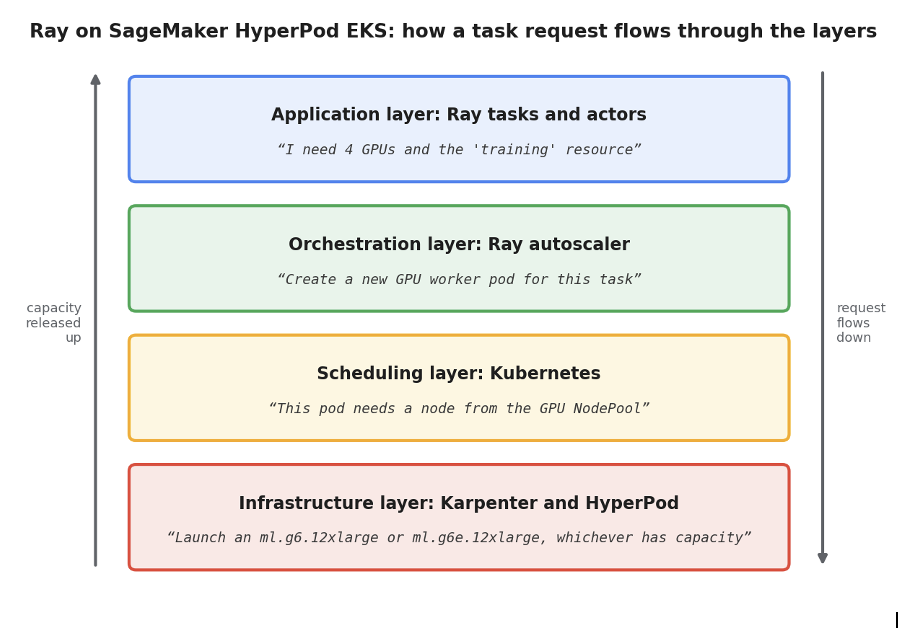
Figure 1. Four stacked layers: application, orchestration, scheduling, and infrastructure. A request flows down through them and capacity is released back up.
The figure shows four stacked layers. In the application layer, a Ray task declares what it needs, for example four GPUs and the training custom resource. In the orchestration layer, the Ray autoscaler creates a worker pod when no existing worker can run the task. In the scheduling layer, Kubernetes sees that the pending pod needs a node from the GPU NodePool. In the infrastructure layer, Karpenter provisions an ml.g6.12xlarge or ml.g6e.12xlarge instance, and HyperPod keeps the node healthy. When the work finishes, capacity is released back up through the same layers.
Infrastructure architecture
The cluster is defined with Terraform so that RobCo can deploy it consistently and tear it down cleanly. It runs in private subnets in the Europe (Frankfurt) Region, eu-central-1, where RobCo already ran its training jobs. Amazon FSx for Lustre holds active datasets and checkpoints, and Amazon Simple Storage Service (Amazon S3) holds colder data under lifecycle policies.
Karpenter NodePools decide which instances the cluster can launch, and each NodePool lists the instance types allowed for one category of work. RobCo’s GPU pool has ml.g6.12xlarge (NVIDIA L4) and ml.g6e.12xlarge (NVIDIA L40S) instances for rendering and training. A CPU pool with ml.m5.2xlarge and ml.m5.12xlarge instances runs preprocessing, augmentation, and packaging. The following excerpt from the GPU pool definition shows its instance types and scale-down setting.
apiVersion: karpenter.sh/v1
kind: NodePool
metadata:
  name: gpu-nodepool
spec:
  template:
    spec:
      requirements:
        - key: node.kubernetes.io/instance-type
          operator: In
          values: ["ml.g6.12xlarge", "ml.g6e.12xlarge"]
  disruption:
    consolidationPolicy: WhenEmpty
    consolidateAfter: 60s
The two instance types are what removed RobCo’s capacity waits, because Karpenter launches whichever type has capacity instead of waiting for one. The consolidateAfter: 60s setting removes a node 60 seconds after its last pod is gone. The cluster therefore stops paying for idle instances almost immediately.
Routing pipeline stages to the right hardware with Ray
With the infrastructure in place, the pipeline still needs a way to say which stage runs where. Ray handles this with custom resources, which are labels that a worker advertises and a task requests. Developers declare hardware needs next to the code that has them, and Ray and Karpenter take care of placement and provisioning.
Custom resources for hardware routing
In RobCo’s Ray cluster configuration, each worker group advertises one custom resource. The following excerpt shows the GPU worker group, which advertises training. Two CPU worker groups advertise small_hardware and large_hardware and run on ml.m5.2xlarge and ml.m5.12xlarge instances.
workerGroupSpecs:
  - groupName: gpu-workers
    replicas: 0
    minReplicas: 0
    maxReplicas: 8
    rayStartParams:
      num-gpus: "4"
      resources: '"{\"training\": 1}"'
    template:
      spec:
        nodeSelector:
          karpenter.sh/nodepool: "gpu-nodepool"
Every worker group starts with replicas: 0 and minReplicas: 0, so an idle cluster runs only the Ray head node. Each GPU worker takes all four GPUs of its node, which matches how RobCo runs training in production. The group selects the NodePool but not an instance type, which leaves Karpenter free to pick either GPU type.
Pipeline code
Pipeline code declares its hardware needs with the Ray @ray.remote decorator. The following simplified example covers preprocessing, rendering, dataset assembly, and parallel training. The function bodies are placeholders, so the example shows the routing without RobCo’s model code.
import ray
ray.init(address="auto")

# CPU steps run on small CPU workers
@ray.remote(num_cpus=1, resources={"small_hardware": 0.001})
def preprocess_cad(cad_path):
return f"/fsx/meshes/{cad_path}"

@ray.remote(num_cpus=1, resources={"small_hardware": 0.001})
def build_dataset(*render_paths):
return "/fsx/datasets/latest"

# Rendering uses one GPU per task
@ray.remote(num_gpus=1)
def render_scenes(mesh_path):
return f"/fsx/renders/{mesh_path}"

# Training takes a whole four-GPU worker
@ray.remote(num_cpus=0, num_gpus=4, resources={"training": 1})
def train(model_name, dataset_path):
return f"/fsx/models/{model_name}"

meshes = [preprocess_cad.remote(p) for p in ["part_a.obj", "part_b.obj"]]
dataset = build_dataset.remote(*[render_scenes.remote(m) for m in meshes])

# The two models train in parallel on separate GPU nodes
print(ray.get([train.remote(m, dataset) for m in ["detector", "classifier"]]))
The CPU tasks request only 0.001 of their custom resource, so the label works as a placement tag rather than a limit. The worker’s CPU count then decides how many of those tasks run on it at once. Each rendering task asks for one GPU, so a single four-GPU worker renders four objects at once. Each training task requests the whole training resource and all four GPUs, so it gets a GPU worker to itself.
On an idle cluster, no worker has the small_hardware resource yet, so the Ray autoscaler creates small CPU pods and Karpenter launches an ml.m5.2xlarge node for them. The two training tasks need two GPU workers, so Karpenter launches two nodes from whichever GPU type has capacity and the models train in parallel. When the run finishes, Ray removes idle workers after 60 seconds and Karpenter removes each empty node 60 seconds later, so no GPU instances keep running between runs.
Running RobCo’s 18-step pipeline
The preceding example shows the mechanics, but RobCo’s production pipeline has 18 steps: a 12-step main path and a 6-step classification sub-pipeline. Each step has its own compute profile and dependencies. Figure 2 shows all 18 steps, colored by the hardware they need.
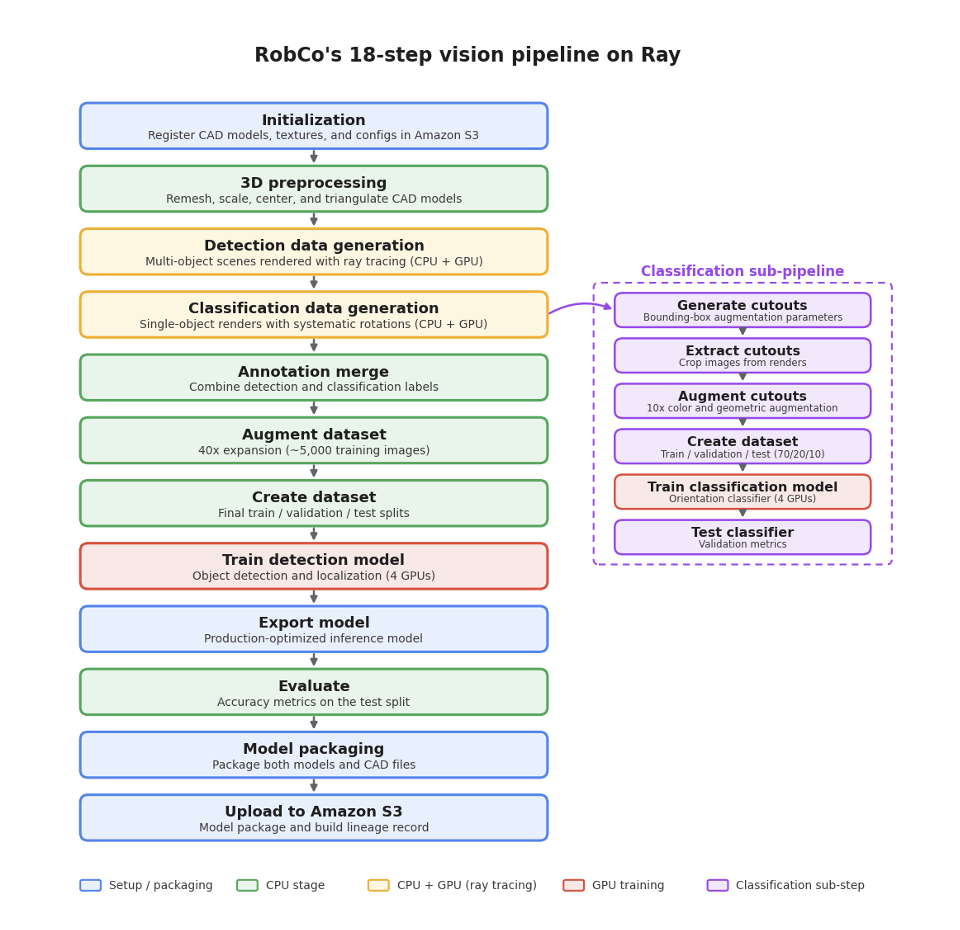
Figure 2. RobCo’s 18-step pipeline: a 12-step main path on the left and a 6-step classification sub-pipeline on the right, with each step colored by compute profile.
The main path on the left registers CAD models, textures, and configuration files in Amazon S3, then remeshes, scales, centers, and triangulates the models on CPU. Two rendering steps, shown in yellow, use both CPU and GPU. One renders multi-object scenes for the detection model, and the other renders single objects at systematic rotations for the classification model. CPU steps in green then merge the annotations, augment the dataset roughly 40 times to about 5,000 training images, and build the training, validation, and test splits. The detection model trains on four GPUs, shown in red. Finally, the pipeline exports and evaluates the detection model, packages both models with the CAD files, and uploads the package and a build lineage record to Amazon S3. The setup and packaging steps are shown in blue. The classification sub-pipeline, shown in purple on the right, starts from the single-object renders. It generates, extracts, and augments object cutouts about 10 times, builds a 70/20/10 dataset split, trains the classification model on four GPUs, and tests it.
Fault tolerance
A GPU node can fail or degrade partway through a multi-hour run. HyperPod deep health checks monitor GPU health, GPU memory errors, and network connectivity, and HyperPod replaces nodes that degrade. Ray then reschedules the failed worker’s tasks onto a free worker or onto a new one that Karpenter provisions. Training jobs checkpoint to FSx for Lustre every few steps, and the checkpoints synchronize to Amazon S3, so training on a replacement node resumes from the last checkpoint. Every pipeline step also writes a success marker when it finishes, so a restarted run skips the steps that already completed. A node failure therefore costs RobCo the work done since the last checkpoint instead of a full 2–3-hour run.
Results
Moving to Ray on SageMaker HyperPod changed both the cost and the predictability of RobCo’s training runs. Each run now costs approximately 15% less than the roughly $50 it cost before, because CPU-only steps run on ml.m5 instances and every node scales to zero between runs. Runs also start much sooner after they are submitted, because Karpenter launches whichever GPU type has capacity, so the multi-hour waits no longer occur. The detection and classification models now train in parallel on separate nodes instead of one after the other. RobCo’s machine learning team submits runs with kubectl apply and leaves scheduling, scaling, and recovery to the system. These results come from RobCo’s own pipeline, and results for other workloads will vary.
Clemens Marschner, Principal Engineer at RobCo, described the change: “Every new part or workcell our customers bring means another training run, so our pipeline has to scale with our business. With Ray on SageMaker HyperPod, each step now runs on the hardware it actually needs, our models train in parallel, and we no longer wait hours for GPU capacity. Just as important, it gives us the foundation for the physical AI models that will power the next generation of our autonomous industrial robots.”[AC1]
Conclusion
RobCo needed its synthetic-data training pipeline to use the right hardware for each stage, start without waiting for capacity, and survive node failures. Ray on SageMaker HyperPod with Karpenter autoscaling met those needs without changes to RobCo’s training code and cut the cost of each run by about 15%. The solution also gives RobCo a foundation for larger distributed training as the team develops vision-language-action models for its robots.
The same pattern fits other machine learning workflows with mixed compute requirements, such as reinforcement learning with simulation or fine-tuning that combines CPU-heavy data preparation with GPU training. To try it, start with the post Ray jobs on Amazon SageMaker HyperPod: scalable and resilient distributed AI and the hands-on Ray on SageMaker HyperPod EKS workshop. For configuration details, see Autoscaling on SageMaker HyperPod EKS and Orchestrating SageMaker HyperPod clusters with Amazon EKS in the Amazon SageMaker AI Developer Guide.