AWS Security Blog
Delegate user access to AI agents with Amazon Cognito token exchange
Suppose you use a restaurant review app to check reviews, book tables, and email invitations to your friends. With OAuth 2.0, the app sends you to the authorization server that your email provider trusts, where you sign in and approve only the access the app requested, such as the contacts.read and messages.send scopes. The review app won’t sees your credentials. It only receives a short-lived access token limited to the scopes you approved, which it presents to your email provider’s API to read your contacts and send invitation emails on your behalf.
That works while the app calls the email API directly, but many requests take a second hop to call downstream services. When you book a table, the app calls its reservation service with your token to email details to your friends, which token should the reservation service use to call the email API? Forwarding the access token issued to the review app hides the reservation service because the email API thinks the app sent the request. Using the reservation service’s own token from an OAuth 2.0 client credentials grant loses user identity, because the email API knows which service called, but not for which user. Figure 1 shows this second hop.
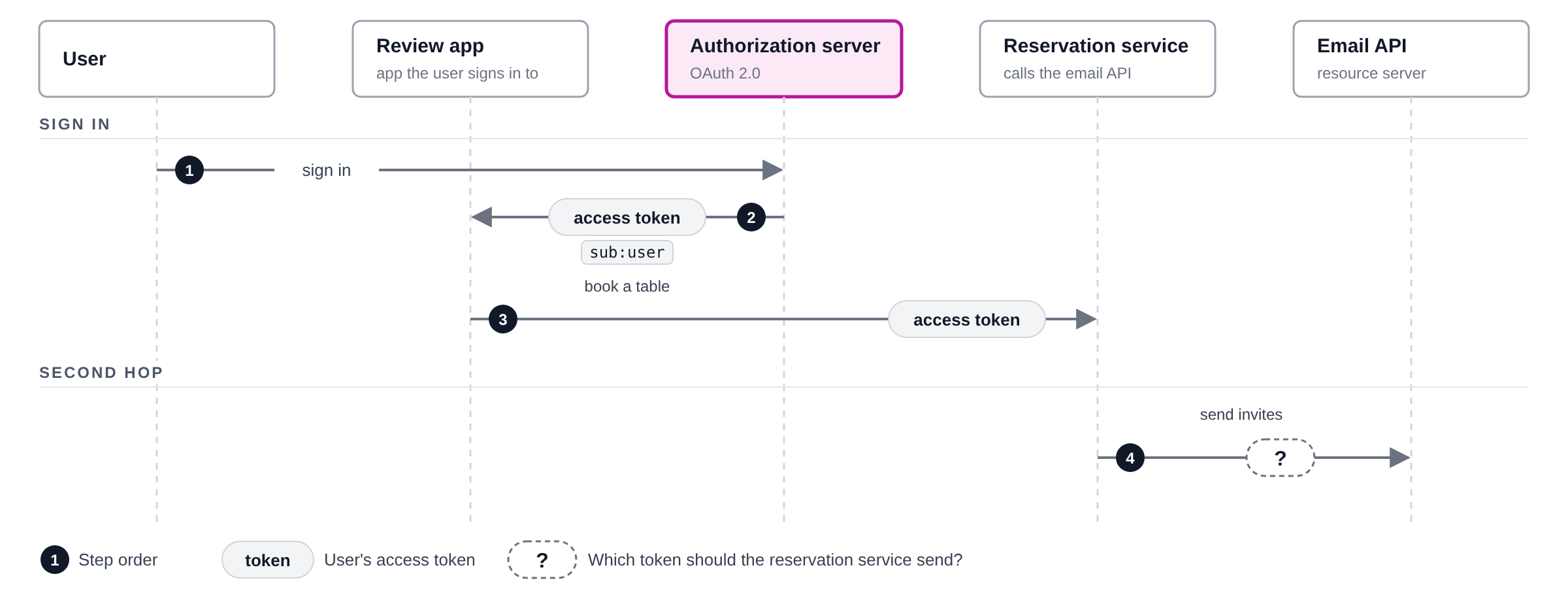
Figure 1: The reservation service calling the email API for a signed-in user
OAuth 2.0 Token Exchange, defined in RFC 8693, handles this second hop. Instead of forwarding your access token, the reservation service goes back to the authorization server with two things: your access token, which shows what you consented for, and its own credentials, which show who it is. The authorization server returns a new token for the email API, called issued token, which identifies the user, can also name the reservation service, and carries the same scopes or fewer.
AI agents make this second hop more common and more important, for example when the review app adds an AI agent that reserves tables and invites friends for you. The agent picks its tools at run time, such as a Model Context Protocol (MCP) server that sends invitations, and those tools call APIs for you. With token exchange, each hop gets only the scopes it needs, and the email API can see which service acted for you.
In this post, we show you how to use the new OAuth token exchange feature in Amazon Cognito when services and AI agents call your APIs on behalf of users, and Cognito serves as the OAuth 2.0 authorization server. We explain the difference between impersonation and delegation, and show you examples of how the feature works with an MCP server and Amazon Bedrock AgentCore Identity.
How token exchange works in Amazon Cognito
Every token exchange starts with a subject token that represents the user. In Amazon Cognito, the subject token can be an access token or ID token that your user pool issued to the app where the user signed in. The calling service sends the subject token to Cognito, and Cognito returns a new token for that service to use at the downstream resource server.
Token exchange distinguishes two patterns, impersonation and delegation. The calling service chooses which pattern to use based on whether the downstream API needs to authorize the service that’s acting on behalf of the user:
- Impersonation – The calling service doesn’t identify itself as the actor. The issued token represents the user. Its
client_idclaim identifies the app client that performed the exchange, but it doesn’t have anact(actor) claim to show a service is acting for the user. - Delegation – The calling service identifies itself as the actor by also sending an actor token. Amazon Cognito adds an act claim that names the calling service, so the resource server can see and log who authorized the action and who carried it out.
Impersonation fits when the calling service only relays the user’s request and makes no decisions of its own, such as a backend for frontend (BFF) that forwards requests from a web app to your APIs. It also fits where a downstream API authorizes the user alone and doesn’t need to know which service relayed the call.
For AI agents, delegation is the important pattern. If the agent used a token of its own, the record would show that an agent called the resource server, but not for whom. With impersonation, the record shows the user but not the agent acting for them. You need delegation to see both for proper authorization and audit trails.
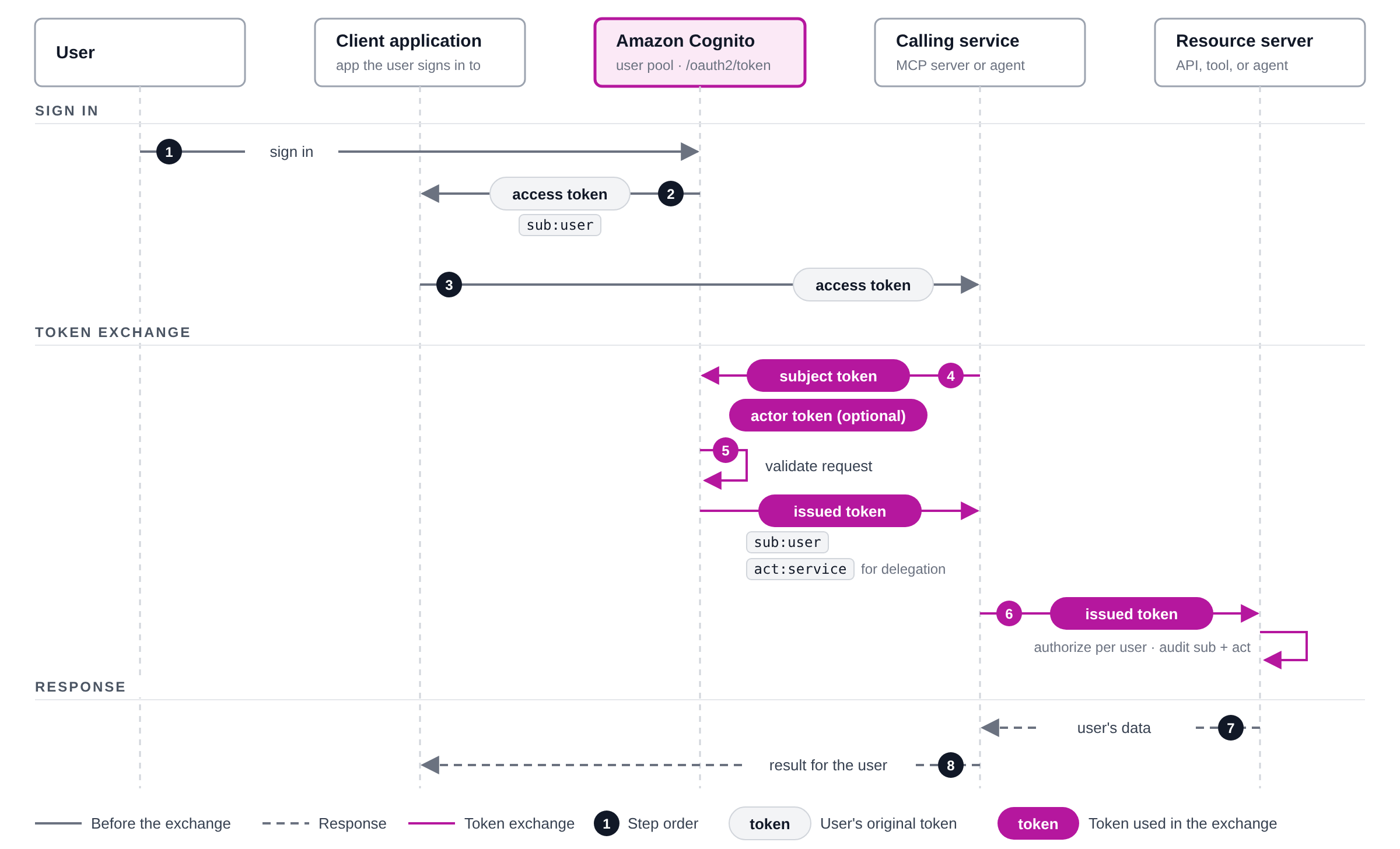
Figure 2: Delegated access across two service hops
Figure 2 shows the flow for delegated access between services:
- The user signs in to your app through Amazon Cognito.
- Cognito issues the user’s access token to the client application.
- The client calls the downstream service, such as an MCP server, with the user’s access token.
- The service calls the Cognito
/oauth2/tokenendpoint and authenticates with its own app client. It sends the user’s access token as the subject token and names the resource server as the audience. For delegation, it also sends its own token as the actor token. - Cognito validates the request and returns an issued token. The issued token still identifies the user in
sub. For delegation, it also identifies the service in theactclaim. - The service calls the resource server, such as an email API, with the issued token.
- The resource server checks that the token’s
audclaim names itself, then authorizes the request for the user and returns the user’s data to the service. - The calling service returns the result to the client.
In addition to requesting a token exchange at the /oauth2/token endpoint on your user pool’s domain, you can call the GetDerivedToken API with an AWS SDK, which doesn’t require a user pool domain. Both accept the same subject token, actor token, audience and scopes, and return an issued token with the same claims.
Here’s an example issued token from a delegation token exchange. The token keeps user’s identity in sub and names the calling service in the act claim.
The email API authorizes the user identified by sub, and act tells it which service is acting for that user. It can then decide whether it trusts that service, and its logs can show both the user and the service for each request. Accept a delegated token only when act.client_id reflects a service you trust, such as the invitations MCP server, and matches the token’s client_id meaning the trusted service requested the token itself.
Security controls during an exchange
Amazon Cognito checks every exchange before it issues a token. It validates the subject token’s signature and expiry, and refuses a token that has been revoked or that belongs to a disabled user in your user pool. If the request includes an audience, the issued token is bound to that resource server, and every requested scope must belong to it. The issued token carries only scopes that both the subject token and the app client allow, so an exchange can narrow your access but doesn’t add to it. It also doesn’t outlive the subject token, and the exchange doesn’t return a refresh token.
For the full list of checks, see Security model in Exchanging tokens for downstream services in the Amazon Cognito Developer Guide. Checks by Cognito don’t replace the resource server’s own: it should still verify the JWT tokens, including signature, issuer, expiry, audience and scopes, and for delegated requests, it should validate the act claim.
Your user pool might have a pre token generation AWS Lambda trigger, which can add or suppress custom claims and scopes in your user pool’s tokens. Amazon Cognito also invokes this trigger during token exchange, with the trigger source TokenGeneration_TokenExchange. However, Cognito doesn’t add any scopes that the trigger returns for an exchange, so the calling service can’t gain more permissions than the user’s token already has. You can still use the trigger to remove scopes from the issued token. For more information, see Customize the exchanged token with a Lambda trigger.
Enable token exchange in your Amazon Cognito user pool
Token exchange is an OAuth 2.0 grant, and you can enable it for each application client as an authentication flow in your Amazon Cognito user pool. Check the prerequisites in the Amazon Cognito Developer Guide.
To enable token exchange for an app client:
- Open the AWS Management Console for Amazon Cognito, and choose your Cognito user pool.
- In the navigation pane, under Applications section, choose App clients, and then choose your app client.
- In App client information, choose Edit.
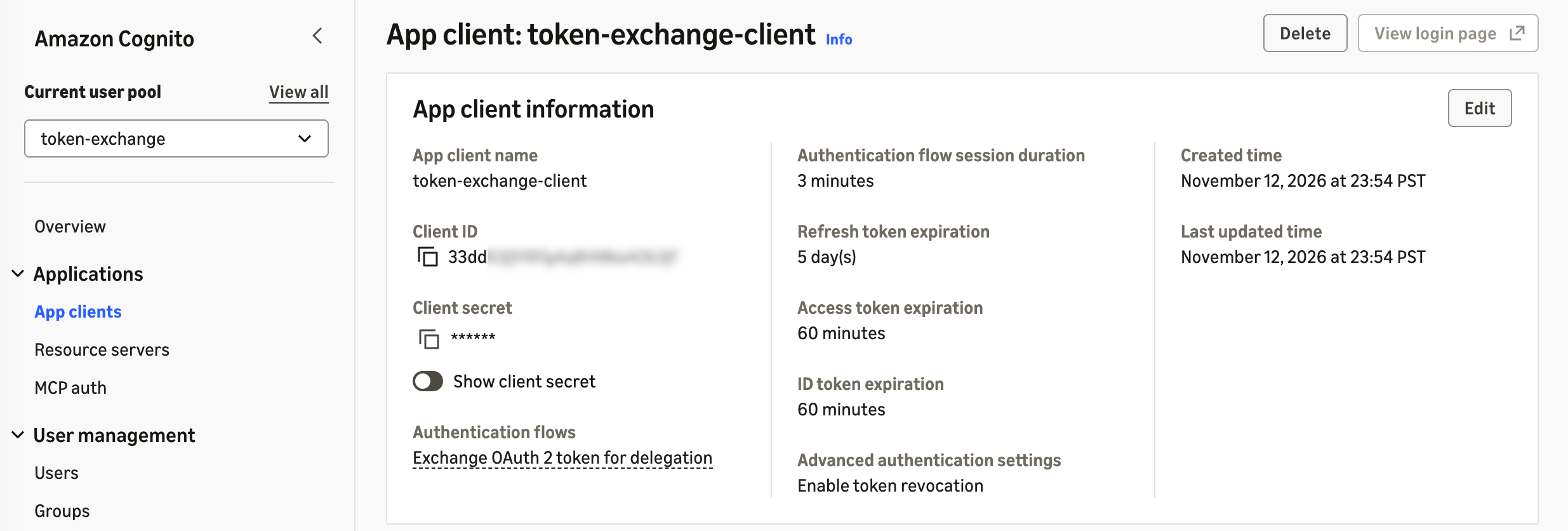
Figure 3: Cognito token exchange app client
- On the Edit app client information page, under Authentication flows, go to Exchange OAuth 2 token for delegation and impersonation and select the following:
- For delegation, select ALLOW_TOKEN_EXCHANGE_DELEGATION.
- For impersonation, select ALLOW_TOKEN_EXCHANGE_IMPERSONATION.
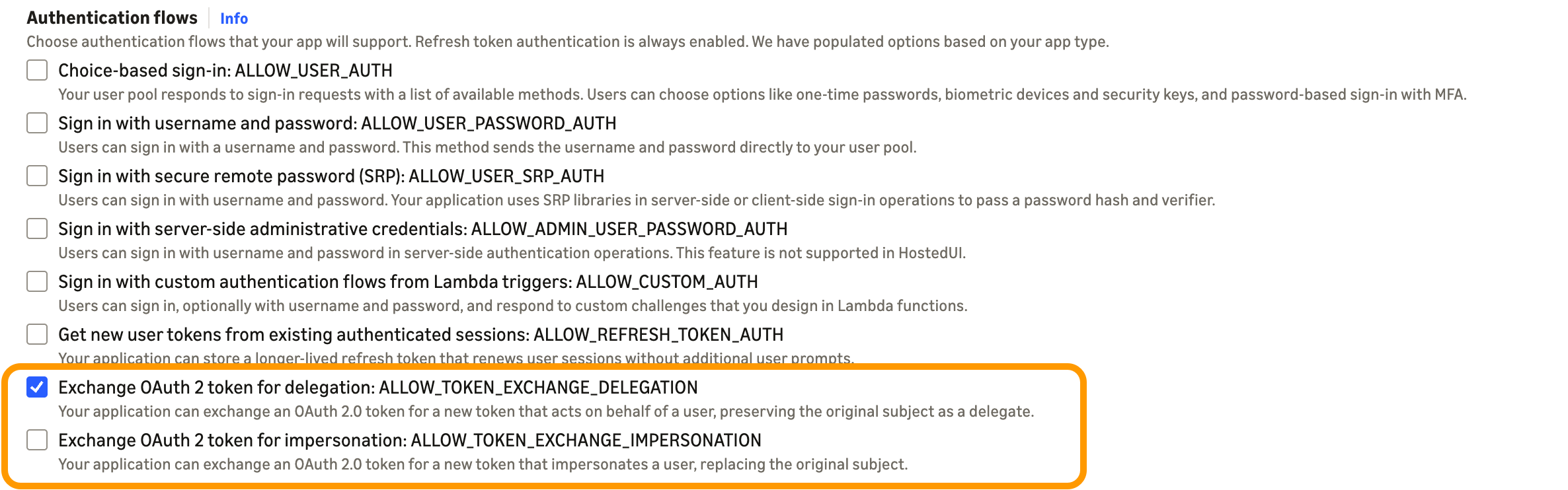
Figure 4: Amazon Cognito token exchange authentication flows
- Choose Save changes.
Example token exchange use cases for agentic workload delegation
Now that you’ve enabled token exchange, we show you two examples of how it works in an agentic workload. Both continue the review app story: its AI agent sends invitations for you by calling the email API, and the email API needs to know who you are and which component acted for you.
The two examples differ in where the exchange happens. Amazon Cognito fills the act claim from the actor token, so act names whichever component sends its own actor token in the exchange. In Example 1, a shared intermediary—such as an MCP server or an AI gateway—performs the exchange for every agent that calls it, so act names the intermediary. In Example 2, the agent requests the exchange itself, so act names the agent.
Example 1: A shared intermediary as the actor
In this example, the intermediary sits in front of the email API. We show it two ways: an MCP server you build that performs the exchange in its own code, and an AI gateway in Amazon Bedrock AgentCore Gateway that performs it through configuration.
Using your own MCP server:
The MCP authorization specification doesn’t allow an MCP server to pass along the token it received from the MCP client. To call the email API for you, the invitations MCP server needs a token of its own. It uses its own app client in your user pool to perform a delegation token exchange.
Figure 5 shows how the invitations MCP server sends invites for you.
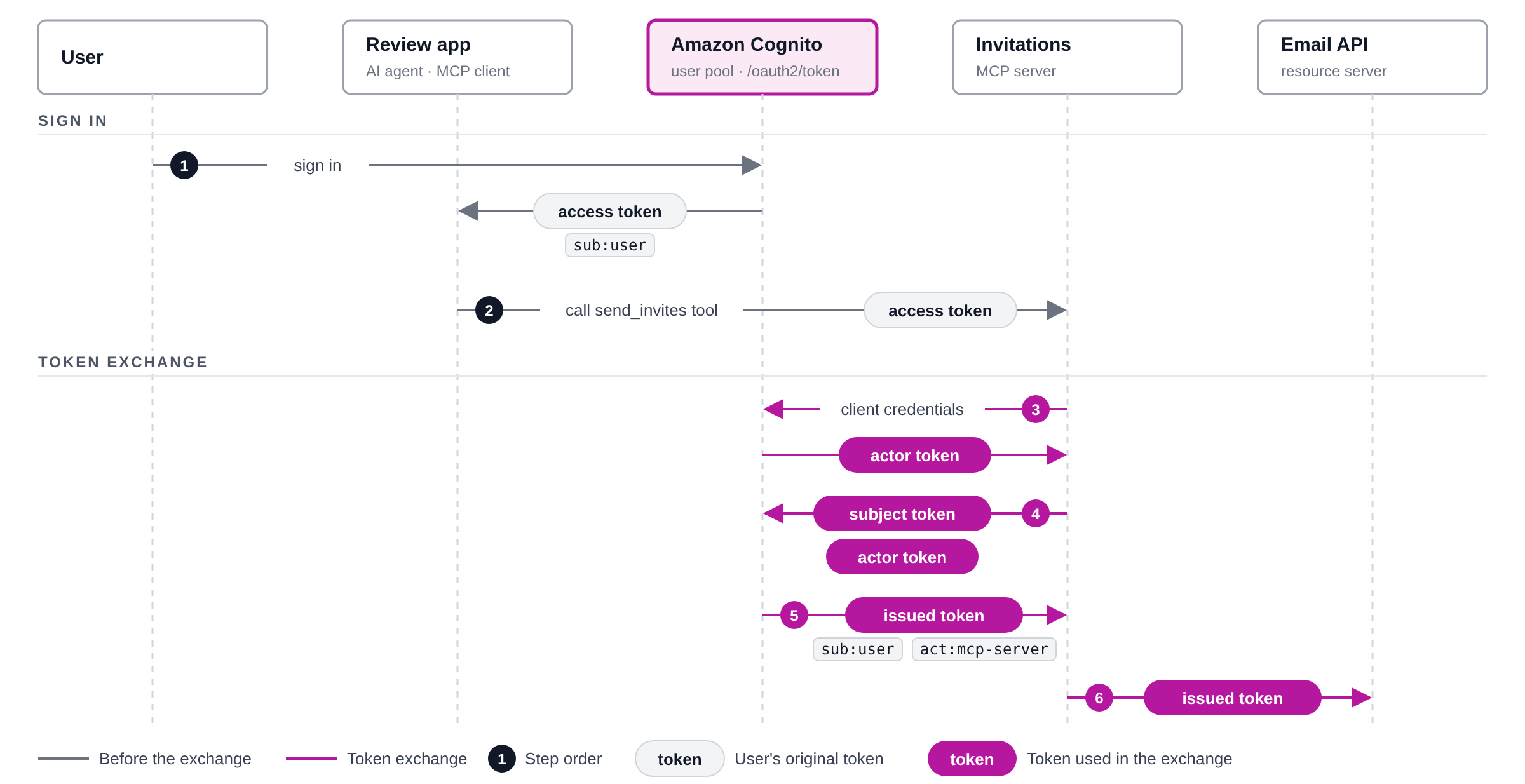
Figure 5: The invitations MCP server sending invites for a signed-in user
- The user signs in to the review app through Amazon Cognito.
- The review app’s AI agent calls the
send_invitestool on the invitations MCP server with the user’s access token. - The MCP server authorizes the inbound request by checking the token’s
client_idand theinvitations-mcp/toolsscope, then gets its own actor token with its client ID and secret in an OAuth 2.0 client credentials grant flow. - The MCP server sends the user’s token as subject token and its actor token to the Cognito
/oauth2/tokenendpoint in a delegation token exchange. It requests onlyemail-api/messages.send, because sending invites doesn’t require reading your contacts. - Cognito validates both tokens and returns the issued token, while keeping the user in
subclaim and adding the MCP server’s app client toactclaim. - The MCP server calls the email API with the issued token. The email API checks
aud=email-apiand themessages.sendscope, and it confirms thatact.client_idmatchesclient_idand names an MCP server it trusts. It then sends the invites from your account and records that the invitations MCP server sent them for you.
To set up the MCP server:
- In Amazon Cognito user pool, register the email API (
email-api) and the MCP server (invitations-mcp) as resource servers in your user pool, with the scopes used. - Create an app client with a client secret for the MCP server in your user pool. Select
ALLOW_TOKEN_EXCHANGE_DELEGATIONin authentication flows, allow the client credentials grant so the MCP server can get its actor token, and allow theemail-api/messages.sendscope that it requests in the exchange. - Have the review app request
email-api/messages.sendwhen you sign in, along withinvitations-mcp/tools. The exchange can remove scopes from your token, but it can’t add any.
Other AI agents can also sign you in through Amazon Cognito and call the invitations MCP server. They can register with your user pool through dynamic client registration (DCR), or identify themselves with a client ID metadata document (CIMD). Token exchange works the same way for these clients. They send your access token to the MCP server, and the MCP server performs the exchange with its own app client, so the issued token names you in sub and the MCP server in act.
Using AgentCore Gateway:
If you don’t want to write the exchange in your MCP server, AgentCore Gateway can perform it for you. Amazon Bedrock AgentCore Identity can perform the same token exchange on behalf of AgentCore Gateway, so the gateway doesn’t store the OAuth client secret or build the request.
Here, AgentCore Gateway replaces the invitations MCP server. It exposes the email API as an MCP tool through an OpenAPI target, and the review app’s AI agent calls that tool with your access token.
Figure 6 shows how AgentCore Gateway sends invites for you.
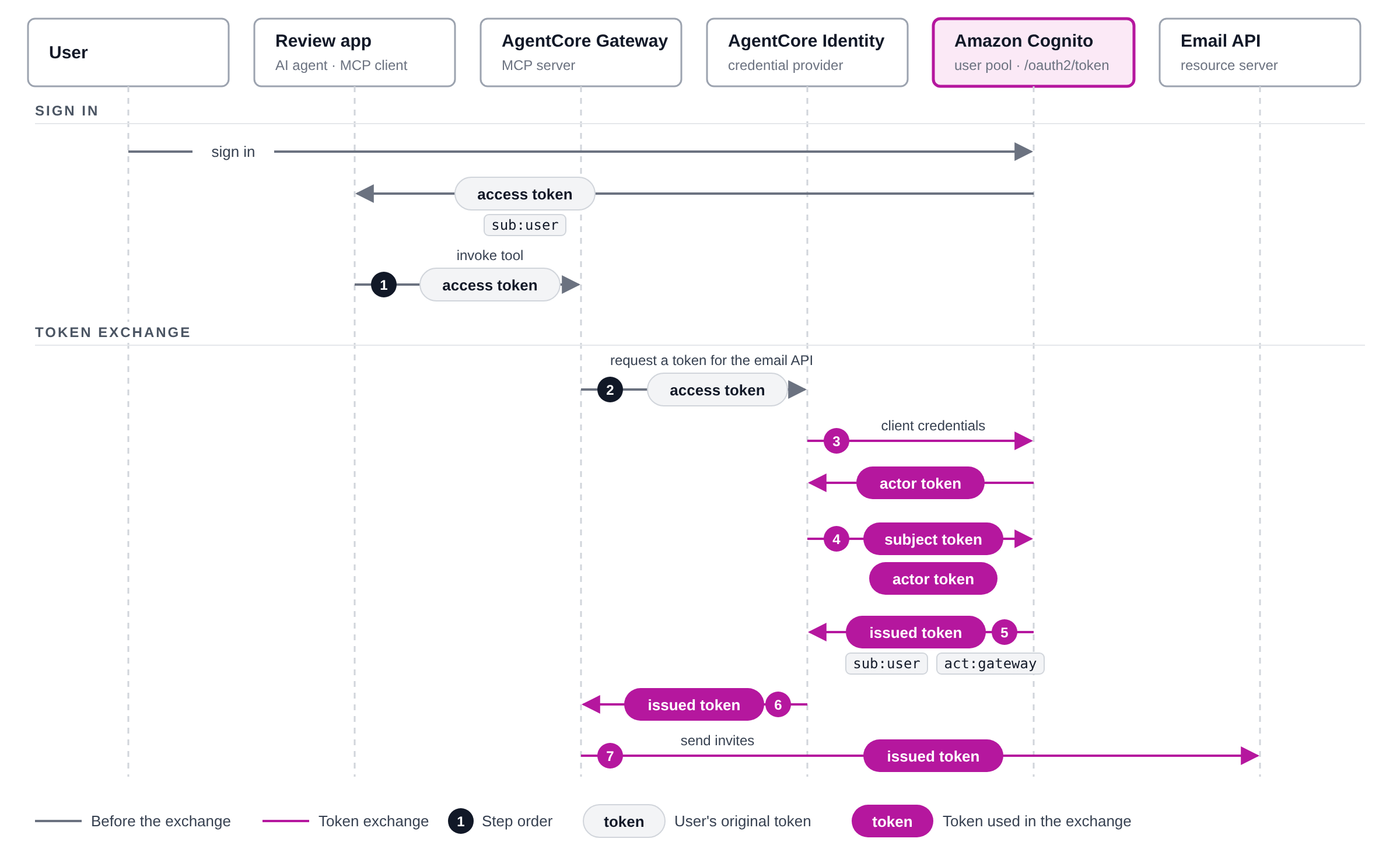
Figure 6: AgentCore Gateway sending invites through AgentCore Identity
- The agent calls the AgentCore Gateway invite tool with user’s access token. The AgentCore Gateway inbound JWT authorizer validates the token against your user pool and accepts only tokens issued to the review app.
- AgentCore Gateway passes user’s access token to AgentCore Identity and asks for a token for the email API target.
- AgentCore Identity uses the AgentCore Gateway app client in a client credentials grant to get an actor token.
- AgentCore Identity sends your token and the actor token in a delegation token exchange, adding the
subject_token_typeandaudiencevalues from the target’s custom parameters. - Amazon Cognito validates the request and returns the issued token, with the user in
sub, and the AgentCore Gateway app client inact. - AgentCore Identity passes the issued token to AgentCore Gateway.
- AgentCore Gateway calls the email API with the issued token, and the email API applies the same checks as for the preceding MCP server setup.
To set up AgentCore Gateway:
- In your Amazon Cognito user pool, create an app client for AgentCore Gateway in the same way as for the MCP server.
- In AgentCore Identity, create an AgentCore Identity credential provider for the AgentCore Gateway app client. A credential provider stores what AgentCore Identity needs to request tokens from Amazon Cognito: your user pool’s discovery URL and the app client’s ID and secret. Use the
CustomOauth2provider type, and enable delegation in itscustomOauth2ProviderConfigsettings: - In AgentCore Gateway, configure the AgentCore Gateway inbound JWT authorizer with your user pool’s discovery URL, and set
allowedClientsto the review app’s client ID. - In the AgentCore Gateway target’s outbound authorization, reference the credential provider and add
subject_token_typeandaudienceas custom parameters. Because your token is an access token, setsubject_token_typetourn:ietf:params:oauth:token-type:access_token.
AgentCore Gateway handles the exchange through configuration, so you don’t need to write agent or interceptor code for it. For more information, see Set up outbound authorization for your gateway.
With either your own MCP server or an AI gateway, act names the intermediary rather than the agent that called it. Every agent behind it appears as the same app client. This design still protects the email API. It accepts only tokens with aud=email-api, and your original access token has no such audience, so an agent can’t bypass the intermediary by forwarding your token. Each call that reaches the email API carries a token with only the scope it needs. The agents don’t hold downstream credentials or exchange logic, and the email API trusts one intermediary instead of every agent. If the email API needs to tell agents apart, perform the exchange in the agent, as Example 2 shows.
Example 2: The agent as the actor on AgentCore Runtime
If the review app’s AI agent runs on Amazon Bedrock AgentCore Runtime, the agent can request the exchange itself through AgentCore Identity and call the email API directly. The issued token then names the agent in act, so the email API knows which agent sent the invites.
Figure 7 shows how the agent sends invites for you.
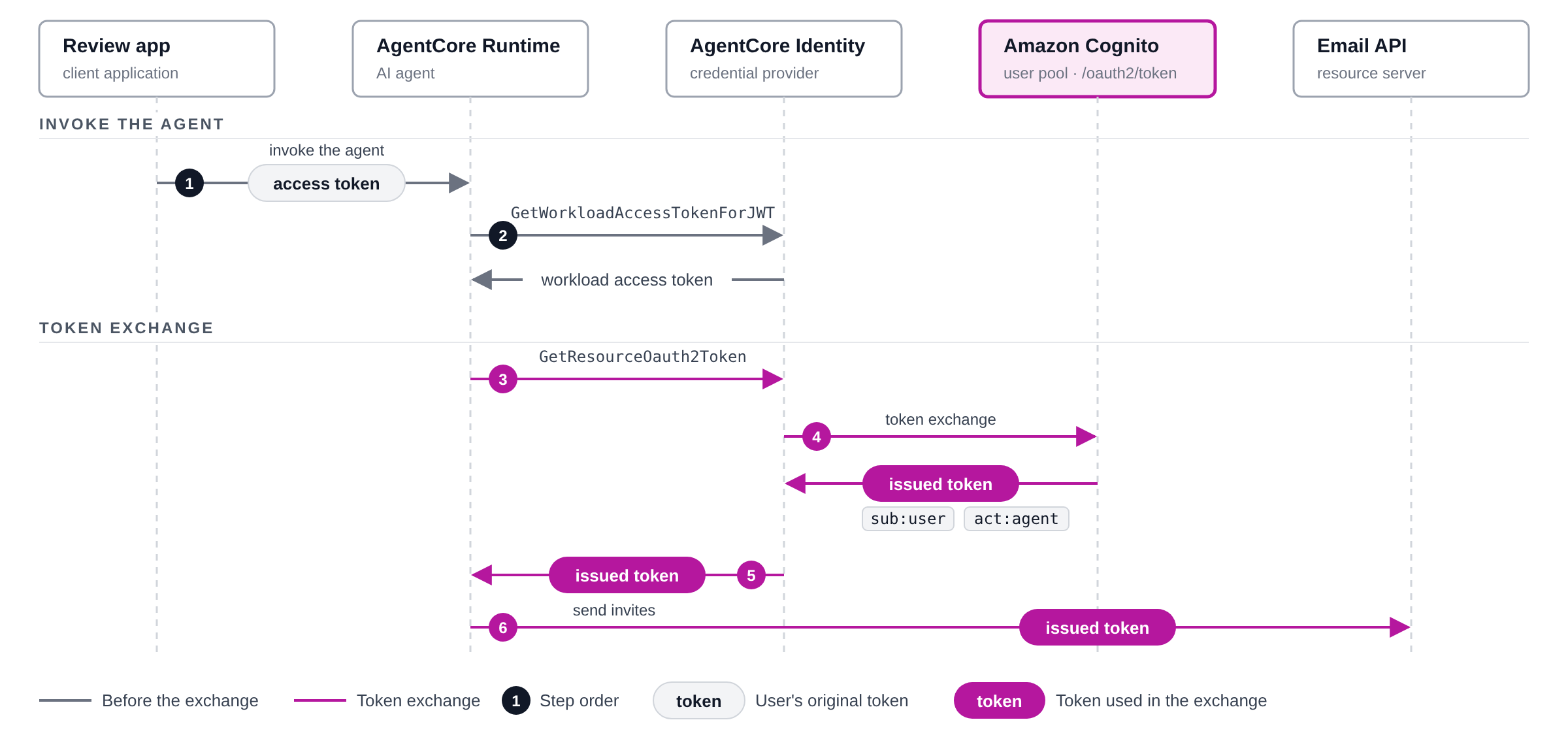
Figure 7: The AI agent on AgentCore Runtime sending invites through AgentCore Identity
- The review app invokes the agent on AgentCore Runtime with the user’s access token.
- Runtime validates your token with its inbound JWT authorizer, exchanges it for a workload access token from AgentCore Identity, and passes that token to the agent. A workload access token is an opaque token that proves which agent is calling. It carries the user’s access token, which AgentCore Identity uses as the subject token in step 4.
- The agent asks AgentCore Identity for a token for the email API by calling GetResourceOauth2Token with the workload access token.
- AgentCore Identity gets an actor token with the agent’s app client, then sends user’s token and the actor token to Cognito in a delegation token exchange.
- Amazon Cognito returns the issued token, with user in
suband the agent’s app client inact, and AgentCore Identity passes it to the agent. - The agent calls the email API with the issued token. The email API applies the same checks as in Example 1, and confirms that
act.client_idnames an agent it trusts.
The issued token has the same shape as in Example 1, but client_id and act name the agent’s app client.
To set up the agent:
- In your Amazon Cognito user pool, create an app client for the agent in your user pool and select
ALLOW_TOKEN_EXCHANGE_DELEGATIONfor it. To tell agents apart inactclaim, give each agent its own app client and credential provider. - In AgentCore Identity, create a credential provider for the agent’s app client in the same way as for AgentCore Gateway.
- In AgentCore Runtime, configure the inbound JWT authorizer on AgentCore Runtime to accept your user pool’s tokens, with
allowedClientsset to the review app’s client ID. - In the agent’s code, request the issued token with the AgentCore SDK:
The decorator makes the GetResourceOauth2Token call in step 3 of Figure 7 and passes the issued token to your function as access_token.
For more information, see On-behalf-of token exchange with AgentCore Identity.
Conclusion
Think back to the agent at the start of this post. The agent had to book a table and send invitations for you, and forwarding the user’s original access token would have hidden which service acted for you and given it more access than the job needed. With Amazon Cognito token exchange, each hop gets its own scoped-down token, bound to the resource server it calls and limited to the scopes it needs. Each issued token also expires no later than your own token and doesn’t come with a refresh token, so no service can keep access after your token expires.
For AI agents, delegation adds a second identity to the token. The act claim names the service doing the work, so a downstream API can choose which agents it trusts. Your audit records can then show both the person who authorized a request and the agent that made it.
You can try this on a new or existing Amazon Cognito user pool on the Essentials or Plus plan. Enable ALLOW_TOKEN_EXCHANGE_DELEGATION for an app client, register the downstream API as a resource server, and call GetDerivedToken or the token endpoint.
If you have questions about this post, contact AWS Support or start a new thread on AWS re:Post.