AWS Security Blog
Implementing data governance on AWS: Automation, tagging, and lifecycle strategy – Part 2
In Part 1, we explored the foundational strategy, including data classification frameworks and tagging approaches. In this post, we examine the technical implementation approach and key architectural patterns for building a governance framework.
We explore governance controls across four implementation areas, building from foundational monitoring to advanced automation. Each area builds on the previous one, so you can implement incrementally and validate as you go:
- Monitoring foundation: Begin by establishing your monitoring baseline. Set up AWS Config rules to track tag compliance across your resources, then configure Amazon CloudWatch dashboards to provide real-time visibility into your governance posture. By using this foundation, you can understand your current state before implementing enforcement controls.
- Preventive controls: Build proactive enforcement by deploying AWS Lambda functions that validate tags at resource creation time. Implement Amazon EventBridge rules to trigger real-time enforcement actions and configure service control policies (SCPs) to establish organization-wide guardrails that prevent non-compliant resource deployment.
- Automated remediation: Reduce manual intervention by setting up AWS Systems Manager Automation Documents that respond to compliance violations. Configure automated responses that correct common issues like missing tags or improper encryption and implement classification-based security controls that automatically apply appropriate protections based on data sensitivity.
- Advanced features: Extend your governance framework with sophisticated capabilities. Deploy data sovereignty controls to help ensure regulatory compliance across AWS Regions, implement intelligent lifecycle management to optimize costs while maintaining compliance, and establish comprehensive monitoring and reporting systems that provide stakeholders with clear visibility into your governance effectiveness.
Prerequisites
Before beginning implementation, ensure you have AWS Command Line Interface (AWS CLI) installed and configured with appropriate credentials for your target accounts. Set AWS Identity and Access Managment (IAM) permissions so that you can create roles, Lambda functions, and AWS Config rules. Finally, basic familiarity with AWS CloudFormation or Terraform will be helpful, because we’ll use CloudFormation throughout our examples.
Tag governance controls
Implementing tag governance requires multiple layers of controls working together across AWS services. These controls range from preventive measures that validate resources at creation to detective controls that monitor existing resources. This section describes each control type, starting with preventive controls that act as first line of defense.
Preventive controls
Preventive controls help ensure resources are properly tagged at creation time. By implementing Lambda functions triggered by AWS CloudTrail events, you can validate tags before resources are created, preventing non-compliant resources from being deployed:
For complete, production-ready implementation, see Implementing Tag Policies with AWS Organizations and EventBridge event patterns for resource monitoring.
Organization-wide policy enforcement
AWS Organizations tag policies provide a foundation for consistent tagging across your organization. These policies define standard tag formats and values, helping to ensure consistency across accounts:
Detailed implementation guidance: Getting started with tag policies & Best practices for using tag policies
Tag-based access control
Tag-based access control gives you detailed permissions using attribute-based access control (ABAC). By using this approach, you can define permissions based on resource attributes rather than creating individual IAM policies for each use case:
Multi-account governance strategy
While implementing tag governance within a single account is straightforward, most organizations operate in a multi-account environment. Implementing consistent governance across your organization requires additional controls:
For more information, see implementation guidance for SCPs.
Integration with on-premises governance frameworks
Many organizations maintain existing governance frameworks for their on-premises infrastructure. Extending these frameworks to AWS requires careful integration and applicability analysis. The following example shows how to use AWS Service Catalog to create a portfolio of AWS resources that align with your on-premises governance standards.
Automating security controls based on classification
After data is classified, use these classifications to automate security controls and use AWS Config to track and validate that resources are properly tagged through defined rules that assess your AWS resource configurations, including a built-in required-tags rule. For non-compliant resources, you can use Systems Manager to automate the remediation process.
With proper tagging in place, you can implement automated security controls using EventBridge and Lambda. By using this combination, you can create a cost-effective and scalable infrastructure for enforcing security policies based on data classification. For example, when a resource is tagged as high impact, you can use EventBridge to trigger a Lambda function to enable required security measures.
This example automation applies security controls consistently, reducing human error and maintaining compliance. Code-based controls ensure policies match your data classification.
Implementation resources:
- Remediating Noncompliant Resources with AWS Config
- AWS Systems Manager – Creating your own runbooks
- AWS Encryption SDK Developer Guide
- Lambda error handling patterns
- EventBridge event patterns
Data sovereignty and residency
Data sovereignty and residency requirements help you comply with regulations like GDPR. Such controls can be implemented to restrict data storage and processing to specific AWS Regions:
Note: This example uses eu-west-1 and eu-central-1 because these Regions are commonly used for GDPR compliance, providing data residency within the European Union. Adjust these Regions based on your specific regulatory requirements and business needs. For more information, see Meeting data residency requirements on AWS and Controls that enhance data residence protection.
Disaster recovery integration with governance controls
While organizations often focus on system availability and data recovery, maintaining governance controls during disaster recovery (DR) scenarios is important for compliance and security. To implement effective governance in your DR strategy, start by using AWS Config rules to check that DR resources maintain the same governance standards as your primary environment:
For your most critical data (classified as Level 1 in part 1 of this post), implement cross-Region replication while maintaining strict governance controls. This helps ensure that sensitive data remains protected even during failover scenarios:
Automated compliance monitoring
By combining AWS Config for resource compliance, CloudWatch for metrics and alerting, and Amazon Macie for sensitive data discovery, you can create a robust compliance monitoring framework that automatically detects and responds to compliance issues:
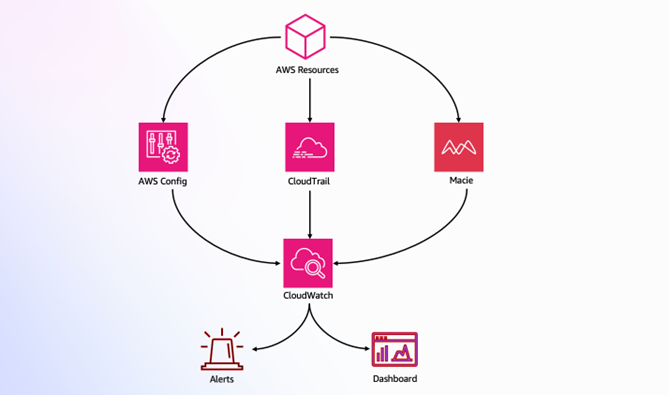
Figure 1: Compliance monitoring architecture
This architecture (shown in Figure 1) demonstrates how AWS services work together to provide compliance monitoring:
- AWS Config, CloudTrail, and Macie monitor AWS resources
- CloudWatch aggregates monitoring data
- Alerts and dashboards provide real-time visibility
The following CloudFormation template implements these controls:
These controls provide real-time visibility into your security posture, automate responses to potential security events, and use Macie for sensitive data discovery and classification. For a complete monitoring setup, review List of AWS Config Managed Rules and Using Amazon CloudWatch dashboards.
Using AWS data lakes for governance
Modern data governance strategies often use data lakes to provide centralized control and visibility. AWS provides a comprehensive solution through the Modern Data Architecture Accelerator (MDAA), which you can use to help you rapidly deploy and manage data platform architectures with built-in security and governance controls. Figure 2 shows an MDAA reference architecture.
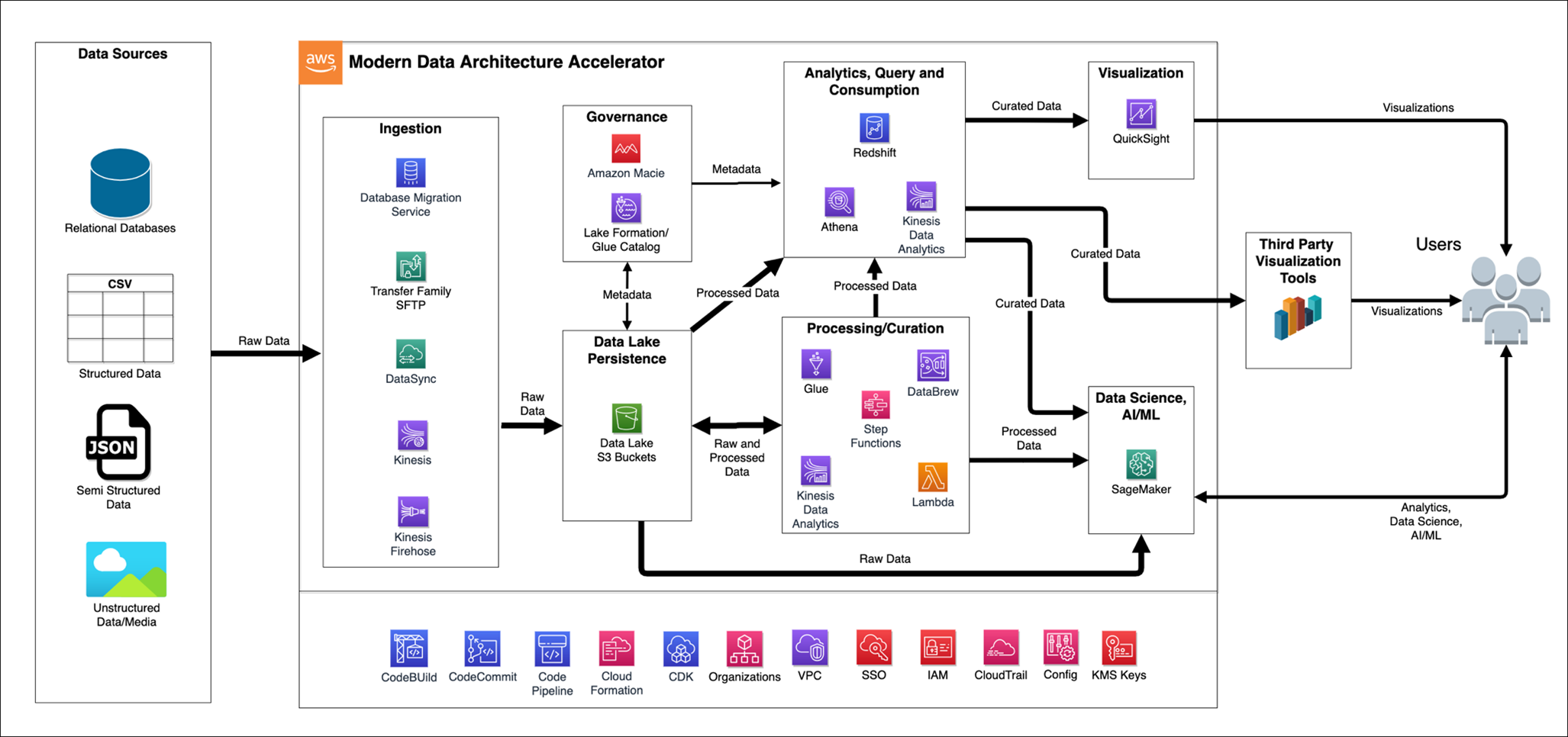
Figure 2: MDAA reference architecture
For detailed implementation guidance and source code, see Accelerate the Deployment of Secure and Compliant Modern Data Architectures for Advanced Analytics and AI.
Access patterns and data discovery
Understanding and managing access patterns is important for effective governance. Use CloudTrail and Amazon Athena to analyze access patterns:
This query helps identify frequently accessed data and unusual patterns in access behavior. These insights help you to:
- Optimize storage tiers based on access frequency
- Refine DR strategies for frequently accessed data
- Identify of potential security risks through unusual access patterns
- Fine-tune data lifecycle policies based on usage patterns
For sensitive data discovery, consider integrating Macie to automatically identify and protect PII across your data estate.
Machine learning model governance with SageMaker
As organizations advance in their data governance journey, many are deploying machine learning models in production, necessitating governance frameworks that extend to machine learning (ML) operations. Amazon SageMaker offers advanced tools that you can use to maintain governance over ML assets without impeding innovation.
SageMaker governance tools work together to provide comprehensive ML oversight:
- Role Manager provides fine-grained access control for ML roles
- Model Cards centralize documentation and lineage information
- Model Dashboard offers organization-wide visibility into deployed models
- Model Monitor automates drift detection and quality control
The following example configures SageMaker governance controls:
This example demonstrates two essential governance controls: role-based access management for secure service interactions and automated hourly monitoring for ongoing model oversight. While these technical implementations are important, remember that successful ML governance requires integration with your broader data governance framework, helping to ensure consistent controls and visibility across your entire data and analytics ecosystem. For more information, see Model governance to manage permissions and track model performance.
Cost optimization through automated lifecycle management
Effective data governance isn’t just about security—it’s also about managing cost efficiently. Implement intelligent data lifecycle management based on classification and usage patterns, as shown in Figure 3:
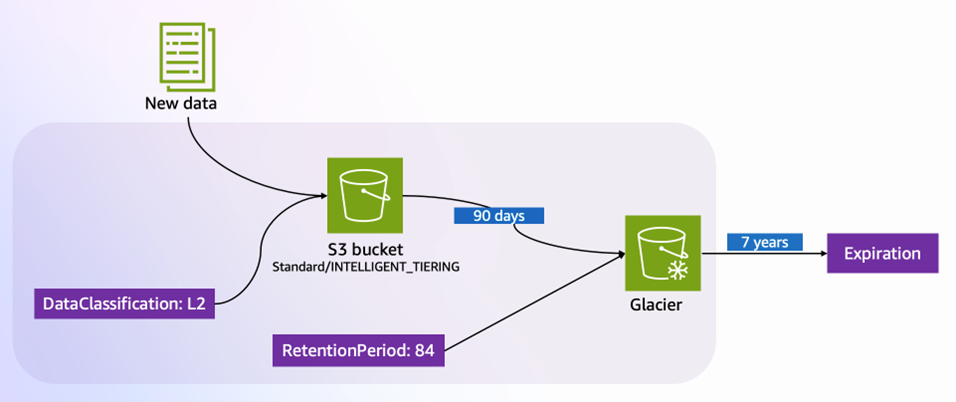
Figure 3: Tag-based lifecycle management in Amazon S3
Figure 3 illustrates how tags drive automated lifecycle management:
- New data enters Amazon Simple Storage Service (Amazon S3) with the tag
DataClassification: L2 - Based on classification, the data starts in
Standard/INTELLIGENT_TIERING - After 90 days, the data transitions to Amazon S3 Glacier storage for cost-effective archival
- The
RetentionPeriodtag (84 months) determines final expiration
Here’s the implementation of the preceding lifecycle rules:
S3 Lifecycle automatically optimizes storage costs while maintaining compliance with retention requirements. For example, data initially stored in Amazon S3 Intelligent-Tiering automatically moves to Glacier after 90 days, significantly reducing storage costs while helping to ensure data remains available when needed. For more information, seeManaging the lifecycle of objects and Managing storage costs with Amazon S3 Intelligent-Tiering.
Conclusion
Successfully implementing data governance on AWS requires both a structured approach and adherence to key best practices. As you progress through your implementation journey, keep these fundamental principles in mind:
- Start with a focused scope and gradually expand. Begin with a pilot project that addresses high-impact, low-complexity use cases. By using this approach, you can demonstrate quick wins while building experience and confidence in your governance framework.
- Make automation your foundation. Apply AWS services such as Amazon EventBridge for event-driven responses, implement automated remediation for common issues, and create self-service capabilities that balance efficiency with compliance. This automation-first approach helps ensure scalability and consistency in your governance framework.
- Maintain continuous visibility and improvement. Regular monitoring, compliance checks, and framework updates are essential for long-term success. Use feedback from your operations team to refine policies and adjust controls as your organization’s needs evolve.
Common challenges to be aware of:
- Initial resistance to change from teams used to manual processes
- Complexity in handling legacy systems and data
- Balancing security controls with operational efficiency
- Maintaining consistent governance across multiple AWS accounts and regions
For more information, implementation support, and guidance, see:
- AWS Security Blog
- AWS Architecture Center
- AWS Compliance Resources
- Amazon Macie User Guide
- AWS Organizations Best Practices
By following this approach and remaining mindful of potential challenges, you can build a robust, scalable data governance framework that grows with your organization while maintaining security, compliance, and efficient data operations.
If you have feedback about this post, submit comments in the Comments section below. If you have questions about this post, contact AWS Support.