AWS Spatial Computing Blog
Accelerating OpenCV on Graviton – the COOL framework
Introduction
Computer vision workloads are compute-intensive and expensive, forcing developers to choose between performance and cost when processing millions of images for applications ranging from autonomous vehicles to medical diagnostics. OpenCV (Open Computer Vision) is an open-source library designed to make computer vision and image processing fast, easy to use, and portable. It’s one of the most widely adopted libraries in robotics, AI, medical imaging, security, and real-time systems. With ~30M+ monthly downloads and an active community of thousands of developers worldwide, the project started 26 years ago and continues to evolve. This vast library (~5 million lines of code, ~2500 algorithms) has official releases for C/C++, Python, and Java, plus many community-supported languages. Over the years, it has been optimized for several processor and accelerator architectures including x86, ARM, PowerPC, RISC-V, CUDA, and Snapdragon.
In this article, we present the first officially supported cloud optimized version of OpenCV: Cloud Optimized OpenCV Library (COOL) including the performance and cost savings of leveraging it on AWS Graviton processors and services.
AWS Graviton – The Foundation for
AWS Graviton is Amazon Web Services’ family of ARM processors purpose-built specifically for cloud workloads. Developed by Annapurna Labs, an AWS acquisition, the chips are engineered from the ground up to deliver high performance, strong cost efficiency, and industry-leading energy savings compared to other processor alternatives.
Graviton chips are optimized at the silicon level for how modern applications run in AWS data centers. Graviton5 is the latest generation, first publicly announced in 2018. Under the hood, Graviton uses the ARM Neoverse architecture, emphasizing parallelism, power efficiency, and high scalability. This makes them well-suited for containerized microservices, serverless applications, and data-heavy workloads involving large image or video corpuses. One of the biggest drivers behind Graviton adoption is its price/performance advantage. Organizations consistently report 20–40% lower costs when migrating from comparable x86 instances, without sacrificing performance.
Target audience and value proposition
The Graviton-optimized releases of OpenCV are available as Amazon Machine Images (AMIs) on the AWS Marketplace, making enterprise-grade computer vision infrastructure more accessible than ever. Each AMI is built on Ubuntu 24.04 LTS with a precompiled, performance-tuned OpenCV, eliminating manual build configuration so developers can focus on shipping vision applications.
These AMIs are officially optimized, supported, and maintained by OpenCV.org, giving organizations confidence in a trusted source for their deployments. Whether you’re a large enterprise processing petabytes of imagery at scale, or a startup that needs flexibility to grow without re-architecting, the OpenCV AMIs are designed to meet you where you are. Scaling up or down is seamless, so teams can match compute resources to demand without unnecessary overhead.
For enterprise clients with demanding datasets and high-throughput pipelines, the low-cost AMIs deliver the performance and reliability that mission-critical workflows require. For hobbyists and smaller teams, they lower the barrier to entry: no need to invest hours hand-tuning a build environment when a production-ready image is available on demand.
At the core of this offering are pre-built OpenCV binaries incorporating exclusive performance gains hand-tuned by the OpenCV core development team, paired with long-term support (LTS) across major releases. Combined with AWS’s secure, scalable computing environment, this is a meaningful step forward for organizations needing commercially approved, auditable OpenCV releases — a capability historically difficult to obtain from an open-source project. These AMIs directly address that gap, offering a formally supported path to deploying OpenCV in production.
This notably represents a response to large organizations which use OpenCV and are looking to have approved commercial-grade releases of this library such as NASA, SnapChat, Youtube and many more.
| Feature | Benefit | Why it matters |
|---|---|---|
| Native optimization | Core OpenCV functions run on average 20% faster with some functions being as high as 70% faster than standard pip install | Speed-sensitive workloads (video analytics, robotics, SLAM) get immediate ROI |
| Official support | One-click ‘Support’ button in the AWS console | Reduced maintenance burden and faster issue resolution, first version of OpenCV with direct support |
| Pay-as-you-use | Small hourly fee per-instance per-hour | Lower cost in time and effort than building & tuning your own image |
| Forward Thinking | Planned support for additional CPUs & GPU back-ends | Expendability for all OpenCV-heavy customers |
Workflow Example: Image Analysis
To validate the benefits of COOL, we defined an image processing workflow analyzing public images from the Mars Pathfinder mission. The workflow extracts multiple types of information from a single image. An input image is first converted to grayscale, then contrast limited adaptive histogram equalization (CLAHE) corrects shadow and bright spot artefacts. Finally, a contour detection algorithm runs. Details of each step and OpenCV functions used are described below (Figure 2 summarizes the workflow):
- Checks the image Lighting: This step (cv2.calcHist) verifies the image’s capture exposure by counting the exact number of dark and light pixels and plotting that data onto a 2D graph.
- Finds Circles: First, the script softens noise for high-frequency gradient areas with a Median Blur (cv2.medianBlur) algorithm. Then, a math tool (cv2.HoughCircles) scans the image to locate circular shapes and draws a green ring around them.
- Traces Outlines: To find exact object shapes, the image is masked via a Binary Threshold (cv2.threshold). With only solid shapes remaining, a (cv2.findContours) easily maps their exact outer borders.

Figure 1: Input Image example (NASA)
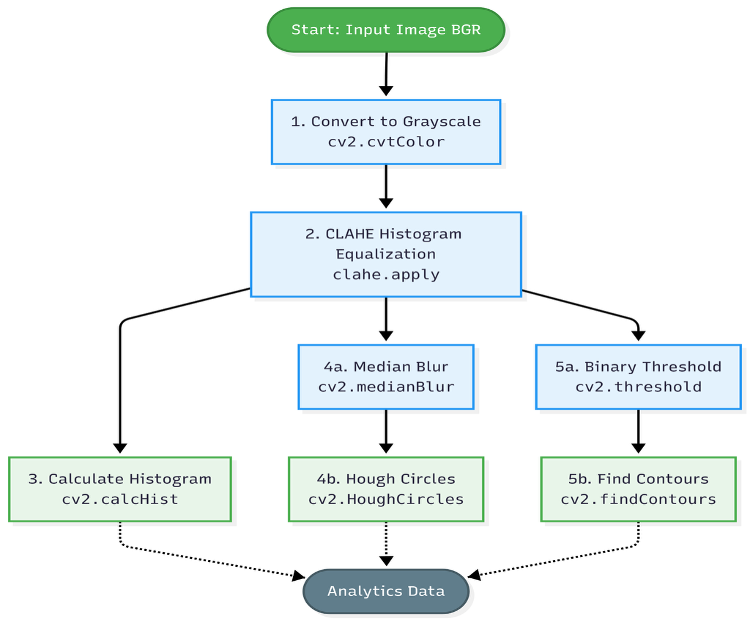
Figure 2: Image processing workflow example used to benchmark COOL
The visual output of several key steps is described in the table below for reference:
| Processing Type | Output |
|---|---|
| CLAHE output | 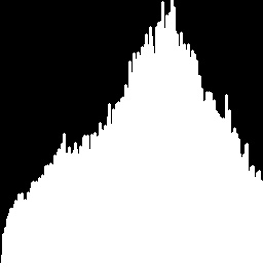 |
| Hough Circles output | 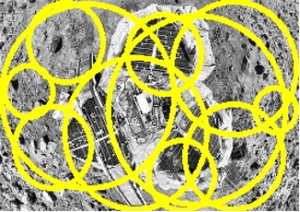 |
| Find contour outputs | 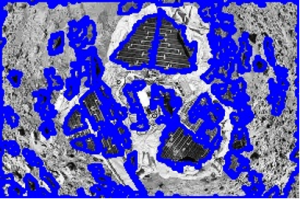 |
Performance gains
Using the above workflow, we measure the benefit of COOL by comparing a Graviton-4 AMI Amazon EC2 instance running the latest OpenCV 4.12 installed via “pip install opencv-python” against a Graviton-4 AMI EC2 instance pre-provisioned with COOL. We later refer to the typical pip install as “DIY OpenCV” versus “COOL” for the optimized library.
Image analysis workflow
For fair comparison, we built a web-based benchmarking tool whose output is shown in Figure 3. DIY OpenCV runs the workflow at 1.2fps, while COOL achieves 1.6fps — a 30% performance gain out of the box. The cost saving is proportional, roughly 30%, costing less than 1 cent for the EC2 processing duration. This represents a significant gain when large image corpuses need processing, regardless of the vision pipeline. The pre-built COOL AMI also saves significant engineering time over recompiling the library for a given hardware target (which can take hours).
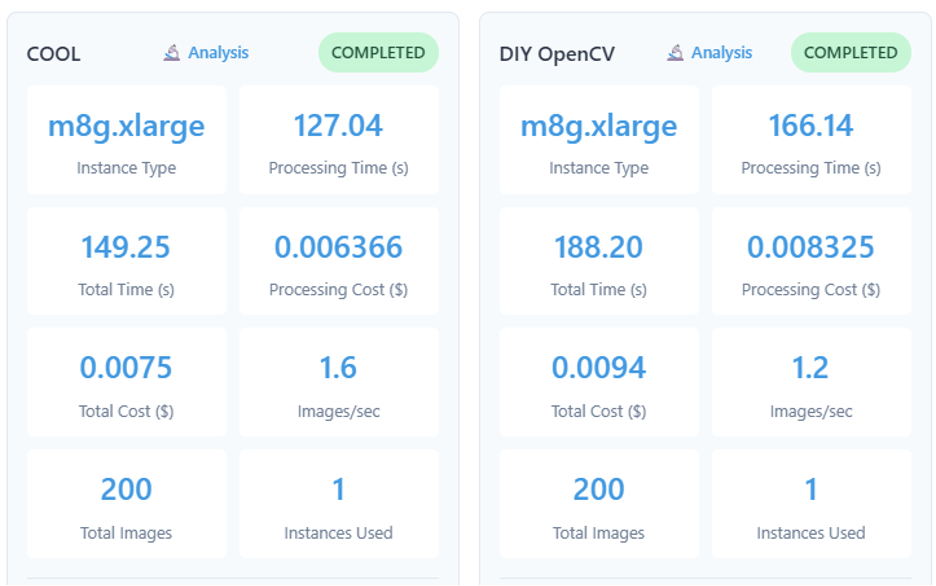
Figure 3 – Benchmark results for the image analysis workflow
General benchmarks
Beyond the image analysis workflow, the OpenCV Core Team has benchmarked over 78 functions to guide optimization on Graviton 2, 3, and 4. In OpenCV, modules are the structural building blocks, defining how functionality is packaged and organized. The chart below tracks performance gains across several modules: Core (fundamental data structures, math operations, and utilities), ImageIO (reading and writing image files across formats), Imgproc (image processing functions including filtering, transformations, edge detection, and color space conversion), and VideoIO (capture and output of video streams from files, cameras, and other sources).
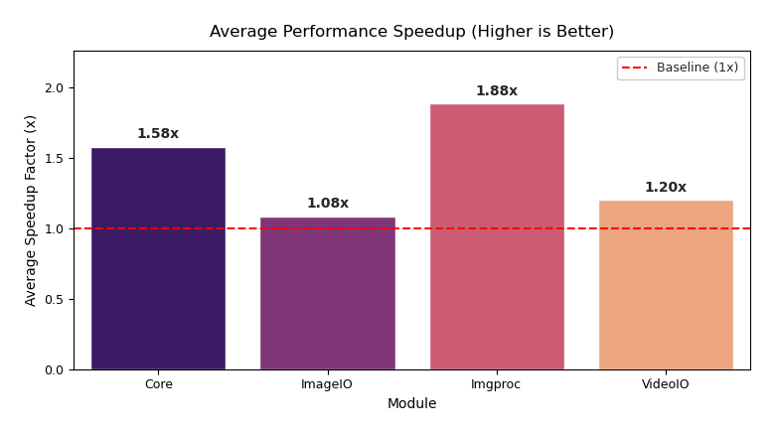
Figure 4 – Speed-up gains across OpenCV modules and core algorithms for Graviton 4
As per the chart, most modules of the COOL library are showing more than a 1.2x performance gain, with many of the standard image processing functions seeing a 1.8x speedup.
Conclusion
COOL is a high-performance, affordable way to run vision workloads in the cloud across a variety of application scenarios. We are evaluating enhancements for future releases, including support for additional processor architectures and serverless workflow integration. Individuals and organizations are encouraged to try the seven-day free trial of COOL with no additional fees above standard AWS billing.
Call to action: seeing is believing! Benchmark your image workflow and evaluate the speed-up gains & EC2 cost with our open-source benchmarking tool (the output of which is depicted in Figure 3) at OpenCV.org/COOL.