AWS Storage Blog
Migrate VMware Storage to Amazon FSx for NetApp ONTAP using AWS Transform
Enterprise storage underpins every critical workload in a VMware environment. It’s not just capacity, it’s the operational backbone that delivers automatic failover, instant snapshots, writable clones, inline deduplication, and multi-protocol access that production applications depend on every day. When the time comes to migrate these workloads to the cloud, teams expect those same capabilities on the other side. The challenge has always been about moving production storage to the cloud without losing the enterprise features your operations were built around.
Amazon FSx for NetApp ONTAP is a fully managed service that delivers these same enterprise storage capabilities, natively in AWS. AWS Transform is an AI-assisted migration service that automates the discovery, planning, and execution of workload migrations to AWS. With this new capability, AWS Transform enables organizations to migrate block storage workloads directly to FSx for ONTAP as part of a single, coordinated migration wave alongside compute and networking.
In this post, we’ll walk through why VMware customers depend on enterprise storage, the challenges of migrating these workloads to the cloud, and how AWS Transform delivers a direct migration path to FSx for ONTAP, preserving enterprise storage capabilities from Day 1, with non-disruptive testing, built-in failback, and an atomic cutover that moves compute, network, and storage together in one operation.
Why VMware customers depend on enterprise storage
VMware environments are typically deployed on enterprise storage arrays that provide a specific set of capabilities production workloads are built around:
- High availability: Automatic failover with aggressive RPO/RTO objectives keeps applications running even when infrastructure fails.
- Storage efficiency: Thin-provisioning, inline deduplication, and compression reduce raw capacity consumption by 60–80%.
- Fast backup and recovery: Crash-consistent snapshots in seconds; writable clones spin up dev/test environments with zero additional capacity.
- Seamless workload mobility: Shared storage across ESXi hosts enables vMotion, VMware HA, and DRS.
- Multi-protocol access: iSCSI, Fibre Channel, NFS, and SMB from a single platform.
- Operational familiarity: Consistent CLI, APIs, and proven runbooks at scale.
These aren’t nice-to-haves. They’re embedded in daily operations; from the way developers spin up test databases to how DR failover is automated. Any migration path that doesn’t preserve these capabilities forces a re-architecture conversation that delays the entire project.
How Amazon FSx for NetApp ONTAP delivers these capabilities in AWS
Amazon FSx for ONTAP is a fully managed service built on NetApp’s ONTAP data management software. It delivers the same enterprise storage capabilities with the scalability and resiliency of AWS infrastructure.
The following table shows what maps directly to the on-premises capabilities VMware customers depend on:
| On-premises capability | FSx for NetApp ONTAP equivalent |
| HA with automatic failover across controllers | Multi-AZ deployment with automatic failover |
| Inline deduplication, compression & data tiering | Inline dedup, compression, and automatic tiering to Amazon S3 |
| Instant snapshots & writable clones | Instant snapshots and space-efficient writable clones at near-zero capacity cost |
| Shared storage accessible from multiple ESXi hosts | iSCSI LUNs accessible from multiple EC2 instances |
| Multi-protocol: iSCSI, NFS, SMB, Fibre Channel | Multi-protocol access: iSCSI, NFS, and SMB from a single file system |
| Familiar ONTAP CLI + REST API, and operational workflows | Same ONTAP CLI, REST API, SnapMirror™ & SnapVault™ workflows |
Whether migrating from NetApp ONTAP, Dell, Everpure, or HPE, FSx for ONTAP provides enterprise storage capabilities as a fully managed service. For existing ONTAP customers, operational workflows, automation scripts, and monitoring tools carry over directly. For customers migrating from other platforms, FSx for ONTAP delivers the same category of capabilities without requiring teams to adopt unfamiliar tooling.
The challenge: migrating VMware workloads to the cloud
When we talk to customers running VMware at scale, we consistently hear the same set of challenges when it comes to migrating to the cloud:
“We need one migration path regardless of our storage protocol.” A single environment may span block and file storage across multiple vendors requiring different tooling for each, turning one project into multiple parallel workstreams.
“We can’t migrate compute and storage separately.” VMs depend on specific volumes, yet many approaches force separate migration streams with separate cutovers. If one lands before the other, applications break.
“We need to test without breaking replication.” Many migration approaches require disconnecting the source-to-target replication to validate at the destination, making each test a one-shot decision. Re-establishing sync after a failed test often means re-baselining from scratch, adding days or weeks to the timeline.
“We need a rollback path.” Some approaches require breaking the replication relationship before you can perform the cutover, meaning there’s no live sync to fall back to if something goes wrong. Every cutover becomes a high-stakes, irreversible event with no built-in safety net.
“We don’t want to sacrifice enterprise storage capabilities.” In many cases, customers accept upfront that they will land on storage that lacks the enterprise features their operations depend on trading capabilities for migration velocity. The re-architecture to restore those capabilities becomes a separate project with its own timeline and budget.
The solution: migrate directly to FSx for ONTAP with AWS Transform
The AWS Transform deploys a Replication Agent installed inside each source VM and performs a full initial replication of all data to the cloud, followed by continuous incremental replication that captures only changed data. Because the agent operates at the guest OS level, it works regardless of the underlying storage vendor or protocol replicating directly to FSx for ONTAP iSCSI volumes. Compute, network, and storage all move together in a single coordinated wave. No intermediate platforms, no separate tools, no second cutover.
This capability is available in all AWS Regions where both AWS Transform for MGN and FSx for ONTAP are available.
High level summary on how the solution works:
Step 1: Provision your target storage: Create your FSx for ONTAP file system, configure network security, and set up secure authentication between AWS Transform and your file system. For detailed setup instructions, see the FSx for ONTAP configuration guide.
Step 2: Configure AWS Transform: In the AWS Transform console, select FSx for ONTAP as the target storage type and point it to the file system provisioned in Step 1. When saved, AWS Transform automatically establishes a PrivateLink connection to your FSx for ONTAP environment for secure, private management of volumes and snapshots.
Step 3: Install the replication agent: Deploy the AWS Replication Agent on each source server to be migrated. For large environments, the MGN Connector automates prerequisite checks and agent installation across hundreds of servers.
Step 4: Replicate and test: The agent performs a full initial replication followed by continuous incremental sync to replication servers in the staging area. Once replication is healthy, launch test instances to validate your applications on the actual target architecture, non-disruptively, while source servers continue running.
Step 5: Cutover to production: Once validation and testing is complete, launch the cutover instance in the target subnet with the latest replicated data served from FSx for ONTAP. Your production workload is now running on enterprise storage in AWS.
For the complete setup guide, see the FSx for ONTAP configuration documentation in the AWS Transform User Guide.
Compute & Storage migration to Amazon EBS and FSx for ONTAP
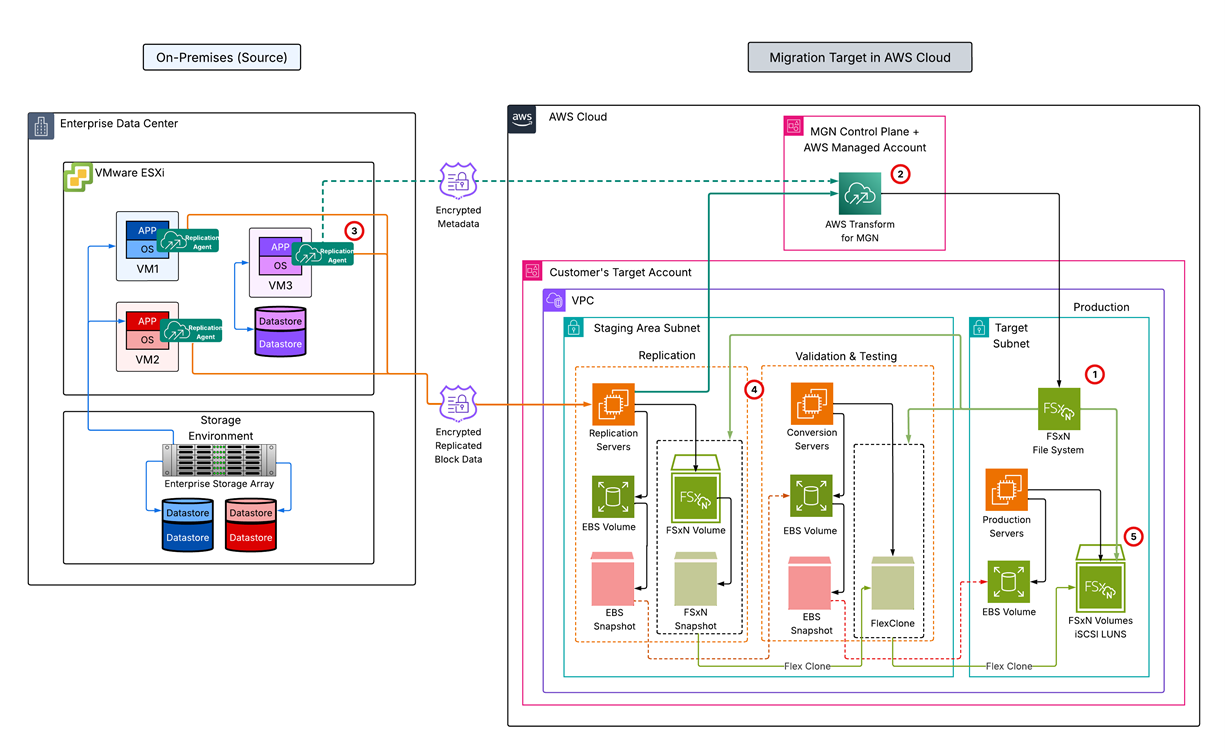
Figure 1: AWS Transform migration architecture with FSx for ONTAP as the target storage
Once the setup is complete and replication begins, AWS Transform manages the full migration lifecycle, from continuous replication through testing, cutover, and finalization. Here’s what each stage looks like and why it matters.
The migration lifecycle: Why each stage matters
Once agents are installed and initial sync completed, AWS Transform managed the full migration lifecycle. The following five stages were designed to address a specific business concern:
1/Continuous Replication:
Replication runs while production stays live. During migration, AWS Transform continuously replicates source data to FSx for ONTAP volumes. There’s no maintenance window for this replication phase. Production applications continue to serve the business needs and your customers. If a network blip interrupts replication, it resumes from where it left off, not from scratch.
2/Non-Disruptive & Repeatable Testing:
Once initial sync completes and replication status shows Healthy, you can launch a test instance to validate your applications on the target architecture, while source servers continue running untouched.
When you launch a test instance, AWS Transform creates a FlexClone of the replicated FSx for ONTAP volume, which is an instant, fully writable copy that shares data blocks with the original replication volume rather than duplicating them. Because the FlexClone is independent of the ongoing replication, replication continues uninterrupted on the original volume while you validate your test instance. This FlexClone is then attached to a fully functional target instance via iSCSI, alongside an EBS boot volume, with multipath I/O auto-configured. All of these resources are auto created by AWS Transform so that your applications are running on the actual target storage, and not a simulation.
This makes testing repeatable if necessary. Each launch creates a fresh instance reflecting the latest replication state. Found an issue? Revert, fix, try again with zero production impact. You can show business stakeholders that their application works on AWS before the cutover conversation happens.
3/Cutover:
When testing passes, you can launch the cutover instance with the latest replicated data. For each new cutover, AWS Transform MGN first deletes any previously launched test instance and dependent resources. Then, it launches a new cutover instance which reflects the most up-to-date state of the source server. This window is limited to the time between stopping writes on the source and bringing up the target, which is minutes for most workloads. And because you have already validated the same architecture in testing, there are no surprises. A single operation transitions the workload.
4/Rollback in case of any issues:
With AWS Transform, launching a cutover instance does not end the migration. Replication continues in the background, your source environment remains live, untouched and fully synchronized. The cutover instance is a production-capable environment: you can validate connectivity, run acceptance testing, serve live traffic, and operate your workloads in AWS. All while the source remains your safety net.
If the cutover instance reveals an issue at any point, you can revert the cutover. The server returns to “Ready for cutover” status, replication never stopped, and the next launch reflects the latest data. No re-baselining or starting over, and no separate rollback migration. You can revert and retry as many times as needed with zero data loss.
This is fundamentally different from migration approaches that require breaking the replication relationship to perform a cutover. With AWS Transform, the replication stream is independent of test and cutover operations, it only stops when you explicitly choose to finalize.
5/Finalize:
Finalize is the deliberate, irreversible step that closes the migration. After validating your cutover instance by confirming connectivity, passing acceptance tests, and serving production traffic you then finalize the cutover.
At this point, AWS Transform splits the FlexClone into a fully independent volume, detaching it from its parent replication volume. Your production storage is now self-contained with no dependency on staging infrastructure or the temporary resources. Replication stops at this point, all staging resources are terminated, and the source server is marked “Cutover complete.”
This is an irreversible action and hence make sure to perform this action after validation and testing is completed. After finalize, you’re running on FSx for ONTAP with full enterprise storage capabilities immediately available. The cost of maintaining replication infrastructure ends. The source environment can be decommissioned. The migration project is complete.
After the cutover
Your target EC2 instances boot from Amazon EBS (OS volume) with all data volumes served via iSCSI from FSx for ONTAP volumes. From the first boot, your data volumes have:
- Multi-AZ HA with automatic failover and zero RPO.
- Inline deduplication + compression + automatic tiering to S3 (65–80% space savings).
- FlexClone for instant writable copies at zero capacity cost.
- Same ONTAP CLI and REST API your storage team already uses.
- Multi-protocol access (NFS, SMB, iSCSI) from the same file system.
No re-architecture. No second project. The enterprise storage capabilities are there from Day 1, and Day 2 operations like backups, clones, DR testing, capacity management work immediately using the same storage-centric workflows your team already runs.
Best practices and operational considerations
- Agent-based replication: The agent is installed inside each guest VM OS. For large-scale deployments, use the MGN Connector to automate agent installation.
- Boot volume always on EBS: All data volumes from a source server go to FSx for ONTAP via iSCSI; the OS volume always lands on Amazon EBS.
- No mixed storage for data disks: All data disks from a source server must use the same storage type either all on EBS or all on FSx for ONTAP. The boot volume always lands on Amazon EBS regardless of the data disk target.
- Up to 5 file systems per account: MGN supports migrating into up to 5 FSx for ONTAP file systems concurrently. Migrate in phases for larger environments.
- Post-migration LUN optimization: During migration, all data disks from a source server are placed as individual LUNs within a single FSx for ONTAP volume. After migration, you can optionally relocate LUNs into dedicated volumes to take advantage of per-volume ONTAP features like independent snapshot policies and tiering configurations, a non-disruptive operation that requires no iSCSI reconfiguration.
- ONTAP configurations not migrated: Source ONTAP configurations (access permissions, quotas, snapshot policies, schedules) are not migrated automatically. Reconfigure these on the target file system after migration.
- Disable automatic backups before finalizing: FSx for ONTAP backups can create locked snapshots that block the FlexClone split operation. Disable backups, finalize, wait for cleanup (up to 24 hours), then re-enable.
Conclusion
Migrating VMware workloads to the cloud no longer requires choosing between migration velocity and enterprise storage capabilities. AWS Transform delivers a single, coordinated migration path from any source storage protocol directly to Amazon FSx for NetApp ONTAP. With continuous replication that doesn’t disrupt production, non-disruptive and repeatable testing on the actual target architecture, built-in rollback until you’re ready to commit, and enterprise storage capabilities available from the first boot, organizations can migrate with confidence and land on a fully managed platform that preserves the operational model their teams already depend on.
To get started:
- Review the FSx for ONTAP configuration guide in the AWS Transform documentation
- Provision your file system and configure secure authentication
- Set FSx for ONTAP as your target in the replication template
- Install agents and start migrating
For troubleshooting, see Troubleshooting FSx for ONTAP issues.
SnapMirror™ and SnapVault™ are trademarks of NetApp, Inc.