亚马逊AWS官方博客
Add web search and browsing to your agents with Amazon Bedrock AgentCore
Abstract: Using Amazon Bedrock AgentCore’s managed Web Search and Browser tools, exposed through a standard MCP endpoint, to give any MCP-compatible agent (Claude Code, Cline, etc.) real-time internet search and web browsing capabilities. Clients only need a URL and a token; deployment is just an AWS CLI init plus a single `helm install`. Data never leaves AWS, and the tool calls themselves consume no additional model tokens.
TOC
1. Overview
A large language model’s knowledge is frozen at its training cutoff — it can’t answer “today’s news” or “the version released an hour ago.” This post shows you how to use the managed capabilities of Amazon Bedrock AgentCore to give any agent that supports the Model Context Protocol (MCP) — such as Claude Code, Cline, OpenCode, or one you build yourself — two new abilities:
- Web search: structured, cited, real-time results powered by Amazon’s web index and a knowledge graph
- Web browsing: read the main content of any URL with a managed headless browser, and even automate interactions
The entire service sits behind a single standard MCP endpoint: deployment takes two steps, and client integration is just a few lines of configuration.
The challenge: web access at enterprise scale
Adding web access to a single agent isn’t hard: you call a search API from a script and spin up a Chrome instance, and it works well enough. The real challenge appears when you deploy agents at scale across an enterprise — dozens or hundreds of agents issuing thousands of concurrent search and scraping requests. That’s when the technical debt of a do-it-yourself solution comes due:
- Operating self-hosted headless Chrome is hard. Browser processes consume memory, crash, hang, and get blocked by anti-bot defenses. You have to build process pools, health checks, crash recovery, concurrency throttling, and image security updates — each a long-term investment, and all prone to cascading failure under high concurrency.
- Third-party search APIs are fragile. Quotas, rate limits, billing, and inconsistent response formats across vendors, plus the constant risk of changes or shutdowns — and because queries leave your environment, they can trigger compliance review.
- Elasticity versus cost. Reserve a fleet of always-on browser instances to handle peak load and you pay for idle capacity during quiet periods; don’t reserve them, and traffic spikes overwhelm you.
Amazon Bedrock AgentCore addresses these problems with a managed, serverless approach:
- Serverless elasticity: search and browser sessions are provisioned on demand and scaled automatically by AWS. From one request to large-scale concurrency, you never pre-provision or operate any browser or search cluster, and you don’t pay for idle instances during quiet periods. (Note: a single Browser resource has a default cap on concurrent sessions; very high concurrency requires splitting across multiple Browser resources or requesting a quota increase — see the official Service Quotas.)
- Higher stability: session isolation (each session runs in its own microVM) and automatic reclamation on expiry are handled by the platform; search is Amazon’s own managed engine, not dependent on a third-party relay that can change at any time. This typically delivers far more stable behavior under high concurrency than a self-built solution.
- Managed capabilities that support compliance: session isolation, AWS CloudTrail auditing (recording control-plane API calls), and queries that never leave AWS significantly reduce the security and compliance review burden. But under the AWS shared-responsibility model, IAM configuration, data governance, and retention policies remain your responsibility — these capabilities *support* compliance rather than *automatically satisfy* it.
In short: it turns a quick proof of concept for one agent into production-grade infrastructure that brings all of your organization’s agents online reliably.
2. See the result first
Assume the service is already deployed at https://your-host.example.com/mcp (the next section gives the deployment commands). Your agent integrates with it using just a snippet of configuration.
Integrate with your MCP client
Add the following to your client’s MCP config file (for example, mcp.json):
{
  "mcpServers": {
    "web": {
      "type": "http",
      "url": "https://your-host.example.com/mcp",
      "headers": {
        "Authorization": "Bearer YOUR_TOKEN"
      }
    }
  }
}
If you use Claude Code, a single command adds it:
claude mcp add --transport http web https://your-host.example.com/mcp \
  --header "Authorization: Bearer YOUR_TOKEN"
Once connected, your agent gains the following tools:
| Tool | Function | Typical scenarios |
|---|---|---|
| `web_search` | Web search returning structured, cited, real-time results | Latest news, market data, competitor moves, fact-checking |
| `web_fetch` | Read the main content of a URL (dynamic pages are rendered automatically) | Closely read an article, doc, or product page |
| `web_browser` (optional) | Full browser automation | Flows needing clicks, form fills, login, multi-tab, screenshots |
web_browser is a stateful browser-operation tool whose actions cover a complete browsing flow:
- Session management:
init_session(open a session),close(close a session) - Page navigation:
navigate(open a URL),refresh,back/forward - Element interaction:
click,type,press_key,evaluate(run a script) - Content extraction:
get_text(main content),get_html,screenshot,get_cookies - Advanced:
set_cookies,new_tab/switch_tab/close_tab/list_tabs(multi-tab),network_intercept,execute_cdp(low-level browser-protocol passthrough)
Just talk to your agent
Once connected, no extra steps are needed; just ask in natural language. For example:
The agent automatically calls web_search to fetch real-time results and summarize them. Another example:
The agent calls web_fetch to retrieve the page’s main content and summarize it. Or:
This “search + read” combination is exactly what lets the agent give cited, verifiable answers.
It’s that simple: on the client side, you configure just one URL and one token. The next section shows you how to deploy the service.
3. Deploy to your AWS account in two steps
Prerequisite: you already have an Amazon Elastic Kubernetes Service (Amazon EKS) cluster with an ingress gateway installed.
You can copy and run every command in this section directly, with no dependency on local code or files.
connector target type became GA in June 2026. Upgrade your AWS CLI / boto3 to a version released after that date; older versions (such as aws-cli 2.34.x) ship a local service model that doesn’t yet include the connector type and will fail parameter validation when creating the target. Run aws --version first and upgrade.
Step 1: Initialize AgentCore and permissions with the AWS CLI
1) Create an AgentCore Gateway and attach the managed Web Search Tool. Web search is exposed through an AgentCore Gateway; web browsing uses the built-in browser, which requires no setup.
us-east-1, so the Gateway and the Web Search target must be created in us-east-1 (the default in the commands below is correct). The Browser Tool is available in more regions (across several AgentCore regions); for simplicity this post keeps everything in us-east-1.
REGION=us-east-1
ACCOUNT=$(aws sts get-caller-identity --query Account --output text)

# 1. Create the Gateway execution role (assumed by AgentCore to invoke the managed connector)
aws iam create-role --role-name BedrockSearchGatewayRole \
  --assume-role-policy-document '{
    "Version":"2012-10-17",
    "Statement":[{"Effect":"Allow",
      "Principal":{"Service":"bedrock-agentcore.amazonaws.com"},
      "Action":"sts:AssumeRole"}]}'

aws iam put-role-policy --role-name BedrockSearchGatewayRole \
  --policy-name websearch --policy-document "{
    \"Version\":\"2012-10-17\",
    \"Statement\":[
      {\"Effect\":\"Allow\",\"Action\":\"bedrock-agentcore:InvokeGateway\",
       \"Resource\":\"arn:aws:bedrock-agentcore:${REGION}:${ACCOUNT}:gateway/*\"},
      {\"Effect\":\"Allow\",\"Action\":\"bedrock-agentcore:InvokeWebSearch\",
       \"Resource\":\"arn:aws:bedrock-agentcore:${REGION}:aws:tool/web-search.v1\"}]}"

# 2. Create an MCP-protocol, IAM-authorized Gateway
GW_ID=$(aws bedrock-agentcore-control create-gateway \
  --region "$REGION" --name bedrock-search-gw \
  --role-arn "arn:aws:iam::${ACCOUNT}:role/BedrockSearchGatewayRole" \
  --protocol-type MCP --authorizer-type AWS_IAM \
  --query 'gatewayId' --output text)

# 3. Attach the managed web-search connector to the Gateway
aws bedrock-agentcore-control create-gateway-target \
  --region "$REGION" --gateway-identifier "$GW_ID" --name web-search \
  --target-configuration '{"mcp":{"connector":{"source":{"connectorId":"web-search"},
    "configurations":[{"name":"WebSearch","parameterValues":{}}]}}}' \
  --credential-provider-configurations '[{"credentialProviderType":"GATEWAY_IAM_ROLE"}]'

# Note the Gateway's MCP URL (needed at deploy time)
aws bedrock-agentcore-control get-gateway --region "$REGION" \
  --gateway-identifier "$GW_ID" --query 'gatewayUrl' --output text
2) Create an IRSA (IAM Roles for Service Accounts) role so the Amazon EKS pod can access AgentCore with least privilege. The commands below use the cluster’s OIDC provider to bind the role to the service’s ServiceAccount, using only the AWS CLI, with no extra files:
CLUSTER=; CLUSTER_REGION=; GW_REGION=us-east-1
ACCOUNT=$(aws sts get-caller-identity --query Account --output text)
OIDC=$(aws eks describe-cluster --name "$CLUSTER" --region "$CLUSTER_REGION" \
  --query 'cluster.identity.oidc.issuer' --output text | sed 's~https://~~')

# Trust policy: only the same-named ServiceAccount in the bedrock-search namespace may assume this role
aws iam create-role --role-name BedrockSearchIRSARole \
  --assume-role-policy-document "{
    \"Version\":\"2012-10-17\",
    \"Statement\":[{\"Effect\":\"Allow\",
      \"Principal\":{\"Federated\":\"arn:aws:iam::${ACCOUNT}:oidc-provider/${OIDC}\"},
      \"Action\":\"sts:AssumeRoleWithWebIdentity\",
      \"Condition\":{\"StringEquals\":{
        \"${OIDC}:aud\":\"sts.amazonaws.com\",
        \"${OIDC}:sub\":\"system:serviceaccount:bedrock-search:bedrock-search\"}}}]}"

# Permissions: browser sessions + invoking the Gateway only
aws iam put-role-policy --role-name BedrockSearchIRSARole \
  --policy-name bedrock-search --policy-document "{
    \"Version\":\"2012-10-17\",
    \"Statement\":[
      {\"Effect\":\"Allow\",\"Action\":[
        \"bedrock-agentcore:StartBrowserSession\",\"bedrock-agentcore:StopBrowserSession\",
        \"bedrock-agentcore:GetBrowserSession\",\"bedrock-agentcore:ListBrowserSessions\",
        \"bedrock-agentcore:UpdateBrowserStream\",
        \"bedrock-agentcore:ConnectBrowserAutomationStream\",
        \"bedrock-agentcore:ConnectBrowserLiveViewStream\"],\"Resource\":\"*\"},
      {\"Effect\":\"Allow\",\"Action\":\"bedrock-agentcore:InvokeGateway\",
       \"Resource\":\"arn:aws:bedrock-agentcore:${GW_REGION}:${ACCOUNT}:gateway/*\"}]}"

echo "IRSA role: arn:aws:iam::${ACCOUNT}:role/BedrockSearchIRSARole"
Step 2: Deploy to Amazon EKS with a single Helm command
The service’s Helm chart is publicly available, so you can install it directly without cloning any repository. Fill in the Gateway URL and IRSA role ARN from the two steps above, plus your own access token:
helm install bedrock-search oci://ghcr.io/aws300/bedrock-search \
  --version 0.2.0 \
  --namespace bedrock-search --create-namespace \
  --set-string bedrockSearch.host=your-host.example.com \
  --set-string bedrockSearch.search.gatewayUrl="" \
  --set-string bedrockSearch.irsaRoleArn="arn:aws:iam:::role/BedrockSearchIRSARole" \
  --set bedrockSearch.browser.enabled=true \
  --set 'bedrockSearch.auth.tokens={YOUR_TOKEN}'
After deployment, the service provides its MCP endpoint at https://your-host.example.com/mcp. Put that URL and token into your client configuration (see the integration example at the top of this post), and your agent gains web search and browsing.
browser automation tool (on by default). If a particular MCP client doesn’t need it, just change the integration URL to https://your-host.example.com/mcp?browser=off to hide browser for that client alone and keep only web_search and web_fetch — no server-side change needed.
openssl rand -hex 32. Do not use the example value. The Helm chart and container image are publicly published ( oci://ghcr.io/aws300/bedrock-search); anyone can helm install them anonymously without cloning any repository. You can customize it further (for example, changing the authentication method, adjusting resource sizing, or adding and removing tools) and then push to your own image registry and chart repository before deploying.
4. Why use the managed tools in Amazon Bedrock AgentCore
Many web-access solutions are thin wrappers around a third-party search engine. The two managed tools in AgentCore are architecturally different.
The Web Search Tool: Amazon’s own web search engine
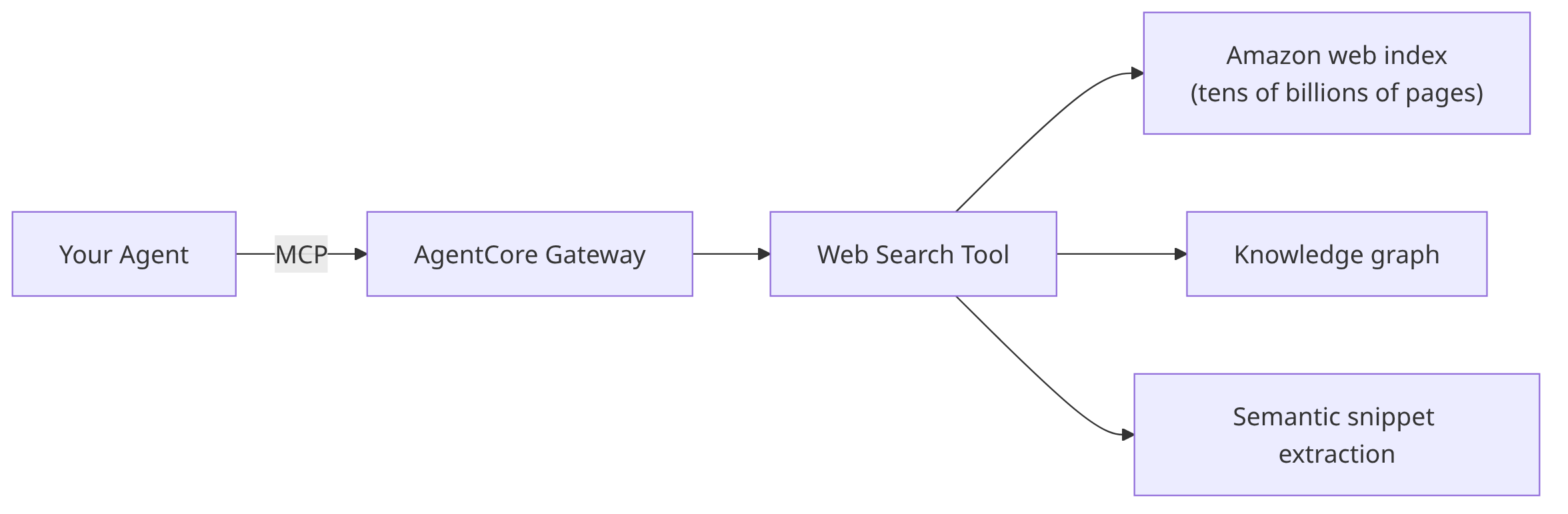
[Image1.Web Search Tool: via the AgentCore Gateway, it calls Amazon’s own web search engine, the knowledge graph, and semantic snippet extraction] |
Its advantages fall into four areas:
- Broad coverage: Amazon’s own web search engine spans tens of billions of pages, so it can answer long-tail questions too — not just the most popular pages.
- Continuously updated: the index refreshes constantly, and new content appears within minutes. Ask what happened today, and you get today’s events.
- Knowledge graph for grounded facts: for factual questions like “who holds a position” or “when was a company founded,” the knowledge graph gives high-confidence answers, reducing the fact drift that comes from a model stitching together page snippets alone.
- Semantic extraction built for model context: it returns query-relevant semantic snippets rather than whole HTML pages — higher information density per token and more precise citations.
In addition, queries are processed entirely within AWS and are not sent to a third-party search engine — a key advantage for teams with data-egress compliance requirements.
The Browser Tool: a managed, isolated browser sandbox

[Image2.Browser Tool: via the MCP service, it calls the AgentCore Browser Tool, driving a managed, isolated headless Chrome to read dynamic pages] |
A pure search tool can only give a page summary; reading the full main content of a specific URL requires a real browser. Advantages of the AgentCore Browser Tool:
- Managed, zero ops: no need to maintain your own browser cluster; sessions are managed by AWS and auto-reclaimed.
- Isolated and observable sessions: each session runs in an isolated, containerized environment, with CloudTrail auditing and session-replay capabilities.
- Handles dynamic pages: a real Chrome engine can execute JavaScript and read modern pages that require rendering, not just static HTML.
Combine the two, and your agent gains a complete loop: search with Amazon’s engine first, then read closely with a real browser.
5. Cost
The cost structure of this solution is clear:
- The tool calls themselves consume no extra LLM tokens: searching and reading a page are actions that call AgentCore directly, with no extra LLM inference on the request path. But note: the agent’s decisions — whether to search and which page to read — are usually still driven by model inference; and once search results and page content flow back into the conversation context, they are billed as input tokens by the model as usual (often the bulk of tokens in web-browsing scenarios).
- Usage-based billing: Web Search is billed per number of queries; the Browser Tool is billed by active resource consumption (vCPU-hours + memory GB-hours, billed per second, with idle and I/O-wait time free), rather than by a session’s wall-clock hold time. The service has built-in idle reclamation and a concurrency cap for browser sessions, preventing forgotten sessions from continuing to consume resources.
- Lightweight infrastructure: the service itself is a stateless adapter layer with a tiny footprint on EKS (default request roughly 0.1 vCPU / 128Mi).
Actual costs follow official AWS pricing; during testing, use AWS Cost Explorer to monitor your actual AgentCore usage.
6. Summary
With the managed Web Search and Browser tools in Amazon Bedrock AgentCore, you can give any agent real-time web search and browsing through a single standard MCP endpoint — and:
- Integration is minimal — the client needs just one URL plus one token
- Deployment is minimal — AWS CLI initialization plus a single
helm installto go live
- Data stays inside AWS, search results are well-grounded and cited, and the tool calls themselves consume no extra model tokens.
Whether you’re building a customer-service agent, a research assistant, or a competitor-monitoring tool, this is a low-effort, fast way to add web access. Try it today in your own AWS account.
7. References
- Amazon Bedrock AgentCore product page
- Amazon Bedrock AgentCore developer documentation
- Model Context Protocol (MCP) specification
- Amazon EKS User Guide: IAM Roles for Service Accounts (IRSA)
*Region availability and API details mentioned in this post are subject to change; refer to the official AWS documentation.*
*Amazon Web Services currently deploys the aforementioned certain generative AI-related services in Global regions. Amazon Web Services China region services are operated by NWCD and Sinnet, with more details at the official Amazon Web Services China region website.