AWS Security Blog
Optimize security operations through an AWS Security Hub POC
April 27, 2026: This post was first published in September 2025 when the enhanced AWS Security Hub was in public preview. It has since been updated to reflect the general availability of Security Hub. This revision also provides a more detailed, step-by-step framework for planning your POC.
AWS Security Hub prioritizes your critical security issues and helps you respond at scale to protect your environment. The service sharpens findings through aggregation, correlation, and enrichment of AWS native security signals into actionable insights, enabling faster and more efficient response times. You can use these capabilities to gain visibility across your cloud environment through centralized management in a unified cloud security solution. Security Hub creates a cloud-native application protection platform (CNAPP) and through the AWS free trial, you can create a comprehensive proof of concept (POC) evaluation without significant upfront investment in time or resources.
In this blog post, we guide you through planning and implementation POC for Security Hub to assess the implementation, functionality, cost estimate, and value of Security Hub in your environment. We walk you through the following steps:
- Understand the value of Security Hub
- Determine success criteria for the POC
- Define Security Hub configuration
- Prepare for deployment
- Enable Security Hub
- Validate deployment
Understand the value of Security Hub
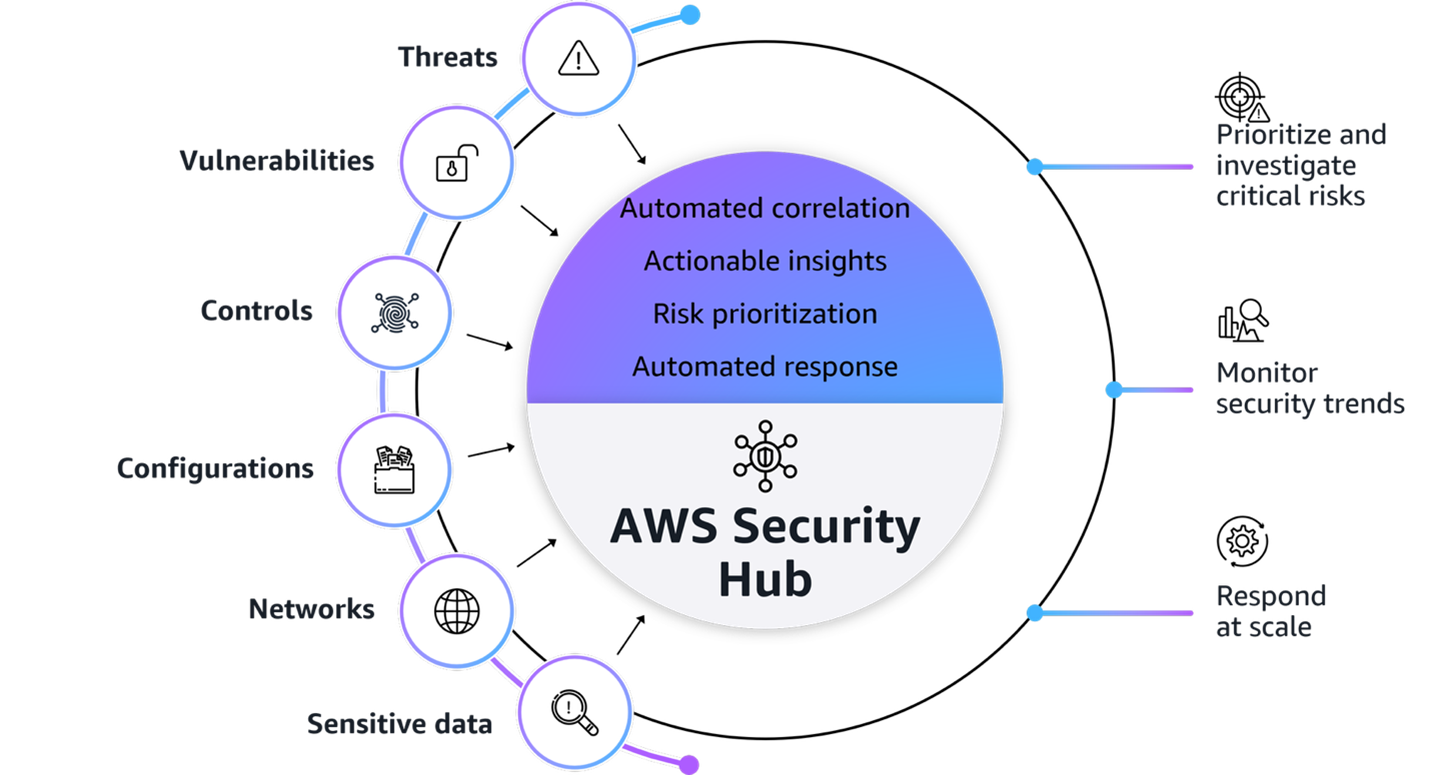
Figure 1: AWS Security Hub overview
Figure 1 provides a visualization of how Security Hub unifies signals from multiple AWS security services, partner solutions capabilities. The signals, which are ingested by Security Hub from multiple AWS security services and curated partner solutions include:
- Threats: Amazon GuardDuty findings
- Vulnerabilities: Amazon Inspector vulnerability findings
- Controls: AWS Security Hub CSPM findings
- Configurations: Resource inventory
- Network exposures: Amazon Inspector network reachability findings
- Sensitive data: Amazon Macie findings
- Extended Plan: Curated partner solutions
At its core, Security Hub provides four key capabilities in one unified solution:
- Unified security operations: Security Hub delivers a unified security operations experience, bringing your security signals into a single consolidated view and avoiding the need to switch between multiple security tools. This provides comprehensive visibility across your entire estate, including AWS, multi-cloud, and on-premises, so your security teams can efficiently detect, prioritize, and respond to potential security risks.
- Intelligent prioritization helps focus on what matters most: Security Hub helps you identify and prioritize critical security risks that might be missed when viewing findings in isolation. Security findings are correlated by analyzing resource relationships and signals from AWS security services and capabilities.
- Actionable insights guide security teams on next steps: Gain actionable insights through advanced analytics to transform correlated findings into clear, prioritized insights that highlight the most critical security risks in your environment. You can quickly understand potential impacts, visualize relationships, and identify which security issues pose the greatest risk to critical resources.
- Streamlined security response and automation capabilities: Security Hub enhances your security operations by enabling streamlined response capabilities. It seamlessly integrates with your existing ticketing systems to help facilitate efficient incident management.
With this integrated approach your security team can:
- Investigate critical risks that need immediate attention from a single pane of glass
- Monitor security trends and attack surface across your environments
- Fix what really matters across the entire attack chain and path
- Automate responses to streamline remediation
Understand the Open Cybersecurity Schema Framework
Security Hub uses the Open Cybersecurity Schema Framework (OCSF) to help standardize security data and analysis and enable better integration between security tools. This standardization helps simplify how security findings are structured and analyzed across your environment. This standardized data model enables seamless integration and data exchange across your security tooling, providing normalized and consistent data formats. When implementing your Security Hub POC, make sure that you’re familiar with the OCSF specifications Security Hub uses.
Additionally, confirm that any analytics or security information and event management (SIEM) tools you plan to integrate with support the OCSF data format to maximize the value of the consolidated security insights provided by Security Hub.
Determine success criteria
Establishing success criteria helps benchmark the outcomes of the POC with the goals of the business. Some example criteria and key performance indicators (KPI) include:
- Alert consolidation metrics: Determine what resources you’re currently using to correlate security events and signals to understand their relationship. Review the process and note if it’s completed outside of AWS or through a SIEM. By setting a benchmark to reduce correlation overhead you can significantly improve efficiency and accelerate security investigations and posture improvement.
- Response time improvements: Reducing your time to detect, investigate, and resolve security events and improve security posture is essential to streamlined security operations. Security Hub provides visualizations for potential attack paths that adversaries could use to exploit resources and helps assess the potential blast radius.
- Reduced mean time to detect (MTTD) security incidents.
- Reduced mean time to response (MTTR) for critical findings.
- Reduced time to identify potentially affected resources in blast radius.
- Increased accuracy of attack path analysis.
- Number of controls implemented based on attack path insights (post investigation).
- Automation capabilities: Having response playbooks as part of your incident management and response plan helps ensure comprehensive investigations lead to improved security posture. Review your automation capabilities to see if portions of or entire playbooks can be automated.
- Potentially increased percentage of security findings automatically routed to the correct teams by using Jira Cloud, ServiceNow, or a third-party tool.
- Reduced average time from detection to ticket creation.
- Severity and risk classification: Review your organization’s inventory of assets to determine if it’s complete and if you can use telemetry to determine the severity level and associated risks.
- Reduced time to identify critical resources and service coverage gaps affected by new vulnerabilities, threats, and misconfigurations.
- Faster and more accurate severity label and risk calculation of findings.
- Reduced time to identify service gap coverage.
After establishing your success criteria, it’s essential to evaluate organizational readiness and potential constraints that might impact your POC implementation. Begin by conducting a comprehensive assessment of your current environment: Determine if the foundational security services (GuardDuty, Amazon Inspector, Security Hub CSPM, and Macie) are enabled across your accounts, and identify your critical workloads and if there are any excessive attack surfaces.
Review your success criteria to make sure that your goals are realistic given your timeframe and potential constraints that are specific to your organization. For example:
- Do you have full control over the configuration of AWS services that are deployed in an organization?
- Do you have resources that can dedicate time to implement and test?
- Is this time convenient for relevant stakeholders to evaluate the service?
Maximize your POC value through service activation
To get the most comprehensive evaluation of the capabilities of Security Hub, coordinate the activation of underlying security services to optimize the overlapping trial periods available at no additional cost. The following is a list of the underlying security services, and their free trial length:
- Security Hub: 30-day trial (essential plan capabilities)
- GuardDuty: 30-day trial (covers most protection plans except GuardDuty Malware Protection)
- Security Hub CSPM: 30-day trial
- Macie: 30-day trial
- Amazon Inspector: 15-day trial
Consider enabling these services simultaneously so that you have at least two weeks of overlapping coverage to evaluate the full correlation and risk prioritization capabilities of Security Hub across each service. Optionally, if you want to conduct a POC with minimal configuration because of limitations, you can enable only Security Hub CSPM and Amazon Inspector during the initial POC phase to properly assess the results and data.
Note: Document your activation dates and trial expiration dates carefully. Create calendar reminders for trial end dates and schedule your key POC evaluation milestones to occur while services are active. This will help make sure that you can thoroughly assess the unified security operations capabilities of Security Hub when services are running at full capacity.
If you already have one or more of these underlying services enabled, you can proceed to enable the new Security Hub. To fully use the new Security Hub capabilities, particularly the exposure findings feature, specific service dependencies must be met, both Security Hub CSPM and Amazon Inspector are essential because they provide the telemetry needed for the Security Hub correlation engine and exposure findings. The combination enables Security Hub to deliver comprehensive risk analysis and prioritization by correlating configuration risks with runtime vulnerabilities. If you have other security services already enabled (such as GuardDuty or Macie), you can maintain these existing services while enabling Security Hub, and it will automatically begin incorporating their findings into its consolidated view, enhancing your overall security posture visualization.
Define your Security Hub configuration
After your success criteria have been established, you’re ready to plan your configuration. Some important decisions include:
- Select a delegated administrator: From the AWS Organizations management account, you can set a delegated administrator for your organization. As a best practice, we recommend using the same delegated administrator across security services for consistent governance and according to our AWS Security Reference Architecture (AWS SRA).
- Select accounts in scope: Define accounts you want to have Security Hub enabled for.
- Define AWS Regions: Determine Regional restrictions or considerations.
- Determine AWS service integrations: In addition to the core security capabilities of posture management and vulnerability management, Security Hub integrates signals from other AWS security services such as GuardDuty and Macie.
- Define third-party integrations:
- For ticketing, Security Hub integrates with popular service management systems such as Atlassian’s Jira Service Management Cloud and ServiceNow.
- Partners who already support or intend to support the OCSF schema to receive findings from Security Hub include companies such as Arctic Wolf, CrowdStrike, DataBee, Datadog, DTEX Systems, Dynatrace, Fortinet, IBM, Netskope, Orca Security, Palo Alto Neworks, Rapid7, Securonix, SentinelOne, Sophos, Splunk, Sumo Logic, Tines, Trellix, Wiz, and Zscaler.
- Service partners such as Accenture, Caylent, Deloitte, IBM, and Optiv can help you adopt Security Hub and the OCSF schema.
- Use the Security Hub cost estimator: Use the Security Hub Cost Estimation Tool for a pre-enablement cost estimate based on your current spend on Amazon Inspector, Security Hub CSPM, and GuardDuty.
Prepare for deployment
After determining your success criteria and Security Hub configuration, identify stakeholders, desired state, and timeframe. Prepare for deployment by completing:
- Project plan and timeline: Develop a project plan with defined success criteria, scope boundaries, key milestones, and realistic implementation timelines. Suggested timeline of events:
- Before enablement:
- Validate core security service configuration for GuardDuty, Amazon Inspector, Security Hub CSPM, and Macie
- Request approvals for free trial from appropriate stakeholders
- Day 0 – Enable the service, become comfortable with the Security Hub layout and begin training security personnel
- Week 1 – Validate desired coverage of threat detection, vulnerability management, and posture management across accounts and Regions
- Week 2 – Connect to IT service management (ITSM) tools and begin creating automations for critical workloads and resources
- Week 3 – Execute a tabletop exercise in response to a selected exposure finding
- Week 4 – Analyze trends of threats and exposures from day 1 through week 4
- Before enablement:
- Identify stakeholders: Identify CISO, information security teams, SOC personnel, incident response teams, security engineers, finance, legal, compliance, external MSSPs, and business unit representatives.
- Develop a RACI matric: Create a detailed RACI chart defining roles and responsibilities across the incident response lifecycle, facilitating accountability and proper communication channels.
- Configure management account access: Secure authorization to delegate administrative access. For more information, see Permissions required to designate a delegated Security Hub administrator account.
- Set up IAM roles and permissions: Use AWS Identity and Access Management (IAM) roles to implement role-based access controls aligned with the RACI chart, including case management, escalation, and read-only roles using AWS managed policies. For more information, see AWS Managed Policies
Enable Security Hub
AWS security services integrate with AWS Organizations to help you centrally manage Security Hub.
- If you haven’t already done so, enable Security Hub CSPM and Amazon Inspector at a minimum. Also enable any other AWS security services that you want to integrate with Security Hub.
- Enable Security Hub for your organization from the organization management account.
- If setting a delegated administrator for Security Hub, see Setting a delegated administrator account in Security Hub from the management account.
Note: As a best practice, we recommend using the same delegated administrator across security services for consistent governance.
- Sign in to the delegated administrator with an IAM policy that gives you permission to enable and disable member accounts. With this policy, you will have granular control to decide what Regions you want enabled.
- Configure Security Hub plans for deployment. Security Hub comes with the Essentials, Threat Analytics, and Extended plans.
- Configure third-party integrations to create incidents or issues for Security Hub findings.
Note: After you enable Security Hub, exposure findings in your environment are created and analyzed immediately. However, it can take up to 6 hours to receive an exposure finding for a resource.
Validate deployment
The final step is to confirm that Security Hub is configured correctly and to evaluate the solution against your success criteria.
- Validate policy: Verify that you have the correct permissions to manage member accounts and Regional restrictions are configured correctly.
- Validate integrations: Verify that tickets with ServiceNow or Jira Cloud are working correctly by signing in to the AWS Management Console for Security hub and choosing Inventory in the navigation pane. Select Findings and verify there is a ticket ID in your finding.
- Assess success criteria: Determine if you achieved the success criteria that you defined at the beginning of the project.
Conclusion
In this post, we showed you how to plan and implement an effective Security Hub POC. You learned how to do so through phases, including defining success criteria, configuring Security Hub, and validating that Security Hub meets your business needs. Take advantage of the trial periods to maximize your testing window without incurring significant costs. Throughout the POC, maintain focus on your predefined success criteria while remaining open to unexpected benefits or challenges that might arise. Maintain open communication with your AWS account team to address any questions or concerns to help you get the most out of your Security Hub POC experience.
Additional resources
- AWS Security Hub User Guide
- How to prioritize security risks using AWS Security Hub
- How to onboard to AWS Security Hub
- Streamline security response at scale with AWS Security Hub automation
If you have feedback about this post, submit comments in the Comments section below. If you have questions about this post, contact AWS Support.