Microsoft Workloads on AWS
Active Directory deployment options for Microsoft Office on Amazon EC2
In this blog, we will first review AWS License Manager’s latest feature release for multiple Active Directory registration support when using Microsoft Office on Amazon Elastic Compute Cloud (Amazon EC2) and then compare it to other Active Directory architectures to see which deployment option is right for you.
Microsoft Office is available for Amazon EC2 as a per-user subscription through AWS License Manager. Amazon Web Services (AWS) provides licenses that have a per-user subscription fee with no long-term licensing commitments. This subscription service lets you adjust your Microsoft Office user subscriptions easily to meet your application needs.
AWS License Manager has a requirement when setting up Microsoft Office on EC2 to use AWS Directory Services for AWS Managed Microsoft Active Directory (AWS Managed AD). AWS Managed AD provides a fully managed Active Directory service in the AWS Cloud. AWS manages the domain controller hosts, recovery, Active Directory replication, snapshots, and updates, which allows you to easily run Active Directory aware workloads while focusing on user management activities.
Multiple Active Directory registration support for Microsoft Office
Since the introduction of user-based licensing offerings, AWS License Manager has been increasing Active Directory feature support for different customer use cases. Last year, AWS License Manager expanded support for shared AWS Managed AD with user-based subscriptions. This year, AWS License Manager is now supporting the registration and use of multiple Active Directories with Microsoft Office.
Feature support for multiple Active Directory registrations was introduced for customers who are running multiple AWS Managed AD deployments in the same AWS account and region. For example, if you had a single AWS account with a separate Virtual Private Cloud (VPC) for each of your clients, each with their own AWS Managed AD domain. This is especially typical for Independent Software Vendors (ISVs) who provide environments to their clients to access their software.
Let’s see how this architecture differs from other Active Directory deployment options.
Active Directory design options for Microsoft Office on Amazon EC2
There are different Active Directory architectural solutions for using Microsoft Office on Amazon EC2. These design solutions depend on your AWS account structure, client architecture, and whether you need to incorporate Self-managed Active Directory.
Single Active Directory
The standard design for running Active Directory with Microsoft Office on EC2 is to use a single AWS Managed AD deployment (Figure 1).
The AWS Managed AD will be registered with License Manager, while the server running Microsoft Office will join the AWS Managed AD domain. User accounts will live in the AWS Managed AD domain and subscribe to Microsoft Office through AWS License Manager.
This solution is ideal if you’re looking to use Microsoft Office on Amazon EC2 instances in a single AWS account.
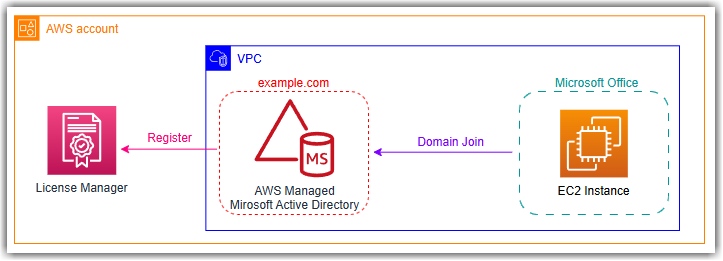
Figure 1. Standard Active Directory design for Microsoft Office on Amazon EC2
Self-managed Active Directory
While AWS Managed AD is a requirement to use Microsoft Office on Amazon EC2, it doesn’t mean Self-managed Active Directory is completely unsupported. To incorporate your Self-managed AD, it will require an AWS Managed AD registered with License Manager to act as a bridge between your existing user accounts and the Microsoft Office deployment (Figure 2).
Just like with the single AD architecture, the AWS Managed AD will be registered with License Manager, while the server running Microsoft Office will join the AWS Managed AD domain. However, user accounts will stay in your Self-managed AD domain. This solution will require the use of a two-way Active Directory Trust so the EC2 instance joined to the AWS Managed AD domain can trust the user accounts from the Self-managed AD domain.
This solution is intended for scenarios where you need to use Microsoft Office on EC2 but also want to remain in control of your Active Directory infrastructure.
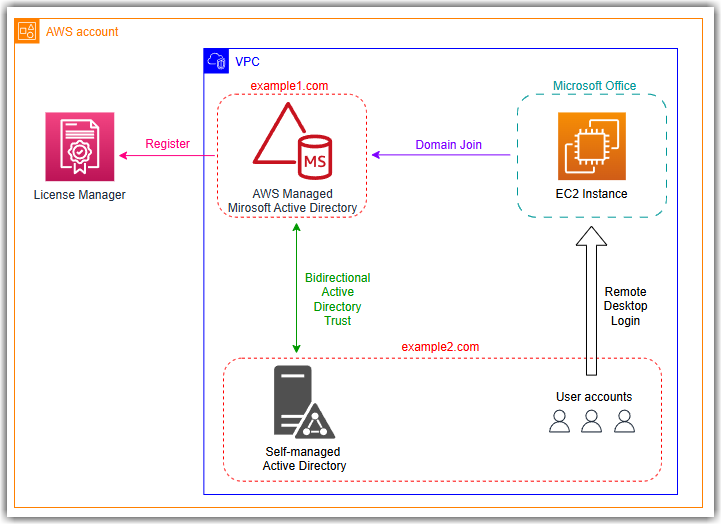
Figure 2. Using Self-managed Active Directory with Microsoft Office on Amazon EC2
Multiple Active Directory Registrations
Using multiple Active Directory registrations is ideal when you have different, segregated workloads running within the same AWS account. Each VPC either has:
- its own independent AWS Managed AD registered with License Manager, or
- VPC peering to a single other VPC with a registered AWS Managed AD.
In this architecture, you could have multiple business units running in the same AWS account without interfering with one another (Figure 3).
When you launch an instance with a Microsoft Office user-based subscription product, AWS License Manager automatically determines which registered Active Directory to use for activation:
- A Direct VPC match will be used when a VPC has an AWS Managed AD registered with License Manager.
- A Peered VPC match will be used if the Amazon EC2 instance is launched in a VPC which is peered to a single VPC where an AWS Managed AD is registered (only one accessible AD per VPC).
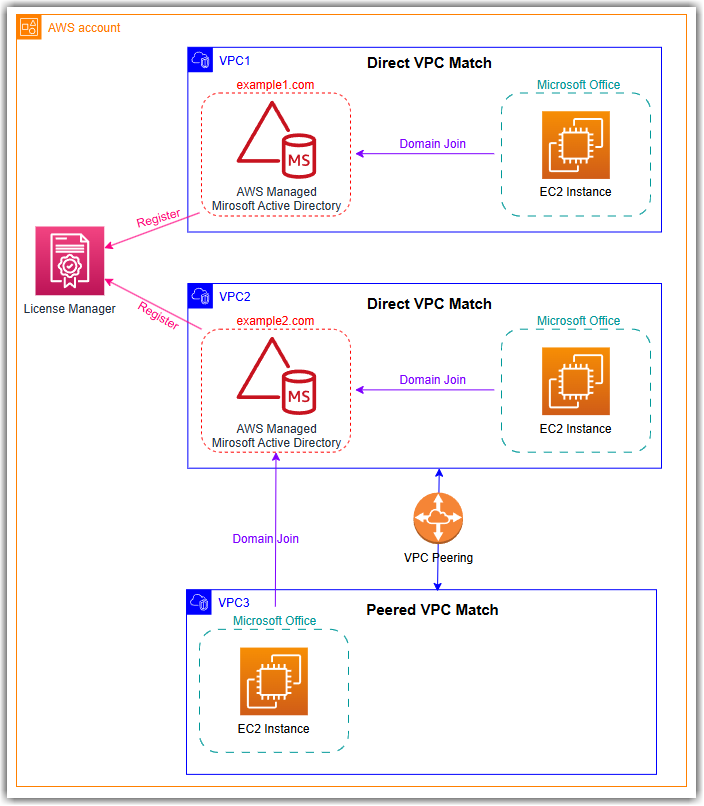
Figure 3. Using Multiple Active Directories with Microsoft Office on Amazon EC2
Sharing an AWS Managed AD
If you are using multiple AWS accounts with AWS Organizations, using a shared AWS Managed AD is the simplest and most cost-efficient architecture because it reduces redundant infrastructure costs.
In this design, AWS License Manager has registered a single AWS Managed AD domain which is shared with other AWS accounts in the organization (Figure 4). By configuring directory sharing on your AWS Managed AD, it allows AWS services in other AWS accounts within your AWS Organizations to reference the directory. This does not require an AD trust because all user and compute objects live in the centralized AWS Managed AD running in the directory owner account.
For more information on configuring directory sharing, see Simplify AWS License Manager user subscription management by sharing AWS Managed Microsoft Active Directory.
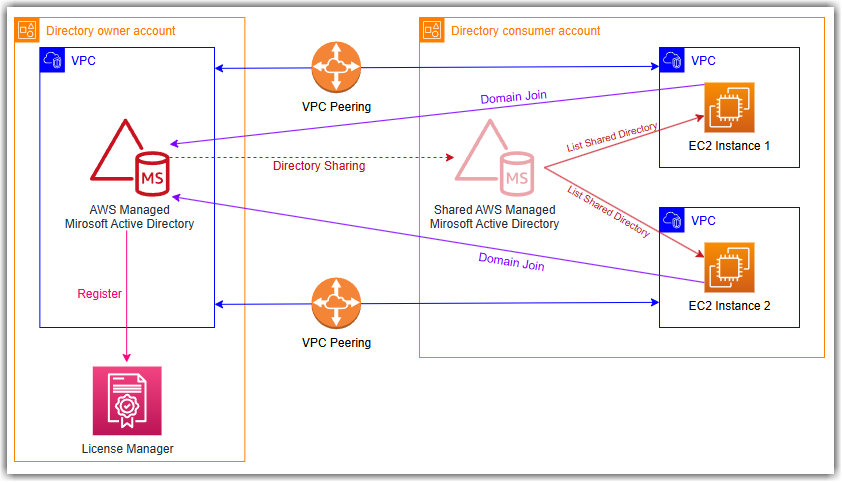
Figure 4. Using Shared AWS Managed AD with Microsoft Office on Amazon EC2
Conclusion
In this blog post, we reviewed AWS License Manager’s latest feature support for multiple Active Directory registrations when using Microsoft Office on Amazon EC2 and then showed how it compared it to other Active Directory deployment architectures.
Whether you have existing workloads running in AWS today or you’re just starting with Microsoft Office on Amazon EC2, AWS has an Active Directory design which can meet your needs. To get started, visit the AWS Marketplace page.