AWS Database Blog
Category: Technical How-to
Unlock Amazon Aurora’s Advanced Features with Standard JDBC Driver using AWS Advanced JDBC Wrapper
In this post, we show how you can enhance your Java application with the cloud-based capabilities of Amazon Aurora by using the JDBC Wrapper. Simple code changes shared in this post can transform a standard JDBC application to use fast failover, read/write splitting, IAM authentication, AWS Secrets Manager integration, and federated authentication.
Configure Optimize CPU on Amazon RDS for SQL Server
Amazon Relational Database Service (Amazon RDS) for SQL Server now offers the Optimize CPU feature, which enabled control over vCPU allocation through core count modification setting. SQL Server licensing costs can consume a significant portion of your database budget, especially when you’re paying for vCPUs that aren’t fully utilized. This post demonstrates how to implement the Optimize CPU feature to potentially reduce licensing costs while maintaining performance for both new and existing Amazon RDS instances, along with performance benchmarking results and cost implications.
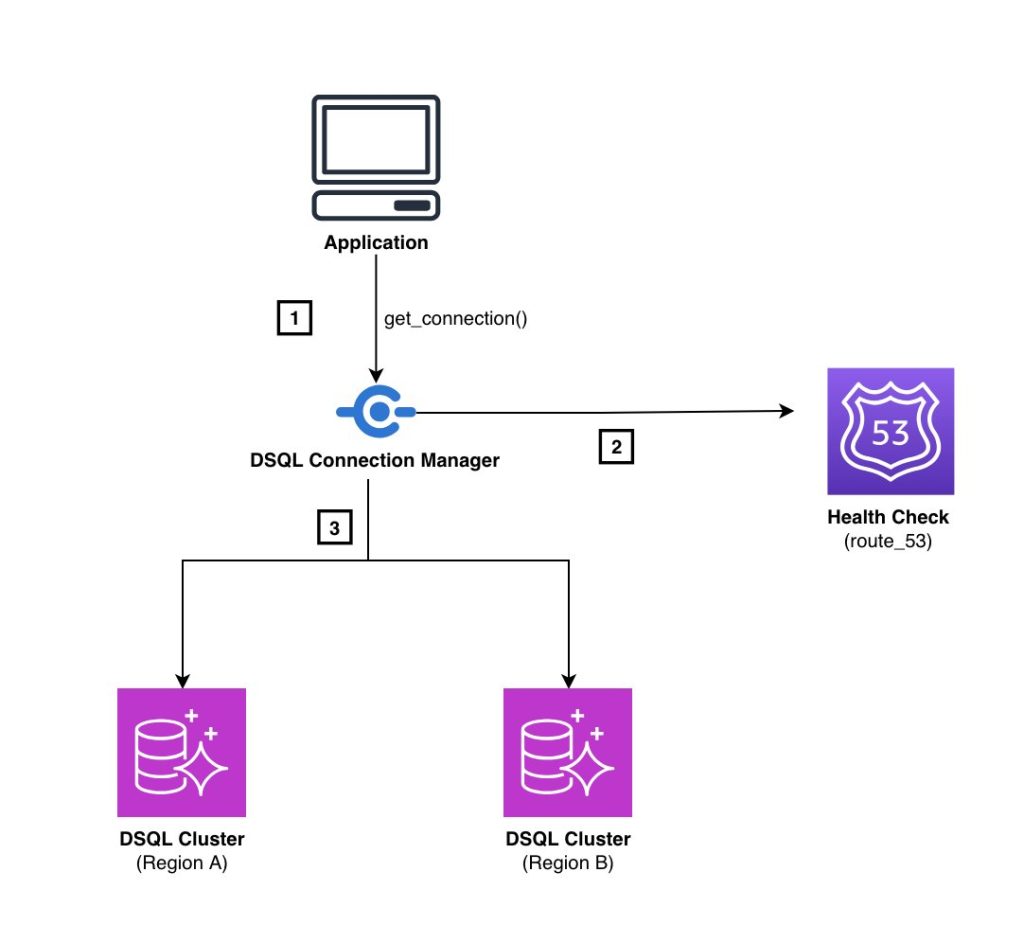
Implement multi-Region endpoint routing for Amazon Aurora DSQL
Applications using Aurora DSQL multi-Region clusters should implement a DNS-based routing solution (such as Amazon Route 53) to automatically redirect traffic between AWS Regions. In this post, we show you automated solution for redirecting database traffic to alternate regional endpoints without requiring manual configuration changes, particularly in mixed data store environments.
Optimizing correlated subqueries in Amazon Aurora PostgreSQL
Correlated subqueries can cause performance challenges in Amazon Aurora PostgreSQL which can cause applications to experience reduced performance as data volumes grow. In this post, we explore the advanced optimization configurations available in Aurora PostgreSQL that can transform these performance challenges into efficient operations without requiring you to modify a single line of SQL code.
Create a SQL Server Developer Edition instance on Amazon RDS for SQL Server
In this post, we show you how to create and deploy SQL Server Developer Edition on Amazon RDS.
Configure additional storage volumes with Amazon RDS for SQL Server
With the introduction of the additional storage volume feature, you can now attach up to three additional storage volumes to your Amazon RDS for SQL Server instances. By using this feature, you can distribute your data and log files across multiple volumes. This enhancement offers more granular control over storage configuration and performance optimization. In this post, you will learn about the following scenarios: Adding a new storage volume, Scaling an existing storage volume, Restoring a database on an additional storage volume, and Deleting a storage volume.
Build and explore Knowledge Graphs faster with Amazon Neptune using Graph.Build and G.V() – Part 2
This is a guest blog by Arthur Bigeard, Founder at gdotv, in partnership with Charles Ivie, Sr Graph Architect at AWS. G.V() is a graph database IDE available for Desktop or on AWS Marketplace, offering extensive graph visualization and querying capabilities for Amazon Neptune and Neptune Analytics. In Part 1 of this series, we demonstrated […]

Build and explore Knowledge Graphs faster with Amazon Neptune using Graph.Build and G.V() – Part 1
This is a guest blog post by Richard Loveday, Head of Product at Graph.Build, in partnership with Charles Ivie, Graph Architect at AWS. The Graph.Build platform is a dedicated, no-code graph model design studio and build factory, available on AWS Marketplace. Knowledge graphs have been widely adopted by organizations, powering use cases such as social […]
Build a fitness center management application with Kiro using Amazon DocumentDB (with MongoDB compatibility)
In this post, we walk through how we used Kiro, an agentic Integrated Development Environment (IDE), to build a complete fitness center management application that digitizes paper-based fitness tracking. We explore Kiro’s spec-driven development workflow and see how it transforms complex application development into a streamlined, iterative process. Our solution uses Amazon DocumentDB as the backend.

Exploring Optimize CPU feature on Amazon RDS for SQL Server
Amazon RDS for SQL Server now supports the Optimize CPU feature. With the Optimize CPU feature you can define the number of vCPUs when you launch new instances or when modifying existing database instances. This feature also provides a detailed billing breakdown of RDS infrastructure costs, and licensing costs for SQL Server and Windows OS. It is available starting from the 7th Generation instance class. In this post, we explore how to use the Optimize CPU feature with Amazon RDS for SQL Server.