AWS Database Blog
From bottlenecks to breakthroughs: Dutchie’s database migration journey
Dutchie, a leading technology platform serving the cannabis industry, manages critical operations for thousands of dispensaries across multiple states, processing millions of transactions annually. In this post, we explore how Dutchie successfully navigated the challenges of migrating mission-critical workloads to Amazon RDS for SQL Server in preparation for 4/20 week in 2025.
Automating Amazon RDS backup and maintenance windows for Daylight Saving Time shifts
In this post, you’ll learn how to deploy a serverless solution using AWS CloudFormation that automatically adjusts RDS maintenance and backup windows for DST transitions.
Set up and troubleshoot IAM database authentication in AWS DMS
In this post, we demonstrate how to configure IAM database authentication in AWS Database Migration Service (AWS DMS). You’ll also learn the structured troubleshooting approach you follow to address the errors when configuring IAM database authentication with AWS DMS
Replicate spatial data using AWS DMS and Amazon RDS for PostgreSQL
In this post, we show you how to migrate spatial (geospatial) data from self-managed PostgreSQL, Amazon RDS for PostgreSQL, or Amazon Aurora PostgreSQL-Compatible Edition to Amazon RDS for PostgreSQL or Amazon Aurora PostgreSQL using AWS DMS. Spatial data is useful for applications such as mapping, routing, asset tracking, and geographic visualization. We walk through setting up your environment, configuring AWS DMS, and validating the successful migration of spatial datasets.
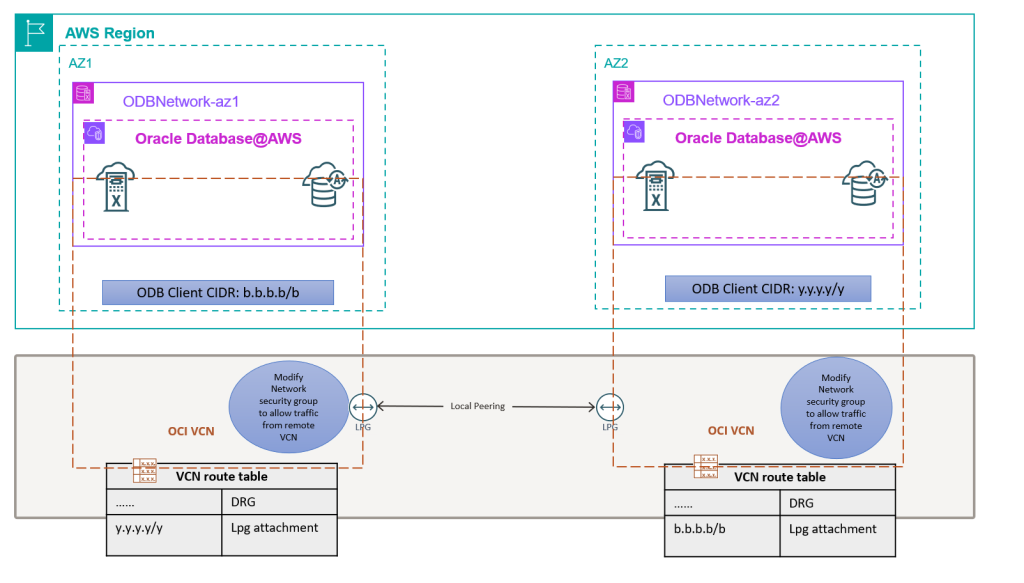
Well-Architected design for resiliency with Oracle Database@AWS
Oracle Database@AWS delivers enterprise-grade database capabilities through database services that use Oracle Exadata infrastructure managed by Oracle Cloud Infrastructure (OCI) within Amazon Web Services (AWS) data centers. High availability (HA) and disaster recovery (DR) options are important aspects to consider when migrating or deploying your critical database in Oracle Database@AWS to help make sure the architecture can meet the service level agreement (SLA) of the application. This post will help you implement and maintain Data Guard configurations that follow Oracle’s Maximum Availability Architecture (MAA) best practices and the AWS Well-Architected Framework. We will show how to select the right network architecture and configure Data Guard associations for both cross-AZ and cross-Region deployments, making sure your applications maintain seamless connectivity during role transitions.
Resilience testing on Amazon ElastiCache with AWS Fault Injection Service
In this post, we guide you on how to run resilience tests on Amazon ElastiCache using AWS Fault Injection Service and how you can use it to strengthen the resilience strategy of your application.
Upgrade legacy Amazon RDS file systems to increase storage capacity and improve performance with minimal downtime
Amazon RDS instances running on legacy file systems face several limitations. Storage is capped at 16 TiB, and some engines, including MySQL, MariaDB, and PostgreSQL, may encounter per-file size limits of approximately 2 TiB due to file system constraints, even though the database engines themselves support larger objects. In this post, I show you how to upgrade an RDS instance to the current file system with minimal downtime using Amazon RDS blue/green deployments.
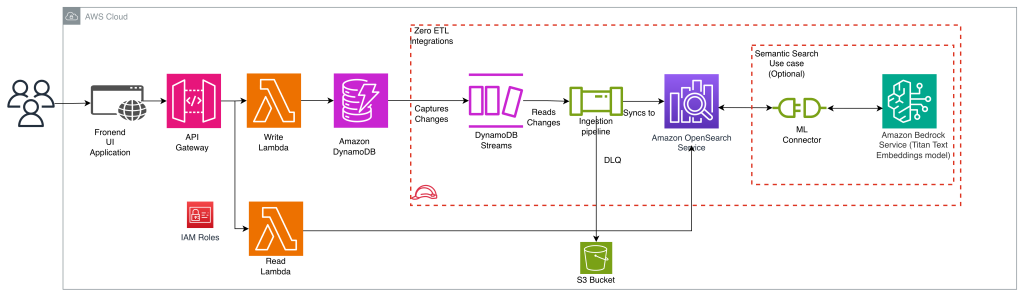
Implementing search on Amazon DynamoDB data using zero-ETL integration with Amazon OpenSearch service
In this post, we show you how to implement search on Amazon DynamoDB data using the zero-ETL integration with Amazon OpenSearch Service. You will learn how to add full-text search, fuzzy matching, and complex search queries to your application without building and maintaining data pipelines.
Use default encryption at rest for new Amazon Aurora clusters
In this post, you learn how Amazon Aurora now provides encryption at rest by default for all new database clusters using AWS owned keys. You’ll see how to verify encryption status using the new StorageEncryptionType field, understand the impact on new and existing clusters, and explore migration options for unencrypted databases.
Streamline Amazon RDS management with consolidation techniques – Part 2
This post is the second in a series of two dedicated to Amazon RDS consolidation. In the first post, we discussed the challenges, opportunities, and solution patterns for Amazon RDS consolidation. In this post, we introduce RDS Consolidator, a practical tool designed to optimize Amazon RDS database consolidation.