AWS in Switzerland and Austria (Alps)
Establish multi-region connectivity from the AWS (Europe) Zurich region with AWS Direct Connect
Introduction
AWS Direct Connect (DX) offers a dedicated, high-speed physical network connection between customers’ on-premises infrastructure (data centers, offices or co-location environment) and AWS, bypassing the public internet. AWS Direct Connect leverages the AWS Global network backbone allowing for more reliability, consistent network performance, all while reducing cost. It is ideal for enterprises needing stable, secure connections for efficient data transfer and hybrid cloud architectures.
The AWS Europe (Zurich) region enables customers in regulated industries with data residency requirements to store data securely in Switzerland, while providing low latency. Businesses can leverage AWS’s global network backbone to adopt multi-region strategies that enhance resiliency, availability, and performance across their worldwide operations. Relying on a single last-mile connectivity provider for Direct Connect links could potentially introduce a single point of failure, making networks vulnerable to disruptions.
This blog explores how businesses can leverage AWS’s global network infrastructure to establish resilient multi-region direct connections, highlighting the benefits and best practices through real-world examples. Adopting this approach enables organizations to strengthen their network architecture across multiple regions, ensuring continuous service delivery while maintaining a competitive edge in a highly connected world.
AWS Direct Connect Concepts
This section will introduce and define the key terminology used throughout the blog post. Understanding these concepts will provide you with the necessary context to grasp the more complex aspects of designing and implementing a robust hybrid cloud network foundation.
- Co-location data center: is a type of data centre where multiple businesses can rent space for servers and other computing hardware. These facilities offer the building, cooling, power, upstream connection, and physical security.
- Last-mile connectivity refers to the network connection between your on-premises network and the AWS Direct Connect location. This connection is typically provided by an AWS Partner or network carrier.
- Dedicated Direct Connect connection: is a direct and dedicated physical link that you own. It connects your on-premises to AWS point of presence.
- Hosted Direct Connect connection: is a shared connection provisioned through AWS Direct Connect Delivery Partner. Hosted connection are shared between multiple customers, therefore they have some limitations in number of virtual interfaces (VIF) they support. The provisioned hosted connection is activated only when the customer accepts it in the AWS Console, CLI, or via API.
The following table provides a 1-to-1 comparison between Dedicated and Hosted connections:
| Feature/Attribute | Dedicated Connection | Hosted Connection |
| Port Speeds | 1, 10, 25, 100, 400 Gbps | 50-500 Mbps, 1, 2, 5, 10 Gbps |
| Virtual Interfaces | Up to 51 (including 4 transit VIFs) | 1 VIF |
| MACsec Encryption | Yes (10 and 100 Gbps ports) | No |
| LAG Support | Yes | No |
| Initial Setup Time | Weeks to months | Days to weeks |
| Infrastructure Management | Customer managed | Partner managed |
| SLA Availability | 99.99% | Varies by partner |
| Cost Model | Port-hour charges | Pay per allocated capacity |
| Contract Term | Minimum 1 year | Flexible, varies by partner |
| Physical Port Access | Direct access | Shared connection |
| Direct AWS Relationship | Yes | Through APN partner |
| Capacity Planning | Fixed capacity | Flexible scaling |
| Technical Expertise Required | High | Moderate |
| Cross-Connect | Customer responsibility | Partner managed |
| Location Options | AWS Direct Connect locations | Partner network locations |
Build Resilient Multi-region Connections on AWS
When implementing AWS Direct Connect, availability should be a top priority in your network design. While a single connection offers dedicated connectivity to AWS, there are several important factors to consider when building redundancy into your Direct Connect architecture.
These are some of the recommendations customers can take into consideration to enhance their connection availability and business continuity of their AWS workloads.
- Diversify Locations: Use multiple Direct Connect (DX) Locations to reduce the risk of localised outages.
- Redundant Connections: Establish at least two Direct Connect connections to different AWS Direct Locations (POP).
- Redundant Hardware & Providers: Use backup hardware and multiple telecom providers to avoid single point of failure.
- Active/Active Setup: Use dynamic routing for automatic failover and load balancing.
- Ample Bandwidth: Ensure enough capacity to handle traffic during failover.
- Hybrid Connectivity: Add AWS VPN as an extra backup.
- Regular Testing: Test failover and validate recovery procedures.
- Leverage AWS Tools: Use the AWS Direct Connect Resiliency Toolkit for the right setup.
Case Study: Reliance on a single network provider
Companies continually raise their service level objectives and want to provide uninterrupted services year-round. Ensuring robust connectivity is therefore a critical requirement.
A key challenge lies in designing network architectures that minimize single points of failure and provide seamless failover capabilities.
One such case involved an organization that discovered the risks of relying on a single network provider for their last-mile connectivity on both production and disaster recovery environments. Their architecture connected their on-premises environment to AWS Europe (Frankfurt) and AWS Europe (Ireland) regions via Direct Connect, but relied on the same partner for the last mile of the connection to both Direct Connect locations. This setup left them exposed to outages in the event of a disruption within the partner’s network. If the partner network went down, the organization’s production and disaster recovery environments in both AWS regions could become inaccessible, severely impacting operations.
In response to this risk, the organization turned to AWS Direct Connect in AWS Europe (Zurich), Switzerland, to enhance their network redundancy and improve resiliency with a second partner. By establishing a high-bandwidth, private connection between their on-premises data center and the AWS Cloud, the organization was able to optimize its architecture for better failover capability and performance.
The Organization’s Original Setup
Location: On-premises in Switzerland.
AWS Regions: Direct Connect connections to AWS regions Europe (Ireland) with code eu-west-1 and Europe (Frankfurt) with code eu-central-1
Connectivity: Relied on a single partner for last-mile connectivity to both Ireland and Frankfurt Direct Connect locations.
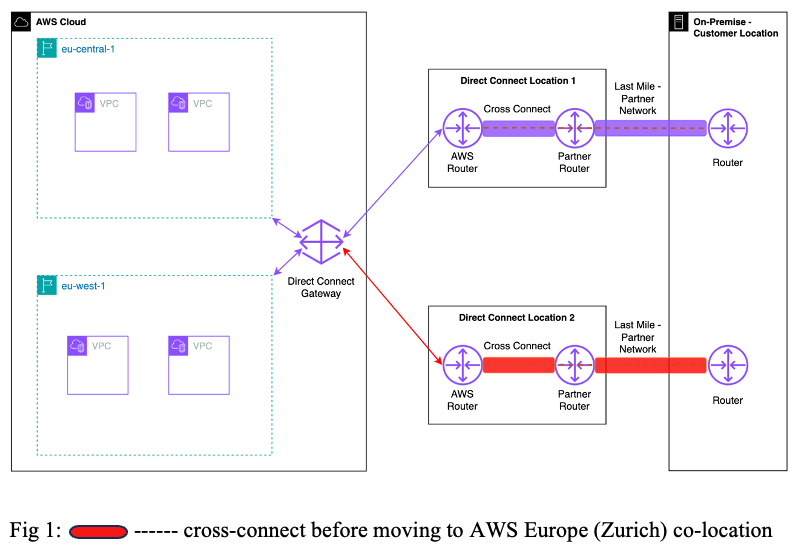
This setup had a major flaw, if the partner network experienced issues affecting connectivity to both Direct Connect locations, both AWS regions could become inaccessible simultaneously, causing a complete loss of redundancy.
The Solution:
The organization needed to diversify its network connectivity to address reliability concerns. Two solutions were considered: either partnering with different providers for last-mile connectivity to each AWS region, or utilizing the newly established Direct Connect location at the Equinix ZH5 co-location center in AWS Europe (Zurich).
Since the organization already had last mile access to Zurich and a router at the same co-location facility, they chose to utilize the new Zurich Direct Connect location 3 for one of their two connections. This reduced dependency on a single partner, lowered costs by eliminating one last mile partner network, and improved overall network resilience.
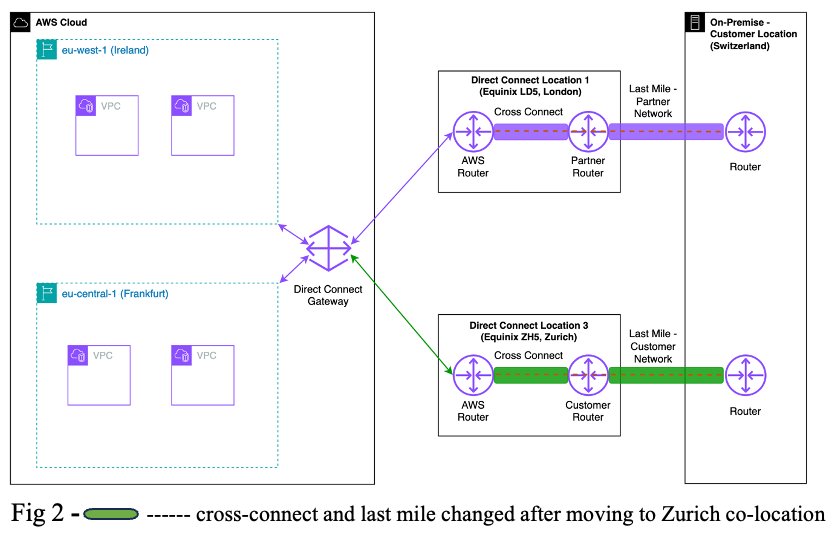
The new setup provided three key advantages:
- Enhanced Resilience: Diversifying last-mile connectivity eliminated the risk of simultaneous outages from a single provider.
- Cost Reduction: Using their own network for last-mile connectivity to Zurich decreased dependency on third-party partners, reducing costs.
- Performance Improvement: Connecting through the Zurich Direct Connect location improved network latency, boosting overall performance for both production and disaster recovery environments.
With regards to the Direct Connect Gateway design, high availability is inherently built into, eliminating the need for multiple Direct Connect gateways to achieve resilience while ensuring seamless connectivity between your on-premises infrastructure and AWS resources across multiple regions.
Step-by-step guide to establishing multi-region connectivity with AWS
In the following section, we describe how you can set up multi-region connectivity leveraging AWS global infrastructure and the AWS Europe (Zurich) region:
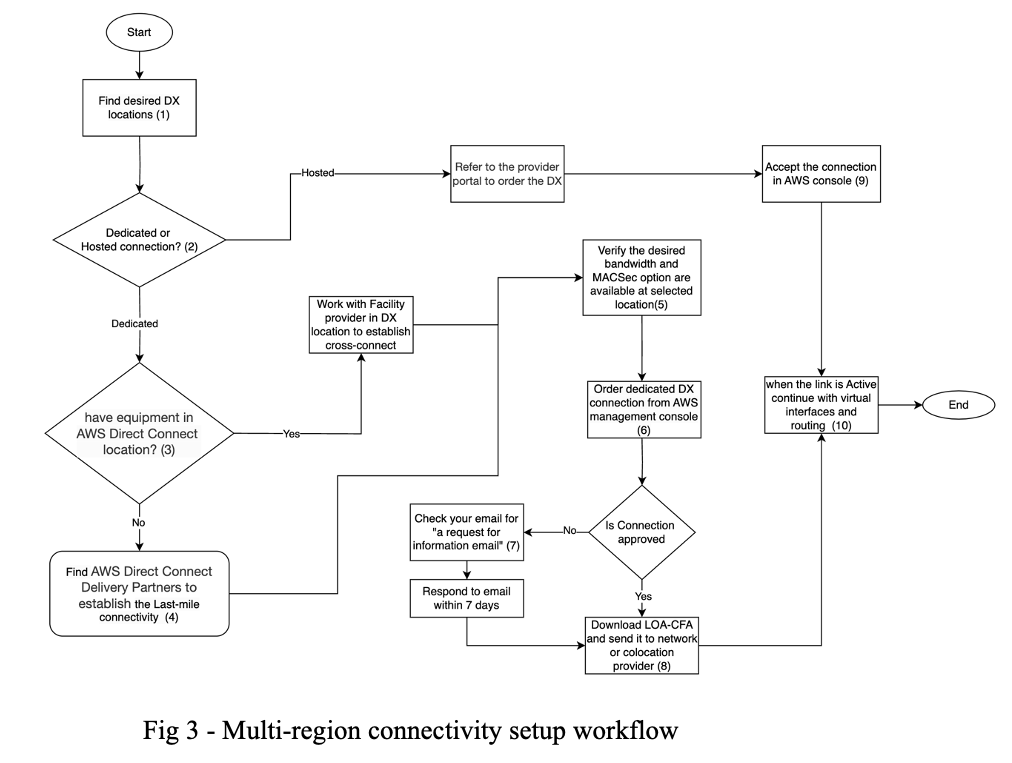
(1) First, choose your AWS Direct Connect location and determine the number of connections needed based on your resiliency requirements. When selecting a location, consider geographical proximity to your network to minimize latency.
To find AWS Direct Connect locations in the AWS Europe (Zurich) region:
- Enable the AWS Europe (Zurich) region in your account. For instructions, see Enabling and disabling AWS regions on your account.
- You can also read AWS Direct Connect available locations around the world from here.
Alternatively, you can list the available Direct Connect locations in your enabled regions using the following AWS CLI command:
for region in $(aws account list-regions \
--region-opt-status-contains ENABLED ENABLED_BY_DEFAULT \
--query "Regions[].RegionName" \
--output text | tr '\t' '\n')
do
aws directconnect describe-locations \
--region "$region" \
--query 'locations[].[region, locationCode, locationName]' \
--no-cli-pager \
--output text
done
(2) Choose your connection type base on the comparison matrix.
(3) In Switzerland, AWS has its own region and is also present in two main data centres, Digital Realty ZUR1 and Equinix ZH5. Find the details of EQZH5 and ZUR1 locations by running the following command:
#!/bin/bash
aws account list-regions \
--region-opt-status-contains ENABLED ENABLED_BY_DEFAULT \
--query "Regions[].RegionName" \
--output text | \
tr '\t' '\n' | \
while read -r region; do
aws directconnect describe-locations \
--region "$region" \
--query "locations[?contains(locationName, 'Zurich')]" \
--output table
done

The output shows (Fig4) Equinix ZH5 is associated with Europe (Zurich) – eu-central-2 while ZUR1 is associated with Europe (Frankfurt) – eu-central-1. This is just for the interal management purpose and doesn’t mean your traffic in ZUR1 location will be routed to Frankfurt if your workload on AWS are hosted in AWS Europe (Zurich) region. The traffic in AWS backbone always takes the shortest path to the destination.
(4) In case you don’t have presence in any of these two regions, to establish the physical link, you can either extend your last-mile connectivity directly to the AWS Direct Connect location leveraging your telecommunications provider or collaborate with an AWS Direct Connect Partner to set up the access.
Run the following command to identify the provider for last-mile connectivity in your region and reach out to them to initiate this process:
#!/bin/bash
aws account list-regions \
--region-opt-status-contains ENABLED ENABLED_BY_DEFAULT \
--query "Regions[].RegionName" \
--output text | \
tr '\t' '\n' | \
while read -r region; do
aws directconnect describe-locations \
--region "$region" \
--query 'locations[?contains(locationName, `Zurich`)].{
AvailableProviders: availableProviders[]
}' \
--output table
done
(5) Verify if the desired portSpeed and MAC security is available in selected Direct Connect location.
#!/bin/bash
for region in eu-central-2 eu-central-1; do
aws directconnect describe-locations \
--region $region \
--query "locations[?contains(locationName, 'Zurich')].{
LocationCode: locationCode,
LocationName: locationName,
MacSecSpeeds: availableMacSecPortSpeeds
}" \
--output table
done
(6) To order a new AWS Direct Connect connection follow the instructions at AWS Direct Connect User guide.
(7) After you order a dedicated Direct Connect connection in the AWS Console, you may receive a ‘Request for Information’ email if additional information is needed. You must respond to this email within 7 days. If you don’t respond within this timeframe, AWS deletes the connection order and you’ll need to submit a new order.
(8) The Letter of Authorization and Connecting Facility Assignment (LOA-CFA) is the authorization to connect to AWS, and is required by the network provider to order a cross connect on behalf of the customer. This document includes essential information like the location, cage, rack, patch panel, ports or strands where the customer is permitted to connect to AWS communications facilities.
Once you receive this document, you are responsible for provisioning connectivity to the specified communication facility and paying any associated fees.
(9) In case you ordered the Hosted Connection through AWS Partner portal, you must accept the hosted connection in the AWS Direct Connect console before you can create any virtual interfaces. Refer to AWS Direct Connect User guide for the details.
(10) When physical connectivity is established, the Direct Connect (DX) connection will change to an ‘available’ state in your Direct Connect management console. Now it’s time to associate the DX connection to a Direct Connect Gateway and create Virtual Interfaces. You can read more about the designs in the relevant documentation here.
Conclusion
As businesses advance in their digital transformation journey, the establishment of a robust, scalable and cost efficient infrastructure becomes increasingly crucial. In this blog we explain through a real-world example, the strategic use of AWS global infrastructure and how the AWS Zurich region enables customers to strengthen their organization’s network resiliency, improving their business continuity and performance.
Learn more:
– Direct Connect Resiliency Recommendations
– AWS Direct Connect Layer 1 Explained: From Data Centers to Cloud Connectivity (by Donald Quindardo, Arun Kumar, and Debapriyo Jogi on 08 JUL 2025)
– Testing AWS Direct Connect Resiliency with Resiliency Toolkit – Failover Testing (by Sidhartha Chauhan and Nick Sciarrilli on 26 AUG 2020)