AWS Architecture Blog
How Dynata scaled AI across the development lifecycle with AI-DLC and Kiro IDE
When Dynata set out to compress multi-sprint feature delivery into a single sprint, the answer wasn’t simply faster coding. It was reimagining the entire development lifecycle with AI. The team progressed in deliberate stages. They began with AI-assisted coding, then connected AI with their knowledge ecosystem across Confluence, Jira, Lucidchart, GitHub, and Figma. Finally, they adopted the AI-Driven Development Lifecycle (AI-DLC) methodology from AWS using Kiro IDE, an AI-native development environment. In doing so, Dynata transformed how its cross-functional teams collaborate.
Delivering software across multiple teams is a collaborative process that produces great outcomes when it works well. Product, project management, engineering, design, quality assurance (QA), and deployment each brings essential perspective, and that coordination requires significant time. Multiple rounds of discussion and review before development begins is common. For complex features, it’s expected and healthy.
In this post, we show how Dynata reduced the development phase of features that typically spanned 3–4 sprints to approximately one sprint’s worth of time. We also share how you can bring AI into the full delivery process, not only individual developer output, giving every team earlier visibility and tighter alignment from the start.
About Dynata
Dynata is the world’s largest first-party data company, delivering precise, reliable insights that help businesses to make informed decisions at scale. Their platform empowers organizations to activate the right audiences, and measure impact with confidence through industry-leading data accuracy, commitment to continuous improvement, and operational excellence.
Across Dynata’s portfolio, multiple distributed engineering teams work in parallel. They build and evolve platform capabilities, integrate with partner ecosystems, and ship features on continuous delivery cycles. Coordinating product intent, design, engineering, and test engineering across teams at that scale while maintaining delivery velocity is the kind of challenge that rewards better process as much as better technology.
The challenge
Dynata’s engineering teams had established a solid foundation that included experienced developers, modern cloud infrastructure on AWS, clear product ownership, and a culture of continuous improvement. As the organization scaled across multiple product lines and distributed teams, the natural next ambition was to make the delivery process faster and more connected across every team involved, including product, engineering, test engineering, and project management.
The areas with the most headroom are familiar across enterprise engineering organizations. Requirements context was spread across Jira, Confluence, Lucid, and design documents, and bringing it all together into a shared, actionable picture before development started took meaningful time. Cross-functional alignment happened largely in sequence, which meant that input from test engineering, design, or deployment planning sometimes came later in the cycle than was ideal. And when scope shifted mid-sprint, absorbing the change required effort proportional to how far into implementation the team had progressed.
Dynata’s goal was clear. The team wanted to bring AI into the delivery process in a way that accelerated the whole cycle, not only individual developer output, and gave every team earlier visibility and tighter alignment from the start.
What followed was a structured, step-by-step approach starting at the code level, expanding to the knowledge ecosystem, and ultimately reaching across the full development lifecycle.
The journey: From code generation to full lifecycle AI
Dynata’s path to AI-driven development didn’t happen in a single leap. It unfolded in three deliberate steps, each one building on the confidence and lessons of the one before. The team started by bringing AI into everyday coding, then connected it to the tools and context that teams already relied on and finally adopted a methodology that brought AI into every phase of delivery. Here is how each step played out.
Step 1: AI-assisted coding
Dynata’s developers began their AI journey with Amazon Q Developer, the AI-powered coding assistant from AWS, using it for code generation, test writing, and implementation acceleration across day-to-day development work.
The productivity gains were immediate and visible. Developers moved faster on implementation, generated higher volumes of well-structured code, and spent less time on repetitive scaffolding. The experience built genuine AI fluency across the engineering team, establishing AI-assisted development as a standard part of the workflow rather than an occasional experiment.
As the team’s ambitions grew beyond code-level assistance, Dynata adopted Kiro IDE, an AI-native development environment from AWS built around spec-driven development, automated steering files, and native support for the AI-DLC workflow. Kiro gave the team the ability to connect AI to the full delivery process, from requirements through to implementation. The move was a natural progression, building on the AI fluency the team had already developed with Amazon Q Developer.
“The code generation results were great from the start. Developers were more productive, and the quality held up.”
Step 2: Connecting AI to the knowledge ecosystem
With a productive coding baseline in place, the team explored what AI could do when given access to broader project context. They integrated their AI tooling with Jira, Confluence, Lucid, and other knowledge sources, giving the AI visibility into tickets, specifications, architecture diagrams, and design documentation alongside the code base.
The value expanded significantly. Tech leads and architects began using AI not only for implementation, but for architectural decision support. They used it to review design choices against existing system context, identify potential conflicts with other components, and validate alignment with established patterns at a per-developer level.
“Once we connected AI with Jira, Confluence, and Lucid, we started using it not just for code but for architectural design at each developer level. The results were also great.”
Step 3: Discovering AI-DLC
With AI delivering value at the coding and architectural design stages, the team set its sights on a broader goal. They wanted AI to help with the entire delivery process, from requirements through to production, not just implementation alone.
The team discovered AI-DLC, the AI-Driven Development Lifecycle methodology from AWS, through AWS blog posts and published customer success stories. The methodology positions AI as a structured part of every phase of software delivery, spanning requirements capture and clarification, design, task planning, and implementation, with human review and approval at each stage. AI-DLC is powered by Amazon Bedrock, which provides the foundation model layer behind the AI analysis, generation, and clarification in Kiro.
“We were looking for solutions to include AI across the lifecycle. Then we saw the AWS AI-DLC posts and success stories and wanted to try it internally.”
Adoption: A staged approach that built confidence at every step
Dynata took a deliberate, staged adoption path. The team built expertise and refined the process before involving the broader organization. This turned out to be one of the most valuable decisions they made.
Stage 1: Internal pilot with interested developers
A small group of developers who were motivated to explore tried AI-DLC independently using Kiro IDE. Kiro implements the AI-DLC workflow natively through Specs (structured requirements-through-tasks pipelines), steering files (team coding standards injected into every AI session), and hooks (automated quality checks at defined workflow points).
What the pilot showed was qualitatively different from standard AI code generation. Rather than only producing code, AI-DLC was helping the process by guiding structured iterations, surfacing gaps and ambiguities proactively, and building confidence in the design before a line of implementation code was written.
“Instead of just generating code, it was helping the process – reviewing, identifying gaps, iterating- giving confidence that it would work at a large scale.”
The pilot also surfaced what needed to be in place before scaling. Steering files needed tuning to produce code at the team’s production standards. The person leading a team session needed solid familiarity with the AI-DLC workflow. And participants benefited from a shared understanding of what the process involved before sitting down together.
It’s worth noting that AI-DLC is IDE-agnostic. Although Kiro provides native support for the full workflow, teams at Dynata also ran AI-DLC sessions using Cursor with Claude and found the methodology worked effectively across environments. What matters is the structured process, and the tooling supports it.
Stage 2: Preparation before team sessions
Before running a full cross-functional workshop, three things needed to be in place:
Session leader readiness. The person guiding the session, typically a tech lead or senior developer, needed working familiarity with the AI-DLC methodology and the IDE being used. Not expert-level mastery, but enough to keep the team moving through each phase, handle questions, and recognize when to spend more time on a step.
Team orientation. All participants including product, project management, tech leads, and developers received a high-level briefing on what AI-DLC is, how the session would be structured, what to expect from each phase, and what their role was. This upfront alignment made sessions significantly more productive.
Input preparation. Steering files describing the team’s coding standards, naming conventions, and architectural patterns were prepared in advance. Jira epics, Confluence specifications, and design documents were gathered and accessible before the session began. The quality of AI output is directly connected to the completeness of the context it is given.
Stage 3: The three-day AI-DLC feature workshop
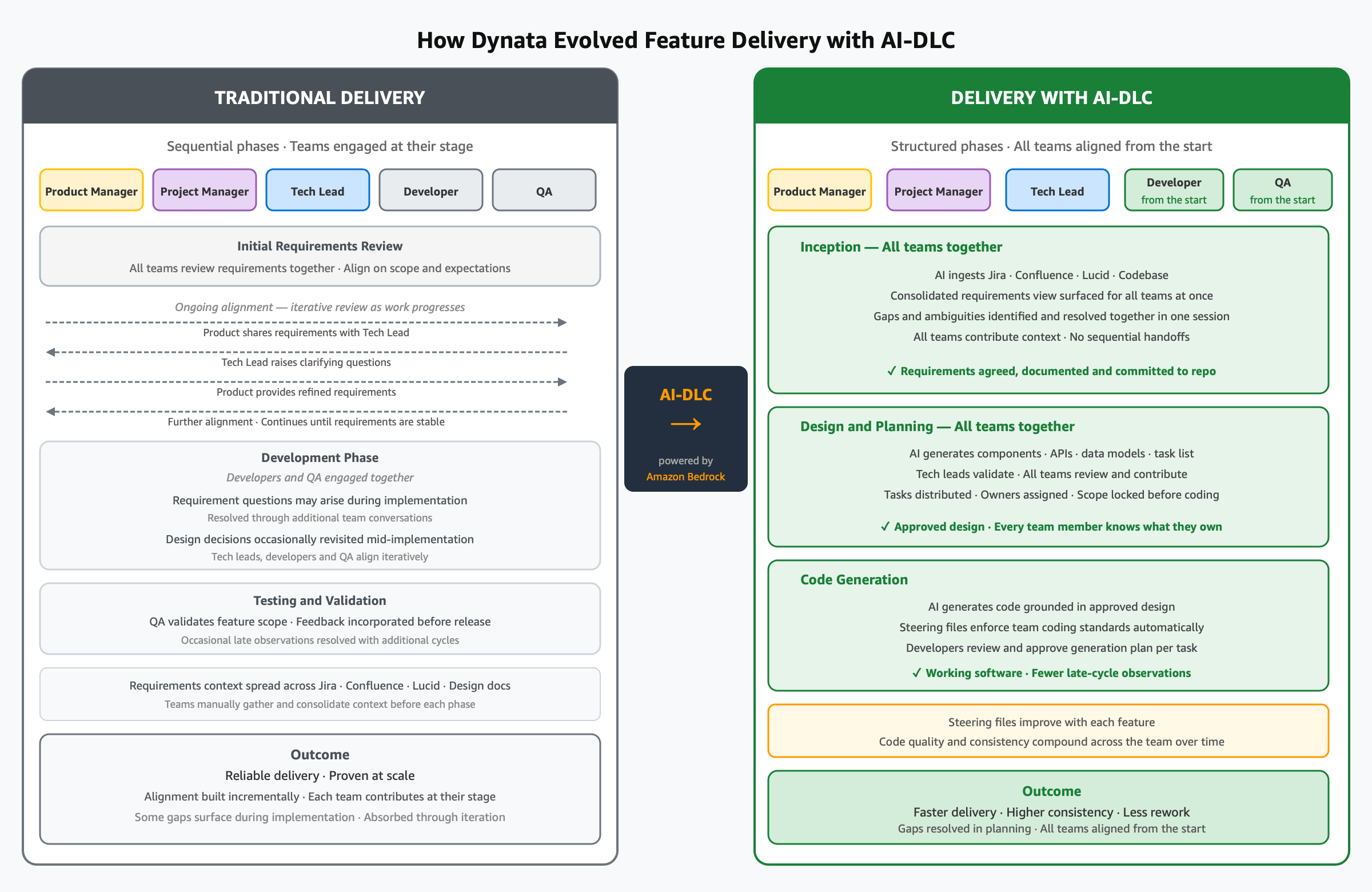
Figure 1: Traditional feature delivery compared to delivery with AI-DLC at Dynata
With preparation complete and pilot learnings incorporated, the team selected a feature and ran a structured three-day workshop. This is where the methodology demonstrated its full value.
The workshop brought together product, the project owner, tech leads, and developers working through the AI-DLC workflow in Kiro IDE together.
Day 1: Requirements and alignment
The AI-DLC workflow guided the team step by step through the Inception phase:
- The AI analyzed all available context, including Jira epics, Confluence pages, design documents, and the existing code base, and generated a consolidated, structured requirements view.
- The AI surfaced clarifying questions, such as gaps between sources, edge cases without defined behavior, and technology decisions that hadn’t been made explicit. The team worked through each question together, with answers captured directly in the IDE.
- All stakeholders reviewed and validated the output together. This was often the first time the full team had seen a unified picture of what was being built, with role-specific documents giving each participant the level of detail relevant to their work.
By the end of the day, requirements were agreed upon, documented, and committed to the repository.
The difference came down to timing. Instead of blockers and ambiguities surfacing during implementation, when resolving them is most expensive, they surfaced during planning, when the cost of a correction is a conversation. A process that typically took days or weeks of iterative meetings across teams was completed in a single structured day.
Day 2: Design and task planning
With agreed requirements in hand, the team moved into design:
- The AI generated component boundaries, service interfaces, data models, API contracts, and dependency maps based on the approved requirements.
- Tech leads and senior developers reviewed the design artifacts, applied their judgment, and validated that the design reflected real system constraints.
- When design questions connected back to requirements, the team updated the requirements documents and the AI kept the design documents consistent. Changes propagated through the artifact chain automatically.
- Product and project management remained in the room throughout. For many, this was the first direct view into how engineering translates requirements into architecture. When design questions required a business decision, the right people were immediately available.
- After design was approved, the AI generated a sequenced task list, each task mapped to design artifacts and requirements, with implementation detail for each.
- The team reviewed and iterated on the task list, then distributed ownership so that each developer took responsibility for specific tasks.
The team also made one practical observation. Thoughtful task distribution upfront, accounting for component dependencies and parallel workstreams, reduces merge conflicts during development. This was something the team refined over the first one or two feature cycles and improved steadily.
Outcome. The team approved design and tasks by the end of the day, with every team member clear on what was being built and who owned what.
Day 3: Code generation and working software
With tasks distributed and owners assigned, developers worked through code generation:
- The AI generated code grounded in the approved design documents, requirements, and user stories with steering files ensuring output conformed to the team’s coding standards from the start.
- Before generating code for each unit, the AI produced a detailed code generation plan for the developer to review and approve, keeping developers in control of what was being built and why.
- All documents and artifacts from Days 1 and 2 were committed to the repository, giving every developer a shared, versioned baseline to work from.
Progress was demoed to the team at regular intervals for directional feedback, keeping everyone aligned as the feature took shape.
“After a few features built using AI-DLC, the quality of the end-to-end results and the code quality showed great improvements.”
Steering files improved with each feature. As the team accumulated more experience describing their standards and conventions, code generation output became more consistent and required less adjustment, a compounding return on the investment in getting the inputs right.
Outcome. By the end of Day 3, the team had a working, demonstrable state of the feature, with the development phase completed and the full scope visible and validated. They also had a clear picture of what remained, including testing, edge case hardening, and release preparation. This isn’t the finish line. It’s a strong, confident starting point for the steps that follow. What it reduces is the uncertainty that normally exists at this stage, because requirements gaps, design misalignments, and implementation surprises are already behind the team, not ahead of them.
Beyond full workshops: Using AI-DLC selectively
After running full three-day workshops for several features, the team discovered something important about the methodology. AI-DLC is flexible, and not every situation calls for the full workflow. Teams began using individual phases of AI-DLC independently, based on what they were trying to achieve:
- Requirements discussions between product and tech teams. Using only the Inception phase to structure a requirements conversation, surface ambiguities, and produce a shared document, without necessarily proceeding to design or code generation in the same session.
- Design-only sessions. Working through the design phase for a well-understood feature to align on architecture before developers began implementation.
- Code generation from existing documentation. Teams with well-documented requirements using only the construction phase to accelerate implementation.
The methodology works as a complete end-to-end workflow, and it works as a targeted tool for specific parts of the process. Teams adopted it wherever it added the most value for their situation, which is the right way to use it.
Observations and what accelerated progress
Throughout the journey, from AI-assisted coding through to full AI-DLC workshops, the Dynata team identified a set of practical observations that shaped how they adopted the methodology and what made the biggest difference. These aren’t theoretical recommendations. They come directly from what the team experienced across multiple features, teams, and sessions.
| Observation | What the team found | What helped |
| Steering file quality | Early code generation output needed adjustment to fully match team standards | Iterative refinement of steering files across features. Quality improved steadily and compounded |
| Session leader readiness | Sessions moved best when the leader had hands-on experience with the workflow | Pilot developers led early team sessions. Pre-session preparation for leaders paid dividends |
| Input context completeness | Richer input context produced better AI output | Pre-session effort to gather and organize source materials consistently improved session quality |
| Task distribution planning | Parallel development on related components required thoughtful dependency planning | Spending time on task distribution during the workshop, not after, reduced rework in subsequent steps |
| Team orientation | Participants who understood the process upfront contributed more effectively | A brief pre-session briefing for all participants improved engagement and session pace |
| IDE flexibility | Teams used both Kiro and Cursor with Claude successfully | AI-DLC is IDE-agnostic. What matters is the structured process, not the specific tooling |
Results
Across features where Dynata applied the full AI-DLC workflow, the results were consistent:
- Approximately 70 percent reduction in development phase time: By Dynata’s own estimate, based on their standard sprint planning, features that would typically span about four sprints were completed in roughly 1 sprint of developer time, with working software demonstrable at the end of the structured workshop.
- Fewer post-production iterations and bugs. By surfacing and resolving requirements gaps and design ambiguities during the planning phase, before code was written, the team saw noticeably lower post-launch rework compared to features built through traditional delivery cycles.
- Requirements alignment in a single session. A process that previously took days to weeks of iterative meetings across teams was consistently completed on Day 1 of the structured workshop.
- Compounding quality improvements. With each successive feature built using AI-DLC, code generation quality improved as steering files were refined, reducing the adjustment needed after generation and raising the baseline for all subsequent features.
The following table summarizes the delivery impact.
| Metric | Traditional delivery | With AI-DLC |
| Development phase time | Baseline | ~70% reduction |
| Development phase for a full-stack feature | 3–4 sprints | Approximately 1 sprint |
| Time to agreed requirements | Days to weeks of iterative review | Day 1 of a structured session |
| Requirement gaps and blockers | Surfaced during implementation | Surfaced during planning, before design or code begins |
| Scope changes | Absorbed mid-implementation, cost grows with progress | Resolved at design level before code is written |
| Cross-team alignment | Sequential, with each team engaged at their stage | Parallel, with all teams present and aligned from Day 1 |
| Post-production bugs and rework | Higher gaps discovered post-implementation | Reduced ambiguities resolved upfront during planning |
| Code quality consistency | Dependent on individual developer conventions | Consistent, enforced through steering files from the first line |
The result is not only faster delivery. It is a different way of working across the full lifecycle. Alignment happens at inception and continues throughout development. Every team has visibility into what is being built, contributes feedback without waiting for a handoff, and sees progress in real time.
Conclusion
By adopting AI-DLC with Kiro IDE, Dynata reduced the development phase of full-stack features from 3–4 sprints to approximately one sprint. Dynata achieved this not by adding engineers or cutting scope, but by aligning every team on a shared plan before the first line of code is written. Requirement gaps surface during planning. Teams absorb scope changes at the design level. The repository preserves institutional knowledge as structured, traceable artifacts.
Dynata is expanding AI-DLC adoption across additional product lines and engineering teams, applying the methodology to more complex integration and infrastructure work. The team continues to refine steering files across projects and is exploring Kiro IDE hooks to automate quality enforcement at defined workflow points.
Building on the flexibility that let teams apply individual phases independently, Dynata is now planning AI-DLC V2.0. This version adds support for targeted phases, so teams can invoke a specific part of the workflow, such as Inception, design, or construction, on its own. They no longer need to step through the full end-to-end cycle. This gives teams finer-grained control to apply AI-DLC exactly where it delivers the most value for a given piece of work.
“Once the requirements, design, and tasks are all agreed upon with the full team, delivery becomes much faster, and the whole team is part of that journey, not just engineering.”
Get started
- Read Introducing AI-DLC: AI-Driven Development Life Cycle: Reimagining Software Engineering.
- Explore the AI-DLC workflows on GitHub.
- Try Kiro IDE and review the Specs and steering files documentation.
- Learn about Amazon Bedrock, the foundation model service powering the AI in Kiro, and read the Amazon Bedrock documentation.