AWS Architecture Blog
Recommended resilience testing in the next generation of AWS Resilience Hub
Organizations that have defined resilience policies and assessed their applications face a common next step: verifying those applications behave as expected when failures occur. Designing fault injection experiments manually requires deep expertise. You need to know which faults to inject, which resources to target, and how to judge whether the outcome counts as success. Many teams do not know where to start, and experiments built by hand can drift out of date as architectures evolve.
Recommended resilience testing in the next generation of AWS Resilience Hub addresses this. It’s a new capability that helps you validate how your services respond to and recover from failure scenarios. The tests are pre-configured and powered by AWS Fault Injection Service (FIS).
Recommended resilience testing uses what AWS Resilience Hub already knows about your service, including its resources, dependencies, and resilience policy. With this information, AWS Resilience Hub automatically creates FIS experiments, injects faults, and evaluates the results against your success criteria and recovery time objective (RTO). It uses that evaluation to determine a pass or fail outcome. What used to be manual experiment design becomes an out-of-the-box test with built-in success evaluation based on your policy. Each test run auto-generates a report, accessible through the Resilience Hub console.
Customers frequently ask which failure modes to test for and what prescriptive testing guidance we can offer. AWS Resilience Hub answers this by providing four tests at launch, selected based on your service’s architecture and resilience policy.
Availability Zone: recovery – Validates your service can detect and recover from an Availability Zone impairment. The test injects the symptoms of a power interruption in a single Availability Zone, affecting compute, networking, storage, and database resources within that AZ. It confirms your service detects the impaired AZ, continues operating in the healthy AZs, and returns to a healthy state within your defined RTO. It can also help surface single-AZ dependencies you might not be aware of.
Dependency validation – Validates how your service responds when its dependencies within the AWS Region are impaired. If you have enabled dependency discovery, the discovered soft dependency with the highest query volume is pre-selected by default. You can adjust the selection to target individual dependencies or specific groups. The dependency validation test blocks dependencies within the Region to see how your service behaves when they are unavailable. It can help you validate that your service remains healthy when soft dependencies are impaired, and surface dependencies you might not have known were hard. You can also include known hard dependencies to understand their impact and confirm your service detects and responds when they are unavailable. We recommend starting with a single soft dependency and expanding from there.
Multi-Region: isolation – Validates your service can operate independently from a Region when connectivity to another Region is unavailable. The test blocks connectivity between the two Regions, including network traffic, cross-Region data replication, and selected dependencies. This test applies to both active-active and active-passive architectures, and is also a useful precursor to the Multi-Region: recovery test.
Multi-Region: recovery – Validates that your service can recover and serve clients within your defined RTO after a Region is impaired. The test introduces failures into dependencies in the selected Region. Through success alarms, it confirms that your service recovers within your defined RTO in the recovery Region and remains healthy for the duration of the test. You perform the recovery action yourself, such as triggering a failover or executing an Amazon Application Recovery Controller (ARC) Region switch plan.
Each test works at three levels. A test template is the pre-configured recommendation, specifying the fault actions, target resource types, and parameters. A test is your configured instance of a template for your service, with your success alarms, stop conditions, and settings. A test run is a single execution that scopes to your current resources and produces a pass/fail outcome with results and a report. You can run the same test quarterly, monthly, or on demand. To get to that pass/fail outcome you can use success criteria in the test.
Choose success criteria that reflect your service’s health and customer experience, such as order success rate or end-to-end availability, rather than the state of individual resources. The impaired resources are expected to be unhealthy. What you are validating is whether your service as a whole absorbed the failure. Combined with your resilience policy, these criteria determine the pass/fail outcome.
For recovery tests (Availability Zone recovery and Multi-Region recovery), the test passes when all success criteria return to a healthy state within the RTO defined in your policy and hold until the test ends. This validates not just that your service recovered, but that it recovered fast enough to meet your stated objectives.
For sustained tests (Dependency validation and Multi-Region isolation), the test passes when all success criteria hold their thresholds from fault injection through the end of the test, proving your service remained healthy throughout the impairment.
You can also select additional alarms for observability only, such as watching the impaired Region degrade. These appear in results and reports without affecting the outcome.
Deep dive: Dependency validation
Of the four recommended resilience tests, dependency validation was one of the most requested capabilities by our customers, and for good reason. Modern applications depend on dozens of services, and understanding which of those dependencies your application can function without is the key to building a resilient application. The dependency validation test determines whether your application continues to work when a given dependency becomes unavailable.
How dependency validation works
The dependency validation test blocks connectivity to your selected dependencies within an AWS Region to observe how your service behaves when they are unavailable. It validates that your service remains healthy when soft dependencies are impaired and surfaces dependencies you might not have known were hard. You can also include known hard dependencies to understand their failure impact.
This is a sustained test. Unlike recovery tests that measure whether you meet your RTO, the dependency validation test passes when all success alarms remain in OK state from the moment faults are injected through the end of the test.
Dependency discovery
You can define dependencies in two ways:
- Turn on dependency discovery. This uses DNS query log analysis with a 35-day look-back window and continuous polling to automatically identify the AWS services, internal endpoints, and third-party endpoints your service calls. Dependency discovery surfaces dependencies you might not be aware of, including unexpected cross-Region calls, critical third-party dependencies, and infrequently accessed services that could cause failures during incidents.
- Manually enter DNS endpoints directly when configuring the test.
After you define your dependencies, we recommend classifying each one as a soft or hard dependency.
| Classification | When to use | Example | What the test validates |
| Soft | Your service degrades but continues operating without this dependency | Analytics API, notification service, feature flags, recommendation engine | Application handles absence gracefully. Test should pass |
| Hard | Your service fails if this dependency is unavailable | Primary database, authentication service, credential exchange | Application detects failure and handles it gracefully. Test might fail (this is expected and informative) |
Prerequisites
Before you begin, make sure you have at least one service created and assessed in the next generation of Resilience Hub. You would also require an AWS Identity and Access Management (IAM) service role for the next generation of Resilience Hub to assume when running a resilience test. This role can either be created in the next generation of Resilience Hub console or you can specify an existing one.
Configuring the test
From your service dashboard in the next generation of Resilience Hub, choose the Testing tab. You will see four recommended resilience tests. Select Dependency validation, and then choose Edit test configuration.
The configuration page walks you through six sections:
1. Basic settings
Test duration: The length of time fault actions run. Set any value from 1 minute to 12 hours (default: 30 minutes). After the duration, the test takes a few additional minutes to evaluate success before it ends.
Dependency Region: The AWS Region where your service is deployed that you want to test for dependency failures.
2. Dependencies to block
This is where the distinction between soft and hard dependencies directly drives your test.
Default behavior:
The discovered soft dependency with the highest query volume is pre-selected. If no dependencies have been classified as soft, none are pre-selected.
- Discovered dependencies: A selection box pre-populated with dependencies found in your service in the selected AWS Region. You can choose up to 10 dependencies to test.
- (Optional) Additional dependencies: Expand this section to include hard dependencies or dependencies not listed in the primary selection. If you didn’t run any dependency discovery, you can use this field to enter a DNS address that will be blocked as a dependency.
Best practice: Start with a single soft dependency and expand from there, progressively building confidence in your application’s failure handling before including hard dependencies.
3. Test actions (fault actions)
The next generation of Resilience Hub uses AWS FIS actions to block connectivity to your selected dependencies, automatically targeting resources discovered in your service. The fault actions inject 100 percent packet loss at the compute layer, dropping traffic to the selected dependencies:
| Fault action | What it does |
aws:ssm:send-command |
Drops traffic from Amazon Elastic Compute Cloud (Amazon EC2) instances to the selected dependencies |
aws:ecs:task-network-packet-loss |
Drops traffic from Amazon Elastic Container Service (Amazon ECS) tasks (EC2 and AWS Fargate) to the selected dependencies |
aws:eks:pod-network-packet-loss |
Drops traffic from Amazon Elastic Kubernetes Service (Amazon EKS) pods to the selected dependencies |
When the test starts, it matches actions to resources discovered in your service. If no resources match an action’s target type, that action is skipped. This means the test automatically adapts to your compute environment, whether you are running on Amazon EC2, Amazon ECS, Amazon EKS, or a combination.
Additional setup required: The setup for these actions depends on your compute type. You need an AWS Systems Manager Agent container in your Amazon ECS task definition, a Kubernetes service account for Amazon EKS pods, or AWS Systems Manager Agent installed on your Amazon EC2 instances.
4. Test alarms
Alarms determine whether the test passes or fails. Select alarms discovered from your service that reflect service performance and customer experience. For example, order success rate for an ecommerce service or transactions processed for a payments system.
- Success alarms: The next generation of Resilience Hub uses these to validate whether your service passed or failed the test. Choose alarms that measure your service’s health across the AWS Region.
- (Optional) Additional alarms: Tracked during the test run and shown in the report, but don’t affect the test outcome. Use additional alarms for observability to monitor how these alarms behave during the dependency impairment.
How to pass: The test passes if all success alarms remain in OK state until the test actions end.
Success criteria and additional alarms share a limit of 5 per configuration update.
5. Stop conditions, reports, and logs
Stop conditions: Amazon CloudWatch alarms that act as guardrails. If breached, they stop the test automatically to protect your workloads. Choose up to five alarms. They must be in the account where the test runs and the AWS Region where the faults are injected.
(Optional) Reports: If you configure an Amazon Simple Storage Service (Amazon S3) bucket as a report destination on your service, the next generation of Resilience Hub generates a report after each test run that includes the test configuration, alarm status, timeline, and results.
Logs: Optionally send test logs to an Amazon S3 bucket or Amazon CloudWatch Logs for deeper analysis. The next generation of Resilience Hub doesn’t charge for sending logs, though ingestion and storage charges apply.
6. Test permissions
The test requires an IAM role to grant access to AWS services and resources. For single account setups, you need one execution role. For multi-account setups, you need an orchestrator role in the account running the test and a target role in each account containing targeted resources. You can create the role directly from AWS Management Console with required permissions pre-configured or use an existing role. Once saved, the role is used by default for future runs.
Note: Updating test settings might change required IAM permissions. Required permissions vary based on the trust policy, fault actions, and test options selected. Always review the IAM role instructions to confirm correct permissions.
Running the test: What success and failure look like
The value of the dependency validation test becomes clear when you compare results across dependency classifications. We walk through two test runs on the same service with the same success alarms: one blocking soft dependencies, one blocking hard dependencies.
Test run: Soft dependencies blocked — PASSED ✅
Dependencies blocked:
- Payment Gateway.
- Notification Service.
Success alarms:
canary-heartbeat-canary-failure-us-east-2: Monitors service health check availability.canary-order-flow-canary-failure-us-east-2: Monitors end-to-end order processing.
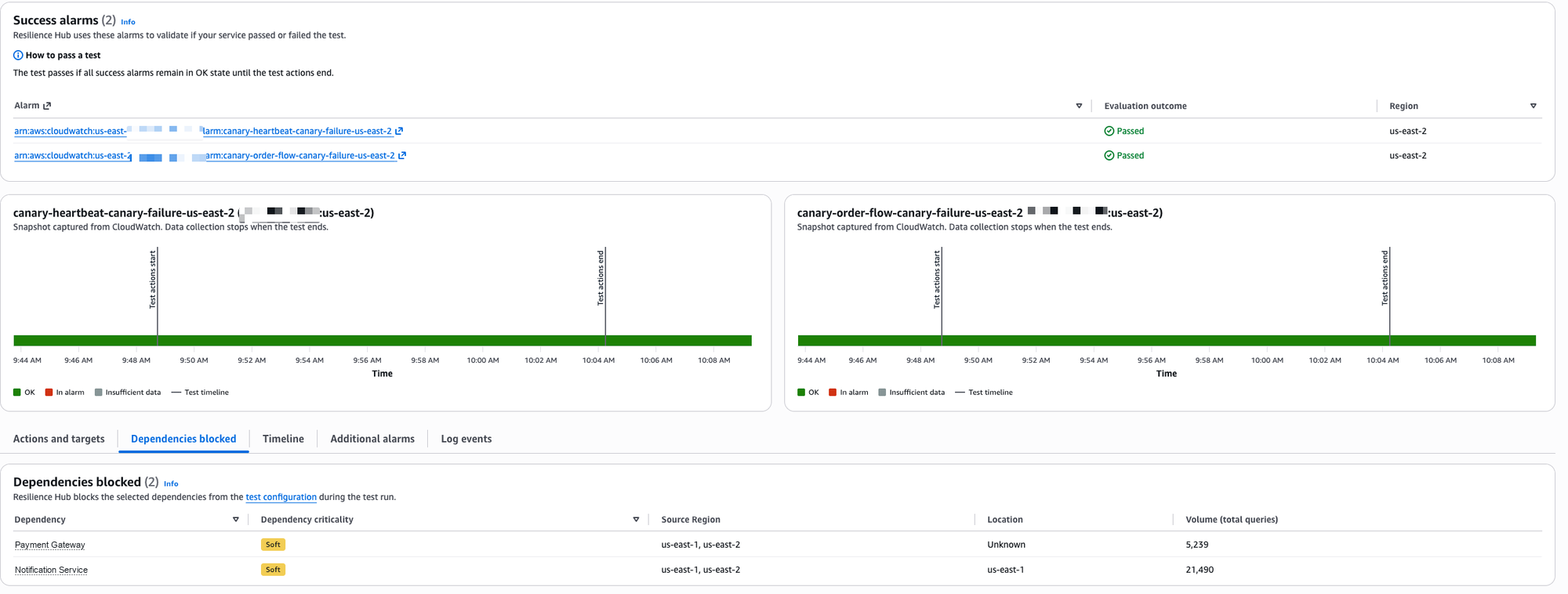
Figure 1: Soft dependency test run with both success alarms holding in OK state for the full test duration
What the results show: Both alarms remained in OK state (solid green) from the moment test actions started through the end of the test. The application continued functioning normally without Payment Gateway and Notification Service. The order flow kept processing. The heartbeat kept responding. The service handled the absence of its soft dependencies gracefully, exactly as designed.
What this proves: These dependencies are correctly classified as soft. Your application can tolerate the loss of these dependencies, suppressing notifications without impacting the customer-facing order flow.
Test run: Hard dependencies blocked — FAILED ❌
Dependencies blocked:
- Amazon Cognito.
- AWS Security Token Service (AWS STS).
Success alarms:
canary-heartbeat-canary-failure-us-east-2: Monitors service health check availability.canary-order-flow-canary-failure-us-east-2: Monitors end-to-end order processing.
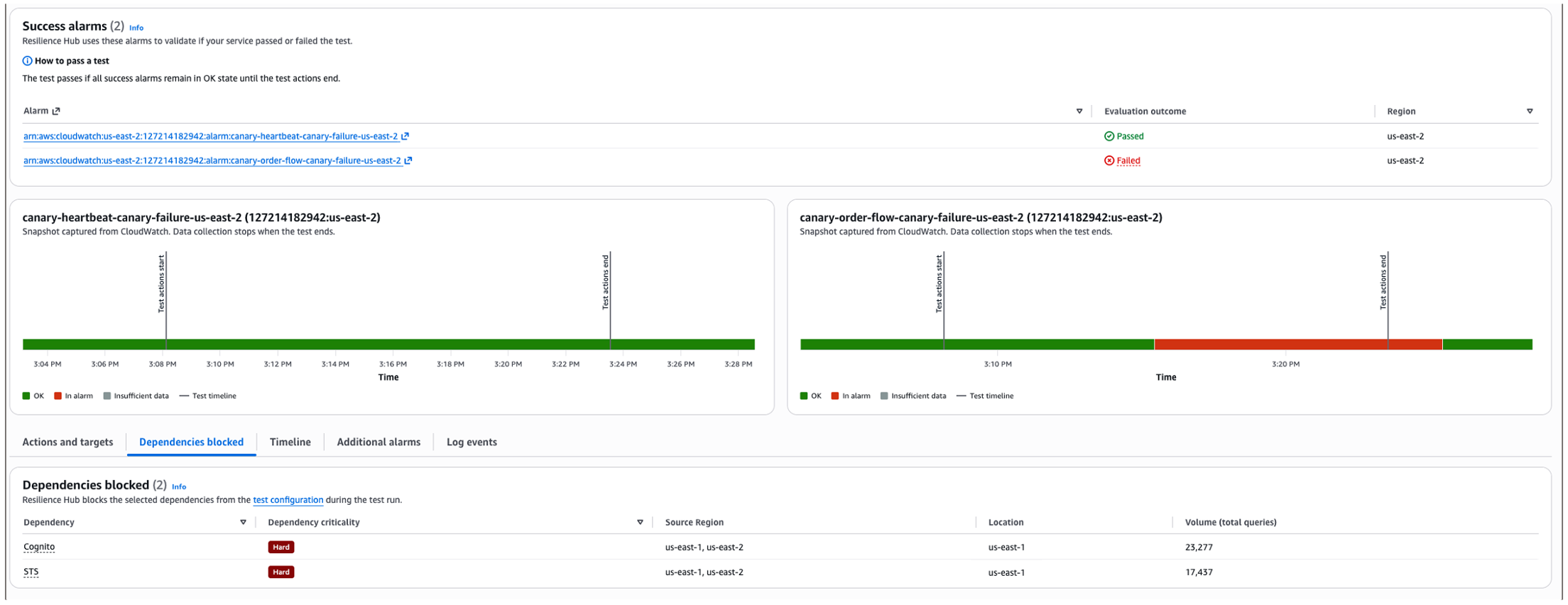
Figure 2: Hard dependency test run with the order-flow alarm entering alarm state while the heartbeat alarm stays healthy
What the results show: The heartbeat canary stayed green throughout. The application did not become unavailable. But the order-flow canary transitioned to alarm state (red) immediately after faults were injected and remained there until the test ended. Without Amazon Cognito (authentication) and AWS STS (credential exchange), the application couldn’t complete the business-critical order flow.
What this proves: Amazon Cognito and AWS STS are correctly classified as hard dependencies. The test confirms that their absence impacts critical functionality, but importantly, it also shows the failure was contained. The application did not cascade into a complete failure. It continued responding (heartbeat passed) while the specific business flow that required authentication failed gracefully.
Interpreting results: A decision framework
Test results aren’t simply pass or fail. A passing test can still surface a misclassified dependency, and a failing test can confirm that a dependency is genuinely critical. What matters is reading the outcome against how you classified the dependency, so you know whether your architecture behaved as intended and what to do about it.
The following decision framework helps you interpret the results of each test, understand what they mean, and decide what to do next.
| Scenario | Expected Outcome | What it means | What to do next |
| Soft dependency blocked → test passes | Yes | Graceful degradation is working. Classification is accurate. | No action required. Your architecture handles this failure correctly. |
| Soft dependency blocked → test fails | No | The dependency might be misclassified as soft when it’s actually hard. Or your degradation logic has a gap. | Review application behavior. Reclassify as hard, or fix the degradation path. |
| Hard dependency blocked → test fails | Yes | Confirms the classification. Critical functionality is impacted without this dependency. | Verify the failure is graceful (no cascading failures, no data corruption, no hung connections). Consider whether you can add retry/fallback to reclassify as soft in the future. |
| Hard dependency blocked → test passes | No | The dependency might be misclassified. It could actually be soft. This could also indicate the dependency isn’t being called as intended. | Investigate whether your application is more resilient than expected, or whether the dependency is not being exercised. Reclassify if appropriate or fix the application logic. |
Summary
Recommended resilience testing in the next generation of AWS Resilience Hub removes the barrier between knowing your architecture and proving it holds under failure. It provides four AWS recommended tests built on AWS FIS, covering Availability Zone recovery, dependency validation, Multi-Region isolation, and Multi-Region recovery. You can move from policy definition and failure mode assessment to evidence-backed validation without building experiments from scratch.
You can start with the dependency validation test to understand how your application handles the loss of its dependencies. Expand to AZ recovery and multi-Region tests as your program matures. Each test run captures a point-in-time snapshot of your current resources, produces a pass/fail outcome evaluated against your resilience policy, and feeds results into your compliance and reporting workflows over time.
Recommended resilience testing is available today in all AWS commercial Regions where the next generation of AWS Resilience Hub is supported. To learn more and get started, visit the AWS Resilience Hub User Guide and the AWS Resilience Hub product page.