AWS Cloud Financial Management
Petabyte-Scale Cost Optimization: How a Video Hosting platform Saved 70% on S3
Video hosting is a storage-intensive business. Even a moderate operation with around one million movies in full HD 1080p resolution can require roughly 10 petabytes (PB) of storage. Amazon Simple Storage Service has long proven to deliver scalability, performance and also cost efficiency. That said, applying continuous FinOps practices can enhance cost efficiency and help organizations maximize the business value of the cloud cost model.
This blog recounts how AWS helped a video-hosting customer reduce its Amazon S3 costs by 70%. The result was achieved by leveraging AWS native tools to understand the lifecycle of millions of video files, followed by fine-tuning the architecture of their just-in-time video hosting platform.
Using AWS Cost and Usage Report to identify the scale of the problem
As the business grows, the customer noticed a steady increase in Amazon S3 costs, which accounted for 40% of their total infrastructure costs. To gain better visibility, AWS Cost Explorer is typically the best place to start. However, because Amazon S3 costs can be influenced by many factors, such as storage classes and access patterns, a deeper analysis using AWS Cost and Usage Report (CUR) is required.
Following the approach outlined in the AWS blog “Analyze Amazon S3 storage costs using AWS Cost and Usage Reports, Amazon S3 Inventory, and Amazon Athena,” AWS performed a detailed breakdown of the total Amazon S3 cost into four major components, as illustrated in the following chart.
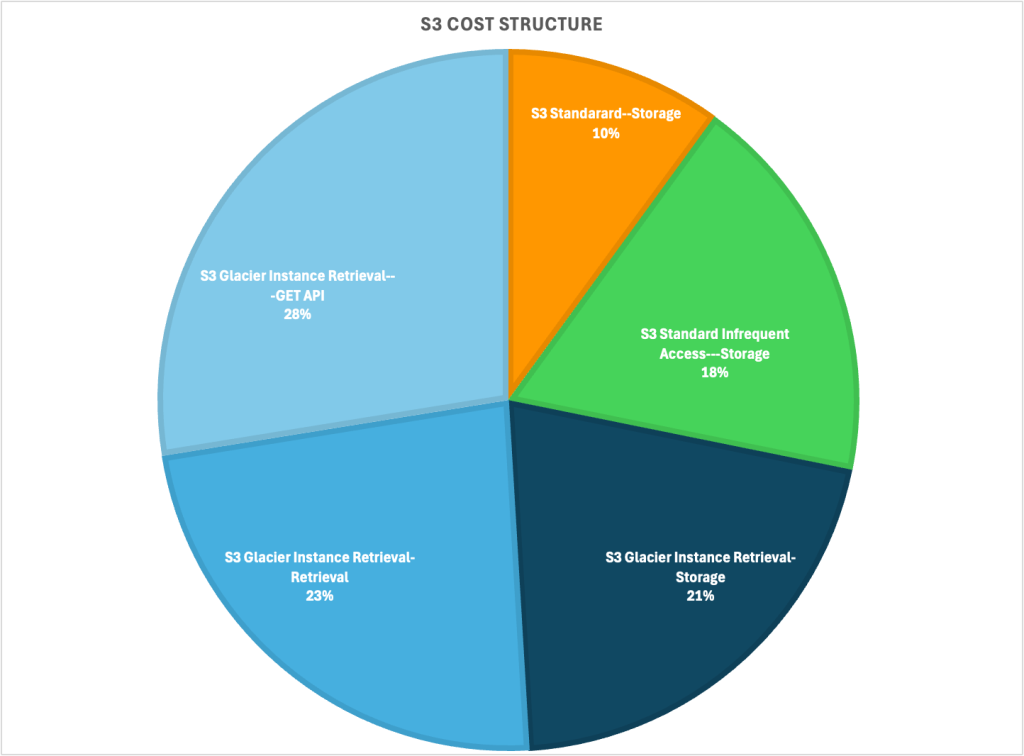
Figure 1: S3 cost breakdown produced from AWS Cost and Usage Reports data
The customer was using three Amazon S3 storage classes, S3 Standard, S3 Standard Infrequent Access and S3 Glacier Instant Retrieval (GIR). At first glance, the majority of the S3 costs (88%) was attributed to GIR. More specifically, GET API (33.7%) and Retrieval (28.6%) costs appear unusually high compared to typical usage patterns (Note: for Glacier Instant Retrieval class, S3 GET and Retrieval cost occurs every time the S3 objects are accessed.).
Because S3 GIR is intended for “long-lived data that is rarely accessed and requires retrieval in milliseconds”, the high volume of retrieval operations indicated a mismatch between the intended architectural design and the platform’s real-world access patterns.
Understand the architecture and potential issues
The customer’s workload is a SaaS platform that hosts sales and marketing videos for enterprise customers worldwide. Because most videos were expected to be viewed by small audiences, the customer adopted a Just-In-Time Processing (JITP) architecture. This approach reduces storage costs by transcoding video segments into specific formats only when requested, eliminating the need to store multiple renditions of the same video.
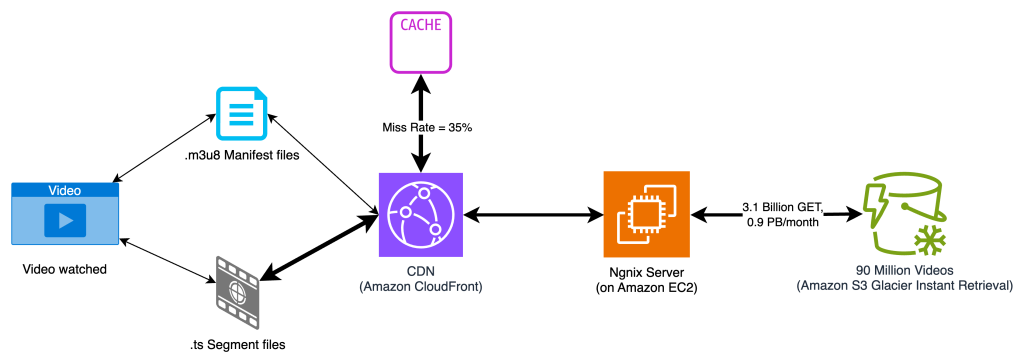
Figure 2: Justin-in-Time Processing (JITP) architecture
To further optimize costs, the customer implemented an Amazon S3 Lifecycle configuration (which incurs some cost but quite negligible for objects MB in size) that automatically transitions video files to S3 GIR storage class, once they are 30 days old and less likely to be accessed. The idea was that as long as these files remained dormant, S3 GIR could reduce storage costs by up to 80% compared to S3 Standard.
However, if a file stored in GIR is accessed unexpectedly, it incurs additional retrieval and GET request charges (as detailed on the Amazon S3 pricing page). While storing 1TB of video data in GIR costs about $4 per month (versus $21 in S3 Standard), if that same data is retrieved once from GIR, the retrieval and GET costs can total around $30—quickly offsetting the intended savings.
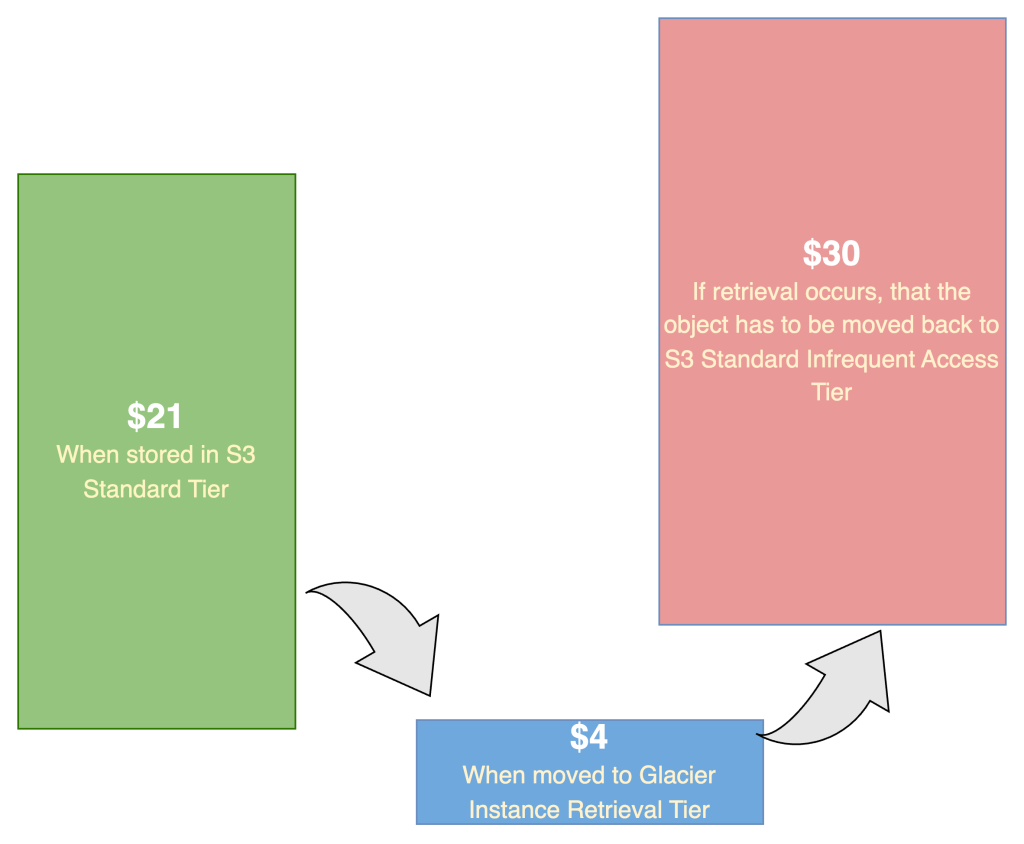
Figure 3: Cost implication for files in S3 GIR when retrieved
As a result, the cost-optimization effort focused on answering two key questions:
- Are there too many video files stored in GIR that still generate high GET and Retrieval activity?
- If so, how can we identify and remediate them effectively?
S3 Access Logging helps find the needles in a haystack
To quantify the origin of the GET and Retrieval requests, the customer turned to Amazon S3 Access Logging, which provides detailed records of every request made to a bucket. Once enabled, S3 automatically writes log files to a target bucket that you configure.
The best way to analyze S3 access log is by querying them in Amazon Athena. Following the steps in the Amazon S3 documentation, you can create a database and table to represent the log data.
For example, the following SQL query returns the top 10 most accessed S3 objects, assuming the database and table are named s3_access_logs_db and mybucket_logs:
SELECT
  COUNT(*) AS access_count,
  key AS file_name
FROM
  s3_access_logs_db.mybucket_logs
WHERE
  operation = 'REST.GET.OBJECT'
  AND httpstatus = '200'
GROUP BY
  key
ORDER BY
  access_count DESC
LIMIT 10;
The results showed that, within just a few hours, many video files were accessed thousands of times—far more frequently than expected:
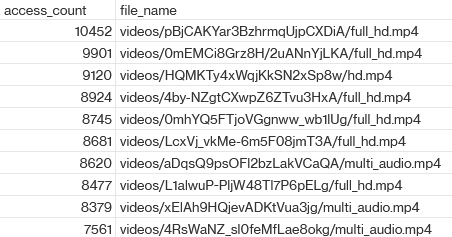
Further analytics confirmed that a tiny fraction (around 0.1%), typically the larger ones, accounted for nearly half of all GET and Retrieval activity in the GIR tier. For these files, storing them in S3 Glacier Instant Retrieval (GIR) was inefficient from a cost perspective. The team evaluated moving them to S3 Intelligent-Tiering, and cost modeling showed this could yield significant savings since Intelligent-Tiering incurs no retrieval fees, and offers GET API costs that are 25× lower than GIR. For example, the following top three accessed files could achieve savings of over 90%.
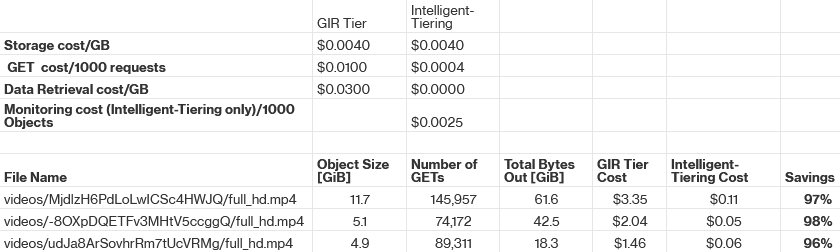
Armed with these insights, the team flagged the most active 60,000 objects (about 0.6% of the 10 million total videos) and reclassified them to S3 Intelligent-Tiering. This change worked as intended and reduced the GIR Retrieval and GET costs by 50%.
While reclassifying the frequently accessed files to S3 Intelligent-Tiering yielded immediate savings, it also highlighted that not all videos follow the same access pattern. This insight paved the way for a more holistic optimization by strategically using multiple S3 storage classes.
Optimize the architecture by leveraging multiple S3 storage classes
In a just‑in‑time packaging environment, the lifetime storage cost depends heavily on the access pattern—that is, how frequently each video is watched over its full lifecycle.
As the team analyzed those long-tail “frequently accessed” files, we realized that these were primarily marketing videos with distinct characteristics:
- Roughly 100x larger due to higher resolution (1080p or 4K) and longer duration
- About 100x more likely to be watched
- Represent 10% of total objects, yet responsible for ~99% of the 3.1 billion monthly GET requests.
To optimize costs, these high-traffic videos should be stored in S3 Intelligent-Tiering upon upload, while the rest of the videos continue using S3 Standard with a 30-day lifecycle policy transitioning to S3 Glacier Instant Retrieval (GIR).
Fortunately, implementing this improvement required only a few lines of code. Once deployed, the GET request volume gradually shifted from GIR to Intelligent-Tiering, and the overall S3 cost steadily declined.
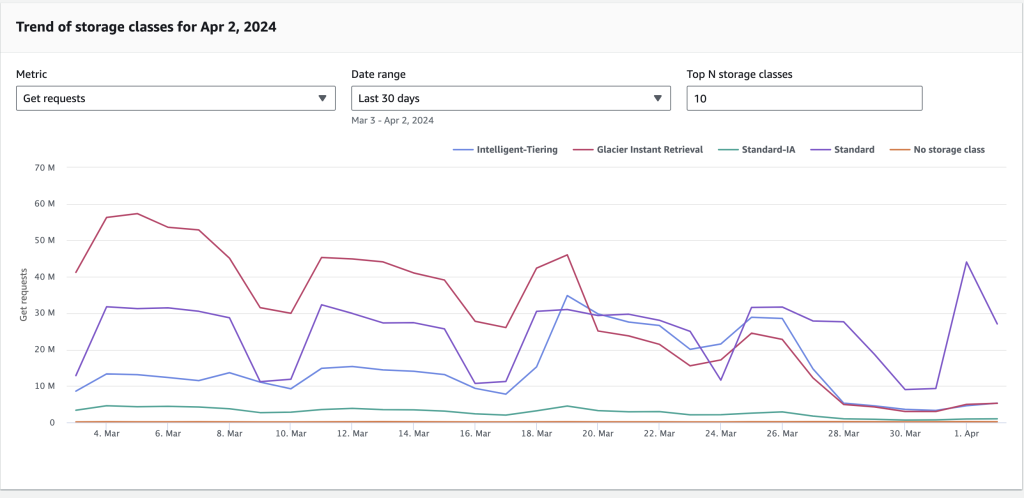
Figure 4: Get requests (for GIR class) trends down after adopting S3 Intelligent-Tier
After optimizing storage classes, the next question was straightforward: Can we further reduce the cost, by cutting down the total number of S3 GET requests?
Tune the rest of the just‑in‑time pipeline
To answer that, the team examined other parts of the Just-in-Time (JIT) video processing pipeline—specifically the content delivery layer (Amazon CloudFront) and the Nginx-based packaging layer.
The guiding idea was simple:
- At the CDN layer: Reduce CloudFront cache misses so that fewer requests fall back to the Nginx-based packaging layer.
- At the packaging layer: Minimize the number of fetches needed to construct each video segment.
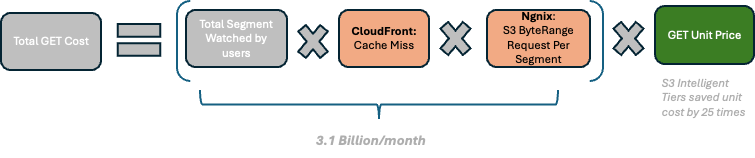
Figure 5: Get request cost conceptual calculation
We analyzed the CloudFront and Nginx layers, and indeed found opportunities to optimize:
- CloudFront optimization: Analysis of Amazon CloudWatch metrics revealed a global CloudFront cache-hit rate of only 65%, dropping to 40% in certain regions.
After tuning the CloudFront distribution configuration, with special focus on low-performing regions, the hit rate increased to around 90%. This improvement alone reduced S3 GET and retrieval requests by roughly 50%. - Nginx-based packaging layer optimization: Each time CloudFront experienced a cache miss, the system regenerated a manifest file and multiple six-second segment files. Because the layer did not cache these files locally, it issued multiple S3 GET range requests to retrieve the necessary data.
By increasing the byte range size for S3 GET requests from 256 KB to 2 MB, the team reduced the number of GETs required to build an average segment from 7.05 to 1.04—an 85% reduction overall.
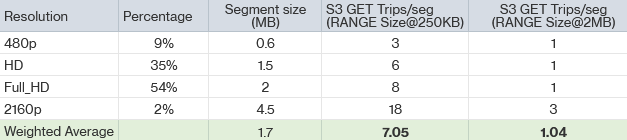
Together, these pipeline optimizations reduced S3 GET requests by 90%, resulting in a proportional drop in retrieval and request costs and completing the final phase of the cost-optimization effort.
Outcome recap & key takeaways
With insights gained from AWS Cost and Usage Report and Amazon S3 Access Logging, the team helped the customer reduce its six-figure annual Amazon S3 bill by roughly 70%. These savings were achieved by optimizing the workload architecture—including tuning CloudFront caching, leveraging S3 Intelligent-Tiering for long-tail content, and adjusting the S3 GET range size for greater efficiency.
Cloud-native (“born-in-the-cloud”) companies enjoy exceptional agility through on-demand cloud pricing and elastic scaling. As these businesses grow rapidly, cost optimization becomes critical to scaling sustainably. From working with millions of customers, AWS has learned that the most effective cost optimization often comes from architectural tuning—designing systems that scale efficiently and use resources only when needed.
To begin understanding your own cost drivers, start with the AWS’s native cost‑management tools to gain visibility. For more comprehensive support, you can also engage the AWS Cloud Financial Management team to develop a tailored cost-optimization strategy for your workloads.