AWS Cloud Financial Management
The AWS State of Cost Efficiency Report
Since launching the Cost Efficiency metric at re:Invent 2025, we keep hearing from our customers: “How do I compare to my peers?” To answer it, we analyzed optimization patterns across more than 71,000 anonymized, opted-in AWS customers over the most recent quarter. Savings Plans coverage is the foundation of any cost optimization strategy, but it’s just one piece of the puzzle. The data shows our most efficient customers go beyond Savings Plans with a set of practices that compound their savings. This report breaks down what the top performers do differently and how you can match their results.
- As of May 2026, the median Cost Efficiency score across all customers is 83, while the mean is 79, a gap driven by a long tail of less-optimized accounts.
- Enabling EC2 memory metrics is associated with 8 to 30 percentage points higher savings per recommendation, yet only 17.7% of eligible customers have this enabled.
- Customers who customize their AWS Compute Optimizer idle and rightsize recommendations score a median of 3 to 4 points higher than non-customizing peers.
- Based on the most recent quarter, larger AWS customers who use both Savings Plans and rightsizing together tend to run about 60% more of their EC2 instances on newer hardware and improve their median Cost Efficiency score 4x faster than customers using Savings Plans alone
- High Savings Plans coverage can mask visible rightsize and Graviton optimization opportunity. Customers with 95 to 100% Savings Plans coverage see total non-Savings Plan optimization opportunity drop 65% to 80% versus customers with 0% to 25% Savings Plan coverage.
What is the Cost Efficiency metric?
Cost Efficiency is a single daily score (0-100%) in AWS Cost Optimization Hub that measures what percentage of your optimizable spend is already well-optimized. It combines workload optimization (rightsizing, idle cleanup) and rate optimization (Savings Plans, Reserved Instances) into one number. For the full breakdown of how the metric works, see our Cost Efficiency launch blog.
How good is your efficiency score?
As of May 2026, the median Cost Efficiency score across all customers is 83, while the mean is 79, a gap driven by a long tail of less-optimized accounts. Open the Cost Optimization Hub to see where you stand. Note: the score will sometimes change as new optimization recommendations are released.
To further understand how customers optimize, we split customers into two groups based on their spend: Smaller and Larger, roughly correlated to SMB vs Enterprise. Smaller customers show a 52 percentage point spread between their least and most efficient members, while Larger customers cluster in a tighter 35 percentage point spread. Both groups reach high efficiency scores at the top end. Two takeaways:
- Smaller customers show a wider spread in scores, reflecting a mix of customers with dedicated FinOps practices and those earlier in their journey.
- Larger customers optimize more consistently. They’re more likely to have dedicated FinOps teams and Savings Plans strategies, and the resulting higher efficiency score.
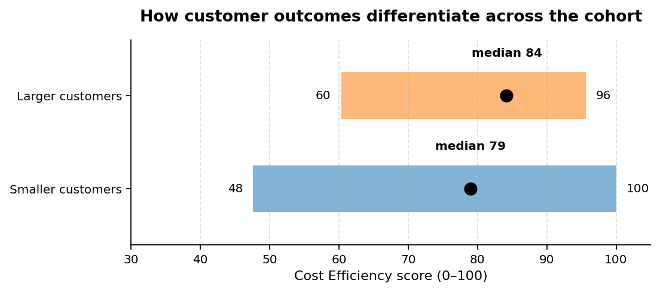
Figure 1. Distribution of Cost Efficiency scores for Smaller and Larger customers. Smaller customers span 52 points and Larger customers span a narrower 35-point range. Both groups reach similar high scores at the top of their range.
High Efficiency Scores are reachable from any starting point
When analyzing the differences between customers with high scores vs customers with lower scores, we identified four behaviors we consistently found in the top 25% of scorers:
Memory metrics on Amazon Elastic Compute Cloud (EC2)
Customers with EC2 instance memory metrics enabled either through Amazon CloudWatch or supported third-party observability tools tend to have higher scores. Enabling memory metrics on your existing EC2 instances is one of the highest impact steps you can take for EC2 cost optimization. For many instances, memory data is the difference between receiving a rightsizing recommendation and receiving none at all. Your Cost Efficiency score may dip initially as new savings opportunities surface, but that means you’re uncovering more savings you can act on. Enabling EC2 memory metrics is associated with 8 to 30 percentage points higher savings per recommendation, yet only 17.7% of eligible customers have this enabled. Figure 2 shows how memory metric adoption increases savings across various instance types.
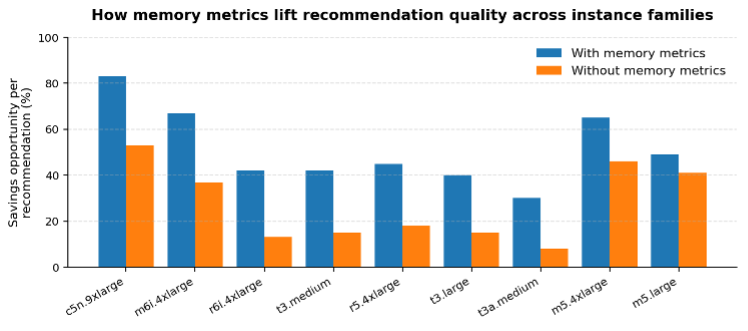
Figure 2. Savings percentages across instance types with and without memory metrics.
Recommendation preference customization
Customers who customize their AWS Compute Optimizer recommendations score 3 to 4 percentage points higher than non-customizing peers. Customizing your recommendations doesn’t necessarily lead to higher savings, but it is a leading indicator of a team that is highly engaged on optimization efforts and is working to ensure recommendations build trust with engineering teams.
High Savings Plan coverage isn’t the endgame
Customers with heavy Savings Plans coverage have high Cost Efficiency scores. There is a direct correlation between Savings Plan coverage and your Cost Efficiency metric, and increasing that coverage increases your score because Savings Plans count as optimized spend. On the surface, this looks like a win: you are highly optimized, but this may sometimes be misleading, because the underlying resources still may be oversized or idle. Customers with 95% to 100% Savings Plans coverage see total non-Savings Plan optimization opportunity drop 65% to 80% versus customers with 0% to 25% Savings Plans coverage. The savings only become actionable again when commitments come up for renewal or workloads shift. See figure 3 for savings values across both Larger and Smaller customers. This leads us to our next point: Shrink first.
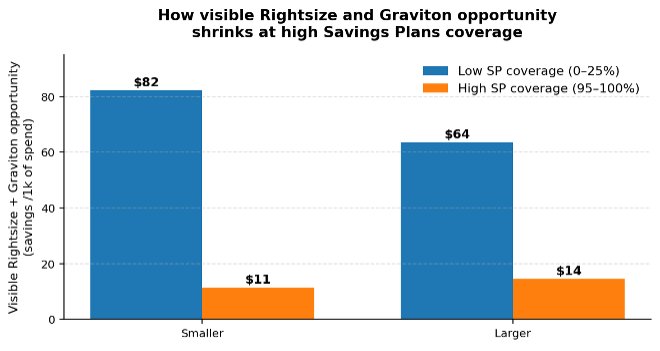
Figure 3. Rightsize and graviton savings differences with low (0-25%) vs high (90%+) Savings Plan coverage.
Shrink first, then commit (The compounding effect)
The most efficient customers pair Savings Plans with active rightsizing, driving bigger gains in their Cost Efficiency score, and their total achieved savings. Based on the most recent quarter, larger AWS customers who use both rightsizing and commitments tend to run about 60% more of their EC2 instances on newer hardware and improve their median Cost Efficiency score 4x faster than customers using Savings Plans alone. Only 47.1% of customers with Savings Plans coverage actively take rightsizing actions, leaving potential savings on the table. Commitments reduce the unit price of your instances, and rightsizing reduces the size of instances you need. By running their workloads on newer hardware, they get higher performance, while also achieving a lower cost per unit. Over time, these savings compound as each additional Savings Plans discounts a leaner, more modern set of resources.
How to improve your efficiency score
You have seen what the top performers do, now let’s put the above insights into action. The steps below are ordered by risk and effort, so you can start with easy wins, building trust and momentum toward larger changes.
Start with idle resources
Idle cleanup is the lowest-risk starting point. These are resources that are likely not doing anything: unattached Amazon EBS volumes, EC2 instances with near-zero utilization, Amazon RDS databases with no connections.
AWS Compute Optimizer identifies idle resources across compute, storage and network services, such as Amazon Elastic Compute Cloud (Amazon EC2), Amazon Elastic Block Store (Amazon EBS), Amazon Relational Database Services (Amazon RDS), and others. Earlier this week, we expanded idle resource detection to six additional AWS Services, doubling the number of idle resource recommendations.
You can see all of these recommendations consolidated in Cost Optimization Hub. Each idle recommendation includes the specific criteria used to identify the resource as idle. For example, an idle EC2 instance is when peak CPU is below 5% and network I/O less than 5MB/day over the last 14 days. We recommend that you verify that the resource is no longer needed before taking action. For EBS volumes, Compute Optimizer recommends creating a snapshot before deletion, so your data remains recoverable. For RDS, you may want to stop the instance rather than delete it if you might need it again. Be aware that RDS instances automatically restart every 7 days for maintenance reasons, so snapshotting and deleting is the long-term solution. To help you handle the high number of recommendations, Compute Optimizer’s automation feature applies recommendations for EBS upgrades and unattached volume cleanup on a recurring schedule when they match your criteria with snapshot and rollback support. Start in non-production environments to build confidence and then expand from there.
Rightsize your resources
Rightsizing your resources holds high savings potential. With memory data enabled, Compute Optimizer can rightsize both CPU and memory on your EC2 instances instead of staying conservative on memory-bound instances. Your score may dip at first as new savings surface, but this means you now have more savings to capture. Compute Optimizer also has rightsize recommendations for RDS and Aurora Databases, EBS volumes, Lambda functions, ECS on Fargate, and more. Focus on recommendations with the total highest savings amount and start with non-production resources to gain trust with engineers. Look into customizing recommendations to increase their relevance for your organization’s risk and performance appetite. You can do this by navigating to your Compute Optimizer console, adjust your recommendation preferences based on lookback period, utilization headroom, and instance family settings. You can configure these settings one-time for your organization, or per account, for environments with different performance and cost trade-offs.
Layer commitment purchases on your optimized resources
Once idle resources are cleaned up and your instances are rightsized, purchase Savings Plans against your leaner resources. Getting the order right is important for maximum savings: if you buy commitments for all resources first, you lock a discounted rate onto over-provisioned capacity, and rightsizing later frees up commitment rather than lowering your bill. Alternatively, you can start off by buying in smaller, more frequent increments, increasing your coverage incrementally as you rightsize. This has the added benefit of avoiding large cliffs of single commitments expiring in the future. Use the new Savings Plans Purchase Analyzer target coverage feature to layer incremental coverage purchases over time rather than committing in a single large block.
Track progress and iterate
Cost Efficiency score updates daily, so actions you take Monday show up by Wednesday. Use the feedback loop to confirm the impact on your savings opportunity and Cost Efficiency score and track against your targets. Setting monthly and quarterly targets allows your FinOps team to show Cost Efficiency gains that are tied to specific cost savings numbers. Set a weekly or biweekly review cadence with account-level breakdowns. This helps teams that need the operational rigor of staying on top of their optimization goals and lets you highlight what your most efficient teams are doing well.
Conclusion
We analyzed optimization patterns across more than 71,000 AWS customers to answer one question: what do the most efficient customers do differently? Top customers go beyond Savings Plans purchases alone. They enable memory metrics, rightsize before they commit, and treat optimization as ongoing, not a one-time event.
Using these top FinOps practices leads to measurably higher savings by driving culture change with tactical trust building efforts. Open Cost Optimization Hub to see your current score and where your largest opportunities sit. Your score updates daily.