AWS for SAP
AWS Systems Manager for SAP now supports SAP HANA scale-out deployments
Until today, customers running their SAP on AWS using the scale-out architecture couldn’t rely on SSM for SAP to automate operations such as backups, Start/Stop and credentials rotations.
We are excited to share that AWS Systems Manager for SAP (SSM for SAP) now supports SAP HANA scale-out deployments. You can now register a multi-node SAP HANA system as a single application and manage it with the same capabilities you already use for single-node systems: SAP HANA backup through AWS Backup, application-aware start and stop, and credential updates.
With the updated feature, customers can use SSM for SAP, which is an automation capability that gives you an application-centric way to operate your SAP workloads on AWS. Instead of treating your SAP landscape as a collection of Amazon Elastic Compute Cloud (Amazon EC2) instances, Amazon Elastic Block Store (Amazon EBS) volumes, and file systems, you register your SAP application once and SSM for SAP discovers its components, hosts, and the AWS resources behind them. From there it keeps that picture current and uses it as the foundation for day-to-day operations.
Once an application is registered, you can protect its SAP HANA database with policy-based backup and restore through AWS Backup. You can also perform application-aware start and stop operations that sequence components in the correct order, and rotate the credentials SSM for SAP uses for monitoring. The same registered application powers the AWS Console for SAP Applications for visual management, the SSM for SAP APIs for automation, and the AWS For SAP Management MCP Server for conversational operations with an AI assistant.
Why scale-out deployments
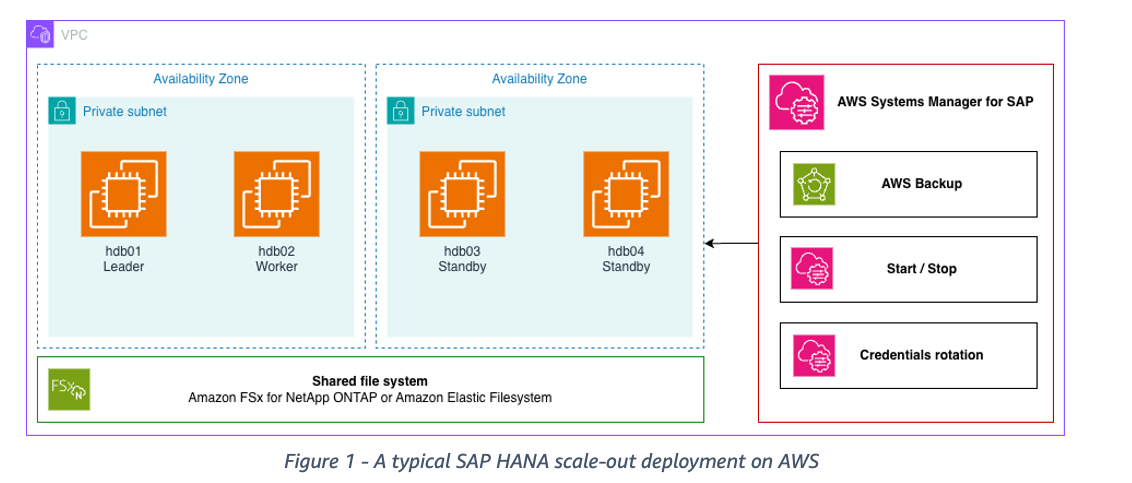
Customers running large SAP BW/4HANA, SAP BW on HANA, or SAP HANA-based data warehouse workloads often exceed what a single certified EC2 instance can hold in memory. SAP HANA scale-out addresses this by distributing one database across multiple hosts that share a single system ID. Each node runs its own index server and holds a portion of the data. All nodes mount a shared file system, and the nodes can be spread across Availability Zones. Deployments vary: some add a standby node that takes over the role of a failed worker, and others pair a scale-out system with SAP HANA System Replication.
The following diagram shows how a typical SAP HANA scale-out deployment looks on AWS.
Scale-out support
With scale-out support, SSM for SAP discovers every node in the system: worker nodes and standby nodes alike, and represents them as components of one application. The following capabilities then apply to the system as a whole.
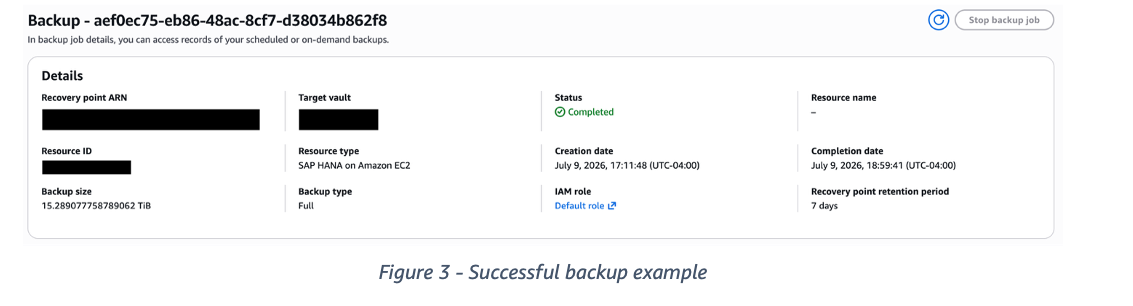
SAP HANA backup managed by AWS Backup. You can protect your scale-out database with AWS Backup using the same policy-based approach you use for single-node systems and highly available HANA systems. Assign the registered HANA databases (TENANTS or SYSTEMDB) to a backup plan. Then AWS Backup orchestrates full and log backups across the nodes, tracks recovery points centrally, and lets you restore from them without building and maintaining your own backup scripting. Backup activity and recovery points are visible on the AWS Backup tab of the application details page in the AWS Console for SAP Applications.
Application-aware start and stop. Starting and stopping a scale-out database is a single operation rather than a sequence you script yourself. SSM for SAP understands the node layout and brings the database up or down in the right order across all hosts. When stopping, you can choose to also stop the underlying EC2 instances, which makes this a practical lever for cost control on non-production scale-out landscapes. Combined with Amazon EventBridge Scheduler, you can put a development or test scale-out system on a business-hours schedule.
Getting started
- Confirm the prerequisites. Make sure the SSM Agent is running on every node of your scale-out system and that each host is a managed node in AWS Systems Manager. Review the SSM for SAP prerequisites for the required IAM permissions and AWS Secrets Manager setup.
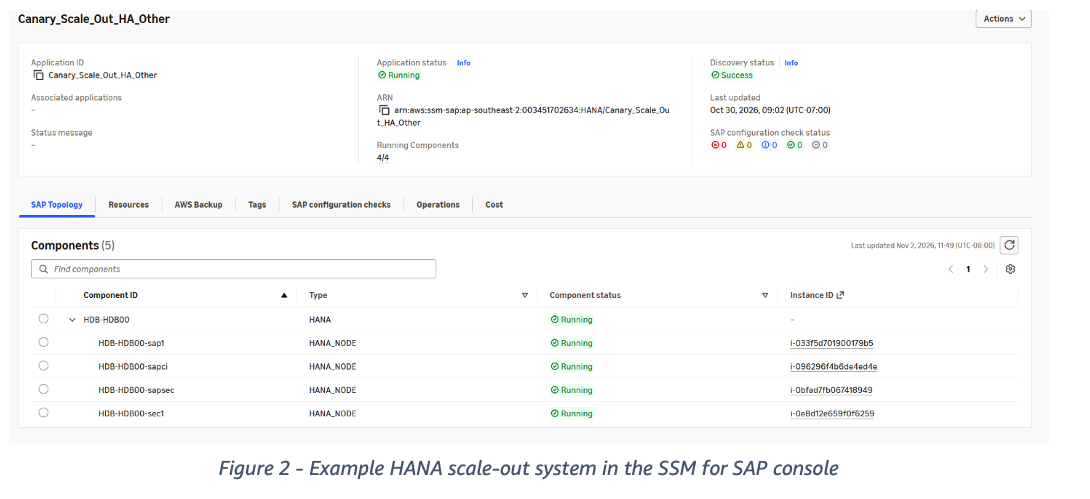
- Register the application. Open the AWS Management Console and search for AWS for SAP, then choose Register application and select your SAP HANA database. You can also register programmatically with the register-application API. SSM for SAP discovers all nodes in the scale-out system and shows them as components of the application.
- Review the topology. On the application details page, check the SAP Topology and Resources tabs to confirm every worker and standby node was discovered as expected. If you add or remove a node later, use Run on-demand discovery to refresh immediately instead of waiting for the hourly refresh.
- From here, you have the options of Enabling backups, Automating operations, Updating credentials and running star/stop.
On figure 2 we’re sharing an example of how your HANA scale-out system will be presented in the AWS Console after registration:
On figure 3 you find an example of a successful backup being taken of the newly registered HANA system:
Availability and pricing
You can use scale-out support in all AWS Regions where AWS Systems Manager for SAP is supported. There is no additional charge for registering a scale-out application or for using the AWS Console for SAP Applications. Standard charges apply for AWS Backup storage and for the underlying AWS resources. See the AWS Systems Manager pricing page for details.
Conclusion
SAP HANA scale-out deployments run some of the largest and most demanding SAP workloads on AWS, and they are the deployments where manual operations cost the most time. With scale-out support in AWS Systems Manager for SAP, those systems get the same managed backup, application-aware lifecycle operations, credential handling, and automated best practice validation that single-node systems have had, applied consistently across every node.
If you already run scale-out systems on AWS, register them with SSM for SAP and start by adding the application to a backup plan and move your non-production systems onto a schedule. For detailed guidance, visit the AWS Systems Manager for SAP documentation and the API reference.
To learn more about running SAP workloads on AWS, visit AWS for SAP.