AWS Big Data Blog
Access a VPC-hosted Amazon OpenSearch Service domain with SAML authentication using AWS Client VPN
Customers often want to deploy Amazon OpenSearch Service domains in virtual private clouds (VPC) and use single sign-on (SSO) with SAML for access control to enhance security. However, setting this up can be challenging.
In this post, we explore different OpenSearch Service authentication methods and network topology considerations. Then we show how to build an architecture to access an OpenSearch Service domain hosted in a VPC using AWS Client VPN, AWS Transit Gateway, and AWS IAM Identity Center.
Solution overview
The following diagram illustrates the solution architecture.
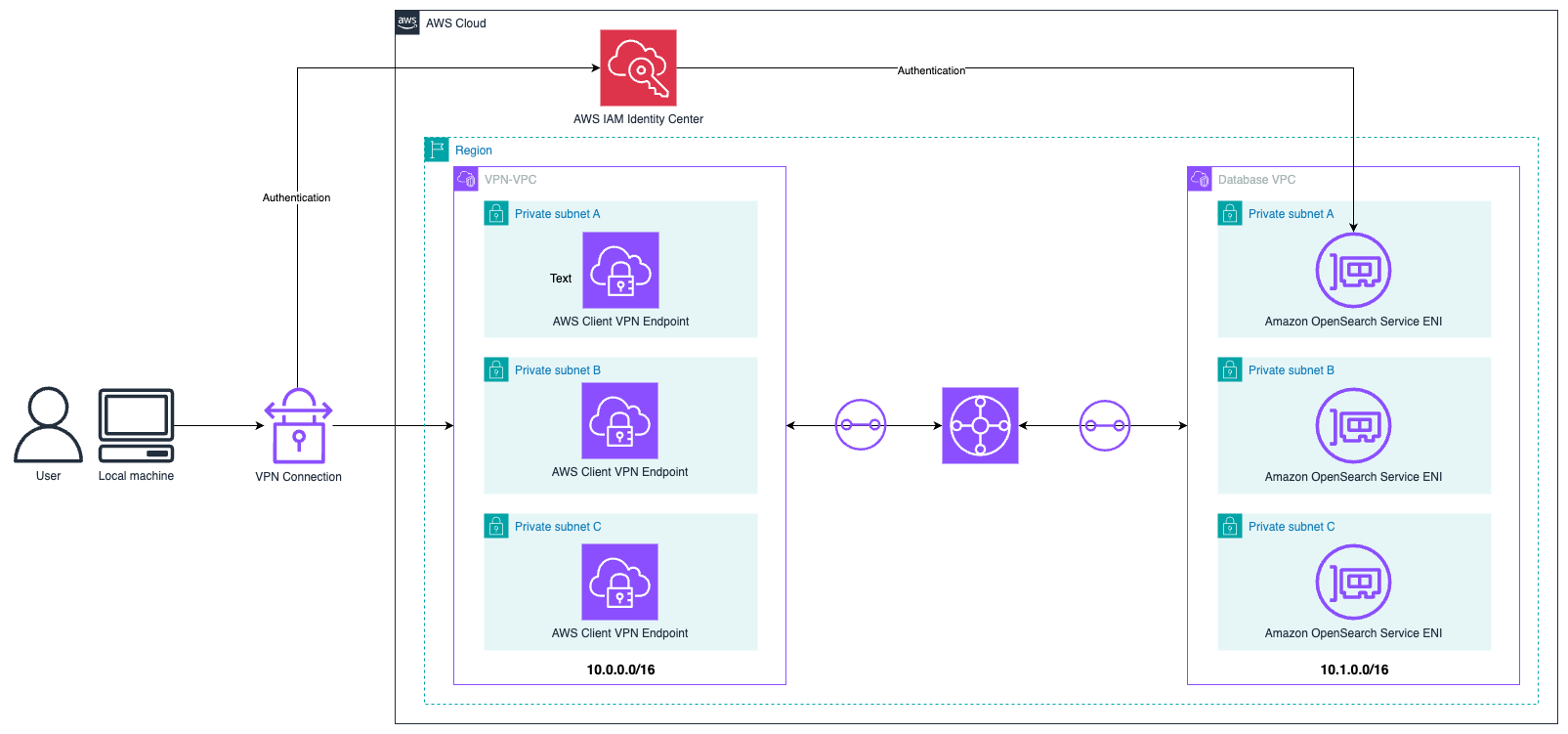
The end-user authenticates with IAM Identity Center and connects to the AWS environment from their browser through Client VPN. The traffic is routed from the VPN VPC to the database VPC where the OpenSearch service endpoints are deployed. The user then authenticates to OpenSearch Service through IAM Identity Center. This architecture provides a scalable, enterprise-grade solution that avoids using bastion hosts while making sure only authorized users can access your OpenSearch Service domains through a secure VPN connection. In the following sections, we walk through the steps to set up IAM Identity Center, configure Transit Gateway to facilitate communication between VPCs, and configure SAML-based authentication using IAM Identity Center for both OpenSearch Service and VPN access. Prior experience setting up Client VPN, IAM Identity Center, and Transit Gateway would be beneficial but is not necessary to follow along with this post.
OpenSearch Service authentication methods and SAML
OpenSearch Service supports multiple authentication methods. You can use AWS Identity and Access Management (IAM) to call the OpenSearch Service configuration API (for details, see Making and signing OpenSearch Service requests). However, this doesn’t give you access to the visual dashboard. To access the visual dashboard and call the OpenSearch Service configuration API, you can use the OpenSearch Service built-in internal user database or Amazon Cognito for authentication and user management features. However, these options use separate user pools, which adds additional security and management overhead when adding and removing users.
Therefore, many customers choose to use SAML federation to integrate OpenSearch Service authentication with their existing identity providers like Entra ID, Okta, or JumpCloud. For this post, we use the IAM Identity Center directory as our identity source. One limitation of this approach is that it only supports identity provider-initiated authentication. This means that users must log in through the IAM Identity Center portal and then access their OpenSearch Service dashboard from there.
Private network topology options for OpenSearch Service
When deploying OpenSearch Service domains in a private VPC, organizations must establish secure and reliable network connectivity to access their OpenSearch Service domains. AWS offers several networking solutions that can be implemented individually or in combination to meet specific access requirements. These options include Transit Gateway for centralized network management, AWS Direct Connect or AWS Site-to-Site VPN for on-premises connectivity, and Client VPN for secure remote access. Each solution provides unique benefits and can be combined to meet different organizational needs, security requirements, and performance expectations.
AWS Transit Gateway
Transit Gateway functions as a cloud router that simplifies network connectivity by acting as a central hub for connecting VPCs and on-premises networks. Implementing Transit Gateway with OpenSearch Service enables consolidated access to your OpenSearch Service domain across multiple VPCs and AWS accounts. Through Transit Gateway route tables, you can precisely control traffic flow between attached networks. It supports transitive routing between VPCs and on-premises networks, significantly reducing the number of peering connections needed to access your OpenSearch Service domain. This centralized approach is a common pattern used by customers, which makes network management scalable as your infrastructure grows.
AWS Client VPN
With Client VPN, you can securely access your private OpenSearch Service domain through a managed OpenVPN-based solution. Using Client VPN removes the need to use a bastion host or proxy server to access an OpenSearch Service domain, reducing your management burden and improving security. Client VPN supports both certificate-based and SAML-based authentication. Client VPN endpoints can be associated with multiple subnets to provide high availability. The service includes comprehensive security features such as connection logging and security group controls.
For more information on VPC connectivity options, refer to the AWS Direct Connect whitepaper.
Combining Client VPN with Transit Gateway provides a scalable and flexible way to access an OpenSearch Service domain in a private VPC. In the subsequent sections, we walk you through how to integrate the various services.
Prerequisites
If you haven’t yet set up IAM Identity Center, refer to Enable IAM Identity Center to enable it. Both organization instances and account instances will work. The Identity Center instance must be deployed in the same AWS Region as your OpenSearch Service domain.
After you set up IAM Identity Center, complete the following steps to create an IAM Identity Center group:
- On the IAM Identity Center console, choose Groups in the navigation pane.
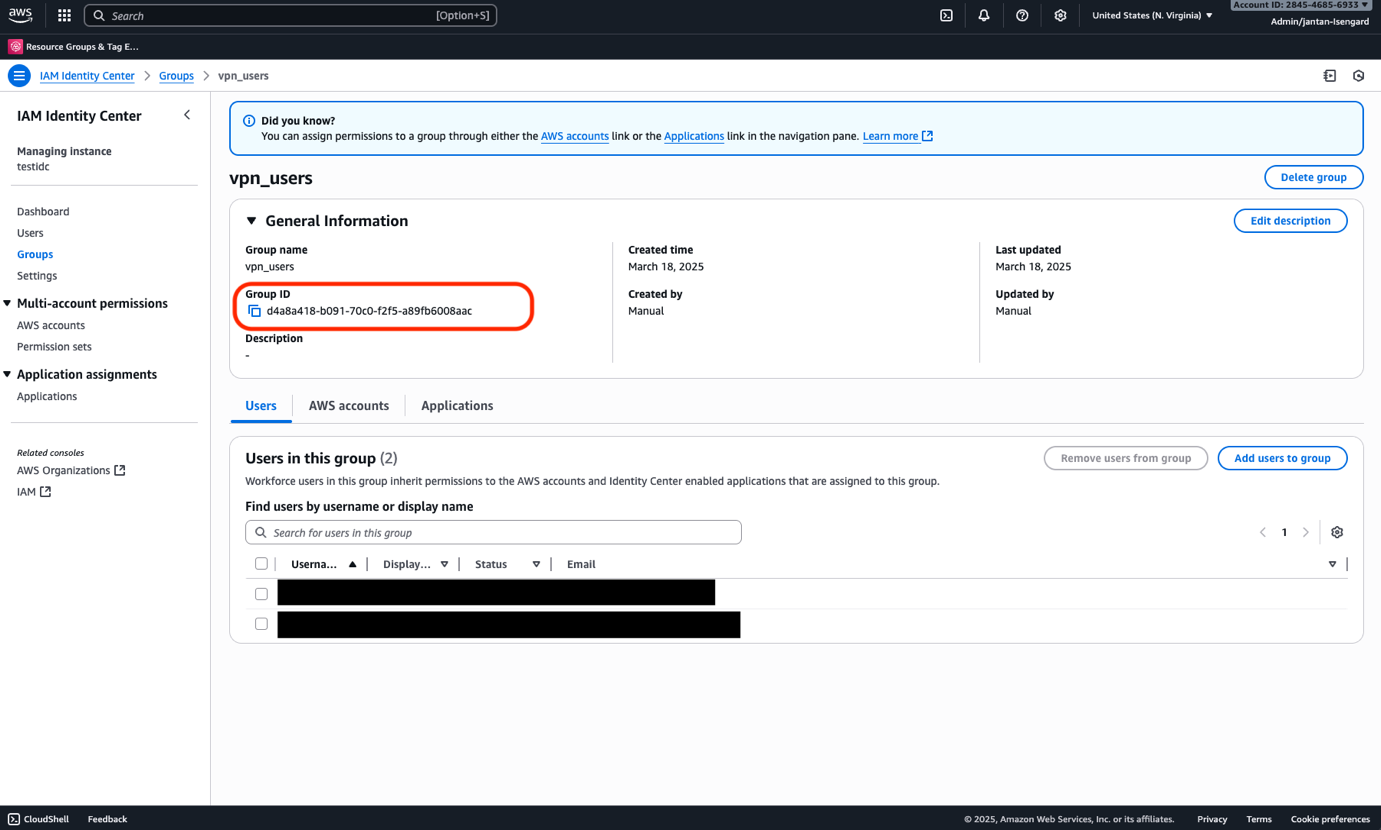
- Choose Create group and create a group (for this example, we name the group vpn_users.
- After you create the group, choose the group name to open its details page.
- Locate the group ID under General information. Save this in a text editor.
- Create a user (or multiple users) and assign them to the vpn_users group. This can be done directly through the user creation flow or after creating the user.
Set up the initial network topology
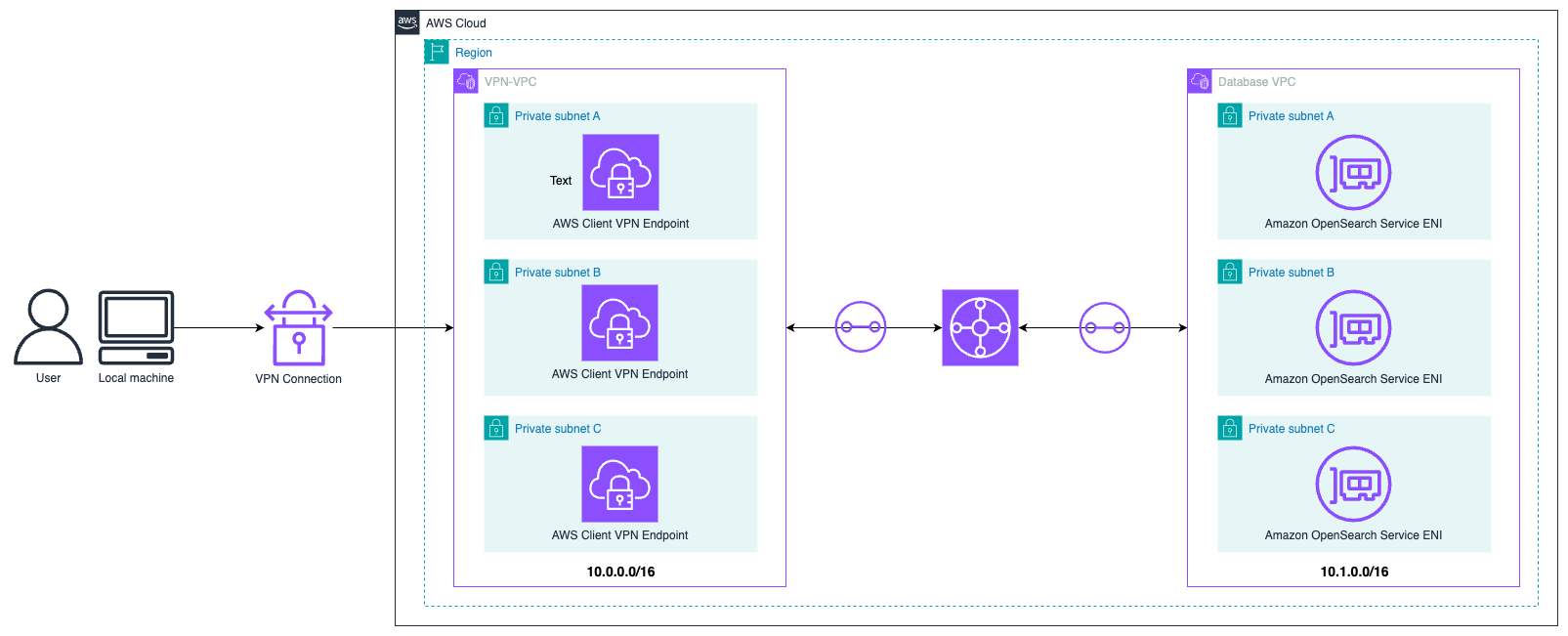
For this post, we use the network topology shown in the following diagram. One VPC hosts the client VPN endpoint with CIDR range 10.0.0.0/16 and a separate VPC with CIDR range 10.1.0.0/16 that hosts our OpenSearch Service nodes. The two VPCs are connected with Transit Gateway. The CIDR ranges in your environment may vary. The only requirement is that they can’t overlap.
Complete the following steps to create the two VPCs using Amazon Virtual Private Cloud (Amazon VPC):
- On the Amazon VPC console, choose Create VPC.
- Choose VPC and more.
- For this post, name the VPC VPN-VPC and use 10.0.0.0/16 for the IPv4 CIDR block.
- Choose 3 for the number of Availability Zones.
- Choose 0 for the number of public subnets.
- Choose 3 for the number of private subnets.
- Choose None for the number of NAT gateways.
- Choose None for the number of VPC endpoints.
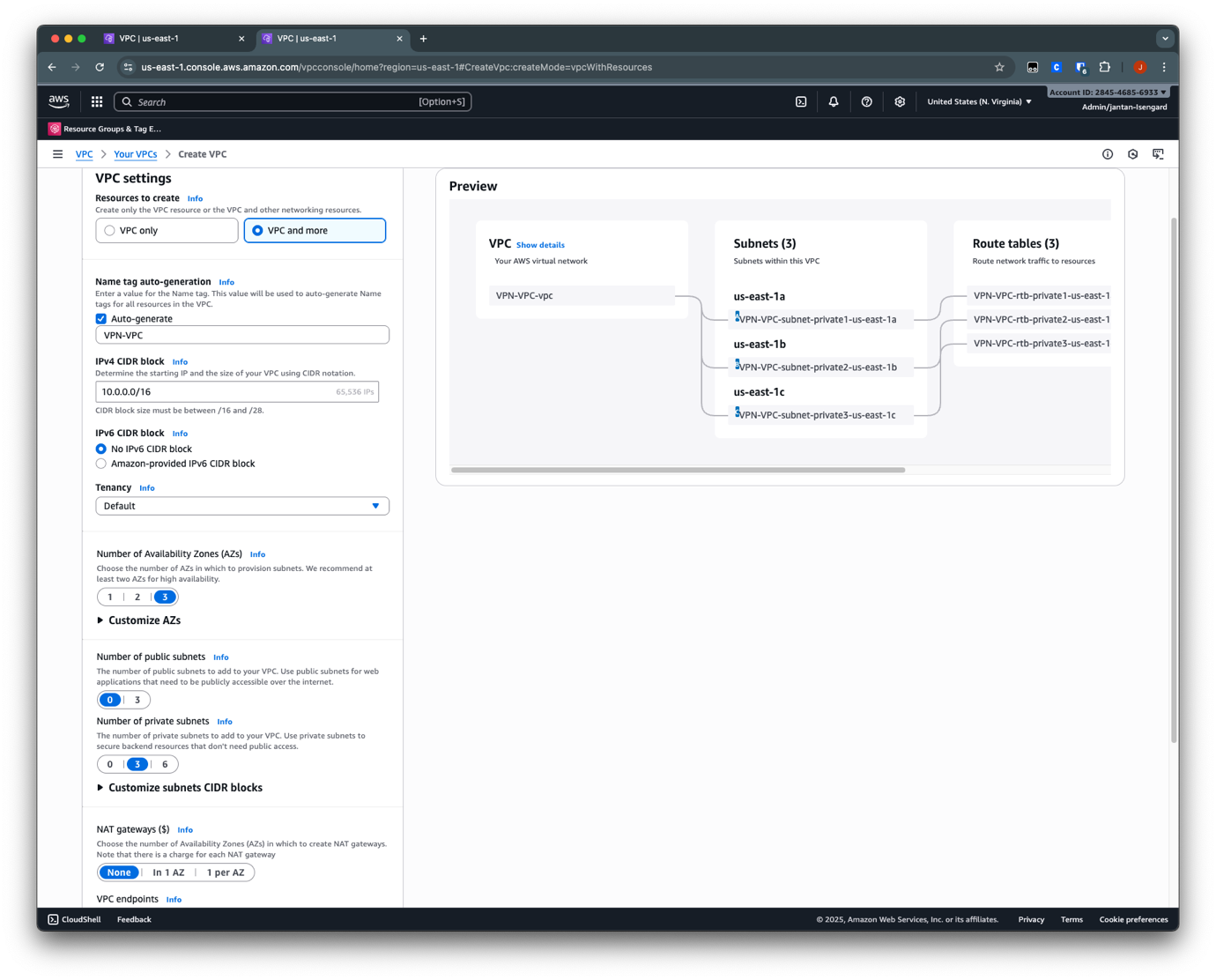
- Repeat these steps to create the second VPC for the OpenSearch Service domain. Keep the same configuration settings except for the following:
- Name: Database-VPC
- IPv4 CIDR Block: 10.1.0.0/16
Configure Transit Gateway
Follow the instructions in Create an AWS Transit Gateway using the Amazon VPC Console to create a transit gateway and attach your VPCs to it.
Next, you must update each VPC route table to facilitate connectivity to the OpenSearch Service domain.
- On the Amazon VPC console, choose Route tables in the navigation pane.
- For VPN-VPC, add routes on the subnets where the Client VPN endpoints are attached. The route is 10.1.0.0/16 using Transit Gateway. This route allows VPN users to reach Database-VPC.

- For Database-VPC, add routes on the subnets of the OpenSearch Service domain endpoint. The route is 10.0.0.0/16 using Transit Gateway. This route allows responses from Database-VPC back to reach the VPN users.

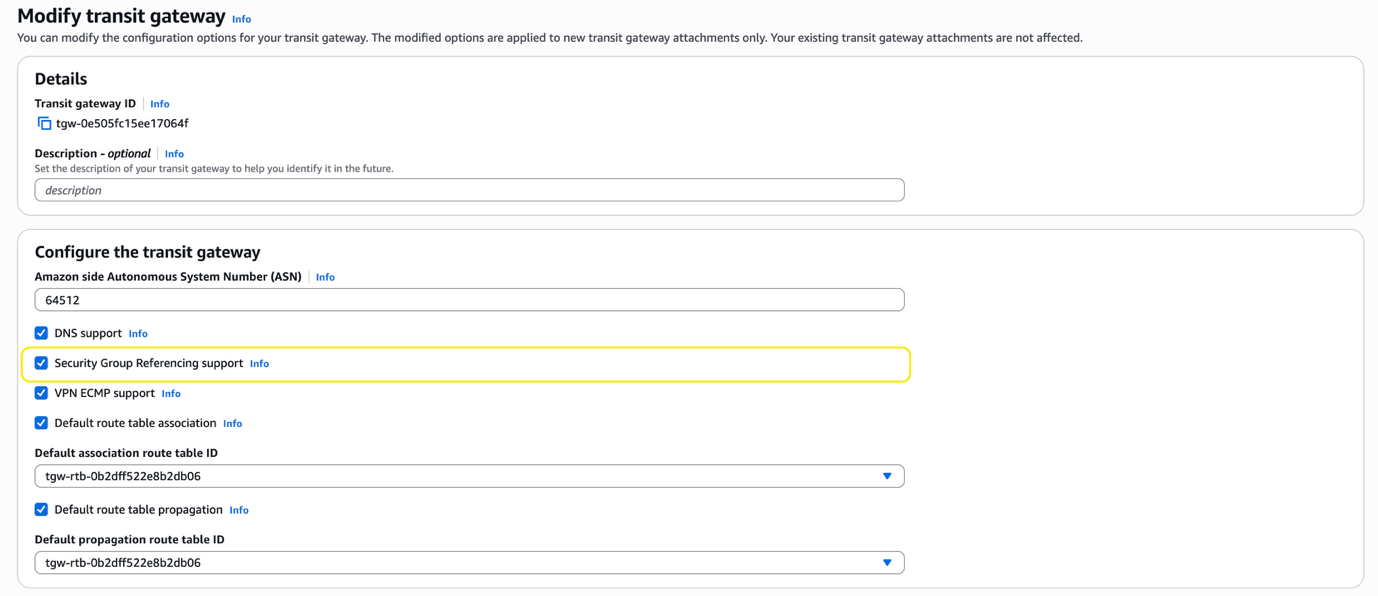
Next, you must update the Transit Gateway Security Group Referencing support configuration. This allows the OpenSearch Service domain’s security group to open port 443 to only the Client VPN security group. This makes applying least privilege simpler.
- On the Transit Gateway console, select the transit gateway you’re using.
- On the Actions menu, choose Modify transit gateway.

- Select Security Group Referencing support and choose Modify transit gateway.
Configure Client VPN authentication
Client VPN can be associated to multiple VPC subnets for high availability. Client VPN supports multiple client authentication methods. For this post, we use SAML-based authentication with IAM Identity Center.
To set up SAML-based authentication with IAM Identity Center, follow the instructions in the following sections. For more details, refer to Authenticate AWS Client VPN users with AWS IAM Identity Center. Deploy and associate the Client VPN endpoint with VPN-VPC.
Configure Client VPN access to database VPC
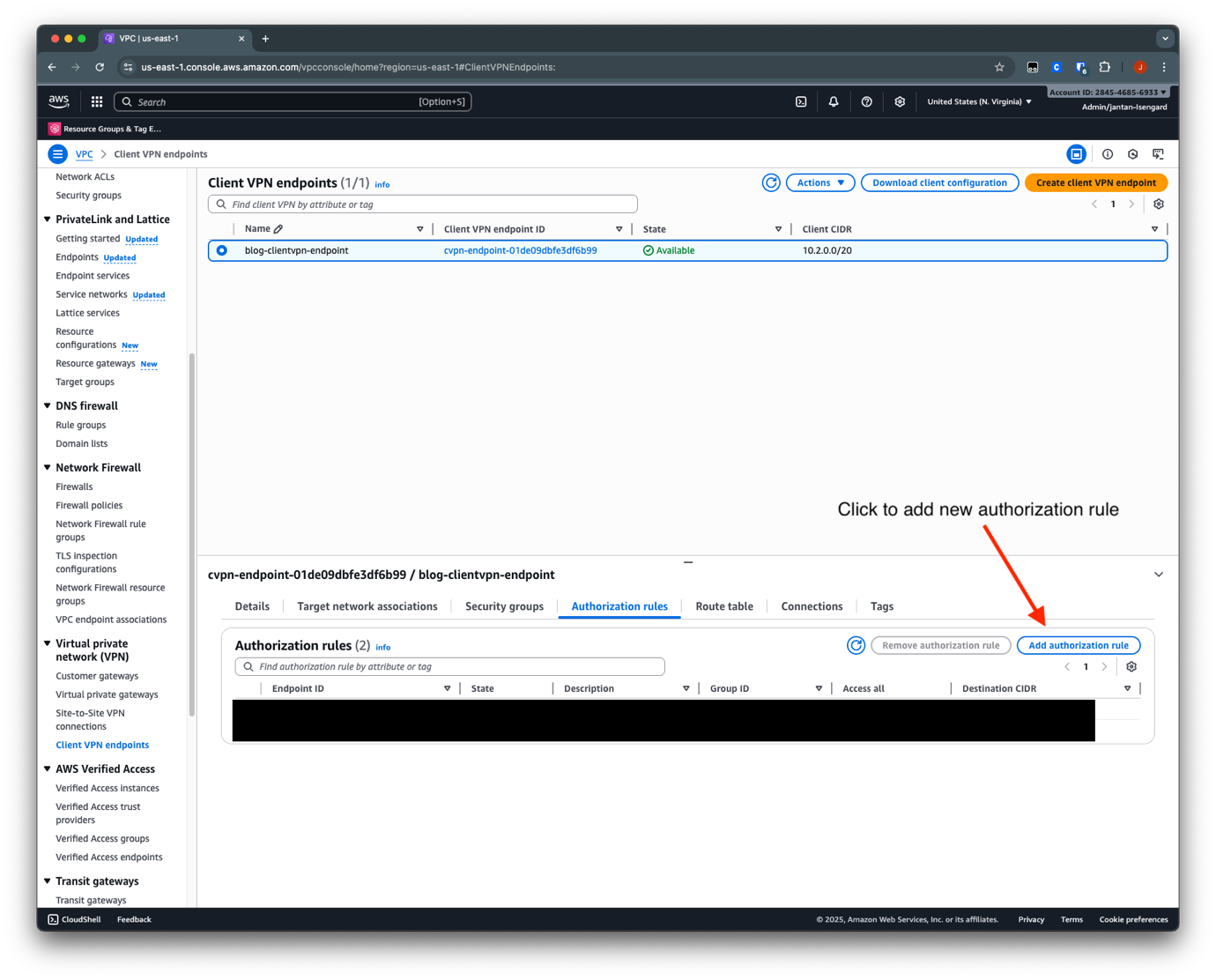
During the initial setup of the Client VPN endpoint, you defined authorization rules that authorized the VPN_users group to access the VPN-VPC network, which is 10.0.0.0/16.Complete the following steps to add connectivity to database-VPC:
- On the Amazon VPC console, choose Client VPC endpoints in the navigation pane.
- Select the endpoint you created.
- In the Authorization rules section, choose Add authorization rules.
- For Destination network to enable access, enter 10.1.0.0/16 (this is the database VPC).
- For Grant access to, select Allow access to all users.
- Choose Add authorization rule.
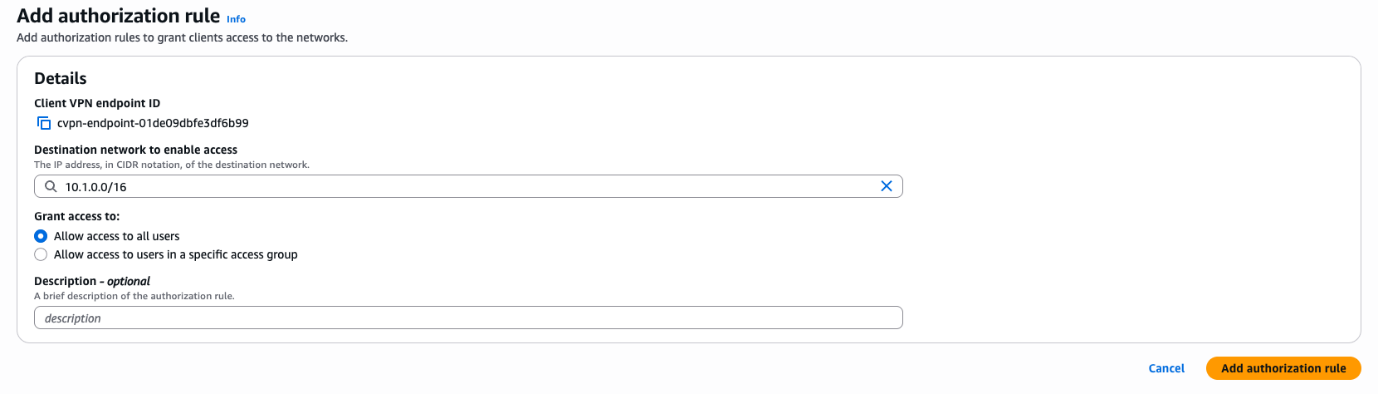
After you create the authorization rule, the user now has access to that CIDR range. Next, you add an entry in the Client VPN endpoint’s route table to provide reachability from a network perspective.
- On the Client VPN endpoints page, select the endpoint you just created.
- In the Route table section, choose Create route.

- For Route destination, enter the CIDR range for Database-VPC (10.1.0.0/16).
- For Subnet ID for target network association, choose a subnet ID.
- Choose Create route.
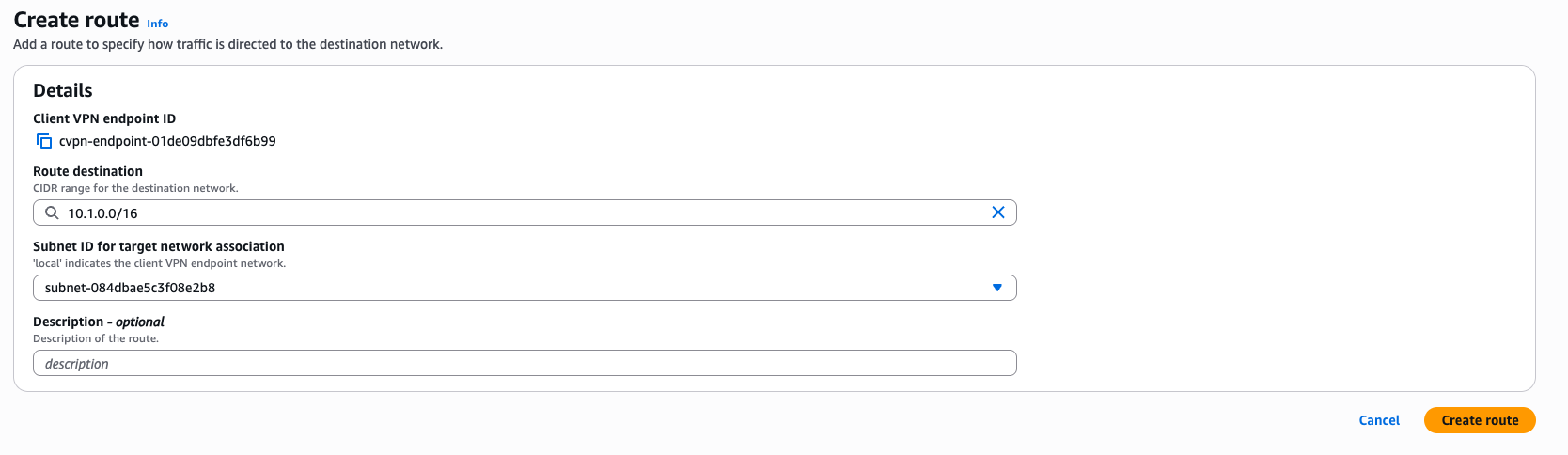
You should see the new route in the “Creating” state. After it has reached the “Active” state, VPN users will have a network path to the database VPC to be able to reach the OpenSearch Service domain.

Configure Client VPN application on your client
Complete the following steps to configure the Client VPN application to your client:
- Download the relevant installer for Client VPN for Desktop and install Client VPN.
- Download and prepare the Client VPN endpoint file.
- Open the Client VPN application.
- Choose Manage Profile, then choose Add Profile.
- Enter a display name and upload the VPN configuration file.
- Choose Add Profile.
Set up federation with IAM Identity Center with OpenSearch Service
Complete the following steps to set up federation with IAM Identity Center with OpenSearch Service:
- Create an OpenSearch Service domain in the database VPC.
- Set up the SAML integration between OpenSearch Service and IAM Identity Center. Assign the same groups that you assigned to the VPN custom application to the OpenSearch Service custom application.
- Modify the security group associated with the OpenSearch Service domain to allow access from the Client VPN subnet.
- Modify the security group of Client VPN and add the following entry:
- Type: HTTPS
- Source: Use Custom and reference the security group of the OpenSearch Service domain
Test the end-to-end flow
Now you can test the entire flow end-to-end:
- Run Client VPN on your local machine. Use the profile that you previously configured.
The client will prompt you to authenticate with IAM Identity Center. After authentication, you will see the message “Authentication details received, processing details. You may close this window at any time.” - Access your IAM Identity Center access portal URL (this can be found on the IAM Identity Center console, under Dashboard). Sign in as a user that has been assigned to the OpenSearch Service custom application in the previous step.
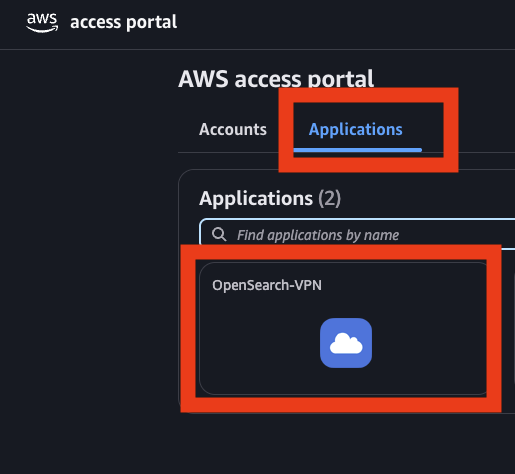
- After authentication, choose the Applications tab in AWS Access Portal and choose the OpenSearch Service application.
This should redirect you to the OpenSearch Service Dashboards page with the role that you assigned.
Clean up
After you test the solution, delete the resources you created to avoid incurring future charges:
- Delete the OpenSearch Service domain and the SAML application, users, and groups in IAM Identity Center.
- Delete the client VPN endpoints that you created and remove the routing rules from Transit Gateway.
Conclusion
In this post, we discussed the networking options for securely accessing an OpenSearch Service domain deployed in a private VPC through services like Transit Gateway, Client VPN, and Site-to-Site VPN. We also discussed how to use IAM Identity Center for authentication and authorization, helping you simplify identity management for OpenSearch Service. If you have feedback about this post, provide it in the comments section.