AWS Big Data Blog
Amazon OpenSearch Service 101: T-shirt size your domain for e-commerce search
In e-commerce, delivering fast, relevant search results helps users find products quickly and accurately, improving satisfaction and increasing sales. OpenSearch is a distributed search engine that offers advanced search capabilities including advanced full-text and faceted search, customizable analyzers and tokenizers, and auto-complete to help customers quickly find the products they want. It scales to handle millions of products, catalogs and traffic surge. Amazon OpenSearch Service is a managed service that lets users build search workloads balancing search quality, performance at scale and cost. Designing and sizing an Amazon OpenSearch Service cluster correctly is required to meet these demands.
While general sizing guidelines for OpenSearch Service domains are covered in detail in OpenSearch Service documentation, in this post we specifically focus on T-shirt-sizing OpenSearch Service domains for e-commerce search workloads. T-shirt sizing simplifies complex capacity planning by categorizing workloads into sizes like XS, S, M, L, XL based on key workload parameters such as data volume and query concurrency. For e-commerce search, where data growth is moderate and read-heavy queries predominate, this approach offers a flexible, scalable way to allocate the resources without overprovisioning or underestimating needs.
How OpenSearch Service stores indexes and performs queries
E-commerce search platforms handle vast amounts of data and daily data ingestion is typically relatively small and incremental, reflecting catalog changes, price updates, inventory status and user activities like clicks and reviews. Efficiently managing this data and organizing it per OpenSearch Service best practices is crucial in achieving optimal performance. The workload is read-heavy, consisting of user queries with advanced filtering and faceting, especially during sales or seasonal spikes that require elasticity in compute and storage resources.
You ingest product and catalog updates (inventory, listings, pricing) into OpenSearch using bulk APIs or real-time streaming. You index data into logical indexes. How you create and organize indexes in e-commerce has a significant impact on search, scalability and flexibility. The approach depends on the size, diversity and operational needs of the catalog. Small to medium-sized e-commerce platforms commonly use a single, comprehensive product index that stores all product information with product category. Additional indexes may exist for orders, users, reviews and promotions depending on search requirements and data separation needs. Large, diverse catalogs may split products into category-specific indexes for tailored mappings and scaling. You split each index into primary shards, each storing a portion of the documents. To ensure high availability and enhance query throughput, you configure each primary shard with at least one replica shard stored on different data nodes.
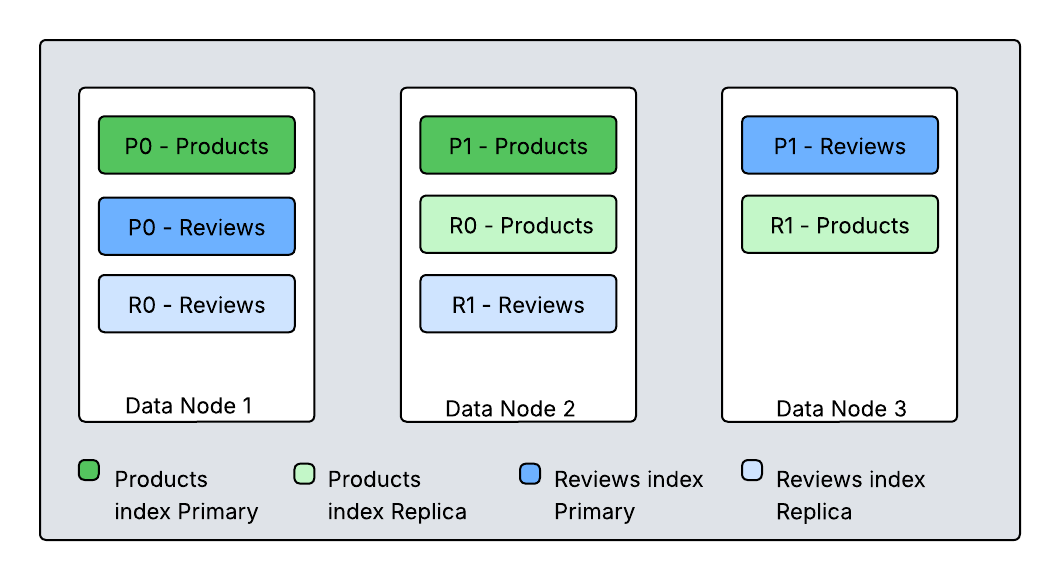
Diagram 1. How primary and replica shards are distributed among nodes
This diagram shows two indexes (Products and Reviews), each split into two primary shards with one replica. OpenSearch distributes these shards across cluster nodes to ensure that primary and replica shards for the same data do not reside on the same node. OpenSearch runs search requests using a scatter-gather mechanism. When an application submits a request, any node in the cluster can receive it. This receiving node becomes the coordinating node for that specific query. The coordinating node determines which indices and shards can serve the query. It forwards the query to either primary or replica shards and orchestrates the different phases of the search operation and returns the response. This process ensures efficient distribution and execution of search requests across the OpenSearch cluster.
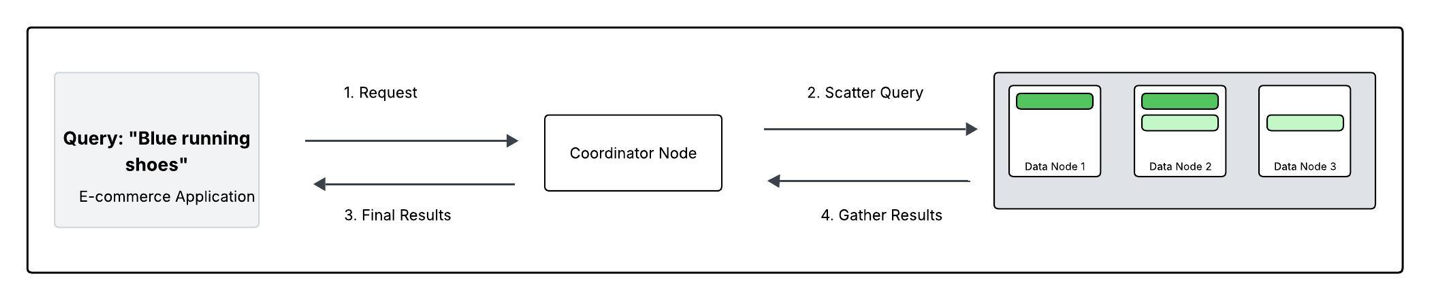
Diagram 2. Tracing a Search query: “blue running shoes”This diagram walks through how a search query–for example, “blue running shoes”flows through your OpenSearch Service domain .
- Request: The application sends the search for “blue running shoes” to the domain. One data node acts as the coordinating node.
- Scatter: The coordinator broadcasts the query to either the primary or replica shard for each of the shards in the ‘Products’ index (Nodes 1, 2, and 3 in this case).
- Gather: Each data node searches its local shards(s) for “blue running shoes” and returns its own top results (e.g. Node 1 returns its best matches from P0).
- Final results: The coordinator merges these partial lists, sorts them into single definitive list of the most relevant shoes, and sends the result back to the app.
Understanding T-Shirt Sizing for E-commerce OpenSearch Service Cluster
Storage planning
Storage impacts both performance and cost. OpenSearch Service offers two main storage options based on query latency requirements and data persistence needs. Selecting the appropriate storage type in a managed OpenSearch Service improves both performance and optimizes cost of the domain. You can choose between Amazon Elastic Block Store( EBS) storage volumes and instance storage volumes (local storage) for your data nodes.
Amazon EBS gp3 volumes offer high throughput, whereas the local NVMe SSD volumes, for example, on the r8gd, i3, or i4i instance families, offer low latency, fast indexing performance and high-speed storage, making them ideal for scenarios where real time data updates and high search throughput are critical for search operations. For search workloads that require a balance between performance and cost, instances backed with EBS GP3 SSD volumes provide a reliable option. This SSD storage offers input/output operations per second (IOPS) that are well-suited for general-purpose search workloads. It also allows users to provision additional IOPS and storage as needed.
When sizing an OpenSearch cluster, start by estimating total storage needs based on catalog size and expected growth. For example, if the catalog contains 500,000 stock keeping units (SKUs), averaging 50KB each; the raw data sums to about 25GB. The size of the raw data, however, is just one aspect of the storage requirements. Also consider the Replica count, indexing overhead (10%), Linux reserves (5%), and OpenSearch Service reserves (20% up to 20GB) per instance while calculating the required storage.
In summary,if you have 25GB of data at any given time who want one replica, the minimum storage requirement is closer to 25 * 2 * 1.1 / 0.95 / 0.8 = 72.5 GB. This calculation can be generalized as follows:
Storage requirement = Raw data * (1 + number of replicas) * 1.45
This helps ensure disk space headroom on all data nodes, preventing shard failures and maintaining search performance. Provisioning storage slightly beyond this minimum is recommended to accommodate future growth and cluster rebalancing.
Data nodes:
For search workloads, compute-optimized instances (C8g) are well-suited for central processing unit (CPU)-intensive operations like nested queries and joins. However, general-purpose instances like M8g offer a better balance between CPU and memory. Memory-optimized instances (R8g, R8gd) are recommended for memory-intensive operations like KNN search, where larger memory footprint is required. In large, complex deployments, compute-optimized instances like c8g or general-purpose m8g, handle CPU-intensive tasks, providing efficient query processing and balanced resource allocation. The balance between CPU and memory, makes them ideal for managing complex search operations for large-scale data processing. For extremely large search workloads (tens of TB) where latency is not a primary concern, consider using the new Amazon OpenSearch Service Writable warm which supports write operations on warm indices.
| Instance Class | Best for users who… | Examples (AWS) | Characteristics |
| General Purpose | have moderate search traffic and want a well-balanced, entry-level setup | M family (M8g) | Balanced CPU & memory, EBS storage. Good starting point for small to medium-sized catalogs. |
| Compute Optimized | have high queries per second (QPS) search traffic or queries involve scoring scripts or complex filtering | C family (C8) | High CPU-to-memory ratio. Ideal for CPU-bound workloads like many concurrent queries. |
| Memory Optimized | work with large catalogs, need fast aggregations, or cache a lot in memory | R family (R8g) | More memory per core. Holds large indices in memory to speed up searches and aggregations. |
| Storage Optimized | update inventory frequently or have so much data that disk access slows things down | I family (I3, I4g), Im4gn | NVMe SSD and SSD local storage. Best for I/O-heavy operations like constant indexing or large product catalogs hitting disk frequently. |
Cluster manager nodes:
For production workloads, it is recommended to add dedicated cluster manager nodes to increase the cluster stability and offload cluster management tasks from the data nodes. To choose the right instance type for your cluster manager nodes, review the service recommendations based on the OpenSearch version and number of shards in the cluster.
Sharding strategy
Once storage requirements are understood, you can investigate the indexing strategy. You create shards in OpenSearch Service to distribute an index evenly across the nodes in a cluster. AWS recommends single product index with category facets for simplicity or partition indexes by category for large or distributed catalogs. The size and number of shards per index play a vital role in OpenSearch Service performance and scalability. The right configuration ensures balanced data distribution, avoids hot spotting, and minimizes coordination overhead on nodes for use cases that prioritizes query speed and data freshness.
For read-heavy workloads like e-commerce, where search latency is the key performance objective, maintain shard sizes between 10-30GB. To achieve this, calculate the number of primary shards by dividing your total index size by your target shard size. For example, if you have a 300GB index and want 20GB shards, configure 15 primary shards (300GB ÷ 20GB = 15 shards). Monitor shard sizes using the _cat/shards API and adjust the shard count during reindexing if shards grow beyond the optimal range.
Add replica shards to improve search query throughput and fault tolerance. The minimum recommendation is to have one replica; you can add more replicas for high query throughput requirements. In OpenSearch Service, a shard processes operations like querying single-threaded, meaning one thread handles a shard’s tasks at a time. Replica shards can serve read requests by distributing them across multiple threads and nodes, enabling parallel processing.
T-shirt sizing for an e-commerce workload
In an OpenSearch T-shirt sizing table, each size label (XSmall, Small, Medium, Large, XLarge) represents a generalized cluster scale category that can help teams translate technical requirements into simple, actionable capacity planning. Each size allows architects to quickly align their catalog size, storage requirements, shard planning, CPU and AWS instance choices to the cluster resources provisioned, making it easier to scale infrastructure as business grows.
By referring to this table, teams can select the category similar to their current workload and use the T-shirt size as a starting point while continuing to refine configuration as they monitor and optimize real-world performance. For example, XSmall is suited for small catalogs with hundreds of thousands of products and minimal search traffic. Small clusters are designed for growing catalogs with millions of SKUs, supporting moderate query volumes and scaling up during busy periods. Medium corresponds to mid-size e-commerce operations handling millions of products and higher search demands, while Large fits large online businesses with tens of millions of SKUs, requiring robust infrastructure for fast, reliable search. XLarge is intended for major marketplaces or global platforms with twenty million or more SKUs, enormous data storage needs, and massive concurrent usage.
| T-shirt size | Number of Products | Catalog Size | Storage needed | Primary Shard Count | Active Shard Count | Data Nodes Instance Type | Cluster Manager Node instanceType |
| XSmall | 500K | 50 GB | 145 GB | 2 | 4 | [2] r8g.xlarge | [3] m8g.large |
| Small | 2M | 200 GB | 580 GB | 8 | 16 | [2] c8g.4xlarge | [3] m8g.large |
| Medium | 5M | 500 GB | 1.45 TB | 20 | 40 | [2] c8g.8xlarge | [3] m8g.large |
| Large | 10M | 1 TB | 2.9 TB | 40 | 80 | [4] c8g.8xlarge | [3] m8g.large |
| XLarge | 20M | 2 TB | 5.8 TB | 80 | 160 | [4] c8g.16xlarge | [3] m8g.large |
- T-shirt size: Represents the scale of the cluster, ranging from XS up to XL for high-volume workloads.
- Number of products: The estimated count of SKUs in the e-commerce catalog, which drives the data volume.
- Catalog size: The total estimated disk size of all indexed product data, based on typical SKU document size.
- Storage needed: The actual storage required after accounting for replicas and overhead, ensuring enough room for safe and efficient operation.
- Primary shard count: The number of main index shards chosen to balance parallel processing and resource management.
- Active shard count: The total number of live shards (primary with one replica), indicating how many shards need to be distributed for availability and performance.
- Data node instance type: The recommended instance type to use for data nodes, selected for memory, CPU, and disk throughput.
- Cluster manager node instance type: The recommended instance type for lightweight, dedicated master nodes which manage cluster stability and coordination.
Scaling strategies for e-commerce workloads
E-commerce platforms continually face challenges with unpredictable traffic surges and growing product catalogs. To address these challenges, OpenSearch Service automatically publishes critical performance metrics to Amazon CloudWatch, enabling users to monitor when individual nodes reach resource limits. These metrics include CPU utilization exceeding 80%, JVM memory pressure above 75%, frequent garbage collection pauses, and thread pool rejections.
OpenSearch Service also provides robust scaling solutions that maintain consistent search performance across varying workload demands. Use the vertical scaling strategy to upgrade instance types from smaller to larger configurations, such as m6g.large to m6g.2xlarge. While vertical scaling triggers a blue-green deployment, scheduling these changes during off-peak hours minimizes impact on operations.
Use the horizontal scaling strategy to add more data nodes for distributing indexing and search operations. This approach proves particularly effective when scaling for traffic growth or increasing dataset size. In domains with cluster manager nodes, adding data nodes proceeds smoothly without triggering a blue-green deployment. CloudWatch metrics guide horizontal scaling decisions by monitoring thread pool rejections across nodes, indexing latency, and cluster-wide load patterns. Though the process requires shard rebalancing and may temporarily impact performance, it effectively distributes workload across the cluster.
Temporary replicas provide a flexible solution for managing high-traffic periods. By increasing replica shards through the _settings API, read throughput can be boosted when needed. This approach offers a dynamic response to changing traffic patterns without requiring more substantial infrastructure changes.
For more information on scaling an OpenSearch Service domain, please refer to How do I scale up or scale out an OpenSearch Service domain?
Monitoring and operational best practices
Monitoring key performance CloudWatch metrics is essential to ensure a well-optimised OpenSearch service domain. One of the key factors is maintaining CPU utilization on data nodes under 80% to prevent query slowdowns. Another metric is ensuring that JVM memory pressure is maintained below 75% on data nodes to prevent garbage collection (GC) pauses that can affect search response time. OpenSearch service publishes these metrics to CloudWatch at 1 minute interval and users can create alarms on these metrics for alerts on the production workloads. Please refer recommended CloudWatch alarms for OpenSearch Service
P95 query latency should be monitored to identify slow queries and optimize performance. Another important indicator is thread pool rejections. A high number of thread pool rejections can result in failed search requests, and affecting user experience. By continuously monitoring these CloudWatch metrics, users can proactively scale resources, optimise queries, and prevent performance bottlenecks.
Conclusion
In this post, we showed how to right-size Amazon OpenSearch Service domains for e-commerce workloads using a T-shirt sizing approach. We explored key factors including storage optimization, sharding strategies, scaling methods, and essential Amazon CloudWatch metrics for monitoring performance.
To build a performant search experience, start with a smaller deployment and iterate as your business scales. Get started with these five steps:
- Evaluate your workload requirements in terms of storage, search throughput, and search performance
- Select your initial T-shirt size based on your product catalog size and traffic patterns
- Deploy the recommended sharding strategy for your catalog scale
- Load test your cluster using OpenSearch benchmark and re-iterate until performance requirements are reached
- Configure Amazon CloudWatch monitoring and alarms, then continue to monitor your production domain