AWS Big Data Blog
Assess and track your Amazon Redshift RA3 to RG modernization with CUDOS
Amazon Redshift is a fully managed, AI-powered cloud data warehouse used by tens of thousands of customers to analyze exabytes of data with industry-leading price-performance. With the launch of Graviton-based RG instances, every Amazon Redshift RA3 customer now has a clear path to even better price-performance. But turning that opportunity into an executed, measurable migration across an organization takes visibility. In this post, we show how the CUDOS dashboard, part of the AWS open-source Cloud Intelligence Dashboards (CID) framework, helps you assess the cost-efficiency opportunity of moving from RA3 to RG, track adoption as it progresses, and quantify the benefits you have already realized.
We walk through the new Amazon Redshift RA3-to-RG section of the CUDOS dashboard. These visuals estimate migration cost efficiency from your current RA3 usage, show how your instance-generation mix is shifting over time, and measure the gains achieved on RG. We also show you how to deploy CUDOS in your own organization.
Amazon Redshift Graviton-based RG instances
On May 12, 2026, Amazon Redshift launched Graviton-based RG instances, a new generation of provisioned nodes that raise the price-performance bar for RA3 customers. RG delivers up to 2.2x faster performance for data warehouse workloads and up to 2.4x faster for data lake workloads, all at 30 percent lower price per vCPU than RA3. RG instances support every data lake format that RA3 supports, and they remove per-TB scanning charges for Amazon Redshift Spectrum. Running data lake queries can be cost-neutral or cheaper even as you add nodes. Amazon Redshift now also meters manual snapshot storage based on the unique data blocks stored across cluster snapshots, which results in lower manual snapshot costs. Because RG maintains full feature parity with RA3, you can modernize without giving up functionality. We recommend that RA3 customers plan their move to RG to maximize price-performance, whether their workloads are compute-intensive or I/O-intensive. For migration candidates, node mapping, prerequisites, migration approaches, fallback, and AWS Database Migration Service (AWS DMS), Zero-ETL, and data-sharing considerations, see Modernize Amazon Redshift: RA3 to RG Migration best practices.
CUDOS dashboard and Cloud Intelligence Dashboards framework
CUDOS (Cost and Usage Dashboard Operations Solution) dashboard is one of the Cloud Intelligence Dashboards (CID), a framework of dashboards built entirely on data from the AWS Cost and Usage Report (CUR). CUDOS is the in-depth, granular, recommendation-driven member of the family: it pairs high-level executive summaries with drill-down all the way to resource-level detail, so executives, FinOps practitioners, product owners, and engineering teams can act on auto-generated optimization recommendations out of the box. Built on fast Amazon Quick Sight SPICE datasets, it organizes cost and usage into dedicated tabs (Executive summaries, Compute, Databases, Storage, AI/ML, Analytics, Security, Data Transfer, and more). It surfaces spend trends, idle-resource waste, Reserved Instance and AWS Savings Plans commitment tracking, and a built-in Taxonomy Explorer for grouping and filtering by tags and account mappings. This is the dashboard that now carries the Amazon Redshift RA3-to-RG modernization insights, turning the migration into a data-driven, trackable optimization effort.
Amazon Redshift RA3-to-RG insights in CUDOS
CUDOS version 5.10 introduces a dedicated Amazon Redshift RA3-to-RG section that transforms your modernization into a data-driven optimization strategy. The section is organized around three questions: “What could we save?”, “How is our migration progressing?”, and “What have we already gained?”.
Estimate the cost-efficiency opportunity from current RA3 usage
The following figure shows the Monthly Cost Savings Opportunities key performance indicator (KPI) and the resource-level savings table.
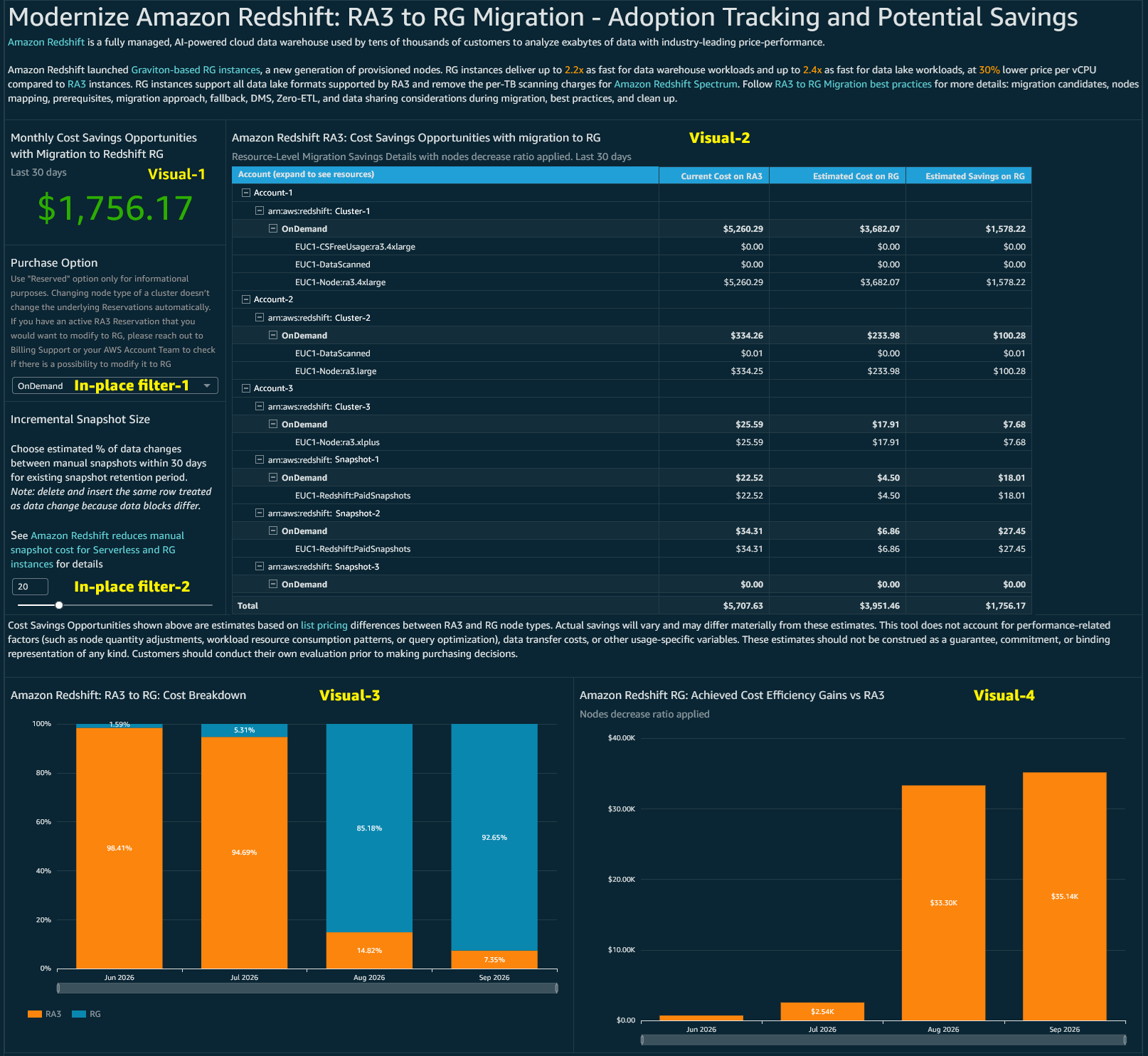
Figure 1: Monthly Cost Savings Opportunities KPI and the resource-level savings table in the CUDOS RA3-to-RG section
A single headline KPI ([Visual-1] “Monthly Cost Savings Opportunities with Migration to Redshift RG”, last 30 days) shows the total estimated monthly savings available if your eligible RA3 resources migrate to RG. Alongside it, the resource-level savings table ([Visual-2] “Amazon Redshift RA3: Cost Savings Opportunities with migration to RG”) breaks that number down in an expandable hierarchy of account, cluster, purchase type, and resource line item. Three columns (Current Cost on RA3, Estimated Cost on RG, and Estimated Savings on RG) show which accounts and clusters offer the most savings potential, and a total row ties back to the KPI. As with all list-price-based estimates, actual savings vary and exclude performance, data-transfer, and other usage-specific factors.
Track adoption as your instance-generation mix shifts
[Visual-3] shows the “Amazon Redshift: RA3 to RG: Cost Breakdown” chart, a 100% stacked column that tracks the share of cost across instance generations month over month. As migration progresses, you can watch the mix shift from the prior generation to RG, giving leadership a clear visual adoption-tracking signal across the organization.
Quantify the benefits already achieved on RG
[Visual-4] shows the “Amazon Redshift RG: Achieved Cost Efficiency Gains vs RA3” chart, a column chart of realized monthly efficiency gains with the 4xlarge node-decrease ratio applied from the Modernize Amazon Redshift: RA3 to RG Migration best practices blog. Where the savings KPI estimates the opportunity ahead of you, this visual quantifies the gains you have already achieved as clusters move to RG. You can use it to demonstrate the return on your modernization effort over time.
Tailor the estimates with in-place filters
With two in-place filters, you can tailor the estimates to your environment:
- Purchase Option: A menu to model savings under On-Demand or Reserved pricing. Use the Reserved option for informational purposes only, because changing a cluster’s node type doesn’t change the underlying Reservations automatically. If you have an active RA3 Reservation that you want to modify for RG, contact Billing Support or your AWS account team.
- Incremental Snapshot Size: A slider to set the estimated percentage of data that changes between manual snapshots, which refines the snapshot-cost portion of the estimate according to the Amazon Redshift reduces manual snapshot cost for Serverless and RG instances announcement.
Deploying CUDOS
CUDOS is deployed with AWS CloudFormation (or a CID Terraform module) into a dedicated data collection account. We recommend keeping this account separate from your management or payer account. The deployment has three main steps:
- Create the CUR destination [Data Collection Account]. Launch the first CloudFormation stack to create an Amazon Simple Storage Service (Amazon S3) bucket (with a policy allowing the AWS Data Exports service to write to it) plus the AWS Glue and Amazon Athena tables. Set the destination account ID and list your source account IDs. Usual deployment time is 5–15 minutes.
- Create CUR 2.0 in each source account [Management/Payer/Source Account]. Launch the second stack in every source account, pointing it at your Data Collection Account as the destination. Usual deployment time is 5 minutes each. The first Data Exports delivery typically takes about 24 hours (up to 72), and you can open a Billing support case to backfill up to 14 months of historical data.
- Deploy the dashboards [Data Collection Account]. Prepare Amazon Quick Sight (sign up, choose the right Region, and allocate about 40 GB of SPICE capacity), then launch the CID dashboards stack and select CUDOS (and optionally the Cost Intelligence and KPI dashboards).
Using the automation, setup takes roughly 15–30 minutes of hands-on work, though the first CUR data refresh can take up to 24 hours to appear. Make sure every stack is deployed in the same Region to avoid cross-Region data-transfer charges. For detailed, step-by-step deployment instructions, see Deployment in Global Regions.
If you already have CUDOS deployed, you can update it to version 5.10 by following the Update Dashboards guide.
Conclusion
Amazon Redshift Graviton-based RG instances give RA3 customers a path to better price-performance: up to 2.2x faster for data warehouse workloads and up to 2.4x faster for data lake workloads, at 30% lower price per vCPU, with full feature parity and no per-TB Spectrum scanning charges. To turn that opportunity into an executed, measurable migration across your organization, you can use the CUDOS dashboard’s new Amazon Redshift RA3-to-RG section to:
- Assess the monthly cost-efficiency opportunity from your current RA3 usage, down to the individual account, cluster, and resource.
- Track adoption as your instance-generation mix shifts from RA3 to RG over time.
- Quantify the efficiency gains you have already achieved on RG.
To get started, follow RA3 to RG Migration best practices to plan your migration, and deploy CUDOS using Deployment in Global Regions guide to assess, track, and quantify your modernization every step of the way.