AWS Big Data Blog
Automate deployment of data and AI applications with Amazon SageMaker Unified Studio CI/CD CLI
Organizations building data and AI applications in Amazon SageMaker Unified Studio combine multiple AWS services, including AWS Glue, Amazon Athena, Amazon Managed Workflows for Apache Airflow (Amazon MWAA), Amazon SageMaker AI, and Amazon Quick Sight, into single applications. Promoting these applications from development to test and production stages requires substituting service-specific configurations for each stage and provisioning resources in the correct order.
Data teams understand which services their applications need but lack continuous integration and continuous delivery (CI/CD) expertise, while DevOps teams understand deployment automation but must learn each AWS service’s provisioning requirements.
The CI/CD CLI for Amazon SageMaker Unified Studio (aws-smus-cicd-cli) is an open source command line tool that automates deployment of multi-service data and AI applications across pipeline stages. Data teams define their application once in a YAML manifest, DevOps teams deploy with a single command, and the CLI handles configuration substitution, dependency ordering, and resource provisioning automatically. For details, see the CI/CD CLI documentation.
In this post, we walk through how the CI/CD CLI works, show you how to deploy a real application across environments, and demonstrate how it fits into your existing CI/CD workflows.
Customer spotlight
Bureau Veritas, a global leader in testing, inspection, and certification, operates across multiple SageMaker Unified Studio environments to support its data and AI teams. With their data and DevOps teams working on different parts of the application lifecycle, Bureau Veritas needed a controlled way to promote workloads from development through test to production while preserving clear ownership boundaries between the two teams.
“We need to promote data and AI applications across SageMaker Unified Studio environments in a controlled way that respects the boundaries between our data teams and our DevOps teams. The CI/CD CLI does exactly that — a single manifest from the data team, a single deploy command from DevOps, and full control over what goes to production.”
— Gilles Kempf, Architecture Manager, Bureau Veritas
How the CI/CD CLI works
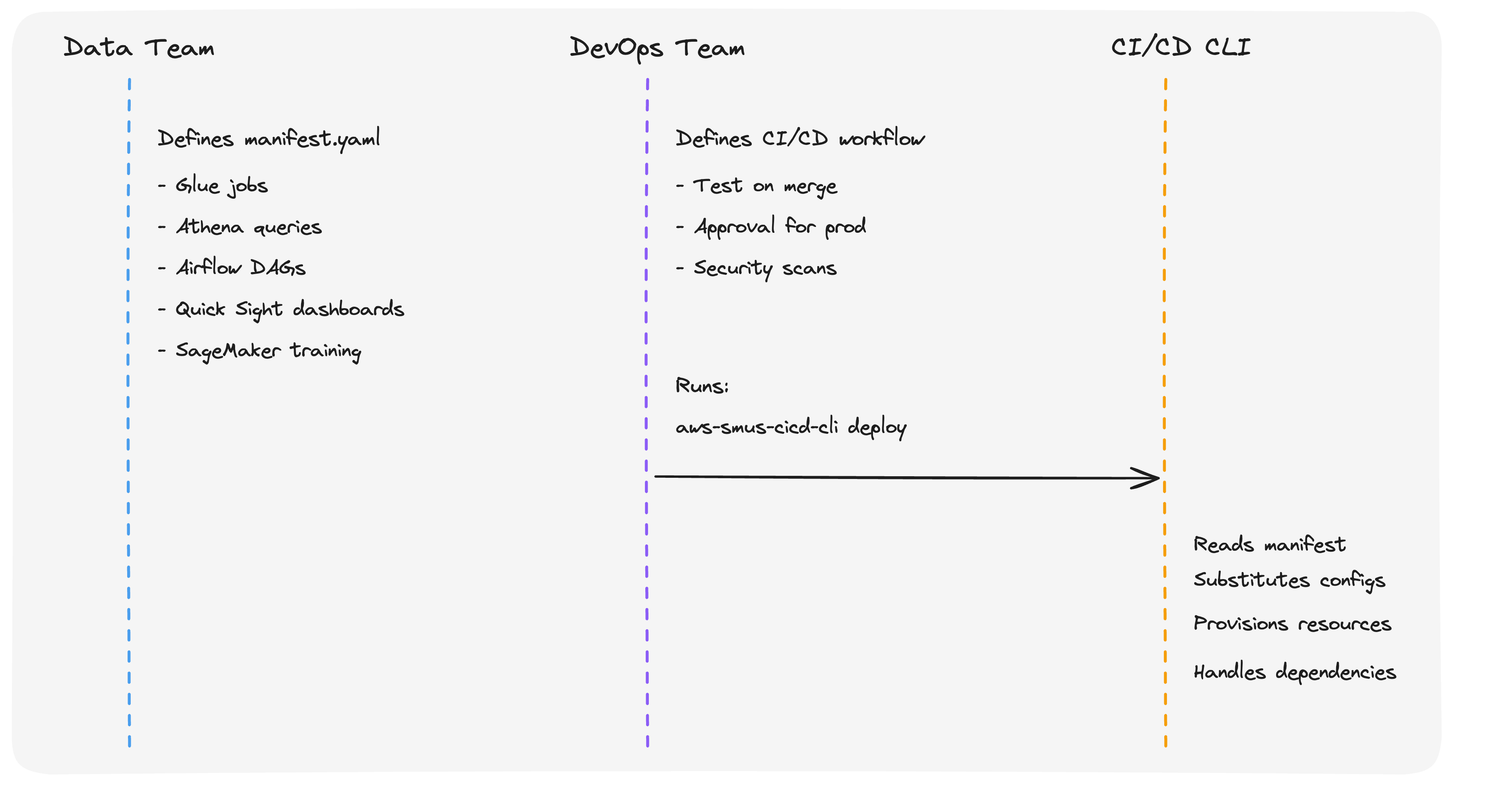
The CI/CD CLI introduces a clean separation of concerns between data teams and DevOps teams.
Data teams define what to deploy in a declarative YAML manifest (manifest.yaml). The manifest describes the application’s resources, including AWS Glue extract, transform, and load (ETL) jobs, Athena queries, Airflow directed acyclic graphs (DAGs), Quick Sight dashboards, and SageMaker training jobs, along with stage-specific configurations for each environment.
DevOps teams define how and when to deploy using their existing CI/CD systems. They retain full control over their deployment methodology. They choose whether to promote content through git branches, a bundle artifactory, or both; they decide the shape of the pipeline, including which stages to include (dev, staging, pre-prod, prod) and which manual approvals or security gates are required. They run aws-smus-cicd-cli deploy inside GitHub Actions, Jenkins, or GitLab CI workflows without needing to understand which AWS services the application uses or how SageMaker Unified Studio projects are structured. The CLI is a utility for AWS analytics service deployment, not a CI/CD methodology. Your team’s existing conventions for branches, approvals, and pipeline shape stay exactly as they are.
The CLI is the abstraction layer between the two. It reads the manifest, substitutes stage-specific configurations (S3 paths, AWS Identity and Access Management (IAM) roles, account IDs, and connection strings), provisions resources in dependency order, and handles all AWS service interactions.The following diagram illustrates this separation:
Key concepts
Application manifest
Each stage maps to a dedicated SageMaker Unified Studio project. This one-stage-to-one-project mapping is the foundation of CI/CD isolation: each project has its own domain, IAM boundaries, connections, and data, so changes in dev can never affect prod. For stronger isolation, projects can span different AWS accounts and AWS Regions. For example, dev in a sandbox account and prod in a production account in a different Region. Because each stage is a real SageMaker Unified Studio project, teams can open it in the console at any time to observe workflows, inspect resources, and troubleshoot deployments. Project membership is managed per project, so you control exactly who has access to each stage. For example, developers in dev and a release team in prod.The manifest file is the single source of truth for your application. It declares:
- Content: application code from git repositories, data files from S3, Quick Sight dashboards, and workflow definitions.
- Stages: environment-specific project mappings (dev, test, prod, etc.), each isolated as described earlier.
- Configuration: stage-specific settings that are substituted automatically at deploy time.
Here is an example manifest for an analytics application with AWS Glue ETL and Quick Sight:
applicationName: SalesAnalyticsDashboard
Each stage must map to a separate SageMaker Unified Studio project, providing full isolation between environments. The CLI substitutes variables like ${AWS_ACCOUNT_ID} and ${AWS_REGION} at deploy time based on the target environment.
Bundles
A bundle is an immutable, versioned archive of your application. The bundle command reads from a source stage (typically dev) and packages the application code, workflow definitions, and resolved configurations into a self-contained artifact. The deploy command then applies that artifact to one or more target stages (test or prod).
This stage-to-bundle-to-stage promotion model supports controlled rollout through quality gates:
The same artifact is deployed at every stage without rebuilding, providing audit trails and reproducible deployments for regulated industries.
SageMaker Catalog integration
The CLI manages Amazon SageMaker Catalog resources as part of the deployment process. You can define catalog assets, glossaries, glossary terms, form types, asset types, and metadata forms, in your manifest. During deployment, the CLI searches for assets in the catalog, creates subscription requests for required data access, and waits for approval before proceeding. This automates the data governance workflow that teams previously handled manually.
CLI commands
The CI/CD CLI provides commands that cover the full deployment lifecycle:
| Command | Description |
| describe | Validates the manifest, checks that target projects exist, and confirms the execution role has required permissions. Use –connect to validate against live AWS environments. |
| bundle | Reads from a source stage and packages application code, workflow definitions, and configurations into an immutable, versioned archive. |
| deploy | Applies bundle contents to one or more target stages. Provisions resources in dependency order. |
| test | Runs post-deployment validation to confirm services are running and ready for workloads. |
| create | Generates a starter manifest from an existing SageMaker Unified Studio project. |
| run | Triggers Airflow workflow execution on MWAA or Airflow Serverless connections. |
| monitor | Monitors workflow execution status in real time. |
| logs | Fetches and streams workflow execution logs. |
| destroy | Removes deployed resources and projects for cleanup or failure recovery. |
Walkthrough: deploying a Quick Sight dashboard with AWS Glue ETL
In this section, we walk through deploying an analytics application that uses AWS Glue for ETL, Athena for queries, and Quick Sight for dashboards. This example is available in the GitHub repository.
Use case
An analytics team owns a Sales Analytics Dashboard built on AWS Glue ETL, Athena, and Quick Sight. They want to promote changes from a development environment to production with reproducible builds, automated validation, and a clear approval gate between stages, without writing custom deployment scripts or exposing data engineers to AWS provisioning details.
Solution overview
We use a sample application from the CI/CD CLI GitHub repository that includes AWS Glue ETL scripts, an Airflow workflow definition, a Quick Sight dashboard bundle, and integration tests. A single manifest.yaml describes the application and its dev and prod stages. The CLI handles the full lifecycle: bundle the app from dev, deploy it to test, run validation, and promote the same immutable artifact to prod.
Prerequisites
Before you begin, make sure you have the following:
- Python 3.8 or later.
- AWS credentials with permissions to deploy to your SageMaker Unified Studio projects. For details on configuring credentials, see Configuration and credential file settings in the AWS CLI.
- Existing SageMaker Unified Studio projects for your target stages.
Solution architecture
Each stage in the manifest maps to a dedicated SageMaker Unified Studio project (see the separation-of-concerns diagram in “How the CI/CD CLI works” earlier in this post). At deploy time, the CLI uploads ETL scripts and workflow definitions to the project’s S3 storage connection, provisions the Airflow workflow in MWAA Serverless, runs the workflow to create AWS Glue jobs and databases, and imports the Quick Sight dashboard. The same bundle artifact is applied to every downstream stage, ensuring dev, test, and prod stay in sync while remaining fully isolated.
Solution implementation
Step 1: Install the CLI
Install the CLI from PyPI:
Step 2: Create or customize a manifest
Clone the repository and start from the analytics example:
The example includes AWS Glue ETL scripts, an Airflow workflow definition, a Quick Sight dashboard bundle, and integration tests. Open manifest.yaml and update the project, domain, and deployment_configuration values under each stage so they match your own SageMaker Unified Studio projects and connection names.Alternatively, generate a manifest from an existing project: aws-smus-cicd-cli create --domain-id <your-domain-id> --dev-project-id <your-project-id>
Step 3: Validate your configuration
Run the describe command with --connect to verify your environment is ready. This connects to your AWS environment and validates that target projects exist, the execution role has the required permissions, and connections are reachable. Fix any issues before deploying.
Step 4: Deploy
Run the deployment:
- Uploads ETL scripts and workflow definitions to S3 using the project’s storage connection.
- Creates the Airflow workflow in MWAA Serverless.
- Runs the workflow, which provisions AWS Glue jobs, creates databases, and runs ETL transformations.
- Imports the Quick Sight dashboard and refreshes datasets with the latest data.
- Processes any catalog asset subscriptions defined in the manifest.
Step 5: Validate
Run post-deployment validation to confirm services are running and ready for workloads:
Step 6: Promote to production
Promote the same bundle artifact that was validated in the test stage to production. This guarantees the exact same artifact runs in prod:
Integrating with GitHub Actions
The CLI works with existing CI/CD solutions. The GitHub repository includes reusable workflow templates that DevOps teams can adopt directly.The following is an example of a GitHub Actions workflow that implements a full bundle-based deployment pipeline:
The CLI also works with Jenkins, GitLab CI, and Azure DevOps. See the CI/CD integration guide for additional examples.
In the next section, we cover which AWS services and workload types the CLI supports.
Supported workloads
The CLI deploys applications that span the following AWS services through Airflow workflow definitions:
- Analytics and BI: AWS Glue ETL jobs and crawlers, Amazon Athena queries, Amazon Quick Sight dashboards, Amazon EMR jobs, Amazon Redshift queries.
- Machine learning: SageMaker training jobs, ML model endpoints, SageMaker AI Pipelines.
- Code and workflows: Jupyter notebooks, Python scripts, Airflow DAGs (MWAA and MWAA Serverless).
- Data and storage: S3 data files, Git repositories, SageMaker Catalog resources (glossaries, glossary terms, form types, asset types, assets, data products, metadata forms).
The examples directory includes working applications for each of these patterns, with manifests, workflow definitions, and integration tests.
Failure recovery
If a deployment fails, the CLI stops at the point of failure and reports the error with a detailed stack trace. To recover:
- Run
aws-smus-cicd-cli describe --connectto check which resources exist and which permissions are missing. - Fix the issue and rerun
aws-smus-cicd-cli deploy. - For bundle-based deployments, redeploy a previous bundle version.
- Use
aws-smus-cicd-cli destroy --targets <target> --forceto clean up a failed deployment.
For detailed rollback procedures, see the Rollback Guide.
Conclusion
In this post, you learned how the Amazon SageMaker Unified Studio CI/CD CLI gives data and DevOps teams a clean separation of concerns: data teams describe their application once in a YAML manifest, and DevOps teams deploy it with a single command through their existing CI/CD pipelines. You saw how stages map to isolated SageMaker Unified Studio projects (optionally spanning AWS accounts and Regions), how bundles provide immutable, reproducible promotion through test and production, and how the CLI integrates with GitHub Actions, Jenkins, GitLab CI, and Azure DevOps. You also walked through deploying a Glue-and-Quick-Sight analytics application from dev through to prod.
Get started
The CI/CD CLI is available at no additional cost in all AWS Regions where Amazon SageMaker Unified Studio is available. You pay only for the underlying AWS resources provisioned during deployment.
Use the following steps to try it out:
- Install the CLI:
- Browse the example applications for analytics and ML patterns.
- Follow the CI/CD CLI documentation to deploy your first application in 10 minutes.
- Review the Admin Guide for infrastructure setup.
For feedback and bug reports, open an issue on the GitHub repository.