AWS Big Data Blog
Enable cross-cloud analytics with Amazon S3 Tables and Google BigQuery, Part 2: access control with Lake Formation
In Part 1, we showed how to connect Google BigQuery to Amazon Simple Storage Service (Amazon S3) Tables, a capability of Amazon S3, using access control based on AWS Identity and Access Management (IAM). A single IAM policy governs both table metadata and data access. We also walked through common cross-cloud analytics scenarios where this pattern adds value. This post covers the approach using AWS Lake Formation. Instead of relying solely on IAM policies for data access, Lake Formation manages fine-grained permissions and vends temporary, scoped credentials to the requesting engine. This is a better fit when multiple engines need different levels of access to the same tables, or when you want to manage grants centrally without touching IAM policies every time a new consumer comes along.
Solution overview
You use the AWS Glue Iceberg REST Catalog (IRC) as the bridge between BigQuery and S3 Tables. BigQuery’s cross-cloud Lakehouse creates a federated catalog that syncs metadata from the Glue IRC, then uses the synced metadata to read Iceberg data files directly.
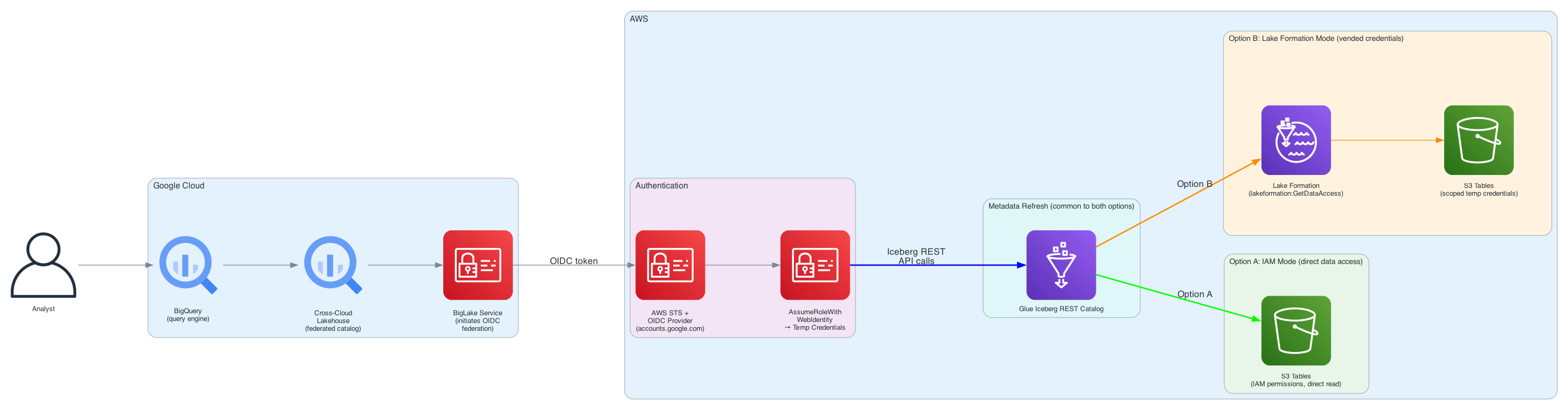
Figure 1: Architecture diagram showing BigQuery connecting to Amazon S3 Tables through the AWS Glue Iceberg REST Catalog
The key components in this architecture:
- Amazon S3 Tables: With Amazon S3 Tables, data is stored in table buckets, specifically designed for storing tables in the Apache Iceberg format. Table metadata is registered on AWS Glue Data Catalog for discovery and governance.
- AWS Glue Data Catalog: With AWS Glue Data Catalog, you can access the federated
s3tablescatalogcatalog that maps S3 Tables resources (table buckets, namespaces, tables) into a catalog hierarchy from supported analytics engines. The standard Iceberg REST endpoint of Glue Data Catalog serves table metadata to external engines. BigQuery connects through this endpoint. - AWS Lake Formation: With AWS Lake Formation, you define access permissions at the catalog, database, and table level. Instead of granting broad IAM permissions for data access, Lake Formation evaluates permissions at query time and issues short-lived credentials limited to the resources the caller is authorized to read.
- Google Cross-Cloud Lakehouse: With Google Cross-Cloud Lakehouse, you can connect BigQuery to external Iceberg catalogs. It assumes an IAM role using OpenID Connect (OIDC), calls the AWS Glue Iceberg REST endpoint, and syncs metadata on a configurable refresh interval.
Prerequisites
Before you begin, you need:
- An AWS account with Amazon S3 Tables available in your AWS Region.
- A Google Cloud project with billing enabled and the BigLake API activated.
- AWS Command Line Interface (AWS CLI) and gcloud CLI installed and configured.
- An S3 table bucket with at least one namespace and table containing data.
Setting up Amazon S3 Tables
If you already have S3 Tables with data, skip to the next section. Otherwise, create a table bucket, namespace, and populate a table.
Create a table bucket and namespace
Use AWS CLI to create resources as follows:
Set up S3 Tables integration with the Glue Data Catalog using Lake Formation mode
Lake Formation needs its own service role to interact with S3 Tables on your behalf. This is the role Lake Formation assumes internally when it reads or writes data on behalf of authorized callers.
Create a Lake Formation service IAM role named LakeFormationS3TablesServiceRole with the following policy:
Attach the following trust relationship:
In the Lake Formation console, in the navigation pane, choose Catalogs, and then choose Enable S3 Table Integration.
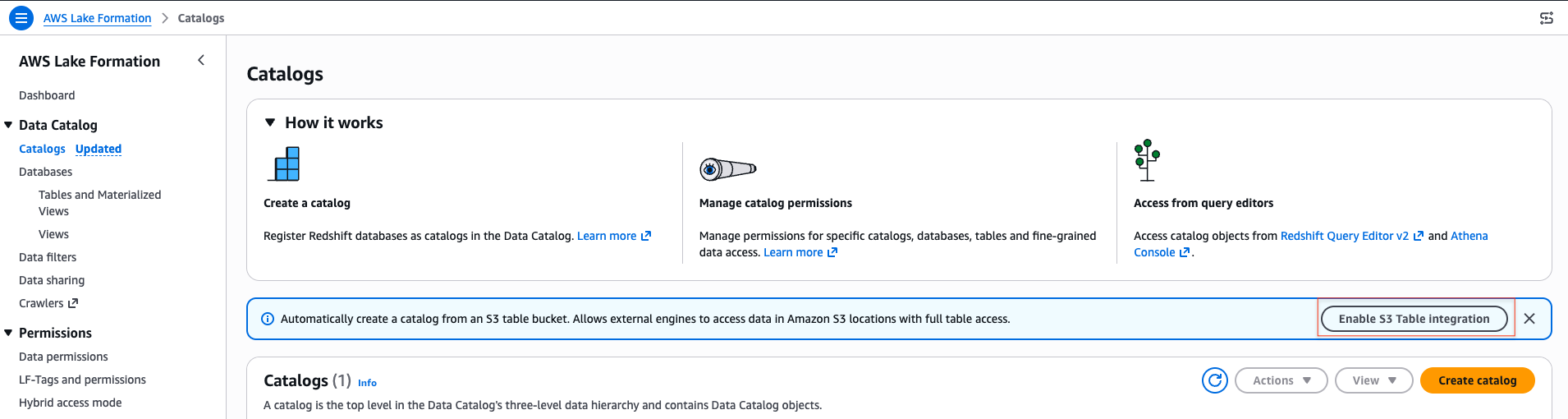
Figure 2: Enabling the S3 Tables integration in the Lake Formation console
Choose the role you created earlier when prompted for an IAM role, and select Allow external engines to access data in Amazon S3 locations with full table access.
S3 Tables integration performs the following:
- Registers the S3 Tables data location with Lake Formation.
- Creates the
s3tablescatalogfederated catalog in Glue.
Important: Before enabling the integration, verify your Lake Formation data lake settings have empty default permissions to prevent IAMAllowedPrincipals from being auto-granted on the catalog:
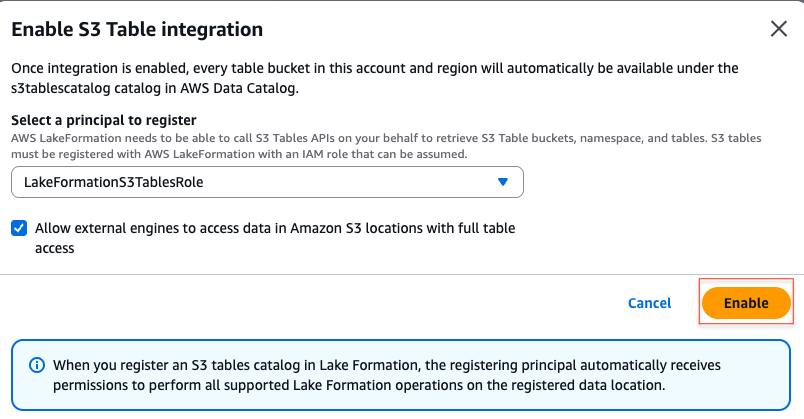
Figure 3: Selecting full table access for external engines during S3 Tables integration
When you select this option, you allow external engines to access data in Amazon S3 locations with full table access, and Lake Formation grants full table-level access to external engines. Column-level and row-level filtering are not enforced for external engine connections. Access is granted at the whole-table level.
Verify the integration by confirming the catalog in Lake Formation console.
Create a table and insert data
Now, to create the table and insert data, open the Amazon Athena console. In the query editor, select s3tablescatalog/<TABLE_BUCKET_NAME> as your data source and <NAMESPACE> as the database. Then run the following SQL statements one by one:
Configuring cross-cloud access
BigQuery assumes an AWS IAM role using OIDC federation to access the AWS Glue IRC. This section walks through creating the role, OIDC provider, and permissions.
Create the OIDC identity provider
Register Google as an OIDC identity provider in your AWS account. This allows AWS to validate tokens issued by Google’s identity service:
The –thumbprint-list parameter is optional. When omitted, IAM automatically retrieves the thumbprint from the OIDC provider’s certificate. See AWS documentation for details.
Create the cross-cloud IAM role on AWS
Sign in to the AWS Management Console. Create the role with a placeholder trust policy. You will update it with the actual BigLake service account ID after you create the federated catalog in Google Cloud.
The --max-session-duration 43200 allows sessions up to 12 hours, which is needed for long-running BigQuery queries.
Attach permissions
The permissions policy differs based on your access control approach. For the Lake Formation approach, attach the following policy:
Grant Lake Formation permissions
Lake Formation permissions work as a layered grant model: you grant access at each level of the catalog hierarchy, from catalog down to table. The cross-cloud role needs DESCRIBE on the catalog and database so it can discover what exists, and SELECT plus DESCRIBE on the table so it can read the actual data. Without grants at every level, Lake Formation denies access even if the IAM policy allows it.
If using Lake Formation, grant the bigquery-cross-cloud-role access to your tables:
- Grant catalog permission:
DESCRIBE. - Grant database permission:
DESCRIBE. - Grant table permission:
SELECT,DESCRIBE.
Grant Lake Formation permissions on the cross-cloud role (one-time).
Before granting Lake Formation permissions, revoke the default IAMAllowedPrincipals access. By default, Lake Formation grants IAMAllowedPrincipals full access to all databases and tables, so you first need to revoke this to enforce fine grain access. IAMAllowedPrincipals provides backward compatibility when you start using Lake Formation permissions to secure the Data Catalog resources that were earlier protected by IAM policies for AWS Glue.
Set up Lake Formation for external engines
For table metadata to sync from Glue to BigLake/BigQuery, the following Lake Formation settings are required. You might notice that a similar setting also appeared during the S3 Table integration setup. The first one registers the data location and enables external access at the catalog level, while this one enables the Lake Formation credential vending mechanism at the account level for all external engines. For a clean cross-cloud setup, we recommend that you enable both.
In the Lake Formation console, choose Administration, then Application integration settings, and then select Allow external engines to access data in Amazon S3 locations with full table access.
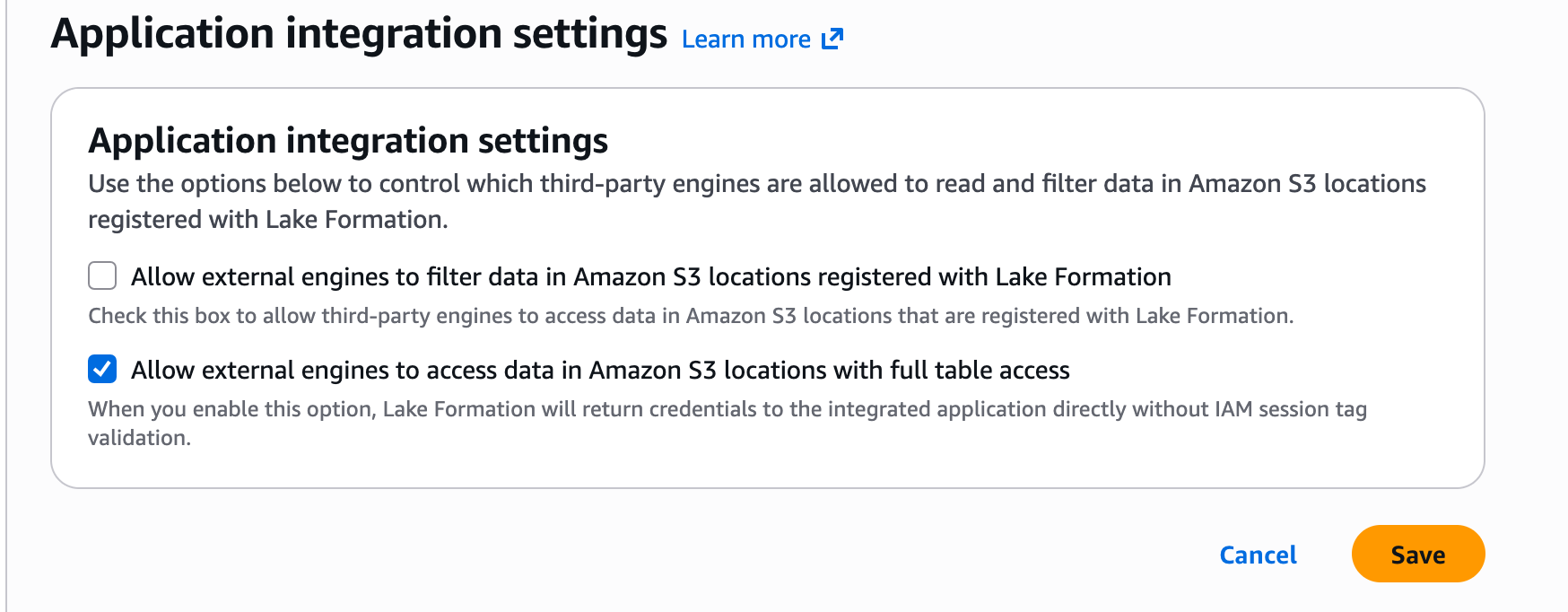
Figure 4: Enabling external-engine access in Lake Formation application integration settings
Connecting BigQuery to S3 Tables
With the AWS side configured, create the federated catalog in Google Cloud that connects BigQuery to the AWS Glue IRC.
Create the federated catalog
Authenticate to Google Cloud using gcloud auth login, or use Cloud Shell, which is pre-authenticated. Verify the BigLake API is enabled:
For Lake Formation mode (with credential vending):
The --glue-warehouse parameter uses the format <AWS_ACCOUNT_ID>:s3tablescatalog/<TABLE_BUCKET>. This tells the AWS Glue IRC to scope requests to your specific S3 Tables bucket within the federated catalog hierarchy.
The --credential-mode=vended-credentials flag (Lake Formation mode) instructs BigQuery Lakehouse to request scoped temporary credentials from Lake Formation rather than using the role’s IAM permissions directly for data access.
The --primary-location refers to the Google Cloud region where the federated catalog metadata is stored. Use the AWS to Google Cloud region mapping to find the corresponding GCP region for your AWS Region. For example, AWS us-east-1 maps to GCP us-east4.
Retrieve the BigLake service account ID
After catalog creation, Google provisions a dedicated service account for your federated catalog. Retrieve its numeric ID:
Update the AWS trust policy
Back on AWS, replace the placeholder in the IAM role’s trust policy with the actual service account ID:
Register the service account ID in the OIDC provider’s audience list. Without this step, AWS rejects the token because the aud claim doesn’t match any registered client:
Set up metadata sync
Wait 3–5 minutes for IAM changes to propagate globally, then set up background refresh:
The --refresh-interval (300 seconds in this example) determines how often BigQuery syncs metadata from the AWS Glue IRC. New tables and schema changes appear in BigQuery within this interval.
Querying from BigQuery
After the catalog refresh completes, BigQuery automatically creates external datasets corresponding to the synced namespaces. No manual CREATE SCHEMA is required.
Verify the sync:
Run a query in BigQuery:
Sample Query Output:
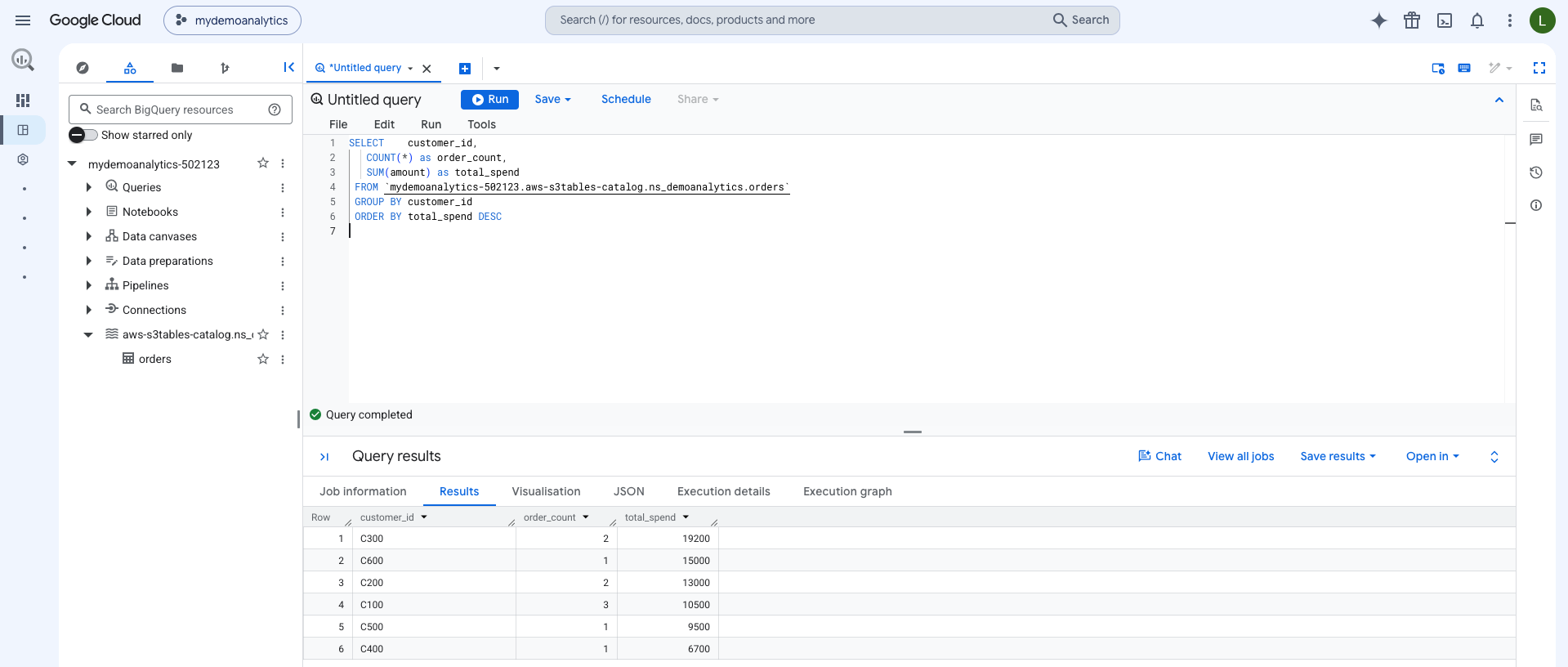
Figure 5: BigQuery query results returned through Lake Formation credential vending
BigQuery reads the Iceberg metadata to identify which Parquet data files contain relevant data. It also applies partition pruning where applicable, and fetches only the necessary files from S3 Tables managed storage.
Schema evolution
When new columns are added to an Iceberg table on the AWS side (through Spark, Athena, or the AWS Glue IRC), the schema change is captured in Iceberg’s metadata. On the next Lakehouse refresh cycle, BigQuery picks up the new columns automatically. No DDL changes are needed in BigQuery.
Metadata freshness
The s3tablescatalog catalog in AWS Glue is a federated catalog that resolves table metadata live from the S3 Tables service on each request. When a streaming job commits new data to an S3 Table, the latest metadata is immediately available through the AWS Glue IRC. BigQuery sees the update on its next refresh cycle (as configured by --refresh-interval).
OIDC identity federation
The trust relationship between Google Cloud and AWS uses OpenID Connect. When BigQuery Lakehouse needs to access your data, it presents a signed JWT token containing:
iss:accounts.google.com(the issuer)sub: The BigLake service account ID (identifies which catalog is making the request)aud: The same service account ID (the intended audience)
AWS validates this token against the registered OIDC provider and trust policy conditions before issuing temporary credentials. Each federated catalog receives a unique service account ID, providing per-catalog isolation and auditability through AWS CloudTrail.
Network path
By default, traffic between BigQuery and AWS travels over the public internet. For workloads requiring private connectivity, Google Cloud supports Cross-Cloud Interconnect or Partner Interconnect. This helps routing queries over a dedicated network path. Refer to the Google Cloud documentation for private interconnect configuration.
Clean up
To avoid ongoing charges, remove the resources created in this walkthrough.
On AWS:
On Google Cloud:
Conclusion
This post demonstrated how to query Amazon S3 Tables from Google BigQuery using AWS Lake Formation credential vending, where Lake Formation manages the permissions and issues temporary, scoped credentials for data access. With the open Iceberg format, you can write data once on AWS and read it from supported engines that speak Iceberg, including BigQuery.
Together with the IAM approach covered in Part 1, two access control modes provide flexibility: IAM for teams who want a straightforward setup and Lake Formation for organizations with complex governance requirements where multiple engines need centrally managed access to the same data.
To get started with this pattern in your environment:
- Review the Amazon S3 Tables documentation for table bucket setup.
- Follow the Google Cloud cross-cloud Lakehouse setup guide for the BigQuery federation configuration.
- Explore the AWS Glue Iceberg REST Catalog APIs for programmatic access patterns.