AWS Big Data Blog
Enable strategic data quality management with AWS Glue DQDL labels
Organizations increasingly depend on trusted, high-quality data to drive analytics, regulatory reporting, and operational decision-making. When data quality issues go undetected, they can lead to inaccurate insights, stalled initiatives, and compliance gaps that directly affect business outcomes. As data volumes grow and pipelines become more distributed, maintaining consistent data quality across teams and data domains becomes progressively more challenging.
You can address these challenges with AWS Glue Data Quality by providing automated, rule-based data validation across datasets in the AWS Glue Data Catalog and within AWS Glue ETL pipelines. With the Data Quality Definition Language (DQDL), you can author both straightforward and advanced validation rules to detect data quality issues early in the lifecycle, before they reach downstream applications or analytics environments.
In this post, we highlight the new DQDL labels feature, which enhances how you organize, prioritize, and operationalize your data quality efforts at scale. We show how labels such as business criticality, compliance requirements, team ownership, or data domain can be attached to data quality rules to streamline triage and analysis. You’ll learn how to quickly surface targeted insights (for example, “all high-priority customer data failures owned by marketing” or “GDPR-related issues from our Salesforce ingestion pipeline”) and how DQDL labels can help teams improve accountability and accelerate remediation workflows.
Managing complex data quality rules across teams and use cases
As organizations advance in their data quality programs, a few rules often grow into hundreds or thousands maintained across many teams and business domains. Take the example of AnyCompany, a large retail organization with multiple data teams managing customer, product, and sales data across different business units. These teams run a variety of data quality rules, including weekly customer checks, daily product validations, frequent sales checks, and monthly compliance reviews, with different naming patterns, schedules, and response processes. This creates a fragmented, hard-to-navigate system where teams operate in isolation and data quality practices become inconsistent.
The challenge lies in the volume of rules and the lack of organizational context around them. When dozens of data quality rules pass or fail, teams still lack clarity on ownership, urgency, or business impact. This slows incident response, limits executive insight, and complicates resource planning. To move from technical monitoring to strategic value, organizations need a unified structure that connects data quality rules to teams, domains, and priorities, bringing essential business context to data quality operations.
Metadata-driven rule organization
AWS Glue DQDL labels address organizational challenges because you can attach custom metadata to data quality rules, transforming anonymous validations into contextually rich, business-aware checks. Labels work as key-value pairs attached to individual rules or entire rule sets, and you can organize quality operations around business dimensions such as team ownership, criticality, frequency, and regulatory requirements, as in the case of the AnyCompany example. When a rule fails, you immediately identify what failed, who should respond, how urgent it is, and which business area is affected, whether it’s the marketing department tracking email completeness with daily frequency tags, compliance teams monitoring age verification with regulation labels, or the finance team validating payment data with high-criticality markers.
Labels integrate with existing DQDL syntax without requiring changes to current rule definitions, working consistently across AWS Glue Data Quality execution contexts. The feature’s flexibility supports organizational taxonomies from cost centers and geographic regions to data sensitivity levels and service-level agreement (SLA) requirements with single rules carrying multiple labels simultaneously for sophisticated filtering and analysis. Labels appear in the outputs, including rule outcomes, row-level results, and API responses, so organizational context travels with quality results whether you’re troubleshooting failures, analyzing trends in Amazon Athena, or building executive dashboards in Amazon Quick Sight.
Getting started: Writing your first labeled data quality rules
Let’s walk through creating your first labeled data quality rules using AnyCompany’s customer data scenario. We’ll use their customer demographics dataset, which contains customer information that multiple teams need to validate with different priorities and frequencies.
DQDL labels follow a straightforward key-value pair syntax that integrates naturally with existing rule definitions. The basic syntax supports two approaches: default labels that apply to the rules in a rule set, and rule-specific labels that apply to individual rules. Rule-specific labels can override default labels when using the same key, providing fine-grained control over your labeling strategy.
When implementing DQDL labels, keep the following constraints in mind:
- Maximum of 10 labels per rule
- Label keys are limited to 128 characters and can’t be empty
- Label values are limited to 256 characters and can’t be empty
- Both keys and values are case-sensitive
- Rule-specific labels override default labels when using the same key
Using this labeling approach, you can organize and manage data quality rules efficiently across different teams and validation requirements.
Best practices for label naming conventions
Here are some proven labeling strategies that scale across enterprise environments:
- Establish a complete standardized taxonomy upfront – Define label keys in DefaultLabels with sensible defaults such as
regulation=noneorsla=24hto provide rules with identical keys for cross-team queries. - Use consistent key naming patterns – Establish standard keys such as
team,criticality,sla,impact, andregulationacross rule sets to maintain query consistency. - Implement hierarchical values – Use formats such as
team=marketing-analyticsto support both broad and specific filtering while keeping key structure consistent. - Include operational metadata in defaults – Define labels such as
sla,escalation-level, ornotification-channelas defaults to drive automated response workflows. - Plan for reporting dimensions – Include keys such as
cost-center,region, orbusiness-unitin your default taxonomy to support meaningful business analytics. - Use standardized value patterns – Establish consistent formats such as
criticality=high/medium/loworsla=15m/1h/1dfor predictable filtering and sorting.
These are guidelines rather than requirements but following them from the start enables powerful cross-team analytics and reduces future refactoring effort.
Customer data validation hands-on example
This post assumes you’re familiar with AWS Glue Data Quality and ETL operations. Using the following hands-on walkthrough, you’ll learn how to implement DQDL labels for organizational data quality management.
Start by establishing default labels that automatically apply to every rule in the rule set, providing consistent organizational context:
DefaultLabels provide a foundational taxonomy that automatically propagates across your entire rule set, creating uniformity and reducing configuration overhead. By defining default values at the organizational level, such as team=data-team, criticality=medium, regulation=none, sla=24h, and impact=medium, every rule inherits these standardized attributes without requiring explicit declaration. This inheritance model promotes consistency while maintaining the flexibility individual teams need to address their unique operational contexts.
Individual teams can selectively override inherited defaults to reflect their specific requirements. For example, examine the following complete rule set:
Notice how the compliance team changes regulation from 'none' to 'age21' for age verification rules and analytics elevates criticality to 'high' for business-critical checks. Unspecified labels automatically inherit the default values, providing consistency while maintaining team-level flexibility.
Applying labeled rules against the dataset
Now let’s see DQDL labels in action by applying AnyCompany’s rule set to actual data through an AWS Glue ETL pipeline. This section assumes you’re familiar with AWS Glue EvaluateDataQuality transform and basic extract, transform, and load (ETL) job creation.
We use AWS Glue EvaluateDataQuality transform within an ETL job to process our customer dataset and apply our labeled rule set. The transform generates two types of outputs: rule-level outcomes that show which rules passed or failed with their associated labels and row-level results that identify specific records and the labeled rules they violated.
By default, labels are excluded from row-level results. However, by enabling them you can analyze data quality results at both the individual record level and across organizational dimensions such as teams and criticality levels.
To enable labels in row-level results, you must configure the additionalOptions parameter in your EvaluateDataQuality transform. The key setting is "rowLevelConfiguration.ruleWithLabels":"ENABLED", which instructs AWS Glue to include label metadata for each rule evaluation at the individual record level.
Here’s how to implement an ETL pipeline that applies our AnyCompany’s rule set with labels enabled:
import sys
from awsglue.transforms import *
from awsglue.utils import getResolvedOptions
from pyspark.context import SparkContext
from awsglue.context import GlueContext
from awsglue.job import Job
from awsgluedq.transforms import EvaluateDataQuality
from awsglue.dynamicframe import DynamicFrame
import boto3
def create_table(athena,s3_bucket,df,db_name,table_name):
ddl = spark.sparkContext._jvm.org.apache.spark.sql.types.DataType.fromJson(df.schema.json()).toDDL()
ddl_stmt_string=f"""CREATE EXTERNAL TABLE IF NOT EXISTS {db_name}.{table_name} ({str(ddl)}) ROW FORMAT SERDE 'org.apache.hadoop.hive.ql.io.parquet.serde.ParquetHiveSerDe' STORED AS INPUTFORMAT 'org.apache.hadoop.hive.ql.io.parquet.MapredParquetInputFormat' OUTPUTFORMAT 'org.apache.hadoop.hive.ql.io.parquet.MapredParquetOutputFormat' LOCATION 's3://{s3_bucket}/label/{table_name}/'"""
athena.start_query_execution(QueryString=ddl_stmt_string,ResultConfiguration={'OutputLocation': f"s3://{s3_bucket}/athena_results/"})
args = getResolvedOptions(sys.argv, ['JOB_NAME'])
sc = SparkContext()
glueContext = GlueContext(sc)
spark = glueContext.spark_session
job = Job(glueContext)
job.init(args['JOB_NAME'], args)
rules="""
DefaultLabels = ["team"="data-team", "criticality"="medium", "regulation"="none", "sla"="24h", "impact"="medium"]

Rules = [
    IsComplete "c_customer_id" labels=["team"="analytics", "criticality"="high", "sla"="15m", "impact"="high"],
    ColumnValues "c_customer_id" matches "e.*" labels=["team"="analytics", "criticality"="medium", "impact"="low"],
    ColumnLength "c_city" > 6 labels=["team"="marketing", "criticality"="medium", "sla"="4h", "impact"="medium"],
    IsComplete "c_name" labels=["team"="marketing", "sla"="4h"],
    ColumnValues "c_age" >= 21 labels=["team"="compliance", "criticality"="high", "regulation"="age21", "impact"="high"] with threshold > 0.99,
    IsComplete "c_birth_date" labels=["team"="compliance", "criticality"="medium", "regulation"="gdpr", "impact"="medium"],
    IsComplete "c_creditissuer" labels=["team"="finance", "impact"="high"],
    ColumnValues "c_creditcardnumber" > 100000000000 labels=["team"="finance", "criticality"="high", "regulation"="payment", "impact"="high"] with threshold > 0.95
]
"""
s3_bucket="REPLACE"
row_level_table="dqrowlevel"
rule_level_table="dqrulelevel"
db_name="default"
additional_options={}
additional_options["observations.scope"]="ALL"
additional_options["performanceTuning.caching"]="CACHE_INPUT"
additional_options["rowLevelConfiguration.ruleWithLabels"]="ENABLED"
df = spark.read.option("header", "true").option("inferSchema", "true").csv("s3://aws-data-analytics-workshops/aws_glue/aws_glue_data_quality/data/customers/")
anycompany_customers=DynamicFrame.fromDF(df, glueContext, "anycompany_customers")
dq_check = EvaluateDataQuality().process_rows(frame=anycompany_customers, ruleset=rules, publishing_options={"dataQualityEvaluationContext": "dq_check","enableDataQualityCloudWatchMetrics": True, "enableDataQualityResultsPublishing": True}, additional_options=additional_options)
rowlevel = SelectFromCollection.apply(dfc=dq_check, key="rowLevelOutcomes", transformation_ctx="rowlevel")
rulelevel = SelectFromCollection.apply(dfc=dq_check, key="ruleOutcomes", transformation_ctx="rulelevel")
rowlevel_df=rowlevel.toDF()
rulelevel_df=rulelevel.toDF()
rowlevel_df.write.mode("overwrite").parquet(f"s3://{s3_bucket}/label/{row_level_table}/")
rulelevel_df.write.mode("overwrite").parquet(f"s3://{s3_bucket}/label/{rule_level_table}/")
athena = boto3.client('athena')
create_table(athena,s3_bucket,rowlevel_df,db_name,row_level_table)
create_table(athena,s3_bucket,rulelevel_df,db_name,rule_level_table)
job.commit()To run this example, update the s3_bucket variable with your own Amazon Simple Storage Service (Amazon S3) bucket name, then create and execute the ETL job in AWS Glue.
After the job is completed, you’ll find:
- Rule-level and row-level results stored in your S3 bucket
- Two new tables automatically created in your default database:
dqrulelevelanddqrowlevel
In the next section, we query these tables using Amazon Athena to analyze the labeled data quality outcomes and extract actionable insights.
Analyzing data quality results by labels using Amazon Athena
We’ve stored our labeled data quality results in Amazon S3 and as a table in the AWS Glue data catalog. Now, we can use Amazon Athena to analyze these results across the organizational dimensions captured in your labels. The labeled metadata transforms raw data quality outcomes into actionable business intelligence that drives targeted remediation and strategic decision-making.
Querying row-level results
With labels stored alongside row-level outcome, you can query specific records that failed data quality checks based on label criteria. For example, the following query identifies individual customer records that failed high criticality compliance rules. You can use it to quickly locate and remediate problematic data for regulatory or business-critical use cases:

You can see the query results above showing failed records filtered by 'high' criticality and 'compliance' team labels.
Querying rule-level results
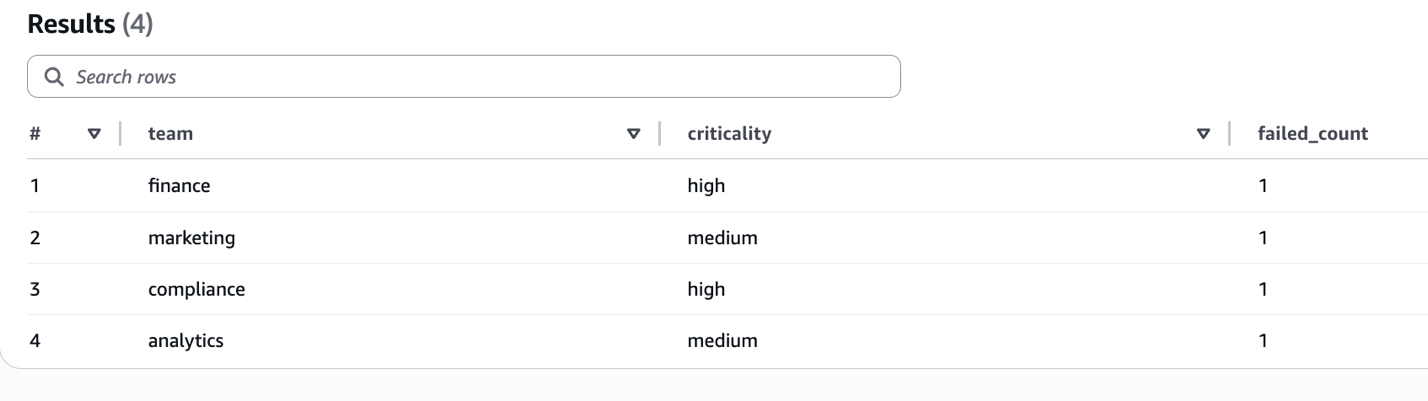
Now that we have stored rule-level outcomes with labels, we can run aggregation queries to analyze failures across different dimensions. For example, the following query groups failed rules by criticality and team to identify which teams have the most high-severity failures. You can use it to prioritize remediation efforts and allocate resources effectively:
The following screenshot shows aggregated failure counts grouped by team and criticality level.
Viewing data quality results using AWS CLI
Beyond querying results in Athena, you can also retrieve data quality outcomes directly using the AWS Command Line Interface (AWS CLI). This is useful for automation, scripting, and integrating data quality checks into continuous integration and continuous delivery (CI/CD) pipelines.
To list data quality results for your ETL job, enter the following:
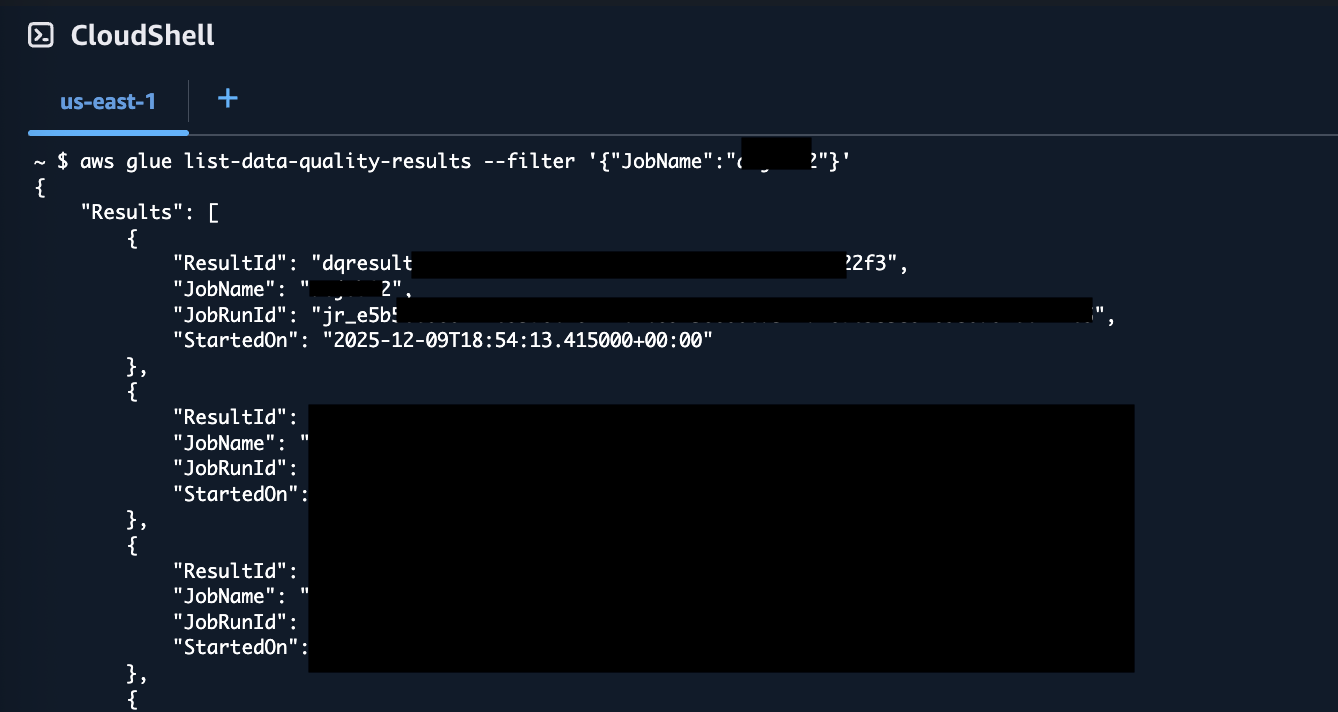
You can see in the above screenshot that the resultant JSON includes a ResultId for each data quality run.
To retrieve details of a specific result, enter the following:
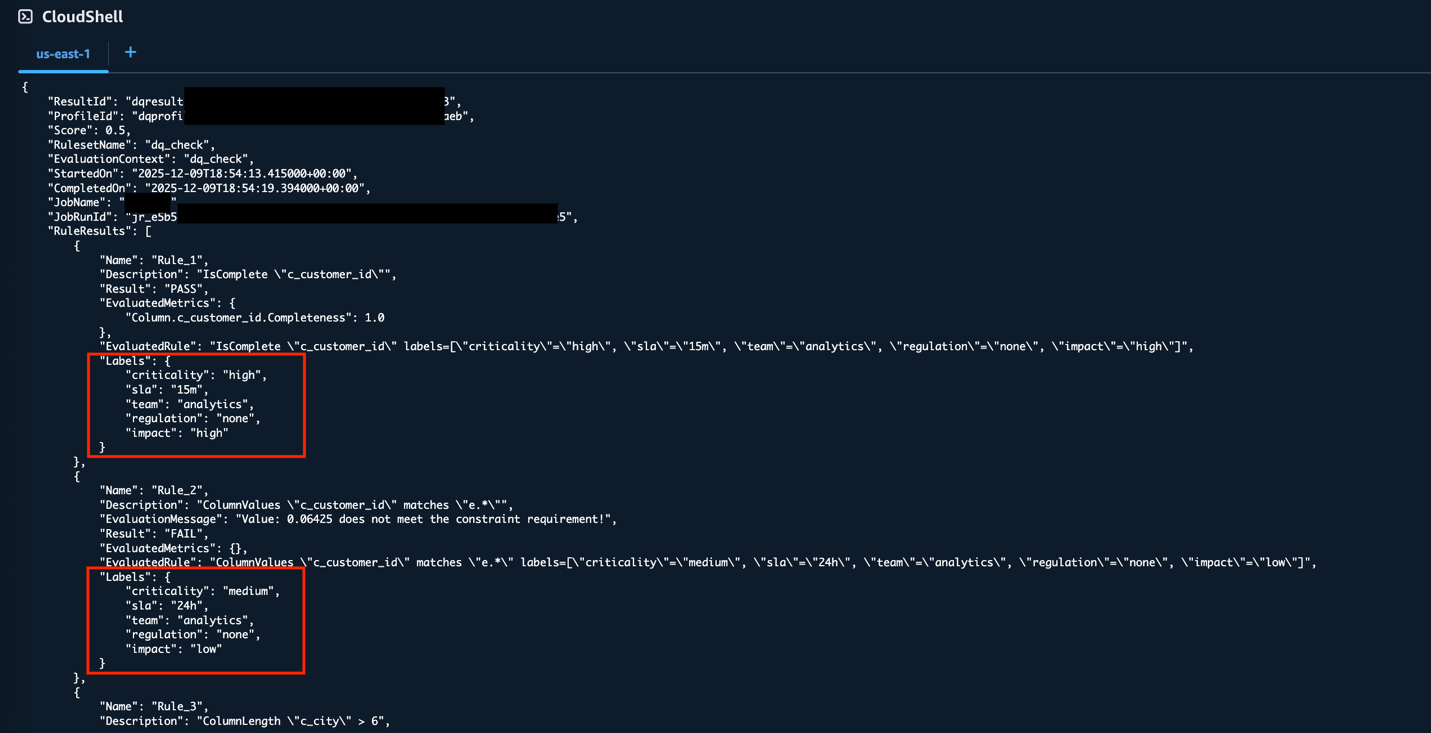
The output includes a Labels object for each rule in the RuleResults array, containing the label key-value pairs you defined. This provides programmatic access to the same labeled data quality results, which can be useful for automation and scripting workflows.
Cleanup
To avoid incurring ongoing charges, delete the resources created in this post:
- To delete the S3 folders containing the data quality results, follow the directions at Deleting Amazon S3 objects.
- To delete the ETL job you created for the test, follow the directions at Delete jobs in the AWS Glue User Guide.
- To delete the AWS Glue Data Catalog
dqrulelevelanddqrowleveltables, follow the directions at DeleteTable in the AWS Glue Web API Reference.
Conclusion
AWS Glue DQDL labels add organizational context to data quality management by attaching business metadata directly to validation rules. This helps teams identify rule ownership, prioritize failures, and coordinate remediation efforts more effectively.Throughout this post, we’ve seen how AnyCompany moved from managing hundreds of generic rules to implementing a labeled system where data quality results include team ownership and business context. Marketing teams can identify their email validation failures, compliance teams can focus on regulatory violations, and finance teams can address payment-related issues without manual coordination.To implement DQDL Labels in your organization:
- Start simple – Begin with basic organizational dimensions such as team ownership, criticality levels, and SLA requirements. Expand your labeling approach as needed.
- Establish standards – Define your label taxonomy up front, including default values for unused dimensions. This consistency supports analytics across teams.
- Integrate gradually – Add labels to existing rule sets during routine maintenance.
- Use analytics – Apply the Athena query patterns from this post to build tools such as dashboards and alerting workflows.
- Build smart automation – Explore creating alerts and notifications tailored to your business criticality and SLA definitions. For example, configure immediate notifications for high-criticality compliance failures while batching low-priority marketing issues into daily reports.
We look forward to seeing how you implement DQDL labels in your organization and expand beyond the examples we’ve covered here. To dive into the AWS Glue Data Quality APIs, refer to Data Quality API documentation. To learn more about AWS Glue Data Quality, check out AWS Glue Data Quality.