AWS Big Data Blog
High-performance Remote Shuffle Service on Amazon EMR with Apache Celeborn
Organizations running large-scale Apache Spark workloads often face a trade-off between achieving lower cost and job reliability. These tradeoffs are more prominent when using Amazon Elastic Compute Cloud (Amazon EC2) Spot Instances or when their jobs process highly skewed datasets. Three shuffle-related challenges drive the pain:
- Spot interruptions trigger costly recomputation: Spot instances can reduce compute spend by up to 90 percent compared to On-Demand instances, but they can be reclaimed with only two minutes of notice. When a Spark executor on a Spot Instance is interrupted, its local shuffle data is lost, and Spark must recompute entire upstream stages to regenerate that data. For shuffle-heavy jobs processing terabytes of data, frequent interruptions cause cascading recomputation and runtime delays, quickly eroding the savings that made Spot attractive in the first place.
- Local shuffle storage causes cluster-wide over-provisioning: In YARN-based Hadoop architectures, including Amazon EMR on EC2, the External Shuffle Service (ESS) stores shuffle data locally on each Node Manager’s node alongside the Spark executor that produced it. Every node must carry large memory and disk allocations to accommodate shuffle output, yet only a few EC2 nodes perform most of the shuffle work. The rest sit oversized and underused. This is a classic coupled storage-compute problem. By decoupling shuffle storage to a dedicated, storage-optimized tier, you can right-size your compute for actual demands.
- Shuffle data protection leaves compute idle: To guard against local shuffle data loss, Spark’s scaling logic prevents nodes that still hold shuffle data from scaling down. EC2 nodes sit idle long after Spark tasks complete. Data skew amplifies this effect: tail-end tasks run far longer than typical ones, delaying shuffle reads and postponing scale-down across the cluster.
Together, these challenges force a difficult choice: cheaper infrastructure or predictable jobs. In this post, we show how Apache Celeborn resolves this trade-off for Amazon EMR on EKS and Amazon EMR on EC2, improving job reliability while unlocking additional cost savings.
What is Apache Celeborn?
Apache Celeborn is an open-source Remote Shuffle Service (RSS) that solves the preceding problems by decoupling shuffle data from the executor lifecycle entirely. It uses a Leader-Worker-Client architecture: Leader nodes manage metadata, Workers read and write shuffle blocks, and Clients integrate with compute engines. Instead of writing shuffle output to local disks, Spark executors push data to a shared, storage-optimized Celeborn cluster that persists shuffle data independently of executor location. This means EMR executor nodes can run on 100% Spot Instances. Spot reclamations no longer cause shuffle data loss. Executors scale in and out freely without triggering upstream recomputation.
Celeborn also provides Raft-based high availability, per-job data replication, and a pluggable shuffle manager that replaces Spark’s default mechanism with minimal configuration changes. With its push-based model, Spark executors send shuffle data directly to Celeborn workers, which cache and consolidate partitions. This reduces the N×M network connections during the read phase, improving both performance and stability at scale.
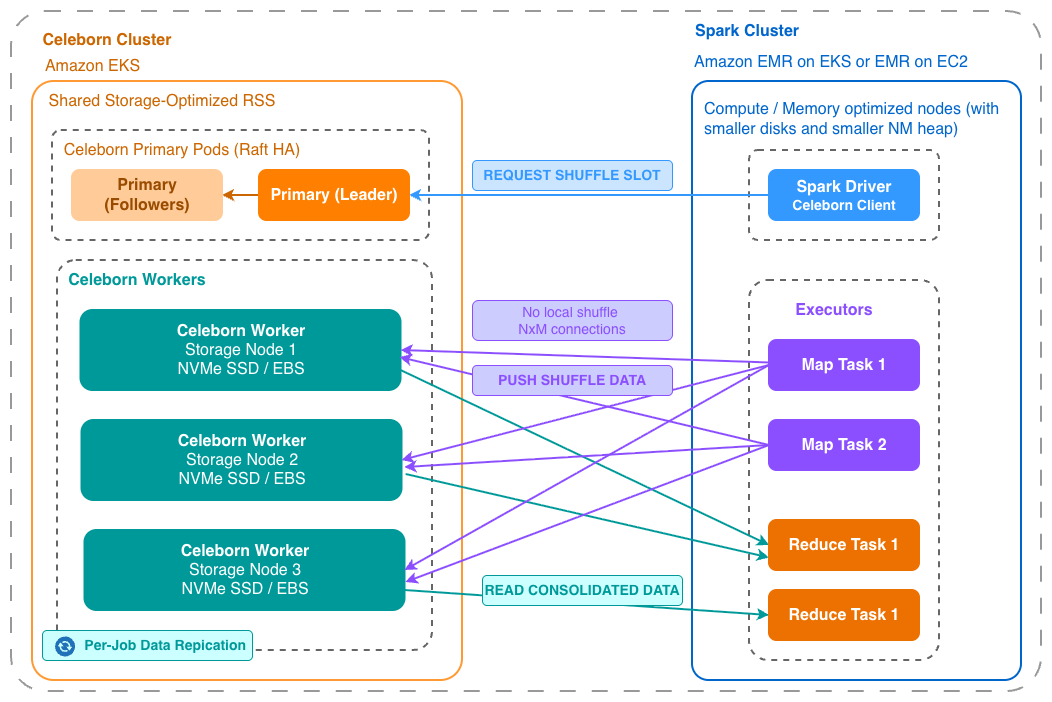
Image 1: Push-based Remote Shuffle Service for Spark on EMR
Overview of solution
In this post, we show you how to deploy a Celeborn cluster alongside EMR on EKS and EMR on EC2. The solution also includes an observability stack to provide operational visibility into the Celeborn cluster. Metrics are collected by the AWS Distro for OpenTelemetry (ADOT) collector and routed to two monitoring paths. The AWS managed option uses Amazon Managed Service for Prometheus and Amazon Managed Grafana. The open source option uses self-managed Prometheus with a built-in Grafana.
Apache Celeborn can be deployed in several ways depending on your operational requirements and scale. These two deployment patterns are the main ones:
- Co-located on the same cluster: Celeborn runs on the same compute environment as Spark. This is the most straightforward operational model, with no cross-cluster networking. The main constraint is shared cluster lifecycle: any upgrade or termination affects Celeborn and running Spark jobs simultaneously.
- Separate Celeborn cluster: Celeborn runs on its own EC2 or EKS cluster, fully isolated from Spark compute. This is the most operationally flexible model and is the focus of this post.
In this solution, Celeborn runs on a dedicated Amazon Elastic Kubernetes Service (Amazon EKS) cluster, separate from the EMR Spark environments. The two workloads have different resource profiles. Celeborn is storage and network I/O intensive, while Spark is CPU and memory intensive. By separating them, each cluster can use instance types optimized for its workload. It also improves independent lifecycle management, so you can upgrade or scale Celeborn clusters without disrupting Spark jobs, and the other way around.
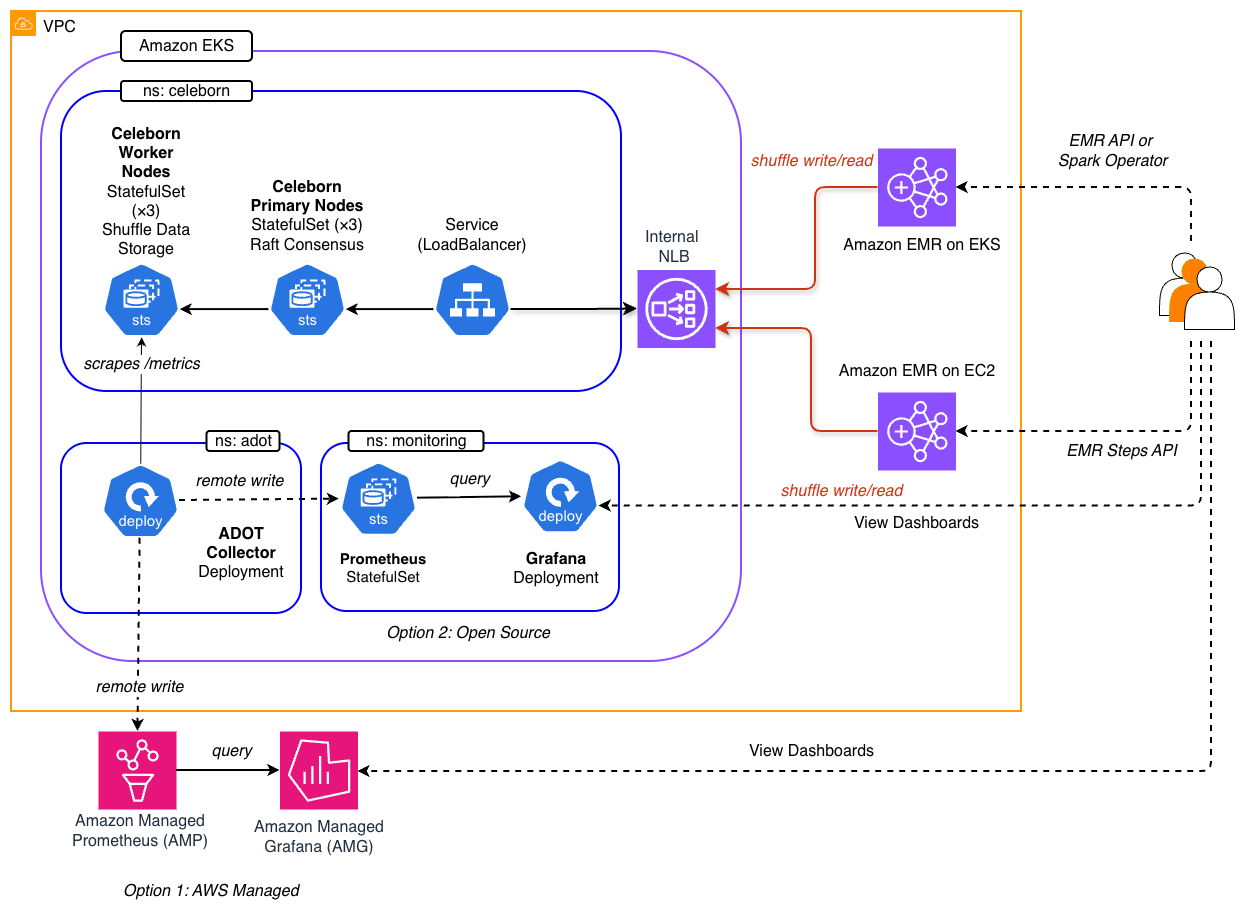
Image 2: Solution Architecture
As the architecture diagram shows, two types of EMR deployment models, EMR on EKS and EMR on EC2, connect to a shared Celeborn cluster through an internal Network Load Balancer (NLB). Behind the scenes, Spark executors register their shuffle partitions to Celeborn workers through this connection, while reducers read consolidated data back during the fetch phase.
The following are the key design considerations for this solution:
- Streamlined operation by a shared RSS model: Celeborn runs on a dedicated EKS cluster. This provides lifecycle independence, allows each cluster to use workload-optimized instance types, and allows a single Celeborn cluster to serve multiple EMR clusters as a shared service.
- Cross-cluster connectivity: Clusters reside in the same Amazon Virtual Private Cloud (Amazon VPC) and share private subnets. The AWS Load Balancer Controller on the Celeborn cluster provisions an internal NLB exposing its active primary pods on ports 9097 (RPC) and 9098 (dashboard). The NLB DNS name is VPC-resolvable, so any EMR cluster in the same VPC can reach Celeborn by setting
spark.celeborn.master.endpointsto the NLB address. - Restricted and secured networking: The Celeborn cluster only allows inbound traffic from the EMR on EC2 and EMR on EKS clusters, sending shuffle data and metrics over the network to the Celeborn cluster.
- State persistence: Primary nodes maintain Celeborn’s coordination state through Raft consensus, which requires storage that survives pod restarts. Deploying them as StatefulSets with EBS-backed persistent volume claims (PVC) lets a restarted primary pod recover its Raft log and identity from durable storage rather than starting from scratch. Workers keep shuffle data on local NVMe instance store for performance, but this is ephemeral. To protect data loss on workers, each shuffle partition is replicated to two other workers by setting
spark.celeborn.client.push.replicate.enabled=true. - Observability: ADOT collector is deployed on the Celeborn EKS cluster. It scrapes Prometheus metrics from Celeborn’s pods, and simultaneously remote writes them to two monitoring backends. Option 1 uses Amazon Managed Service for Prometheus as the metrics store, with Amazon Managed Grafana surfacing pre-built dashboards for Celeborn cluster health and Java Virtual Machine (JVM) metrics. This option requires AWS IAM Identity Center. Option 2 deploys a self-managed Prometheus stack with a built-in Grafana on the Celeborn EKS cluster, with Prometheus configured as a remote-write receiver for the same ADOT collector. This option suits environments without IAM Identity Center or those preferring a single open-source tooling.
Critical configurations
The following two tables list the key configurations that make up the solution.
- Spark configuration (RSS client): Tells the Spark client to use Celeborn as the shuffle manager in place of Spark’s built-in implementation.
- Celeborn configuration (RSS server): Controls how the primary and worker Celeborn pods operate on Kubernetes.
Note: The values in the following tables are reference defaults used in this walkthrough. Adjust them based on your workload requirements and cluster sizing.
1. Spark configuration (RSS client)
The following table highlights some key Spark configurations required to use Celeborn as the shuffle manager. You can refer to these configurations applied for each Spark submission method in the scripts below:
- EMR on EC2 cluster: emr-on-ec2/submit-job.sh.
- EMR on EKS virtual cluster: emr-on-eks/submit-emr-api.sh.
- EMR on EKS with Spark operator: emr-on-eks/submit-spark-operator.sh.
| Parameter | Value | Purpose |
| spark.shuffle.service.enabled | false | Disables Spark’s built-in External Shuffle Service. Must be off before Celeborn can take its place |
| spark.shuffle.manager | org.apache.spark.shuffle.celeborn.SparkShuffleManager | Replaces Spark’s default SortShuffleManager with Celeborn’s shuffle manager |
| spark.celeborn.master.endpoints | <NLB_DNS>:9097 | Points Spark to the Celeborn primary RPC endpoint through the internal NLB. You can add multiple NLB addresses here, separated by a comma. |
| spark.shuffle.sort.io.plugin.class | org.apache.spark.shuffle.celeborn.CelebornShuffleDataIO | Registers Celeborn’s data I/O plugin alongside the shuffle manager |
| spark.celeborn.client.push.replicate.enabled | true |
Default: false OPTIONAL: if shuffle performance has a higher priority than job stability, turn off the data replication at a job level. This setting replicates shuffle data across multiple Celeborn workers for fault tolerance. |
| spark.celeborn.client.spark.push.unsafeRow.fastWrite.enabled | false | Default: true COMPULSORY: Disables Celeborn’s optimization for UnsafeRow, making it compatible with the optimized Spark runtime in EMR |
| spark.dynamicAllocation.shuffleTracking.enabled | false | Default: true COMPULSORY: Disables shuffle tracking. |
| spark.sql.adaptive.localShuffleReader.enabled | false |
Default: true. COMPULSORY: makes sure Spark does not use local shuffle readers to read the shuffle data. |
| spark.celeborn.client.spark.shuffle.fallback.policy | NEVER |
Default: AUTO. COMPULSORY: to make sure we don’t see intermittent writes to local and remote shuffles. |
2. Celeborn configuration (RSS server)
The following table provides the server-side settings that control how the Celeborn primary and worker pods operate on Kubernetes. These values are set in the Helm values.yaml file.
| Parameter | Value | Purpose |
| master.replicas | 3 | Number of Celeborn primary node replicas for HA. A minimum 3 required for Raft quorum |
| worker.replicas | 3 | Number of Celeborn workers to store shuffle data, should be less than EC2 node number. |
| master.volumeClaimTemplates | gp3, 5 GiB | Persistent storage for Raft consensus state |
| worker.volumes | 4 × hostPath (/mnt/nvme/disk1-4) | Shuffle data stored on local NVMe instance store is ephemeral but significantly faster than Amazon Elastic Block Store (EBS) volumes for shuffle I/O |
| master/worker tolerations | celeborn-dedicated | Schedules Celeborn pods only on dedicated tainted nodes |
| master/worker podAntiAffinity | preferred, w=100 | Spreads replicas across different nodes to limit failure blast radius |
| image.tag | 0.6.2 | Pinned Apache Celeborn version |
Deploy the solution
This solution contains six layers, each of which is dependent on the previous deployments. See the details in the following deployment steps:
- Shared Infrastructure (Step 2).
- Celeborn Remote Shuffle Service installation (Step 3).
- Prepares sample data and creates EMR compute (Step 4, 5).
- Observability Layer (Step 6-7 and Step 9).
- Submit job (Step 8).
- Cleanup (Step 10).
Note: This walkthrough creates billable AWS resources, including Amazon EKS clusters, EC2 instances, Amazon Managed Grafana, Amazon Managed Service for Prometheus, and a Network Load Balancer. To avoid ongoing charges, follow the cleanup instructions at the end of this post.
Prerequisites
Before you deploy this solution, make sure the following prerequisites are in place:
- Access to a valid AWS account with AWS Organizations and IAM Identity Center enabled.
- The AWS Command Line Interface (AWS CLI) installed on your local machine.
- Git, kubectl, Helm 3 and curl, and Python 3 utilities installed on your local machine.
- Docker installed and running.
- Permission to create AWS resources, such as Amazon EKS clusters, AWS CloudFormation stacks, AWS Identity and Access Management (IAM) roles, VPC resources, and Amazon EMR clusters.
- Familiarity with Kubernetes, Apache Spark, Apache Celeborn, Amazon EKS, Amazon EMR on Amazon EKS, and Amazon EMR on Amazon EC2.
Deployment steps
Step 1: Clone from the source repository
Clone the repository to your local machine and set the AWS_REGION:
Step 2: Deploy the shared infrastructure
This step creates the core AWS resources, including the VPC, AWS Key Management Service (AWS KMS) key, security groups, and Amazon Simple Storage Service (Amazon S3) bucket.
Step 3: Deploy the Celeborn cluster
This step provisions a dedicated EKS cluster for Celeborn and exposes it through an internal NLB. It follows security best practices by keeping the EKS endpoint private, allowing public access only from a deployment workstation IP, and enabling encryption for secrets plus logging for all cluster components.
Step 4: Prepare the sample data
Execute the following script to generate sample data:
Step 5. Deploy a compute engine (choose one or both)
Create at least one of the following EMR deployment models to run Spark jobs.
Option A: EMR on EKS
Option B: EMR on EC2
Step 6. Deploy observability
To monitor the Celeborn cluster, deploy one of the observability options. After deployment, a Grafana URL and login details are available in the .environment-info file located at the repository’s root directory. Follow the instructions in Step 9 to sign in to your Grafana dashboard. You will see two pre-built dashboards on the Grafana web UI:
- Celeborn Cluster Overview: Active shuffles, worker status, disk usage, and memory utilization.
- Celeborn JVM Metrics: Heap usage, garbage collection, and thread activity.
Option A: AWS managed services
This option deploys an Amazon Managed Service for Prometheus workspace for metrics storage and an Amazon Managed Grafana workspace to host dashboards. Amazon Managed Grafana requires IAM Identity Center, so first enable it at the organization level and create an SSO user:
Then deploy the stack:
Option B: Open-source tool
This option deploys a Prometheus stack, including a built-in Grafana service, onto the Celeborn EKS cluster in the monitoring namespace.
Step 7: Deploy ADOT Collector
The ADOT collector scrapes Prometheus metrics from Celeborn pods and remote-writes them to all active monitoring backends: Amazon Managed Service for Prometheus, open-source Prometheus, or both.
Step 8: Submit a Spark job
The sample job is a PySpark word-count application that creates shuffle through groupBy and orderBy operations. Both EMR deployment options below are configured with Celeborn as the shuffle manager.
Option A: Using EMR on EKS
Submit the job using the StartJobRun API:
This code snippet shows the core part of the script (see the full version):
Alternatively, submit the job using a Spark Operator:
The script automatically generates a SparkApplication manifest then applies it to EMR on EKS. For example, kubectl apply -f your-job-manifest-name.yaml
Option B: Using EMR on EC2
Submit the job as an EMR Step through the Steps API:
The following snippet shows the core API call used by the script:
Step 9: Review the Grafana dashboard for remote shuffle metrics
The Grafana endpoint is dynamically generated at deploy time and is unique to your deployment. To access it, open the .environment-info file at the repository root. This file contains the Grafana URL along with login instructions. Sign in using the credentials listed there, then navigate to the Celeborn Cluster Overview dashboard to observe remote shuffle metrics in real time. A sample Grafana dashboard screenshot is shown below:
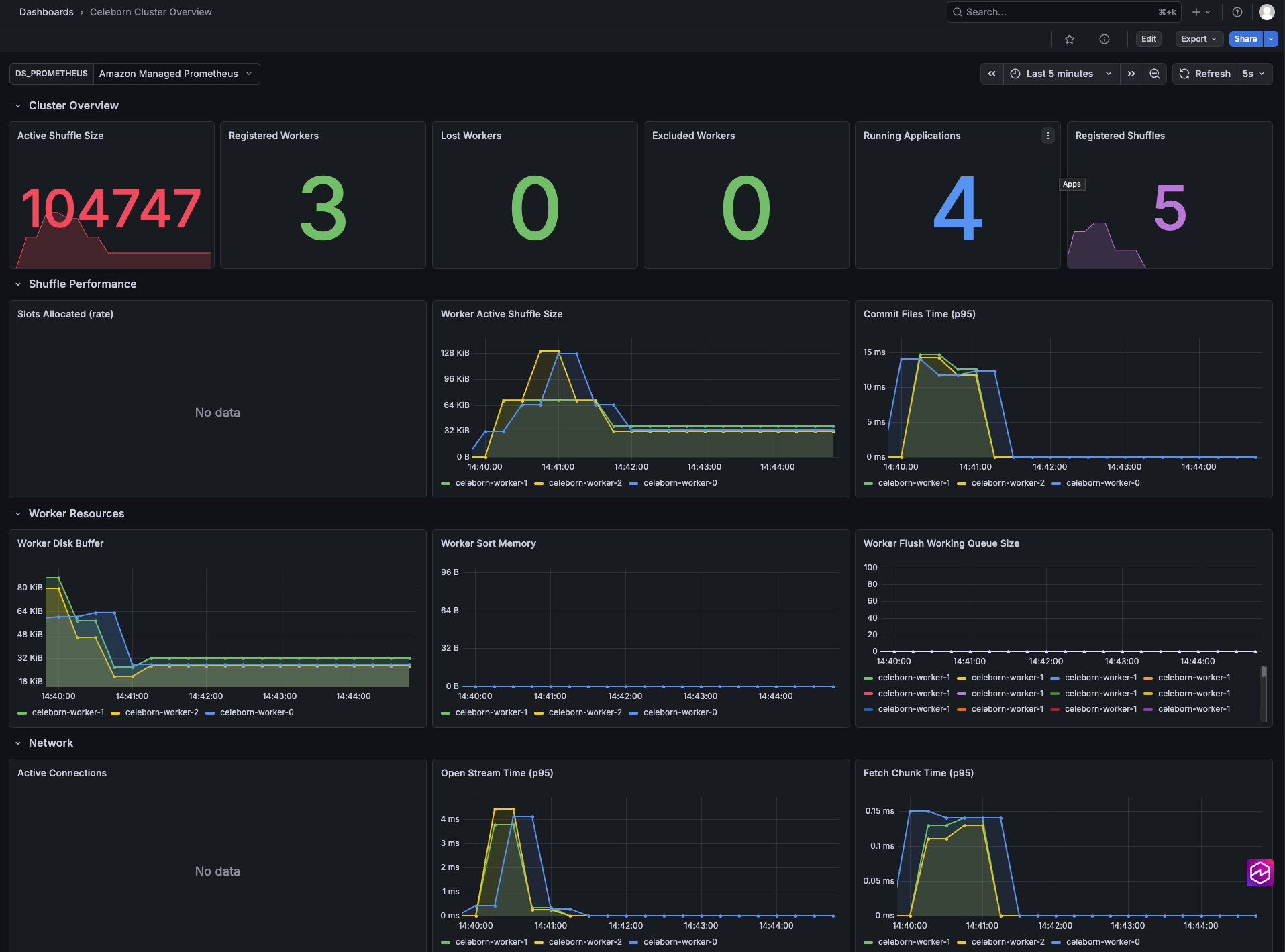
Image 3: Grafana dashboard for Celeborn Metrics
Step 10. Cleaning up
To avoid incurring future charges, run the cleanup script from the root directory:
This script detects which components are deployed and tears them down in reverse dependency order, automatically skipping components that are not present. Shared infrastructure is always deleted last, since other components depend on it.
WARNING: This will permanently remove all resources created previously, including any data stored in S3 buckets and configurations. The action cannot be undone. Make sure you have backed up any data you wish to retain before proceeding.
Considerations for production implementation
This post demonstrates a working end-to-end architecture for integrating Celeborn with Amazon EMR. Before taking this pattern to production, consider the following areas.
1. Security
The following considerations help you secure a Celeborn deployment across data isolation, encryption, and access control.
1.1. Shuffle data isolation between teams
Celeborn partitions shuffle data by application ID, which is designed to prevent jobs from accidentally reading each other’s data. This is sufficient when all jobs share the same trust boundary. For multi-team deployments where data privacy is required, a dedicated Celeborn cluster per team is the most effective isolation boundary: each team gets its own NLB and security group, and shuffle data never co-mingles at the infrastructure level.
1.2. Data in transit
In our implementation, shuffle data travels over plain TCP between Spark executors and Celeborn workers. Access is restricted to nodes using security groups. The internal NLB isn’t reachable outside the VPC, and security group rules block all other intra-VPC traffic.
For workloads requiring encryption in transit, Celeborn supports TLS on both RPC and data channels through the celeborn.ssl.* configuration. This is a cluster-wide setting that applies to all jobs on the cluster and must be enabled server-side in celeborn-defaults.conf.
1.3. Data at rest
EBS volumes (used for Celeborn leader pod Raft state) are encrypted with the shared AWS KMS key. NVMe instance store volumes on Celeborn worker nodes are ephemeral and not encrypted by default. Shuffle data written to NVMe is not protected by AWS KMS. For compliance requirements mandating encryption at rest, consider using EBS-backed worker storage instead of instance store, where worker pods mount PersistentVolumeClaim (through volumeClaimTemplates) that reference the encrypted gp3 StorageClass. This comes at the cost of lower I/O throughput compared to local NVMe.
1.4. EKS secrets encryption
EKS clusters encrypt Kubernetes secrets at rest using AWS KMS (EncryptionConfig in the cluster CloudFormation templates). This covers Kubernetes API objects but not application-level shuffle data.
1.5. Application-level authorization
Our deployment enforces access control in the network layer (that is, VPC and security group rules). Celeborn also provides an application-level authorization framework, which is disabled by default. Turning it on adds a second level of security control where only applications presenting valid credentials can register with the cluster. This is recommended for production deployments where multiple workloads or teams share the same VPC subnets, ensuring that network proximity alone does not grant shuffle service access.
Configuration for the Celeborn server:
Configuration to enable authentication in every Spark app:
2. Autoscaling
You can scale Celeborn workers or primary pods using kubectl. For example:
- Celeborn workers register with a primary node when they start, so scaling out is safe even while the cluster is running. Scaling in, however, requires more care. Removing a worker pod during an active job may cause shuffle data loss unless
celeborn.client.push.replicate.enabled=trueis enabled. To reduce the risk of accidental disruption during node scale-in or upgrades, add a Pod Disruption Budget to prevent multiple workers from being evicted at the same time. - Spark executors: Dynamic Resource Allocation (DRA) is enabled in sample Spark jobs (
spark.dynamicAllocation.enabled=true). This means the number of executors can scale automatically within the configuredminExecutorsandmaxExecutorsrange.
3. Resiliency
- Primary Node HA: 3-replica Raft quorum with EBS-backed durable state is designed to tolerate one leader node failure without job interruption.
- Worker replication: the setting
celeborn.client.push.replicate.enabled=truecopies each shuffle partition to two workers, designed to tolerate a single worker failure mid-job. Without replication, a worker failure causes a fetch failure and job retry. - Pod Disruption Budgets (PDB): not configured in this demo. Add PDBs for Celeborn’s StatefulSets to prevent simultaneous eviction during node upgrades or scale-in.
- Multi-AZ placement:
podAntiAffinity(preferred, weight 100) spreads pods across nodes and Availability Zones. For strict Availability Zone isolation, switch torequiredDuringSchedulingIgnoredDuringExecution.
4. Monitoring and alerting
Consider extending the Grafana dashboards with the alerting rules on:
- Active shuffle partition count: indicator of job load.
- Worker disk utilization: prevent shuffle storage exhaustion.
- Push failure rate: early signal of connectivity or capacity issues.
- Celeborn primary node failover: leadership changes indicate Raft instability.
Conclusion
In this post, we showed how to deploy Apache Celeborn as a Remote Shuffle Service on Amazon EKS and integrate it with Amazon EMR on EKS and Amazon EMR on EC2. By decoupling shuffle storage from Spark’s compute, this architecture delivers resilience to node failures, eliminates disk contention, and enables independent scaling of storage and compute tiers.
Running Celeborn on a dedicated cluster gives you lifecycle independence from Spark, lets multiple EMR clusters share a single shuffle service, and provides fault tolerance through push-based shuffling, Raft-based high availability, and per-job data replication. It also provides automatic fallback to Spark’s built-in shuffle during maintenance windows. Stop choosing between cost and reliability. With Celeborn on Amazon EMR, you get both.
For more information, see the Amazon EMR on EKS documentation and the Apache Celeborn documentation. To explore the full implementation, visit the aws-samples GitHub repository. If you have questions or feedback, leave us a comment.