AWS Big Data Blog
How United Airlines uses Amazon Redshift and AWS Glue Data Catalog federation to query Databricks-managed data
This post was co-written with Ankit Aggarwal and Raja Kalluri from United Airlines.
United Airlines processes billions of events daily across its data platform, which spans Amazon Redshift and Databricks with Unity Catalog. To bridge these platforms without duplicating data, the team turned to AWS Glue Data Catalog federation.
In this post, we walk through how to configure AWS Glue Data Catalog federation to connect with Databricks Unity Catalog, so you can run live SQL queries from Amazon Redshift without moving or duplicating data.
Why United Airlines needed catalog federation
United Airlines curates petabytes of data through a medallion architecture (bronze to silver to gold) on Amazon Simple Storage Service (Amazon S3). The airline user interaction data layer alone is several double-digit terabytes of near real-time streamed data. Teams use it to measure customer engagement patterns, feature adoption, and conversion behavior across web and mobile touchpoints. Analysts need to query this curated data through Amazon Redshift Serverless. As part of the existing data platform architecture these data tables are cataloged in Databricks Unity Catalog, not in the AWS Glue Data Catalog. As a result, Amazon Redshift has no native visibility into them. Without catalog federation, the only way to make this data queryable from Amazon Redshift would have been to duplicate it into Amazon Redshift Managed Storage (RMS) and build pipelines to keep it in sync.
AWS Glue Data Catalog federation removed this need. Amazon Redshift users now query the gold layer stored in Amazon S3 directly, with Iceberg metadata resolved from Unity Catalog at query time and no data movement. AWS Glue Data Catalog federation connects Amazon Redshift to external catalogs like Unity Catalog, so analysts query cross-platform data without building sync pipelines or duplicating storage.
Amazon Redshift Serverless is powered by the same Graviton-based query engine used in the new RG instance family, which delivers up to 2x faster data lake query performance compared to prior generations. This engine is purpose-built for reading Apache Iceberg tables directly from Amazon S3, making it well-suited for such federated query workloads.
United Airlines is taking a phased approach to adopting AWS Glue Data Catalog federation across its data platform. The initial focus is the most heavily used user interaction data tables, with 30 tables currently federated in production and 70 more in active rollout. Several hundred additional tables across different business domains are planned for production in the coming months.
Solution overview
AWS Glue Data Catalog federation bridges these platforms at the metadata layer. Here’s how the architecture works.
The architecture follows a four-layer federation chain:
- Databricks Unity Catalog exposes tables through its Iceberg REST API endpoint. For Delta tables, you can turn on UniForm format to make them Iceberg compatible.
- AWS Glue Data Catalog creates a federated catalog that connects to Databricks Unity Catalog, making metadata visible within AWS without data movement.
- A resource link database in the default AWS Glue catalog acts as a bridge, pointing to the federated catalog database. This is required for Amazon Redshift compute.
- Amazon Redshift Serverless references the resource link database through an external schema. When a query runs, Amazon Redshift traverses the link, calls AWS Glue Federation, and reads the Iceberg data through the Databricks Unity Catalog REST API. AWS Lake Formation governs permissions throughout this chain.
Key services or service features used in this solution:
- AWS Glue Data Catalog – Federated catalog and resource link in the default catalog.
- AWS Lake Formation – Permission vending and fine-grained access control.
- Amazon Redshift Serverless – Queries through external schema.
- AWS Identity and Access Management (IAM) – Role-based permissions for Amazon Redshift namespace and SAML-authenticated users.
- Databricks Unity Catalog – Source catalog exposing Iceberg tables through a REST API.
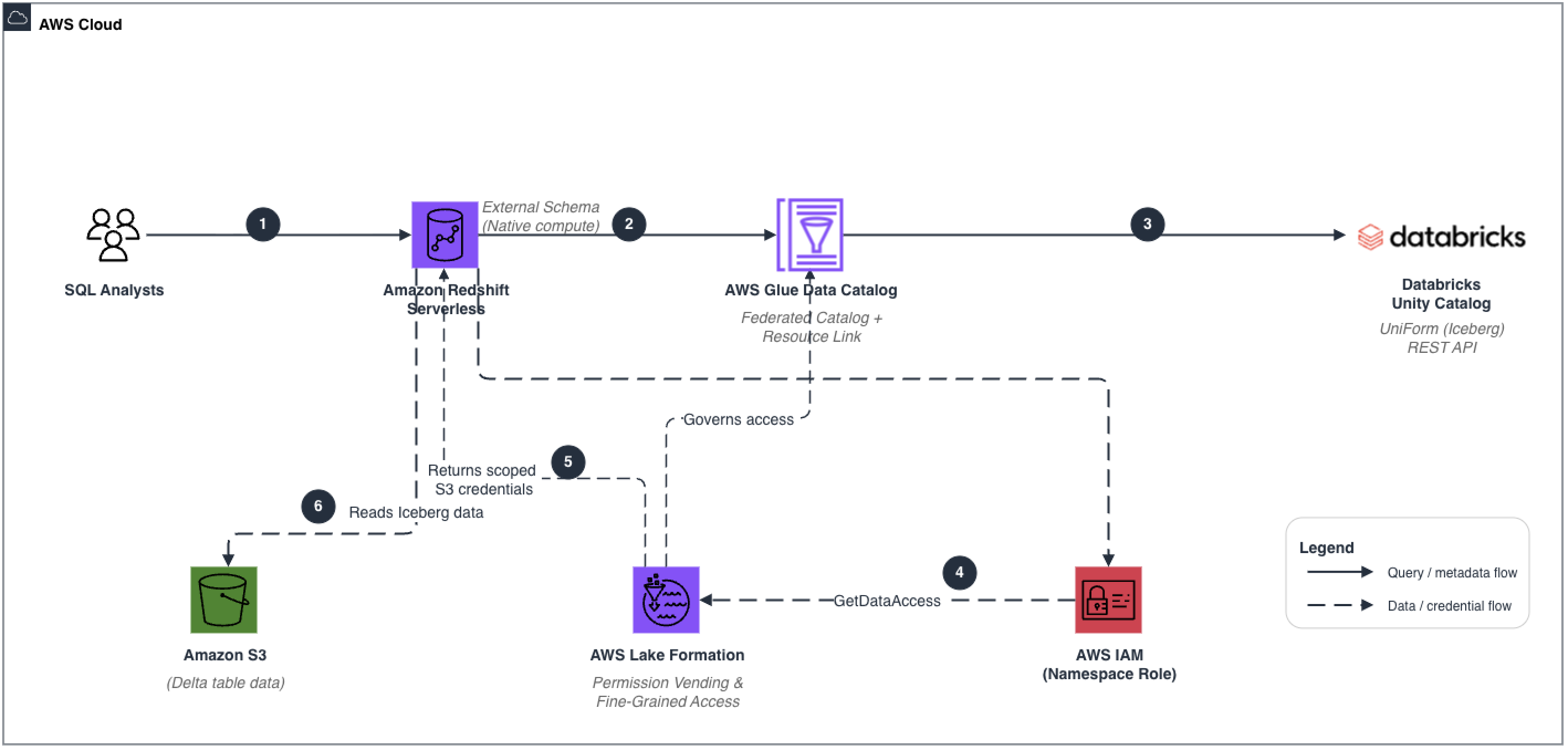
Figure 1: Federation chain from Databricks Unity Catalog to Amazon Redshift Serverless through AWS Glue and Lake Formation
The architecture follows a six-step flow:
- A SQL analyst submits a query to Amazon Redshift Serverless.
- Amazon Redshift resolves the external schema through the AWS Glue Data Catalog (resource link to federated catalog).
- The AWS Glue federated catalog calls the Databricks Unity Catalog Iceberg REST API to retrieve current table metadata.
- The namespace IAM role calls AWS Lake Formation GetDataAccess to obtain scoped, temporary S3 credentials.
- Lake Formation evaluates fine-grained access policies and vends credentials for the authorized data files.
- Amazon Redshift Serverless reads the Iceberg data files directly from S3 and returns results to the analyst.
Prerequisites
Before you begin, make sure the following are in place:
- A Databricks workspace with Unity Catalog enabled and at least one catalog, schema, and table. Databricks uses UniForm to generate Iceberg metadata on Delta Lake tables on Amazon S3.
- An AWS account with permissions to manage AWS Glue, AWS Lake Formation, Amazon Redshift Serverless, and IAM.
- An Amazon Redshift Serverless workgroup and namespace already provisioned.
- AWS Lake Formation set up with a data lake administrator.
- AWS Command Line Interface (AWS CLI) configured with appropriate credentials.
- Familiarity with Amazon Redshift Query Editor v2 or a SQL client.
Note: For setting up the Databricks Unity Catalog side (Phase 1), follow the steps in the AWS blog post Access Databricks Unity Catalog data using catalog federation in the AWS Glue Data Catalog. This walkthrough picks up after the federated catalog has been created in AWS Glue.
Solution walkthrough
The walkthrough is organized into six steps covering Lake Formation configuration, the resource link pattern, IAM role setup, and querying Databricks tables from Amazon Redshift.
Step 1: Configure AWS Lake Formation
1a. Add a data lake administrator
- In Lake Formation, choose Administration, then choose Administrators and add your admin IAM user or role.
1b. Confirm the federated catalog is registered
- Choose Data Catalog, then Catalogs and verify that databricks-federated-catalog is visible and registered.
Step 2: Create a resource link in the default AWS Glue catalog
This step is the key architectural detail in the walkthrough. Amazon Redshift resolves CREATE EXTERNAL SCHEMA only against the default AWS Glue Data Catalog. The federated catalog (databricks-federated-catalog) is a separate, non-default catalog object. To give Amazon Redshift a path to the federated data, you create a resource link database in the default catalog that points to the federated catalog’s database.
A resource link does not copy data or metadata. It’s a pointer that Lake Formation resolves at query time.
To create the resource link in the Lake Formation console:
- Choose Data Catalog, Databases, Create database. Then select Resource link.
- For Resource link name, enter databricks_federated_db_link.
- For Target catalog, enter databricks-federated-catalog.
- For Target database, enter the database name that was discovered by the AWS Glue crawler (for example, databricks_federated_db).
Alternatively, use the AWS CLI:
Step 3: Configure the Amazon Redshift Serverless namespace IAM role
When Amazon Redshift queries through the resource link, it uses the IAM role attached to the Amazon Redshift Serverless namespace to call the Lake Formation GetDataAccess API. Lake Formation permissions must be granted to this namespace role.
Choose one of these two approaches:
- Option A – Update your existing namespace role by adding the following policy inline.
- Option B – Create a new dedicated role (named RedshiftServerlessNamespaceRole) and attach it to the namespace alongside existing roles.
Attach the following IAM policy to the role:
Note: The Resource: “*” in this policy is shown for simplicity. In production, scope resources to specific AWS Glue catalog ARNs, database ARNs, and table ARNs based on your use case.*
After creating or updating the role, associate it with your Amazon Redshift Serverless namespace:
- In the Amazon Redshift Serverless console, choose Namespaces, select [your namespace], then choose Security and encryption, then Manage IAM roles.
- If you use Option A, the existing role already has the new permissions, so no change is needed.
- If you use Option B, add the new role alongside the existing roles.
Step 4: Grant Lake Formation permissions to the Amazon Redshift namespace role
4a. Grant DESCRIBE on the resource link database (default catalog)
- In Lake Formation, choose Permissions, Data lake permissions, then Grant.
- Principal: RedshiftServerlessNamespaceRole.
- Resources: Named Data Catalog resources, Default catalog, databricks_federated_db_link (resouce link).
- Database permissions: DESCRIBE.
4b. Grant SELECT and DESCRIBE on the target tables (Grant on Target)
Resource links permit only DESCRIBE and DROP permissions on the link itself. To allow Amazon Redshift to actually read data, you must separately grant SELECT on the target tables in the federated catalog. This is the Lake Formation Grant on Target pattern.
- Principal: RedshiftServerlessNamespaceRole.
- Resources: Named Data Catalog resources, databricks-federated-catalog, databricks_federated_db, then Tables.
- Table permissions: SELECT, DESCRIBE.
- Catalog permission: DESCRIBE.
Important: SELECT must be granted on the TARGET tables in the federated catalog, not on the resource link. Granting SELECT only on the resource link won’t work. This is a common configuration error.
Step 5: Create an external schema in Amazon Redshift
With the resource link in place and permissions granted, you can now create an external schema in Amazon Redshift that points to the resource link database. The external schema is the query interface. When a user runs SQL against it, Amazon Redshift traverses the link to the federated catalog and retrieves metadata and data from Databricks Unity Catalog.
The DATABASE parameter must reference the resource link database name in the default AWS Glue catalog (databricks_federated_db_link), not the federated catalog name directly. The CATALOG_ARN parameter isn’t required here because the resource link lives in the default catalog and Amazon Redshift resolves it automatically.
Connect to your Amazon Redshift cluster as a superuser (for example, using Amazon Redshift Query Editor v2) and run:
A key design principle in this architecture is the clear separation between data physically stored in Amazon Redshift and data accessed externally through federation. External schemas provide a transparent abstraction layer, so Amazon Redshift users can query data stored in S3 without ingestion. For consistency and clarity, United Airlines follows a standard naming convention for all federated schemas in Amazon Redshift: {domain}_iceberg. This convention makes it immediately clear that the data isn’t natively stored within Amazon Redshift but is accessed by using federation through AWS Glue and Lake Formation. This distinction is critical for analysts and engineers, because it improves discoverability, avoids ambiguity between storage layers, and reinforces architectural discipline when working across hybrid data environments.
The User Interactions domain exposes curated datasets representing customer interaction activity, engagement behavior, and channel usage patterns. Operational datasets follow the same pattern, providing governed access to supporting business events and reference information through a common federation framework.
You create a view layer over each external schema using WITH NO SCHEMA BINDING, so that analysts always resolve the freshest schema on each query execution. For example:
Step 6: Verify and query Databricks tables from Amazon Redshift
After creating the external schema, verify that the Databricks tables are visible and run a test query.
Verify table visibility
Query a Databricks Unity Catalog table
When a query runs, Amazon Redshift calls Lake Formation GetDataAccess using the namespace IAM role to obtain temporary credentials. It then contacts the AWS Glue federated catalog, which in turn calls the Databricks Unity Catalog Iceberg REST API to retrieve metadata and read table data. The result is returned to the Amazon Redshift user transparently.
For SAML-authenticated users, connect using your IdP JDBC plugin:
The Amazon Redshift JDBC driver handles authentication automatically. It authenticates with your IdP, receives a SAML assertion, and calls sts:AssumeRoleWithSAML for temporary IAM credentials. It then calls redshift-serverless:GetCredentials to connect as the mapped database user.
Business impact
AWS Glue Data Catalog federation delivered measurable architectural and operational improvements for United Airlines:
| Area | Before | After | Impact |
| Data access | Delta Lake and Amazon Redshift data were completely siloed, so Amazon Redshift users had no access to curated datasets on Databricks-managed S3 data | Amazon Redshift users get real-time access to Databricks-managed data through AWS Glue Data Catalog federation | ~100 analysts gained access to user interaction data tables in the first phase without adding new pipelines. |
| Disaster recovery | Cross-Region DR relied on Amazon Redshift snapshots every 3 hours (recovery point objective, or RPO, of 3 hours or more) | Amazon S3 cross-Region replication on the Delta Lake provides a near-continuous RPO. A new Amazon Redshift Serverless workgroup in the DR Region can federate to the same S3 data | More resilient architecture. Reduces cost for Amazon Redshift snapshot and copy maintenance across Regions |
| Architecture simplification | Data processing happened in both Databricks and Amazon Redshift, requiring manual catalog synchronization between the two platforms which was operationally expensive and prone to drift | With the federated architecture, data processing is consolidated in Databricks, and Amazon Redshift acts solely as a query engine powering user queries and dashboards through catalog federation | Single processing platform, zero sync pipelines, single source of truth |
| Infrastructure cost | Running dedicated Amazon Redshift ETL cluster with RMS storage, snapshots, and compute for data processing | For this use case with federation, Amazon Redshift is not needed for ETL but only as a query engine. No RMS storage duplication, no snapshot replication required | ~$30K/month in redundant ETL infrastructure cost reduced |
Security considerations
At United Airlines, identity governance is unified through Azure Active Directory groups. On the AWS consumption side, users authenticate to Amazon Redshift Serverless through SAML federation. AD group membership determines database-level access to federated schemas. On the Databricks side, the same AD groups govern access to Unity Catalog schemas. This single-identity model provides consistent access control across both platforms without requiring separate user provisioning. Lake Formation handles credential vending for S3 data access during federated queries, while schema-level access decisions are managed through the AD group mappings on each platform.
The architecture also provides multiple layers of security controls built into the federation chain:
- AWS Lake Formation governs fine-grained access control throughout the federation chain, so that principals can only access authorized databases, tables, and columns.
- IAM roles follow least-privilege principles. The Amazon Redshift namespace role is scoped only to AWS Glue metadata operations and Lake Formation GetDataAccess.
- SAML-based authentication integrates enterprise identity providers, so that users authenticate through existing SSO infrastructure before accessing federated data.
- All Amazon Redshift connections enforce TLS encryption (ssl=true), protecting data in transit between clients and the Amazon Redshift endpoint.
- Lake Formation permission vending issues short-lived, scoped credentials for each query execution rather than long-lived static credentials.
Other considerations
Review the catalog federation service limitations before deploying. Key requirements:
- Delta Lake tables must have UniForm enabled to expose Iceberg-compatible metadata.
- We recommend that source tables be well-partitioned and regularly compacted, because the federated query performance reflects how efficiently the data is organized at write time.
Clean up
To avoid ongoing charges for resources created in this walkthrough, remove them in the following order. This teardown doesn’t affect Databricks metadata or your underlying data stored in Amazon S3.
- Drop the external schema in Amazon Redshift:
DROP SCHEMA databricks_schema;. - Delete the resource link database in the default AWS Glue catalog (databricks_federated_db_link).
- Revoke Lake Formation permissions granted to the Amazon Redshift namespace role on both the resource link database and the target tables in the federated catalog.
- Delete the federated catalog in AWS Glue (databricks-federated-catalog).
- Deregister the AWS Glue connection for the Databricks Unity Catalog if no longer needed.
- Optionally, remove the IAM role (RedshiftServerlessNamespaceRole) if it was created solely for this walkthrough.
Conclusion
In this post, we showed how United Airlines uses AWS Glue Data Catalog federation to give Amazon Redshift Serverless analysts real-time access to double-digit terabytes of curated user interaction data on Amazon S3, without duplicating a single byte or building sync pipelines.
The architecture uses the Iceberg REST API, resource link databases, and Lake Formation credential vending to create a governed query path between Amazon Redshift and Unity Catalog. For United Airlines, this eliminated redundant ETL infrastructure costs, removed the need for catalog synchronization, and turned Amazon Redshift Serverless into a dedicated high-performance query engine for analysts and dashboards.
For questions or feedback, leave a comment on this post.