AWS Big Data Blog
Introducing enhancements to Amazon EMR Managed Scaling
Amazon EMR Managed Scaling has been helping customers automatically resize their clusters to optimize performance and reduce costs. We are excited to introduce a significant enhancement to this feature: Advanced Scaling for Amazon EMR. This new capability provides additional flexibility to configure the desired resource utilization or performance levels for your cluster using a utilization-performance slider. After the slider is set, EMR Managed Scaling intelligently scales the cluster and optimizes cluster resources based on your configured performance or resource utilization levels.
Customers appreciate the simplicity of EMR Managed Scaling, where they specify the minimum and maximum compute limits for their clusters and EMR Managed Scaling automatically resizes the cluster. EMR Managed Scaling continuously samples key metrics associated with the workloads running on clusters and scales up or down accordingly. However, customers’ workloads are increasingly getting more complex, with variability across dimensions such as data volumes and cost vs. SLA requirements. Consequently, customers prefer to have additional levers to tune the scaling behavior most suitable for their workload. In this post, we discuss the benefits of Advanced Scaling for Amazon EMR and demonstrate how it works through some example scenarios.
Advanced Scaling for Amazon EMR
Previously, customers who wanted to adjust the default EMR Managed Scaling behavior had no other option but to disable EMR Managed Scaling and create custom automatic scaling rules. Custom autoscaling rules created several problems:
- Custom autoscaling rules are not shuffle-aware and shuffle data is lost.
- Custom autoscaling is not aware of the application driver and can terminate it, failing the entire job.
- Custom autoscaling can be slower to respond to real time needs.
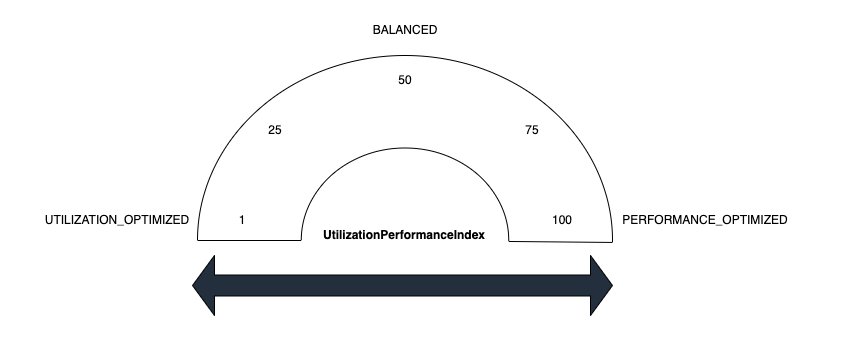
These are some of the reasons why custom autoscaling is not the right fit. Customers wanted out-of-the-box support for Managed Scaling to handle the scaling that optimizes for the customers end goal to optimize cost or performance. The new Advanced Scaling capability enhances the existing benefits of EMR Managed Scaling by introducing additional controls and helping you configure the desired resource utilization or performance level for your cluster using a utilization-performance slider. EMR Advanced Scaling then internally translates intent into tailored algorithm strategy (UtilizationPerformanceIndex), such as how quickly to scale, how much to scale, and so on, to make scaling decisions for the cluster. This helps optimize cluster resources while making sure we meet the performance or resource utilization intent set by the customer.
For example, for a cluster running multiple tasks of relatively short duration (order of seconds), EMR Managed Scaling previously used to scale up the cluster aggressively and conservatively scale it down to avoid negative impact to job runtimes. Although this is the right approach for SLA-sensitive workloads, it might not be optimal for customers who are fine with little delay but prefers saving cost. Now, you can configure EMR Managed Scaling behavior suitable for your workload types, and we will apply tailored optimization to intelligently add or remove nodes from the clusters. This helps you achieve the optimal price-performance for your clusters along with increased flexibility of additional user-controls.
The value you set for Advanced Scaling optimizes your cluster to your requirements. Values range from 1-100. Supported values are 1, 25, 50, 75 and 100. If you set the index to values other than these, it results in a validation error. Scaling values map to resource-utilization strategies. The following list defines several of these:
- Utilization optimized (1) – This setting prevents resource over provisioning. Use a low value when you want to keep costs low and to prioritize efficient resource utilization. It causes the cluster to scale up less aggressively. This works well for the use case when there are regularly occurring workload spikes and you don’t want resources to ramp up too quickly.
- Balanced (50) – This balances resource utilization and job performance. This setting is suitable for steady workloads where most stages have a stable runtime. It’s also suitable for workloads with a mix of short and long-running stages. We recommend starting with this setting if you aren’t sure which to choose.
- Performance optimized (100) – This strategy prioritizes performance. The cluster scales up aggressively to ensure that jobs complete quickly and meet performance targets. Performance optimized is suitable for service-level-agreement (SLA) sensitive workloads where fast run time is critical.
Customers can also choose intermediate values (25 and 75) for more nuanced control. The intermediate values available provide a middle ground between strategies to fine tune your cluster’s Advanced Scaling behavior.
Use cases and benefits
Amazon EMR’s Advanced Scaling feature improves cluster management by offering dynamic adaptation to diverse business requirements across industries. The feature enables strategic timing of scaling policies throughout the day, with early morning hours dedicated to workload preparation, peak business hours focusing on maximum performance, evening periods maintaining moderate scaling for post-business processing, and overnight hours optimized for cost-effective batch operations. This comprehensive approach allows organizations to fine-tune their resource allocation based on specific operational patterns, ultimately delivering an optimal balance between performance and cost-efficiency while ensuring business needs are met across different time zones and usage patterns.
Scaling configuration
In the following sections, we walk through a range of scenarios testing against a 3 TB TPC-DS dataset, then walk you through the results of testing a sample job. We wanted to evaluate how Amazon EMR would respond with advanced scaling policies in scenarios optimizing cluster utilization, balancing performance with utilization, and aggressive performance requirements.
With Advanced Scaling currently available through API and console support coming soon, we updated existing cluster configurations. We modified UtilizationPerformanceIndex with 1, 50, and 100, to correspond to the different scaling strategies using the put-managed-scaling-policy API with an advanced scaling strategy, as seen in the following examples:
Scenario 1: Utilization optimized
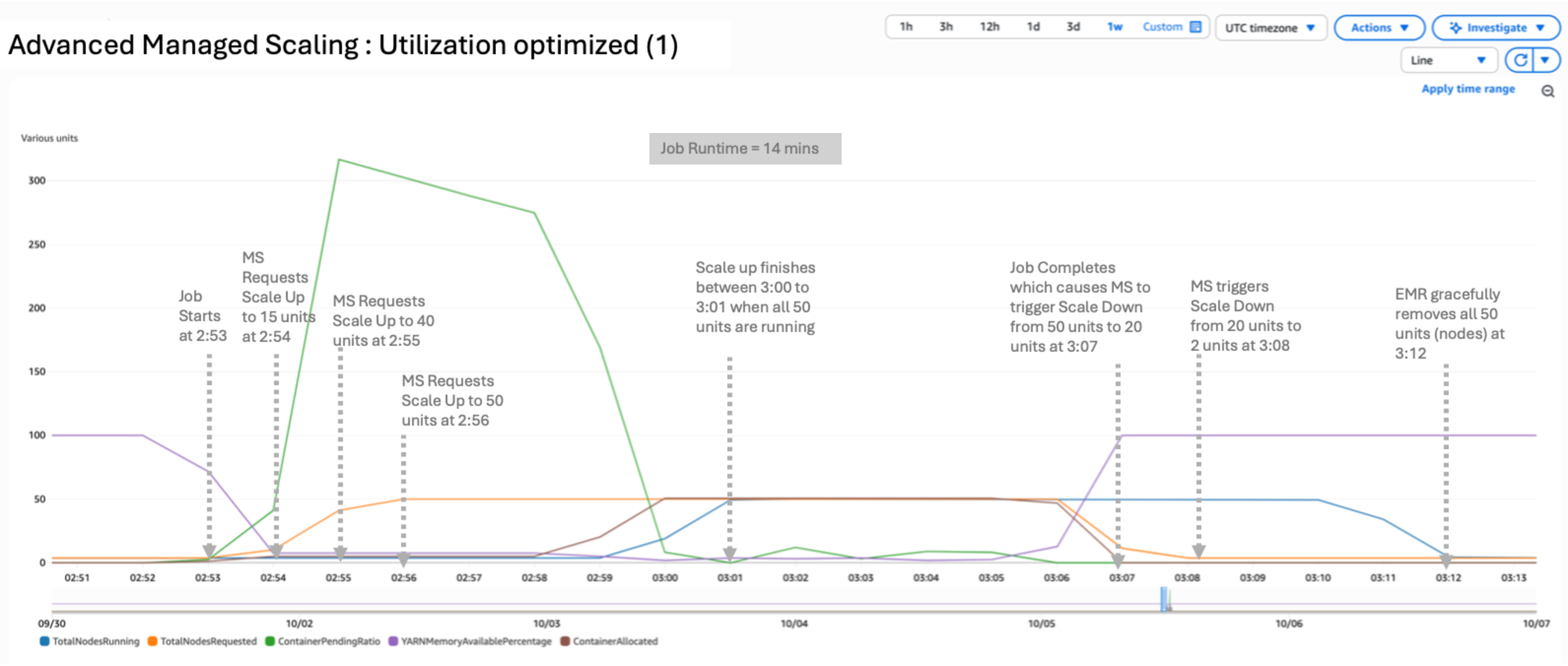
In this scenario, we used a utilization optimized configuration by setting UtilizationPerformanceIndex to 1:
The result of the test yielded a peak of 16 nodes running and 16 requested. The scale-up and scale-down process is conservative. It takes 15 minutes to completely release the nodes after the requested metric subsides, as shown in the following figure. The job completed in 12 minutes, 39 seconds. UtilizationPerformanceIndex of 1 or 25 can be useful when the cluster is running a sequence of jobs with little to zero idle time. It can prevent frequent node churn because nodes will be available for the next set of jobs.
Scenario 2: Balanced
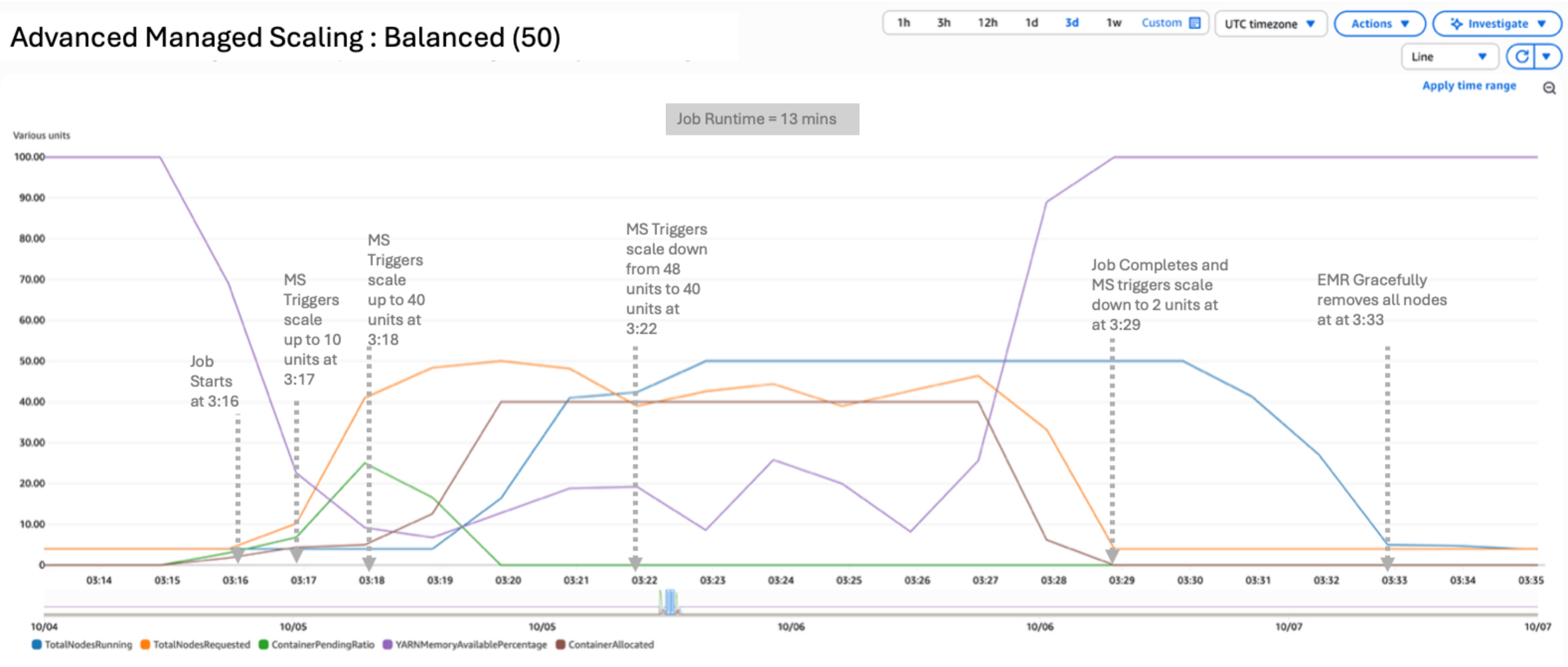
In this scenario, we used a balanced configuration by setting UtilizationPerformanceIndex to 50:
The result of the test yielded a peak of 43 nodes running and 32 requested. UtilizationPerformanceIndex of 50 uses a balanced approach for scaling the resources. Nodes requested and running are higher such that you can get a better price-performance ratio. The job completed in 7 minutes, 1 second.
Scenario 3: Performance optimized
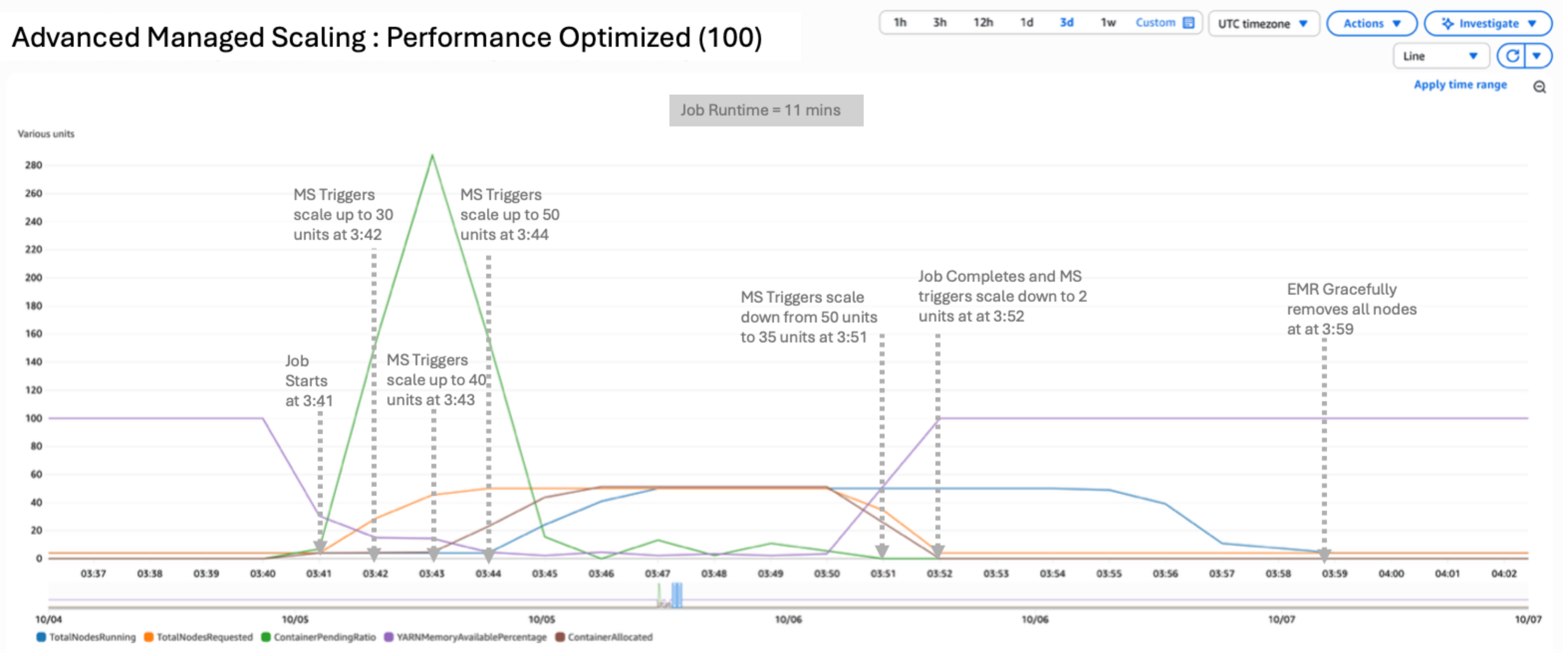
In this scenario, we used a performance optimized configuration by setting UtilizationPerformanceIndex to 100:
The result of the test yielded a peak of 50 nodes running and 46 requested. UtilizationPerformanceIndex of 100 delivers the highest performance by aggressively scaling resources up and down. You can expect the highest nodes requested and running in this configuration. Scale-down will closely follow the node requested metric and therefore can lead to frequent churn of nodes if there are short idle periods between job submissions. This setting is ideal for latency-sensitive workloads that need to finish under SLA. The example job completed in 6 minutes, 16 seconds.
Comparison
The following table summarizes the differences between these scaling methods and time taken for each.
| Scaling Method | Utilization Index | Peak Total Nodes Requested | Peak Total Nodes Running | Job Run Time (Seconds) | Cost to Run job | Use Case |
| Scenario1 – Utilization optimized | 1 | 16 | 16 | 759 | Low | Workloads with regular spikes; prioritizes cost efficiency with conservative scaling |
| Scenario 2 – Balanced | 50 | 32 | 43 | 421 | Medium | Steady workloads with mixed stage durations; recommended starting point |
| Scenario 3 – Performance Optimized | 100 | 46 | 50 | 376 | High | SLA-sensitive workloads requiring fast completion times |
Advanced Managed Scaling in Amazon EMR introduces a more nuanced approach to cluster management through the customized scaling strategies to meet your business requirements. This spectrum offers fine-grained control over how clusters respond to workload demands. At one end, with a utilization optimized configuration of 1, the system prioritizes efficient resource usage, scaling up conservatively to maintain cost-effectiveness and taking advantage of existing cluster resources. In the balanced configuration at 50, the strategy aims to strike an equilibrium between resource utilization and job performance. To meet performance SLAs, the performance optimized value of 100 showed aggressive scaling responding to increased demand for resources quickly, regardless of resource consumption. This granular control helps you fine-tune your cluster’s behavior based on your specific needs, balancing cost, efficiency, and performance.
Conclusion
To Summarize, Advanced Scaling for Amazon EMR represents an advancement in cluster management, offering greater control and efficiency. By fine-tuning your clusters’ behavior, you can achieve more cost-effective and performant big data processing. We encourage you to try this new feature and discover how it can optimize your EMR workloads. Start by experimenting with different UtilizationPerformanceIndex values and closely monitor your cluster’s performance and cost metrics. Over time, you will be able to find the perfect balance that meets your specific needs.
To learn more about Amazon EMR Managed Scaling and Advanced Scaling, refer to our documentation. We’re excited to see how you use this new capability to enhance your big data processing on AWS, and we look forward to your feedback as we continue to evolve and improve our services.