AWS Big Data Blog
Real-time CDC from Aurora PostgreSQL to Amazon S3 Tables using Debezium and Firehose
Enterprises running transactional workloads on Amazon Aurora PostgreSQL-Compatible Edition (Aurora PostgreSQL) need their operational data available for analytics. However, analytical queries and cross-database joins compete for resources on OLTP-optimized clusters. Batch exports introduce latency, and when data spans multiple Aurora clusters, there’s no straightforward way to join datasets or run cross-domain analytics. Real-time change data capture (CDC) addresses this by streaming row-level changes into a separate analytics layer. However, most CDC approaches write append-only records that require downstream consumers to reconstruct current state from the change log.
In this post, we show you how to build a CDC pipeline that delivers query-ready Iceberg tables directly. The pipeline captures inserts, updates, and deletes from Aurora PostgreSQL and applies them as row-level operations in Amazon S3 Tables, a capability of Amazon Simple Storage Service (Amazon S3). The destination tables always reflect the current state of the source database. You use Debezium on Amazon MSK Connect for change capture and Amazon Managed Streaming for Apache Kafka (Amazon MSK) for streaming. You also use AWS Lambda to transform CDC events and resolve operation semantics, and Amazon Data Firehose to deliver records into Iceberg tables. You deploy the infrastructure using the AWS Cloud Development Kit (AWS CDK).
Apache Iceberg supports row-level updates, deletes, ACID transactions, schema evolution, and time travel natively. S3 Tables handles Iceberg snapshot management and compaction automatically. With AWS Lake Formation for access control, multiple teams can query the tables through Amazon Athena, Amazon Redshift, or Amazon SageMaker Unified Studio.
Solution overview
The following diagram shows the architecture of the CDC pipeline.
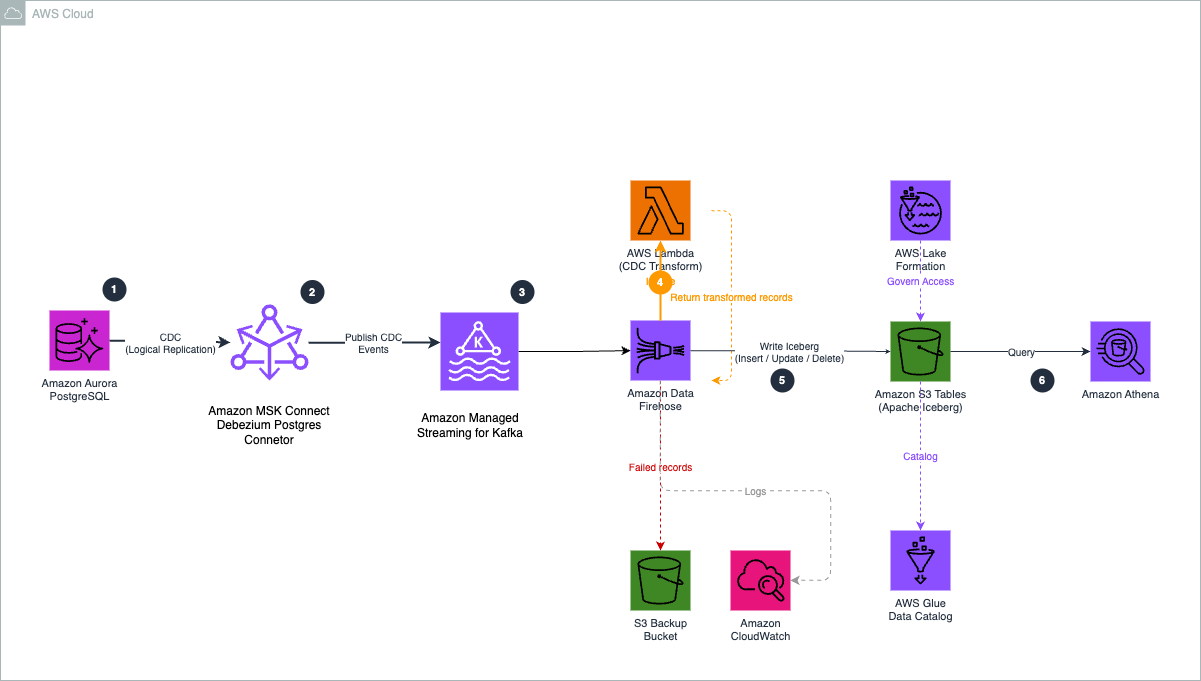
Figure 1. CDC pipeline architecture from Aurora PostgreSQL to Amazon S3 Tables.
The pipeline uses six components:
- Aurora PostgreSQL to Debezium. Debezium runs on MSK Connect in your VPC and uses PostgreSQL’s native logical replication to stream row-level changes from the write-ahead log (WAL), with minimal impact on query performance.
- Debezium to Amazon MSK. The
ByLogicalTableRouterSMT reroutes CDC events from multiple tables into a single topic (aurora.cdc.all-tables), retaining the source table name in each message. - Amazon MSK to Firehose. Firehose connects to the MSK cluster using the IAM access control over AWS PrivateLink and continuously polls the topic for new messages.
- Firehose to Lambda. For each batch, Firehose invokes the Lambda function to decode the Kafka message, flatten the Debezium envelope, and set otfMetadata routing with the destination table and operation type.
- Firehose to S3 Tables. Firehose reads the
otfMetadata, routes each record to the correct Iceberg table, and performs the appropriate row-level operation using configured unique keys (for example,order_idfor orders). S3 Tables handles compaction and snapshot management automatically. - Query and access control. After data lands in S3 Tables, you can query the Iceberg tables with Amazon Athena, Amazon Redshift, or Amazon SageMaker Unified Studio, with AWS Lake Formation managing fine-grained access control.
Firehose supports one MSK topic per delivery stream. The single-topic routing pattern uses a Debezium SMT to consolidate multiple tables into one topic, and a Lambda function to route records to the correct destination. With this, you can serve multiple tables through one Firehose stream, reducing cost and operational complexity.
Debezium event transformation
Debezium produces CDC events in an envelope structure containing both the previous and current state of a row, along with metadata about the source database, table, and operation type. However, Firehose expects records in a flattened JSON format with routing metadata that indicates the target table and operation type.
The Lambda function bridges this gap by performing three operations on each record:
- Decode. When Firehose uses Amazon MSK as a source, it delivers the Kafka message value as a base64-encoded string in the
kafkaRecordValuefield. The function base64-decodes this field to obtain the raw Debezium JSON payload. - Flatten and extract. Pulls the row data from the Debezium envelope. For inserts and updates, the function uses the
afterfield (the row after the change). For deletes, it uses thebeforefield, because theafterfield is null when a row is removed. - Route. Sets the otfMetadata block with
destinationTableName(extracted from the Debeziumsource.tablefield) andoperation(mapped from Debezium’s single-character codes to Firehose’s operation types).
The following table shows how Debezium operation codes map to Firehose Iceberg operations:
| Debezium code | Meaning | Firehose operation |
| c | Row created (insert) | insert |
| u | Row updated | update |
| d | Row deleted | delete |
| r | Snapshot read (initial load) | insert |
When Debezium starts with snapshot.mode=initial, it reads all existing rows and emits them as r (read) events. These represent rows that existed before CDC began, so they are mapped to insert to establish the baseline state in the destination tables.
For example, the function transforms this Debezium envelope:
Into a response record with routing metadata:
The kafkaRecordValue contains the base64-encoded flattened row data (for example, {"order_id": 1, "customer_id": 1, "total_amount": 299.99}), and the otfMetadata block tells Firehose which table to write to and which operation to perform.
With this routing metadata, a single Firehose stream can write to multiple destination tables. For more information, see Route incoming records to different Iceberg tables.
Walkthrough
The following sections walk you through building the CDC pipeline end to end. Before you begin, complete the prerequisites.
Prerequisites
Before you begin, make sure you have the following:
- An AWS account with permissions to create the resources described in this post.
- An existing Amazon Virtual Private Cloud (Amazon VPC) with at least two subnets in different Availability Zones.
- An Aurora PostgreSQL cluster in the same VPC with logical replication enabled (
rds.logical_replication = 1). - Aurora database credentials stored in AWS Secrets Manager. Note the secret ARN for the CDK configuration.
- AWS CDK v2 installed (
npm install -g aws-cdk). - Node.js 18+ and npm.
- AWS Command Line Interface (AWS CLI) v2 installed and configured with appropriate credentials.
- An Amazon S3 general purpose bucket for the Debezium plugin upload and Firehose failed record backup.
- S3 Tables integration with AWS analytics services enabled in your AWS Region (one-time setup).
Step 1: Enable CDC in Aurora PostgreSQL
PostgreSQL supports change data capture through its logical replication framework, which allows database changes to be streamed from the write-ahead log (WAL). Debezium uses this mechanism to continuously read row-level changes and publish them to Kafka topics.
To enable logical replication in Aurora PostgreSQL, configure a custom DB cluster parameter group:
- Create a custom parameter group and set the following parameter:
rds.logical_replication = 1. - Apply the parameter group to your Aurora cluster and reboot the cluster for the change to take effect.
- Connect to your Aurora PostgreSQL cluster and create the source tables:
- Create a publication that defines which tables are included in the change stream. Debezium automatically creates the logical replication slot when the connector starts for the first time, so you don’t need to create one manually.
- Verify the publication was created:
You should see one row returned, confirming the publication is active.
Important: When the Debezium connector starts (Step 6), it creates a replication slot named debezium_slot. This slot retains WAL segments until consumed. If the connector is stopped for an extended period, WAL segments can accumulate and increase storage usage on the Aurora cluster. Monitor the ReplicationSlotDiskUsage Amazon CloudWatch metric for your Aurora cluster.
Step 2: Build and register the Debezium plugin
MSK Connect runs connectors using custom plugins that you upload to Amazon S3. In this step, you download the Debezium PostgreSQL connector, package it as a ZIP file, upload it to S3, and register it with MSK Connect.
First, create an S3 bucket for the plugin, or use an existing metadata management bucket:
Download and package the Debezium connector:
Register the plugin with MSK Connect:
Create a worker configuration that tells MSK Connect to serialize Kafka messages as JSON without schemas:
Note the customPluginArn and workerConfigurationArn from the output. You need these for the CDK configuration in the next step.
Note: The custom plugin and worker configuration are created through the AWS CLI because the Debezium connector JARs must be downloaded from the Debezium project and packaged manually. The remaining infrastructure is deployed using the AWS CDK in the following steps.
Step 3: Configure the CDK project
Clone the sample repository and install dependencies:
Open cdk/lib/v2/config.ts and update the configuration values to match your environment:
Key configuration notes:
- auroraSecurityGroupId. The security group attached to your Aurora cluster. The CDK creates an MSK security group with ingress rules allowing traffic from this security group, and a reverse rule allowing MSK Connect workers to reach Aurora on port 5432.
- tableKeys. The primary key column for each table. Firehose uses these to match incoming records against existing rows for update and delete operations in the Iceberg tables.
- s3TablesBucketName. The name for your S3 table bucket. Table bucket names must be unique for your account in the chosen Region.
Step 4: Deploy the CDK stacks
Deploy all six stacks with a single command. The CDK resolves the dependency order automatically:
When prompted, review the AWS Identity and Access Management (IAM) changes and confirm the deployment. The CDK deploys the following stacks:
| Stack | What it creates |
CdcMskCluster |
Amazon MSK cluster (2x kafka.m5.large brokers) with dual authentication (IAM for Firehose, unauthenticated for Debezium), custom configuration with auto.create.topics.enable=true, security groups with ingress rules for Aurora and MSK Connect workers |
CdcMskConnectIam |
MSK Connect service execution role with permissions for Kafka cluster operations, VPC networking, S3 plugin access, and AWS Secrets Manager; Amazon CloudWatch Logs group for connector logs |
CdcS3Tables |
S3 table bucket, aurora_cdc namespace, two Iceberg tables (orders, products) with column schemas |
CdcLambdaTransform |
Lambda function for CDC event transformation and multi-table routing |
CdcFirehoseRole |
Firehose IAM role with permissions for Amazon MSK, S3 Tables, AWS Glue Data Catalog, AWS Lake Formation, VPC networking, and Lambda invocation |
CdcFirehose |
Firehose delivery stream with MSK as source (private connectivity through AWS PrivateLink), Lambda processing, Apache Iceberg Tables as destination with two table configurations, and S3 backup bucket for failed records |
The MSK cluster takes approximately 25 minutes to create. The Debezium connector takes approximately 5 minutes after the cluster is ready. You can monitor the deployment progress in the AWS CloudFormation console.
After the deployment completes, you can verify the resources in the AWS console. The S3 table bucket shows the two Iceberg tables in the aurora_cdc namespace.
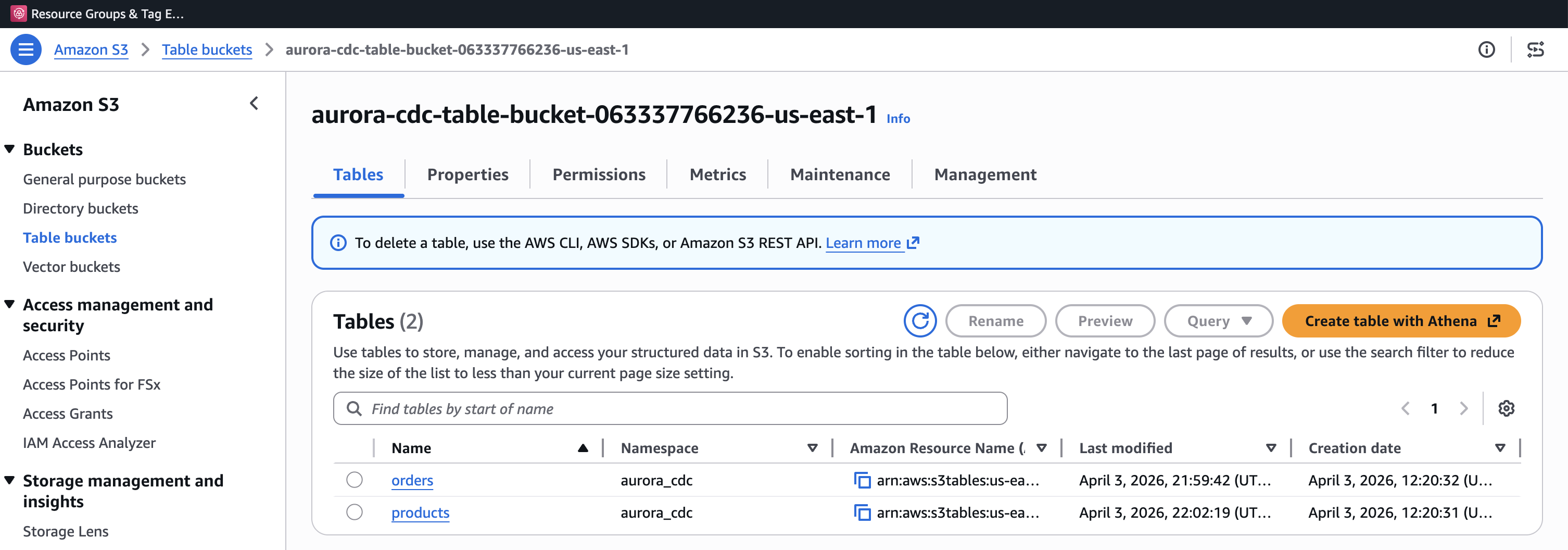
Figure 2. S3 table bucket showing the orders and products Iceberg tables in the aurora_cdc namespace.
The Firehose delivery stream shows the MSK source, Lambda transformation, and Apache Iceberg Tables destination.

Figure 3. Amazon Data Firehose delivery stream with MSK source, Lambda transformation, and Apache Iceberg Tables destination.
The MSK cluster uses dual authentication (IAM for Firehose, unauthenticated for Debezium through TLS_PLAINTEXT), multi-VPC private connectivity for Firehose PrivateLink access, and auto.create.topics.enable=true so Debezium can create topics on first connect. VPC connectivity and the cluster resource policy are configured as CLI steps in Step 5.
Step 5: Enable MSK VPC connectivity, grant Lake Formation permissions, and apply MSK cluster policy
After the CDK deployment completes, enable multi-VPC private connectivity with IAM on the MSK cluster. Firehose requires this to create an AWS PrivateLink endpoint to the MSK brokers. This setting can’t be configured during cluster creation and must be applied as an update, which triggers a rolling broker restart (approximately 20–30 minutes).
Wait for the cluster state to return to ACTIVE before proceeding:
Next, grant the Firehose IAM role permissions through AWS Lake Formation. S3 Tables uses a sub-catalog format for the CatalogId parameter, which differs from the standard AWS Glue Data Catalog. These permissions require a data lake administrator identity.
Grant database-level and table-level permissions to the Firehose role:
Note the CatalogId format: <account-id>:s3tablescatalog/<table-bucket-name>. This is specific to S3 Tables and tells Lake Formation to look up permissions in the S3 Tables catalog rather than the default Glue Data Catalog. For more information, see Integrating Amazon S3 Tables with AWS analytics services.
Next, attach a resource-based policy to the MSK cluster that grants the Firehose service principal permission to create VPC connections:
You can find the <msk-cluster-arn> in the CdcMskCluster stack outputs from Step 4, and the <firehose-role-arn> in the CdcFirehoseRole stack outputs.
Step 6: Create the Debezium connector
With the MSK cluster running and Lake Formation permissions in place, create the Debezium connector using the MSK Connect API. The connector reads changes from Aurora PostgreSQL and publishes them to the MSK topic.
Firehose supports only one MSK topic per delivery stream, so each source table would otherwise need its own Firehose stream and VPC connection. To avoid this, the connector uses the Debezium ByLogicalTableRouter Single Message Transform (SMT) to route changes from multiple tables into a single topic (aurora.cdc.all-tables). The Lambda function then uses the source table name in each message to direct records to the correct Iceberg table. This single-topic pattern uses one Firehose stream for multiple tables, reducing cost and operational complexity.
First, retrieve the MSK bootstrap servers from the cluster:
Note the BootstrapBrokerString value (the PLAINTEXT brokers). Then create the connector:
The <msk-security-group-id> and <msk-connect-service-role-arn> can be found in the CdcMskCluster and CdcMskConnectIam stack outputs respectively. The ByLogicalTableRouter Single Message Transform routes CDC events from the monitored tables into a single topic (aurora.cdc.all-tables).
Step 7: Verify the Debezium connector
After creating the connector, verify that it is running and has completed its initial snapshot.
The connector state should show RUNNING, as shown in the following figure.
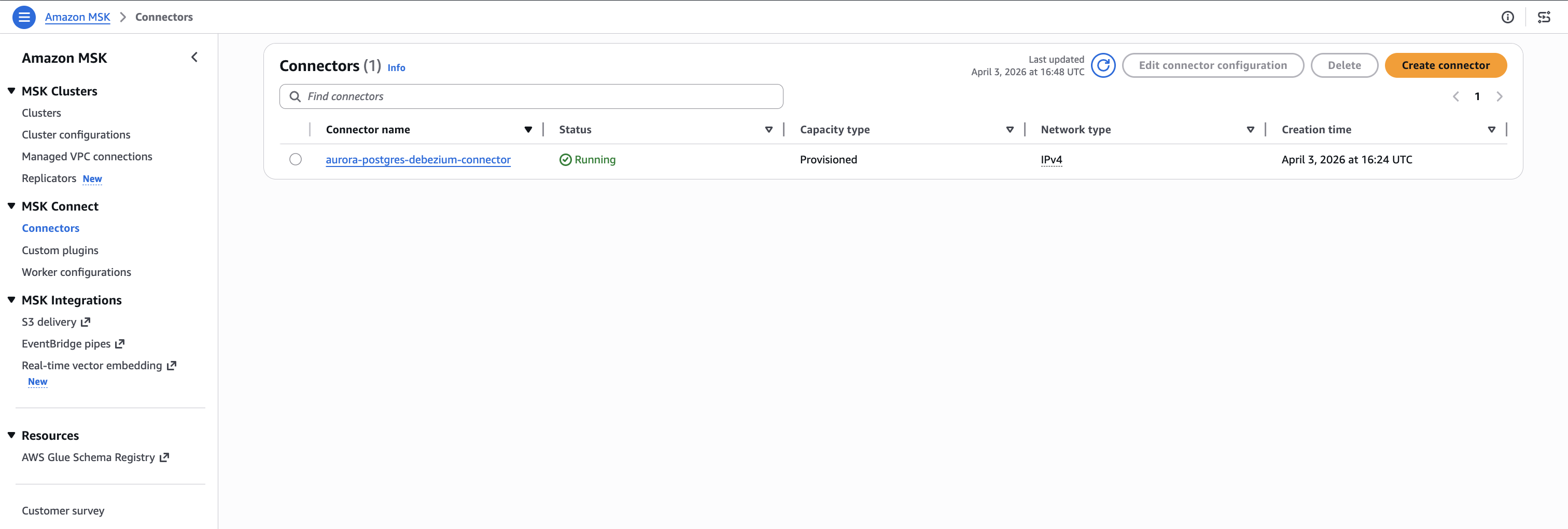
Figure 4. Debezium connector running on Amazon MSK Connect.
Check the CloudWatch Logs to confirm the snapshot completed:
You should see messages indicating the transition to streaming mode:
Finished exporting 0 records for table 'public.orders' (1 of 2 tables)
Finished exporting 0 records for table 'public.products' (2 of 2 tables)
Snapshot completed
Starting streaming
If the tables were empty when the connector started, the export count is 0. If you had existing data, the snapshot captures the existing rows as r (read) operations, which the Lambda function maps to insert operations in the Iceberg tables.
Verify that the Firehose delivery stream is active:
The status should return ACTIVE.
Step 8: Test the pipeline
Insert test data into the Aurora PostgreSQL source tables. Each insert triggers a CDC event that flows through the pipeline: Aurora WAL to Debezium to MSK topic to Firehose to Lambda transform to S3 Tables.
This creates six records across two tables. Each record generates a Debezium CDC event with operation type c (create), which the Lambda function maps to an insert operation in the corresponding Iceberg table.
Step 9: Verify data delivery
Check the Firehose IncomingRecords metric to confirm records are flowing through the delivery stream:
You should see a Sum value of 6 or more. If the value is 0, wait another minute and retry. There can be a short delay between MSK topic delivery and Firehose metric reporting.
If records aren’t appearing, check the Firehose error output in the backup S3 bucket and the Lambda function’s CloudWatch Logs for transformation errors.
Step 10: Query data using Amazon Athena
With data delivered to S3 Tables, you can query the Iceberg tables using Amazon Athena. S3 Tables integrates with the AWS Glue Data Catalog as a sub-catalog, so you reference tables using the S3 Tables catalog format.
Tip: If records aren’t appearing in Athena, check the Firehose IncomingRecords CloudWatch metric and the Lambda function’s CloudWatch Logs for transformation errors.
Open the Athena console, select the AwsDataCatalog data source, and run the following queries:
Replace <table-bucket-name> with your S3 table bucket name. You should see the records from the initial snapshot that Debezium captured when the connector started.
The following figures show the initial state of both tables as queried through Athena. At this point, the products table contains seven records and the orders table contains seven records, captured during the Debezium initial snapshot.
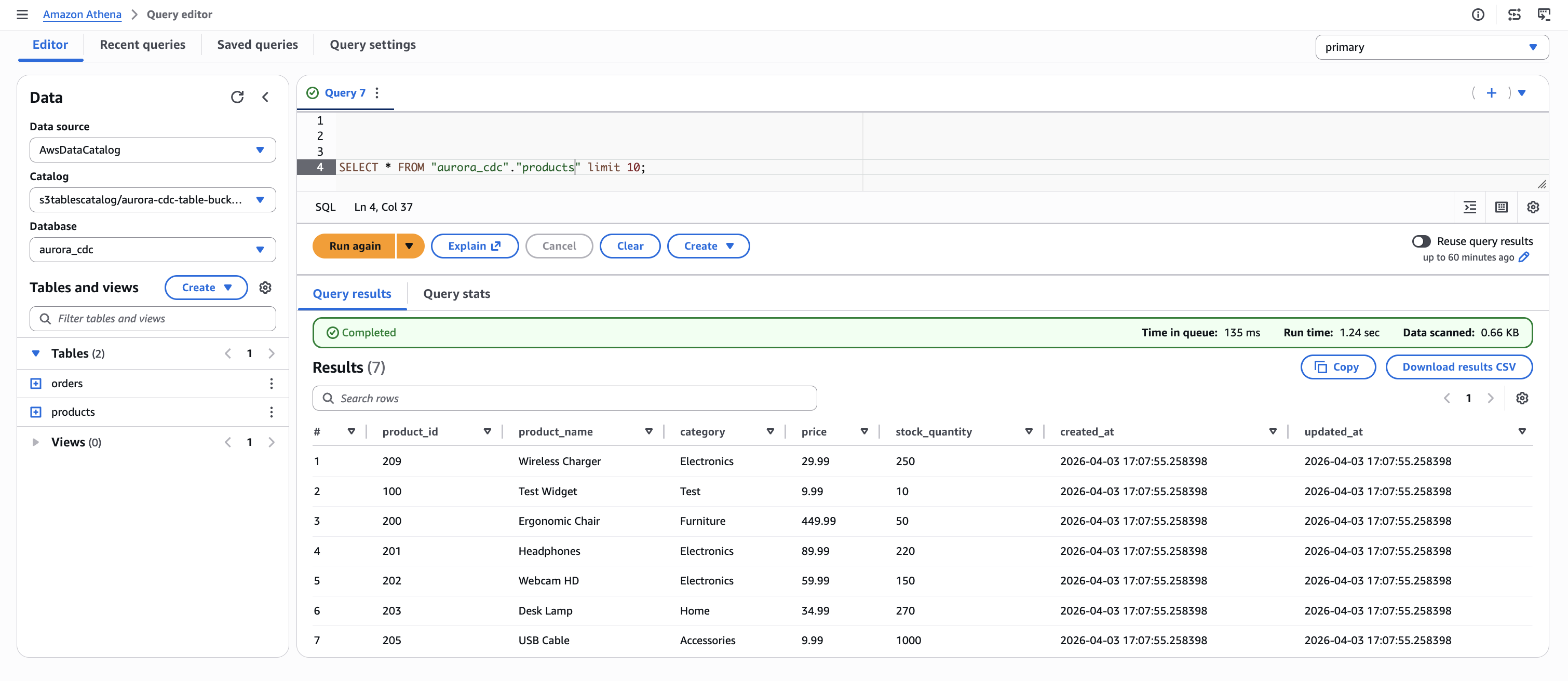
Figure 5. Initial state of the products table in Amazon Athena, showing seven records captured from Aurora PostgreSQL through the CDC pipeline.
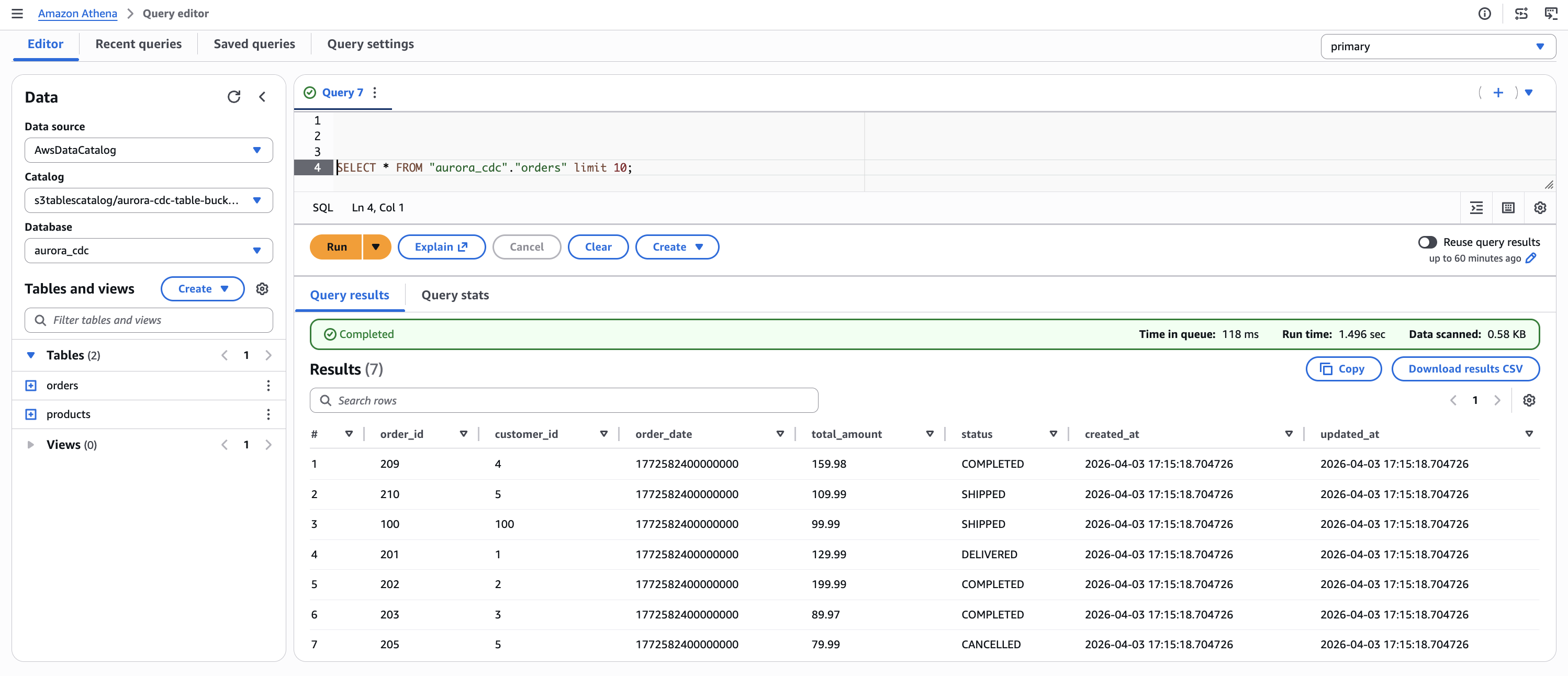
Figure 6. Initial state of the orders table in Amazon Athena, showing seven records captured from Aurora PostgreSQL through the CDC pipeline.
Now test that update and delete operations propagate correctly. Run the following statements in Aurora:
Wait for the changes to propagate through the pipeline, then query Athena again. The following figures show the results after the insert, update, and delete operations have been applied.
In the products table, the Test Widget record (product_id 100) is no longer present because it was removed by the delete operation. The Ergonomic Chair row now reflects the updated price (549.99) and stock quantity (30). Two new records, Bluetooth Speaker and Standing Desk, appear with a later created_at timestamp, confirming they were inserted after the initial snapshot.
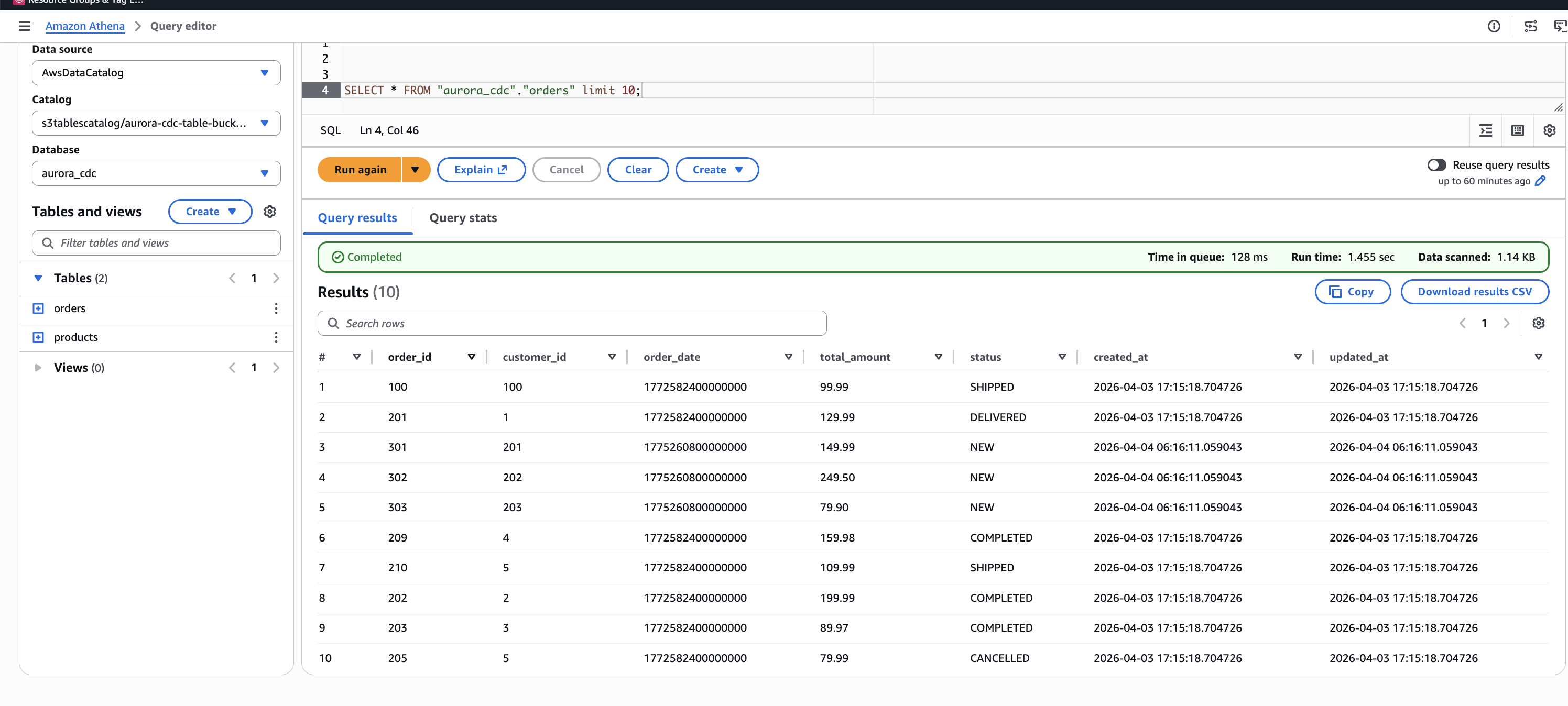
Figure 7. Products table after CDC operations. The Ergonomic Chair, Headphones, and Desk Lamp rows reflect updated values. Bluetooth Speaker and Standing Desk are newly inserted records. The Test Widget record has been removed by the delete operation.
In the orders table, order 100 now shows a status of SHIPPED and order 201 shows DELIVERED, reflecting the update operations. Three new orders (301, 302, 303) appear with status NEW and a later timestamp, confirming they were inserted after the initial load.
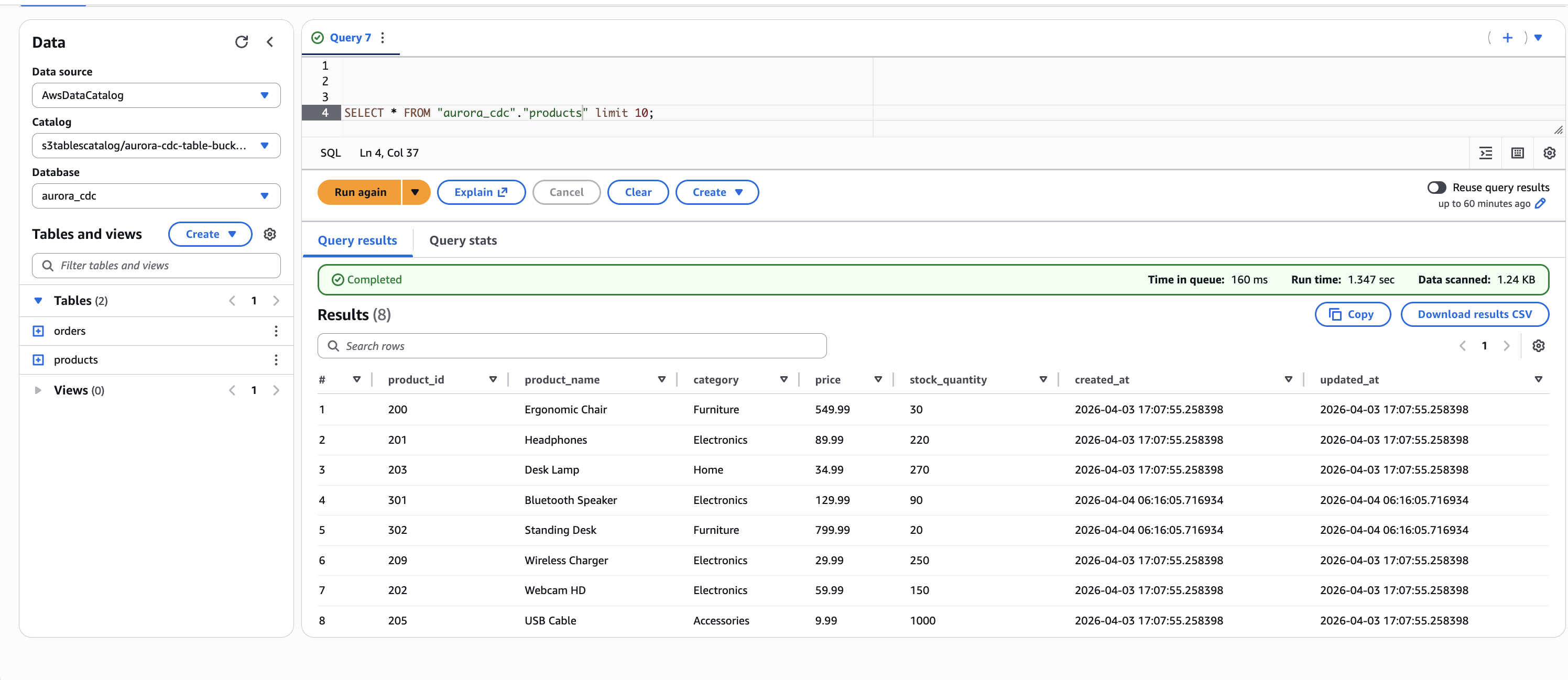
Figure 8. Orders table after CDC operations. Orders 100 and 201 reflect updated status values. Orders 301, 302, and 303 are newly inserted records.
This confirms that the pipeline correctly handles the three CDC operation types: inserts, updates, and deletes are captured from the Aurora WAL by Debezium, routed through the single MSK topic, transformed by the Lambda function, and applied as row-level Iceberg operations by Firehose.
S3 Tables handles compaction and snapshot management for Iceberg tables automatically, including compaction of small data files and expiration of old snapshots. You don’t need to run manual maintenance operations.
You can also use Iceberg’s time travel capability to query the table as it existed before the updates:
This returns the original data before the update, demonstrating the time travel capability that Apache Iceberg provides through S3 Tables.
Cleaning up
To avoid ongoing charges, delete the resources in reverse dependency order.
Delete the CDK stacks:
Delete the Debezium custom plugin and worker configuration that were created through the AWS CLI in Step 2:
Clean up the Aurora PostgreSQL replication resources:
Important: The replication slot (debezium_slot) was created automatically by Debezium. If you plan to redeploy the pipeline later, you don’t need to drop the slot and publication. However, the replication slot continues to retain WAL segments while the connector isn’t running, which can increase storage usage on the Aurora cluster. The MSK cluster is the largest cost component of this solution and can’t be paused. It can only be deleted and recreated.
Conclusion
In this post, we showed you how to build a near real-time CDC pipeline from Aurora PostgreSQL to Apache Iceberg tables in Amazon S3 Tables. The key architectural decisions include:
- Single-topic routing with multi-table delivery. The Debezium
ByLogicalTableRouterSMT routes CDC events from multiple tables through one MSK topic, and the LambdaotfMetadatarouting directs each record to the correct Iceberg table. This reduces VPC connection costs by using a single Firehose stream for inserts, updates, and deletes across multiple destination tables. - Fully managed CDC pipeline. MSK Connect runs Debezium, Firehose handles delivery with automatic retries, and S3 Tables manages Iceberg compaction and snapshots. The Lambda transform preserves CDC semantics by mapping Debezium operations to Iceberg row-level operations.
- Governed lakehouse access. Lake Formation controls fine-grained access to the Iceberg tables, and data from multiple isolated Aurora clusters can be unified in a single S3 Tables namespace for cross-domain analytics.
- Infrastructure as code. Six AWS CDK stacks deploy the core pipeline, with Lake Formation permissions, MSK cluster policy, and Debezium connector configured through documented CLI steps.
To get started, clone the sample repository and follow the walkthrough steps. For more information about the services used in this solution, see the Amazon MSK Developer Guide, Amazon Data Firehose Developer Guide, and Amazon S3 Tables User Guide.
We encourage you to try this solution and adapt it to your own CDC workloads. If you have questions or feedback, leave a comment on this post.
Related posts
- Build a data lake for streaming data with Amazon S3 Tables and Amazon Data Firehose
- Stream CDC into an Amazon S3 data lake in Apache Iceberg format with AWS Glue Streaming and Amazon MSK Connect
- Introducing Amazon MSK Connect – Stream Data to and from Your Apache Kafka Clusters Using Managed Connectors