AWS Big Data Blog
Reduce EMR HBase upgrade downtime with the EMR read-replica prewarm feature
HBase clusters on Amazon Simple Storage Service (Amazon S3) need regular upgrades for new features, security patches, and performance improvements. In this post, we introduce the EMR read-replica prewarm feature in Amazon EMR and show you how to use it to minimize HBase upgrade downtime from hours to minutes using blue-green deployments. This approach works well for single-cluster deployments where minimizing service interruption during infrastructure changes is important.
Understanding HBase operational challenges
HBase cluster upgrades have required complete cluster shutdowns, resulting in extended downtime while regions initialize and RegionServers come online. Version upgrades require a complete cluster switchover, with time-consuming steps that include loading and verifying region metadata, performing HFile checks, and confirming proper region assignment across RegionServers. During this critical period—which can extend to hours depending on cluster size and data volume—your applications are completely unavailable.
The challenge doesn’t stop at version upgrades. You must regularly apply security patches and kernel updates to maintain compliance. For Amazon EMR 7.0 and later clusters running on Amazon Linux 2023, instances don’t automatically install security updates after launch; they remain at the patch level from cluster creation time. AWS recommends periodically recreating clusters with newer AMIs, requiring the same hard cutover and downtime risks as a full version upgrade. Similarly, when you need to use different instance types, traditional approaches mean taking your cluster offline.
Solution overview
Amazon EMR 7.12 introduces read-replica prewarm, a new feature that tackles these challenges. This feature lets you make infrastructure changes to Apache HBase on Amazon S3 at scale while reducing downtime risk and maintaining data consistency.
With read-replica prewarm, you can prepare and validate your changes in a read-replica cluster before promoting it to active status, cutting service interruption from hours to minutes. You will learn how to prepare your read-replica cluster with the target version, execute cutover procedures that minimize downtime, and verify successful migration before completing the switchover.
Read-replica prewarm architecture
The following diagram shows the architecture and workflow. Both primary and read-replica clusters interact with the same Amazon S3 storage, accessing the same S3 bucket and root directory.
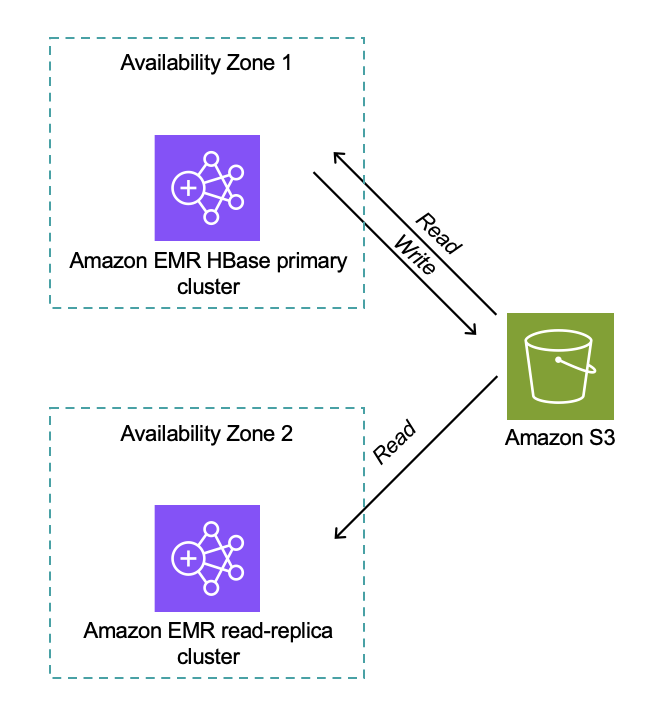
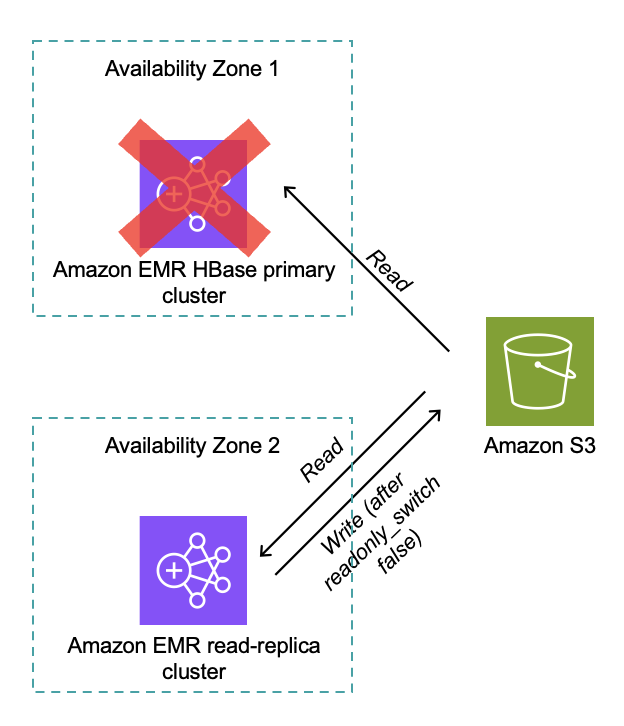
Distributed locking confirms only one HBase cluster can write at a time (for clusters version 7.12.0 and later). The read-replica cluster performs full HBase region initialization without time pressure, and after promotion, the read replica becomes the active writer as shown in the following diagram.
Implementation steps HBase cluster upgrade
Now that you understand how read-replica prewarm works and the architecture behind it, let’s put this knowledge into practice. You will follow a process that consists of three main phases: preparation, cutover, and verification. Each phase includes specific steps, shown in the following figure, that you will execute in sequence to complete the migration.
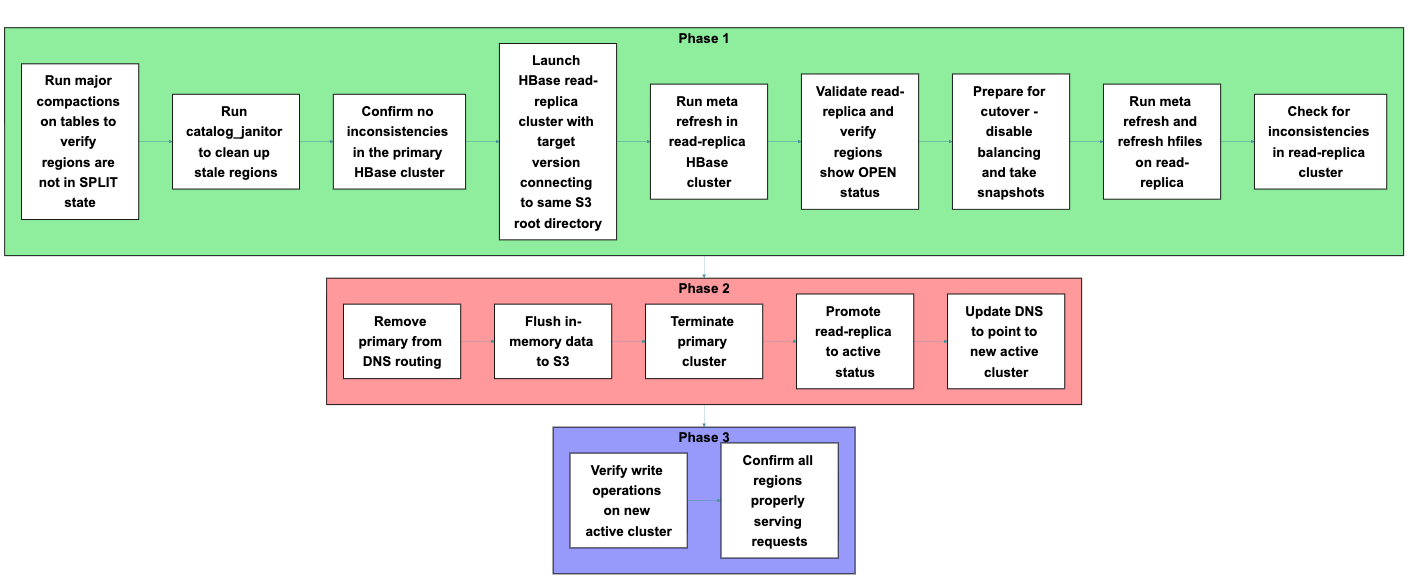
Phase 1: Preparation
Before starting the migration, prepare both your primary cluster and launch a new read-replica cluster. Each step in this phase builds toward confirming that your new cluster can properly access and serve your existing data.
- Run major compactions on tables to verify regions are not in SPLIT state
Run major compactions to consolidate data files and verify regions are not in SPLIT state. Split regions can cause assignment conflicts during migration, so resolving them at the start helps maintain cluster stability throughout the transition. - Run
catalog_janitorto clean up stale regions
Execute thecatalog_janitorprocess (HBase’s built-in maintenance tool) to remove stale region references from the metadata. Cleaning up these references prevents confusion during region assignment in the read-replica cluster. - Confirm no inconsistencies in the primary HBase cluster
Verify cluster integrity before migration:Running the HBase Consistency Check tool version 2 (HBCK2) performs a diagnostic scan that identifies and reports problems in metadata, regions, and table states, confirming your cluster is ready for migration.
- Launch HBase read-replica cluster with the target version connecting to the same HBase root directory in Amazon S3 as the primary cluster
Launch a new HBase cluster with the target version and configure it to connect to the same S3 root directory as the primary cluster. Confirm that read-only mode is enabled by default as shown in the following screenshot.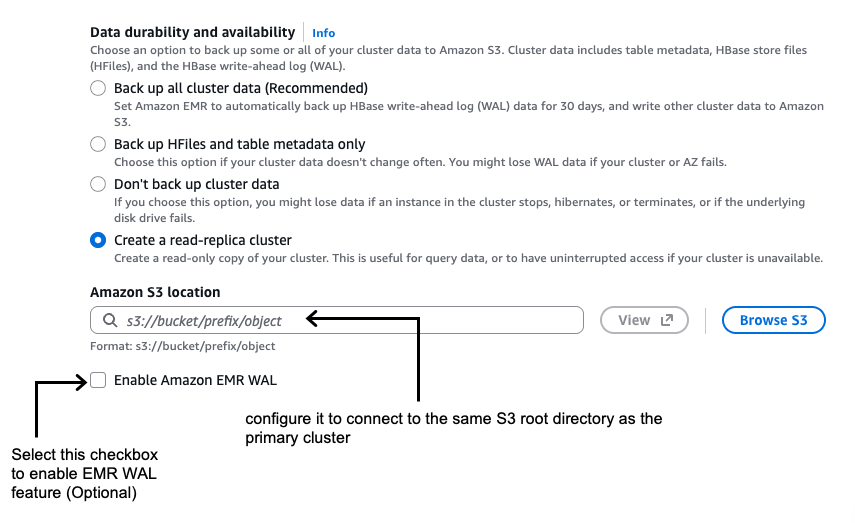
If you are using AWS Command Line Interface (AWS CLI), you can enable the read replica while launching the Amazon EMR HBase on the Amazon S3 cluster by setting the
hbase.emr.readreplica.enabled.v2parameter totruein the HBase classification as shown in the following example: - Run meta refresh in this read-replica HBase cluster
You’re creating a parallel environment with the new version that can access existing data without modification risk, allowing validation before committing to the upgrade.
- Validate the read-replica and verify that regions show OPEN status and are properly assigned:
Execute sample read operations against your key tables to confirm the read replica can access your data correctly. In the HBase Master UI, verify that regions showOPENstatus and are properly assigned to RegionServers. You should also confirm that the total data size matches your previous cluster to verify complete data visibility. - Prepare for cutover on primary cluster
Disable balancing and compactions on the primary cluster:Preventing background operations from changing data layout or triggering region movements maintains a consistent state during the migration window.
Take snapshots of your tables for rollback capability:
These snapshots enable point-in-time recovery if you discover issues after migration.
- Run meta refresh and refresh hfiles on the read replica:
Refreshing confirms the read replica has the most current region assignments, table structure, and HFile references before taking over production traffic.
- Check for inconsistencies in the read-replica cluster
Run the HBCK2 tool on the read-replica cluster to identify potential issues:When a read replica is created, both the primary and replica clusters show metadata inconsistencies referencing each other’s meta folders: “There is a hole in the region chain”. The primary cluster complains about meta_<read-replica-cluster-id>, while the read replica complains about the primary’s meta folder. This inconsistency doesn’t impact cluster operations but shows up in hbck reports. For a clean hbck report after switching to the read replica and terminating the primary cluster, manually delete the old primary’s meta folder from Amazon S3 after taking a backup of it.
Additionally, check the HBase Master UI to visually confirm cluster health. Verifying the read-replica cluster has a clean, consistent state before promotion prevents potential data access issues after cutover.
Phase 2: Cutover
Perform the actual migration by shutting down the primary cluster and promoting the read replica. The steps in this phase minimize the window when your cluster is unavailable to applications.
- Remove the primary cluster from DNS routing
Update DNS entries to direct traffic away from the primary cluster, preventing new requests from reaching it during shutdown. - Flush in-memory data to Amazon S3
Flush in-memory data to confirm durability in Amazon S3:Flushing forces data still in memory (in MemStores, HBase’s write cache) to be written to persistent storage (Amazon S3), preventing data loss during the transition between clusters.
- Terminate the primary cluster
Terminate the primary cluster after confirming the data is persisted to Amazon S3. This step releases resources and eliminates the possibility of split-brain scenarios where both clusters might accept writes to the same dataset. - Promote the read replica to active status
Convert the read replica to read-write mode:The promotion process automatically refreshes meta and HFiles, capturing final changes from the flush operations and confirming complete data visibility.
When you promote the cluster, it transitions from read-only to read-write mode, allowing it to accept application write operations and fully replace the old cluster’s functionality.
- Update DNS to point to the new active cluster
Update DNS entries to direct traffic to the new active cluster. Routing client traffic to the new cluster restores service availability and completes the migration from the application perspective.
Phase 3: Validation
With your new cluster now active, you’re ready to verify that everything is working correctly before declaring the migration complete.
Execute test write operations to confirm the cluster accepts writes properly. Check the HBase Master UI to verify regions are serving both read and write requests without errors. At this point, your migration to the new Amazon EMR release is complete, and your applications can connect to the new cluster and resume normal read-write operations.
Key benefits
The read-replica prewarm approach delivers several important advantages over traditional HBase upgrade methods. Most notably, you can reduce service interruption from hours to minutes by preparing your new cluster in parallel with your running production environment.
Before committing to the upgrade, you can thoroughly test that data is readable and accessible in the new version. The system loads and assigns regions before activation, eliminating the lengthy startup time that traditionally causes extended downtime. This pre-warming process means your new cluster is ready to serve traffic immediately upon promotion.
You also gain the ability to validate multiple aspects of your deployment before cutover, including data integrity, read performance, cluster stability, and configuration correctness. This validation happens while your production cluster continues serving traffic, reducing the risk of discovering issues during your maintenance window.
For testing and validation workflows, you can run parallel testing environment by creating multiple HBase read replicas. However, you should verify that only one HBase cluster remains in read-write mode to the Amazon S3 data store to prevent data corruption and consistency issues.
Rollback procedures
Always thoroughly test your HBase rollback procedures before implementing upgrades in production environments.
When rolling back HBase clusters in Amazon EMR, you have two primary options.
- Option 1 involves launching a new cluster with the previous HBase version that points to the same Amazon S3 data location as the upgraded cluster. This approach is straightforward to implement, preserves data written before and after the upgrade attempt, and offers faster recovery with no additional storage requirements. However, it risks encountering data compatibility issues if the upgrade modified data formats or metadata structures, potentially leading to unexpected behavior.
- Option 2 takes a more cautious approach by launching a new cluster with the previous HBase version and restoring from snapshots taken before the upgrade. This method guarantees a return to a known, consistent state, eliminates version compatibility risks, and provides complete isolation from corruption introduced during the upgrade process. The tradeoff is that data written after the snapshot was taken will be lost, and the restoration process requires more time and planning.
For production environments where data integrity is paramount, the snapshot-based approach (option 2) is generally preferred despite the potential for some data loss.
Considerations
- Store file tracking migration: Migrating from Amazon EMR 7.3 (or earlier) requires disabling and dropping the
hbase:storefiletable on the primary cluster, then flushing metadata. When launching the new read-replica cluster, configure theDefaultStoreFileTrackerimplementation using thehbase.store.file-tracker.implproperty. When operational, runchange_sftcommands to switch tables toFILEtracking method, providing seamless data file access during migration. - Multi-AZ deployments: Consider network latency and Amazon S3 access patterns when deploying read replicas across Availability Zones. Cross-AZ data transfer might impact read latency for the read-replica cluster.
- Cost impact: Running parallel clusters during migration incurs additional infrastructure costs until the primary cluster is terminated.
- Disabled tables: The disabled state of tables in the primary cluster is a cluster-specific administrative property that isn’t propagated to the read-replica cluster. If you want them disabled in the read replica, you must explicitly disable them.
- Amazon EMR 5.x cluster upgrade: Direct upgrade from Amazon EMR 5.x to Amazon EMR 7.x using this feature isn’t supported because of the major HBase version change from 1.x to 2.x. For upgrading from Amazon EMR 5.x to Amazon EMR 7.x, follow the steps in our best practices: AWS EMR Best Practices – HBase Migration
Conclusion
In this post, we showed you how the read-replica prewarm feature of Amazon EMR 7.12 improves HBase cluster operations by minimizing the hard cutover constraints that make infrastructure changes challenging. This feature gives you a consistent blue-green deployment pattern that reduces risk and downtime for version upgrades and security patches.
When you can thoroughly validate changes before committing to them and reduce service interruption from hours to minutes, you can maintain HBase infrastructure more confidently and efficiently. You can now take a more proactive approach to cluster maintenance, security compliance, and performance optimization with greater confidence in your operational processes.
To learn more about Amazon EMR and HBase on Amazon S3, visit the Amazon EMR documentation. To get started with read replicas, see the HBase on Amazon S3 guide .