AWS Big Data Blog
Scale fine-grained permissions across warehouses with Amazon Redshift and AWS IAM Identity Center
Amazon Redshift is a fully managed, petabyte-scale cloud-based data warehouse that you can use to scale analytics workloads effortlessly. As organizations expand their analytics capabilities across multiple business units, they need streamlined approaches for defining and managing fine-grained permissions for each warehouse. Many organizations use external identity providers (IdPs) like Microsoft Entra ID, Okta, or Ping to manage workforce identities centrally and need streamlined data warehouse integration with consistent access controls. We address these challenges by introducing Amazon Redshift federated permissions with AWS IAM Identity Center integration so that you can define security policies once and automatically enforce them across the warehouses in your account.
Amazon Redshift federated permissions are now supported with IAM Identity Center across multiple AWS Regions, where you can use identities from supported identity provider (IdP) such as Microsoft Entra ID, Okta, Ping Identity, or OneLogin across supported AWS Regions with IAM Identity Center. This enables you to align with business requirements including resiliency and proximity to users. You can now extend IAM Identity Center from your primary AWS Region to additional Regions of your choice based on your data residency requirements. In that region, you can get horizontal multi-warehouse scalability by adding new warehouses using Amazon Redshift federated permissions across multiple warehouses. With Redshift federated permissions, you define data permissions once from any Redshift warehouse in that region and automatically enforce them across all warehouses in the account in that region.
This post provides a comprehensive technical walkthrough for implementing Amazon Redshift federated permissions with AWS IAM Identity Center to help achieve scalable data governance across multiple data warehouses. It demonstrates a practical architecture where an Enterprise Data Warehouse (EDW) serves as the producer data warehouse with centralized policy definitions, helping automatically enforce security policies to consuming Sales and Marketing data warehouses without manual reconfiguration. You will learn how to do the following:
- Configure IAM Identity Center connections for both data sharing producers and consumers
- Register Amazon Redshift serverless namespaces with AWS Glue Data Catalog
- Set up trusted identity propagation (TIP)
- Create and attach Dynamic data masking policies to help protect personally identifiable information (PII) like customer dates of birth
- Implement row-level security policies to control data visibility based on user roles
- Map IdP groups to Amazon Redshift database roles for seamless access management
Prerequisites
Before you begin, verify that you have the following:
- An AWS account with admin role privileges
- Assign data lake admin permissions to above admin role. For instructions, see Create a data lake administrator
- Enable IAM Identity Center integration using the Lake Formation
- Review the blog post to understand the setup process of AWS IAM Identity Center integration with Amazon Redshift Query Editor v2
- IAM Identity Center enabled in your AWS account, with users and groups created as listed under Solution overview section of User access (figure 2)
- As an Amazon Redshift superuser, grant CONNECT, CREATE TABLE, INSERT, SELECT, and sys:secadmin permissions to
AWSIDC:awssso-admindatabase role - An IAM role for IAM Identity Center access:
- Step 1:Create an IAM policy for Amazon Redshift access. To integrate Amazon Redshift with IAM Identity Center, create an IAM policy (for example, aws-idc-policy) in the account where your Amazon Redshift data warehouse exists:
- Step 2: Create the IAM role. Create an IAM role (Amazon Redshift – Customizable) in the account where your Amazon Redshift data warehouse exists (for example, IAMIDCRedshiftRole).
- Step 3: Attach IAM policies to the role. Attach the following two IAM policies to the previously mentioned role:
- aws-idc-policy
- AmazonRedshiftFederatedAuthorization
- Step 4: Update the trust relationships. Update the trust relationships for this role with the following:
Note: AmazonRedshiftFederatedAuthorization is a managed policy that provides the necessary permissions for running queries with Amazon Redshift federated authorization.
- Attach above IAMIDCRedshiftRole IAM role to all Redshift serverless endpoints
Solution overview
The following architecture diagram demonstrates federated permissions in a multi-warehouse environment, enabling scalable data governance across Amazon Redshift warehouses by automatically enforcing security policies.
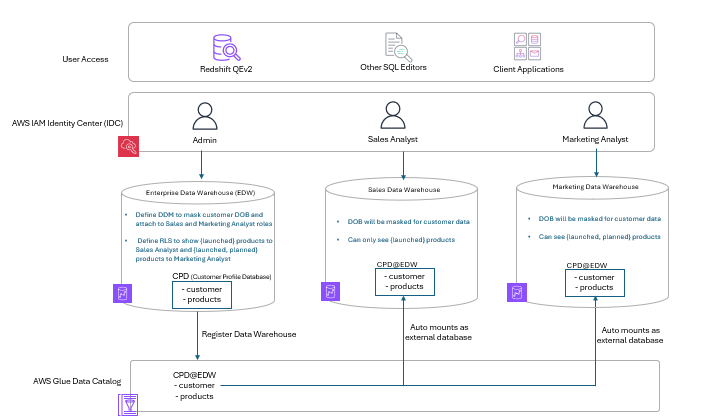
Figure 1: Sample architecture diagram
User access
Users can access data warehouses through Amazon Redshift Query Editor v2, third-party SQL editors (such as DBeaver and SQL Workbench), or custom client applications. The access methods help provide consistent security enforcement.
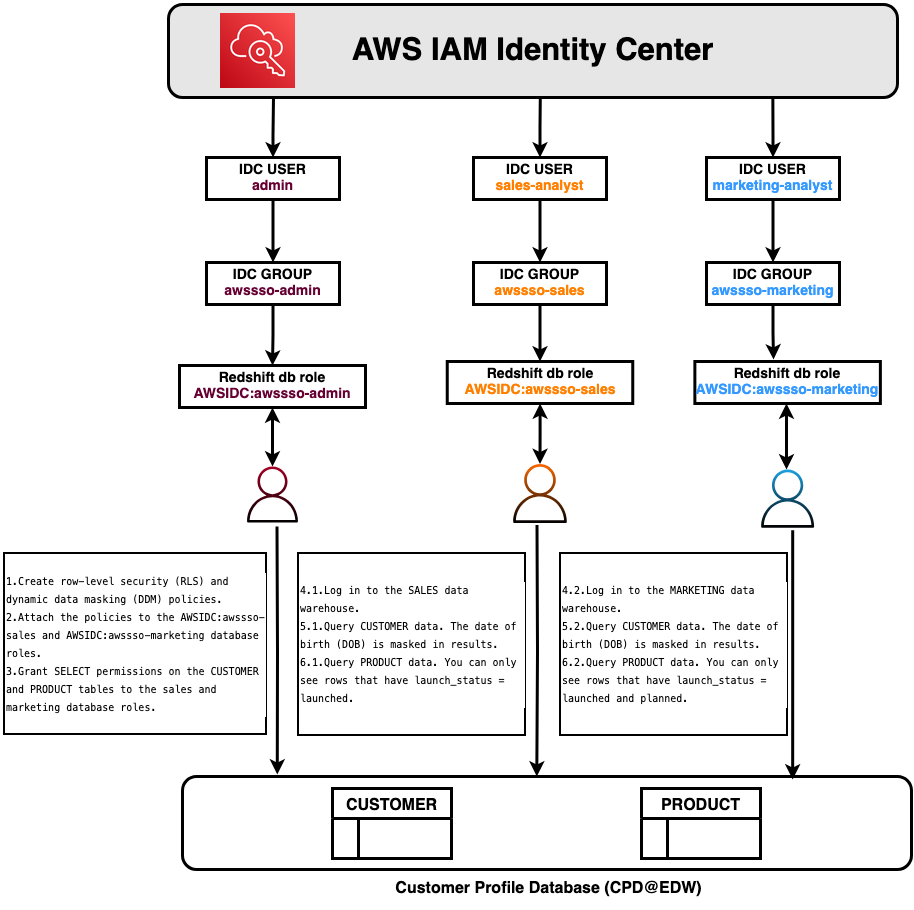
AWS IAM Identity Center integration
IAM Identity Center provides centralized authentication with single sign-on capabilities and automatically assigns role-based permissions based on organizational roles. This identity federation links corporate identities directly to AWS resources, making sure that authentication occurs at the identity layer before warehouse access.
Multi-warehouse architecture
This architecture uses three distinct data warehouses that serve different business functions while sharing centralized security policies.
Enterprise Data Warehouse (EDW)
The EDW serves as the central repository for enterprise data. In this architecture, customer and product data are stored in the Customer Profile Database (CPD), where administrators define two critical security policies:
- Dynamic data masking (DDM) – Masks sensitive customer Date of Birth (DOB) fields for both Sales Analyst and Marketing Analyst roles, helping protect personally identifiable information (PII) while allowing analytical work
- Row-level security (RLS) – Controls product visibility based on user roles. Sales Analysts view only launched products, while Marketing Analysts view both launched and planned products
The EDW registers with the AWS Glue Data Catalog, creating a unified metadata repository that makes data discoverable across the warehouses in the account. This registration establishes the foundation for federated permissions, enabling automatic policy propagation.
Sales data warehouse
When Sales Analysts query customer and product tables, the system automatically enforces policies defined in the EDW through federated permissions. The registered namespace from the EDW automatically mounts as an external database, alleviating the need to recreate or reattach policies. Customer DOB fields appear masked, and only launched products are visible without additional configurations.
Marketing data warehouse
The Marketing Data Warehouse automatically inherits and enforces EDW security policies. Customer DOB fields remain masked to help protect PII, but with RLS policies, Marketing Analysts can view both launched and planned products. This provides the broader visibility needed for marketing planning. This differentiated access control is automatically enforced based on user roles.
Walkthrough
In this walkthrough, you create two Amazon Redshift IAM Identity Center (IDC) connections:
- Data sharing producer identity center connection – Assigned to the edw-wg Amazon Redshift serverless workgroup
- Data sharing consumer identity center connection – Assigned to the cpd-sales-wg and cpd-marketing-wg Amazon Redshift serverless workgroups
Set up IDC connections for Amazon Redshift federated permissions
In this section, you configure the IAM Identity Center connections that enable federated authentication across your warehouses. You will create separate connections for the producer (policy-defining) warehouse and consumer warehouses.
Configure Amazon Redshift data sharing producer IDC connection
To create the producer IDC connection:
- Open the Amazon Redshift Serverless console.
- Choose IAM Identity Center connections by expanding the hamburger menu.
- Choose Create application.
- Verify that you see “Amazon Redshift connected to IAM Identity Center”, and then choose Next.
- Configure the connection properties:
- For IAM Identity Center display name, enter a name.
- For Managed application name, enter rs-multicluster-producer.
- For Identity provider namespace, choose AWSIDC.
- For IAM role for IAM Identity Center access, choose the TIP IAM role that you created.
- For Query editor v2 application, choose Enable the query editor v2 application.
- For IAM Identity Center application type, choose Configure Amazon Redshift federated permissions using AWS IAM Identity Center (Recommended).
- Choose Next.
- For Configure client connections that use third-party IdPs, choose No.
- Choose Next.
- Verify that the configuration details match your inputs and then choose Create Application.
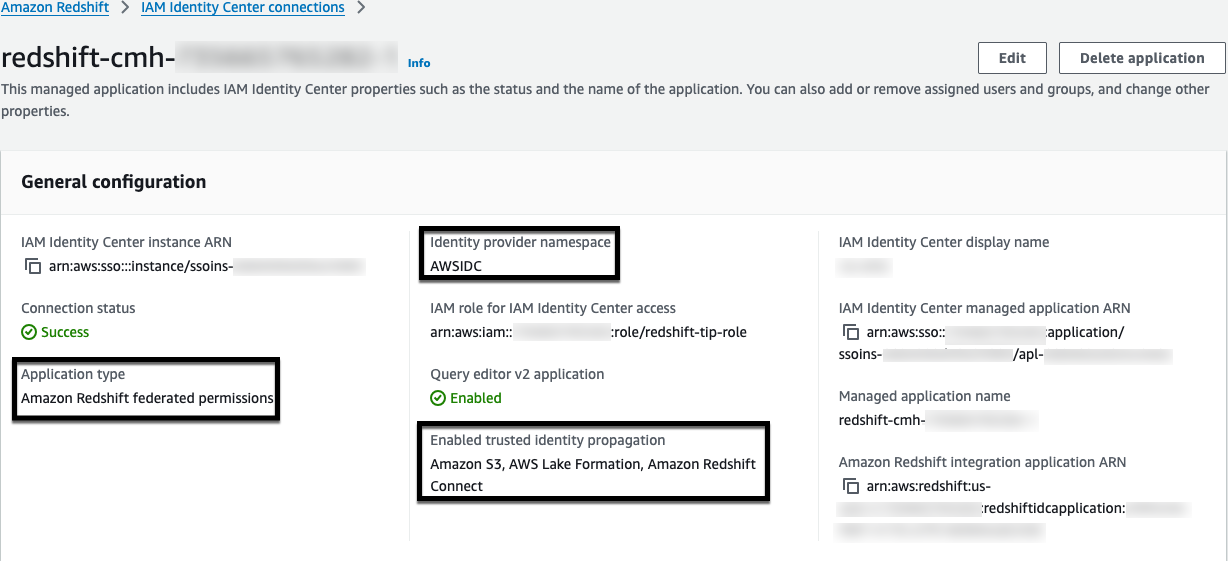
Figure 3: Data sharing producer IDC connection
Configure data sharing consumer IDC connection
To create the consumer IDC connection:
- Open the Amazon Redshift Serverless console.
- Choose IAM Identity Center connections by expanding the hamburger menu.
- Choose Create application.
- Verify that you see “Amazon Redshift connected to IAM Identity Center”, and then choose Next.
- Configure the connection properties:
- For IAM Identity Center display name, enter a name.
- For Managed application name, enter rs-multicluster-consumer.
- For Identity provider namespace, choose AWSIDC.
- For IAM role for IAM Identity Center access, choose the TIP IAM role that you created.
- For Query editor v2 application, you will see the notification “You already have a query editor v2 application.”
- For IAM Identity Center application type, deselect Configure Amazon Redshift federated permissions using AWS IAM Identity Center (Recommended).
- For Trusted identity propagation, choose AWS Lake Formation access grants and Amazon Redshift Connect.
- Choose Next.
- For Configure client connections that use third-party IdPs, choose No.
- Choose Next.
- Verify that the configuration details match your inputs, and then choose Create Application.
- Add your required users or groups to the IDC application for Amazon Redshift data sharing consumers.
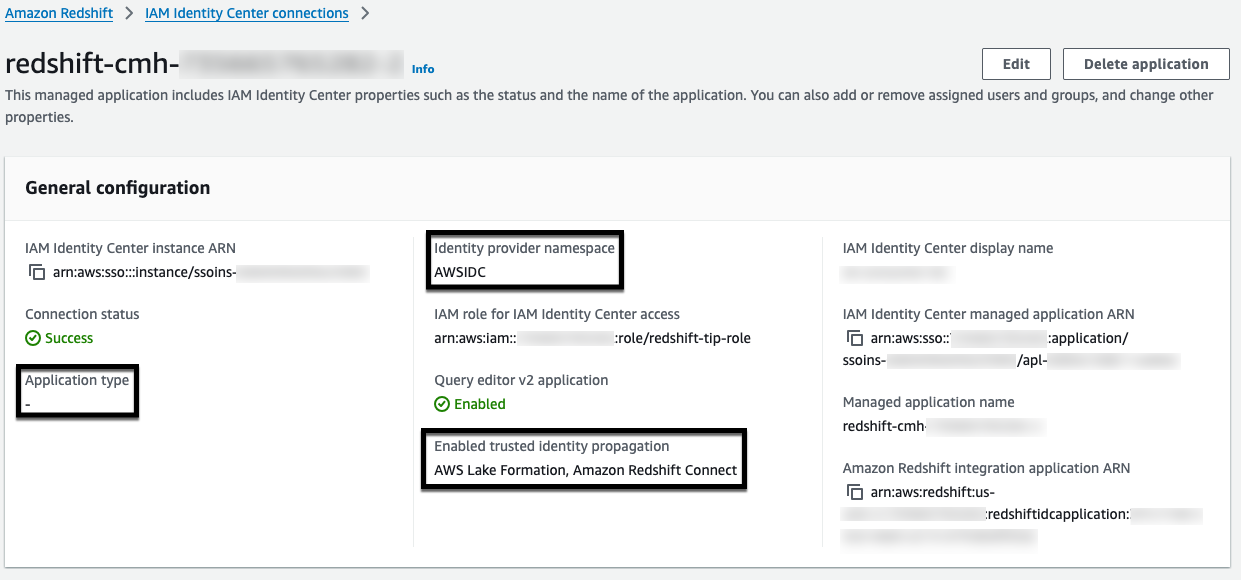
Figure 4: Data sharing consumer IDC connection
Configure Amazon Redshift data sharing producer IDC connection for Amazon Redshift serverless namespace
To register the edw-ns namespace with federated permissions:
- Open the Amazon Redshift Serverless Namespace console.
- Choose your Amazon Redshift Serverless namespace.
- Choose Actions, and then select Register with AWS Glue Data Catalog.
- Choose Register with Amazon Redshift federated permissions.
- Choose Amazon Redshift federated permissions using AWS IAM Identity Center.
- Choose Register.
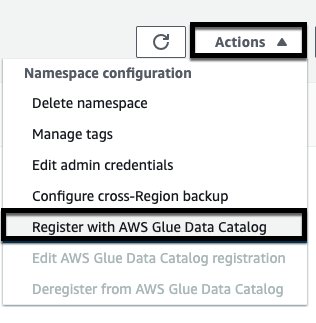
Figure 5: Amazon Redshift data warehouse registration with Glue Data Catalog
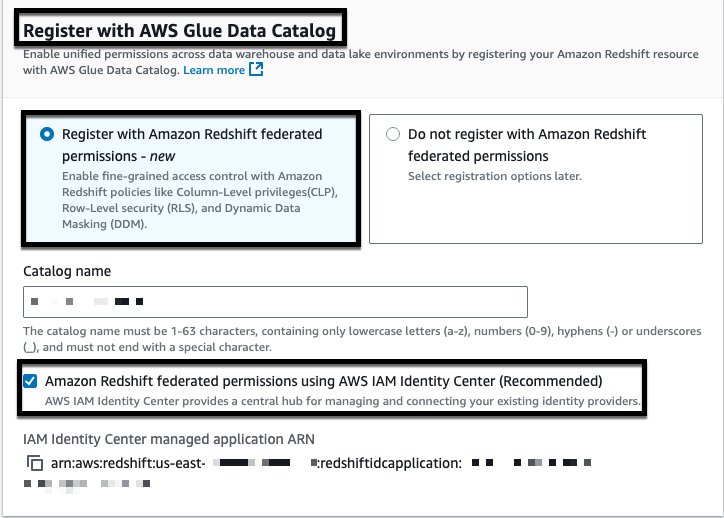
Figure 6: Amazon Redshift data warehouse registration with Glue Data Catalog
Note: IAM Identity Center managed application ARN Data sharing producer IDC connection created would be used.
Configure Amazon Redshift data sharing consumer IDC connection for existing serverless namespace
For cpd-sales-wg and cpd-marketing-wg serverless workgroups, gather the following information from your registered IAM Identity Center connection:
- IAM Identity Center display name
- Identity provider namespace
- IAM Identity Center managed application ARN
- IAM role for IAM Identity Center access
Run the following SQL command as a database administrator to enable the integration:
To modify an existing identity provider, use the ALTER IDENTITY PROVIDER command:
Data preparation and access setup from producer
In this section, you create the customer and product tables, load sample data, create DDM and RLS policies, attach the policies to database roles and grant SELECT permissions to the roles.
Prepare data on EDW
Connect to the EDW data warehouse as an IDC Admin user and run the following SQL commands.
Create the product table:
Insert sample product data:
Create the customer table:
Insert sample customer data:
Create DDM and RLS policies
Create the masking policy for customer date of birth:
Create RLS policies for product launch status:
Create Amazon Redshift DB roles for Sales and Marketing groups
Create the database roles:
Attach masking policies
Attach the masking policy to both roles:
Attach RLS policies and enable RLS on product table
Attach the RLS policies and enable row-level security:
Grant access to tables to roles
Grant SELECT permissions to both roles:
Connect to SALES data warehouse using IAM Identity Center
To connect as a Sales Analyst:
- Connect to cpd-sales-wg using the IAM Identity Center connection type as user sales-analyst, and then choose Continue.
- Choose sales-analyst, and then choose Next.
- Enter your password, and then choose Sign in.
- Enter your MFA code, and then choose Sign in.
You are now connected to Amazon Redshift Query Editor V2 with a successful connection to cpd-sales-wg as sales-analyst.
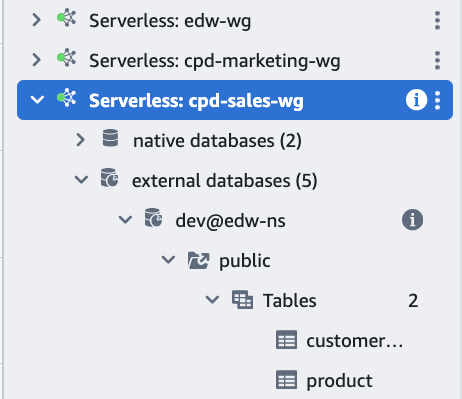
Figure 7: Connect to Sales data warehouse as IDC user
Query shared data as Sales Analyst
Query the customer table with dynamic data masking applied:
You can successfully access the customer table, but the sensitive information in the date_of_birth column is encrypted.

Figure 8: Result set of customer table
Query the product table with row-level security enabled:
You can successfully access the product table, but only view data for products with a launch_status value of launched.

Figure 9: Result set of product table
Note: To connect to the data sharing producer onboarded to Amazon Redshift federated permissions as an IDC user, a superuser is required to provide a CONNECT privilege to the IDC user trying to connect. For more information about how to grant the CONNECT privileges to the user, see Connect privileges in the Amazon Redshift Database Developer Guide.
Connect to Marketing data warehouse using IAM Identity Center
To connect as a Marketing Analyst:
- Connect to cpd-marketing-wg using the IAM Identity Center connection type as user marketing-analyst, and then choose Continue.
- Choose marketing-analyst, and then choose Next.
- Enter your password, and then choose Sign in.
- Enter your MFA code, and then choose Sign in.
You are now connected to Amazon Redshift Query Editor V2 with a successful connection to cpd-marketing-wg as marketing-analyst.
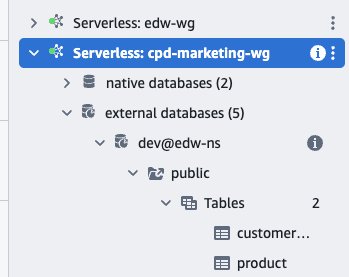
Figure 10: Connect to Marketing data warehouse as IDC user
Query shared data as Marketing Analyst
Query the customer table with dynamic data masking applied:
You can successfully access the customer table, but the sensitive information in the date_of_birth column is encrypted.

Figure 11: Result set of customer table
Query the product table with row-level security enabled:
You can successfully access the product table and view data for products with launch_status values of both launched and planned.

Figure 12: Result set of product table
Additional resources
For more information about implementing federated permissions in your environment, see the following resources:
AWS Documentation
AWS Blogs
- Simplify multi-warehouse data governance with Amazon Redshift federated permissions
- Integrate Identity Provider (IdP) with Amazon Redshift Query Editor V2 and SQL Client using AWS IAM Identity Center for seamless Single Sign-On
- Troubleshooting connections from Amazon Redshift query editor v2
AWS Demo
Key benefits
- Reduced administrative overhead – Centralized policy management removes manual replication
- Consistent security enforcement – Policies apply uniformly across the warehouses and access methods
- Seamless identity integration – Single sign-on with existing identity providers through trusted identity propagation and role-based access control
Conclusion
This post showed you how Amazon Redshift federated permissions with AWS IAM Identity Center integration helps streamline multi-warehouse data governance by centralizing security policy management. You define dynamic data masking and row-level security policies once in a central Enterprise Data Warehouse, and they automatically enforce across the connected data warehouses in the same account and Region.