AWS Big Data Blog
Simplify multi-warehouse data governance with Amazon Redshift federated permissions
Modern data architectures increasingly rely on multi-warehouse deployments to achieve workload isolation, cost optimization, and performance scaling. Amazon Redshift federated permissions simplify permissions management across multiple Redshift warehouses.
With federated permissions, you register Redshift warehouse namespaces with the AWS Glue Data Catalog, creating a unified catalog that spans your entire warehouse fleet in the account. Registered namespaces are automatically mounted in every warehouse, providing data discovery without manual configuration. You can define permissions on database objects using familiar Redshift SQL commands, specifying global identities through AWS Identity and Access Management (IAM) or AWS IAM Identity Center (IDC). These permissions are stored alongside the warehouse data and enforced consistently, regardless of which warehouse runs the query. This provides a unified and secure access control model across your Redshift environment.
In this post, we show you how to define data permissions one time and automatically enforce them across warehouses in your AWS account, removing the need to re-create security policies in each warehouse.
Key capabilities of Amazon Redshift federated permissions
Federated permissions in Amazon Redshift offer the following key capabilities:
- Global identity integration – Federated permissions use IAM and IAM Identity Center to provide single sign-on (SSO) across all registered warehouses. Users authenticate one time through their existing identity provider (IdP) and receive consistent access based on their global identity, regardless of which warehouse they connect to. This alleviates the need to create and manage separate user accounts in each warehouse, reducing administrative overhead and improving the user experience.
- Unified catalog with automatic mounting – When you register a Redshift namespace with the Data Catalog using federated permissions, it becomes automatically visible in all warehouses within your account. Analysts using the Amazon Redshift Query Editor v2 or their preferred SQL client can discover and query tables across registered warehouses without manual catalog configuration. This automatic mounting capability simplifies data discovery and enables cross-warehouse analytics.
- Consistent fine-grained access control – Row-level security (RLS) policies, dynamic data masking (DDM) policies, and column-level security (CLS) defined on warehouses using Amazon Redshift federated permissions automatically enforce when data is queried from consuming warehouses. You can implement advanced access controls—such as AWS Region-based row filtering, role-based masking for sensitive columns like SSN or credit card numbers, and time-based access restrictions—with confidence that these policies apply across warehouses.
- SQL-based permission management – Federated permissions use familiar Redshift SQL syntax for permission management. You create RLS policies with
CREATE RLS POLICY, attach them to tables and roles withATTACH RLS POLICY, define masking policies withCREATE MASKING POLICY, and grant permissions with standardGRANTstatements. This SQL interface enables infrastructure as code (IaC) approaches, supports database administrators to use their existing skills, and integrates naturally with existing extract, transform, and load (ETL) and automation workflows that use IAM or IAM Identity Center authentication.
Multi-warehouse architecture with federated permissions
The multi-warehouse architecture with federated permissions in Amazon Redshift represents a data mesh approach where multiple independent compute resources operate on shared data with unified governance. The following diagram illustrates the Redshift federated permissions setup process with the Data Catalog.

The process consists of the following steps:
- Each Redshift warehouse (1,2…N) registers with the Data Catalog. Refer onboarding documentation on registering the warehouse.
- After you register your Redshift warehouses with the Data Catalog, you can query data across your warehouses. Registered catalogs are automatically mounted in every warehouse in the account, appearing in the database explorer of Query Editor v2, and SQL clients connected to Amazon Redshift. To query a table in a registered catalog, use the three-part naming convention:
database@catalog_name.schema_name.table_name. - When you run a cross-catalog query, Amazon Redshift propagates your global identity (IAM role or IAM Identity Center user) to the remote warehouse. The remote warehouse’s catalog instance validates your permissions against the grants and fine-grained access control policies defined on the queried tables. If you have the necessary permissions, the table metadata and any applicable RLS, DDM, or CLS policies are returned to the consuming warehouse. Your local warehouse’s compute instance integrates these security policies into the query execution plan and runs the query on Redshift Managed Storage (RMS).
The enforcement of fine-grained access controls on remote data is a key differentiator of federated permissions. Traditional Redshift data sharing doesn’t support RLS or DDM policies on shared tables. With federated permissions, the security policies defined on the remote warehouse automatically apply when data is queried from any consumer warehouse. This supports compliance with data governance requirements without requiring administrators to duplicate security policies across warehouses.
The multi-warehouse architecture scales horizontally without increasing governance complexity. When you add a new warehouse to your account and register it with federated permissions, it automatically inherits the appropriate permission model without manual configuration. Analysts connecting to the new warehouse immediately see all databases they have access to across the mesh, and all security policies apply automatically. This alleviates the N-squared problem of managing permissions across N warehouses, reducing the administrative burden from N separate configurations to a single unified governance model.
Query lifecycle
The following diagram illustrates the step-by-step flow of how a user query on Redshift Warehouse 1 accesses objects in Redshift Warehouse N with federated permissions.

Note: Steps 2, 3, and 4 will be skipped if permission details are available in the local cache
The workflow consists of the following steps:
- The user connects to Redshift Warehouse 1 and queries a table in Federated Catalog N.
- Redshift Warehouse 1 calls the Data Catalog
GetTableAPI. This request includes the user’s token. - The request routes to Redshift Warehouse N.
- Redshift Warehouse N verifies the user permissions. If it’s authorized, it returns the table metadata and security policy details such as RLS policies, DDM rules, and CLS settings.
- Redshift Warehouse 1 applies the security policies in the query plan and runs the query against Redshift Managed Storage (RMS), where Redshift stores data in an optimized format.
- The results are returned to the user.
Solution overview
The example in this post demonstrates how to define RLS and DDM policies on a data warehouse and verify that these policies are enforced when querying from another data warehouse.
We will create a table with credit card data and apply RLS and DDM policies to limit consumer cards data and mask credit card values for non-admin users. These policies will be applied across all the data warehouses consistently and mask the credit card details when non-admin users query the table.
Prerequisites
Create the following IAM roles:
Adminrole with the AmazonRedshiftFullAccess policy and grant sys:superuser or sys:secadmin role access.Readonlyrole with the AmazonRedshiftQueryEditorV2ReadSharing policy- Create two Redshift data warehouses and register the data warehouses with AWS Glue Data Catalog(GDC).
Create table and load data
Run following steps to create a credit_card table and load sample data.
- Connect to the first Redshift data warehouse1 using the IAM Aadmin role
- Create a credit_cards table
- Insert sample data
Apply RLS and DDM policies
Run following steps to create and apply RLS and DDM policies.
- Create an RLS policy to filter only consumer card types:
- Create a DDM policy that masks credit cards:
- Attach RLS and DDM Policies to RedOnly role
- Enable Row Level Security on the table
- Grant select on the table to Readonly role
Connect to data warehouse 2 as read-only user
Run following steps on data warehouse 2 to query the data.
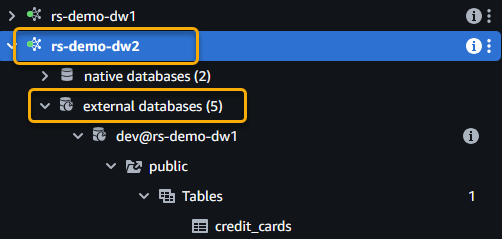
- Connect to data warehouse 2 as a read-only user and expand the external databases. The following screenshot shows an example using Query Editor V2.
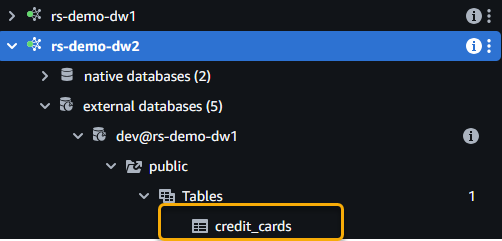
- Notice the
credit_cardstable from data warehouse 1 when you expand the catalog.
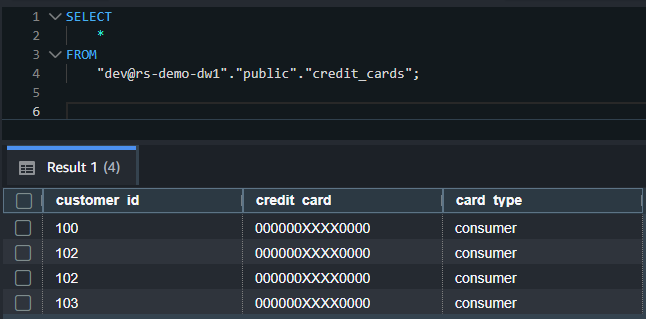
- Run the following SQL to query the table. Replace
rs-demo-dw1in the following SQL with the catalog name you gave while registering data warehouse 1: - You should see only
consumertype credit cards with card details masked in the output. The RLS and DDM policies applied in data warehouse 1 on theIAMR:ReadOnlyuser are enforced even though you queried the table from a different data warehouse.
The following screenshot shows an example output.
- For auditing, you can run
SHOWcommands to view the policies applied on the tables for the roles:
This example demonstrates the power of federated permissions: security policies defined one time on a warehouse automatically enforce across your warehouses, maintaining compliance without duplicating policy definitions.
Considerations
Keep in mind the following when using federated permissions:
- Amazon Redshift federated permissions are applied for the data warehouses in the same account and Region.
- You can connect to the Redshift data warehouse using IAM users and roles or SSO credentials from your IdP integrated through IAM Identity Center.
- Local users can assume global identities to leverage the federated permissions.
- Amazon Redshift federated permissions are available at no additional cost in Regions where Amazon Redshift is available. You pay only for your existing Amazon Redshift compute and Data Catalog usage.
- Refer Considerations when using Amazon Redshift federated permissions for further details.
Clean up
To avoid incurring future charges, delete the resources you created, including the Redshift data warehouses and IAM roles.
Conclusion
Amazon Redshift federated permissions transform multi-warehouse data governance into a streamlined, automated process. For organizations operating multiple Redshift warehouses, federated permissions deliver immediate value by reducing administrative time and supporting consistent security enforcement. The familiar SQL interface and backward compatibility with existing Redshift permissions enable rapid adoption without requiring teams to learn new governance models.
The integration with IAM and IAM Identity Center provides enterprise-grade identity management with SSO capabilities, and the automatic mounting of registered catalogs simplifies data discovery and cross-warehouse analytics. If you are currently using Amazon Redshift local permissions, refer to the tool described in Modernize Amazon Redshift authentication by migrating user management to AWS IAM Identity Center.
To learn more and get started, see Amazon Redshift Federated Permissions documentation.