AWS Compute Blog
Bring your own client certificate for backend mTLS in Amazon API Gateway
Enterprises that use Amazon API Gateway in front of internal or partner backends often want to bring their own client certificate for backend mutual TLS (mTLS) authentication. During mTLS, the backend presents its own server certificate and also requests the caller to present a client certificate to validate it against a trusted certificate authority (CA). Until now, you could use only an API Gateway-generated, self-signed SSL certificate for the outbound connection, because there was no CA behind it for the backend to trust. Backends that enforce a specific corporate or partner CA reject that self-signed certificate, and the mutual TLS handshake fails. Bringing your own CA-signed certificate is necessary for scenarios such as migrating APIs off legacy gateways or meeting your internal PKI mandates that require certificates from an approved CA.
With API Gateway, you can now bring your own client certificate for backend mutual TLS (mTLS) authentication. You can either use a third-party certificate or a certificate issued by AWS Private Certificate Authority. If you’re using a third-party certificate, you must import the certificate in AWS Certificate Manager (ACM). Then you configure the ACM certificate ARN in your REST API stage. API Gateway presents that certificate during the backend mTLS handshake.
Solution overview
In this post, you build a REST API with an outbound mTLS connection using this newly launched API Gateway feature. This solution demonstrates an outbound mTLS connection between Amazon API Gateway and a backend application running on Amazon Elastic Container Service (Amazon ECS).
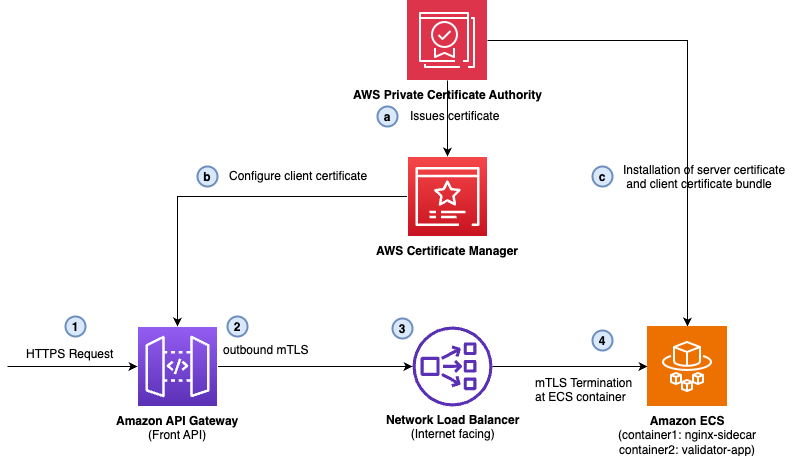
The following diagram shows the solution architecture.
The solution uses:
-
AWS Private Certificate Authority with a root-subordinate CA hierarchy to issue both the client and server certificates through AWS Certificate Manager (ACM).
-
Amazon API Gateway REST API stage configured with the ACM client certificate ARN (ClientCertificateId), so that the API Gateway presents the certificate during the outbound TLS handshake.
-
Amazon ECS on AWS Fargate running an NGINX sidecar that holds the server certificate and validates the incoming client certificate against a CA bundle (root and subordinate chain).
A request goes through the following steps:
-
Client application invokes the REST API exposed by API Gateway. The API Gateway stage is configured with an ACM client certificate ARN.
-
API Gateway opens an outbound connection to the Network Load Balancer (NLB) to begin the TLS handshake. The API Gateway presents an ACM client certificate configured at the stage level when the backend requests one.
-
The NLB listens for the incoming TCP request on port 443 and forwards the call to Amazon ECS Fargate. The NLB acts as a passthrough and does not terminate the TLS connection.
-
The NGINX sidecar container running on Amazon ECS performs the inbound mTLS handshake:
-
NGINX presents the backend server certificate and verifies the client certificate against a mounted CA bundle (root and subordinate chain).
-
After verification, NGINX forwards the request and parsed certificate details to the validator app container over local HTTP.
-
The validator app re-checks the certificate validity window, matches the common name against an allowlist, and returns a structured JSON response.
Note: The NGINX sidecar is not mandatory for this flow. It demonstrates separation of concerns: NGINX handles the mTLS handshake, and the validator app contains the business logic.
Prerequisites for demo
To follow along, you need the following:
-
Create an AWS account if you do not already have one.
-
Access to an AWS account through the AWS Management Console and the AWS Command Line Interface (AWS CLI). The AWS Identity and Access Management (IAM) principal you use must have permissions to make the necessary AWS service calls and manage the resources in this post. Follow the principle of least privilege.
-
Docker installed and running, to build and push the two container images.
-
Python 3.14 installed.
-
jq command line tools installed.
Environment setup
Run the following commands to set up the demo environment:
-
Create a new folder and clone the GitHub repository:
-
Set the environment variables after replacing the placeholders:
Build the container images
Run the following commands to create container images of NGINX sidecar container and the validator app containers:
-
Create two Amazon Elastic Container Registry (Amazon ECR) repositories, one for NGINX and another for validator app containers respectively:
-
Build and push the NGINX and validator app containers:
Deploy and test the solution
You first deploy the stack without the client certificate configured in the API Gateway and perform negative testing. The mTLS handshake will fail because of a missing client certificate in the request. Then you update the stack to configure client certificate in API Gateway stage and retest mTLS.
-
Run the following command to build and deploy the overall stack without client certificate configured at API Gateway stage:
-
Wait for the task to reach
RUNNINGand pass its target group health check: -
Capture the front API invoke URL from the stack outputs:
-
Wait a minute or two after the stack finishes, then invoke the front API:
The following is the NGINX configuration for mTLS:
The
curlcommand returnsHTTP/2 400, with a response body containing400 No required SSL certificate was sent. Because the API Gateway is not presenting a client certificate on the outbound handshake, the NGINX sidecar container in Amazon ECS rejects the mTLS connection. The following screenshot shows the response: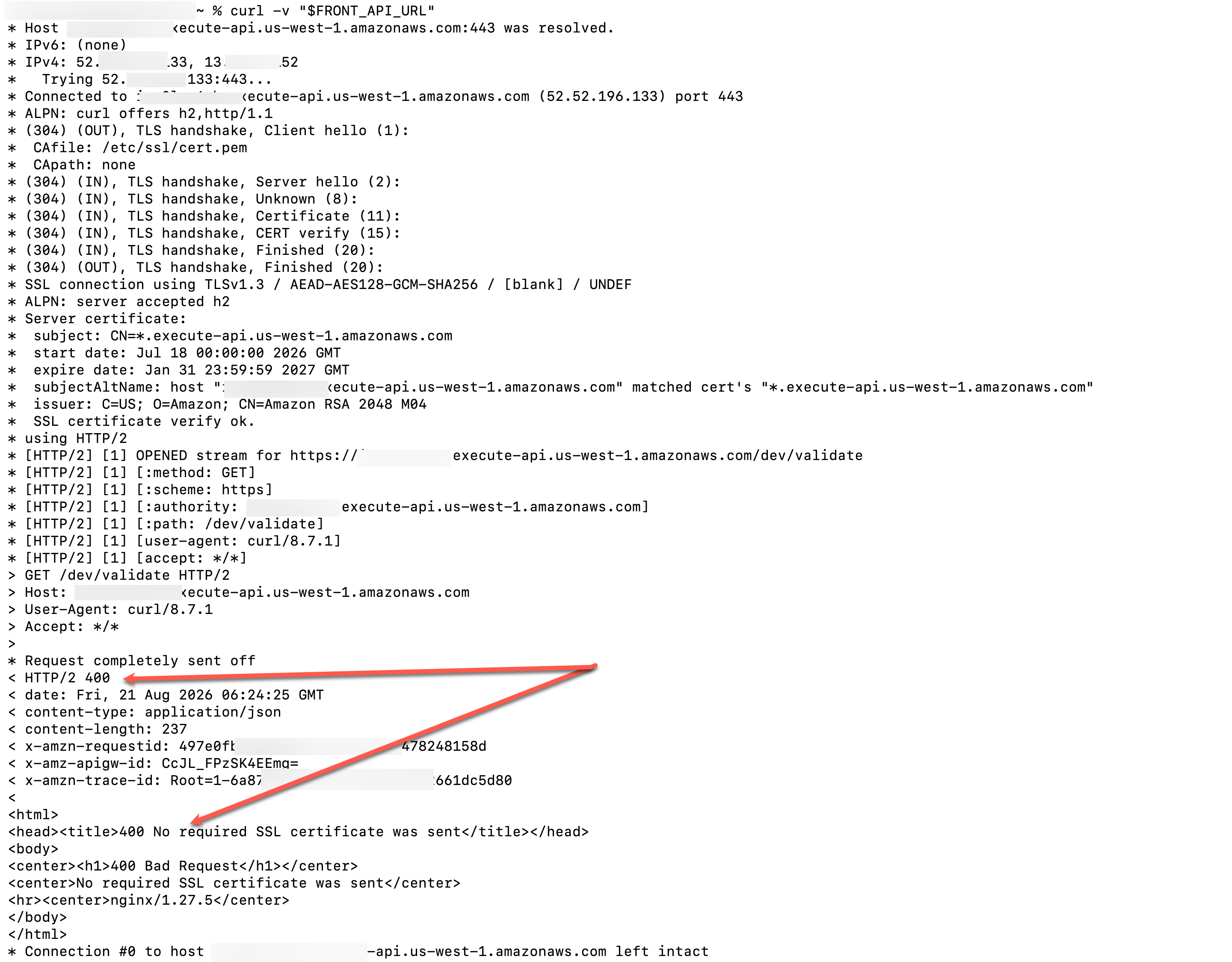
-
Now redeploy the solution with outbound mTLS enabled:
-
Wait a minute or two after the stack finishes, then invoke the front API again:
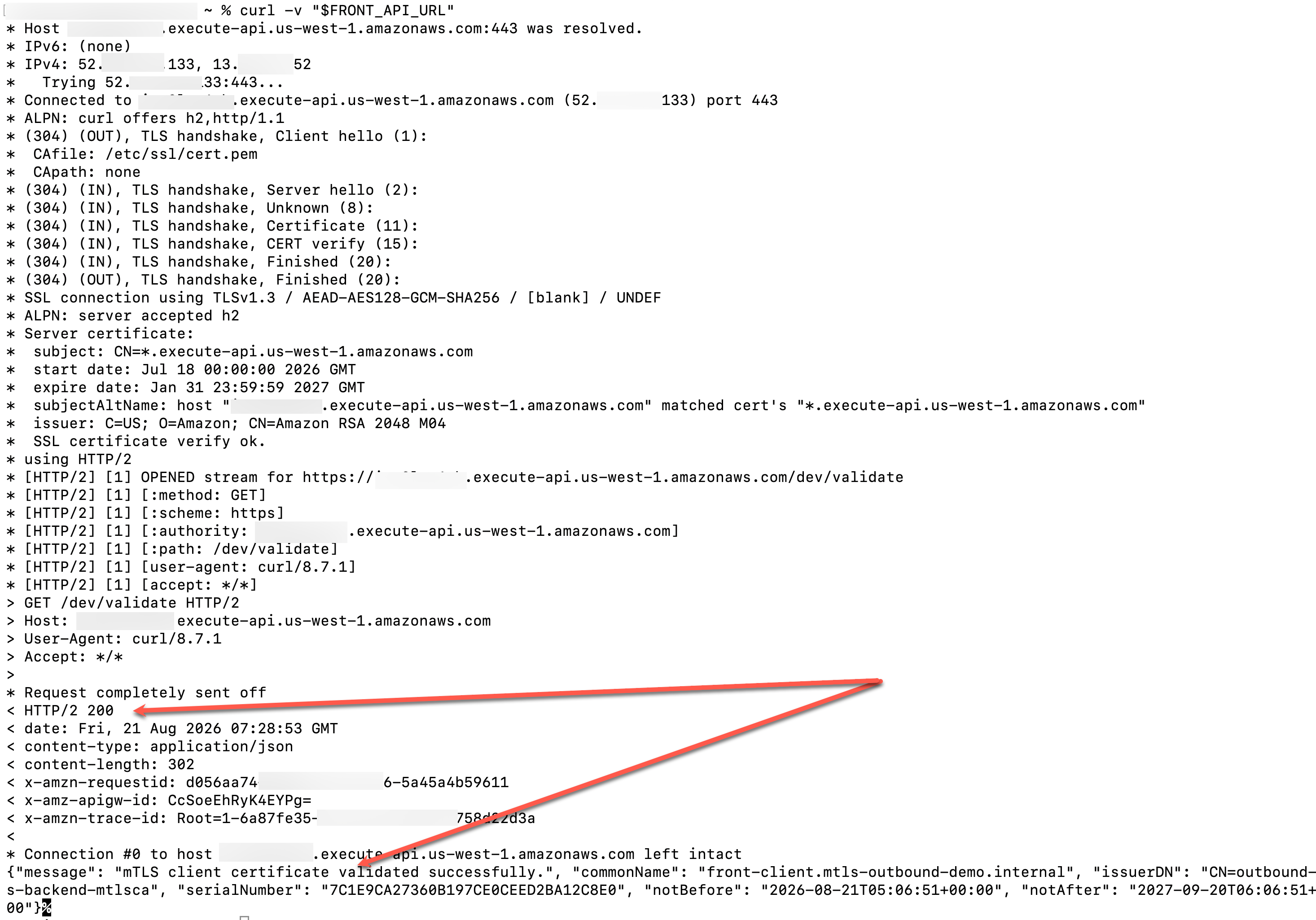
Because the client certificate is now presented during the mTLS handshake, the handshake completes successfully, as shown in the following response snippet:
Automatic certificate renewal
When a certificate changes in ACM, API Gateway detects the update and propagates the new certificate automatically. You do not redeploy the stage, and the API experiences no downtime during rotation. Certificate propagation is eventually consistent. During an update, the backend might briefly receive either the old or the new certificate. ACM also emits certificate expiration notifications through Amazon EventBridge, which you can use to set alarms before a certificate expires.
Clean up
If you followed along only for demonstration purposes, to avoid incurring future charges, run the following commands to delete the resources created in this demo:
-
Clean up the S3 buckets:
-
Delete the stack:
-
Delete the ECR repository:
Conclusion
In this post, you configured a REST API with an outbound mTLS connection using Amazon API Gateway and an ECS Fargate backend. With this new feature launch in API Gateway, you can now bring your own client certificate for outbound mTLS handshake for your REST APIs. You can now meet your internal PKI mandates to authenticate backends that pin a specific certificate issuer.
To get started, import a certificate from your own PKI into ACM and configure your API Gateway REST API stage for outbound mTLS authentication. For more information, see Present client certificates to backend services with mutual TLS in API Gateway. If you have feedback about this post, leave it in the comments section. For technical questions, you can start a thread on AWS re:Post.