AWS Compute Blog
Low-latency, high-throughput SQS event processing with AWS Lambda provisioned mode
Customers building event-driven applications on AWS rely on Amazon Simple Queue Service (Amazon SQS) and AWS Lambda event source mappings (ESMs) to process millions of events every day. The fully managed polling infrastructure of ESMs eliminates the need to write and maintain custom code. You can focus on business logic while Lambda handles scaling, batching, and error handling automatically.
As workloads grow, many customers need to meet demanding requirements for low-latency message processing, high-concurrency execution, and high-throughput event processing. Use cases such as real-time payment processing, fraud detection, IoT telemetry pipelines, and flash-sale order fulfillment require the ESM to scale rapidly and sustain peak performance without queue backlog.
To address these needs, AWS launched provisioned mode for SQS event source mappings. Provisioned mode gives you direct control over the number of event pollers assigned to your ESM for predictable and rapid scaling. With Provisioned mode, you can configure event pollers up to 10,000, supporting concurrency of up to 100,000 concurrent Lambda executions and throughput of 10 GB/s. You can process up to a million events per second.
Provisioned mode is also available for Apache Kafka event source mappings including Amazon Managed Streaming for Apache Kafka (Amazon MSK) and self-managed Kafka.
How SQS event source mappings work
When you configure an SQS queue as an event source for a Lambda function, Lambda automatically creates an ESM resource. The ESM manages a fleet of internal event pollers that continuously poll the SQS queue, retrieve messages, and invoke your Lambda function with batches of events.
In default ESM mode, Lambda automatically manages the number of event pollers based on queue depth and processing throughput. The system starts with five pollers and scales up as the queue backlog builds, supporting up to 1,250 concurrent invocations. This automatic scaling works well for the majority of event processing workloads. However, the scale-up rate in default mode (approximately 300 additional concurrent executions per minute) can leave latency-sensitive workloads with growing queue backlogs during sudden traffic spikes.
What is provisioned mode?
Provisioned mode gives you explicit control over the minimum and maximum number of event pollers assigned to your ESM. Instead of relying solely on automatic scaling, you define:
MinimumPollers: the number of event pollers always active and ready to process messages (range: 2–200).MaximumPollers: the upper bound on event pollers the ESM can scale to (range: 2–10,000).
These pollers remain active and continuously poll your SQS queue, eliminating cold-start delays in the polling infrastructure. When traffic spikes arrive, your ESM already has capacity allocated to handle the burst.
Default mode vs. provisioned mode
| Attribute | Default mode | Provisioned mode |
| Minimum event pollers | 2 | 2 |
| Maximum event pollers | 5 | 10,000 |
| Maximum concurrent executions | Up to 1250 | Up to 100,000 |
| Maximum throughput | N/A | 10 GB/s |
| Scale-up rate | ~300 concurrency/min | ~1,000 concurrency/min |
| Poller control | Lambda controlled | Min/Max configurable by you |
| Billing | Included in Lambda pricing | Event poller unit (EPU) hours |
| Best for | Majority of workloads | Spiky, latency-sensitive, high-throughput workloads |
Activating provisioned mode for ESM
You can configure provisioned mode when creating a new ESM or updating an existing one. The following examples show configuration using the AWS CLI, AWS Serverless Application Model (SAM), and AWS CloudFormation.
AWS CLI
Create a new ESM with provisioned mode:
Update an existing ESM to enable provisioned mode:
AWS SAM template
AWS CloudFormation
Provisioned mode for SQS ESM in action
To see the performance profile with provisioned mode for SQS, deploy a Lambda function that has an SQS queue as its trigger. Use the reference pattern on Serverless Land or follow the Creating and configuring an Amazon SQS event source mapping guide to configure provisioned mode for your SQS event source mapping. In the following scenarios, a producer writes 40 million messages, each with a 1 KB payload size, to an SQS queue. Batch size is set to 10, with function duration at about 200 ms.
Scenario 1: Baseline (default mode)
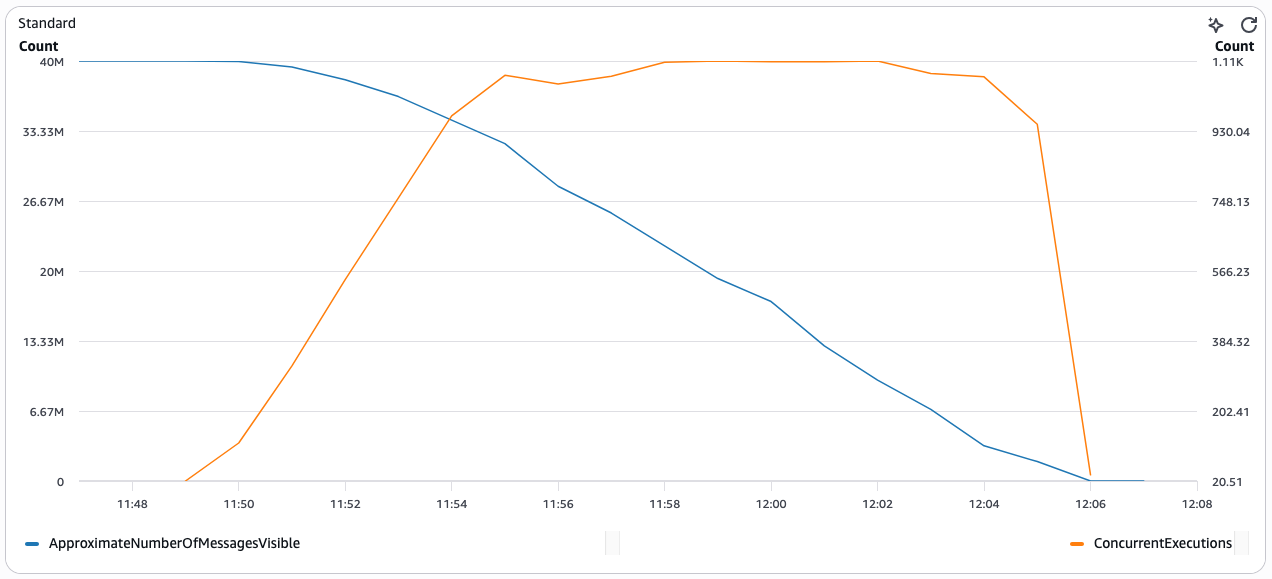
The following chart shows the relationship between ApproximateNumberOfMessagesVisible (blue) and ConcurrentExecutions (orange) over time for the baseline scenario using default mode with no provisioned pollers. With provisioned mode disabled, Lambda takes approximately 17 minutes to drain the backlog of 40 million messages. It takes about 6 minutes to reach the maximum concurrent executions.
Scenario 2: Configuring minimum event pollers and auto-scaling
To optimize the ESM throughput for these kinds of workloads and reduce the time to drain the message backlog, set the minimum event pollers to a higher than default value. In this scenario, the minimum pollers are set to 100 and maximum pollers are set to 1000.
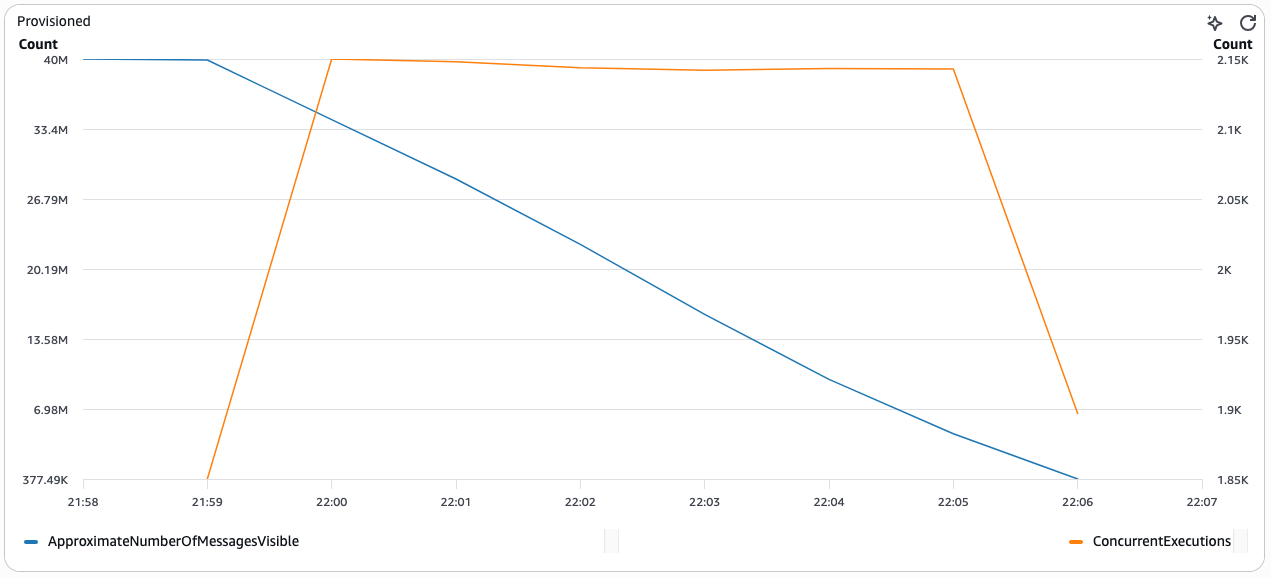
Lambda drains the backlog of 40 million messages in approximately 7 minutes. This is more than 55% faster than the baseline without provisioned mode. It takes only about 1 minute to reach maximum concurrent executions.
Scenario 3: Default minimum event pollers and auto-scaling
In some cases, the workload might not be as performance-sensitive. With the same volume of 40M messages in your SQS queue, activate provisioned mode for ESM. Start with the default minimum event pollers (set to 2) and let Lambda automatically scale the event pollers based on incoming traffic.
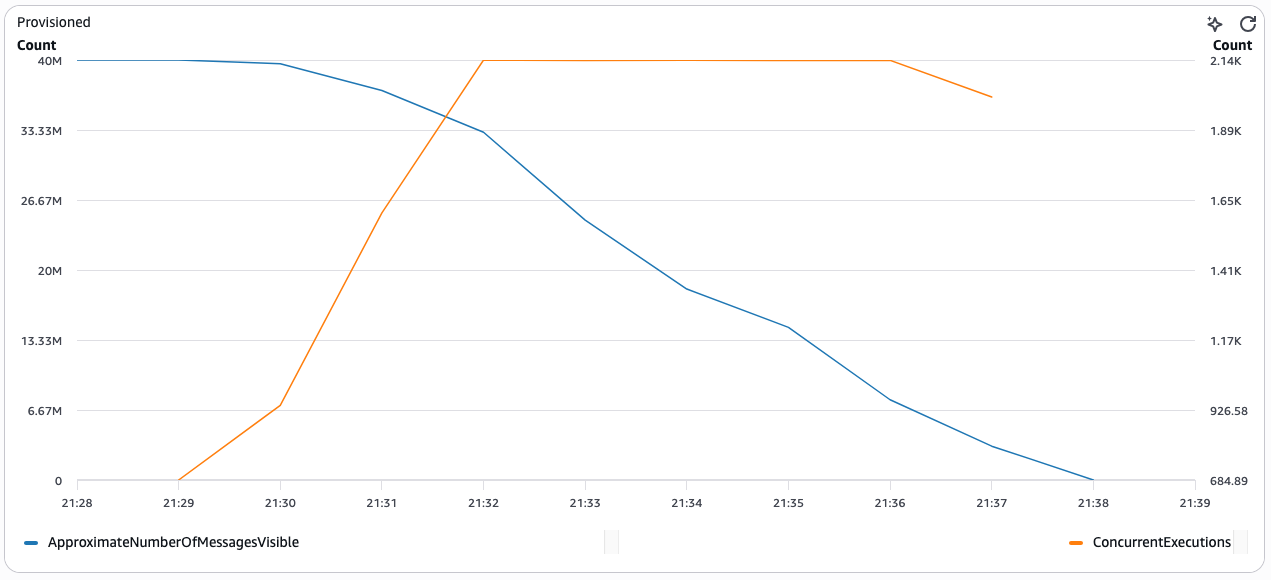
With this configuration, Lambda drains the backlog in approximately 9 minutes. This is still more than 45% faster than the baseline without provisioned mode. It takes about 3 minutes to reach maximum concurrent executions.
Best practices for configuring provisioned pollers
When configuring provisioned mode, keep the following recommendations in mind:
Right-size your minimum pollers
Each event poller supports up to 10 concurrent Lambda invocations and approximately 1 MB/s throughput. Use this formula to estimate your minimum poller count:
MinimumPollers = max(TargetConcurrency / 10, TargetThroughputMBps / 1)
For example, if your workload requires 500 concurrent executions and 200 MB/s throughput, set MinimumPollers to at least 200. To estimate the number of event pollers required to verify optimal message processing performance when using provisioned mode for SQS ESM, follow the steps described in determining the required event pollers.
Set maximum pollers for burst capacity
Set MaximumPollers to handle your peak traffic scenario. The ESM scales between your minimum and maximum based on queue depth. A good starting point is 2–5x your minimum pollers.
Align with Lambda concurrency limits
Provisioned pollers invoke your Lambda function concurrently. Verify that your account’s concurrent execution quota accommodates the maximum concurrency your pollers can drive:
MaxConcurrency = MaximumPollers × 10
If you set MaximumPollers to 5,000, your account needs at least 50,000 concurrent execution capacity. Request a quota increase through the Lambda quotas page if needed.
Start conservatively and iterate
Begin with a lower MinimumPollers value and monitor the CloudWatch metrics described in the following section. Increase the minimum if you observe queue depth growth during traffic spikes, or decrease it if pollers remain underutilized during off-peak hours.
Use FIFO queues for ordered workloads
When processing order-sensitive workloads, use FIFO queues with high-throughput mode activated. Provisioned mode works with both SQS standard and FIFO queue types.
Set up dead-letter queues
Configure dead-letter queues to manage messages that fail processing after multiple attempts.
Adjust batch size as needed
The batch size parameter remains adjustable, with a default value of 10 messages and a maximum of 10,000 messages for standard queues.
Cost considerations
Provisioned mode billing is based on event poller unit (EPU) hours. You pay for the number of provisioned pollers allocated, regardless of whether they are actively processing messages. See AWS Lambda pricing for details. Key optimization strategies are:
- Match minimum pollers to your sustained baseline traffic to avoid over-provisioning during low-traffic periods.
- Use maximum pollers for burst capacity as you only pay for pollers that scale up while they are active.
Monitoring provisioned mode with CloudWatch
Lambda publishes the following CloudWatch metrics for provisioned mode ESMs:
| Metric | Description |
| ProvisionedPollers | Current number of provisioned event pollers allocated |
| ConcurrentExecutions | Number of concurrent Lambda invocations driven by the ESM |
| ApproximateNumberOfMessagesVisible | SQS queue depth (from SQS metrics) |
| Duration | Function execution time per invocation |
Set CloudWatch alarms on ApproximateNumberOfMessagesVisible to detect queue backlogs, and on ProvisionedPollers to track the number of provisioned pollers. To understand how your ESM processes messages at each stage, from polling through invocation to completion, opt in to the EventCount metric group. This provides detailed metrics including PolledEventCount, FilteredOutEventCount, InvokedEventCount, FailedInvokeEventCount, and DeletedEventCount.
Conclusion
Provisioned mode for SQS event source mappings gives you control over scaling behavior for your most demanding workloads. By configuring minimum and maximum event pollers, you achieve predictable low-latency processing, scale to 100,000 concurrent executions, and sustain throughput of up to a million events per second, without waiting for automatic scale-up.
Dedicated pollers deliver predictable, low-latency performance. This makes them well-suited for workloads like real-time financial transactions, high-volume IoT data ingestion, or flash sale order processing. You can achieve 3x faster scaling compared to default mode. Combined with CloudWatch observability and flexible configuration through CLI, SAM, and CloudFormation, provisioned mode integrates into your existing deployment workflows.
To get started, explore the provisioned mode configuration guide for SQS event source mappings. Deploy the sample application from the Serverless Land reference pattern. To request a concurrent execution quota increase for high-throughput workloads, visit the Lambda quotas page.