AWS Contact Center
Blend structured business logic with agentic AI to deliver delightful conversational experiences
The self-service experience your customers deserve — and how to build it
Mateo Jackson runs customer experience at AnyCompany Internet, and for two quarters his team has watched the same pattern. A customer explains the problem to a bot that cannot help, repeats it to a second one, then waits on hold for a person who starts from scratch. Effort scores climb, handle times stretch, and the customers who call more than once are the ones who leave.
Mateo knows what good looks like. He spent years writing the policies, the scripts, and the escalation rules for how AnyCompany handles an outage, a billing dispute, or a hardware replacement — investing in what he believed could be world-class self-service, if the tools ever caught up. What he never had was a way to put that knowledge into a conversational AI experience without a six-month-or-longer engineering project.
That changed this month. The outage policy was already written and the integrations were already in place, so Mateo built his first agentic self-service experience on a Tuesday, tested it against a few hundred simulated calls on Wednesday, and had the first iteration live on Thursday. Here is the experience he delivered.
A storm takes out fiber on the north side of town at 6:40 in the morning. By 7:15, calls are coming in. Sofía is one of them. The voice that answers greets her by name, confirms the last four digits of her account, and thanks her for being a customer. There is a confirmed outage on her street, crews on site, estimated to be restored by 11:30. It mentions her open case from last night unprompted, still open and still separate. It asks whether her modem light is solid or blinking, because that changes what happens next. A credit has been applied, and it reads the amount and the terms in full without stopping. Her modem is three generations old, so she qualifies for a replacement. A notification arrives on her phone with three router options, monthly cost next to each, visible while she is still talking. She taps the middle one. The voice confirms it by name and says it ships today. When she asks about a billing dispute from March, policy requires a transfer, and the person who picks up already has the outage, the credit, the router she chose, and the March dispute in front of them. Sofía repeats nothing. A little over three minutes, start to finish.
Two people built that call. Nikki Wolf administers AnyCompany’s Amazon Connect Customer instance, and she owns the integrations, the model and permission settings, and the infrastructure the conversation runs on. Mateo owns what Sofía hears. Neither had to wait for the other.
The demo is the easy part
Building something that sounds like Sofía’s call in a demo takes an afternoon. Write a few prompts, point them at a documentation site, pick a voice, and it handles common questions convincingly. It will also be the version that never ships to production.
Go back through that call. Almost nothing that mattered was the model’s decision to make:
- Sofía already had an open case. Does the AI open a second one, or pick up the first?
- She qualified for a credit, but she took one last month. Is that allowed, and for how much?
- She had not verified her account yet. How much can the AI say before she does?
- The credit terms have to be read in full, without interruption. Does the AI get to paraphrase them?
- She could have asked for a person three words in. Does the AI try once more, or transfer immediately?
Each of those has a correct answer at AnyCompany, and Mateo spent years arriving at it. None of them is “let the model decide.” But the parts the model does own — interpreting Sofía’s frustration, adapting its tone when she mentions the dropped calls, holding a natural conversation while navigating four different systems — those matter just as much, and they have to feel right alongside the precision. That is the work the demo skips, and it is where conversational AI projects stall for reasons that are structural rather than technical. The conversation lives in one system, the business rules live in another, the results live in a third, and nobody can see the full execution path in one trace. Every change requires someone to translate what the business wants into what each tool will accept. Weeks pass. What ships is adequate, or it does not ship at all.
New agentic self-service capabilities in Amazon Connect Customer
Here is what Amazon Connect Customer makes possible. The conversation, the business rules, and the results sit in one place, owned by the person who knows the answers.
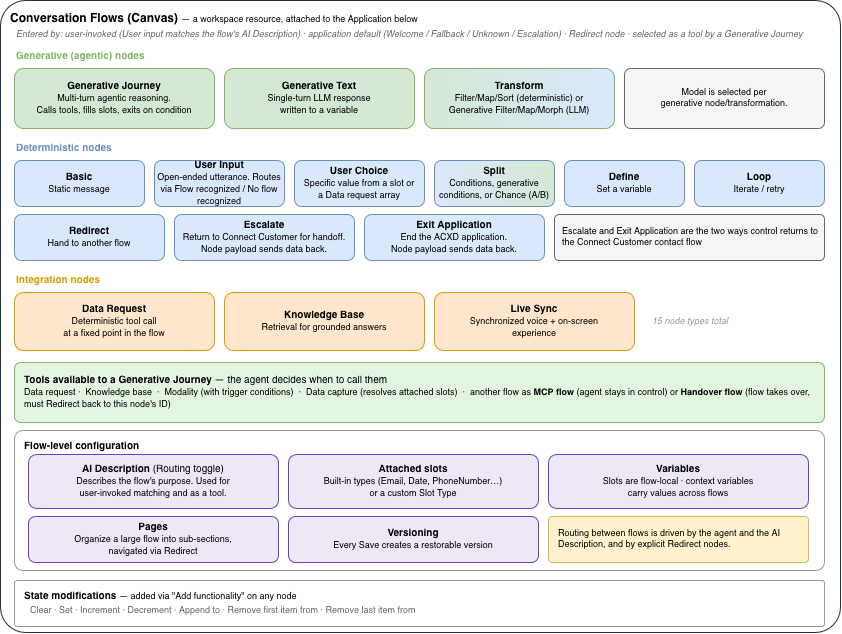
Generally available now, agentic CX designer offers a no-code visual canvas where the conversation gets built. Agentic AI handle the parts that need natural fluidity (understanding intent, holding a conversation, retrieving knowledge); deterministic, rule-based steps lock down the moments that must be exact (identity verification, credit eligibility, compliance disclosures). Both agentic and deterministic steps sit on the same canvas, and you can see exactly where AI reasons and where policy is enforced.
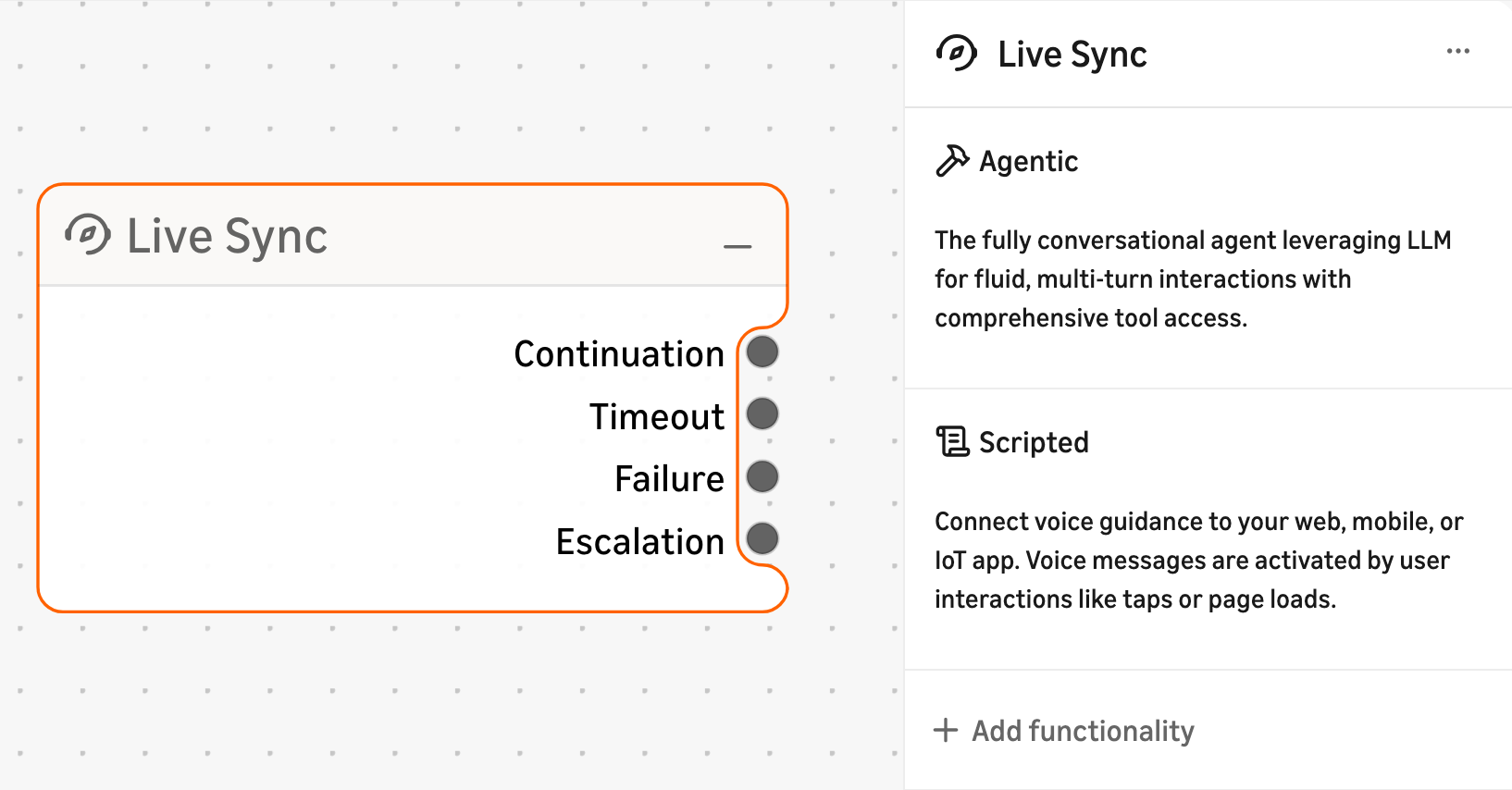
Live Sync is the first fully integrated enterprise CX technology that synchronizes a voice conversation with a digital, on-screen interface in real time, with no channel switch required. The customer sees and acts on their options while they are still talking.
Touchpoint renders the customer-facing side on digital. It is a drop-in client SDK for Amazon Connect Customer that you embed on your website or mobile app — it surfaces web chat, in-app voice, and the multimodal capabilities of Live Sync from the same conversation, sending what the customer taps back into the flow.
Agentic voices give the conversation its voice, across more than 50 languages and 100 voices. A single voice adapts tone to the moment, handles interruptions the way a person does, and switches languages mid-conversation when the customer does, with no separate procurement or custom integration.
The rest of this post follows Mateo through how he built the experience, and what to watch once customers are in it.
Build
The outage process is already written down covering how to confirm an outage, when a service credit applies, and when equipment qualifies for replacement. That document is where the build starts. No labeled training data to stand up the first version, no intent model to train.
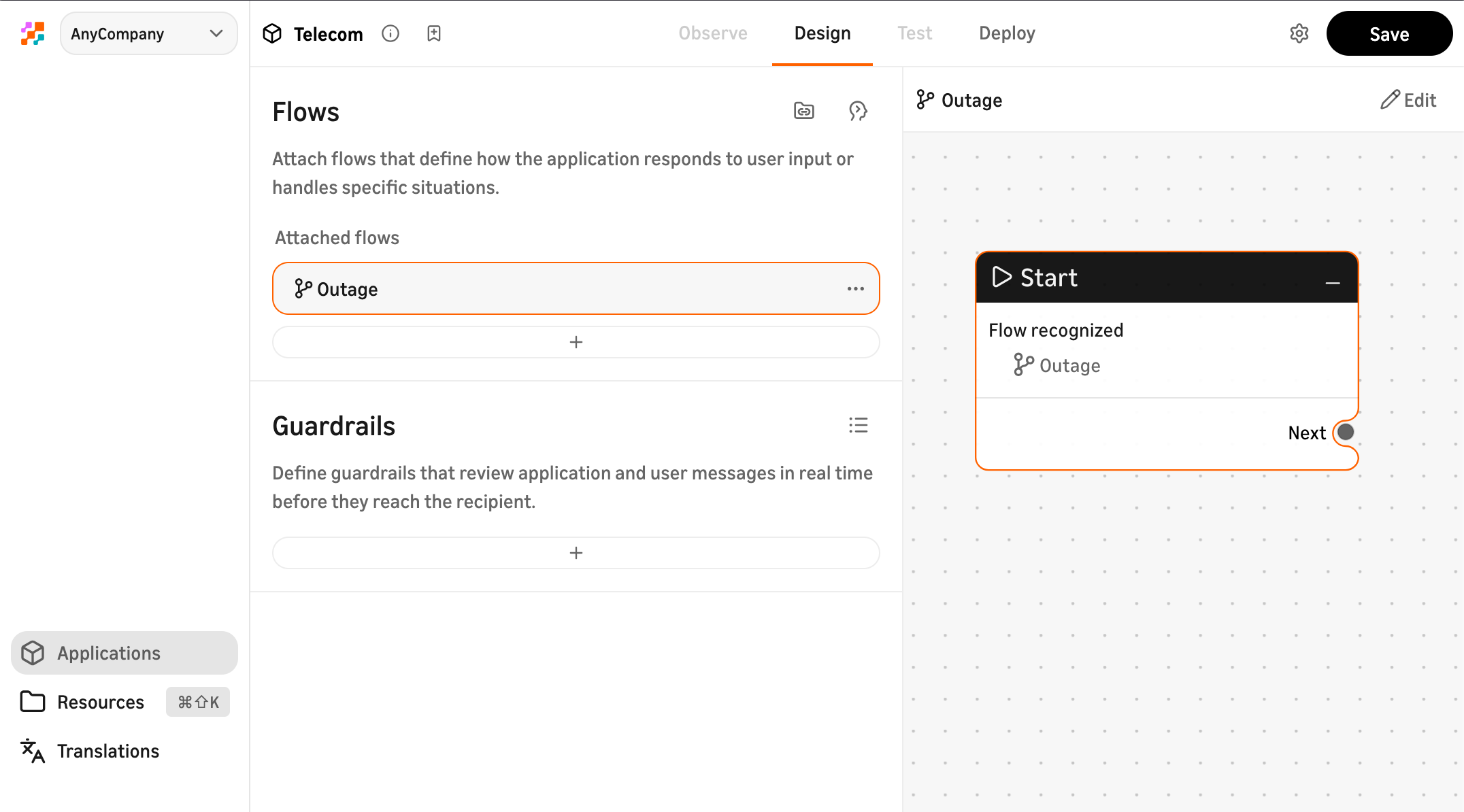
Start with the persona
Mateo begins with the persona: how the assistant should sound, what it should do first, what it may offer, and when it should stop and get a person. This is prompt design, and it reads a lot like the guidance he would give someone new on his team.
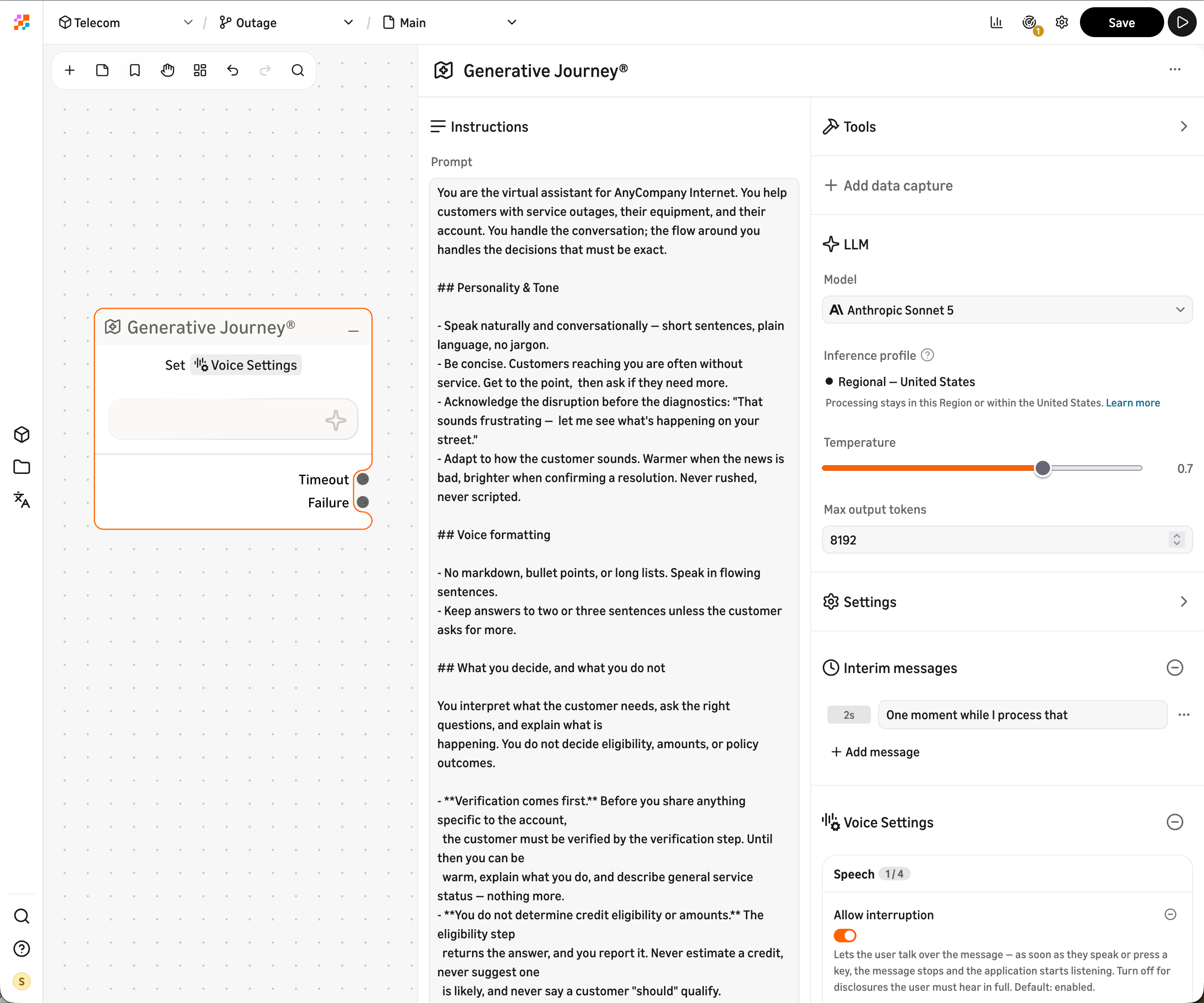
Then he picks the model. For every agentic step on the canvas, Mateo selects a model from a dropdown and tunes it to the task. A step that needs fast, natural conversation gets a model tuned for latency. A step that needs to reason across multiple tools and plan a multi-turn resolution gets a model built for depth. Different parts of the same flow can use different models, matched to what each moment in the conversation actually requires.
Amazon Connect Customer does not charge by model or by token (see pricing), so the only question is which model gives Sofía the best experience.
Blend agentic reasoning with deterministic control
Then Mateo reaches the part that cannot be left to interpretation. Whether a customer qualifies for a credit, and how much, is not a judgment call. It is a rule, it has an owner, and that owner is not the model.
So he handles the conversation one way and the decision another.
Agentic nodes (Generative Journey) reason over the conversation context, select from a set of approved tools, and generate dynamic responses. For Sofía’s call, the Generative Journey node listens, interprets what she needs, asks clarifying questions about her modem, and explains the outage situation — adapting naturally to her tone and the specifics of her account.
Deterministic nodes use slots with explicit validation. Agentic CX designer includes built-in slot types for values like dates, emails, phone numbers, and alphanumeric strings. Builders can also create custom slot types for constrained values — yes/no, plan tiers, or a short list of valid PINs. Each slot supports regex validation, configurable retry counts, and explicit escalation paths when validation fails. For Sofía’s credit, the deterministic node checks her account against the eligibility rules and returns the exact amount. No ambiguity, no variance between calls.
Both node types sit next to each other on the canvas. The connection between them is visible, and the canvas maintains full conversation state across both: slots collected, variables set, tools invoked, and where the customer is in the process. That state persists if the conversation escalates — context follows the customer to a human agent or another AI agent.
Think about a pharmacist. You want them to talk with you, ask what else you are taking, and notice that you sound congested. You do not want them improvising the dosage. That is blended deterministic and agentic AI: you choose how much the AI decides at each step, and you can change it any time in the same workflow.
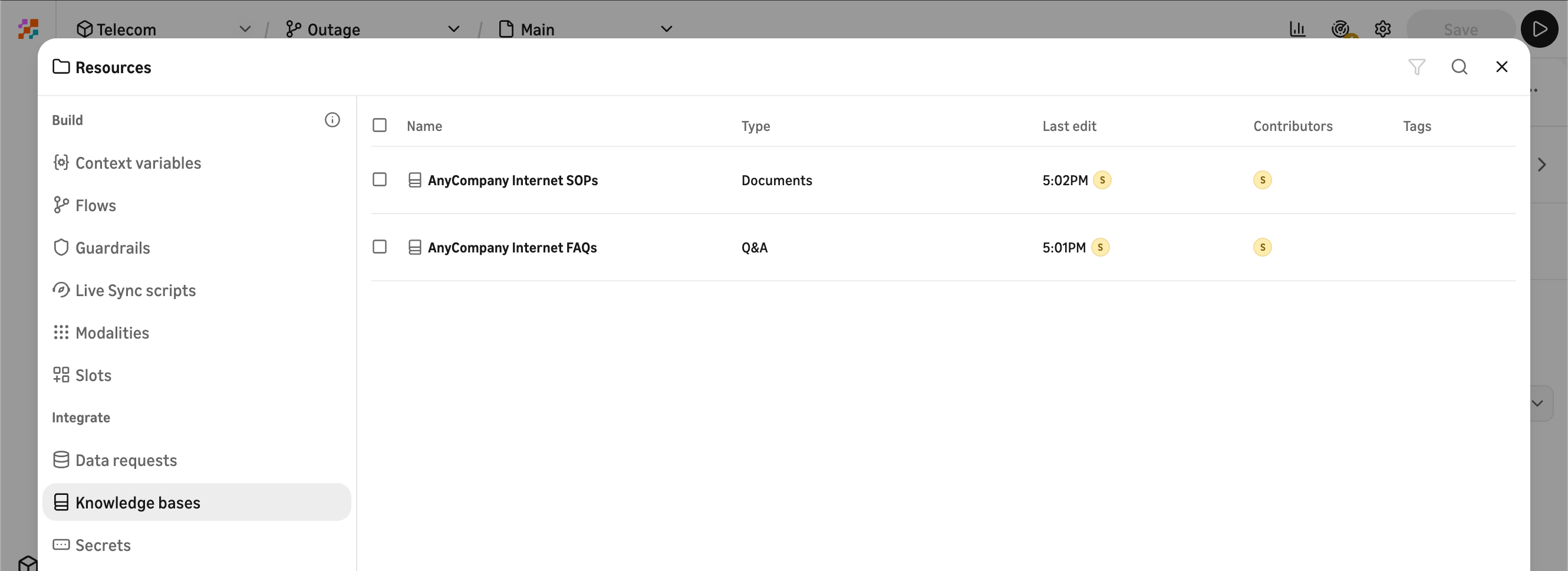
Knowledge: what the assistant knows
When Sofía asks why her internet is out, the assistant answers from AnyCompany’s outage procedure, not from the model’s training data. Knowledge lives in the workspace as Q&A entries for common questions and document uploads for longer reference material, and the assistant retrieves from that approved content at runtime.
Actions: connecting to the systems that do things
The assistant needs to look up Sofía’s account, confirm the outage status from the network operations system, and post a service credit. That is where Nikki comes in.
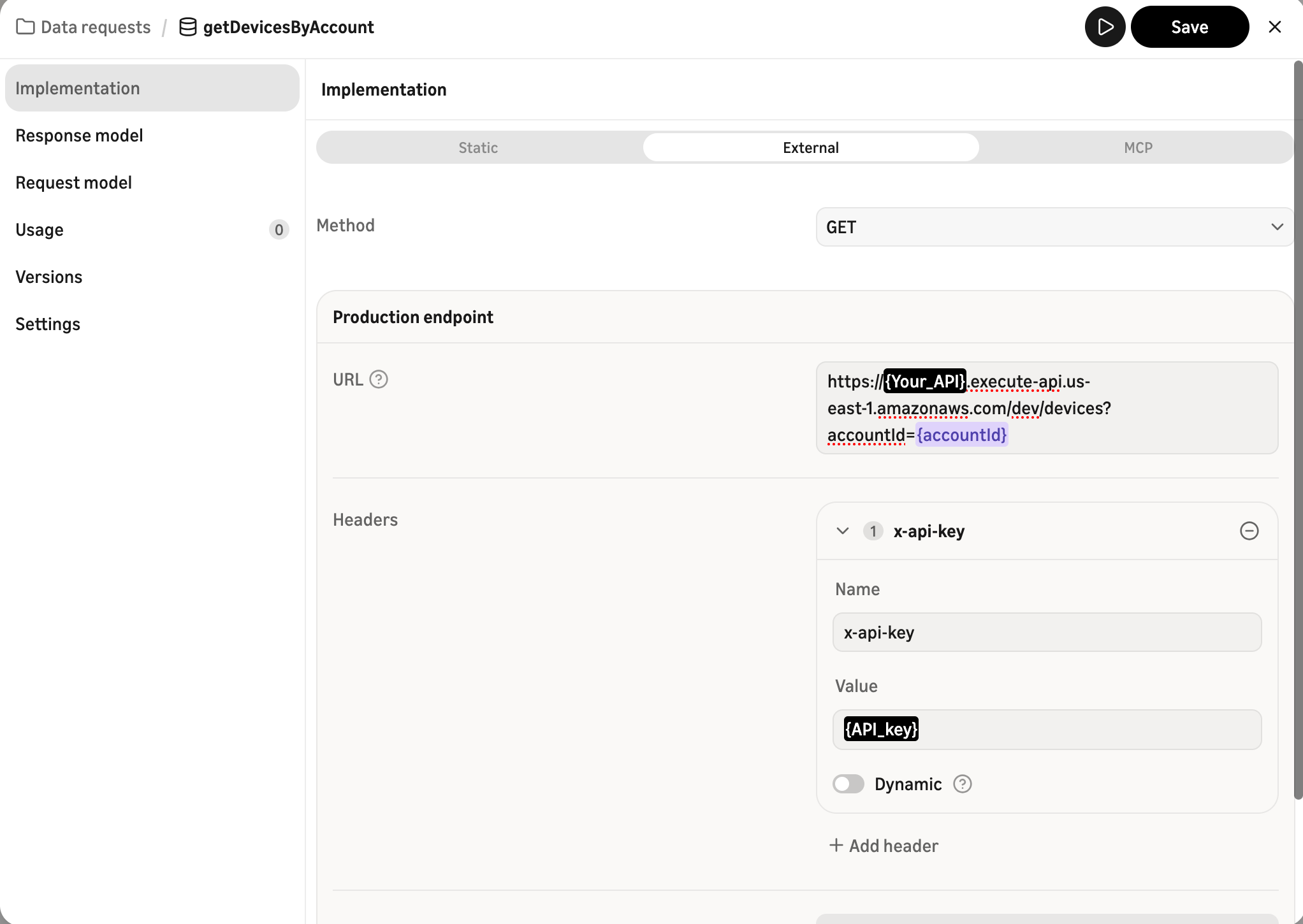
A data request node in agentic CX designer calls an external system. Two integration paths are available at GA:
REST data requests call any API with an accessible endpoint — GET, POST, PUT, or DELETE. Nikki configures three, for the account lookup, the outage status check, and posting the credit. For each, she defines the endpoint, authentication, request payload, and response mapping. She also defines what happens when a call fails — retry, follow an alternate path, or escalate.
MCP egress calls tools exposed by a remote Model Context Protocol endpoint. If your team already exposes tools through AgentCore Gateway, the administrator registers the MCP endpoint once in workspace settings. No Lambda wrapper, no API Gateway layer in between — the designer invokes the tool directly using the MCP protocol.
In both cases, secrets (API keys and tokens) are stored in the workspace and referenced from data request headers rather than hardcoded into individual nodes.
The separation matters: Mateo drops a data request into the conversation as a step. He sees what goes in (account ID) and what comes out (credit amount, outage status) without needing to know the endpoint URL or the authentication configuration. Nikki can rotate credentials, update an endpoint, or change the response mapping without touching the conversation design. Configure once, reuse across flows and applications.
Give it a voice
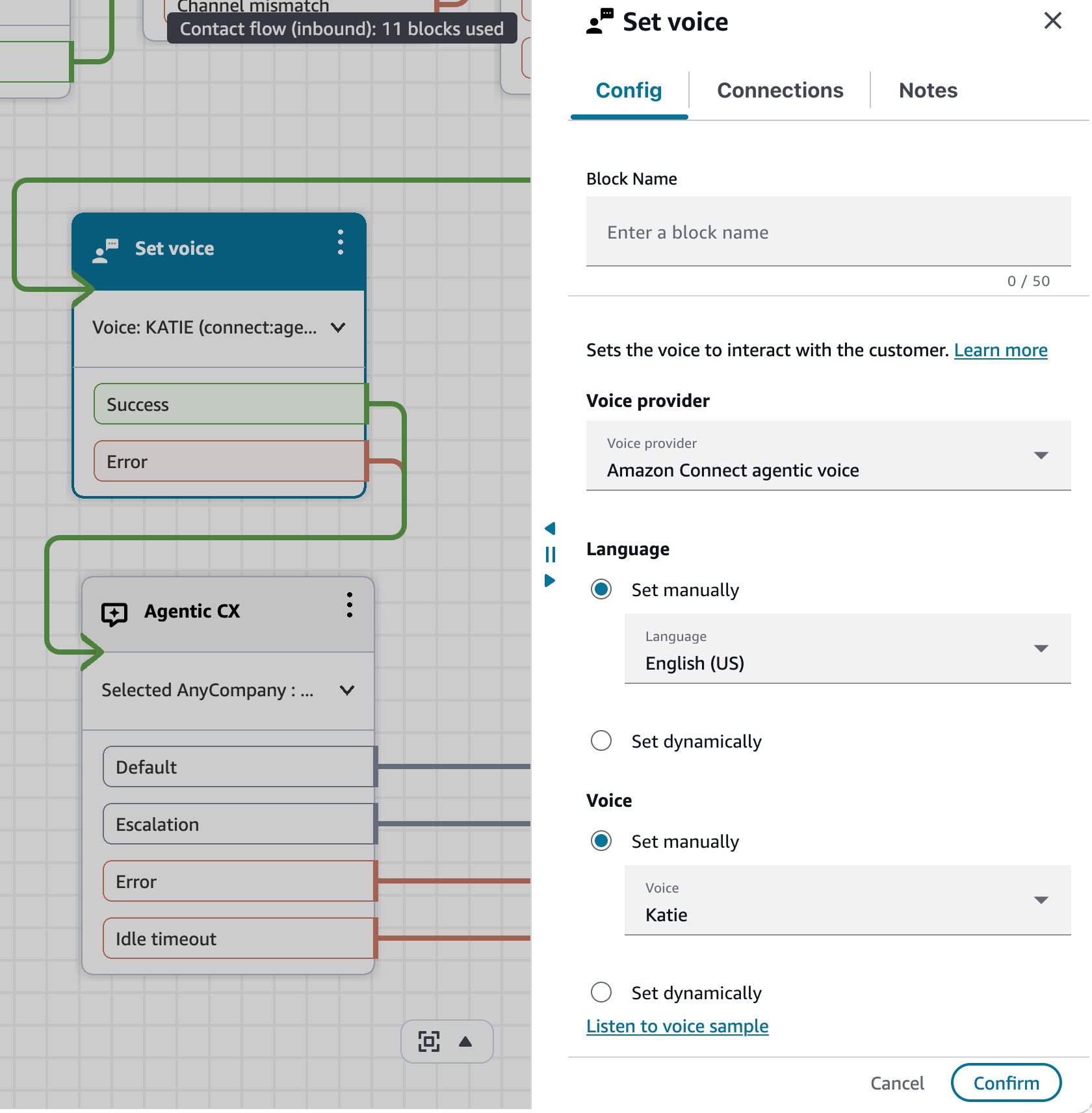
The experience Mateo is building will serve customers on voice, so he configures the voice persona in the Connect Customer flow using the Set Voice block. The designer orchestrates the conversation; Connect Customer controls which voice is used and how it sounds.
Agentic voices handle turn-taking in real time, recognizing when a customer is cutting in with a correction versus thinking out loud. The voice adapts emotion as the conversation moves, warmer when delivering bad news, brighter when confirming a resolution. If the customer switches languages mid-sentence, the voice follows without missing a beat, drawing from more than 50 supported languages and 100 available voices.
This separation means voice delivery (latency tuning, interruption behavior, failover) stays with the infrastructure owner, while conversation logic stays with the CX owner. Different deploy cycles, different permissions.
See it, don’t just hear it — Live Sync
Some things are easier to see than to hear. Sofía qualifies for a router upgrade and there are three models with different monthly costs. Reading three options aloud, twice, is how you lose people.
With Live Sync, the assistant triggers a notification and the three options appear on Sofía’s phone, visible while she is still talking. She taps one. The conversation keeps going, and what she picked feeds back into it. No separate app, no “hang up and go to our website.” One continuous experience across voice and screen.
Touchpoint renders the visual side. It is the client SDK you embed on your web or mobile app that surfaces Live Sync’s multimodal cards within the same conversation session, and sends customer actions (a tap, a form submission) back into the flow.
Hand off with context, no starting over
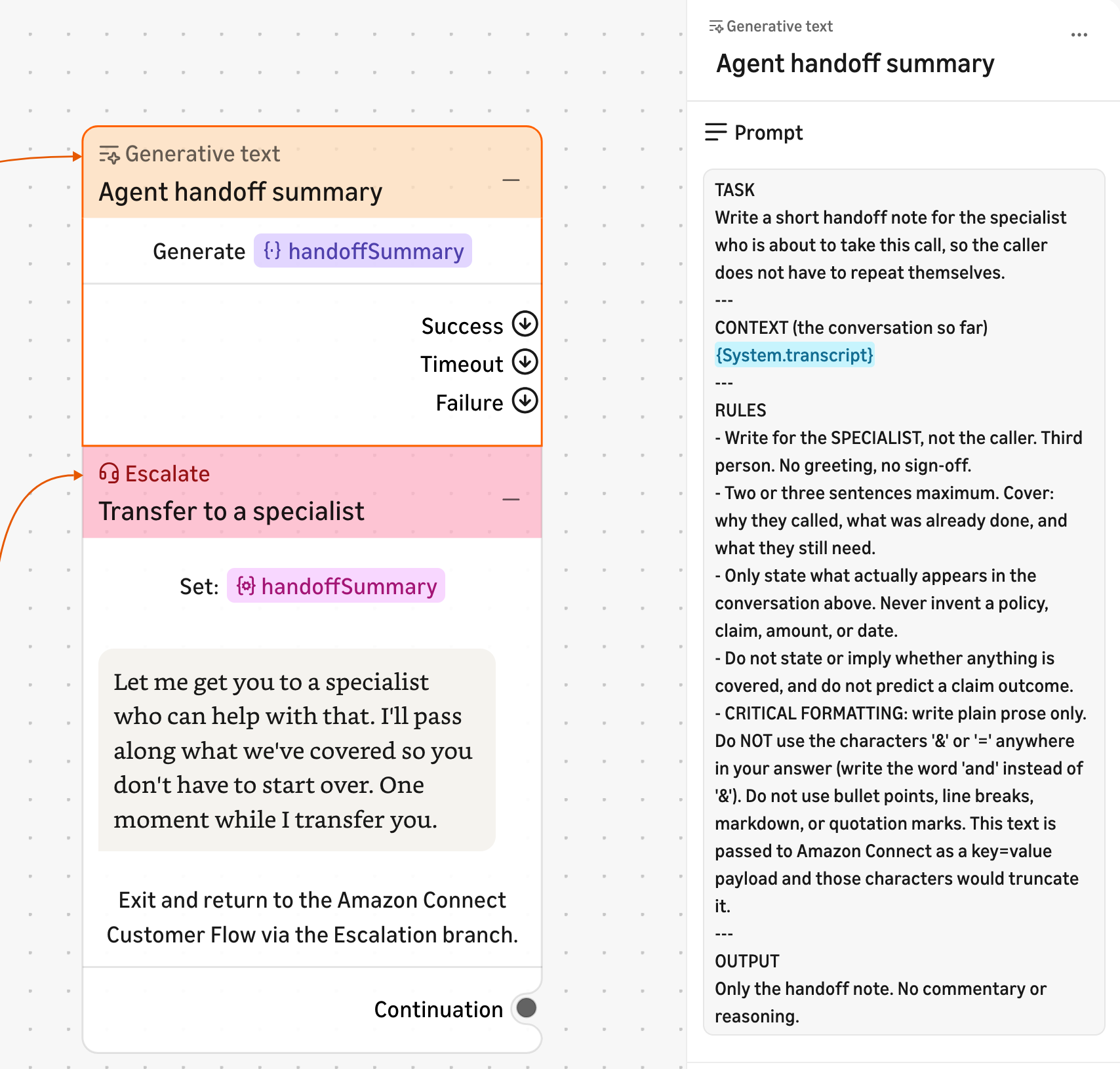
Sometimes the right answer is a person, or another AI agent. When that happens, everything the conversation has already established travels with it: the account, the confirmed outage, the credit, the router the customer chose. The canvas state — all collected slots, variables, and tool results — passes to the receiving agent. Nobody asks the customer to start over.
The canvas looks right. Now Mateo needs to know whether it works right.
Test
Testing happens at two layers, and each complements the other.
Test in the canvas — while you design
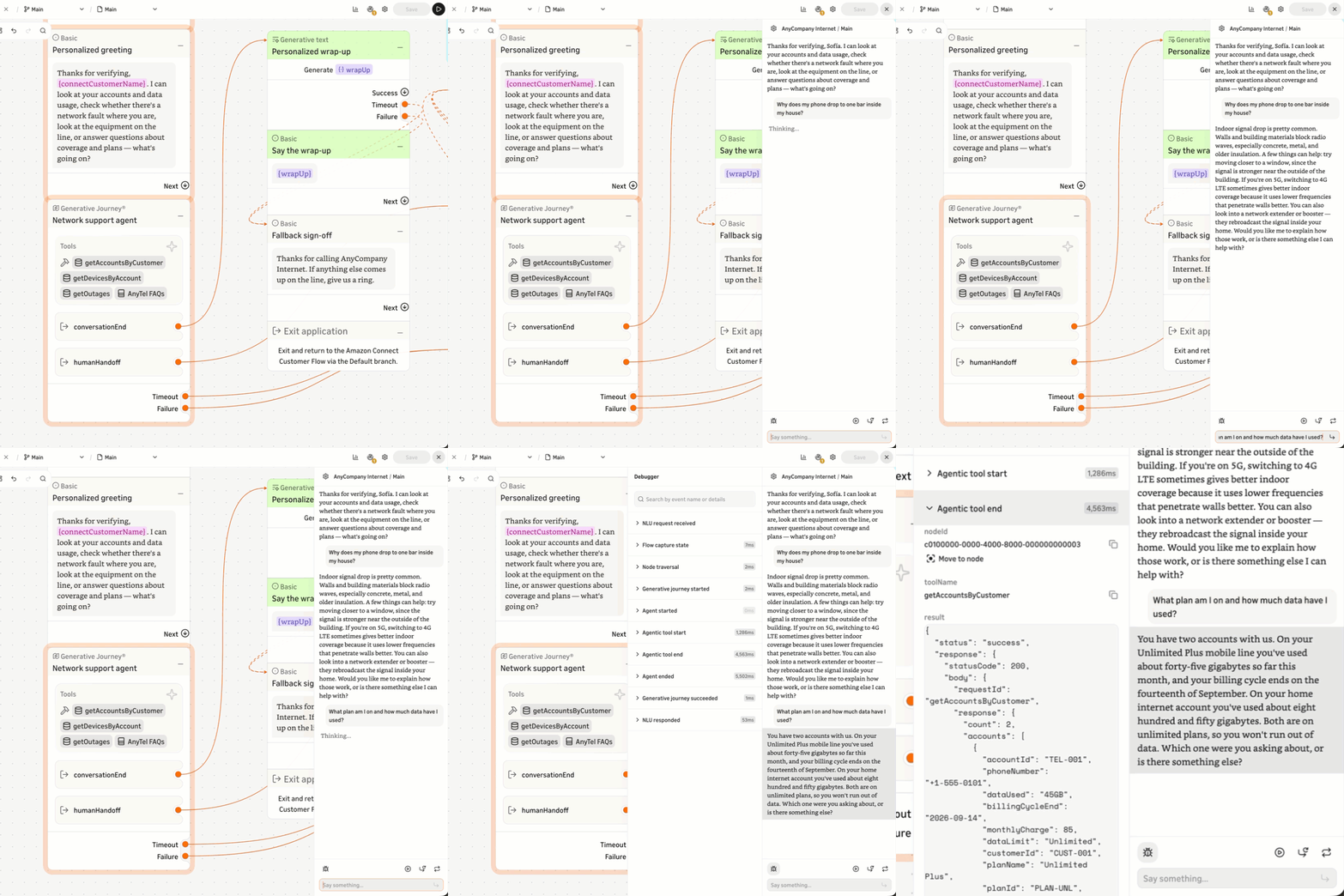
The designer gives you four test modes: application tests for a full conversation, flow tests for a single flow, routing tests for utterance-to-flow matching, and saved flow-logic tests you keep as a regression suite. All four run against a turn-by-turn debugger that exposes, for every node the conversation touched, the inputs and outputs, the slot and variable values as they accumulate, the agentic reasoning behind Generative Journey, Generative Text, and Transform nodes (what the model considered, which tools it selected, and why), the guardrail decisions (what was evaluated, what passed, what was blocked), the knowledge lookups (which Q&A entries or document chunks were retrieved), and the data request results (the call payload, the response, and any error handling that fired).
Changes reflect immediately in the test chat with no redeploy. Save the flow, run the test, see the result. When the credit comes back as $15 instead of $30, you see whether the model misread Sofía’s intent or the data request returned the wrong value from the account system. Different bugs, different owners.
Test the deterministic steps and the exits first: the credit amount, the compliance disclosure, the escalation trigger. Those are the ones that cost you when they are wrong. Guardrail results are visible per turn, so you can confirm that prompt injection attempts and policy violations are caught before any traffic reaches the experience. For teams with CI/CD pipelines, the testing surface validates conversation logic before deployment gates.
Test the full contact path — before traffic
The designer tests the conversation. Amazon Connect Customer’s testing and simulation capability tests the full contact path — the Connect Customer flow that routes the call, the Set Voice block, the Agentic CX block invocation, and the queue configuration on the other side of an escalation. You write tests in plain language, mock the external systems you do not want to call for real, and schedule them to rerun after every change. Semantic matching means a reworded prompt does not break a test it should pass.
Testing and simulation supports end-to-end test cases across conversations. You can assert contact attributes, override Lambda or the Agentic CX behavior, override queue or hours of operation, and send text or DTMF input as if you were the customer. Use both surfaces: the designer canvas for validating conversation logic at design time, and Connect Customer simulation for validating the assembled experience after deployment.
Publish, deploy, and change
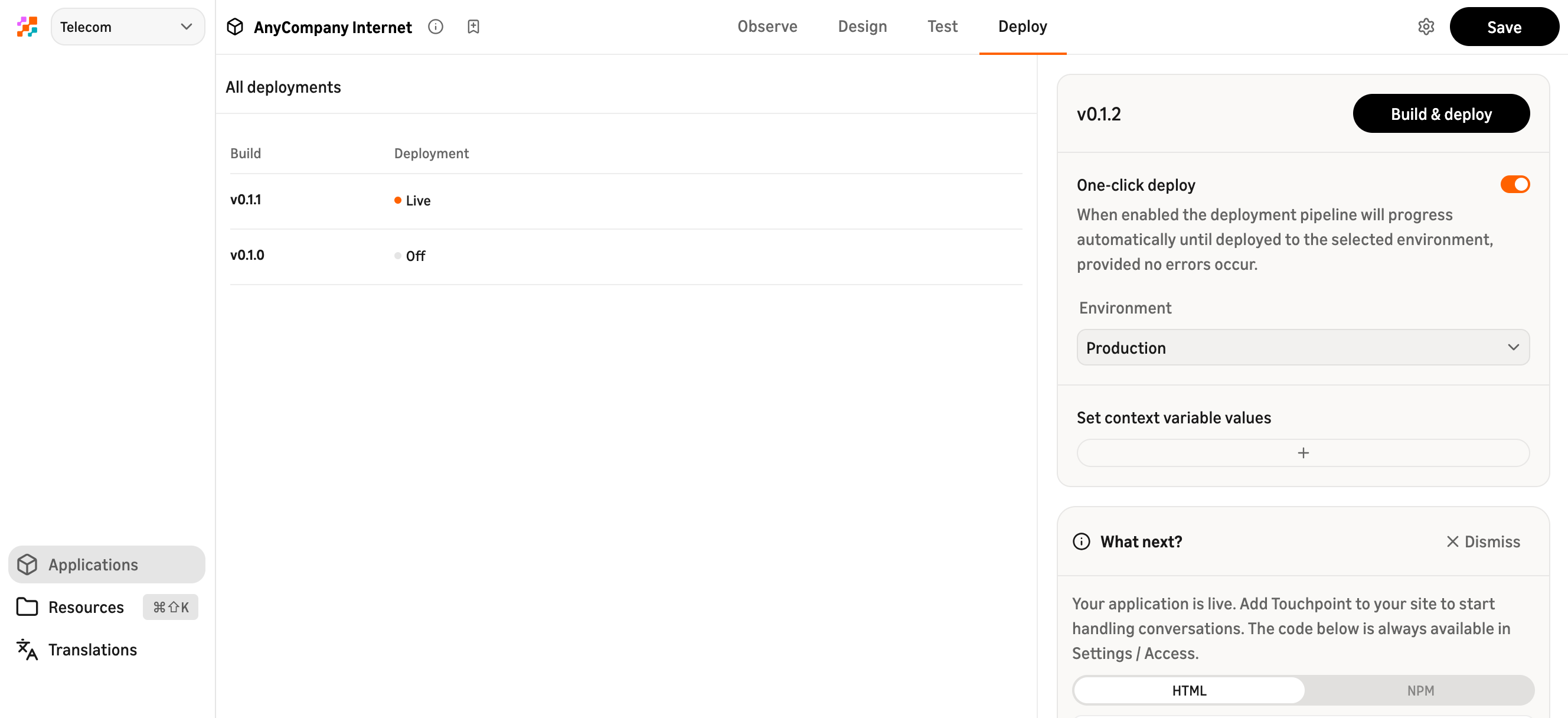
When testing passes, Mateo creates a build — an immutable snapshot of all flows, application configuration, and guardrail assignments as they exist at that moment. Comparing two builds shows what changed: modified nodes, updated guardrail assignments, new integrations. The administrator can enforce that only reviewed builds reach production.
Deploying a build makes it live. Previous builds are retained, so rollback is one action if something goes wrong in production.
The Connect Customer flow invokes the designer application through the Agentic CX block. Once that block is connected, the same build serves voice, chat, or SMS — determined by the channel configuration in the Connect Customer flow. A customer who calls hears it through agentic voices; a customer who types in chat gets the same logic, the same deterministic guardrails, the same outcome. One build, every supported channel.
 Optimize
Real customers are in it now. The analytics overlay draws traffic and drop-off directly on the flow Mateo built — same canvas, with numbers on it. If a third of callers leave at the same step, he sees which one and opens it right there. That feedback loop turns the first version into a good version in the same week, not months.
Guardrails are evaluated every turn and logged, so you can detect when a customer prompt pushes against a policy boundary. If the model produces an output that contradicts a deterministic node (a credit amount that does not match the business rule), the deterministic node’s result wins — the flow, not the model, is authoritative.
Conversational analytics covers each contact down to a single interaction and the reasoning behind it — you can trace why the model chose a particular path, what knowledge it retrieved, and where it handed off. Performance evaluations score contacts against your quality criteria, measured consistently rather than spot-checked by hand. Guardrail evaluations and audit logs can be exported for compliance tooling — every write and delete action is logged with actor, timestamp, and affected resource.
What happens next week
The following Monday, Mateo opens the analytics overlay and sees that 28% of callers drop off at the credit-disclosure step. He listens to a few conversations and realizes customers are hearing “terms and conditions” and assuming they need to hold for an agent.
He rewrites the prompt on that node: instead of “I will now read the terms and conditions,” the assistant says “Here are the details of your credit — this takes about fifteen seconds.” He saves, tests in the canvas, creates a new build, and deploys it before lunch.
By Wednesday, the drop-off at that step is down to 9%. The experience is the same one he built on a Tuesday two weeks ago. It just got better, because the person closest to the customer owns it end to end.
Get started
If your process is already written down (the procedure for confirming an outage, the policy for service credits, the rule for when equipment qualifies for replacement) you already have the part that takes longest.
If you own the experience: Open the Amazon Connect Customer console, go to the agentic CX designer, and create your first application. The Admin Guide walks through setup, and there is an AWS Skill Builder course if you want a guided path.
If you own the platform: The Admin Guide also covers integration patterns, REST and MCP configuration, workspace administration, and the build and deploy pipeline.
Add the web experience: Install the Touchpoint client SDK to surface chat, voice, and Live Sync on your website or mobile app.
Evaluate with your team: Request a guided workshop to walk through the architecture and a hands-on build against your own use case.
About the Author
 Alex Schrameyer (he/him) is a Worldwide Solutions Architect Lead for Agentic Experience at Amazon Web Services (AWS) based in the Chicago area. He believes that exceptional agent experiences are the cornerstone of outstanding customer service, and focuses on architecting solutions that empower both human agents and AI agents to deliver seamless customer experiences. Alex enjoys traveling around the world, and you might find him at your local baseball stadium or theme park. Alex Schrameyer (he/him) is a Worldwide Solutions Architect Lead for Agentic Experience at Amazon Web Services (AWS) based in the Chicago area. He believes that exceptional agent experiences are the cornerstone of outstanding customer service, and focuses on architecting solutions that empower both human agents and AI agents to deliver seamless customer experiences. Alex enjoys traveling around the world, and you might find him at your local baseball stadium or theme park. |