AWS Contact Center
Email security deep dive: Manual DKIM signing through Amazon SES
Overview
Manual DKIM signing on Amazon Simple Email Service (Amazon SES) gives you direct control over which headers your messages sign, including the ability to over-sign headers for DKIM replay attack mitigation. Amazon SES offers two DKIM signing paths, and the difference between them determines how much control you have.
Easy DKIM: SES manages DKIM keys and signs outgoing messages on your behalf. You activate it per identity per region. The set of headers SES signs is fixed, so you have no control over which headers are included in the signature, and Easy DKIM does not support over-signing.
Manual DKIM: You compute the DKIM-Signature header yourself, add it to the raw Multipurpose Internet Mail Extensions (MIME) message, and send the message to SES. This is the only path that gives you control over which headers are signed. That control includes the ability to over-sign headers for replay attack mitigation.
| Feature | Easy DKIM | Manual DKIM |
|---|---|---|
| Key management | SES generates and manages the keys | You generate and manage the keys |
| Header control | Fixed set of headers chosen by SES | You choose which headers to sign |
| Over-signing support | Not supported | Supported |
Manual DKIM works identically over either SES transport:
SendRawEmail API [1]: you call the API with the raw MIME message as a single byte blob in the request payload.
SES Simple Mail Transfer Protocol (SMTP) endpoint [2]: you issue a standard SMTP session (MAIL FROM / RCPT TO / DATA) over port 587 with STARTTLS, authenticate with SMTP credentials, and send the raw MIME message as the DATA payload.
Because DKIM signatures live in the MIME header section of the message (not in API request parameters, and not in SMTP envelope commands), the signing logic is the same for both transports. Only the delivery mechanism differs.
This guide covers end-to-end manual DKIM signing through SES: generating keys, publishing the public key in the Domain Name System (DNS), placing the DKIM-Signature, identifying which headers are safe to sign, and providing annotated Python code for both transports.
If you are evaluating manual DKIM signing specifically to mitigate DKIM replay attacks through over-signing, refer to the companion post, “Email security deep dive: Defending against DKIM replay on Amazon SES” [8].
The central point: where the DKIM-Signature lives
A DKIM signature is a header field in the MIME message. It is an RFC (Request for Comments) 5322 header field only, placed among the other message headers. It is not a MIME body part or attachment, an SMTP envelope command (such as MAIL FROM, RCPT TO, or AUTH), or a SendRawEmail API request parameter or HTTP header.
The signing client computes the DKIM-Signature string and prepends it to the other headers in the RFC 5322 message (From:, To:, Subject:, and so on), before the blank line that separates headers from the body. This complete, pre-signed MIME payload is then handed off to SES through whichever transport you choose.
This is why manual DKIM works identically over SendRawEmail and SMTP: the payload that contains your DKIM-Signature is the same in both cases. The transport choice changes how the payload is handed off, not the payload itself.
Recipient MTAs always extract DKIM signatures from the MIME header section of the delivered message, regardless of the transport used upstream. The signature that arrives at the recipient is byte-for-byte the same one the signing client produced. SES does not modify your manual signature.
End-to-end signing workflow
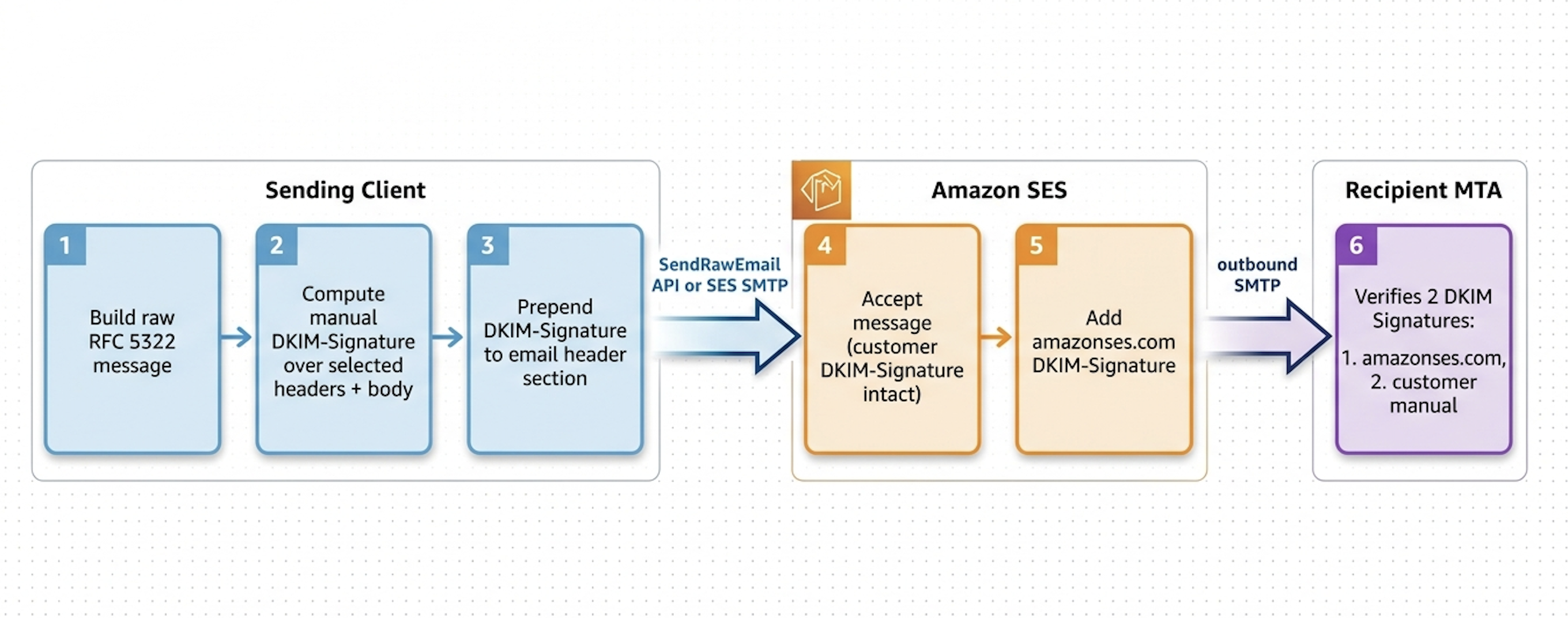
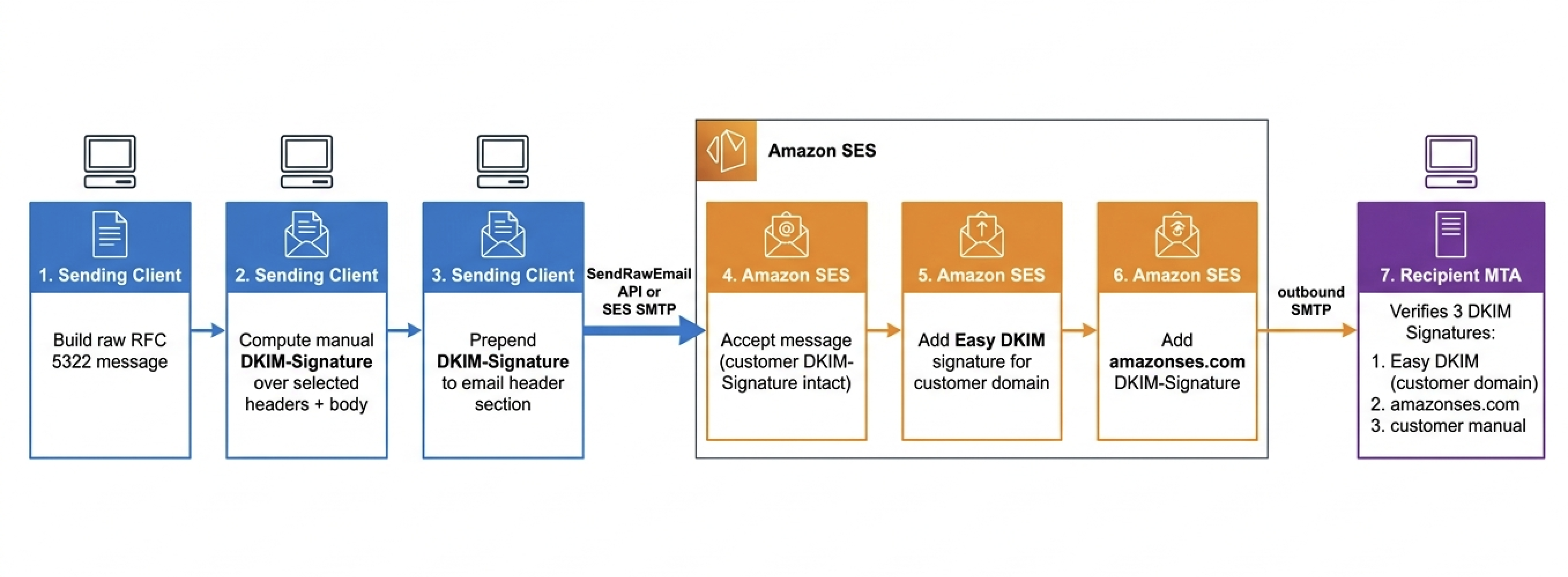
The following diagrams illustrate the complete flow of a manually signed message through Amazon SES for the two Easy DKIM configurations. These diagrams make the structure concrete: what the client produces, what SES adds, and what the recipient ultimately verifies.
Workflow 1: Easy DKIM disabled
When Easy DKIM is disabled on the sending identity, SES adds only its standard amazonses.com DKIM signature. The recipient receives two DKIM signatures: the customer’s manual signature and the SES-managed amazonses.com signature. The following diagram shows this flow.
Workflow 2: Easy DKIM enabled
When Easy DKIM is enabled, SES also generates and adds an Easy DKIM signature for the customer’s domain. The recipient therefore receives three DKIM signatures: the customer’s manual signature, the SES-managed Easy DKIM signature (using the customer’s domain), and the SES-managed amazonses.com signature. The following diagram shows this flow.
What to take away from these diagrams
A few properties are worth emphasizing about how the signatures are produced and preserved:
The customer’s DKIM-Signature is byte-for-byte unchanged from client to recipient. SES does not rewrite, re-canonicalize, or remove it.
SES always adds the amazonses.com signature regardless of customer configuration. This signature uses an SES-owned domain and does not contribute to DMARC alignment with the customer’s From domain.
The remaining properties concern how Easy DKIM and the choice of transport affect the result:
Easy DKIM is the optional third signature. When activated, it coexists with any customer-supplied manual DKIM-Signature; it does not replace the customer’s signature.
Both transports (SendRawEmail API and SES SMTP) produce identical results at the recipient. The choice of transport does not affect DKIM.
For the implications of the Easy DKIM state on DKIM replay attack mitigation, refer to the companion post: Email security deep dive: Defending against DKIM replay on Amazon SES [8].
Key generation and DNS publishing
Manual DKIM requires you to generate and manage a Rivest–Shamir–Adleman (RSA) key pair, then publish the public key in DNS as a TXT record under a selector you choose.
Step 1: Generate the key pair
Use openssl to generate an RSA private key. The SES Manual DKIM Signing documentation [6] states that when signing messages manually, you should use a bit length of at least 1024 bits. A 1024-bit key’s public component fits in a single DNS TXT string (255-character limit):
# 1024-bit key (minimum recommended by SES; fits in a single TXT string)
openssl genrsa -out dkim_private.pem 1024
Stronger keys are also supported:
# 2048-bit key (may require multi-string TXT record at some DNS providers)
openssl genrsa -out dkim_private.pem 2048
Step 2: Extract the public key in DKIM base64 format
DKIM expects the public key as a base64-encoded SubjectPublicKeyInfo structure, without the PEM —–BEGIN… and —–END… markers and with newlines removed:
openssl rsa -in dkim_private.pem -pubout 2>/dev/null \
  | sed '1d;$d' \
  | tr -d '\n' > dkim_public.b64

cat dkim_public.b64
The output is a single base64 string, typically around 216 characters for a 1024-bit key or 392 characters for a 2048-bit key.
Step 3: Choose a selector name
The selector is a DNS label you choose to identify a specific DKIM key. Selectors are useful for key rotation. You can publish multiple keys under different selectors simultaneously.
In this guide, we use selector mymanualdkim2026. Any valid DNS label works; pick a convention that fits your environment and key rotation practice.
The selector becomes the first label in the DNS record: mymanualdkim2026._domainkey.<your-domain>.
Step 4: Publish the DNS TXT record
The DKIM DNS TXT record format is defined in RFC 6376 §3.6.1:
<selector>._domainkey.<your-domain>. IN TXT "v=DKIM1; k=rsa; p=<base64-public-key>"
Example for selector mymanualdkim2026 on domain mydomain.example with a 1024-bit key:
mymanualdkim2026._domainkey.mydomain.example. IN TXT "v=DKIM1; k=rsa; p=MIGfMA0GCSqGSIb3DQEBAQUAA4GNADCBiQKBgQ..."
Publish this TXT record using whichever DNS provider manages your domain. DNS propagation typically completes within a few minutes when using a 300-second TTL.
Step 5: Verify DNS resolution before sending
Before sending a signed message, confirm the TXT record resolves:
dig +short TXT mymanualdkim2026._domainkey.mydomain.example
You should see the v=DKIM1; k=rsa; p=… value returned.
SES still adds its own DKIM signatures
A key implementation detail to be aware of is that SES adds signatures of its own to every message:
SES always adds a DKIM signature for the SES-owned amazonses.com domain, regardless of whether you are signing manually and regardless of which transport you use. This signature uses SES’s own key and does not align with your From domain, so it does not contribute to DMARC alignment. You will always see it in delivered messages.
If Easy DKIM is activated on your identity, SES also adds an Easy DKIM signature for your domain, even when your raw MIME already contains a manual DKIM-Signature. Both signatures are transmitted to the recipient. The Easy DKIM signature uses the fixed SES-managed header set and does not over-sign.
The resulting message at the recipient will therefore carry two DKIM signatures if Easy DKIM is disabled (manual and amazonses.com), or three DKIM signatures if Easy DKIM is activated (manual, Easy DKIM, and amazonses.com). Both patterns are shown in the delivered-header examples that follow.
Headers that SES overwrites or manages: do not sign them
The SES Manual DKIM Signing documentation [6] explicitly instructs that the following fields must not be signed when using manual DKIM with SES:
- Message-ID
- Date
- Return-Path
- Bounces-To
SES rewrites or manages these headers on every message, regardless of what you supply in the raw MIME. The SES Email header fields documentation [5] describes the Date and Message-ID rewrites in detail:
“If you specify a Date header, Amazon SES overrides it with a timestamp that corresponds to the date and time in the UTC time zone when Amazon SES accepted the message.”
“If you provide a Message-ID header, Amazon SES overrides the header with its own value.”
Return-Path and Bounces-To are handled by SES as part of its bounce-routing mechanism. If you supply these headers, SES may rewrite them, and signing them would break the signature at the recipient.
Warning: Implication for manual DKIM: never include date, message-id, return-path, or bounces-to in the h= tag. A signature covering any of these will fail at the recipient because SES rewrites or sets the value after the signature is computed.
This was verified experimentally for Date during the investigation behind this guide: messages signed with h=from:to:subject passed DKIM at Gmail, while messages signed with h=from:to:subject:date returned dkim=fail consistently across every timezone format tried for the Date header. The same rewrite behavior applies to both SendRawEmail and SMTP.
Headers safe to sign through SES
The following headers are commonly recommended for signing per RFC 6376 §5.4.1 [7]:
- From
- Reply-To
- Subject
- To, Cc
- Resent-Date, Resent-From, Resent-To, Resent-Cc
- In-Reply-To, References
- List-Id, List-Help, List-Unsubscribe, List-Subscribe, List-Post, List-Owner, List-Archive
Note: RFC 6376 §5.4.1 also lists Date as recommended-to-sign, but as explained earlier, Date must be excluded when signing through SES because SES rewrites the Date header at send time.
Of these, the following have been experimentally verified as safe to sign through SES in the testing behind this guide:
- From
- To
- Subject
- MIME-Version
- Content-Type
- Content-Transfer-Encoding
A working h= set verified in testing is h=from : to : subject : mime-version : content-type. This works identically through both SendRawEmail and SMTP.
Other headers from the RFC-recommended set have not been individually tested through SES. Customers should verify that any additional headers they plan to sign are preserved unchanged by SES before relying on them in production.
Example 1: Easy DKIM disabled, two DKIM signatures at recipient
In this example, the SES identity has Easy DKIM disabled. The bh values shown are real, taken from an actual test send. They are identical across the manual DKIM signature and the SES-added amazonses.com signature, demonstrating that SES did not modify the body between signing and delivery.
The following headers show the client-sent payload (what the signing client produces; the same bytes over SendRawEmail or SMTP).
DKIM-Signature: v=1; a=rsa-sha256; c=relaxed/simple;
d=mydomain.example; i=@mydomain.example; q=dns/txt;
s=mymanualdkim2026; t=1776531208;
h=from : to : subject : mime-version : content-type;
bh=OjohP5LgVDDaUNJnNqewUFeJej0CDr3SGiLW+w2aBj8=;
b=Nhfslrj/osaJtpjAuDcoaAjH6BdeKwhTlZTnyVlMnQXDoRAcS8ZGTQTzMsBgaWhFl7MEg
X7VqSHpZzFMmUpfcuWMKzmjS0CO7PDCrVi7QxtcIN/f2KsZXSkwd7RHvWQMNUUskXf3ecOu
4Ksk3TG1zhlsut+b5akzPqrey6kX8Xw=
Content-Type: text/plain; charset="us-ascii"
MIME-Version: 1.0
Content-Transfer-Encoding: 7bit
From: alice@mydomain.example
To: bob@yourdomain.example
Subject: Manual DKIM example - Easy DKIM off
Manual DKIM signing through Amazon SES, Easy DKIM disabled.
The following headers show the delivered message at the recipient (as seen in Gmail).
Authentication-Results: mx.yourdomain.example;
dkim=pass header.i=@amazonses.com header.s=sesselector456xyz header.b="JVZuskL/";
dkim=pass header.i=@mydomain.example header.s=mymanualdkim2026 header.b="Nhfslrj/";
spf=pass (mx.yourdomain.example: domain of 0100019abc1234567-89abcdef-1234-5678-9abc-def012345678-000000@mail.mydomain.example designates 192.0.2.1 as permitted sender) smtp.mailfrom=0100019abc1234567-89abcdef-1234-5678-9abc-def012345678-000000@mail.mydomain.example;
dmarc=pass (p=QUARANTINE sp=QUARANTINE dis=NONE) header.from=mydomain.example
DKIM-Signature: v=1; a=rsa-sha256; q=dns/txt; c=relaxed/simple;
s=sesselector456xyz; d=amazonses.com; t=1776531209;
h=Content-Type:MIME-Version:Content-Transfer-Encoding:From:To:Subject:Message-ID:Date:Feedback-ID;
bh=OjohP5LgVDDaUNJnNqewUFeJej0CDr3SGiLW+w2aBj8=;
b=JVZuskL/lIjvbf1H6VRI2DxCGJqqzsBTFAFAWuh8qIxVRTwQd1A24QubBLNZLUAw
PUSlMjoh/T8oXejRYi1kj6yaT+ecpr4kasWji7gqP1RkSYo09/dO2VVdjJ9Kb1wFJEm
IG1peocXMfDPqTv27oHwRkyh4oUpeFGJRMlepWSE=
DKIM-Signature: v=1; a=rsa-sha256; c=relaxed/simple;
d=mydomain.example; i=@mydomain.example; q=dns/txt;
s=mymanualdkim2026; t=1776531208;
h=from : to : subject : mime-version : content-type;
bh=OjohP5LgVDDaUNJnNqewUFeJej0CDr3SGiLW+w2aBj8=;
b=Nhfslrj/osaJtpjAuDcoaAjH6BdeKwhTlZTnyVlMnQXDoRAcS8ZGTQTzMsBgaWhFl7MEg
X7VqSHpZzFMmUpfcuWMKzmjS0CO7PDCrVi7QxtcIN/f2KsZXSkwd7RHvWQMNUUskXf3ecOu
4Ksk3TG1zhlsut+b5akzPqrey6kX8Xw=
Content-Type: text/plain; charset="us-ascii"
MIME-Version: 1.0
Content-Transfer-Encoding: 7bit
From: alice@mydomain.example
To: bob@yourdomain.example
Subject: Manual DKIM example - Easy DKIM off
Message-ID: <0100019abc1234567-89abcdef-1234-5678-9abc-def012345678-000000@email.amazonses.com>
Date: Sat, 18 Apr 2026 16:53:29 +0000
Feedback-ID: ::1.us-east-1.K8th3BEBWV+mMFU+Ra2k72Pd/rSsatQhv4lUrGZFRuE=:AmazonSES
X-SES-Outgoing: 2026.04.18-192.0.2.1
Manual DKIM signing through Amazon SES, Easy DKIM disabled.
The delivered headers show the following:
Two DKIM signatures appear in Authentication-Results. The amazonses.com signature (header.s=sesselector456xyz) is always added by SES, does not align with the From domain, and does not contribute to DMARC alignment. The manual signature (header.s=mymanualdkim2026) aligns with the From domain and carries DMARC.
The manual DKIM-Signature at the recipient is byte-for-byte identical to what the client sent: same bh=, same b=, same t=, and same h= list. SES does not modify your manual signature.
Both signatures share the same bh=OjohP5LgVDDaUNJnNqewUFeJej0CDr3SGiLW+w2aBj8=. This is the body hash, computed over the canonicalized message body. Because the body was not modified between client signing and SES signing, both signers compute the same hash. Any divergence would indicate the body was altered somewhere in the pipeline.
SES added Message-ID, Date, Feedback-ID, and X-SES-Outgoing headers at send time. Your signature does not cover Date or Message-ID, so these additions do not break verification.
DMARC passes via the manual DKIM signature (aligned on mydomain.example).
Example 2: Easy DKIM enabled, three DKIM signatures at recipient
In this example, the SES identity has Easy DKIM activated. Three DKIM signatures are present at the recipient: the Easy DKIM signature (for the customer domain), the amazonses.com signature, and the manual DKIM signature. All three share the same body hash, which is further empirical evidence that the body is unmodified between client, SES, and recipient.
The following headers show the client-sent payload (identical signing flow to Example 1, with different body text).
DKIM-Signature: v=1; a=rsa-sha256; c=relaxed/simple;
d=mydomain.example; i=@mydomain.example; q=dns/txt;
s=mymanualdkim2026; t=1776531248;
h=from : to : subject : mime-version : content-type;
bh=sg1pm8tAvGTI7Ghw+47c/5U2w9XJkR95naVW2XLTmeM=;
b=Pcqs+zJrcXXEPo5tttGF7RFxLA+mYYY4jmUz/GIEw6jDVE/CaEmx/rZOJEgxuJSLsRi/f
juZKXrCMSap8wa0KwDHGTVVyPW8gNOyYXXKtna/YWNyT1CInH4GBwL1JG7MLQvRLz1NIvY3
V3biJkk80OXENcAxEZcc8KAJ2rkMDB4=
Content-Type: text/plain; charset="us-ascii"
MIME-Version: 1.0
Content-Transfer-Encoding: 7bit
From: alice@mydomain.example
To: bob@yourdomain.example
Subject: Manual DKIM example - Easy DKIM on
Manual DKIM signing through Amazon SES, Easy DKIM enabled.
The following headers show the delivered message at the recipient (as seen in Gmail).
Authentication-Results: mx.yourdomain.example;
dkim=pass header.i=@mydomain.example header.s=easydkimselector123abc header.b=iwas3sPg;
dkim=pass header.i=@amazonses.com header.s=sesselector456xyz header.b=mPt7odBJ;
dkim=pass header.i=@mydomain.example header.s=mymanualdkim2026 header.b=Pcqs+zJr;
spf=pass (mx.yourdomain.example: domain of 0100019fed6543210-cfaded06-d323-4546-b1aa-c7f9e7f3fad5-000000@mail.mydomain.example designates 192.0.2.1 as permitted sender) smtp.mailfrom=0100019fed6543210-cfaded06-d323-4546-b1aa-c7f9e7f3fad5-000000@mail.mydomain.example;
dmarc=pass (p=QUARANTINE sp=QUARANTINE dis=NONE) header.from=mydomain.example
DKIM-Signature: v=1; a=rsa-sha256; q=dns/txt; c=relaxed/simple;
s=easydkimselector123abc; d=mydomain.example; t=1776531250;
h=Content-Type:MIME-Version:Content-Transfer-Encoding:From:To:Subject:Message-ID:Date;
bh=sg1pm8tAvGTI7Ghw+47c/5U2w9XJkR95naVW2XLTmeM=;
b=iwas3sPggxyNtdJuNcpPrSfN8aLNdrab5MMRxU0td/D8AaBUan/ZAE7EoyvLTqL9
VeDuxPzCQ9OuorbEwfqLaOsNYRa8CevFSaSyMTmTzhM5kq7GvnkLdamU3RlgTw9Ur9c
hNW98lUaaNA0LN4/tooG9+RKKXmc9Zh/3KpnI0Gx9jVY0V1WqVpFxcmDj7gWgUXzfrN
E0p4VQeb/UTsSv88cPs27iO7LrpGwsgouDbeJXtK4n+q7I2juLKBSp3AoceaQavABzr
PJGlgKwbEpOFT9hshS8VnaZaF9q7wzMj3AsmDRHbASGd+Cty8bKfoTmjxnR/fHQUjqa
7CdutXBWRA==
DKIM-Signature: v=1; a=rsa-sha256; q=dns/txt; c=relaxed/simple;
s=sesselector456xyz; d=amazonses.com; t=1776531250;
h=Content-Type:MIME-Version:Content-Transfer-Encoding:From:To:Subject:Message-ID:Date:Feedback-ID;
bh=sg1pm8tAvGTI7Ghw+47c/5U2w9XJkR95naVW2XLTmeM=;
b=mPt7odBJQacT6iW2GwSvIzcZi7vbCZM1icjwATLQSgZP3QDUyE1mkdl22CeAXZ4N
riQ3oihuDrqcglg3oj2lRGPMGBZ81slS/7vDUnu6swYI5QfsCDLQJyrf4Sz3SRPHlDV
yiNxZxy8hK2Rr7MEhYR/bq2YBIYjuUAAq/boMF/w=
DKIM-Signature: v=1; a=rsa-sha256; c=relaxed/simple;
d=mydomain.example; i=@mydomain.example; q=dns/txt;
s=mymanualdkim2026; t=1776531248;
h=from : to : subject : mime-version : content-type;
bh=sg1pm8tAvGTI7Ghw+47c/5U2w9XJkR95naVW2XLTmeM=;
b=Pcqs+zJrcXXEPo5tttGF7RFxLA+mYYY4jmUz/GIEw6jDVE/CaEmx/rZOJEgxuJSLsRi/f
juZKXrCMSap8wa0KwDHGTVVyPW8gNOyYXXKtna/YWNyT1CInH4GBwL1JG7MLQvRLz1NIvY3
V3biJkk80OXENcAxEZcc8KAJ2rkMDB4=
Content-Type: text/plain; charset="us-ascii"
MIME-Version: 1.0
Content-Transfer-Encoding: 7bit
From: alice@mydomain.example
To: bob@yourdomain.example
Subject: Manual DKIM example - Easy DKIM on
Message-ID: <0100019fed6543210-cfaded06-d323-4546-b1aa-c7f9e7f3fad5-000000@email.amazonses.com>
Date: Sat, 18 Apr 2026 16:54:09 +0000
Feedback-ID: ::1.us-east-1.K8th3BEBWV+mMFU+Ra2k72Pd/rSsatQhv4lUrGZFRuE=:AmazonSES
X-SES-Outgoing: 2026.04.18-192.0.2.1
Manual DKIM signing through Amazon SES, Easy DKIM enabled.
The delivered headers show the following:
Three DKIM signatures appear in Authentication-Results. The Easy DKIM signature (header.s=easydkimselector123abc) signs a fixed header set that you do not control and aligns with the From domain. The amazonses.com signature (header.s=sesselector456xyz) is always added by SES and does not align with the From domain. The manual signature (header.s=mymanualdkim2026) aligns with the From domain.
All three signatures share bh=sg1pm8tAvGTI7Ghw+47c/5U2w9XJkR95naVW2XLTmeM=, the same body hash, computed independently by three different signers over the same body. This only happens when the body is unmodified. Any configuration that modifies the body (open/click tracking or content rewriting) would cause the SES-added signatures to diverge from the manual one.
The manual DKIM-Signature is again byte-for-byte identical to what the client sent.
DMARC passes with two independently aligned DKIM signatures (Easy DKIM and manual) plus SPF alignment. Any one of these would be sufficient on its own.
This coexistence has important implications if you are using manual DKIM for over-signing as a DKIM replay attack mitigation. Refer to the companion post [8] for the full analysis.
Choosing between basic and over-signed manual DKIM
Both reference scripts that follow expose an OVERSIGN boolean constant in the INPUT PARAMETERS block. The default is OVERSIGN = False, which produces a standard DKIM signature that lists each header once in the h= tag. Setting OVERSIGN = True causes the From, To, and Subject headers to be listed twice, binding an empty slot for each so that any unauthorized duplicate header causes the signature to fail at the recipient.
Choose OVERSIGN = True if you are implementing DKIM replay attack protection. Refer to the companion post “Email security deep dive: Defending against DKIM replay on Amazon SES” [8] for the threat model, a concrete walkthrough of how over-signing catches replay attempts, and the important caveat that over-signing is only effective for DMARC when Easy DKIM is disabled on the sending identity.
Otherwise, leave OVERSIGN = False for a standard manual DKIM signature. Manual signing still gives you control over which headers are signed and lets you operate your own key rotation; over-signing is only one of the additional capabilities it enables.
Example 1: SESv2 SendEmail API
The following script demonstrates manual DKIM signing through SES v2 SendEmail. Input parameters are declared as constants in ALL CAPS at the top of the file and should be customized for your environment before running.
# Manual DKIM signing, then send via the Amazon SES v2 SendEmail API (raw content).
# Install: pip install boto3 dkimpy
# Assumes: a verified SES domain identity, and a DKIM RSA key whose public half is
# published at <SELECTOR>._domainkey.<DOMAIN> as a TXT record.

import boto3, dkim
from email.mime.text import MIMEText

# --- Inputs: change these for your environment ------------------------------

SENDER    = "alice@mydomain.example"        # From address; its domain must be SES-verified
RECIPIENT = "bob@yourdomain.example"
DOMAIN    = b"mydomain.example"             # DKIM signing domain (bytes)
SELECTOR  = b"mymanualdkim2026"             # DNS label of your published public key
PRIVATE_KEY_PATH = "/path/to/dkim_private.pem"   # keep secret; load from a vault in prod
REGION    = "us-east-1"
OVERSIGN  = False                           # True also defends against DKIM replay
# ----------------------------------------------------------------------------

# Build a minimal RFC 5322 message.
# IMPORTANT: do not set Date or Message-ID. SES sets/rewrites them at send time,
# so a signature covering them would fail DKIM verification at the recipient.

msg = MIMEText("Manual DKIM signing through Amazon SES.", "plain")
msg["From"] = SENDER
msg["To"] = RECIPIENT
msg["Subject"] = "Manual DKIM signing example"
raw_message = msg.as_bytes()

# The headers the signature covers. Basic signing lists each once.
# Over-signing lists From/To/Subject TWICE, binding an "empty slot" so that a
# second copy added to a replayed message makes verification fail.
include_headers = (
    [b"from", b"from", b"to", b"to", b"subject", b"subject", b"mime-version", b"content-type"]
    if OVERSIGN else
    [b"from", b"to", b"subject", b"mime-version", b"content-type"]
)

# dkim.sign() returns ONLY the DKIM-Signature header (not the whole message),
# so you must prepend it yourself. This is the step most people miss.

with open(PRIVATE_KEY_PATH, "rb") as key:
    signature = dkim.sign(
        message=raw_message, selector=SELECTOR, domain=DOMAIN, privkey=key.read(),
        include_headers=include_headers, canonicalize=(b"relaxed", b"simple"),
    )
signed_message = signature + raw_message

# Optional but recommended: confirm it verifies against live DNS before sending.

assert dkim.verify(signed_message), "DKIM verification failed - check selector/DNS"

# Send the pre-signed bytes as raw content. SES preserves headers it doesn't own,
# so your DKIM-Signature reaches the recipient unchanged.

boto3.client("sesv2", region_name=REGION).send_email(
    FromEmailAddress=SENDER,
    Destination={"ToAddresses": [RECIPIENT]},
    Content={"Raw": {"Data": signed_message}},
)
Example 2: SESv1 SendRawEmail
To send through the older SESv1 SendRawEmail API instead, keep the SESv2 script above unchanged and replace only its send call with the following.
# SESv1 alternative: to send through the older SendRawEmail API instead, keep
# everything above unchanged and replace the SESv2 send call with this one.

boto3.client("ses", region_name=REGION).send_raw_email(
    Source=SENDER,
    Destinations=[RECIPIENT],
    RawMessage={"Data": signed_message},
)
Example 3: Send email using SMTP
The following script delivers the same manually-signed message through the SES SMTP endpoint on port 587 with STARTTLS. The DKIM signing logic is identical to the SendRawEmail variant; only the transport is different.
Important: SMTP credentials for SES are distinct from AWS API credentials. You generate them in the SES console or convert an existing IAM access key; refer to [2] for details. Never commit SMTP credentials to source control. This example reads them from environment variables.
# Manual DKIM signing, then deliver via the Amazon SES SMTP interface (port 587, STARTTLS).
# Install: pip install dkimpy
# Assumes: a verified SES domain identity, a DKIM key published at
# <SELECTOR>._domainkey.<DOMAIN>, and SES SMTP credentials (NOT your AWS keys).

import os, smtplib, dkim
from email.mime.text import MIMEText

# --- Inputs: change these for your environment ------------------------------
SENDER    = "alice@mydomain.example"        # From address; its domain must be SES-verified
RECIPIENT = "bob@yourdomain.example"
DOMAIN    = b"mydomain.example"             # DKIM signing domain (bytes)
SELECTOR  = b"mymanualdkim2026"             # DNS label of your published public key
PRIVATE_KEY_PATH = "/path/to/dkim_private.pem"   # keep secret; load from a vault in prod
REGION    = "us-east-1"
OVERSIGN  = False                           # True also defends against DKIM replay

# SES SMTP credentials are distinct from AWS keys; read from env, never hard-code.
SMTP_HOST = f"email-smtp.{REGION}.amazonaws.com"
SMTP_USERNAME = os.environ["SES_SMTP_USERNAME"]
SMTP_PASSWORD = os.environ["SES_SMTP_PASSWORD"]
# ----------------------------------------------------------------------------

# Build a minimal RFC 5322 message.
# IMPORTANT: do not set Date or Message-ID. SES sets/rewrites them at send time,
# so a signature covering them would fail DKIM verification at the recipient.

msg = MIMEText("Manual DKIM signing over SES SMTP.", "plain")
msg["From"] = SENDER
msg["To"] = RECIPIENT
msg["Subject"] = "Manual DKIM over SMTP example"
raw_message = msg.as_bytes()

# The headers the signature covers. Basic signing lists each once.
# Over-signing lists From/To/Subject TWICE, binding an "empty slot" so that a
# second copy added to a replayed message makes verification fail.

include_headers = (
    [b"from", b"from", b"to", b"to", b"subject", b"subject", b"mime-version", b"content-type"]
    if OVERSIGN else
    [b"from", b"to", b"subject", b"mime-version", b"content-type"]
)

# dkim.sign() returns ONLY the DKIM-Signature header (not the whole message),
# so you must prepend it yourself. This is the step most people miss.

with open(PRIVATE_KEY_PATH, "rb") as key:
    signature = dkim.sign(
        message=raw_message, selector=SELECTOR, domain=DOMAIN, privkey=key.read(),
        include_headers=include_headers, canonicalize=(b"relaxed", b"simple"),
    )
signed_message = signature + raw_message

# Optional but recommended: confirm it verifies against live DNS before sending.

assert dkim.verify(signed_message), "DKIM verification failed - check selector/DNS"

# The DKIM-Signature lives in the MIME headers, so SMTP delivers it unchanged.

with smtplib.SMTP(SMTP_HOST, 587, timeout=30) as smtp:
    smtp.starttls()
    smtp.login(SMTP_USERNAME, SMTP_PASSWORD)
    smtp.sendmail(SENDER, [RECIPIENT], signed_message)
bh (body hash) precomputation
The bh= (body hash) value is deterministic for a given body and canonicalization algorithm. A client performing manual DKIM signing can precompute the bh= that SES Easy DKIM and the SES amazonses.com signature would produce for the same body, using the same body canonicalization (simple is the default, visible as c=relaxed/simple). In testing (Examples 1 and 2), the locally-computed bh= consistently matched the bh= in all signatures for unmodified bodies, across both transports.
This only holds when the body is unmodified between your computation and SES sending. Features that modify the body (open/click tracking via configuration sets, or content rewriting) will cause SES-added signatures to compute a different bh= value. Precomputation is therefore mainly useful as a diagnostic aid, for example verifying that SES did not alter the body. It is not a practical necessity, since you already have the private key needed to compute your own signature.
Conclusion
Manual DKIM signing through Amazon SES gives you direct control over which headers are signed. It works identically across the SendRawEmail API, the SES v2 SendEmail API, and the SES SMTP endpoint, and is the foundation for over-signing as a replay attack mitigation. To put this into practice, start by generating a key pair and publishing the public key in DNS under a selector. Then send a test message signed with the verified-safe header set (h=from : to : subject : mime-version : content-type), and confirm dkim=pass at the recipient before expanding to production traffic.
From here, consider these next steps:
To add replay attack protection through over-signing, refer to the companion post “Email security deep dive: Defending against DKIM replay on Amazon SES” [8], and note that over-signing is only effective for DMARC when Easy DKIM is disabled.
For the authoritative reference on the signing rules described in this post, refer to the SES Manual DKIM Signing documentation [6].
Before relying on any additional headers beyond the verified-safe set, test them through your own SES configuration.
Cleaning up
If you set up manual DKIM signing only to follow this walkthrough, remove the test resources afterward:
- Remove the DNS TXT record you published for the DKIM selector (for example, mymanualdkim2026._domainkey.mydomain.example).
- Delete the private key file you generated (dkim_private.pem) and any extracted public-key file.
- If you changed the Easy DKIM setting on the identity for testing, revert it to its original state.
- If you verified an SES identity solely for this testing, remove it as well; retain any identity still in production use.
About the authors
 Sourabh Sharma is a Cloud Engineer at AWS based in Sydney, specializing in Amazon SES, Media Services, and Perimeter Security. As an Amazon SES Subject Matter Expert, his primary focus is on helping AWS customers implement email security best practices to strengthen their organizations’ security posture and improve overall email deliverability.
 Shashikant Sharma is a Cloud Engineer at AWS based in Sydney, specializing in Amazon SES and Media Services. As an Amazon SES Subject Matter Expert, he has been helping AWS customers adopt email sending best practices, navigate reputation issues, and follow bulk sender guidelines for running successful email campaigns.
References
The following resources provide additional detail on the APIs, standards, and services referenced in this post.
[1] SES SendRawEmail API — RawMessage
[3] RFC 5322 — Internet Message Format
[4] RFC 6376 — DKIM Signatures
[5] SES Email header fields (Considerations)
[6] SES Manual DKIM Signing Guide
[7] RFC 6376 §5.4.1 — Headers to sign
[8] Companion post (Part 2 of this series): “Email security deep dive: Defending against DKIM replay on Amazon SES.”