AWS Contact Center
Validate Amazon Connect Customer region switch with chaos engineering using AWS Fault Injection Service
Amazon Connect Customer Global Resiliency (ACGR) enables customers who require the highest level of resiliency for business continuity or need to meet regulatory requirements that mandate redundancy across geographically distant locations. ACGR offers native Connect Customer resources replication across the core resources including Flows, Routing Profiles, Queues, Hours of Operation and more (for complete list refer to our admin guide), across linked ACGR instances. While ACGR replicates critical Amazon Connect Customer resources, you are responsible for maintaining external pipelines to verify downstream dependencies such as AWS Lambda functions that execute business logic within Flows, or Amazon DynamoDB tables used for session data or routing data are replicated and configured accurately in the alternate Region. To validate that these dependencies function correctly in both Regions, you need a structured, repeatable testing approach. AWS Fault Injection Service (FIS) lets you inject controlled faults into individual components and observe whether your CloudWatch alarms correctly detect each issue. The signals produced by these tests allow you to validate your traffic transition runbooks, identify gaps in your replica Region configuration, and confirm that your operational procedures for shifting traffic to the alternate Region are current and effective. As your customer experience solution evolves with new deployments and configuration updates across both Regions, we recommend running these tests at least every 30 days or after any key infrastructure change to maintain confidence in your ability to shift traffic at any time.
This post walks through a sample implementation that pairs FIS experiments with ACGR to test traffic transition readiness across each dependency layer. The source code is available in the repository.
Why AWS Fault Injection Service (FIS)?
The practice of intentionally injecting faults to verify system behavior is known as chaos engineering. AWS FIS lets you apply it as a fully managed service rather than building custom tooling or scripting ad-hoc test cases. The complete list of FIS capabilities is noted here. The highlights relevant to this post are:
- Managed, repeatable experiments. You define faults declaratively in your CloudFormation template, so the same experiment runs identically every time against your ACGR-linked resources.
- Built-in guardrails. Each experiment declares a stop condition that references a CloudWatch alarm and carries a time limit. When the alarm triggers, FIS stops the experiment, so the fault stays scoped to the component you targeted and clears once it has served its purpose.
- Managed fault actions. aws:lambda:invocation-error and aws:lambda:invocation-add-delay affect a Lambda function from outside, letting you test the function you already run in production with no code change.
- Automation-friendly. An experiment starts with a single StartExperiment API call, so any automation you already run, such as a deployment pipeline, can start one to validate your region switch path as part of your release process.
Unlike manual region switch tests that require specialized knowledge to execute, FIS experiments are declarative, self-documenting and can be run by any team member at any time, allowing you to validate your alternate Region configuration on a regular cadence.
Prerequisites
You need the following before you deploy:
- An Amazon Connect Customer instance with ACGR enabled across both Regions. ACGR requires AWS Enterprise Support or AWS Unified Operations and your account team onboards it for you. An ACGR replica shares the same instance ID in both Regions.
- A SAML 2.0 identity provider integrated with that instance.
- A traffic distribution group with your ported phone number associated.
- A supported Region pair: us-east-1 with us-west-2, or eu-west-2 with eu-central-1.
- git, make, zip and python3, and the AWS CLI v2, configured with credentials that can create these resources.
The template creates the rest for you: the VPC, two private subnets, a security group, an Amazon S3 bucket for the FIS fault configuration, and the FIS extension layer ARN, resolved from a public AWS Systems Manager parameter for your Region. The make targets create the Amazon S3 bucket for your Lambda packages. The VPC reaches DynamoDB and Amazon S3 through free gateway endpoints. This does not add to your bill.
Solution overview
The sample deploys infrastructure to both the source and replica Regions of an ACGR-enabled Amazon Connect Customer instance. Each Region runs an identical stack of components that includes Flows, an Amazon Lex V2 bot, AWS Lambda functions, and Amazon DynamoDB table. Each Region has its own set of FIS experiments, CloudWatch alarms, and a traffic-shift Lambda function.
Important: This sample is intended for non-production use. Deploy it in a dedicated AWS account with no production workloads. The automated region switch mechanism demonstrates how alarms can trigger traffic shifts programmatically — in production, add a manual approval gate before executing traffic distribution changes. For the full security posture, accepted findings, and hardening steps required before production use, see the github repository.
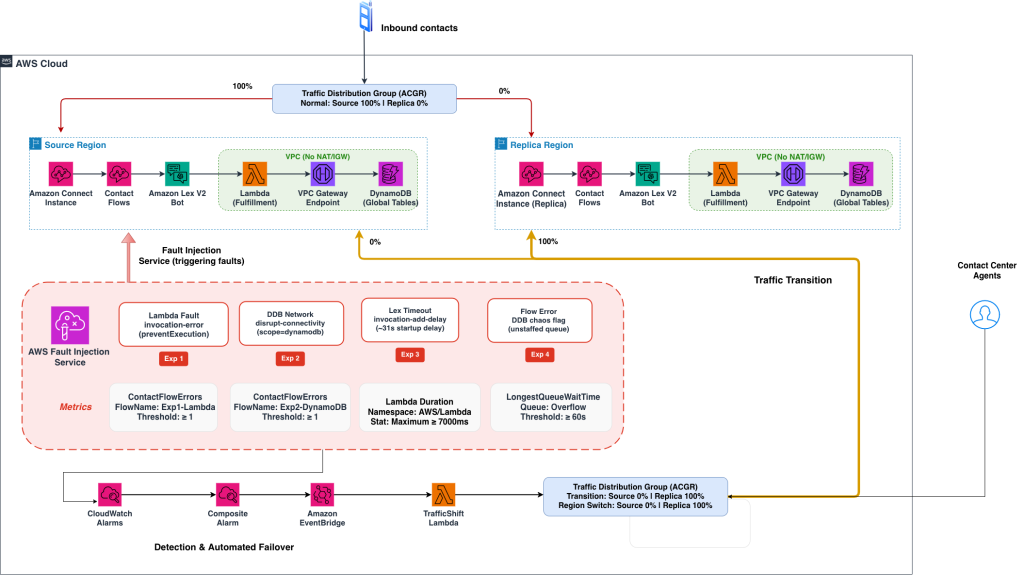
Figure 1: Fault Injection architecture implemented across Global Resiliency.
The architecture demos each fault with a distinct CloudWatch metric, so a fault in any layer is independently observable with the following sequential flow:
- Inbound contacts reach a traffic distribution group managed by Amazon Connect Customer Global Resiliency, normally 100 percent to the source Region and 0 percent to the replica.
- Both Regions run the same components: an Amazon Connect Customer instance with Flows, an Amazon Lex V2 bot, a Lambda function in a VPC, and an Amazon DynamoDB global table.
- Black lines trace the call: Amazon Connect Customer to Amazon Lex, Amazon Lex to the AWS Lambda function, the AWS Lambda function to Amazon DynamoDB.
- AWS Fault Injection Service holds four experiments, each breaking one link: the lookup function fails, the path to DynamoDB is blocked, the Lex code hook is delayed, or a DynamoDB flag sends the caller to a queue with no agents.
- Red lines follow the response: an alarm triggers, a composite alarm triggers an Amazon EventBridge rule, and AWS Lambda function calls UpdateTrafficDistribution to move traffic to the replica Region.
- Grey dashed lines show what stays in sync across Regions: Flows, the Lex bot, and the data.
In many cases, Flows invoke external services during execution. For example, the sample Flow calls an AWS Lambda function that reads from an Amazon DynamoDB table. To ensure DynamoDB data is available in both Regions, the sample uses DynamoDB Global Tables to replicate customer and chaos-configuration data. The sample also uses Amazon Lex Global Resiliency (ALGR) APIs, which replicate your Lex V2 bot from the source Region to the replica Region while preserving the bot ID and alias ID. This capability is available for the us-east-1 to us-west-2 and eu-west-2 to eu-central-1 Region pairs at the time of this blog publish. You can test the sample in the US or EMEA Region pairs. The sample does not support ap-northeast-1 to ap-northeast-3, because Amazon Lex Global Resiliency is not available there.
Please refer to the repo link for the step-by-step deployment instructions and fault simulation.
Flow ARNs use the ACGR runtime parameter $.AwsRegion: This parameter lets each Region resolve its own Lambda function and Amazon Lex bot at runtime, which makes your replica Region self-sufficient.
Each experiment gets its own Flows – ContactFlowErrors carries a ContactFlowName dimension, so a flow per experiment turns one metric into four independent signals. Callers reach a menu flow that announces the serving Region, and the digit you press selects the experiment to run.
The four experiments
| # | Component | FIS action | Alarms on | Services involved |
| 1 | Account-lookup Lambda function | aws:lambda:invocation-error | ContactFlowErrors (Amazon Connect Customer) | Amazon Connect Customer, AWS Lambda, Amazon DynamoDB |
| 2 | DynamoDB reachability | aws:network:disrupt-connectivity | ContactFlowErrors (Amazon Connect Customer) | Amazon Connect Customer, AWS Lambda, Amazon DynamoDB |
| 3 | Amazon Lex code hook | aws:lambda:invocation-add-delay | Duration (AWS Lambda) | Amazon Connect Customer, Amazon Lex V2, AWS Lambda, Amazon DynamoDB |
| 4 | Contact flow configuration | A DynamoDB flag (Custom action) | LongestQueueWaitTime (Amazon Connect Customer) | Amazon Connect Customer, Amazon Lex V2, AWS Lambda, Amazon DynamoDB |
The first three experiments use native FIS actions. The fourth uses a custom mechanism, a flag in DynamoDB to simulate fault injection. The following experiments are described next:
Experiment 1 marks each account-lookup invocation as failed before the code runs. The flow takes its error branch, the caller hears that the lookup service is unavailable, and ContactFlowErrors metric is populated because of the fault simulation.
Experiment 2 blocks both the AWS Lambda subnets from the Amazon DynamoDB endpoint at the network ACL, so the flow’s audit write fails and takes the error branch. There is no arming delay, since the fault is applied at the network level; call as soon as the experiment shows running.
Experiment 3 injects a 31 second delay into the Lex fulfillment Lambda function, so the code hook runs slowly and still returns cleanly. Lambda Duration therefore captures this condition, distinct from the error signals in Experiments 1 and 2. A validated run recorded a Duration of approximately 31 seconds with zero errors.
Experiment 4 lets you exercise your flow’s own failure handling directly. The flow transfers the contact to an overflow queue with no assigned agents, so LongestQueueWaitTime rises deterministically, and you can repeat the experiment without an agent on hand. This is helpful for simulating faults in business logic or rules. You set and clear the flag with a single item write:
# Arm, in the source Region
aws dynamodb put-item --table-name $STACK-Config --region $SOURCE_REGION \
  --item '{"config_key":{"S":"chaos_flag#'$SOURCE_REGION'"},"enabled":{"BOOL":true}}'

# Clear when you have finished
aws dynamodb put-item --table-name $STACK-Config --region $SOURCE_REGION \
  --item '{"config_key":{"S":"chaos_flag#'$SOURCE_REGION'"},"enabled":{"BOOL":false}}'
The flag is scoped per Region, and this is the design point most worth taking away. Because the configuration table is a global table, a single shared key would replicate the fault to your replica Region. Scoping it per Region keeps the fault local to the Region under test.
Regional traffic transition addresses Regional impairment. Configuration you replicate by design will follow your traffic, so keep the state that drives your flows Region-aware when you want a transition to recover it.
The metrics and alarms configured in this sample are only references, and the same can be configured across metrics pertaining to other services as per your requirement.
How a transition executes
The fault simulation populates CloudWatch metrics which, when they exceed the configured threshold (modifiable), raise a composite alarm, which triggers an Amazon EventBridge rule, which in turn invokes your traffic transition function. The function holds for RegionSwitchDelaySeconds, confirms the alarm is still active, and calls UpdateTrafficDistribution. The EnableAutoRegionSwitch parameter deploys that chain. It defaults to false in the template, but the make targets set it to true, so pass ENABLE_AUTO_REGION_SWITCH=false if you do not want it.
Both Regions have the same composite alarm, the same EventBridge rule, and the same TrafficShiftHandler Lambda function. Each Region’s handler shifts traffic away from its own Region, so there is no central controller to become a single point of failure. When a Region’s composite alarm triggers, that Region’s handler runs.
if alarm_state == 'ALARM':
    other_region = REPLICA_REGION if MY_REGION == SOURCE_REGION else SOURCE_REGION
    return shift_traffic(away_from=MY_REGION, towards=other_region)
The function reads the current distribution before acting and returns early when traffic has already moved, so both Regions can alarm at once and still reach the same outcome.
The delay is deliberate. Shifting a contact center’s telephony is not free, so the function holds, then re-checks that the alarm is still active before it acts, which filters out a transient blip. Each FIS experiment’s own alarm is also its stop condition, so in Experiments 1 to 3 FIS ends the fault at about the moment the alarm fires; place your test call while the fault is active. In Experiment 4 the flag stays set until you clear it. Recovery stays in your hands, so you can confirm the condition is resolved before customers return.
Experiments 1 and 3 need time to arm
Experiments 1 and 3 apply their fault through the FIS Lambda function extension, which reads its configuration from Amazon S3. Allow about a minute after starting either one, then place your call.
The sample sets two environment variables on the instrumented functions, so the extension collects that configuration promptly: AWS_FIS_POLL_MAX_WAIT_MILLISECONDS to 3000, and AWS_FIS_SLOW_POLL_INTERVAL_SECONDS to 20. Both are worth carrying into your own implementation.
Walkthrough
The repository provides make targets for each stage, and its README and runbook carry the expected output and verification steps for each. Clone the repository and set the values the targets need.
git clone https://github.com/aws-samples/sample-chaos-engineering-in-amazon-connect-customer-global-resiliency && cd sample-chaos-engineering-in-amazon-connect-customer-global-resiliency

export STACK=connect-chaos-sample
export SOURCE_REGION=us-east-1
export REPLICA_REGION=us-west-2
export ACCT=$(aws sts get-caller-identity --query Account --output text)
export INSTANCE_ID=<your-connect-instance-id>
export TDG_ID=<your-traffic-distribution-group-id>

export SOURCE_INSTANCE_ARN=arn:aws:connect:$SOURCE_REGION:$ACCT:instance/$INSTANCE_ID
export REPLICA_INSTANCE_ARN=arn:aws:connect:$REPLICA_REGION:$ACCT:instance/$INSTANCE_ID
Step 1 – Deploy both Regions:
make deploy-pair command creates the code bucket, packages the Lambda functions, deploys the source Region, reads the Amazon Lex bot and alias IDs from its outputs, and deploys the replica Region with those IDs. An IsSourceRegion condition manages what belongs where. Keep both stacks in place, since your replica Region serves calls using its own functions.
make deploy-pair STACK=$STACK \
   SOURCE_REGION=$SOURCE_REGION REPLICA_REGION=$REPLICA_REGION \
   SOURCE_INSTANCE_ARN=$SOURCE_INSTANCE_ARN \
   REPLICA_INSTANCE_ARN=$REPLICA_INSTANCE_ARN \
   TDG_ID=$TDG_ID ENABLE_AUTO_REGION_SWITCH=true
ENABLE_AUTO_REGION_SWITCH set to true deploys the EventBridge rule and the transition function. ENABLE_LEX_GR and ENABLE_TRAFFIC_GEN also default to true in the makefile. Set ENABLE_TRAFFIC_GEN to false for a smaller stack.
Step 2 – Complete the steps that need live state:
make post-deploy command seeds the tables, associates your phone number with the menu flow, and sets the traffic distribution to the source Region. Associating the number is what connects a caller to the flow, so run this before placing a call.
make post-deploy STACK=$STACK \
   SOURCE_REGION=$SOURCE_REGION REPLICA_REGION=$REPLICA_REGION \
   INSTANCE_ID=$INSTANCE_ID TDG_ID=$TDG_ID
Step 3 – Verify:
make verify command runs 29 checks across both Regions, covering stack status, Amazon Lex bot and alias replication, the $.AwsRegion tokens in every flow, seed data, the traffic distribution and the alarms.
make verify STACK=$STACK \
   SOURCE_REGION=$SOURCE_REGION REPLICA_REGION=$REPLICA_REGION TDG_ID=$TDG_ID
Step 4 – Place a baseline call:
Dial your number, press 1, key the seeded account number 12345, and press #. This confirms your environment is ready.
The template also deploys an optional traffic generator, controlled by EnableTrafficGenerator. Invoke it with a mode and fault_type payload and it publishes synthetic CloudWatch metrics, which lets you validate the alarm, EventBridge, and traffic-shift path without a phone. It bypasses the call path itself, so a live call remains the real proof.
Step 5 – Run an experiment:
Read the experiment template IDs from the stack outputs.
get_out () { aws cloudformation describe-stacks --stack-name $STACK --region "$1" \
   --query "Stacks[0].Outputs[?OutputKey=='$2'].OutputValue" --output text; }
Export the variables obtained from the previous output.
export EXP1=$(get_out $SOURCE_REGION FISExperiment1)   # Lambda invocation error
export EXP2=$(get_out $SOURCE_REGION FISExperiment2)   # DynamoDB network disruption
export EXP3=$(get_out $SOURCE_REGION FISExperiment3)   # Lex code hook latency
It is recommended to begin with Experiment 2, since it has no arming delay, and then proceed to other experiments (or you can start with experiments of your preference).
aws fis start-experiment --experiment-template-id $EXP2 --region $SOURCE_REGIONMake a test call and press 2 to hear the failure prompt. Traffic moves after the configured delay. Call once more and press the same digit: that call is served by your replica Region, which confirms the flow you exercised in the source Region now works in the replica. For Experiments 1 and 3, allow about a minute after starting before you call.
Step 6 – Reset between experiments:
make reset returns traffic to the source Region, stops any running experiment, clears the Experiment 4 flag in both Regions, and waits for the alarms to settle.
make reset STACK=$STACK \
   SOURCE_REGION=$SOURCE_REGION REPLICA_REGION=$REPLICA_REGION TDG_ID=$TDG_ID
Running it between experiments keeps each result independent and gives FIS the clear alarm state it needs for the next one. FIS allows five active experiments per Region, a fixed quota. Stopping each run when you have finished with it keeps room for the rest of your testing.
Monitoring
The sample creates a CloudWatch dashboard per Region, ConnectChaos-{region}. Four panels carry the signal each experiment is alarmed on:
- ContactFlowErrors on the Experiment 1 flow (Amazon Connect Customer)
- ContactFlowErrors on the Experiment 2 flow (Amazon Connect Customer)
- Duration on the Amazon Lex fulfillment function (AWS Lambda fulfillment function)
- LongestQueueWaitTime on the overflow queue (Amazon Connect Customer)
Choose regional or unified with the DashboardType parameter.
Each alarm threshold is a template parameter, and the defaults suit demonstration rather than steady-state monitoring. ContactFlowErrorsThreshold defaults to 0, so one flow error trips the alarm and a single test call drives the full chain. LexCodeHookLatencyThresholdMs defaults to 7000, above normal fulfillment and below the injected delay. Raise both for production.
Clean up
Empty the FIS configuration buckets, then delete the replica Region’s stack followed by the source Region’s, since the global tables belong to the source stack.
Cost
Running the full set of four experiments costs a few dollars. AWS FIS is billed at $0.10 per action-minute, so the three FIS-driven experiments at the default five-minute duration come to at most about $1.50 per pass, because each experiment stops early when its alarm fires. Amazon Connect Customer telephony, Amazon Lex V2 requests, AWS Lambda function invocations, and CloudWatch alarms account for the rest. Between runs, the standing charges are your phone number, which bills daily whether you call or not, the CloudWatch alarms and dashboards, and DynamoDB global table storage. Rates vary by Region, so check the pricing pages for yours.
Conclusion
This sample provides a structured, repeatable mechanism to verify that your ACGR-enabled Amazon Connect Customer instance can successfully shift traffic to the alternate Region on demand. By associating each component with a distinct CloudWatch metric and using AWS FIS or having custom flags/scripts to simulate faults you exercise the full detection-to-traffic-shift chain through ACGR’s UpdateTrafficDistribution API.
Two ideas carry beyond the sample. Confirm what your metrics emit on the channel you serve, because the metric that best captures a condition is sometimes a layer away from where you expect it. And keep the state that drives your flows Region-aware, so a transition recovers the customer experience along with the traffic.
The pattern is reusable. You can add experiments for other dependencies, configure additional metrics, or extend the TrafficShiftHandler Lambda with auto-recovery logic that returns traffic to the source Region when alarms clear. The same building blocks, FIS templates, distinct alarms, a composite alarm, EventBridge, and a per-Region traffic-shift Lambda, apply to any ACGR-enabled Amazon Connect Customer deployment you want to validate.
Additional Resources
- Amazon Connect Customer Global Resiliency Documentation
- Amazon Connect Customer Global Resiliency Workshop
- Amazon Connect Customer API Reference — Traffic Distribution
About the authors
 |
Pallavi Bhat is a Solutions Architect at Amazon Web Services based in Bengaluru, India. With over five years of experience in the industry, she specializes in serverless architectures, Amazon Connect Customer, and Generative AI, helping customers design and implement intelligent, scalable solutions. She is passionate about building AI-powered customer experience solutions. Outside of work, she enjoys dancing, reading books, and exploring new topics — a curiosity that fuels her approach to solving complex technical challenges. |
 |
Nideesh KT is an experienced IT professional with expertise in cloud computing, AI, and technical support. Nideesh has been working in the technology industry for 10 years. In his current role as a Sr. Technical Account Manager, Nideesh provides technical assistance and architects cloud and AI-driven applications for Enterprise customers. Outside of work, Nideesh enjoys staying active by going to the gym, playing sports, and spending time outdoors. |
 |
Abilashkumar P C is a Senior Specialist Solutions Architect at AWS having over 8 years of experience focusing on Applied AI, and CXE based out of London. He works with customers to design and build resilient conversational AI focused on achieving business outcomes. Outside of work, he likes driving and hiking. |
 |
Naveen Narayan is a Principal Worldwide Specialist Solutions Architect at AWS, focused on Amazon Connect Customer and applied AI for the contact center. With nearly three decades in the contact center industry, he works with enterprise customers to design resilient, AI-driven customer experience solutions using Amazon Connect Customer’s workforce optimization, global resiliency, and agentic AI capabilities. |
 |
Manoj Srinivas is a Product Manager at Amazon Web Services based in Seattle, WA. He drives development of Amazon Connect Customer Global Resiliency, the capability that lets enterprises run Amazon Connect Customer seamlessly across AWS Regions for business continuity and compliance. Outside of work, he loves to travel and play soccer. |