AWS Database Blog
Automated blocking and query alerts for Amazon RDS for SQL Server
In this post, we show you how to build automated alerts for blocking and long-running queries on Amazon Relational Database Service (Amazon RDS) for SQL Server. Without automated monitoring, these conditions can lead to application timeouts, degraded performance, and user-facing errors before anyone notices.
On Amazon RDS for SQL Server, you can use SQL Server Agent for scheduling jobs, but it doesn’t natively publish to Amazon CloudWatch or Amazon Simple Email Service (Amazon SES). You can query Dynamic Management Views (DMVs), which expose SQL Server performance and state information, to detect blocking, but without a scheduled mechanism, you must manually run these checks. Manual monitoring through SQL Server Management Studio or third-party tools adds licensing cost and operational overhead.
We walk you through building a serverless monitoring solution using AWS Lambda, Amazon CloudWatch, and Amazon SES. It detects sessions blocked beyond a configurable threshold (for example, 60 seconds) and queries running longer than expected (for example, 300 seconds). When the Lambda function detects either condition, it sends an HTML-formatted email alert containing session IDs, root blocker identification, query text, and wait times. Because the function runs on a one-minute schedule, we set the blocking threshold to 60 seconds so that it aligns with the polling interval. For more information, see the note in Step 6.
After completing this walkthrough, you will understand how SQL Server blocking chains propagate through the blocking_session_id column in sys.dm_exec_requests. You will also learn how a recursive Common Table Expression (CTE) traces the root cause of a blocking chain. Finally, you will simulate both scenarios for end-to-end validation.
Understanding blocking and long-running queries
Blocking in SQL Server occurs when one session acquires a lock on a resource (such as a row or page) and another session requests a conflicting lock on the same resource. The second session waits until the first session releases the lock through a COMMIT, ROLLBACK, or timeout. You can observe this relationship in sys.dm_exec_requests: blocked sessions have a non-zero blocking_session_id value that points to the session keeping the lock. The wait_time column shows how long the session has been waiting, in milliseconds.
In production environments, blocking often forms chains. One session blocks a second, and that second session blocks a third. To identify the root cause, you trace the chain back to the session that started it, the root blocker. This solution uses a recursive CTE that walks the blocking_session_id chain until it finds the session at the root of the blocking chain (blocking_session_id = 0).
Long-running queries are sessions that have been running beyond a normal duration threshold. The total_elapsed_time column in sys.dm_exec_requests tracks how long each request has been running. To avoid false positives from SQL Server internal activity, the detection query filters on the is_user_process column in sys.dm_exec_sessions so that only user sessions are considered. It also excludes background commands such as CDC_SCAN, BRKR TASK, and GHOST CLEANUP by comparing the command column against a known list of system commands.
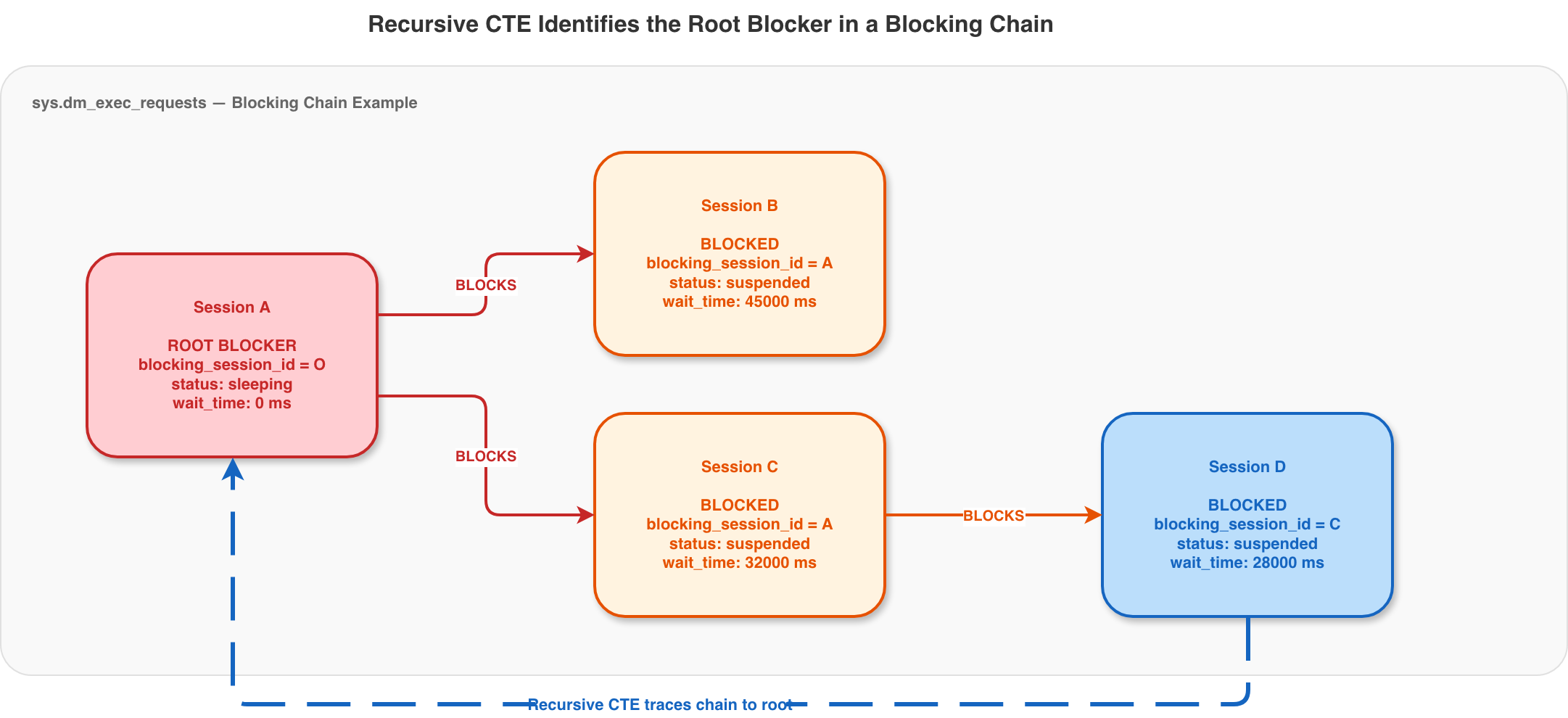
Figure 1: Recursive CTE identifies the root blocker in a blocking chain
Key DMVs for detection
| DMV | Purpose | Key columns |
sys.dm_exec_requests |
Active requests with blocking info | session_id, blocking_session_id, wait_time, total_elapsed_time |
sys.dm_exec_sessions |
Session details | login_name, host_name, is_user_process |
sys.dm_exec_connections |
Connection SQL handles | most_recent_sql_handle |
sys.dm_exec_sql_text() |
Query text from handle | text |
Solution overview
This solution helps you monitor blocking in real time using four AWS services working together. Amazon EventBridge triggers an AWS Lambda function every 60 seconds. The Lambda function connects to your Amazon RDS for SQL Server instance using the pytds library. It queries DMVs for blocking and long-running sessions. It then pushes custom metrics to Amazon CloudWatch. When it detects issues, it sends HTML-formatted email alerts through Amazon SES.
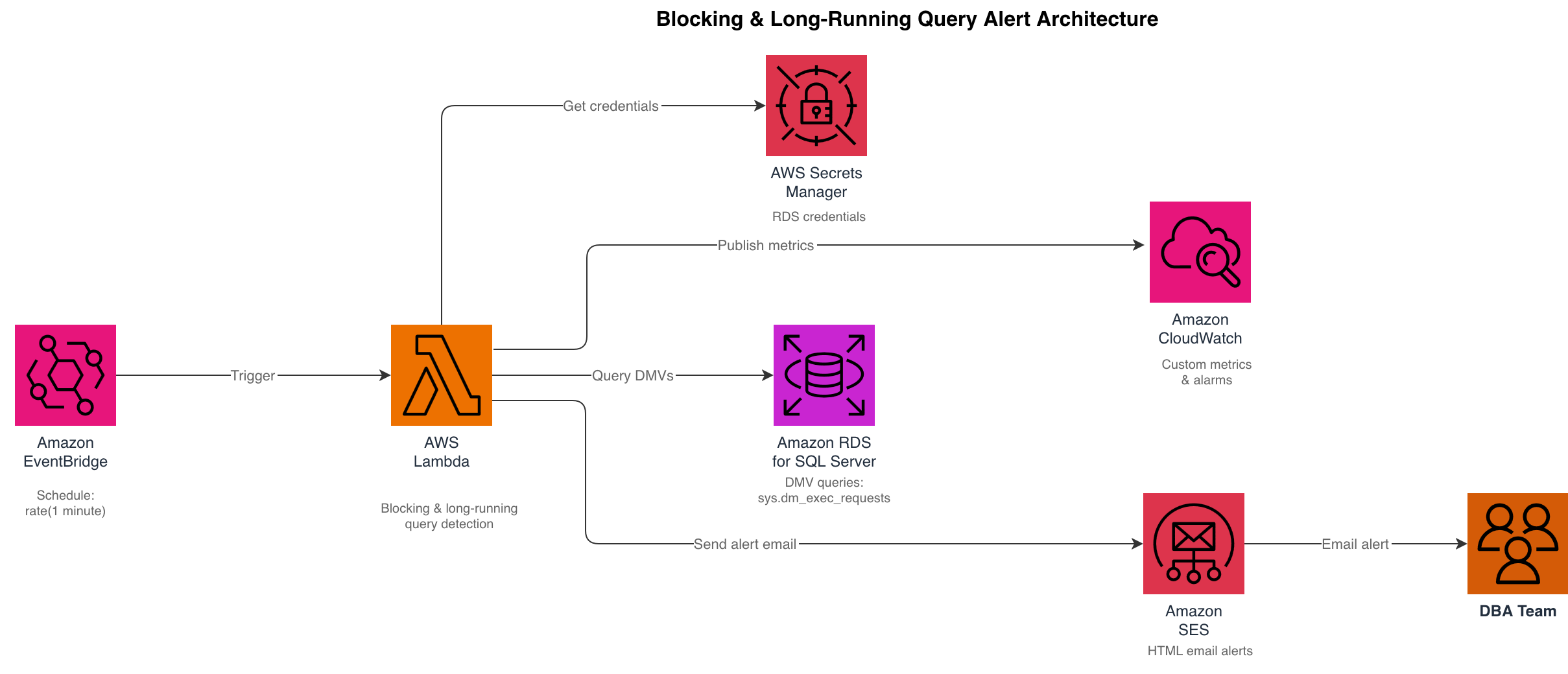
Figure 2: Blocking and long-running query alert architecture
Prerequisites
Before you begin, verify that you have the following resources configured in your AWS account:
- An Amazon RDS for SQL Server instance (Standard or Enterprise Edition, version 2016 or later).
- A virtual private cloud (VPC) with private subnets that route to a NAT gateway (required for Lambda to reach AWS services).
- A security group that allows the Lambda function to connect to the RDS instance on port 1433.
- An AWS Secrets Manager secret containing the monitoring user’s RDS credentials as JSON ({“username”:“…”,“password”:“…”}). This is separate from the default RDS-managed master-user secret, because the solution connects as the dedicated least-privilege user created in Step 1 rather than the master user.
- Amazon SES with verified sender and recipient email addresses.
- Python 3.12 Lambda runtime with the python-tds (pytds) library packaged in the deployment ZIP.
Choosing pytds as the SQL Server library
The pytds library simplifies your deployment by requiring no C extensions or ODBC driver installation. You can deploy directly on AWS Lambda without additional layers or custom builds. The package size is approximately 89 KB.
Step 1: Create a dedicated monitoring user
As a security best practice, do not connect with the master user. Instead, use a dedicated monitoring user that has only the minimum permissions required to run the T-SQL queries in this solution. You can also reuse an existing least-privilege user that already has those permissions. The Lambda function only reads Dynamic Management Views (DMVs), so it doesn’t require administrative rights.
Connect to your Amazon RDS for SQL Server instance with the master user and run the following T-SQL to create the monitoring user and grant the exact permissions it needs. With VIEW SERVER STATE, the user can read sys.dm_exec_requests, sys.dm_exec_sessions, and sys.dm_exec_connections. With VIEW ANY DEFINITION, sys.dm_exec_sql_text() can return the query text.
These two permissions are the only ones this solution needs. If you prefer to reuse an existing user, grant that user the same two permissions. Use the monitoring user’s credentials in the next step when you create the Secrets Manager secret.
Step 2: Store credentials in AWS Secrets Manager
Store the monitoring user’s SQL Server credentials securely so the Lambda function can retrieve them at runtime without embedding passwords in environment variables or source code. Rather than passing the secret value inline on the command line, which can expose it through shell history, the process list, and logs, place the credentials in a local file and reference it with the file:// prefix. Delete the file after the secret is created.
Step 3: Verify email addresses in Amazon SES
Verify both the sender and recipient email addresses. Verify both addresses before you send email if your Amazon SES account is in sandbox mode.
Step 4: Create the Lambda function
The Lambda function performs two checks on each invocation:
- A recursive CTE query that identifies blocked sessions and traces each blocking chain back to the root blocker.
- A query for user sessions running longer than the configured threshold, excluding SQL Server internal background processes.
Important:
The complete Lambda function code, including the blocking detection CTE and long-running query detection, is available in the accompanying GitHub repository. The repository also includes infrastructure as code (IaC) templates for deploying the full solution.
The function uses the following key components:
get_credentials()– Retrieves RDS credentials from AWS Secrets Manager.- Blocking detection – A recursive CTE that walks the
blocking_session_idchain to find the root blocker. - Long-running detection – Queries
sys.dm_exec_requestsfiltering bytotal_elapsed_time, restricts results to user sessions by using theis_user_processcolumn insys.dm_exec_sessions, and excludes system background commands (CDC_SCAN,BRKR TASK,GHOST CLEANUP,CHECKPOINT, and other internal tasks) by filtering thecommandcolumn. - CloudWatch metrics – Publishes
BlockedSessionCountandLongRunningQueryCountcustom metrics. - SES alerts – Sends HTML-formatted email with session details in a readable table.
Environment variables
| Variable | Description | Example |
RDS_ENDPOINT |
Amazon RDS instance endpoint | mydb.abc123.eu-west-2.rds.amazonaws.com |
RDS_SECRET_ARN |
AWS Secrets Manager secret ARN | arn:aws:secretsmanager:eu-west-2:123456:secret:rds-creds |
BLOCKING_THRESHOLD_SECONDS |
Blocking alert threshold | 60 |
LONG_RUNNING_THRESHOLD_SECONDS |
Long-running query threshold | 300 |
DB_IDENTIFIER |
RDS instance ID | my-rds-instance |
SES_SENDER |
Verified Amazon SES sender | alerts@example.com |
SES_RECIPIENT |
Alert recipient email | dba@example.com |
Deploy the function
Package the Lambda function with the pytds dependency and deploy it to the same VPC as your RDS instance. The subnets require a NAT gateway route for the function to access AWS Secrets Manager, Amazon CloudWatch, and Amazon SES. See the GitHub repository for detailed deployment instructions.
Step 5: Create the Amazon EventBridge schedule
Schedule the Lambda function to run every minute using Amazon EventBridge. Because the function polls once per minute, it takes a point-in-time sample of blocking and long-running sessions rather than monitoring continuously.
Step 6: Create Amazon CloudWatch alarms
Create alarms that transition to ALARM state when the custom metrics exceed zero. The Lambda function publishes two custom metrics, BlockedSessionCount and LongRunningQueryCount, so create one alarm for each. These alarms give you visibility in the CloudWatch console. You can also use them to trigger additional notifications, such as sending alerts to an Amazon Simple Notification Service (Amazon SNS) topic or invoking a remediation Lambda function. The Lambda function also sends email notifications directly through Amazon SES for either condition, so the alarms provide the console view and an optional hook for Amazon SNS or automated remediation.
Next, create the alarm for the long-running query metric.
Note: This solution polls once per minute, so it detects blocking as a point-in-time sample rather than continuously. With the blocking threshold set to 60 seconds to match the one-minute schedule, the function alerts on blocking that is still active and has been waiting for at least 60 seconds when the check runs. You can still use a shorter threshold, such as 30 seconds. However, the one-minute poll might miss two cases: a blocking episode that starts and fully resolves between two invocations, or one whose wait time falls between the threshold and the next poll.
Step 7: Simulate and test
To validate the full alert pipeline, simulate both a long-running query and a blocking scenario on a user database.
Testing long-running queries
Run a resource-intensive cross-join query on your database. The cross-join produces millions of row combinations, causing the query to run well over the configured threshold.
Testing blocking detection
Open two SQL Server Management Studio sessions. In Session 1, start a transaction that acquires exclusive locks without committing. In Session 2, run a query that needs to read the same rows.
After approximately 60 seconds, the Lambda function detects the blocking, identifies Session 1 as the root blocker, and sends you an HTML email. Release the lock by running ROLLBACK TRANSACTION; in Session 1.
Cost estimate
The following table estimates the monthly cost for this solution. The estimate includes both resource costs and API call costs for each service.
| Service | Usage | Monthly cost (USD) |
| AWS Lambda | 43,200 invocations (1/min), 256 MB, ~5 s each | ~$0.50 |
| Amazon CloudWatch | 3 custom metrics + 43,200 PutMetricData API calls | ~$1.20 |
| Amazon CloudWatch Alarms | 2 alarms | ~$0.20 |
| Amazon EventBridge | 43,200 invocations | ~$0.04 |
| Amazon SES | Email alerts (on demand, ~$0.10/1000 email messages) | ~$0.01 |
| AWS Secrets Manager | 1 secret ($0.40) + 43,200 GetSecretValue API calls ($0.22) | ~$0.62 |
| Total | ~$2.57/month |
Note: The Secrets Manager cost includes both the per-secret charge ($0.40/month) and API usage ($0.05 per 10,000 API calls × 43,200 calls = ~$0.22/month). Cost optimization tip: Cache credentials using the AWS Parameters and Secrets Lambda Extension to reduce Secrets Manager API costs by up to 90 percent.
Clean up
To avoid ongoing charges, delete the resources created during this walkthrough. The following commands remove the Lambda function, Amazon EventBridge rule, CloudWatch alarms, and Secrets Manager secret:
Conclusion
In this post, we showed you how to build a serverless monitoring solution that checks your Amazon RDS for SQL Server instance every minute for blocking and long-running queries. The solution identifies the root blocker in blocking chains and excludes system background processes to avoid false positives. It delivers HTML-formatted email alerts with session details in a readable table format. The total operating cost is approximately $2.57 per month.
To extend this solution, consider adding multiple recipients in Amazon SES, creating an Amazon CloudWatch dashboard to visualize blocking trends over time, or setting up Amazon SNS topics to deliver alerts to your preferred notification channels. The complete solution code and IaC templates are available in the GitHub repository.