AWS Database Blog
Best practices and architecture patterns for cross-account sharing in Oracle Database@AWS
Oracle Database@AWS (ODB@AWS) is an offering that enables you to access Oracle Exadata infrastructure managed by Oracle Cloud Infrastructure (OCI) inside Amazon Web Services (AWS) data centers, giving you a unified experience between Oracle Cloud Infrastructure (OCI) and AWS. This simplifies the migration of Oracle Exadata workloads to the AWS Cloud while maintaining full feature availability, architectural compatibility, and the same performance as on-premises deployments.
Currently Oracle Database@AWS offers the following OCI services:
- Oracle Exadata Database Service on Dedicated Infrastructure (ExaDB-D)
- Oracle Autonomous AI Database on Dedicated Exadata Infrastructure (ADB-D)
- Oracle Database Autonomous Recovery Service (ARS)
Oracle Database@AWS offers multiple ways to define an operational model for running Oracle databases across business units, while improving lifecycle management and governance of your environments. In this post, we walk through the available options for sharing Oracle Database@AWS (ODB@AWS) resources across AWS accounts. We also cover common cross-account architecture patterns, along with best practices and key considerations. This helps you design your ODB@AWS architecture across your AWS accounts efficiently. For a quick refresher on the core terms used throughout this post, refer to the core concepts section at the end of this post.
Cross-account resource sharing and deployment options
Part 1: Resource sharing options
Following are the high-level approaches available for sharing ODB@AWS resources and Marketplace subscription across accounts within the same organization.
- Resource sharing with AWS Resource Access Manager (AWS RAM).
AWS Resource Access Manager (AWS RAM) sharing allows you to share Exadata infrastructure and ODB network resources across multiple AWS accounts within the same AWS organization.
- AWS Marketplace Entitlement sharing with AWS License Manager for sharing the subscription with other accounts.
Entitlement sharing enables the buyer account (grantor account) to share entitlement of Oracle Database@AWS to multiple AWS accounts (grantee accounts) within the same AWS organization. Each grantor or grantee account provisions and operates ODB@AWS within its own AWS account, maintaining isolated networking, security boundaries, and operational control while using a centrally managed subscription.
Part 2: Resource sharing deployment patterns (resource modeling)
Following are common architecture patterns you can use when modeling and deploying resources across single or multiple AWS accounts within the same organization:
- Single-account (buyer account–only) deployment
- Cross-account resource sharing of Exadata infrastructure or the ODB network
- Cross-account subscription sharing to isolate resources
- Cross-account hybrid model combining subscription and resource sharing
- Cross-account hybrid model – Grantee account to do the RAM sharing
- Cross-account hybrid model – Account as both Trusted and Grantee account
Resource sharing with AWS Resource Access Manager (AWS RAM)
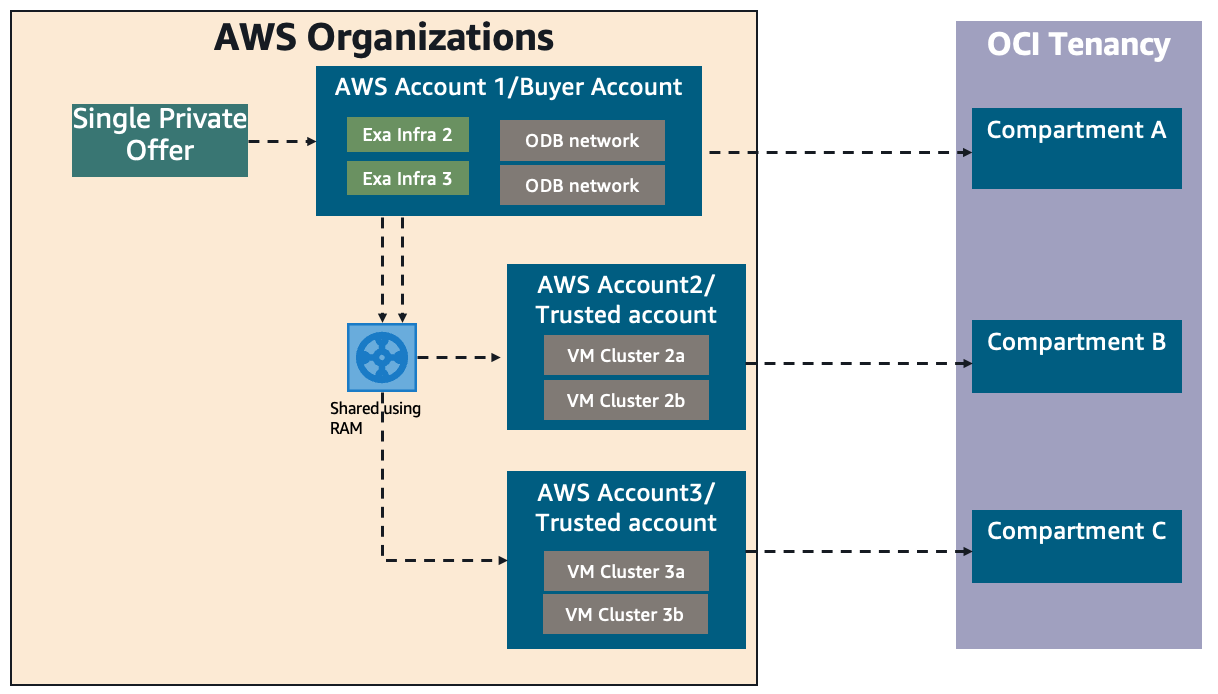
Oracle Database@AWS uses AWS Resource Access Manager (AWS RAM) to enable secure, controlled resource sharing. This is valuable for organizations looking to optimize their Oracle database infrastructure costs while maintaining governance and security boundaries across different teams or business units. With this option, the AWS buyer account can share provisioned Exadata infrastructure or ODB network with other AWS trusted accounts. Trusted accounts can create a VM cluster or an Autonomous VM cluster along with CDB/PDBs in their own accounts. Trusted accounts cannot create Exadata infrastructure or an ODB network. Trusted accounts can create a transit Amazon Virtual Private Cloud (Amazon VPC )and peer with the shared ODB network.In the following architecture pattern, buyer account provisioned both ODB network and Exadata infrastructure and shared with trusted account 1 and 2. Trusted accounts can create VM clusters on top of the shared infrastructure and peer with application VPCs.
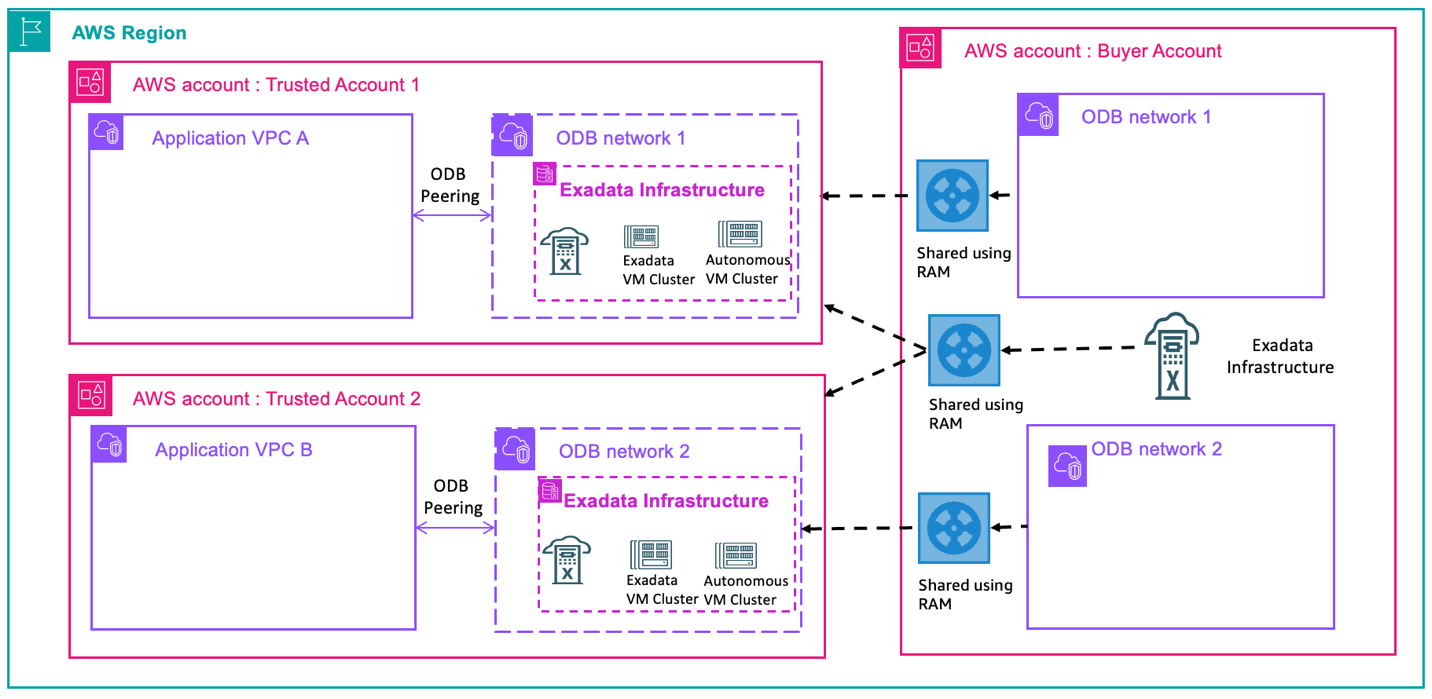
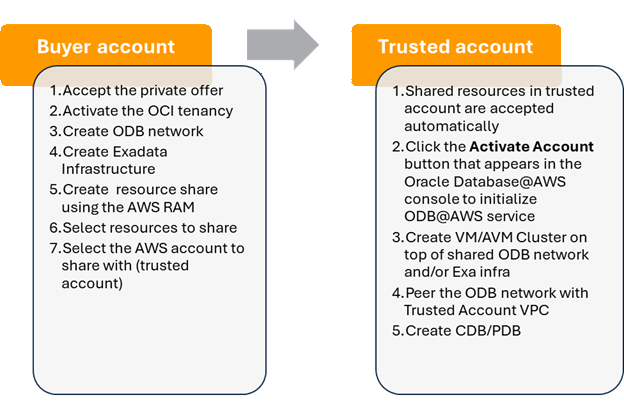
Following are the steps to enable resource sharing between a buyer account and a trusted account.
Marketplace entitlement sharing with AWS License Manager
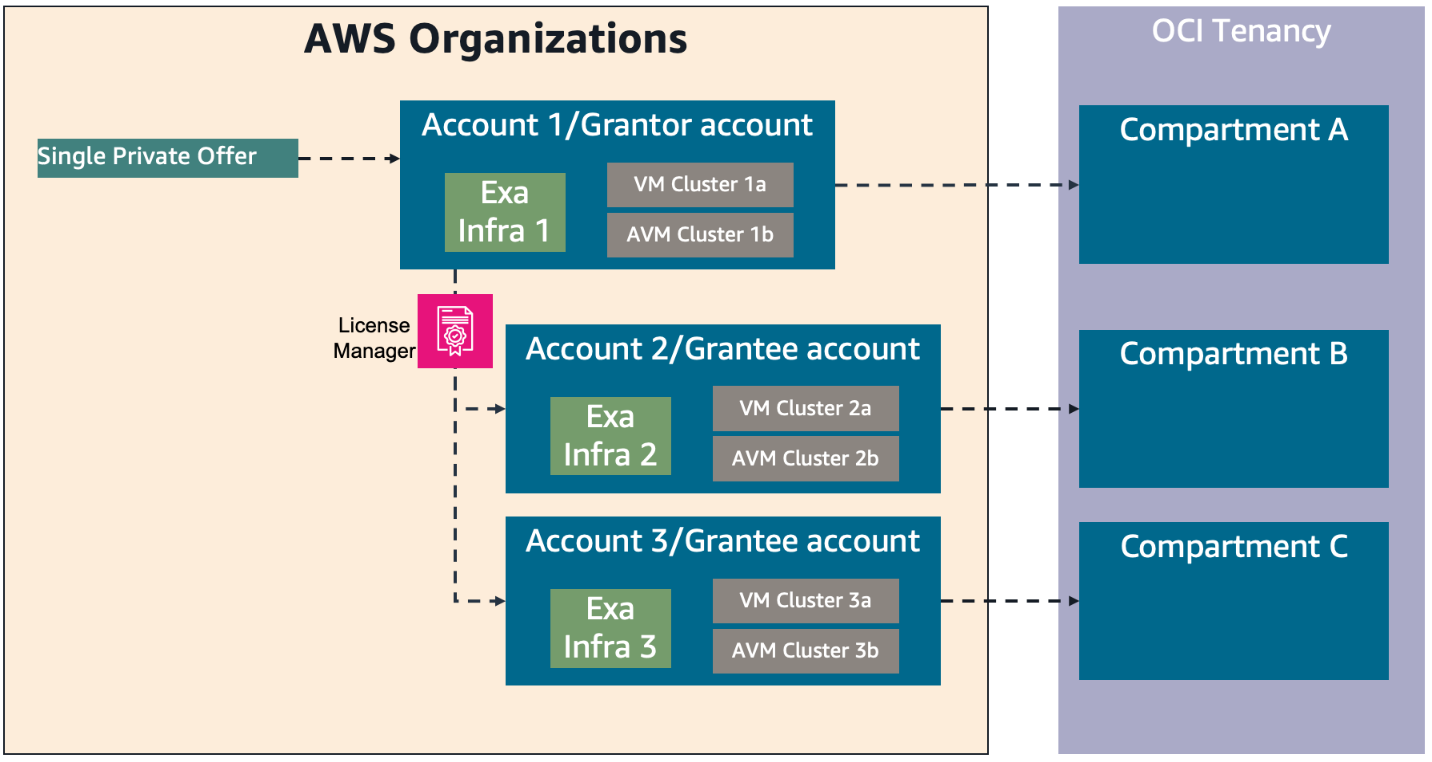
The AWS Marketplace seller private offer feature enables you to request and receive Oracle Database@AWS pricing and EULA terms from Oracle. Refer to the onboarding section for step-by-step instructions on how to request and purchase ODB@AWS in AWS Marketplace. With the Marketplace entitlement sharing option, you can share Oracle Database@AWS subscription and entitlement across AWS accounts in the same AWS organization. The buyer (grantor) AWS account shares the entitlement to grantee AWS accounts through AWS License Manager. The grantee accounts then provision their own ODB network, Exadata infrastructure, VM cluster, Autonomous VM cluster, and databases in their own accounts.
In the following architecture diagram, grantor or buyer account shares the entitlement with grantee accounts 1 and 2 which enables the grantee accounts to create their own ODB network and Exadata infrastructure.
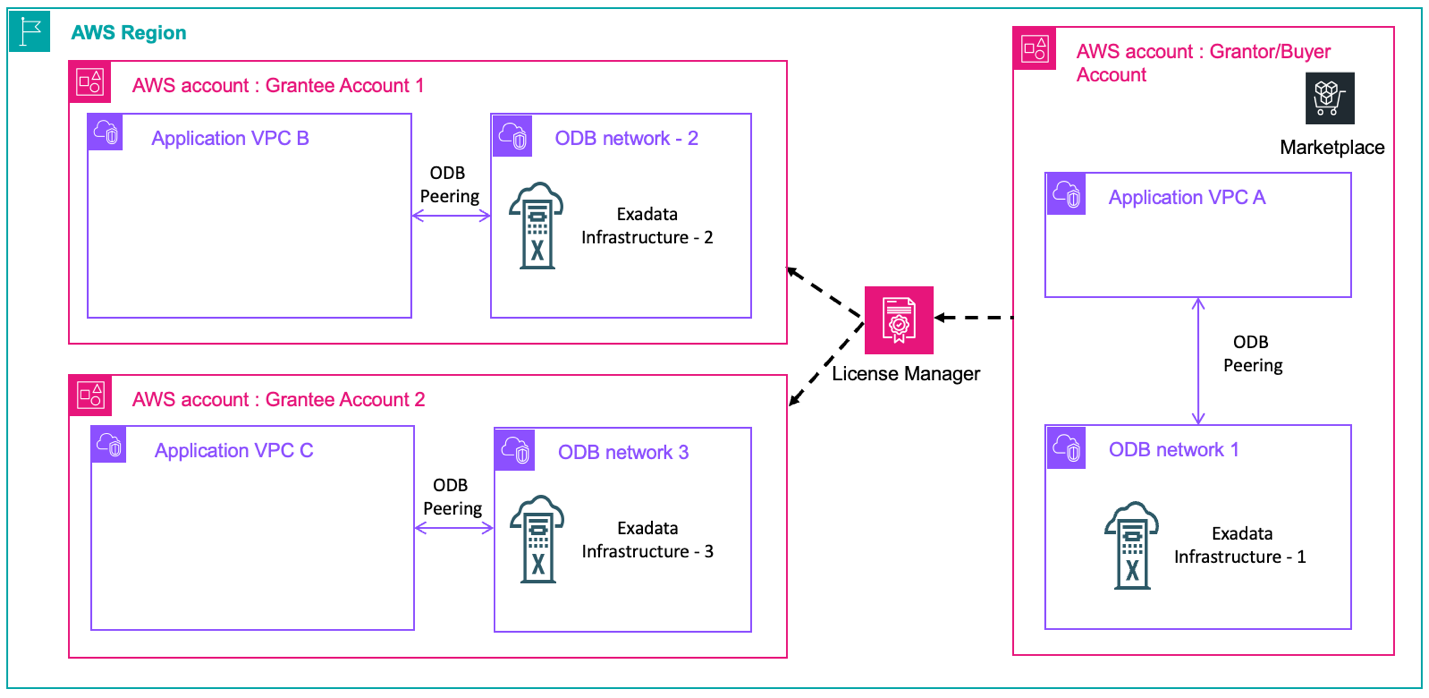
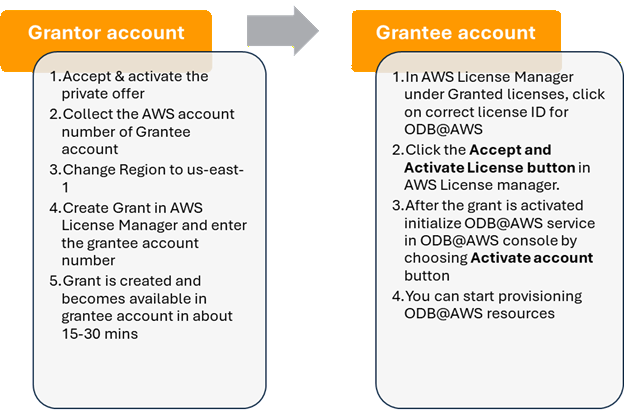
Following are the steps to enable entitlement sharing between grantor account and grantee account
Resource modeling use cases
- Single account/buyer account only deployment
In this case, you can deploy Oracle Database@AWS resources in a single AWS account. As part of this multicloud link configuration, each AWS account has a dedicated compartment inside the linked OCI tenancy. The buyer account can deploy their choice of the Oracle Database@AWS services.
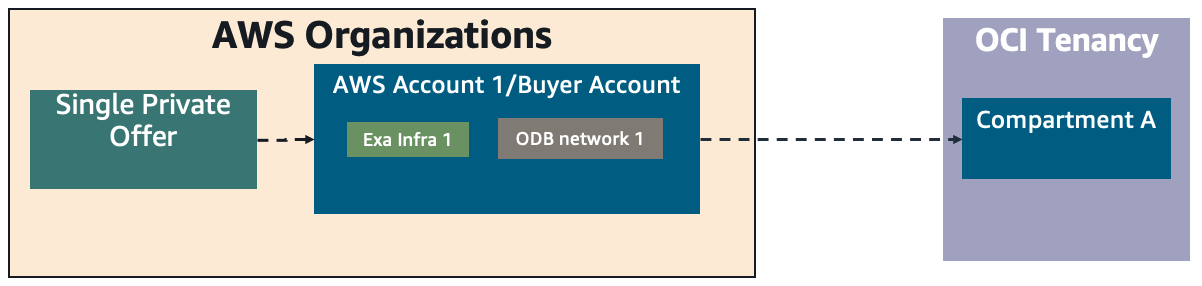
In the following architecture patterns, ODB@AWS resources including ODB network, Exadata infrastructure, VM cluster, and databases are deployed and owned by the buyer account that accepted the Marketplace offer. In Figure 1, the applications that connect to the Oracle database are in multiple VPCs in the same account and are directly peered using ODB peering.
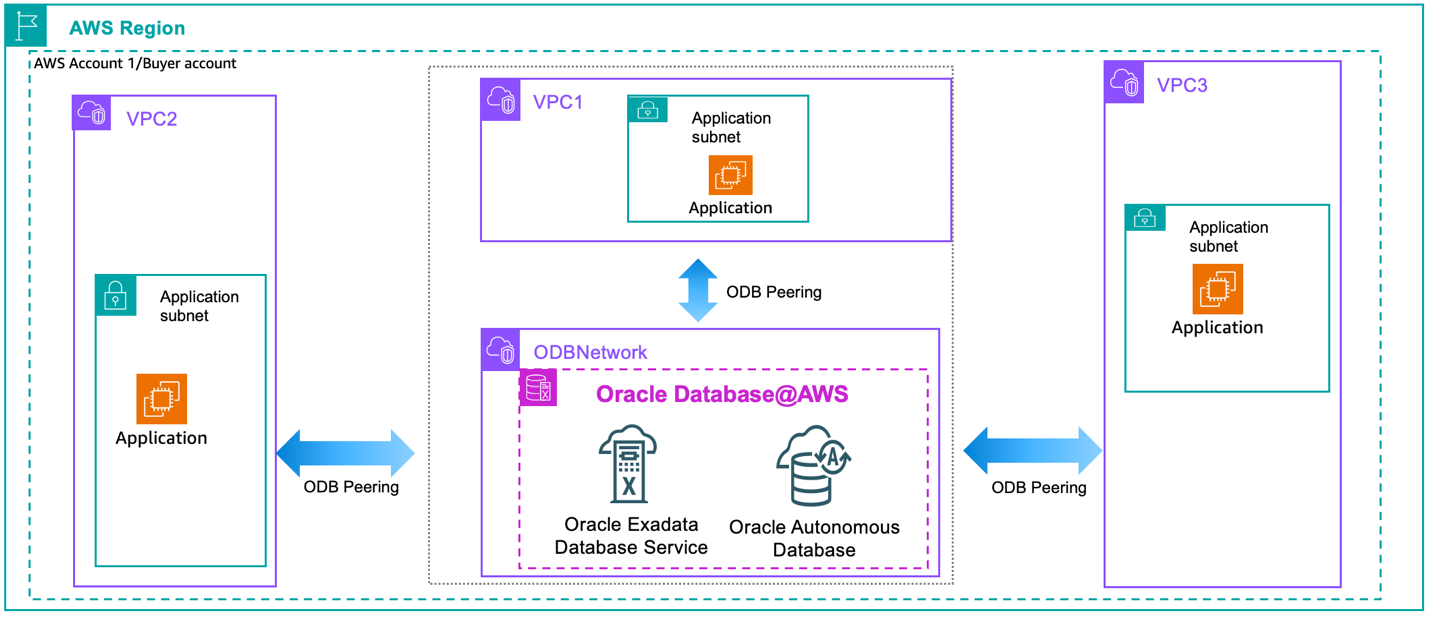
Figure 1: Direct ODB peering with multiple application VPCs in the same account
In the following architecture diagram, applications that connect to the Oracle database follow the hub and spoke architecture through AWS Transit Gateway for connectivity. Architectures shown in Figure 1 and Figure 2 are the simplest patterns for use cases where applications, databases, and ODB@AWS Marketplace offer are in a single account.
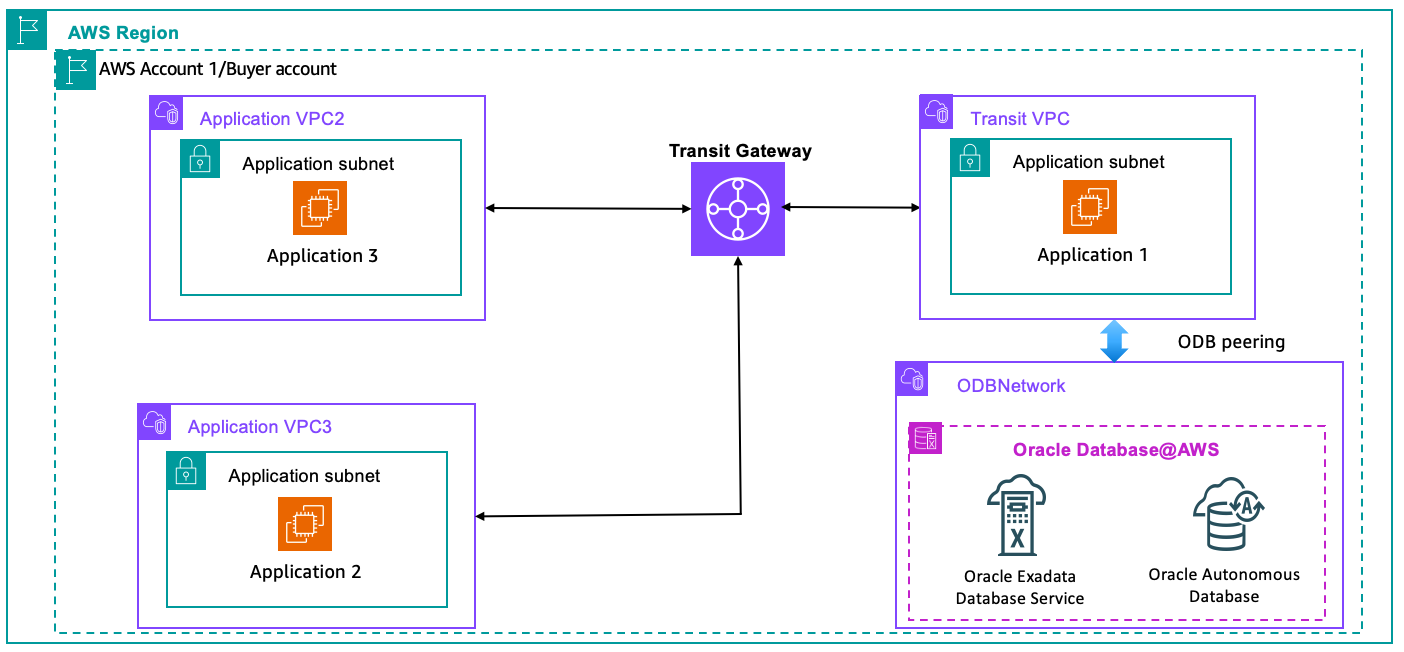
Figure 2: Connectivity from multiple VPCs to ODB@AWS through Transit Gateway in the same account
- Cross-account sharing of Exadata infrastructure or ODB network
This pattern helps you share Exadata infrastructure and ODB network across multiple AWS accounts using AWS RAM. Each trusted AWS account can have a dedicated VM cluster or AVM cluster to deploy their databases. A single Exadata infrastructure or ODB network can be shared with multiple AWS trusted accounts. This helps you reduce costs by sharing Exadata infrastructure across multiple lines of business or teams. As shown in the following diagram, the buyer AWS account (Account 1) is linked to the OCI tenancy with compartment A. Exadata resources are shared from buyer account with trusted account 2 and trusted account 3. Each of the trusted accounts has a corresponding compartment on the OCI side under the same OCI tenancy.
For cross-account peering between ODB network and application/transit VPC, you can share the ODB network from the buyer account to the trusted account and then peer with the VPC in the trusted account as shown in the following diagram.
Note: You cannot directly peer ODB network in buyer account with VPC subnets that are shared using AWS RAM from trusted account.
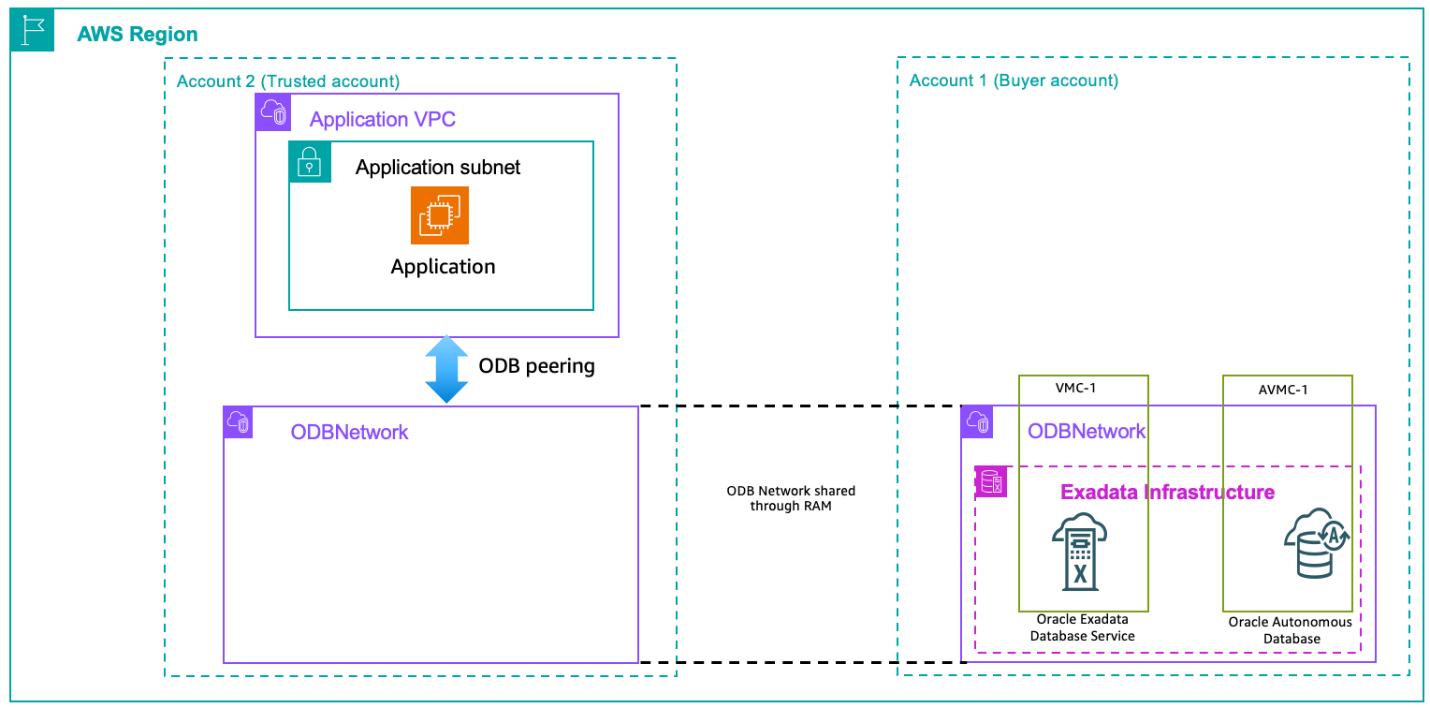
You can also share Exadata infrastructure in addition to the ODB network with the trusted accounts as shown in the following diagram. This is a good approach to isolate non-prod and prod workloads into separate AWS accounts.
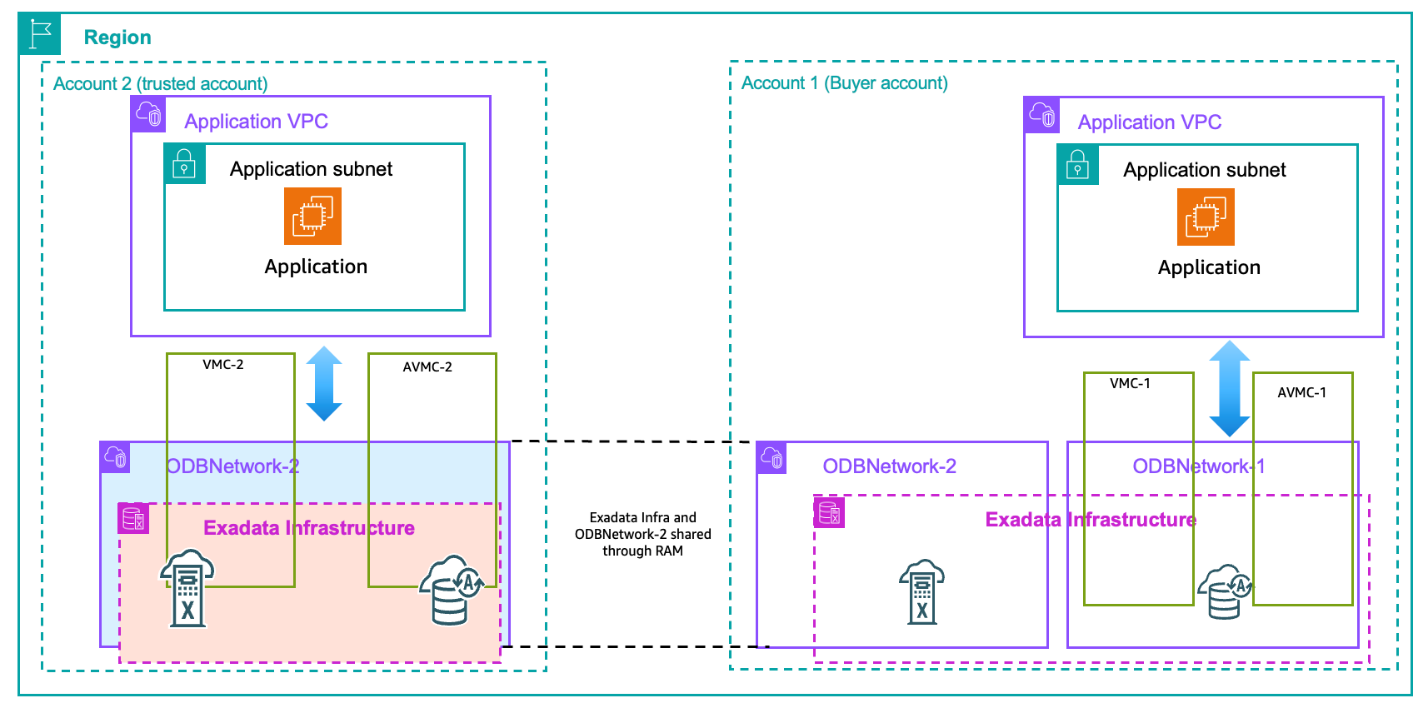
- Cross-account Marketplace subscription for resource isolation
In the following pattern, you can isolate Oracle Database@AWS across multiple AWS accounts in the same organization while allowing each account to independently provision and fully manage the lifecycle of its own Oracle Database@AWS resources. Account A uses License Manager to share subscription entitlement with account B and account C. This approach helps you manage large database deployments across multiple lines of business or to support compliance or governance requirements of not sharing infrastructure between various software development lifecycle (SDLC).
- Cross-account hybrid model combining subscription and resource sharing
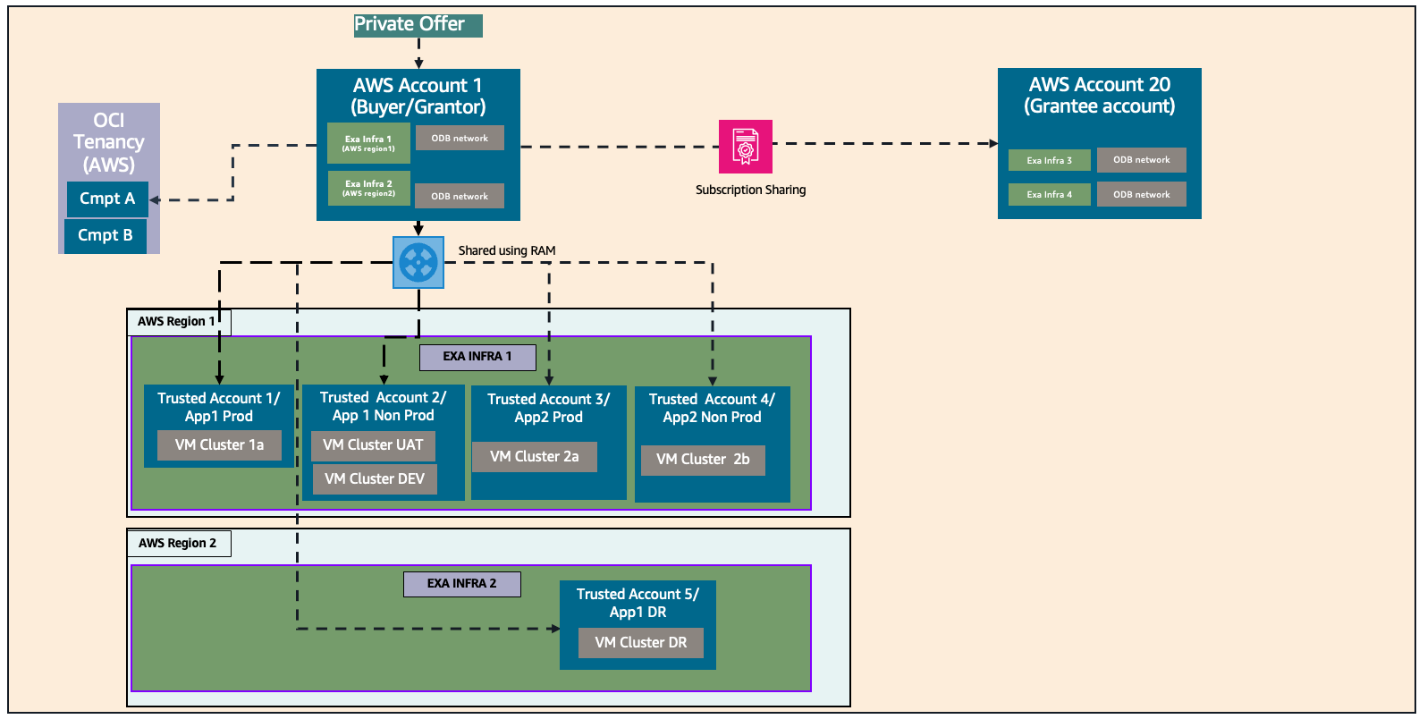
This pattern illustrates a cross-account hybrid model that combines subscription sharing using AWS License Manager and resource sharing using AWS Resource Access Manager. In the following diagram, AWS grantor (buyer) account shares the subscription with a grantee account using AWS License Manager. Both buyer and grantee accounts create their own Exadata infrastructure and ODB network. Buyer account also shares Exadata infrastructure and ODB network with multiple trusted accounts each with its own VM clusters for hosting production or non-production workloads, or for segregating by application.
- Cross-account hybrid model – Grantee account to do the AWS RAM sharing
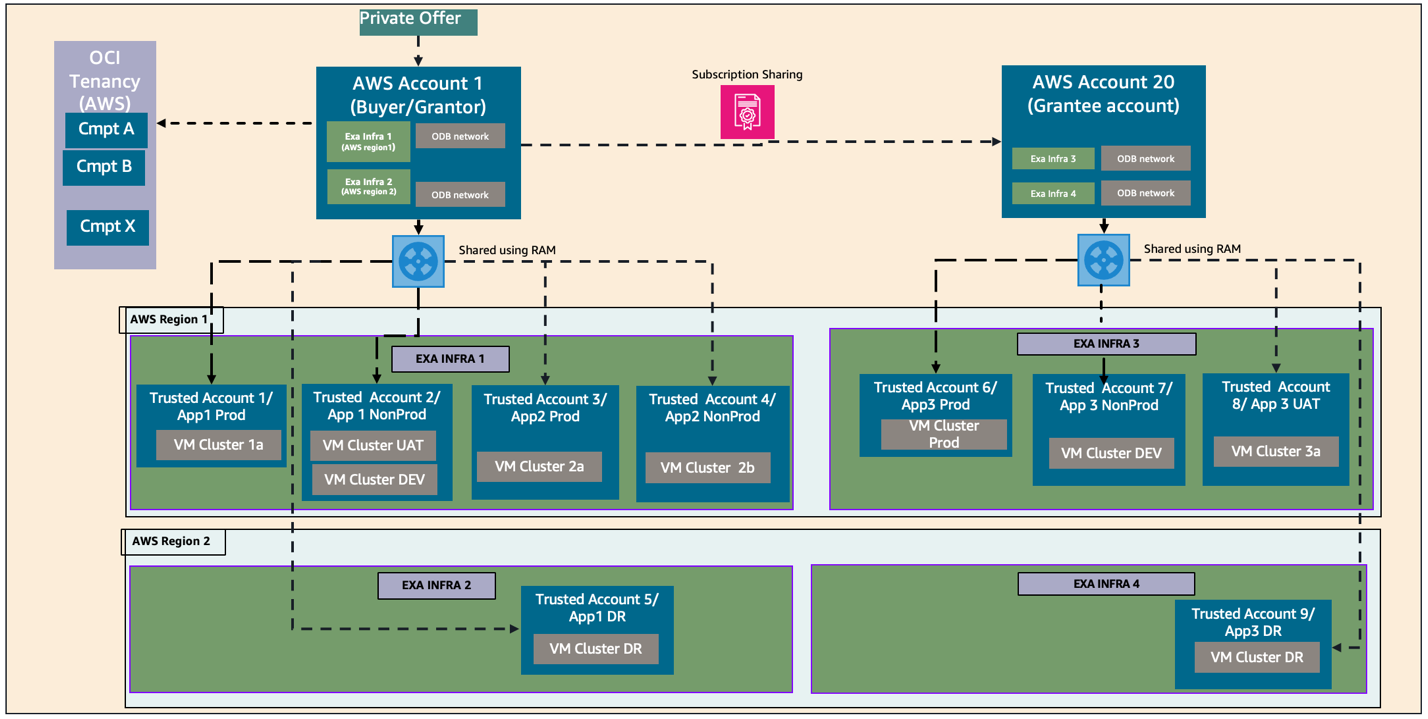
The next pattern presents a complex cross-account hybrid model, building on the prior one, in which both the grantor and grantee accounts share ODB@AWS resources with their own trusted accounts with AWS RAM. As shown in the following architecture diagram, both grantor and grantee accounts deploy their own Exadata infrastructure and ODB networks and they also share these ODB@AWS resources with multiple trusted accounts. Combining subscription sharing and AWS RAM sharing, you can segregate at two levels: first at the infrastructure and ODB network level, and second at the VM cluster level.
- Cross-account hybrid model – Account as both a trusted and grantee account
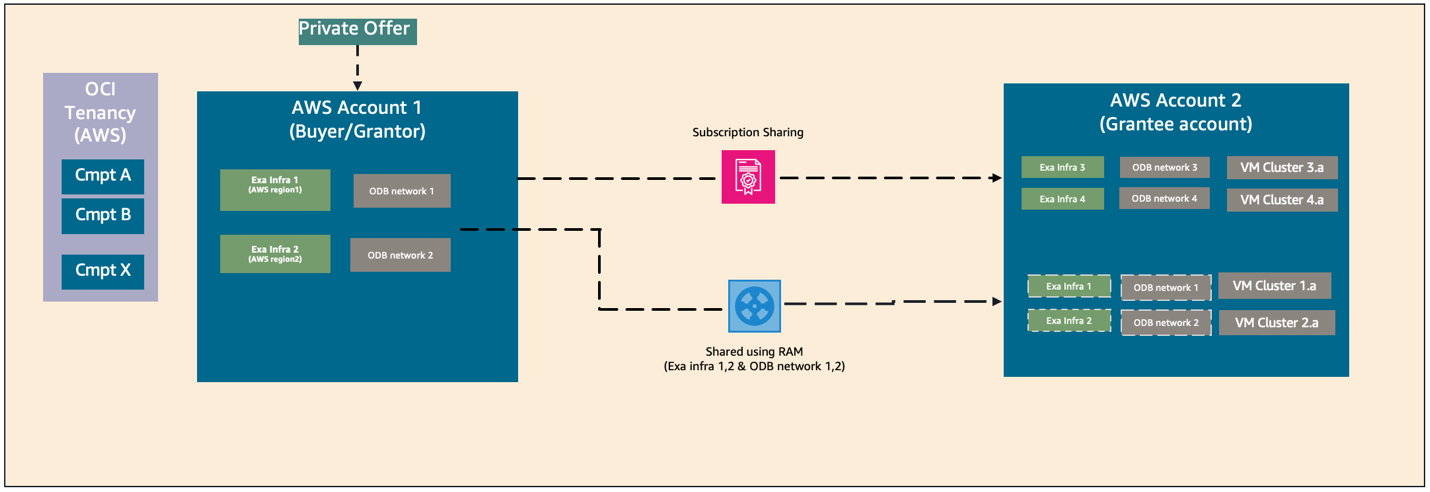
The following pattern shows how an AWS account acts as both trusted account and grantee account. In this use case, buyer account A enables both AWS RAM sharing and subscription sharing with AWS Account 2. Account 2 can deploy resources on shared Exadata and ODB network from account 1. At the same time account 2 can also deploy Exadata and ODB networks isolated from account 1. This pattern is useful in scenarios where you have dedicated Exadata for production workloads and share Exadata for non-prod workloads.
The following table summarizes the activities that each AWS account type can perform.
| AWS RAM sharing | Entitlement sharing | Create ODB network | Create Exadata Infrastructure | Create Exa-VMC/AVMC | |
| Buyer/Grantor | ✓ | ✓ | ✓ | ✓ | ✓ |
| Trusted | ✓ | ||||
| Grantee | ✓ | ✓ | ✓ | ✓ |
Considerations
Following are a few best practices to consider before you start using AWS RAM sharing and entitlement sharing features with ODB@AWS. In addition, refer to limitations for ODB@AWS entitlement sharing and AWS RAM sharing for additional information.
- When sharing resources across accounts with AWS RAM, the resource owner account maintains full control over resource lifecycle.
- Trusted accounts can use shared resources based on granted permissions but cannot delete them.
- We recommend that you use an AWS member account as a buyer account and not a management account.
- A trusted account can use shared resources from only one buyer account (from one offer). Thus, two buyer accounts cannot share resources with the same trusted account.
- A grantee account accepts a license (entitlement) grant from only one grantor or buyer account and can have only one active grant at a time.
- You can share entitlements only with AWS accounts within the same AWS organization.
- You cannot share entitlements with an entire organizational unit (OU) or the entire organization.
- A grantor or buyer account cannot share entitlements with another grantor or buyer account.
- Entitlement grant operation in AWS License Manager can be performed only from the N. Virginia (us-east-1) AWS Region. ODB@AWS activation will be in OCI tenancy’s home Region which can be different from us-east-1.
Core concepts
Following is a review of the core concepts used in this post.
AWS Organizations: AWS Organizations help you centrally manage and govern your environment as you grow and scale your AWS resources. Using Organizations, you can create accounts and allocate resources, group accounts to organize your workflows, apply policies for governance, and simplify billing by using a single payment method for your accounts. Organizations are integrated with other AWS services, so you can define central configurations, security mechanisms, audit requirements, and resource sharing across accounts in your organization.
Buyer account: A buyer account is the AWS account responsible for AWS Marketplace service onboarding, linking the AWS account to services, resource provisioning, and sharing resources with trusted accounts. This is the AWS account that requests and accepts a private offer for Oracle Database@AWS. This account must be a member account in your AWS organization.
Owner account: An AWS account that creates a specific resource is considered the owner account for that resource. For example, the account that creates an Exadata infrastructure resource is the owner account for that resource. Typically, when initially deploying Oracle Database@AWS, the buyer account deploys the first Exadata infrastructure resource and is thus also the owner account for the resource. If a second account is used to create an Exadata VM cluster with the infrastructure resource, the second account is the owner account for the VM cluster. The owner account for the infrastructure resource must explicitly allow access to the resource to the second account using it to provision the VM cluster.
Trusted account: An AWS trusted account refers to an account authorized to access resources or perform actions in another account (the “trusting” account) through IAM roles, or within an AWS Organization, it allows services to act on behalf of the organization. This account is granted access by an owner account to a specific resource. Oracle Database@AWS allows owner accounts to share resources like Exadata Infrastructures and ODB Networks with other AWS accounts that are members of the same AWS organization.
Grantor account: This is the AWS account that owns and shares anOracle Database@AWS subscription through AWS License Manager to the grantee account. The grantor account is typically the account that accepted the Oracle Database@AWS private offer through AWS Marketplace. By creating a grant in AWS License Manager, the grantor account enables one or more AWS accounts within the same AWS Organization to share the Oracle Database@AWS subscription.
Grantee account: This is the AWS account that receives an Oracle subscription grant from the grantor account through AWS License Manager. After the grant is accepted and activated, the grantee account can independently provision, manage, update, and delete Oracle Database@AWS resources using the shared subscription. The grantee account maintains full control over the resource lifecycle it creates. A grantee account can accept a subscription grant from only one grantor account at a time.
Exadata infrastructure: Oracle Exadata infrastructure is a high-performance, integrated hardware and software system designed for running Oracle databases. This is the underlying architecture of database servers and storage servers that runs Oracle Exadata databases. The infrastructure resides in an AWS Availability Zone (AZ).
ODB Network: An ODB networkis a private isolated network that hosts OCI infrastructure in an AWS Availability Zone (AZ). The ODB network consists of a CIDR range of IP addresses. The ODB network maps directly to the network that exists within the OCI child site, thus serving as the means of communication between AWS and OCI.
Transit Virtual Private Cloud (VPC): This is the VPC that is directly peered with ODB network and facilitates connection to other VPCs through Transit Gateway.
OCI Multicloud Linked Compartment: An OCI compartment that corresponds to a cloud provider entity. The default name of a linked compartment depends on the partner cloud. AWS compartment is prefixed with the AWS account ID.
Conclusion
In this post, we walked through the various options for sharing ODB@AWS resources across AWS accounts. We also explored common cross-account architecture patterns, along with best practices and key considerations.If you have questions or feedback, please leave a comment.
About the authors