AWS Database Blog
Building a multi-Region API with Prisma ORM and Amazon Aurora DSQL
Global applications require databases that can serve users with low latency while maintaining consistency across AWS Regions. Traditional relational databases typically implement active-passive models. One Region accepts writes, the other serves read replicas. Traditional failover approaches can involve downtime, data replication gaps, and operational complexity.
Amazon Aurora DSQL removes the single-writer limitation of traditional active-passive models. Both peered Regions accept reads and writes with strong consistency, and there are no instances to manage, no Amazon Virtual Private Cloud (Amazon VPC) to configure, and no static passwords to rotate. But connecting an ORM like Prisma to a distributed SQL database requires deliberate adaptation for its distributed-database characteristics, such as async-only index creation and optimistic concurrency control.
In this post, we show how you can build a multi-Region active-active API using Prisma ORM and Amazon Aurora DSQL.
What is Amazon Aurora DSQL?
Amazon Aurora DSQL is a serverless, distributed relational database service designed for transactional workloads. You can deploy globally distributed applications with strong consistency across Regions, while AWS handles the underlying infrastructure. You get automatic scaling without managing infrastructure.
Why Amazon Aurora DSQL for multi-Region applications
Amazon Aurora DSQL supports active-active multi-Region deployments. Every peered Region accepts both reads and writes with strong consistency. There are no instances to size, no Amazon VPC to configure, and no static passwords to manage. Amazon Aurora DSQL handles authentication entirely through short-lived AWS Identity and Access Management (IAM) tokens.
Key features for Node.js developers:
- PostgreSQL-compatible: Use familiar SQL and existing drivers. Prisma connects by using
@prisma/adapter-pgand the@aws/aurora-dsql-node-postgres-connector. - Zero credential exposure: IAM token-based authentication removes the need for static passwords. The
AuroraDSQLPoolhandles token generation and refresh automatically. - Serverless: Scales to zero with no sharding or instance upgrades required.
- Multi-Region writes: Both peered Regions accept writes simultaneously. A witness Region (us-east-2 in this example) participates in quorum for durability without serving application traffic.
DSQL constraints to be aware of
DSQL makes deliberate trade-offs to support distributed writes. The following PostgreSQL features aren’t supported:
| Feature | DSQL Approach | How to use |
| Referential Integrity | Managed at the application layer for lower write latency | relationMode = "prisma" in Prisma schema |
| Primary keys | Recommend UUIDs for globally unique, conflict-free generation | gen_random_uuid() for primary keys |
| Index creation | Async for fast, non-blocking DDL | aurora-dsql-prisma migrate generates CREATE INDEX ASYNC |
| Schema migrations | Lock-free | PRISMA_SCHEMA_DISABLE_ADVISORY_LOCK=1 for migrations |
What is Prisma ORM?
Prisma is an open source ORM for Node.js and TypeScript that replaces traditional ORMs with a type-safe database client, a declarative schema language, and a migration system. The Prisma driver adapter system (@prisma/adapter-pg) works with custom connection pools, which is how we integrate it with the IAM-authenticated connections of Amazon Aurora DSQL.
Solution overview
The solution runs two application instances: one in us-east-1 and one in us-west-2. Each is connected to DSQL Regional endpoints simultaneously. When a Region becomes unreachable, the application switches to the peer endpoint in-process, without restarting or reconfiguring.
The key pieces that make this work together:
- Amazon Aurora DSQL multi-Region clusters: Two peered endpoints that both accept reads and writes with strong consistency, backed by a witness Region for quorum.
- AuroraDSQLPool: Manages AWS Identity and Access Management (IAM) token generation and connection pool refresh per Region, so credentials don’t go stale mid-request.
- MultiRegionDsqlClient: Establishes and health-checks connections to both Regions at startup, then exposes a
failover()method that switches the active Prisma client to the secondary in-process. - Prisma Object-Relational Mapping (ORM): Adapted for the constraints of DSQL (no foreign keys, UUID primary keys, async index creation) by
relationMode = "prisma"and theaurora-dsql-prismamigration tool.
The full source code is available on GitHub.
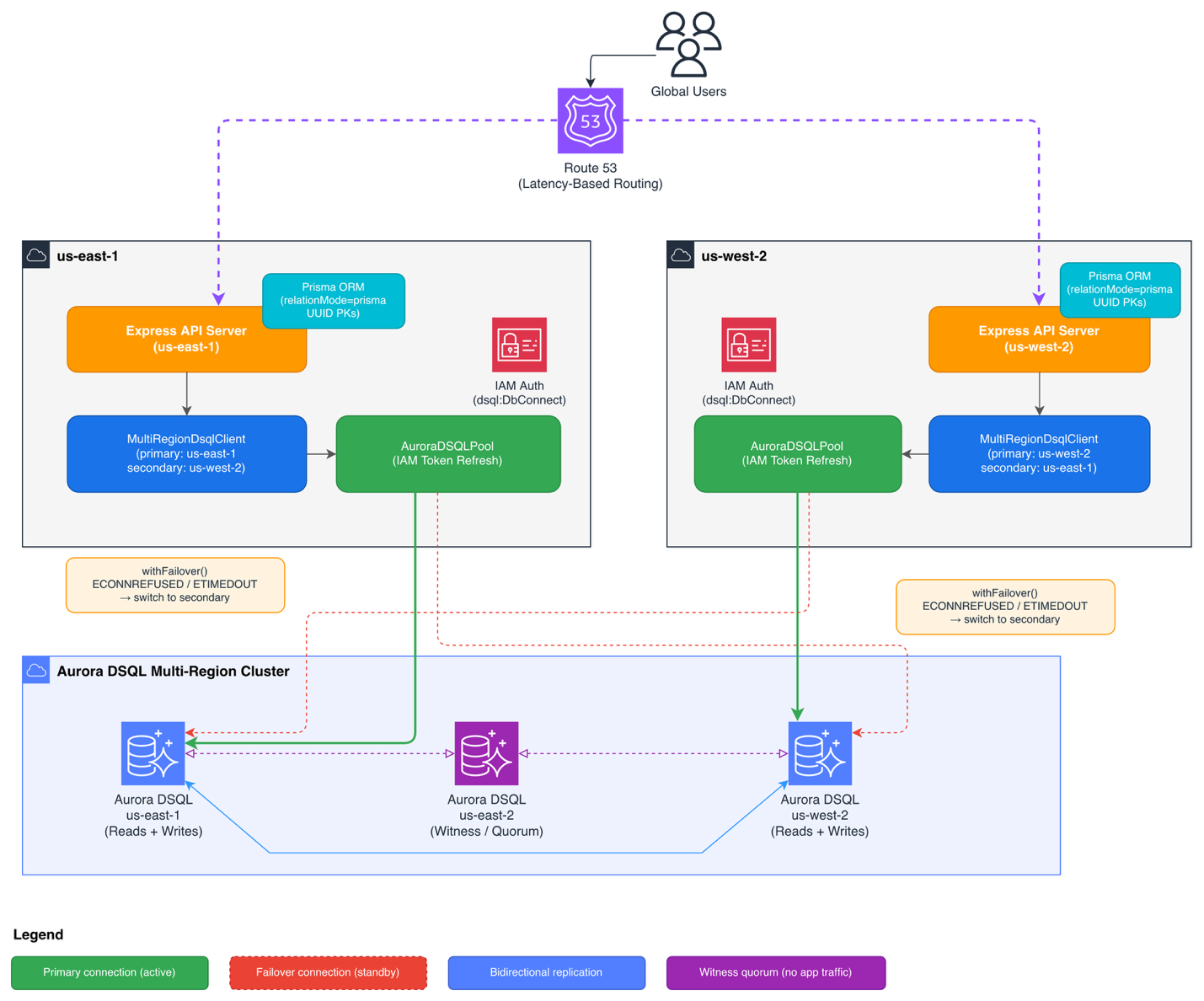
The system uses two application instances communicating with a shared Amazon Aurora DSQL multi-Region cluster:
- App instances (us-east-1 and us-west-2): Each runs an Express API server. Both live and serve traffic simultaneously. Amazon Route 53 latency-based routing directs users to the nearest Region.
- MultiRegionDsqlClient: Runs inside each app instance. At startup, it establishes and verifies connections to both DSQL Regional endpoints. The local Region is treated as primary. The peer Region is secondary.
- Amazon Aurora DSQL multi-Region cluster: Two peered endpoints (us-east-1 and us-west-2) that both accept reads and writes. A witness Region (us-east-2) participates in quorum but has no application endpoint.
The failover flow works as follows:
- Both app instances connect to both DSQL endpoints at startup and verify connectivity with
SELECT 1. - Each instance routes requests through
withFailover(), which calls the active Prisma client. - If the active client throws
ECONNREFUSED,ETIMEDOUT, or an “unavailable” error,withFailover()callsdsql.failover(), which switchesactivePrismato the secondary client in-process. - The retry executes against the secondary. No restart required.
Prerequisites
Before you get started, make sure you have the following:
- An AWS account with credentials configured.
- An IAM role with permissions to:
- Create and manage Amazon Aurora DSQL clusters.
- Generate DSQL authentication tokens (
dsql:DbConnectAdminordsql:DbConnect) - Create IAM roles and policies.
- Node.js 20+.
- AWS Command Line Interface (AWS CLI) v2 installed and configured.
This post uses the us-east-1 and us-west-2 AWS Regions. For instructions on assigning permissions to the IAM role, refer to Amazon Aurora DSQL identity-based policies.
Clone the repository containing the source code. The repository README has the complete step-by-step setup commands for every section that follows.
Step 1: Provision the Amazon Aurora DSQL multi-Region cluster
Amazon Aurora DSQL is serverless. There are no instances, VPCs, or security groups to configure. IAM authentication secures the publicly accessible cluster endpoints.
Create a multi-Region cluster using the AWS CLI:
This returns cluster identifiers for each Region. Your endpoints will be:
Poll until both clusters reach ACTIVE status:
Step 2: Set up the Prisma schema
The Prisma schema requires three adjustments from a standard PostgreSQL setup to be compatible with DSQL.
relationMode = "prisma" — Prisma enforces referential integrity in application code. Aurora DSQL supports database-level foreign key constraints; this sample enforces referential integrity in the application layer to reduce per-operation reads and transaction-limit pressure.
gen_random_uuid() for IDs — DSQL supports sequences and identity columns (with an explicit CACHE) but not Prisma’s autoincrement() shorthand. UUIDs generated by the database are globally unique across Regions by definition.
@@index at the model level — The aurora-dsql-prisma CLI tool transforms these into CREATE INDEX ASYNC statements that DSQL supports.
Validate and generate the migration
Install dependencies and validate the schema against DSQL constraints:
Generate a DSQL-compatible migration file:
Step 3: Configure IAM authentication
Amazon Aurora DSQL uses IAM-based authentication, no static passwords. The prisma.config.ts file generates a short-lived signed token at startup for Prisma CLI tools (migrations, schema generation). The AuroraDSQLPool handles token refresh automatically for the runtime connection pool.
Two token types are available depending on the user:
| User type | Token method | Required IAM permission |
| admin | getDbConnectAdminAuthToken() |
dsql:DbConnectAdmin |
| Non-admin | getDbConnectAuthToken() |
dsql:DbConnect |
Your AWS credentials (instance profile, ECS task role, etc.) need the appropriate permission scoped to the cluster Amazon Resource Names (ARNs).
Run migrations
Because DSQL doesn’t support advisory locks (used internally by Prisma Migrate), set the following environment variable before deploying migrations:
You only need to run migrations once. DSQL replicates schema changes to each peered Region automatically.
Step 4: Build the multi-Region client
The MultiRegionDsqlClient (src/dsql-client.ts) is the core of the failover strategy. It establishes connections to both Regions at startup and exposes a failover() method that switches the active Prisma client in-process.
A few design decisions worth noting:
Both connections are established and verified at startup. Failover is instant because there is no cold connection to establish under pressure. The client verifies the secondary endpoint with SELECT 1, so you know it is healthy before you need it.
AuroraDSQLPool handles token refresh. Amazon Aurora DSQL uses short-lived IAM tokens. The connector manages the refresh cycle automatically, so your application doesn’t need to handle token expiry.
Failover is centralized and explicit. The withFailover wrapper in Step 5 triggers failover() automatically, but only on a narrow allowlist of connectivity errors: ECONNREFUSED, ETIMEDOUT, and unavailable. Optimistic concurrency control (OCC) contention errors (40001) are a separate steady-state condition and aren’t treated as failover triggers. Handle those with a retry-with-backoff strategy on mutations.
Failover is one-shot with no automatic fail-back. Once activePrisma switches to the secondary, it stays there until the process restarts. If the secondary then fails, failover() has no further fallback. For production use, consider either restarting on failover or adding a circuit breaker that periodically retests the primary and switches back when it recovers.
Step 5: Build the API server
The Express server (src/server.ts) wraps every database operation in a withFailover helper that catches connectivity errors and retries against the secondary Region:
Route handlers pass their Prisma operations directly to withFailover:
The withFailover helper retries failed operations against the secondary Region. This is safe for reads, but writes require care. ECONNREFUSED means the connection didn’t reach the primary, so a retry is safe. ETIMEDOUT and unavailable are ambiguous. The write might have already committed on the primary before the error was returned. Retrying in that case can create duplicate records. For production workloads, restrict failover retries to reads only, or add idempotency keys to your mutation endpoints so the database can detect and ignore duplicate retries.
Each order’s Region field records its originating Region, which is useful for debugging and auditing in multi-Region deployments.
The server exposes the following endpoints:
| Method | Path | Description |
| GET | /orders |
List orders (most recent 50) |
| POST | /orders |
Create an order with optional line items |
| GET | /orders/:id |
Get a single order by ID |
Step 6: Deploy to multiple Regions
Set environment variables for each instance, then build and start:
us-east-1 instance:
us-west-2 instance:
Each instance treats its local Region as primary and the peer as secondary. Amazon Route 53 latency-based routing directs users to the Region that provides the best latency. If a Region goes down, Amazon Route 53 health checks redirect traffic, and the surviving instances are already connected to the peer DSQL endpoint.
Test the API
Step 7: Test failover
The project includes an integration test that validates the full failover path against live DSQL clusters. Both CLUSTER_ENDPOINT and CLUSTER_ENDPOINT_SECONDARY must be set.
The test connects to both Regions, writes an order by the primary, triggers application-level failover to the secondary, and verifies the data replicated. DSQL replication is near-instant, but the test includes a retry loop to account for propagation time.
Expected output:
Security considerations
This architecture implements multiple overlapping security layers:
- IAM authentication everywhere: Amazon Aurora DSQL uses short-lived IAM tokens (no static passwords). The
AuroraDSQLPoolhandles token generation and refresh automatically. Scopedsql:DbConnectAdminto specific cluster ARNs, not*. Use separate IAM roles for admin (migrations) and application (runtime) access. - No Amazon VPC required: DSQL endpoints are publicly accessible and secured entirely by using IAM. There are no security groups or VPC peering configurations to manage.
- Schema validation in CI: Run
npm run validatein your continuous integration (CI) pipeline to catch DSQL-incompatible schema changes (foreign keys, synchronous indexes) before they reach production. - Least-privilege roles: The application runtime only needs
dsql:DbConnect. Only the migration role needsdsql:DbConnectAdmin.
Cost considerations
The serverless architecture means you pay only for what you use:
- Amazon Aurora DSQL: You pay for database activity (read/write/compute) through Distributed Processing Units (DPUs) and storage consumed. No idle instance costs. See Amazon Aurora DSQL pricing.
- Amazon Elastic Compute Cloud (Amazon EC2) / Amazon Elastic Container Service (Amazon ECS) / AWS Lambda: You pay based on your chosen compute model for the application layer.
- Amazon Route 53: Amazon Route 53 charges per hosted zone and DNS query for latency-based routing.
For development and testing, costs are minimal since DSQL scales to zero when idle.
Clean up
To avoid ongoing charges, delete the resources created in this walkthrough.
Remove the database tables:
Example:
Delete the DSQL clusters (disable deletion protection first):
Conclusion
In this post, you built a multi-Region active-active API using Prisma ORM and Amazon Aurora DSQL. The MultiRegionDsqlClient pattern establishes verified connections to both Regions at startup and switches the active Prisma client on failure. This gives you in-process failover without restarts or external orchestration.
The adaptation work for Prisma is straightforward: relationMode = "prisma" for referential integrity, gen_random_uuid() for primary keys, and the aurora-dsql-prisma tool for DSQL-compatible migrations. After those are in place, your Prisma queries work unchanged across both Regions.
By combining the type-safe query layer of Prisma with the distributed write capability of Amazon Aurora DSQL, you get an architecture where both Regions are truly active for writes with strong consistency, not only for reads. You can extend this pattern to other Node.js applications that need to serve traffic globally: ecommerce order management, financial transactions, real-time inventory, or workloads where both Regions need to accept writes simultaneously.
The complete source code and configuration files are available in the GitHub repository. Try it out and adapt it to your specific use case.