AWS Database Blog
Building an AI-powered grid investigation agent with Aurora DSQL and Amazon Bedrock AgentCore
AI agents are becoming central to how organizations build and scale intelligent systems. As teams deploy more specialized agents, the need for these agents to discover and communicate with each other grows rapidly. The Agent-to-Agent (A2A) protocol, an open standard for inter-agent communication, addresses this by providing a common interface through which agents can exchange tasks and results, regardless of the framework or model powering them. In this post, we show how to build an Amazon Aurora DSQL database agent that other AI agents can discover and query through natural language using the A2A protocol.
Historically, database agents were tightly coupled to the applications they served: embedded query layers, ORM wrappers, or bespoke microservices that only one system could call. Each new consumer meant new integration work, new credentials to manage, and new API surfaces to maintain. The result was a proliferation of point-to-point connections that were brittle, hard to secure, and difficult to reuse across teams.
You’ll walk through how to build and deploy this using Amazon Bedrock AgentCore capabilities, including AgentCore Runtime for hosting, AgentCore Gateway for tool access via MCP, and the Strands Agents SDK for agent logic.
The use case: Grid investigation for utility operations
Imagine a utility company managing a power grid across multiple regions. When an outage occurs, operators need to quickly correlate data across assets, incidents, crew dispatches, sensor readings, and customer reports to identify root causes. In this post, we build an AI agent backed by Aurora DSQL that can investigate grid events through natural language, querying operational data across six relational tables to produce a root-cause analysis.
What is Amazon Aurora DSQL?
Amazon Aurora DSQL is a serverless, distributed relational database service optimized for transactional workloads. It offers virtually unlimited scale without requiring you to manage infrastructure, and its active-active architecture provides 99.99% single-Region and 99.999% multi-Region availability.
Why Aurora DSQL for utility operations
Your agent needs a durable store for grid operational data. Aurora DSQL provides that as persistent “grid memory.” As a serverless, distributed SQL database, it stores the relational operational data (assets, outage records, crew assignments, and work orders) that agents need to investigate and correlate grid events.
Key features for utility developers
- PostgreSQL-compatible — Use familiar SQL and existing drivers, such as the aurora-dsql-python-connector for ready-made integrations of psycopg, psycopg2, and asyncpg.
- Identity columns and sequences — DSQL supports native PostgreSQL identity columns and sequence objects, allowing you to generate auto-incrementing IDs (like
incident_id) directly in the database, simplifying legacy system migrations. - Zero credential exposure — Using native DSQL connectors for Python (asyncpg), Go, and Node.js, authentication is handled entirely through IAM tokens, reducing security risks of traditional passwords in critical infrastructure.
- Network quorum resilience — DSQL’s consensus-based write architecture provides strong consistency across Regions, so the agent reads the latest operational data regardless of where it was written.
- Serverless — Scales to zero with no sharding or instance upgrades required.
- Automatic scaling — Meets workload demands without manual intervention.
What is Amazon Bedrock AgentCore?
Amazon Bedrock AgentCore is an agentic platform for building, deploying, and operating highly effective agents securely at scale using any framework and foundation model. With AgentCore, agents can take actions across tools and data with the right permissions and governance, run securely at scale, and report performance in production without infrastructure management. AgentCore services work together or independently with open source frameworks such as CrewAI, LangGraph, LlamaIndex, and Strands Agents, and with supported foundation models.
AgentCore provides seven core features:
| Feature | Purpose |
| Runtime | Container-based compute with session isolation, supports workloads up to 8 hours |
| Memory | Short-term and long-term memory across interactions |
| Gateway | Transforms APIs and AWS Lambda functions into agent-compatible tools. Supports Model Context Protocol (MCP) servers. |
| Identity | Secure access to AWS services and third-party tools |
| Observability | Monitoring, logging, and performance insights via OpenTelemetry |
| AgentCore Browser | Web browsing capabilities for agents |
| AgentCore Code Interpreter | Secure sandboxed code execution |
For this walkthrough, the focus is on Gateway (to expose grid investigation tools via MCP), an AWS Lambda function (to run parameterized SQL against Aurora DSQL), Runtime (to host the agent as an A2A server), and the Strands Agents software development kit (SDK) to build the agent logic.
Architecture overview
The system uses a two-agent architecture communicating via the Bedrock AgentCore A2A (Agent-to-Agent) protocol:
- App Agent (
agent/agent.py): A thin relay that receives operator questions via CLI and delegates them to the Database Agent via A2A. It does not connect to the database or generate SQL. It simply passes the question through and relays the response. - Database Agent (
agent/database_agent.py): A long-lived process registered with AgentCore Runtime. It connects to the AgentCore Gateway via MCP, fetches the live database schema at startup via theget_schematool, generates parameterized SQL, queries the relevant tables, correlates results, and produces root-cause analyses.
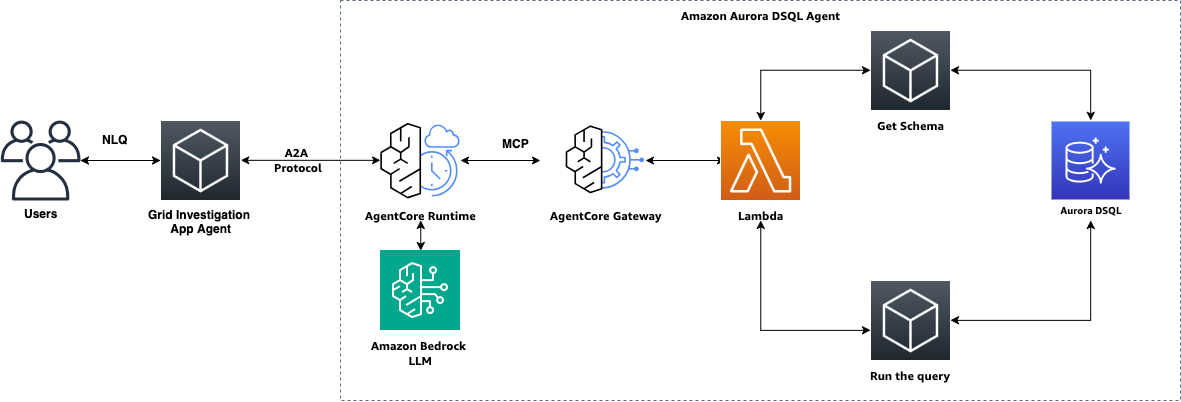
The flow works as follows:
- A grid operator sends a natural language question (for example, “Why did feeder F324 experience voltage instability between 2:10 and 2:20 PM?”).
- The App Agent relays the question to the Database Agent via A2A protocol, using SigV4-signed HTTPS requests to AgentCore Runtime.
- The Database Agent interprets the request, generates parameterized SQL, and invokes the appropriate tools via MCP through AgentCore Gateway.
- Gateway routes each tool call to the Lambda function, which validates and executes the SQL against Aurora DSQL using the
aurora-dsql-python-connector(IAM tokens are generated automatically). - The Database Agent correlates findings across data sources, identifies the root cause, and produces an investigation summary with recommended actions.
- The response flows back through A2A to the App Agent and is displayed to the operator.
Data model
The agent reasons across six tables that capture different aspects of grid operations. See Step 1 for the full list.
Prerequisites
Before you get started, make sure you have the following prerequisites:
- An AWS account.
- An IAM role with permissions to do the following:
- Create and manage Aurora DSQL clusters.
- Generate DSQL authentication tokens (
dsql:DbConnectAdminordsql:DbConnect). - Create, view, and manage Amazon Bedrock AgentCore resources.
- Access to Amazon Bedrock foundation models (which you can request through the Amazon Bedrock console).
- Create, view, and manage IAM roles and policies for the agent runtime.
- Python 3.12+.
- AWS Command Line Interface (AWS CLI) v2 installed and configured.
psqlclient installed locally (for schema setup).bedrock-agentcoreCLI (pip install bedrock-agentcore-starter-toolkit).- Familiarity with Python and basic SQL concepts.
For this post, we use the us-east-1 AWS Region. For instructions on assigning permissions to the IAM role, refer to Identity-based policy examples for Amazon Bedrock and Aurora DSQL identity-based policies.
Clone the GitHub repository containing the source code. The repository README has the complete step-by-step setup commands for every section that follows.
Step 1: Set up your Aurora DSQL cluster
Aurora DSQL is serverless, there are no instances, virtual private clouds (VPCs), or security groups to configure. The cluster endpoint is publicly accessible and secured via IAM authentication.
Create a cluster using the AWS CLI:
Poll until the cluster status is ACTIVE:
Example response when ready:
The cluster endpoint follows the format: <identifier>.dsql.us-east-1.on.aws

Apply the schema
Generate a short-lived admin token and apply the schema (see infra/schema.sql in the repository for the full table definitions):
The schema creates six tables that capture distinct aspects of grid operations. Authentication uses short-lived IAM tokens. No static passwords are stored or transmitted.
| Table | What it stores |
grid_incidents |
Outage/fault/voltage-instability records with severity and resolution time |
feeder_events |
Voltage, current, and frequency sensor readings per feeder |
switching_events |
Breaker open/close/reclose operations (manual and automated) |
transformer_inspections |
Load, oil temperature, and status from field inspections |
incident_weather |
Temperature, wind, precipitation, and lightning proximity |
maintenance_log |
Scheduled and completed repair/upgrade/inspection work |
Load sample data
This inserts sample incidents, feeder events, switching events, transformer inspections, weather records, and maintenance logs across multiple feeders.
Step 2: Create the Lambda function and provision AgentCore Gateway
Rather than giving the agent fixed query templates, this architecture uses a Lambda function (lambda/grid_tools/handler.py) that exposes two dynamic tools:
| Tool | Description | Parameters |
query_grid_database |
Execute a parameterized read-only SQL query against Aurora DSQL. The agent generates the SQL with %s placeholders and passes values separately. Only SELECT queries are allowed. Results capped at 500 rows. |
sql (string, required): SQL with %s placeholders. parameters (string array, optional): values for placeholders. |
get_schema |
Retrieve the live database schema from information_schema. Returns table names, column names, data types, and nullability for the grid tables. |
None |
The agent generates SQL based on schema context in its system prompt. This dynamic approach means the agent can answer questions about the grid data without code changes, adding a new table or column requires only a schema update in Aurora DSQL.
How the Lambda works
The Lambda connects to Aurora DSQL using the aurora-dsql-python-connector library, which handles IAM token generation automatically. No manual generate_db_connect_admin_auth_token calls are needed in application code. A few key design decisions:
- Every query uses parameterized SQL (
%splaceholders). The agent never constructs raw SQL, which alleviates injection risks. - A
validate_sqlfunction enforces read-only access: onlySELECTandWITH(CTE) statements are allowed, only the six known tables can be referenced, and multi-statement queries are blocked. - Results are capped at 500 rows with an auto-appended
LIMIT.
Deploy Lambda and Gateway
A single setup script (gateway/setup_gateway.py) handles everything: creates IAM roles for both Lambda and Gateway, deploys the Lambda, creates the AgentCore Gateway with Amazon Cognito OAuth, and registers the Lambda as an MCP target with the tool schemas.
The script creates the following resources:
| Resource | Name |
| Lambda role | grid-investigation-lambda-role (trust: lambda.amazonaws.com, policy: dsql:DbConnectAdmin + Amazon CloudWatch) |
| Gateway role | grid-investigation-gateway-role (trust: bedrock-agentcore.amazonaws.com, policy: lambda:InvokeFunction) |
| Lambda | grid-investigation-tools (Python 3.12, 512 MB, 30s timeout) |
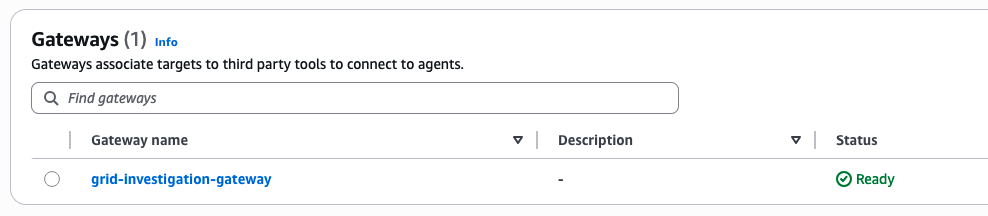
| Gateway | grid-investigation-gateway (Cognito OAuth + semantic search enabled) |
The script outputs the environment variables you need for the agent and saves them to gateway/gateway_config.json.
This process will take 5-8 minutes to complete. You can also check the created resources in the AWS console.

Package and update Lambda dependencies
The Lambda uses aurora-dsql-python-connector and psycopg2-binary which need to be bundled into the deployment zip. After the initial deploy, update the function code with dependencies:
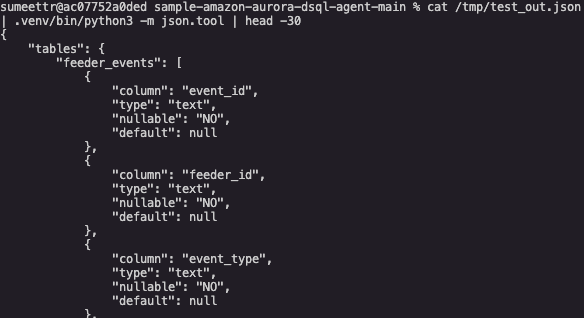
Test the Lambda directly
The output shows Lambda function is connecting to DSQL and returning the live schema.
Set up the least-privilege database role
The Lambda should connect as a least-privilege database role rather than admin. The schema (infra/schema.sql) creates a grid_reader role with SELECT-only grants on the six grid tables. Grant this role to the Lambda’s IAM execution role so it connects with minimal permissions:
This is the primary security boundary. Even if SQL validation in the Lambda is bypassed, the database enforces SELECT-only access on the allowed tables.
Step 3: Build the Database Agent
The Database Agent (agent/database_agent.py) is the core of the system. It runs as a long-lived A2A server built with the Strands Agents SDK and the A2AServer wrapper, which implements the A2A protocol over FastAPI/uvicorn.
How it works at startup
- Connects to the AgentCore Gateway via MCP using Cognito OAuth tokens obtained through the
bedrock-agentcore-starter-toolkit. - Calls the
get_schemaMCP tool to fetch the live database schema from Aurora DSQL. - Injects that schema into a system prompt template so the LLM has an accurate view of available tables and columns, even if the schema changes.
- Starts an A2A server on port 9000 with a
/pinghealth check endpoint (required by AgentCore Runtime for liveness probes).
System prompt design
The system prompt is a template with a {schema} placeholder that gets replaced at startup with the live schema. It includes SQL generation rules (parameterized queries only, SELECT only, LIMIT required) and an investigation workflow that tells the agent to query the six tables, correlate findings, and produce a root-cause analysis. Because the schema is fetched dynamically, adding a new table or column requires only a schema update in Aurora DSQL. No code changes are needed.
Investigation workflow
When a grid operator asks about an incident, the agent follows a structured workflow:
- Query
grid_incidentsto find the incident window - Query
feeder_eventsfor sensor anomalies during that window - Query
switching_eventsfor breaker activity - Query
incident_weatherfor environmental factors - Query
transformer_inspectionsfor equipment status - Query
maintenance_logfor recent related work - Correlate findings and produce a root-cause analysis with recommended actions
The full agent code is in the repository at agent/database_agent.py.
Step 4: Deploy the Database Agent to AgentCore Runtime
AgentCore Runtime hosts the Database Agent as a containerized A2A server with session isolation. The bedrock-agentcore CLI handles packaging, container creation, and deployment. A deployment script (agent/register_database_agent.py) wraps the CLI commands into two steps:
agentcore configure— packages the agent code, resolves dependencies, and creates the container configuration for A2A protocol.agentcore launch— builds the container image, pushes it to Amazon Elastic Container Registry (Amazon ECR), and deploys it to AgentCore Runtime.
Run the deployment:
After deployment you’ll see:
The agent ARN is saved to gateway/gateway_config.json under the a2a key. The App Agent reads it from there automatically. To redeploy after code changes, run the same command again. It updates the existing agent in place.
Verify the deployment:

A few things to note:
- The agent name uses underscores (
grid_database_agent), not hyphens. This is an AgentCore naming requirement. - The
--auto-update-on-conflictflag handles redeployments gracefully if the agent already exists. - Deployment typically takes 3–5 minutes as AgentCore builds the container and provisions compute.
Step 5: Build and run the App Agent
The App Agent (agent/agent.py) is intentionally thin. It takes an operator’s natural language question, wraps it in an A2A JSON-RPC message/send payload, signs the request with SigV4 using the caller’s AWS credentials, and sends it to the Database Agent running on AgentCore Runtime.
Key design points:
- Authentication to AgentCore Runtime uses IAM SigV4 signing (not Cognito OAuth). Each request is signed with the
bedrock-agentcoreservice name. - The A2A protocol uses JSON-RPC 2.0 with the
message/sendmethod. Each message includes a uniquemessageIdand the question as a text part. - The
X-Amzn-Bedrock-AgentCore-Runtime-Session-Idheader enables session affinity, routing follow-up questions to the same Database Agent instance. - The agent ARN is read from
gateway/gateway_config.json, which was populated during Step 4.
The App Agent also supports a --local flag for development, which sends requests directly to a Database Agent running on localhost:9000 instead of AgentCore Runtime. The full source is in agent/agent.py.
Step 6: Test the agent
With everything deployed, test the agent by asking grid investigation questions:
More sample questions to try:
The following example shows the agent’s response to the feeder F324 question. The agent queries the six tables, correlates the results, and produces a structured investigation summary:
The agent correlates data across the six tables and produces structured investigation reports with timelines, contributing factors (equipment status, weather conditions, switching activity), root-cause assessments, and recommended corrective actions.
Security considerations
This architecture implements defense in depth across multiple layers:
- IAM authentication everywhere — Aurora DSQL uses short-lived IAM tokens (no static passwords), AgentCore Runtime uses SigV4-signed requests, and the Lambda execution role follows least-privilege with only
dsql:DbConnectAdminand CloudWatch permissions. - Read-only SQL enforcement — The Lambda
validate_sqlfunction rejects non-SELECT statement, blocks multi-statement queries, and restricts table references to the six known grid tables. The agent is designed to help prevent data modification or deletion. - Parameterized queries — SQL queries uses
%splaceholders with separate parameter arrays, helping prevent SQL injection. The agent never constructs raw SQL strings. - Network isolation — Aurora DSQL endpoints are secured via IAM (no VPC required). AgentCore Gateway uses Cognito OAuth for MCP connections. AgentCore Runtime uses SigV4 for A2A connections.
- Result size limits — Queries are capped at 500 rows with an auto-appended
LIMITclause, helping prevent accidental data exfiltration or memory exhaustion.
Cost considerations
The serverless architecture means you pay only for what you use:
- Aurora DSQL — Billed per read/write operation and storage consumed. No idle instance costs. See Aurora DSQL pricing.
- Lambda — Billed per invocation and compute duration (512 MB, typically <1 second per query). See Lambda pricing.
- Bedrock — Billed per input/output token for the Claude model. A typical investigation involves 5–8 tool calls. See Amazon Bedrock pricing.
- AgentCore — Runtime, Gateway, and other services are billed based on usage. See Bedrock AgentCore pricing.
For development and testing, costs are minimal since components scale to zero when idle.
Clean up
To avoid ongoing charges, delete the resources created in this walkthrough:
Clean up local files
Conclusion
In this post, you built an Aurora DSQL database agent that AI agents can discover and query through the A2A protocol. The two-agent architecture (a thin App Agent relaying questions via A2A to a Database Agent running on AgentCore Runtime) keeps concerns cleanly separated: the App Agent handles user interaction and authentication, while the Database Agent owns the entire investigation workflow.
The dynamic SQL approach (two tools instead of fixed query templates) means the agent can answer questions about the grid data without code changes. Adding a new table or column requires only a schema update in Aurora DSQL. The agent picks up the change automatically at startup via get_schema.
By exposing a database through an A2A-compatible agent rather than a bespoke API, you turn your data into a reusable service that agents in your organization can consume. You can extend this pattern to other operational domains, such as fleet management, supply chain monitoring, or financial transaction analysis. Anywhere you need an AI agent to reason across structured data with strong security guardrails, this architecture applies.
The complete code and configuration files for this deployment are available in our GitHub repository. We encourage you to try it out and adapt it to your specific use case.