AWS Database Blog
Building scalable applications on Amazon Aurora DSQL
In this post, we provide practical guidance for designing applications that scale effectively with the Amazon Aurora DSQL distributed architecture. You will learn how to identify common patterns that limit scalability, apply proven design patterns that distribute workload efficiently, and implement transaction strategies optimized for Aurora DSQL. We cover primary key selection, schema design principles, indexing strategies, and multi-Region optimization, while maintaining full ACID (atomicity, consistency, isolation, and durability) compliance across AWS Regions.
Distributed databases unlock horizontal scale, but they work best when data models account for how reads and writes are spread across nodes. While Amazon Aurora DSQL handles an increasingly broad range of workloads out of the box, designing to minimize hot key contention remains one of the most impactful optimizations that you can make.
To ground these concepts in a concrete example, we use a multi-Region web application as our reference architecture throughout this post. It’s a system where many users perform concurrent reads and writes, expect low latency, and require strong consistency. This is exactly the kind of application that exercises a distributed database fully and lets us walk through the design decisions developers face when building on Aurora DSQL.
Understanding the architecture
The following section walks you through how the architecture works.
Active-active multi-Region writes
Aurora DSQL supports multiple active writers across Regions. For our social application, this means that US users can connect to us-east-1 and us-west-2 while European users connect to us-east-1, and both endpoints accept reads with no cross-Region latency and writes synchronously replicated between the two Regions.
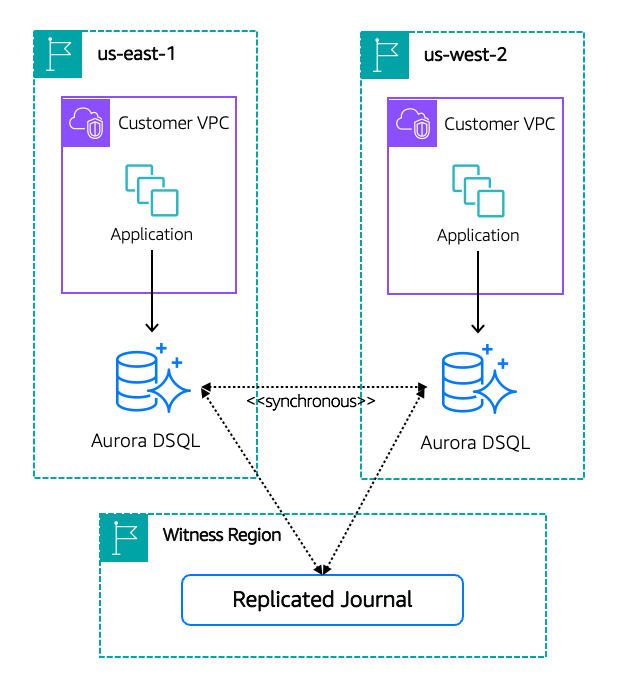
Every write can be served by the nearest Region. There’s no single primary bottleneck.
But multiple active writers introduce a new question: what happens when two writers try to modify the same row at the same time?
Optimistic concurrency control (OCC)
Aurora DSQL uses optimistic concurrency control (OCC): transactions run without locks and are validated at commit. When two transactions modify the same row, one succeeds and the other is rejected. High contention means more rejections, so the key to scaling is reducing contention through schema design.
With OCC, transactions don’t block waiting for other transactions to release locks. When a conflict is detected at commit time, the aborted transaction receives an immediate error, allowing the application to retry with fresh data. This typically succeeds on the next attempt within milliseconds.
What OCC means for your application
OCC shifts responsibility to the application layer in several important ways. Building a scalable application on DSQL requires designing around these behaviors from the start:
1. Every write path must handle retries.
When a transaction aborts because of an OCC conflict, your application receives a SerializationError. This isn’t a bug or an exceptional condition. It’s a normal part of operation under concurrency. Your application must catch this error and retry the transaction with fresh data.
2. Transaction scope directly impacts conflict probability.
The longer a transaction holds open and the more rows it touches, the higher the chance another transaction modifies overlapping data before commit. Scalable applications on DSQL keep transactions short and focused.
3. Schema design determines your conflict surface.
If multiple independent operations all update the same row, they will conflict even though they’re logically unrelated. A status update, a counter increment, and a timestamp refresh are all independent. If they share a row, they serialize against each other. For a deep dive into how OCC works under the hood, see Concurrency Control in Amazon Aurora DSQL.
4. Not all workloads conflict equally.
Read-only operations don’t conflict. Inserts into different rows don’t conflict. Only concurrent modifications to the same row cause conflicts. Scalable applications maximize the proportion of operations that fall into the first three categories:
| Operation type | Conflicts with concurrent writes? |
| Read-only transactions | No |
| Inserts into different rows | No |
| Updates to different rows | No |
| Updates to the same row | Yes, one transaction aborts |
Strong snapshot isolation
Aurora DSQL operates at strong snapshot isolation. Each transaction reads from a consistent snapshot of the database taken at transaction start. This means your reads within a transaction are stable: you won’t see uncommitted data or changes committed by other transactions mid-flight. Combined with OCC conflict detection at commit time, your application gets consistent reads without needing to code around dirty reads or non-repeatable reads.
For your application, that has a direct consequence. When you read a record, check whether a parent row exists before inserting a child, or load a set of related rows inside a transaction, you’re reading from a consistent point in time. You don’t need to add defensive re-reads or application-level consistency checks around those operations. The snapshot is stable for the life of the transaction.
Primary key strategy
Choosing the right identifier type
Aurora DSQL supports UUIDs, identity columns, and sequences for primary keys. UUIDs are the recommended default. They require no coordination and distribute writes uniformly. Use identity columns or sequences only when you need human-readable integer IDs (such as invoice numbers or ticket IDs). You can combine both with the hybrid pattern: a UUID primary key plus a sequence-generated display number.
UUIDs: The default for primary keys
The tradeoff: UUIDs aren’t sortable by creation time (you need a separate created_at index for chronological queries), and they’re harder to communicate (“user abc-123…” compared to “user 47291”).
When you need integer IDs
DSQL supports identity columns with a cache model designed for distributed operation. The cache size controls how many sequential IDs each session pre-allocates locally, reducing cross-Region coordination at the cost of strict global ordering. Unlike standard PostgreSQL, where any cache value is valid, DSQL offers two purposeful modes: CACHE 1 for strict ordered allocation, and CACHE >= 65536 for high-throughput distributed allocation. Choose the right mode upfront.
Identity columns
| Use case | Recommended approach |
| Primary keys in high-scale workloads | UUID (gen_random_uuid()) |
| Human-readable IDs where ordering matters (invoices, account IDs) | Identity column with CACHE 1 |
| Human-readable IDs at high insert rates | Identity column with CACHE >= 65536 |
| Internal primary key + user-facing number | Hybrid: UUID PK + sequence display ID |
In a distributed system like DSQL, generating sequential IDs requires coordination across Regions. Identity columns use a cache model to manage this: each session pre-allocates a block of IDs locally, so inserts don’t need cross-Region round-trips for every row. The cache size you choose determines the trade-off between strict global ordering and insert throughput. CACHE >= 65536 is the right choice for high-frequency inserts. Each session pre-allocates a block of IDs locally and vends them without cross-Region coordination per insert:
CACHE 1 is the right choice when closer sequential ordering matters and insert rates are moderate (hundreds per second or less):
Whichever mode you use, design your application to handle non-contiguous ID values. Gaps are normal because of rollbacks, session termination, and concurrent allocation.
The hybrid pattern: UUID primary key + sequence display ID
The UUID handles distributed writes efficiently. The sequence generates the user-facing number. Because DSQL executes each DDL statement in its own transaction, create the sequence and table separately:
Use post_id for all joins and as the reference column across related tables. post_number is what you show in URLs and share with users.
Quick reference: Choosing an identifier type
| Use case | Recommended approach |
| Primary keys in high-scale workloads | UUID (gen_random_uuid()) |
| Human-readable IDs where ordering matters (invoices, account IDs) | Identity column with CACHE 1 |
| Human-readable IDs at high insert rates | Identity column with CACHE >= 65536 |
| Internal primary key and user-facing number | Hybrid: UUID PK and sequence display ID |
Schema design for OCC
The way that you structure tables directly determines your OCC conflict rate, and your conflict rate determines your effective throughput. This is one of the most impactful design decisions when building on Aurora DSQL.
The hot row problem
Consider a naive schema where multiple frequently updated fields share a single row per entity:
When traffic spikes, every request updates request_count. Simultaneously, connection events update active_connections. Billing events update total_spend. And every action updates last_active. All targeting the same row, so OCC aborts most of them.
Even at moderate concurrency, this schema produces conflict rates above 5 percent during peak traffic.
The fix: Separate by contention pattern
Split tables so that logically independent operations don’t share a row:
Now a settings update does not conflict with a usage counter increment. Billing events are inserts into their own table, and inserting new rows doesn’t conflict with inserting other new rows. Conflict rate drops from over 5 percent to well under 1 percent.
Append-only patterns alleviate conflicts
Tables where rows are inserted but not updated are inherently conflict-free under OCC. This insight reshapes how you model state changes:
Understanding DSQL design constraints
Aurora DSQL makes deliberate architectural tradeoffs to achieve its distributed scalability. Some PostgreSQL features aren’t supported or behave differently. Refer to the Aurora DSQL PostgreSQL compatibility documentation for the current list. The following sections cover the constraints most likely to affect application design.
Counter updates without triggers
Because triggers aren’t supported, counter updates that would previously have been handled automatically now live explicitly in your application code. This is actually an advantage. The logic is visible, testable, and you control exactly when it runs within the transaction:
Referential integrity
Aurora DSQL supports foreign key constraints, which enforce referential integrity in the database. You can also handle referential integrity at the application layer to avoid the extra per-operation reads and transaction-limit overhead foreign keys add in a distributed database; if you do, nothing stops you from inserting a child record that references a non-existent parent.
Handle it pragmatically:
Retry logic and error classification
Not all errors deserve a retry. A robust application on DSQL classifies errors and responds appropriately.
Make retried operations safe to re-execute
OCC retries mean the same operation runs more than once. Operations that accumulate state (like counter increments) will produce incorrect results if retried blindly. Use ON CONFLICT DO NOTHING with a natural key to make inserts safe, and gate side effects on whether the insert was new:
For operations without a natural unique constraint, use a client-generated idempotency key:
Error classification
Classify errors into three categories before deciding whether to retry:
- Retry with backoff: OCC conflicts (
SerializationErrorin asyncpg). These are expected under concurrency and safe to retry. - Reconnect and retry: Connection failures (
ConnectionDoesNotExistError,InterfaceError). Get a fresh connection before retrying. - Never retry: Constraint violations (
UniqueViolationError,CheckViolationError). These indicate a logic error, not a transient condition. - Retry only if the operation is idempotent: Timeouts (
QueryCanceledError). The transaction state is unknown, so only retry if the operation is safe to re-execute.
Refer to your driver’s documentation for the exact exception classes, as these may vary across driver versions.
Retry with exponential backoff and jitter
For a deeper discussion, see Marc Brooker’s blog post on exponential backoff and jitter.
Handling Region failover
When a Region becomes unhealthy, we recommend shifting application traffic to the healthy Region using DNS (for example, Amazon Route 53 health checks with failover routing). This avoids the surprise latency spikes that occur when queries silently route across Regions. If DNS failover isn’t an option, application-level fallback to a secondary endpoint can serve as a stopgap. For a detailed implementation guide, see Implement multi-region endpoint routing for Amazon Aurora DSQL and the sample code on GitHub.
DDL is non-transactional
You can’t mix DDL and DML in a single transaction in DSQL:
The expand-contract pattern
Consider adding a status column to replace a boolean is_active flag. This requires three phases:
Phase 1 — Expand: Add the new column without a DEFAULT value (DSQL requires column addition and default population to be separate operations).
Phase 2 — Migrate: Deploy application code that writes to both is_active and status on every insert and update. After the dual-write deployment is stable across all instances, switch read paths from is_active to status.
Phase 3 — Contract: After all reads use the new column, remove the old one.
Migration best practices
- Deploy schema changes separately from code changes.
- Batch data backfills into small transactions (100–500 rows) to avoid OCC spikes.
- Monitor conflict rate during migrations. If it spikes, slow down the batch rate.
- Allow time for DDL to propagate across Regions before relying on new schema everywhere.
- Go additive-first: add columns, then deploy code, then drop old columns.
Query performance in a distributed context
Keep transactions short
Longer transactions (more rows read/written) have longer validation phases and higher conflict probability:
Avoid N+1 queries
Each query incurs network overhead to DSQL. N+1 patterns are proportionally more expensive than in a local database:
Batch large operations
Aurora DSQL enforces a 3,000 mutated row limit per transaction, so you must chunk large operations. Batch your updates:
Monitoring and observability
For a social application on DSQL, these metrics tell you whether your design is healthy:
| Metric | Healthy | Investigate | Redesign |
| OCC conflict rate | Low | Moderate | High |
| Commit p99 latency | Low | Moderate | High |
| Connection pool utilization | Low | Moderate | High |
| Retry exhaustion rate | Near zero | Non-trivial | Frequent |
Best practices summary
Schema design
- Separate hot (frequently updated) and cold (rarely updated) data into different tables.
- Use append-only tables for logs, events, and interactions (zero OCC conflicts).
- Choose UUID v4 for primary keys. Uniform distribution requires no coordination.
- Use identity columns or sequences with
CACHE >= 65536when human-readable integer IDs are needed at high throughput. - Use the hybrid pattern (UUID primary key and sequence display ID) when you need both scalability and user-facing readable numbers.
- Design composite keys that match your access and partition patterns.
Transactions
- Keep transactions short.
- Move external work (API calls, computations) outside transaction boundaries.
- Retry OCC conflicts with exponential backoff + jitter.
- Use
BEGIN READ ONLYfor queries that don’t modify data. - Batch related writes into single transactions to reduce conflict surface.
Idempotency
- Use client-generated UUIDs or natural composite keys for inserts.
- Add idempotency keys to mutation endpoints that lack natural deduplication.
- Check return values of
ON CONFLICT DO NOTHINGto detect retries compared to first executions. - Never blindly retry counter increments without deduplication.
Error handling
- Classify errors as retriable (OCC conflict, connection lost) compared to non-retriable (constraint violation).
- Make sure retried operations are safe to re-execute.
- Implement Region failover for connection failures.
- Log conflict details for schema debugging.
Performance
- Use covering indexes for high-frequency read queries.
- Limit indexes on write-heavy tables (each adds OCC validation cost).
- Prefer keyset pagination over OFFSET.
- Avoid N+1 query patterns. Use JOINs or batch fetches instead.
- Chunk large batch operations into small transactions.
Conclusion
In this post, you learned how to design applications that scale on Amazon Aurora DSQL. You saw how active-active multi-Region writes and OCC shape your application. You also learned how to pick primary keys and separate hot from cold data to keep contention low, how to keep transactions short and retry serialization errors safely, and how to evolve schemas with the expand-contract pattern while staying under the 3,000-row mutation limit. Aurora DSQL handles consensus, replication, and failover, leaving you to focus on data modeling and resilient transaction handling.
Get started with Aurora DSQL in the AWS Management Console or by following the getting-started guide in the Aurora DSQL documentation. Apply these patterns to one high-throughput table first, watch your OCC conflict rate, and expand from there.