AWS Database Blog
Building type-safe applications with Drizzle ORM in Aurora DSQL
Building type-safe applications with Drizzle ORM and Amazon Aurora DSQL means fewer production surprises, IAM-based authentication instead of stored passwords, and a database that handles scaling for you. Aurora DSQL gives you a PostgreSQL-compatible database that automatically scales based on traffic, requires no capacity planning, and authenticates through AWS Identity and Access Management (AWS IAM) instead of stored passwords. Drizzle ORM checks your queries against your schema at compile time, so you catch column typos and type errors while coding, not after deploying.
Getting Drizzle ORM to work with Aurora DSQL takes three adjustments. You’ll use UUIDs for primary keys (Aurora DSQL’s recommended approach for distributed workloads), define relationships in your application code using Drizzle’s relations() API, and set up a lightweight migration runner. Once those are in place, you get faster development cycles, fewer production errors, and zero infrastructure overhead.
In this post, you’ll build a working veterinary clinic CLI application that demonstrates production-ready patterns for connecting Drizzle ORM to Aurora DSQL. By the end, you’ll have a running app with one-to-many and many-to-many relationships, and the patterns you learn (UUID primary keys, application-level relationships, and a custom migration runner) work with other TypeScript ORMs on Aurora DSQL too. Here’s what we’ll cover:
- Define a Drizzle ORM schema using UUID primary keys compatible with Aurora DSQL.
- Manage table relationships using Drizzle’s relations() API instead of foreign key constraints.
- Connect through AWS IAM authentication using the Aurora DSQL Connector.
- Build a migration runner that replaces the SERIAL-based tracking table with UUIDs.
- Run CRUD (create, read, update, delete) operations against Aurora DSQL.
Solution overview
You’ll create a Node.js CLI application that catches database errors before production by running type-safe CRUD operations against Aurora DSQL through Drizzle ORM. You’ll use a veterinary clinic domain model: owners and pets (one-to-many), veterinarians and specialties (many-to-many).
The following diagram shows the architecture.
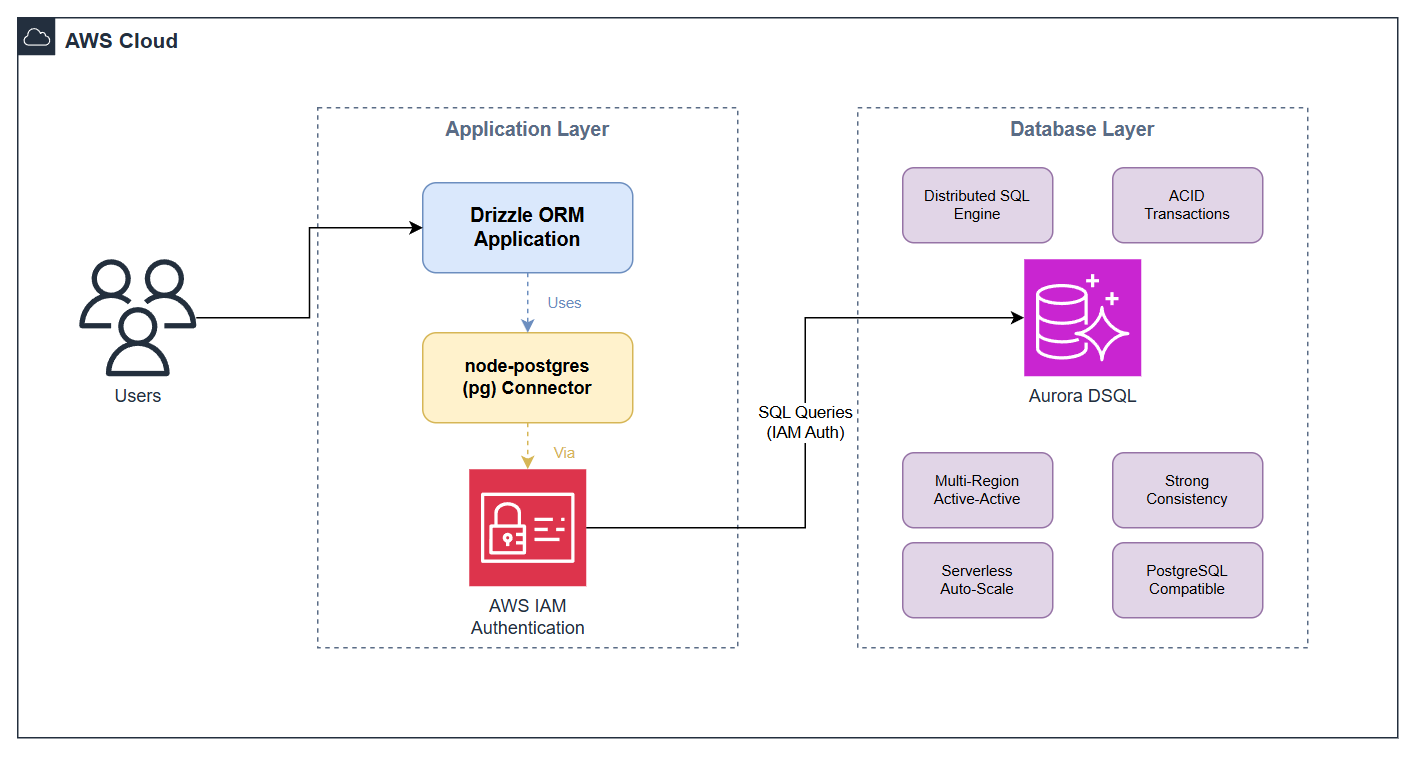
Figure 1: Drizzle ORM application architecture with Amazon Aurora DSQL
When you run the app:
- The Aurora DSQL Connector generates and refreshes short-lived IAM authentication tokens.
- A custom migration runner applies Drizzle Kit-generated SQL using a UUID-based tracking table.
- Drizzle ORM’s query builder runs CRUD operations. You use the relations() API to join tables at the application level.
Key considerations
Aurora DSQL is a distributed, serverless database. Its architecture affects schema design choices such as primary key selection. The migration guide covers additional patterns.
- UUIDs are the recommended primary key type because they require no coordination across the distributed system, which means your inserts scale without bottlenecks. Aurora DSQL also supports sequences and identity columns (with CACHE specified) when you need integer identifiers.
- Aurora DSQL supports foreign key constraints. This sample implements referential integrity in application code instead, which avoids the extra per-operation reads and transaction-limit overhead that foreign keys can add in a distributed database. JOIN operations work as expected either way. Drizzle ORM’s relations() API provides eager loading (fetching related records in a single query) and relational queries.
- Drizzle ORM’s built-in migrate() function creates its tracking table using the SERIAL pseudo-type. This sample includes a migration runner that uses UUID primary keys instead.
- Aurora DSQL uses IAM authentication with time-limited tokens. The Aurora DSQL Connector for node-postgres handles token generation and refresh. See Authentication and authorization for Aurora DSQL.
Prerequisites
To follow along with this tutorial, you’ll need:
- An AWS account.
- AWS Command Line Interface (AWS CLI) v2.
- Node.js 20 or later.
- Git.
- An Aurora DSQL cluster.
IAM permissions configuration
Use the following IAM policy. ClusterSetup covers the one-time cluster creation step. DatabaseAccess is what your application uses at runtime.
Replace <region> and <account-id> with your values. Use dsql:DbConnect instead of dsql:DbConnectAdmin when connecting as a non-admin user.
Important: After creating your cluster, remove
dsql:CreateClusterfrom your policy and scope the DatabaseAccess statement to your specific cluster ARN. The ClusterSetup statement uses a wildcard because the cluster identifier isn’t known before creation.
Estimated time and costs
This tutorial takes 15 to 20 minutes. Running the sample generates minimal database activity.
Aurora DSQL charges for Distributed Processing Units (DPUs) and storage (GB-month). See Amazon Aurora DSQL Pricing. Delete your cluster after testing.
Solution walkthrough
To create an Aurora DSQL cluster
- Open a terminal and run:
- Copy the identifier from the JSON response.
- Retrieve the cluster endpoint:
- Wait for the status field to show Active. The endpoint field is the hostname your application connects to (for example, abc123def456.dsql.us-east-1.on.aws).
To clone the sample and install dependencies
- Clone the repository:
- Navigate to the Drizzle sample and install:
Note: If you want to run the sample immediately, skip ahead to “To build and run the application”. The following sections walk through the key parts of the code — schema design, connection setup, and migrations — to explain the Aurora DSQL-specific adaptations made in this sample.
To define the Drizzle schema
In src/schema.ts, you define five tables. Most use UUID primary keys (generated by gen_random_uuid()); the specialty table uses a VARCHAR primary key. None define foreign key constraints.
The owner table uses a UUID primary key. Aurora DSQL generates the ID on insert:
The pet table stores an owner reference as a UUID column without a REFERENCES clause. The explicit string argument in uuid(“owner_id”) sets the database column name. Omitting it, as in the owner table, derives the name from the TypeScript key:
This sample declares relationships in application code using Drizzle’s relations() API (see src/schema.ts) rather than with foreign key constraints, which Aurora DSQL supports. Drizzle uses these declarations for eager loading — fetching an owner and all their pets in a single query — without any REFERENCES clauses in the schema.
To connect to Aurora DSQL
In src/dsql-client.ts, you connect using the Aurora DSQL Connector (@aws/aurora-dsql-node-postgres-connector), which extends pg.Pool from node-postgres. Drizzle ORM accepts it without adapter code:
Your connection pool generates IAM tokens and refreshes them before expiration. The searchPath value comes from a fixed comparison against two hardcoded constants — never interpolate user-supplied values into the options string, as it is passed directly to PostgreSQL as a startup parameter and is not parameterized.
To apply migrations
Drizzle ORM’s built-in migrate() tracks applied migrations in a table with a SERIAL primary key. Aurora DSQL does not support the SERIAL pseudo-type. The custom runner in src/migrate.ts replaces this with a UUID-based tracking table, reads drizzle/meta/_journal.json to find pending migrations, and records each applied migration with a SHA-256 hash.
To generate new migrations after schema changes:
To build and run the application
- Set environment variables. Replace the endpoint with your cluster endpoint from the first step:
- Build and run:
- Verify the output:
Note: If you see “Missing required environment variable CLUSTER_ENDPOINT”, check that your environment variables are set in the current shell session.
To validate with tests
Run the Jest integration test:
A successful run produces:
To handle write conflicts with retry logic
Aurora DSQL uses optimistic concurrency control (OCC) and returns SQLSTATE 40001 when two transactions conflict on the same row (OC000) or when a session’s cached schema is stale (OC001). Both cases are safe to retry. The recommended pattern is exponential backoff with jitter so that concurrent retries are less likely to conflict with each other.
Add src/utils/retry.ts to the project:
Wrap any transaction that may conflict in withRetry():
withRetry() uses a type guard to safely narrow the caught error before checking the SQLSTATE code. It retries up to three times with exponential backoff and random jitter. If all retries are exhausted, the original error is re-thrown so the caller can decide whether to surface it or escalate to a dead-letter queue.
Clean up
To delete the Aurora DSQL cluster
Using the AWS CLI:
Or in the Aurora DSQL console: select your cluster, choose Actions, then Delete.
To remove database tables without deleting the cluster
Conclusion
In this post, you learned how to connect Drizzle ORM to Amazon Aurora DSQL by making three targeted adaptations: using UUID primary keys instead of the SERIAL pseudo-type, managing table relationships at the application level through Drizzle’s relations() API, and building a custom migration runner that replaces the SERIAL-based tracking table. You also added OCC retry logic with exponential backoff and jitter to handle write conflicts in production. These patterns provide a foundation for building type-safe applications on Aurora DSQL.
To take this further, connect as a non-admin user with a custom schema to test multi-tenant patterns. Explore the additional ORM samples available in the aurora-dsql-samples repository to find the implementation approach that fits your team.
Get started by cloning the aurora-dsql-samples repository and deploying the sample against your own Aurora DSQL cluster. For more on Aurora DSQL, see the Aurora DSQL User Guide. To learn more about Drizzle ORM’s PostgreSQL support, visit the Drizzle ORM PostgreSQL guide.