AWS Database Blog
Detect CDC failures faster with AWS DMS
During a migration cutover, longer retry waits can allow change data capture (CDC) lag to grow while downstream systems assume data is current. AWS Database Migration Service (AWS DMS) uses exponential backoff for recoverable errors. With default settings, RecoverableErrorThrottlingMax allows an individual wait between retry attempts to grow to 1,800 seconds (30 minutes). It does not define the total time until task failure. In our PostgreSQL test, the tuned configuration surfaced failure after about 225 seconds instead of allowing the next retry interval to continue growing.
In this post, we show how to tune AWS DMS error handling settings so CDC tasks surface failures within minutes in the tested scenario. We compare three retry configurations, apply strict data manipulation language (DML) policies for cutover windows, configure complementary Amazon EventBridge and Amazon CloudWatch signals, and show how to validate the resulting task state.
The problem: Silent retries during migration
When a CDC task encounters a recoverable environmental error, such as a connectivity failure or timeout, AWS DMS retries the operation. Retries can help a task survive a brief interruption, but increasing wait intervals can delay failure detection during a migration cutover. Consider the documented default settings:
| Setting | Default value | Implication |
RecoverableErrorCount |
-1 |
Variable retry count based on task state and error type |
RecoverableErrorInterval |
5 seconds |
Base wait between retries |
RecoverableErrorThrottling |
true |
Exponential backoff enabled |
RecoverableErrorThrottlingMax |
1800 seconds |
An individual retry interval can grow to 30 minutes |
RecoverableErrorStopRetryAfterThrottlingMax |
true |
Stops retrying after max throttle is reached |
With these defaults, a CDC task can silently retry for an extended period before surfacing a failure. During a migration cutover window, this creates several risks:
- Your downstream systems assume data is current when it isn’t.
- Your data lag accumulates undetected, violating compliance service level agreements (SLAs).
- Cutover activities proceed on stale data, risking rollback or data inconsistency.
For regulated industries where audit trails and data accuracy are non-negotiable, you need to detect these failures quickly.
Configure error handling for faster failure detection
Before tuning, it’s important to understand how these four settings interact. For detailed documentation, see Error handling task settings.
RecoverableErrorCount controls the maximum number of restart attempts after a recoverable environmental error. The default value of -1 does not mean unlimited retries. AWS DMS derives the retry count from the task state and error type. For example, the documented behavior uses different counts for a running task and a task that is starting. Setting the value to 0 disables retries, and a positive integer sets an explicit maximum.
RecoverableErrorInterval sets the base interval in seconds between retry attempts. The default is 5 seconds. This value serves as the starting point for the backoff calculation when throttling (the progressive increase of wait times between retries) is active.
When set to true (default), RecoverableErrorThrottling activates exponential backoff, a technique where retry wait times progressively double. For example, with a base interval of 15 seconds, retries occur at 15s, 30s, 60s, 120s, and so on. Each retry doubles the wait until the throttling maximum is reached.
RecoverableErrorThrottlingMax sets the upper bound, in seconds, for the wait between retry attempts when throttling is active. The default is 1,800 seconds (30 minutes). This value caps an individual retry interval. Total time to task failure also depends on RecoverableErrorCount, task state, error type, and whether AWS DMS stops when the cap is reached.
RecoverableErrorStopRetryAfterThrottlingMax determines whether AWS DMS stops retrying once the throttling maximum is reached (true, the default). When set to false, AWS DMS continues retrying at the RecoverableErrorThrottlingMax interval until RecoverableErrorCount is exhausted.
Solution overview
The following diagram illustrates how the fail-fast configuration protects your migration.
The source database streams changes through a CDC task on an AWS DMS replication instance. The ErrorBehavior settings provide two protection layers: recoverable error settings bound the retry sequence, and apply error policies stop the task on selected DML conflicts. When the task fails, Amazon EventBridge can route the failure event to Amazon Simple Notification Service (Amazon SNS) for email or to AWS Lambda for optional remediation. Amazon CloudWatch monitors CDCLatencyTarget as a complementary lag signal. Amazon EventBridge delivery of AWS service events is best effort, so do not use it as the only integrity signal.
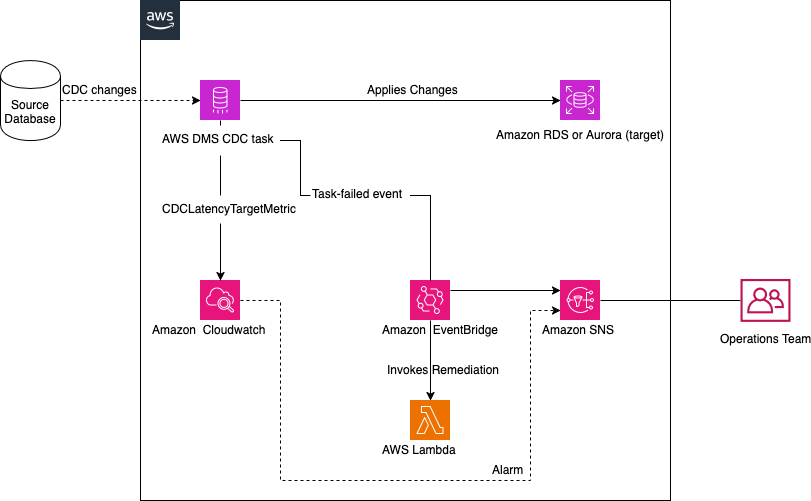
AWS DMS fail-fast CDC error handling flow
Prerequisites
- Use an existing AWS DMS replication instance, source and target endpoints, and a replication task configured for ongoing CDC.
- Use a currently supported AWS DMS version. The error-handling documentation does not state a separate minimum version for these settings. DMS service events in Amazon EventBridge require version 3.4.5 or later. The tests in this post used 3.5.x.
- Obtain least-privilege permissions to describe, stop, modify, and start the replication task and, if used, manage the monitoring targets. Review AWS DMS identity and access management.
- Export and securely store the complete current task settings before changing
ErrorBehaviortask settings. Merge the examples into the full settings document instead of replacing unrelated sections. - Schedule a maintenance window because the task must be stopped before modification. Test the settings and failure injection in a non-production environment before applying them to a migration task.
- If you use the CLI examples, configure the AWS CLI for the intended Region and account and replace each angle-bracket placeholder with your resource value.
How the settings interact: Key findings from testing
We tested several configuration combinations to understand the actual retry behavior during CDC. The following scenarios show how different settings affect your failure detection window.
Test methodology
We ran these tests on an AWS DMS replication instance running engine version 3.5.x, with a PostgreSQL source and an Amazon Relational Database Service (Amazon RDS) for PostgreSQL target, using an ongoing CDC task. To induce a recoverable error, we simulated a network drop by blocking the target database port (5432) at the security group level while the task was applying changes. We then restored access after observing the retry behavior. The retry intervals reported in each scenario (15s, 30s, 60s, 120s, 180s) were measured from the task’s CloudWatch logs. The total-time figures are the measured cumulative wait before the task transitioned to a stopped state. Your exact timings might vary with engine version and network conditions, so treat these as representative rather than guaranteed.
Scenario A: Throttling disabled (RecoverableErrorThrottling: false)
The following configuration disables throttling and uses a fixed retry interval:
With this configuration, the task retries at a fixed 15-second interval, exactly 5 times. Total time before task failure: approximately 75 seconds. This approach is predictable but offers no backoff protection. If the error is truly transient (for example, a brief DNS resolution delay), all retries might fire before the issue resolves.
Scenario B: Throttling enabled, stop after max disabled
This scenario adds exponential backoff but doesn’t stop at the throttling maximum. The following configuration retries with increasing wait times:
The retry pattern follows exponential backoff: 15s, 30s, 60s, 120s, then capped at 180s. After reaching the 180-second cap, subsequent retries occur every 180 seconds until RecoverableErrorCount (5) is exhausted. Transient errors get more time to resolve, but the total failure window extends.
Scenario C: Throttling enabled, stop after max enabled (recommended)
This scenario combines backoff protection with a stop at the configured throttling maximum. It is the recommended configuration for the tested compliance-driven cutover scenario:
With RecoverableErrorStopRetryAfterThrottlingMax set to true, AWS DMS stops as soon as the next backoff interval would reach or exceed RecoverableErrorThrottlingMax (180 seconds). The exact sequence is:
- Retry 1 after 15s (cumulative 15s).
- Retry 2 after 30s (cumulative 45s).
- Retry 3 after 60s (cumulative 105s).
- Retry 4 after 120s (cumulative 225s).
- The next interval would double to 240s, which exceeds the 180-second maximum, so the task stops instead of retrying again.
The task therefore fails after approximately 225 seconds (about 3 to 4 minutes), well under 5 minutes. Because the hard stop triggers before the fifth backoff wait, the window is bounded and predictable rather than the roughly 6.75 minutes you would get if all five intervals elapsed.
For the tested cutover scenario, Scenario C allowed time for brief transient errors while bounding the observed detection window. Evaluate a different retry budget for steady-state replication or workloads with longer recovery times.
Detecting apply errors faster with strict DML policies
Beyond recoverable errors, another category of failures can silently accumulate during CDC: apply errors. These occur when DMS encounters conflicts while applying DML operations (INSERT, UPDATE, DELETE) to the target database. Examples include a primary key violation on insert, a missing row on update, or a constraint conflict on delete.
By default, DMS logs these errors and continues replication. The following table lists the four apply error policies and their defaults, plus the related escalation count:
| Setting | Default value |
ApplyErrorDeletePolicy |
IGNORE_RECORD |
ApplyErrorInsertPolicy |
LOG_ERROR |
ApplyErrorUpdatePolicy |
LOG_ERROR |
ApplyErrorEscalationPolicy |
LOG_ERROR |
ApplyErrorEscalationCount |
0 |
During a migration cutover, data inconsistencies between source and target can accumulate silently. The task looks healthy, but the target data drifts from the source.
To address this, set all four apply error policies to STOP_TASK. With this configuration, a DML conflict immediately stops the task. The following JSON sets every apply error policy to stop the task on the first conflict:
With this fail-fast approach, the task stops on the first apply error covered by these policies. Your monitoring pipeline can then notify the migration team, subject to the delivery behavior of the configured monitoring services. Combined with the recoverable error tuning, this covers bounded environmental retries and selected data-level failures.
Considerations before applying STOP_TASK everywhere
Setting all apply error policies to STOP_TASK is appropriate for compliance-driven cutovers that prioritize immediate investigation over continued replication. It is an aggressive choice: a single conflict stops the task. Steady-state replication workloads often use the documented defaults instead. If the task continues as ongoing replication after cutover, reassess the policies rather than carrying the strict cutover configuration forward automatically.
Recommended configuration for migration workloads
Based on the documented setting behavior and our PostgreSQL test, the following configuration sets selected data and apply error policies to stop the task, uses bounded exponential backoff, and enables additional safeguards. Review each setting against your source engine, target engine, task type, and recovery objectives before use:
How these settings work together
This configuration creates two layers of fail-fast protection, plus additional safeguards:
- Environmental failures (network drops, connectivity issues): The recoverable error settings bound the retry window to approximately 3 to 4 minutes (about 225 seconds). With
RecoverableErrorCount: 5,RecoverableErrorInterval: 15, andRecoverableErrorThrottlingMax: 180, the task retries with exponential backoff (15s, 30s, 60s, 120s) and then stops before the next interval would exceed 180 seconds. Your data lag stays within roughly 3 to 4 minutes before an alert fires. - Data and apply failures: The
STOP_TASKvalues stop the task for the selected data, table, truncation, and apply-error conditions. This does not make every possible data error fail immediately. In particular,FullLoadIgnoreConflicts:trueremains scoped to zero-row and duplicate-key conflicts while AWS DMS applies cached events during full load. - Additional safeguards:
FailOnTransactionConsistencyBreached:trueis relevant only to CDC tasks with specific source engines. See the error handling task settings documentation for supported sources.FailOnNoTablesCaptured:true, which is the documented default, stops the task if no tables match the mapping rules at startup.
Event publication behavior: EventErrorPolicy: IGNORE tells AWS DMS not to stop replication if it encounters an error while sending a task-related event. This avoids turning a notification-path problem into a replication outage, but it also means an event notification can be missed. Use Amazon EventBridge together with CloudWatch metrics, task status, and DMS logs rather than as the only integrity signal.
Full-load conflict behavior: FullLoadIgnoreConflicts: true applies to duplicate-key and zero-row errors while AWS DMS applies cached events during full load. Change this value only after evaluating the full-load behavior separately from CDC apply policies.
Important: Stop the replication task before modifying its task settings. Changes to recoverable error parameters do not take effect on a running task. Plan the interruption before the CDC phase or use an approved maintenance window.
Considerations and limitations
- Use the strict
STOP_TASKpolicies for a bounded migration or cutover window only after testing. A benign conflict can stop the entire task, so the same values might not suit long-running replication. - Treat the 225-second result as representative test evidence, not a service-level guarantee. Engine version, task state, error type, network conditions, and task recovery work can change observed timing.
ApplyErrorFailOnTruncationDdl:truedoes not work with PostgreSQL 11.x or earlier or with endpoints that do not replicate TRUNCATE DDL.FailOnTransactionConsistencyBreachedapplies only to CDC tasks with specific source engines, as described in the error handling task settings documentation.- DMS service events in Amazon EventBridge require DMS 3.4.5 or later and are delivered on a best-effort basis. A failure-specific event rule reduces false alerts from normal stops but does not replace status, log, and metric monitoring.
- Stopping and resuming a CDC task is an operational change. Back up the full task settings, use least-privilege credentials, test outside production, and follow your migration change process.
Pairing with CloudWatch alarms for automated alerting
Tuning the error settings can shorten the observed detection window. Pair task status, DMS logs, CloudWatch alarms, and Amazon EventBridge rules so your team has complementary ways to detect a failure or growing lag.
These two signals are complementary, and they detect different things:
- Task failure event: An Amazon EventBridge rule matching
REPLICATION_TASK_FAILED(DMS-EVENT-0078) targets task failures and excludes ordinary stopped-task events. AWS service-event delivery to Amazon EventBridge is best effort, so combine this signal with task status, logs, and CloudWatch monitoring. - Latency (secondary signal): A CloudWatch alarm on the
CDCLatencyTargetmetric detects growing lag between the replication instance and the target. This is useful for catching degradation before a failure, but a stopped task does not always move latency, so don’t rely on it alone to detect a failure.
Setting up a CloudWatch alarm on target latency
Use the AWS DMS event notifications to monitor task state changes. To monitor lag, create a CloudWatch alarm on the CDCLatencyTarget metric to detect when target latency exceeds your acceptable threshold. For a detailed walkthrough of key DMS metrics and how to configure CloudWatch alarms, see AWS DMS key troubleshooting metrics and performance enhancers.
Setting up an Amazon EventBridge rule for task failure
Use Amazon EventBridge to capture an AWS DMS task-failed event and route it to an Amazon SNS topic for email notification. The following pattern matches the documented task-failed event rather than every task stop:
This rule targets an AWS DMS task-failed event, including failures caused by the strict settings described in this post. Route the event to an Amazon SNS topic for email, or invoke a Lambda function for optional remediation. Because event delivery is best effort, keep the complementary monitoring paths described earlier.
For current AWS DMS event fields, categories, and event identifiers, see Working with events and notifications in AWS DMS.
Applying the configuration
Apply the settings with the JSON editor on the AWS Management Console or the modify-replication-task AWS CLI command. The following CLI sequence uses placeholders and preserves a backup before modification.
Warning: Perform these steps in a non-production environment first. For production migration tasks, use your approved change process and maintenance window.
- Export the current task settings before changing the task.
Expected output: task-settings-backup.json contains the complete current task settings. Verify the file before continuing.
- Stop the replication task and wait until its status is stopped.
Expected output: stopping. Use
describe-replication-tasksuntil the task reports stopped before modifying it. - Merge the recommended
ErrorBehaviorobject into a copy of the complete settings and save it as task-settings.json. Preserve unrelated settings from the backup. - Modify the stopped task with the merged settings file.
Expected output: modifying. Wait until the task returns to stopped before resuming processing.
- Resume CDC processing.
Expected output: starting, followed by running after the task resumes.
Validation
- Confirm that
describe-replication-tasksreports running and review the DMS task log for unexpected apply or connection errors. - In a controlled non-production test, reproduce the environmental interruption used in your test plan. For the configuration and PostgreSQL environment in this post, the observed waits were 15, 30, 60, and 120 seconds before the task stopped after about 225 seconds. Treat different timing as a result to investigate, not as a guaranteed failure.
- Confirm the task-failed Amazon EventBridge path when an event is delivered, check the CloudWatch alarm independently, restore connectivity, and follow your recovery runbook. Do not inject failures into a production migration task for validation.
Cleanup
If you created test resources while following this post, remember to delete them to avoid ongoing charges:
- Stop and delete any test DMS replication tasks.
- Delete test DMS endpoints.
- Delete test DMS replication instances.
- Remove any CloudWatch alarms or Amazon EventBridge rules created for testing.
- Delete any Amazon SNS topics created for notifications.
- On any non-test task you experimented on, revert the
ErrorBehaviorsection to its prior settings so you don’t leave a production task on the aggressiveSTOP_TASKconfiguration.
Conclusion
Default AWS DMS error handling favors recovery from transient interruptions. During a migration cutover, increasing retry waits can delay failure detection. In our PostgreSQL test, explicit retry values and a stop at the throttling maximum produced an observed failure window of about 225 seconds. Strict apply-error policies separately stopped the task for selected data conflicts.
Review your current task settings in a non-production environment, then decide whether the tested retry budget and strict apply-error behavior match your cutover objectives. For the complete option reference, see Error handling task settings.
For further reading, see Setting up Amazon CloudWatch alarms for AWS DMS resources using the AWS CLI and Working with events and notifications in AWS DMS.