AWS Database Blog
Effectively managing storage in Amazon RDS for Oracle Databases
Efficient storage management is crucial for maintaining the performance, reliability, and cost-effectiveness of your Oracle databases running on Amazon RDS. As your data grows and your workloads evolve, it’s essential to proactively monitor and optimize your storage utilization. In this post, we explore various techniques and best practices for effectively managing storage in RDS for Oracle Databases.
Amazon Relational Database Service (Amazon RDS) for Oracle provides a fully managed database service that makes it straightforward to set up, operate, and scale Oracle databases in the AWS Cloud. Amazon RDS for Oracle manages time-consuming database administration tasks so you can focus on your applications. While you develop and improve your core applications, RDS handles essential backend operations: provisioning new databases, implementing patches, running backups, managing recovery processes, monitoring for failures, and performing repairs. With this comprehensive database management, you can spend more time building applications and less time on administrative tasks. It offers a range of instance types and storage options to meet your performance and cost requirements and provides built-in high availability features such as Multi-AZ(Availability Zone) deployments for enhanced availability.
Overview
In this post, we discuss different ways to monitor, optimize, and manage free storage in Amazon RDS.
1. Monitor the storage
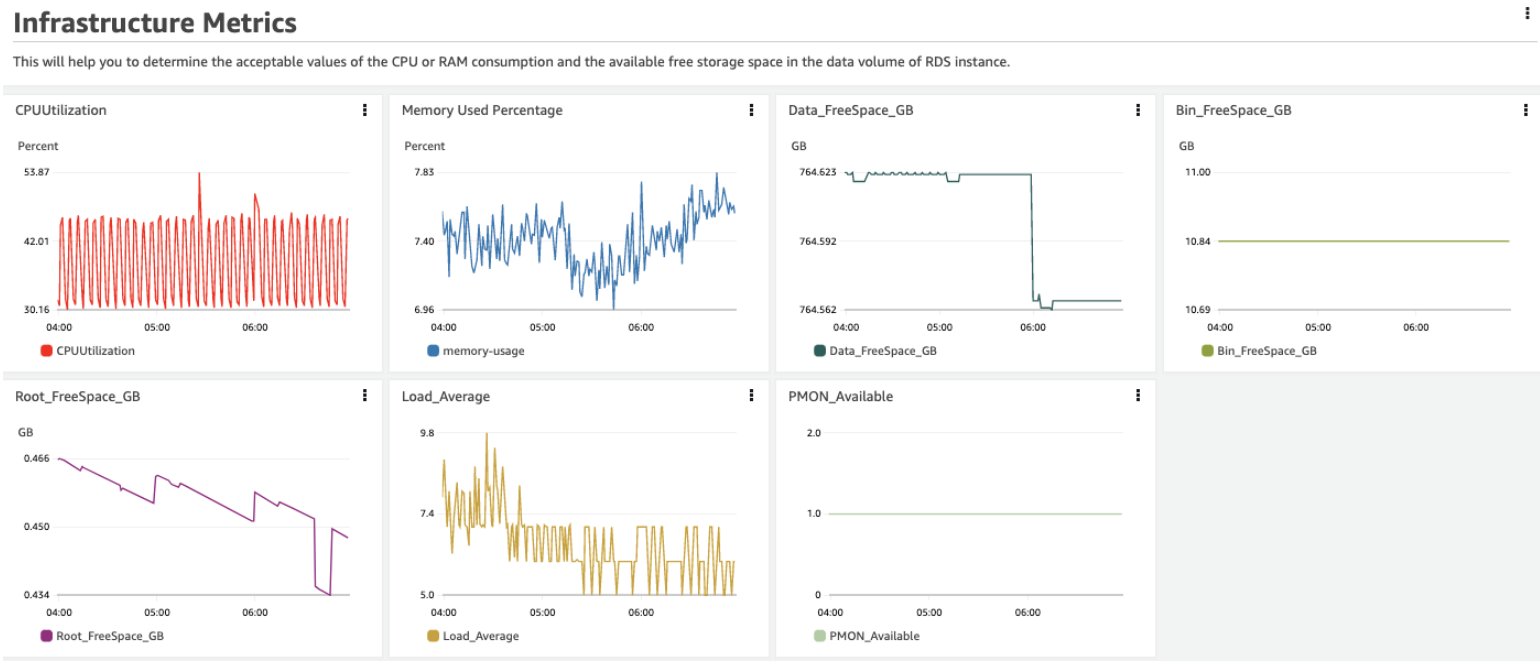
Amazon CloudWatch empowers you to closely monitor the health of your RDS instances and observe changes to the underlying infrastructure and database workloads. Using CloudWatch you can monitor a wide range of metrics over specific time periods, such as disk usage, CPU utilization, memory usage, disk I/O, and network traffic. You can use this comprehensive visibility to quickly identify and address issues that might arise.
You can also further create a custom SQL query similar to one mentioned in: Why does my Amazon RDS for Oracle DB instance use more storage than expected? and send an email to the required recipients using engine features such as UTL_MAIL as mentioned in: How do I send an email from my Amazon RDS for Oracle DB instance?
RDS for Oracle is fully managed and consists of a data volumes, binary(bin) volume and root volume. The root and bin volumes contain the OS and the Oracle Database binaries respectively. These volumes are monitored and maintained by the internal Amazon RDS automation system. As an Amazon RDS for Oracle customer, you need to monitor the data volumes. This is the same storage that is provisioned during the Amazon RDS instance creation time. The data volumes for RDS for Oracle instance hosts the data files, redo and archive log files, and trace files. This is the location for the database directory and so it will host the dump file for data pump export and import, RMAN backup pieces, and files referred to by external tables. Additionally, external tables can be stored in Amazon Simple Storage Service (Amazon S3), with S3 integration, providing more flexibility for data storage and access options.
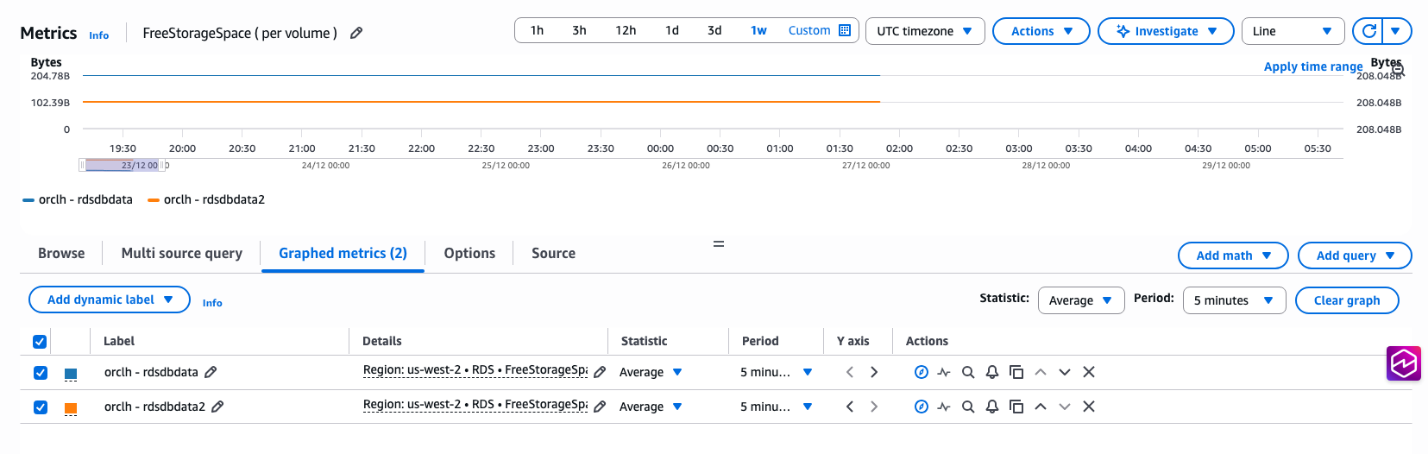
The CloudWatch metric to monitor free storage space per volume is FreeStorageSpace. It gives the amount of available storage space per volume and is measured in bytes, as shown in the following figure.
Furthermore, you can set up CloudWatch alarms to receive notifications when a metric exceeds a predefined threshold. Using this proactive approach you can take timely action to resolve problems before they escalate and impact your operations. CloudWatch metric alarms are powerful monitoring tools that track a single CloudWatch metric or the outcome of a mathematical expression derived from multiple CloudWatch metrics. It can trigger various actions, such as sending notifications to an Amazon Simple Notification Service (Amazon SNS) topic, based on the metric or expression value in relation to a specified threshold over a defined time period. This supports proactive monitoring and quick identification and resolution of issues to maintain the reliability, availability, and optimal performance of your AWS environment.
To monitor an Amazon RDS for Oracle instance, use the following:
The preceding AWS Command Line Interface (AWS CLI) command creates a CloudWatch alarm named “FreeSpace” to monitor the free storage space of an RDS database instance called “testrds” in the US West (Oregon) AWS Region. The alarm is set to trigger when the average free storage space falls below 50 GB for two consecutive 1-minute periods. When activated, it sends a notification through an Amazon SNS topic. This setup helps you proactively manage database storage by alerting them before the database runs critically low on space. The command uses a shared AWS profile for authentication, allowing for standardized access across a team or organization.
Monitor Additional Storage Volumes (ASVs)
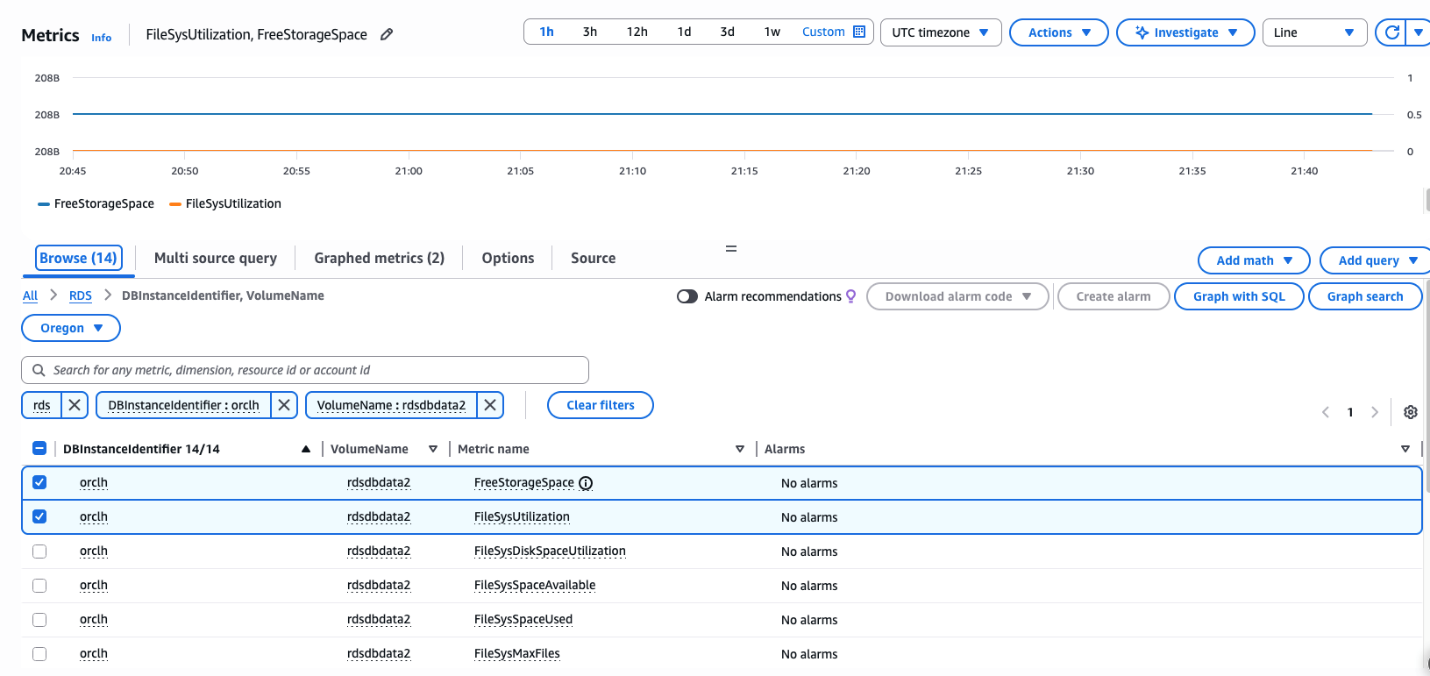
For monitoring additional storage volumes in CloudWatch, a new dimension “RDS -> DB Instance Identifier, Volume Name (per-volume metrics)” is available.
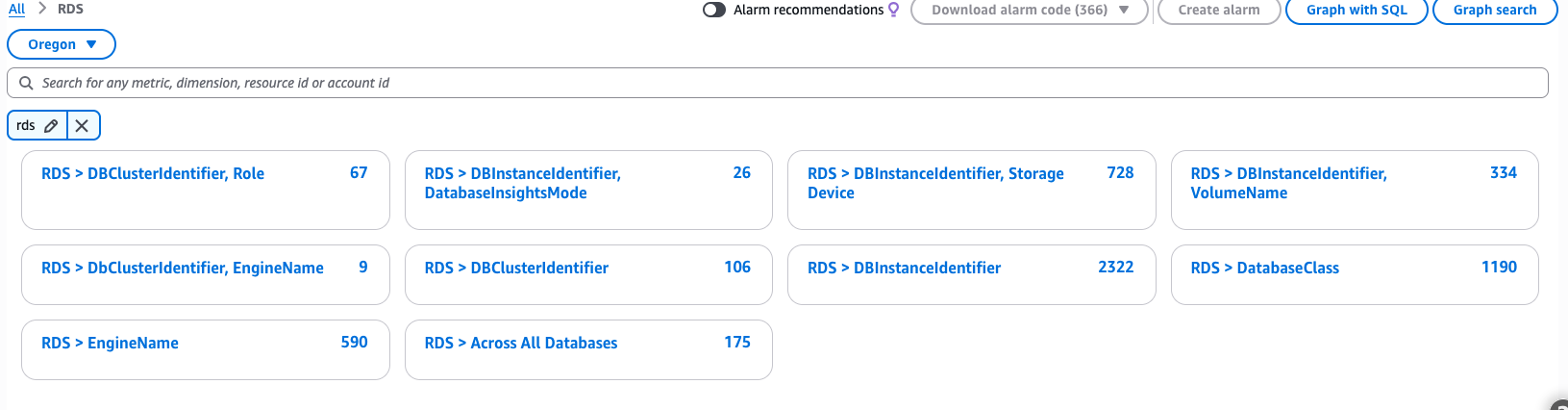
From the filtering, you could further drill down to database identifier and volume name. The volume name for additional storage volumes would follow the naming convention rdsdbdata<n> where n can be 2, 3 or 4 (max 3 additional volumes). The primary storage volume has a volume name of “rdsdbdata” (without any number).
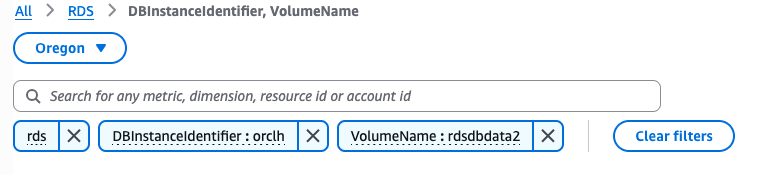
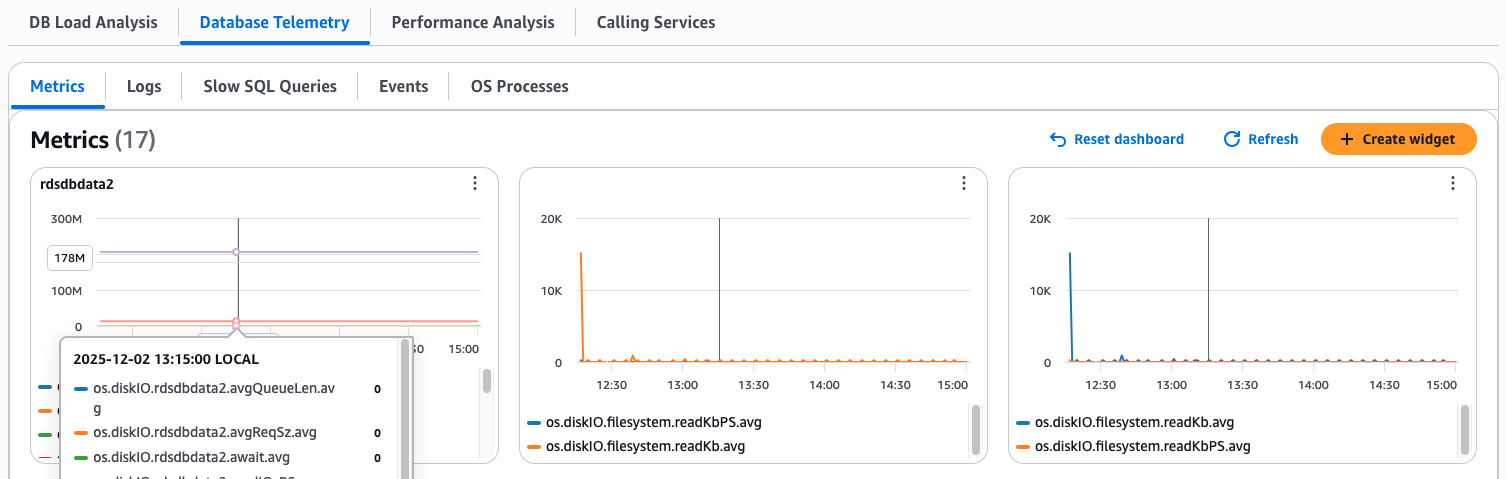
In the following screenshot, we look at the metrics of the additional storage volume: rdsdbdata2
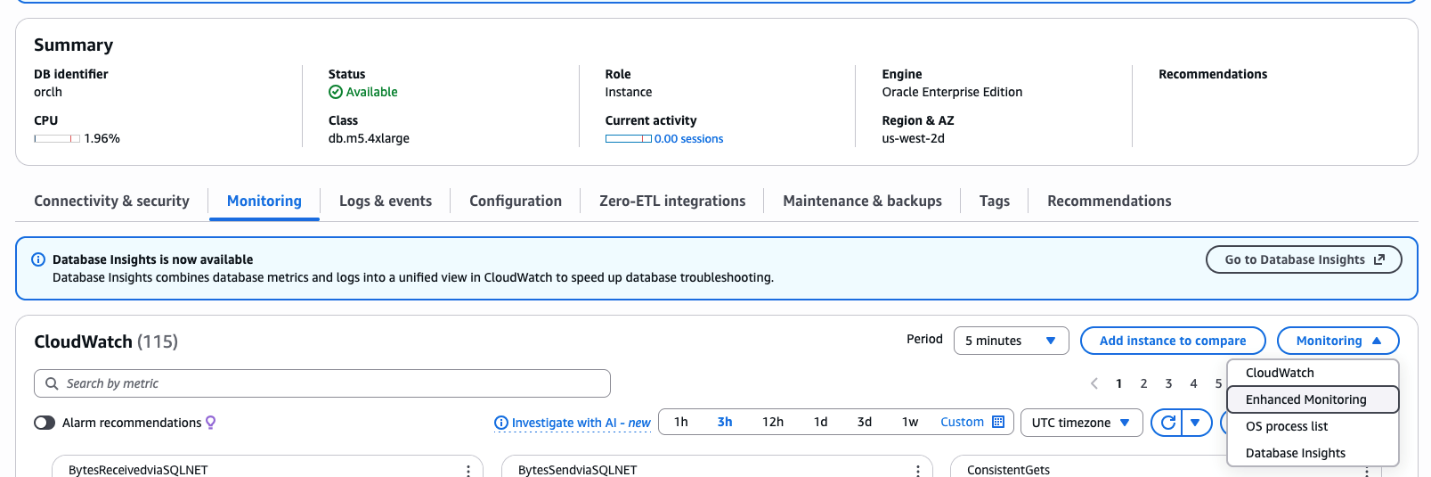
To view the metrics in Enhanced Monitoring, select “Enhanced Monitoring” option from the drop down under the Monitoring tab.
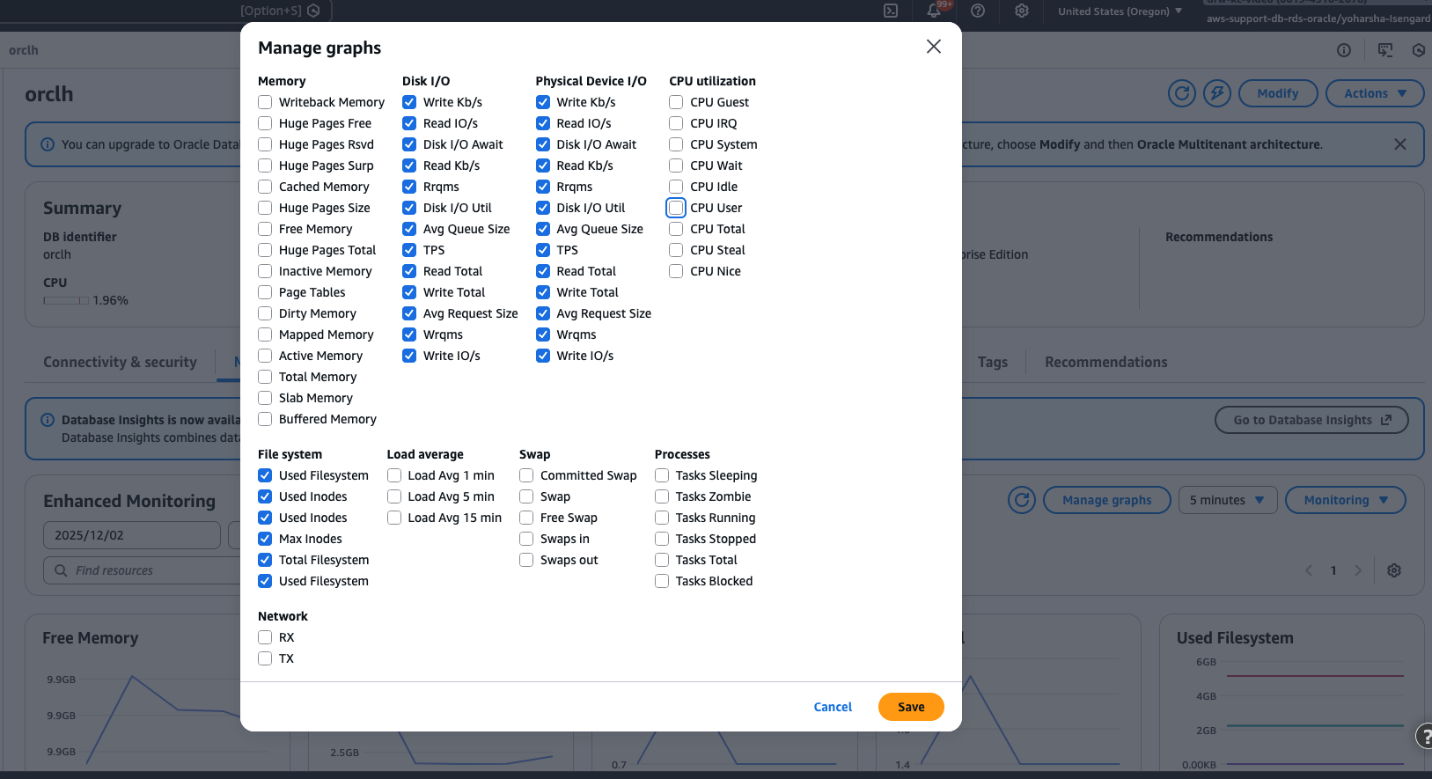
You can open the Manage Graphs option and select the required metrics:
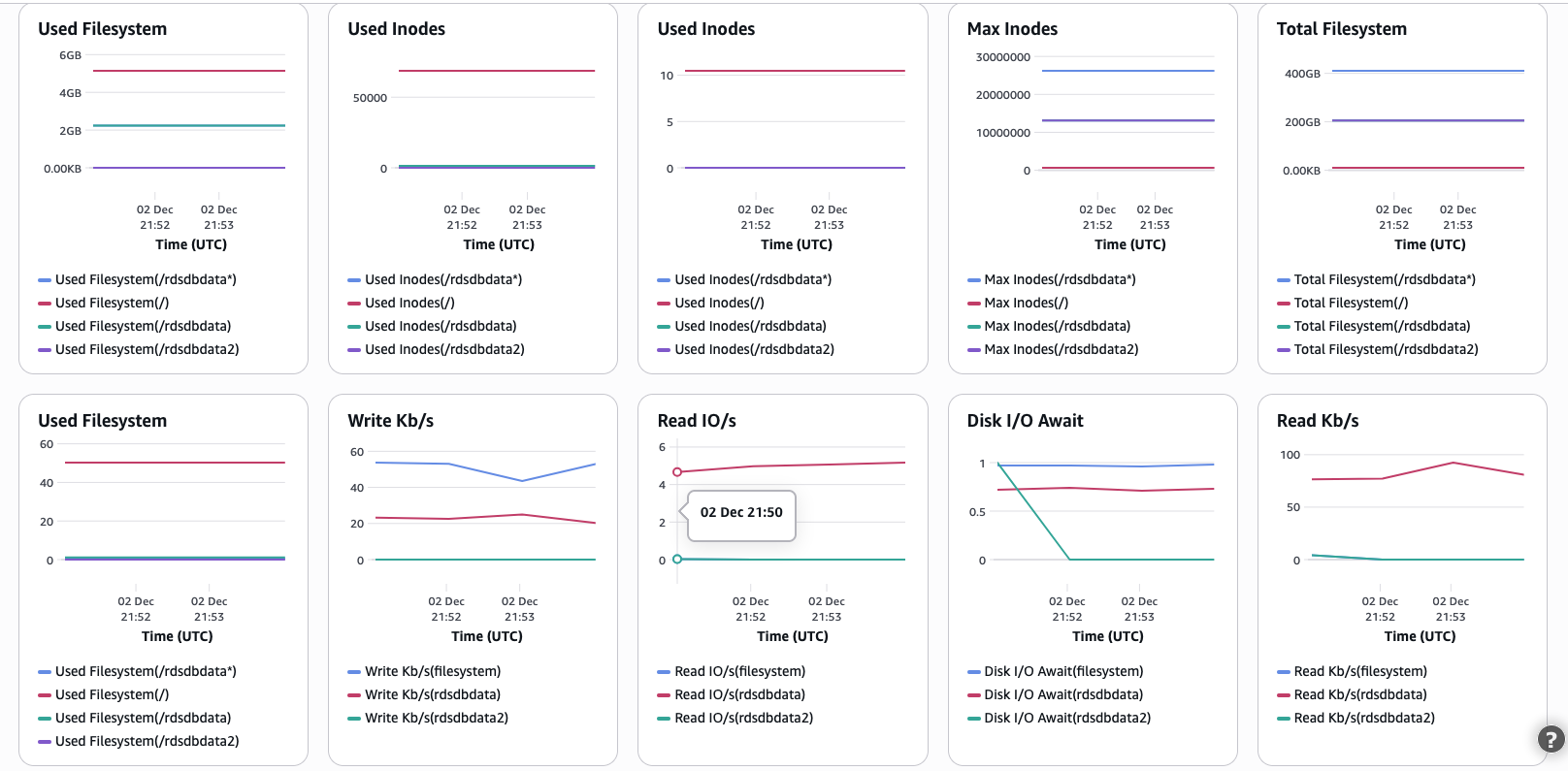
Once you choose save, you can view the volume metrics of all the volumes including any additional storage volumes. The Total Filesystem(/rdsdbdata*) metric provides the aggregate sum of the primary and additional storage volumes.
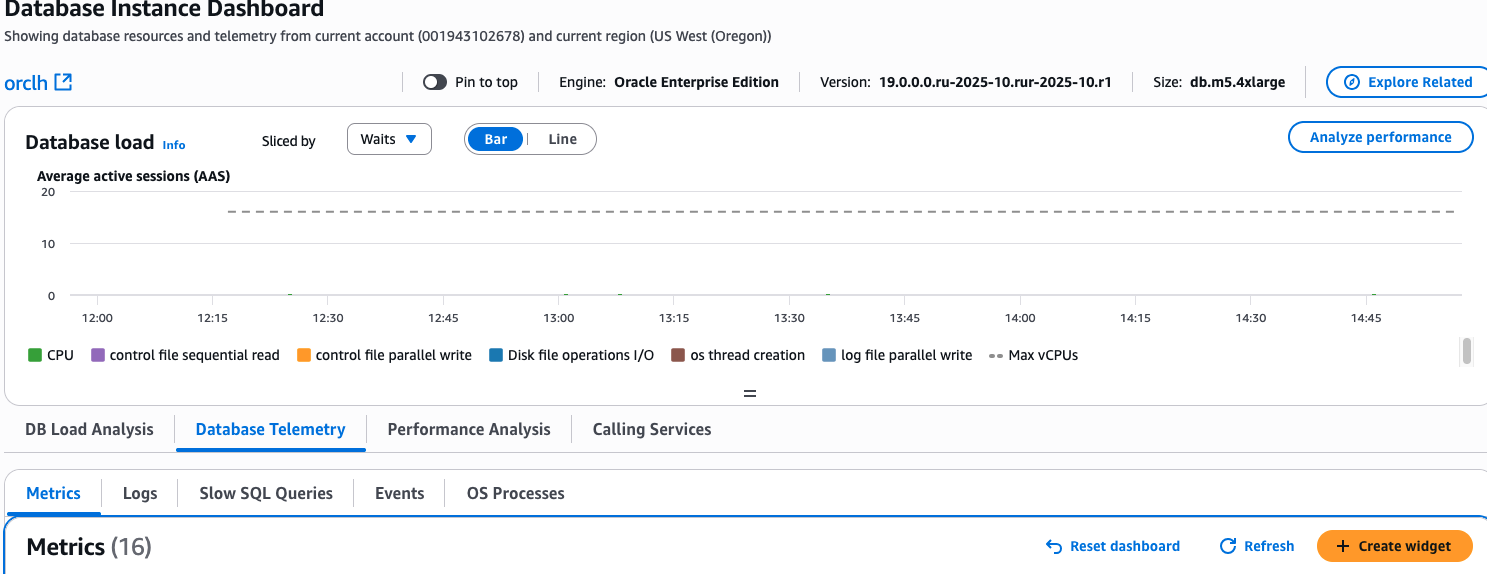
To view the metrics in Database Insights Advanced, go to Database Telemetry -> Metrics -> Create Widget
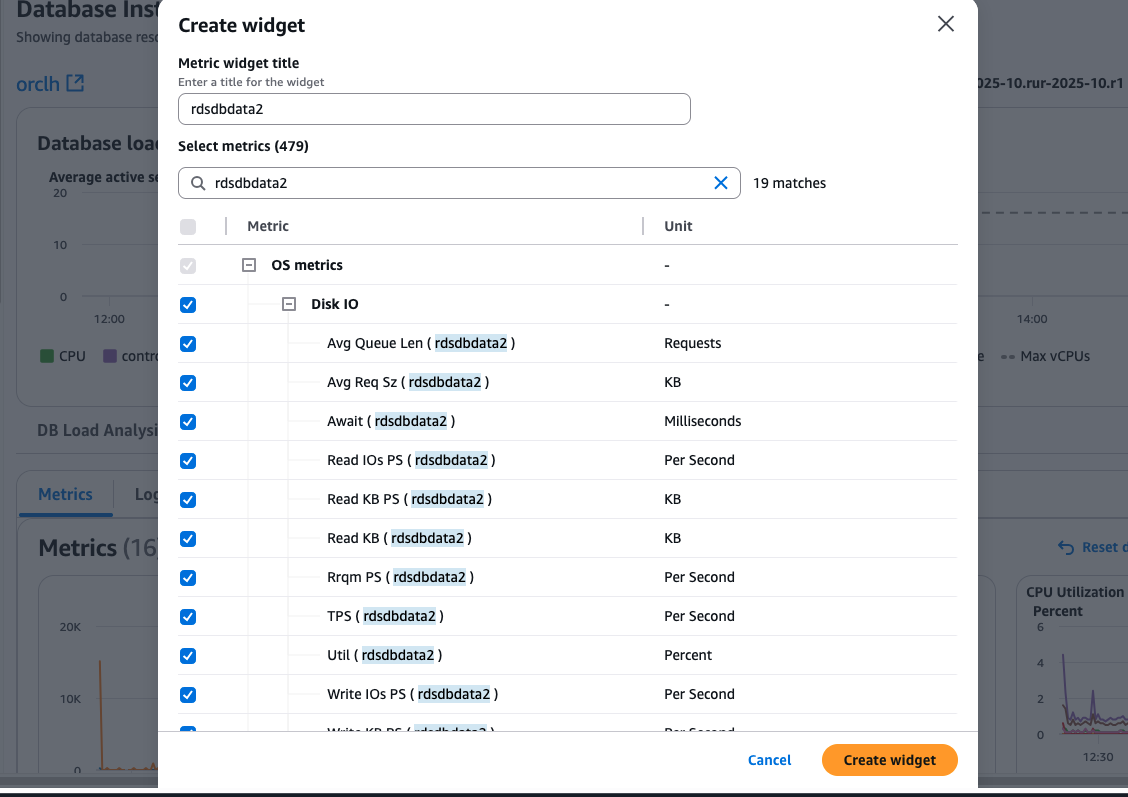
Enter a widget title and search for “rdsdbdata2” in the select metrics to select the relevant metrics for the ASV.
Once you create the widget, you should be able to view the details.
2. Storage autoscaling
Storage autoscaling is a convenient feature that enables Amazon RDS to automatically scale up your storage when it detects that you’re running out of free storage space.
Note: Storage autoscaling helps prevent unexpected storage getting full outside of work hours or monitoring windows. It’s recommended to scale the storage of RDS for Oracle instance to the expected size needed plus buffer space. This is to avoid going into the storage optimization state, which can take 24 hours or more to complete.
You can check if you have storage autoscaling enabled for your RDS for Oracle instance, by using the AWS Management Console for Amazon RDS or using the AWS CLI to describe the instance and check if the MaxAllocatedStorage parameter has a value. It’s important to understand how Storage autoscaling works and its limitations.
Amazon RDS initiates a storage modification for an autoscaling-enabled DB instance when the following conditions are met:
- Free available space is less than or equal to 10% of the allocated storage.
- The low-storage condition lasts for at least 5 minutes.
- At least 6 hours have passed since the last storage modification or storage optimization has completed, whichever is longer.
The additional storage is added in increments of whichever is greater:
- 10 GiB
- 10% of the currently allocated storage
- Predicted storage growth exceeding the current allocated storage size within the next 7 hours based on the FreeStorageSpace metric from the past hour.
Remember, while storage autoscaling is a useful feature, it should not be relied upon solely. Knowing the limitations of this feature, implementing robust monitoring practices, and regularly reviewing storage requirements is crucial for maintaining a healthy and well-performing RDS for Oracle database.
Storage autoscaling is currently not available for additional storage volumes. If an instance has additional storage volumes, you can still use storage autoscaling for the primary volume. Storage autoscaling is not supported only for “additional storage volumes”. However, you can monitor the storage as described in Monitor the storage, setup alarms and manually increase the storage or free up space as discussed in Removing unwanted files.
3. Removing unwanted files
Database operations such as RMAN backups, data pumps, archive logs, audit and trace files continuously generate files that can quickly consume valuable storage space. When left unmanaged, these files can lead to performance degradation, failed operations, and unnecessary costs as RDS storage is charged based on allocated space.
To delete a file in database directory like DATAPUMP_DIR, you can use the UTL_FILE.FREMOVE package in RDS for Oracle. This package provides a convenient way to remove files from directories and release space back to the operating system. See the Performing miscellaneous tasks for Oracle DB instances for more information on how to manage database directories in an RDS for Oracle instance. It is recommended to have an audit policy to track actions performed using UTL_FILE package for security purpose.
For DATAPUMP_DIR:
For trace files, audit files and listener logs, the default retention in Amazon RDS is 7 days. For alert logs, it’s 30 days. It’s important to review the rententon schedule and make necessary adjustements according to your requirements.
For more information about maintaining log files, see Amazon RDS for Oracle database log files.
The management of archive log files in RDS for Oracle follows specific retention patterns based on the instance configuration and replication setup. The default retention period for archive logs in a standalone RDS for Oracle instance is set to 0 hours, meaning these logs are automatically purged from the host system immediately after being successfully uploaded to Amazon S3 for backup purposes.
In RDS for Oracle, the retention behavior changes significantly under different replication scenarios. When read replicas are implemented, the retention period defaults to 2 hours because logs must be kept until they are applied to all replicas, leading to increased storage requirements. For cross Region replicas, RDS for Oracle keeps the transaction logs on the source DB instance until they have been transmitted and applied to all cross-Region read replicas. Hence, it is important to monitor the replica lag metric.
For more information about retention for archive log files, see Retaining archived redo logs.
Managing audit trails
It’s important to properly manage audit trails on your databases to maintain efficient performance and optimum use of disk space. As audit trails on your databases grow in volume, querying an audit trail with a large volume of audit data can impact performance and lead to space scalability issues. It’s best to archive the old records and purge them from the online audit trail periodically.
For more information, see Security auditing in Amazon RDS for Oracle: Part 1.
4. Table and tablespace reorganization
Table reorganization in Oracle is the process of restructuring a table to improve its performance, reclaim unused space, or modify its structure. Here’s an overview of table reorganization and how to do it:
Reorganize tables
Table reorganization in Oracle databases serves multiple critical purposes that directly impact database performance and efficiency. The primary motivation for table reorganization is to address fragmentation issues that naturally occur over time as data is inserted, updated, and deleted, leading to scattered data blocks and inefficient space utilization. Through reorganization, unused space can be reclaimed, reducing the overall storage footprint and improving space efficiency. This process significantly enhances query performance by optimizing the physical storage of data, making sure that related data is stored contiguously where possible.
Additionally, reorganization allows for the reordering of data to better align with common access patterns, such as sorting data based on frequently used columns or index keys. From a structural perspective, table reorganization provides an opportunity to modify table structures, such as adding or dropping columns, without the need for separate operations that might impact performance. This comprehensive approach to table maintenance not only optimizes current performance but also prepares the database for future growth and changing business requirements.
Regular table reorganization should be part of a database maintenance strategy, particularly for tables experiencing high volumes of DML operations or those critical to business operations.
Check for table fragmentation
For information about checking for table fragmentation, see How to Find Fragmentation for Tables and LOBs (Doc ID KB138882)
Run the following procedure with schema name and table name:
What options are available in Oracle to reorganize tables?
Note: The following should be tested in lower-priority environments first. Some methods might require downtime and should be performed during maintenance windows.
Oracle provides multiple approaches for table reorganization, each with distinct advantages and trade-offs: CTAS, ALTER TABLE MOVE, DBMS_REDEFINITION, export/import, and ALTER TABLE SHRINK SPACE.
CTAS method
Table reorganization in Oracle can be accomplished through several methods, with CREATE TABLE AS SELECT (CTAS) being one of the most used approaches. The CTAS method involves a three-step process:
- Creating a new table with the desired structure and copying data from the existing table using a
SELECTstatement. - Dropping the original table.
- Renaming the new table to match the original table name.
While this method offers advantages such as simplicity, straightforwardness, and the flexibility to implement structural changes quickly, it comes with notable considerations and limitations.
The primary drawback is the requirement for double the storage space during the reorganization process, because both the original and new tables exist simultaneously. Additionally, the table becomes unavailable for DML operations during the reorganization, which can impact business operations in production environments. Another significant consideration is that dependent objects such as indexes, triggers, and grants must be recreated after the reorganization, requiring careful planning and additional steps in the process.
Despite these limitations, CTAS remains a popular choice for smaller tables or during maintenance windows where downtime is acceptable. Here’s the basic syntax:
The ALTER TABLE MOVE command offers a straightforward method for reorganizing tables and reclaiming space.
By using this approach, you can move tables to different tablespaces, compress data, and reorganize the table’s storage structure. The MOVE operation is advantageous for its directness in defragmenting space, ability to change storage parameters, and option to move tables across tablespaces. However, it requires downtime because the table is locked during the operation, and all indexes must be rebuilt afterward. The operation can be enhanced with the ONLINE keyword in Enterprise Edition to minimize disruption, though this might impact performance.
The following is a sample ALTER TABLE MOVE implementation:
DBMS_REDEFINITION represents a more sophisticated approach, allowing for online table reorganization with minimal downtime. This method is particularly valuable in production environments where continuous availability is important. Using DBMS_REDEFINITION, you can perform complex structural changes while maintaining dependent objects automatically. The process begins with DBMS_REDEFINITION.START_REDEF_TABLE, specifying the original and interim table details. While this method offers significant advantages for production systems, it requires careful implementation, additional storage space during the process, and might be slower than offline alternatives.
The export/import method provides the most comprehensive reorganization option, enabling complete table restructuring and data migration between different Oracle versions or systems. However, this approach comes with considerable drawbacks, including significant downtime requirements, additional storage needs for export files, and potentially long execution times for large tables.
Shrink
The ALTER TABLE SHRINK SPACE command offers an efficient online method for reclaiming unused space in Oracle tables and their associated indexes, making it a valuable tool for database space management. This operation is particularly effective for tables experiencing significant space fragmentation because of frequent DELETE or UPDATE operations, because it works by moving rows to the beginning of the table or segment and releasing free space at the end for return to the tablespace. Before implementing a shrink operation, verify the table’s eligibility and enable row movement using the following command.
The shrink process typically follows a two-step approach:
- Use the
COMPACToption to defragment the space. - Use
CASCADEto shrink both the table and its dependent objects.
While this method offers several advantages, including online operation with minimal disruption, no additional storage requirements, and automatic index maintenance, there are important considerations to keep in mind. The operation requires row movement to be enabled, might temporarily impact performance during execution, and isn’t suitable for tables with long-running transactions or certain Large Objects (LOB) segments. Tables with triggers or foreign key constraints might require special attention, and it’s recommended to perform shrink operations during low-activity periods. The typical implementation sequence looks like the following:
Weekly monitoring of space usage and fragmentation levels can help you determine the optimal timing for shrink operations, making it an essential part of proactive database maintenance strategies.
Oracle Table Reorganization Methods: Pros and Cons
| Method | Pros | Cons |
| CTAS (Create Table As Select) | • Simple and straightforward implementation
• Flexible for implementing structural changes • Good for smaller tables • Complete control over new table structure |
• Requires double storage space during process
• Table unavailable for DML operations during reorganization • Dependent objects (indexes, triggers, grants) must be recreated • Causes downtime – best for maintenance windows |
| ALTER TABLE MOVE | • Direct method for defragmenting space
• Can change storage parameters • Ability to move tables across tablespaces • Simpler syntax than other methods |
• Table is locked during operation (downtime required)
• All indexes must be rebuilt afterward • Limited structural changes possible • Performance impact during operation |
| DBMS_REDEFINITION | • Online reorganization with minimal downtime
• Maintains dependent objects automatically • Allows complex structural changes • Ideal for production environments • Continuous availability during process |
• Requires careful implementation
• Needs additional storage space during process • More complex to implement than other methods • Potentially slower than offline alternatives • Requires Enterprise Edition features |
| Export/Import | • Most comprehensive reorganization option
• Complete table restructuring possible • Supports data migration between different Oracle versions |
• Significant downtime requirements
• Additional storage needed for export files • Long execution times for large tables • Most disruptive of all methods |
| ALTER TABLE SHRINK SPACE | • Efficient online method with minimal disruption
• No additional storage requirements • Automatic index maintenance • Good for reclaiming space after mass deletes • Can include CASCADE option for dependent objects |
• Requires row movement to be enabled
• May temporarily impact performance • Not suitable for tables with long-running transactions • Limited effectiveness for certain LOB segments • Special consideration needed for tables with triggers or foreign keys |
Remember, the best method to use depends on your specific needs, table size, available downtime, and Oracle version. Test in a non-production environment before deploying to production.
Tablespace management and reorganization in Oracle: A comprehensive approach
Tablespace reorganization in Oracle databases represents a critical aspect of database maintenance aimed at optimizing storage utilization, improving performance, and managing space efficiently. Tablespaces, being logical storage units that group related data segments, require regular maintenance to help prevent fragmentation and maintain optimal performance. Common signs indicating the need for reorganization include degraded query performance, increased space fragmentation, and inefficient space utilization. Oracle provides several approaches to tablespace management, including moving datafiles, resizing tablespaces, adding new datafiles, and implementing space-saving features like table compression.
The coalesce operation represents one approach within this broader maintenance strategy. Tablespace coalesce operations in Oracle provide a mechanism for combining adjacent areas of free space within a tablespace to create larger contiguous blocks, fundamentally improving space utilization and reducing fragmentation. This operation is specifically designed for locally managed tablespaces with automatic segment space management, working by scanning bitmap blocks to identify and merge adjacent free extents. The coalesce operation offers several significant advantages:
- It can be performed while the tablespace remains online and available
- Requires no additional storage space for execution
- It can be either automatically triggered by Oracle or manually initiated using the command
While the operation effectively improves space utilization and can enhance performance through reduced fragmentation, it does come with certain limitations. The process might not be as effective as a complete reorganization when dealing with 80% or more fragmented tablespaces, can consume significant system resources particularly for large tablespaces, and notably doesn’t compact or move existing data. For more information, see Resizing tablespaces, data files, and temp files.
Regular monitoring and proactive maintenance of tablespaces, including periodic reorganization and coalescing operations, are essential components of a comprehensive database management strategy. You should develop a systematic approach to tablespace management, considering factors such as peak usage periods, growth patterns, and performance requirements while implementing these maintenance operations.
It’s important to note that while tablespace coalesce can help optimize space usage, it’s not a substitute for proper sizing and management of tablespaces. Regular monitoring and proactive management are still necessary for optimal database performance.
In some cases when data is removed from an Oracle tablespace in an Amazon RDS database, the allocated space for that tablespace does not automatically shrink. The database marks the data blocks that were previously occupied as free space, allowing them to be reused for new data insertions within the same tablespace. However, the overall allocated size of the tablespace remains unchanged. To reclaim the unused space and reduce the tablespace’s footprint, you need to manually resize the tablespace or its associated data files through specific procedures.
5. Reduce the size of the tablespace
To resize a tablespace, see How do I resize the tablespace for my Amazon RDS for Oracle DB instance?
Keep in mind that resizing operations can impact performance, so it’s recommended to perform them during maintenance windows or low activity periods. Take backups and test the procedures in a non-production environment before applying them to your production databases.
SYSAUX usage
In Amazon RDS for Oracle, closely monitoring the SYSAUX tablespace is critical, because it can grow rapidly due to various factors such as the Automatic Workload Repository (AWR), optimizer statistics, or auditing. By default, the SYSAUX tablespace is set as auto-extensible, making it even more important to monitor its space utilization.
To effectively manage the SYSAUX tablespace, gather detailed information about which components are consuming space within the tablespace, the retention period of AWR reports, and the segment distribution. Oracle provides “Tips if Your SYSAUX Tablespace Grows Rapidly or Too Large (Doc ID 1292724.1)” which offers valuable guidance on addressing SYSAUX tablespace growth issues. Note that if the size of the AUDIT tablespace is full, you might not be able to log in to the database if audit_sys_operations is set to true.
Recommended practices to avoid or mitigate SYSAUX growth problems:
- Make sure no application or user objects are present in the SYSAUX tablespace, because it is intended for Oracle-managed components only.
- If auditing is enabled, use a separate tablespace for auditing and size it appropriately. You can use the following command to set the audit trail location:
- Because of Amazon RDS limitations, you cannot directly reorganize objects within the SYSAUX tablespace to release free space. However, you can consider the following options:
- Turn off
AUTOEXTENDfor the SYSAUX tablespace, so the free space within the tablespace will be reused for other segments. - Use AWS Database Migration Service (AWS DMS) or Data Pump to migrate to a new instance and monitor future growth on SYSAUX.
- Turn off
- Monitor SYSAUX growth regularly to identify the components contributing to its growth, and take appropriate actions, such as adjusting AWR retention periods, rebuilding optimizer statistics, or resizing the tablespace as needed.
By following these practices and using Oracle’s documentation, you can proactively manage the SYSAUX tablespace, help prevent unexpected growth issues, and maintain optimal performance and stability of your Oracle database environment.
Conclusion
Effective storage management is essential for maintaining the performance, reliability, and cost-effectiveness of your Oracle databases running on Amazon RDS. By implementing robust monitoring practices, using features like storage autoscaling (for RDS for Oracle), removing unwanted files, and performing table reorganizations, you can optimize your storage utilization and make sure your databases operate at peak efficiency.
See the Working with Storage for Amazon RDS for Oracle Instances for the latest updates and best practices.