AWS Database Blog
Guide your Amazon Aurora MySQL migration with Kiro powers
Today, we announce the Amazon Aurora MySQL power for Kiro. The power connects Kiro’s AI agent to Aurora MySQL and pairs live database access with curated best-practice guidance. You describe what you need in natural language. The agent generates the API calls, SQL, and configuration for you to review and run. In this post, we walk through how the power guides a production migration from Amazon Relational Database Service (Amazon RDS) for MySQL 8.0 to Aurora MySQL through four phases: assessment, replica creation, promotion, and post-cutover validation.
A migration to Aurora MySQL involves several decisions: which method fits your downtime tolerance, source instance compatibility, how to translate parameter groups, and what to change in your application connection strings after cutover. In production, this can be a multi-week effort covering a compatibility audit, parameter group reconciliation, a rehearsed cutover runbook, and a fallback plan. Kiro powers on Amazon Aurora MySQL answers these questions inside your integrated development environment (IDE). You describe your source instance and your downtime tolerance. The power runs compatibility checks, recommends a migration method, and generates commands you review and run.
If you use Aurora PostgreSQL, see Introducing Amazon Aurora powers for Kiro for the PostgreSQL equivalent.
What are Kiro powers?
Kiro is an AI-powered IDE that helps you build applications through natural-language conversations. Kiro powers extend that capability with domain-specific expertise. When you install a power, Kiro gains deep knowledge of a specific technology’s best practices, APIs, and configuration patterns.
Each power combines up to three components. Model Context Protocol (MCP) servers connect Kiro to live services such as checking your RDS instance status, reading parameter groups, and calling AWS APIs on your behalf. Steering files encode best practices curated by domain experts, so Kiro’s recommendations follow current standards rather than generic large language models (LLMs). Validation hooks optionally verify your configuration against those best practices and flag issues before deployment.
The Aurora MySQL power covers migration assessment, execution, replication configuration, and cluster management. To learn more, explore the Aurora MySQL power in the library.
Solution overview
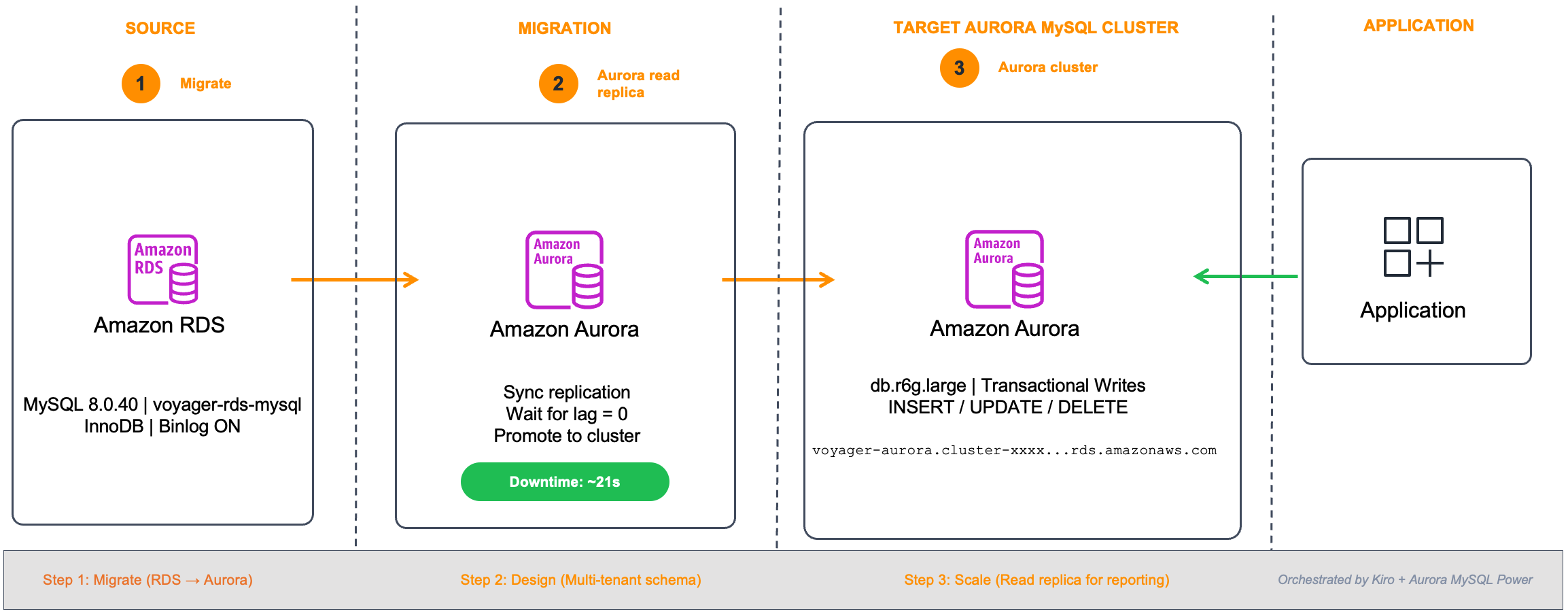
Based on your downtime tolerance and source configuration, the power recommends a migration method. This post covers the read replica promotion path, which provides near-zero downtime. The migration progresses through four phases:
- Assess – Kiro checks your source instance for compatibility issues, validates binary logging, evaluates storage engines (MyISAM or InnoDB), and compares parameter groups.
- Migrate – For the read replica method (one of the migration paths the power supports based on your downtime tolerance), creates an Aurora read replica of your RDS for MySQL instance and establishes binary log replication from source to target.
- Promote – Monitors replica lag until it reaches zero, then promotes the Aurora replica to a standalone cluster.
- Switch – Validates data integrity, provides new connection endpoints, and confirms your application is routing traffic correctly.
Prerequisites
Before trying the power on your own instance, confirm that you have the following:
- An AWS account with AWS Identity and Access Management (IAM) permissions to create and manage Aurora MySQL clusters, RDS instances, and associated resources.
- An existing Amazon RDS for MySQL 8.0 instance with automated backups enabled (retention period of at least one day). If you need to set up a test instance, see Creating an Amazon RDS DB instance.
- Kiro IDE installed (version 1.0 or later). Download from kiro.dev.
- The Amazon Aurora MySQL power installed in Kiro (see the Install section at the end of this post).
- An Amazon Virtual Private Cloud (Amazon VPC) with at least two subnets in different Availability Zones and a DB subnet group configured.
- A security group allowing inbound MySQL connections (port 3306) from your development environment.
For version requirements for read replica migration, see Replication between Aurora and MySQL in the Amazon Aurora User Guide.
Install the Aurora MySQL power
Enable the Aurora MySQL power in Kiro:
- Open the sidebar in Kiro IDE and choose Powers.
- In the AVAILABLE panel, scroll down to Amazon Aurora MySQL.
- Choose Amazon Aurora MySQL and choose Install.
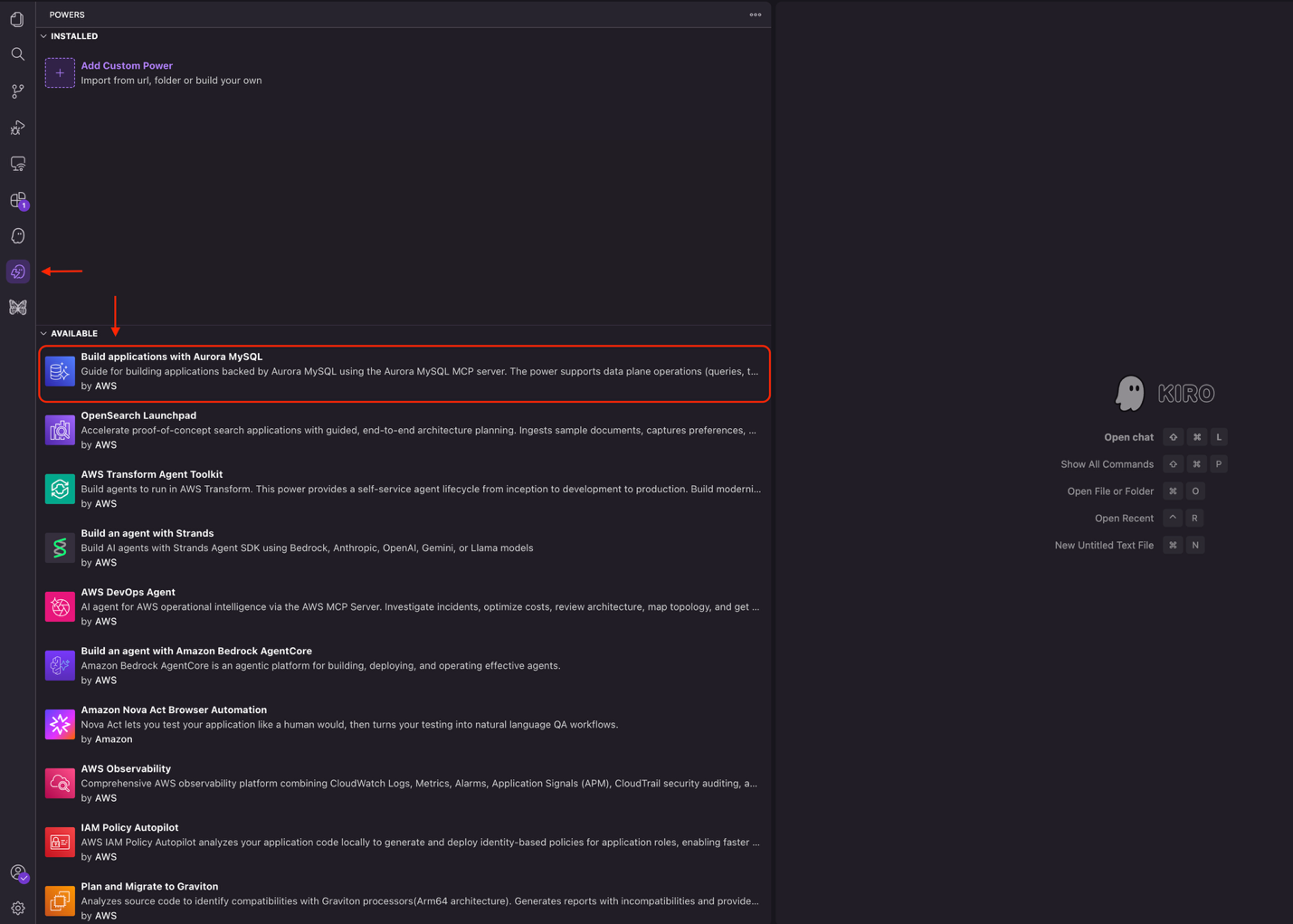
The Aurora MySQL power can create and manage Aurora MySQL clusters in the AWS Regions. To learn more about the Aurora MySQL MCP server, visit our documentation.
You can also install Kiro powers by visiting the Kiro powers marketplace. Under Browse powers, find the Amazon Aurora power and choose Add to Kiro +.
Watch the power in action
The following video demonstrates the full migration conversation from initial prompt through post-cutover validation.
Considerations and limitations
Before using the Aurora MySQL power for migration, note the following:
- Source version requirement. Migration using read replica promotion requires the source RDS for MySQL instance to run version 5.7.44 or later, or 8.0.28 or later. For current requirements, see Replication between Aurora and MySQL.
- Binary logging required. The source instance must have automated backups enabled (which enables binary logging). Set the backup retention period to at least one day.
- Same account and Region. The Aurora MySQL power currently supports read replica migration within the same AWS account and Region.
- InnoDB only. Because Aurora supports the InnoDB storage engine, if there are any tables on RDS using MyISAM, convert them to InnoDB before migration.
- Replication lag during heavy writes. Because the replication is performed using MySQL binary logs, replica lag can increase under sustained heavy write loads. The power monitors lag continuously and only recommends promotion when lag reaches zero.
- Kiro power scope. The power provides guidance and generates commands. It doesn’t change your AWS resources without your explicit confirmation at each step.
- What to monitor after cutover. During the first 24 hours, watch:
- Amazon CloudWatch metrics for Aurora: confirm CPUUtilization stays within your baseline range and DatabaseConnections matches your expected application pool size.
- Application-side: confirm zero connection errors after endpoint switch, query latency p99 remains within your pre-cutover baseline, and transaction rollback rate shows no unexpected increase.
What comes next
After you migrate to Aurora MySQL, the power can help you take advantage of advanced Aurora features such as:
- Add read replicas – Describe your read workload pattern (reporting, analytics, search) and the power recommends instance classes and parameter tuning for each replica.
- Configure Aurora Global Database – Describe your disaster recovery (DR) requirements (target recovery point objective, which Regions) and the power sets up cross-Region replication with automatic failover.
Each is a separate conversation in Kiro that builds on the cluster that you just migrated.
Beyond migration, the Aurora MySQL power provides end-to-end database development assistance, from schema design and query optimization to Aurora Serverless scaling configuration. You can perform both data plane operations (queries, table creation, schema management) and control plane operations (cluster creation, parameter tuning) through natural language. The power dynamically loads only the guidance relevant to your current task and takes action after your approval, so you get targeted Aurora MySQL expertise without information overload.
Conclusion
In this post, we introduced the Amazon Aurora MySQL power for Kiro and demonstrated how it guides a migration from RDS for MySQL to Aurora MySQL with a cutover downtime of tens of seconds. The power assesses your source instance for compatibility, recommends a migration method based on your downtime tolerance, monitors replication to zero lag, promotes the cluster, validates data integrity, and provides the endpoint changes needed to switch your application. After migration, you can adopt Aurora capabilities such as storage Auto Scaling, database cloning, read replica Auto Scaling, parallel query, Global Database, zero-downtime patching, and Aurora Serverless.
Install the Aurora MySQL power from the Kiro IDE and Kiro webpage and start your conversation today. For details on the Aurora MySQL MCP server, see the GitHub repository. For Aurora MySQL feature documentation, see the Amazon Aurora User Guide.